
 September 4, 2010 at 16:48
Visualization of different disks in the file manager or Not quite console FAR
I had a long-standing idea on how to expand the capabilities of the file manager interface by improving the visualization of different disks, different types of disks, and specific folders. And now it has been implemented.
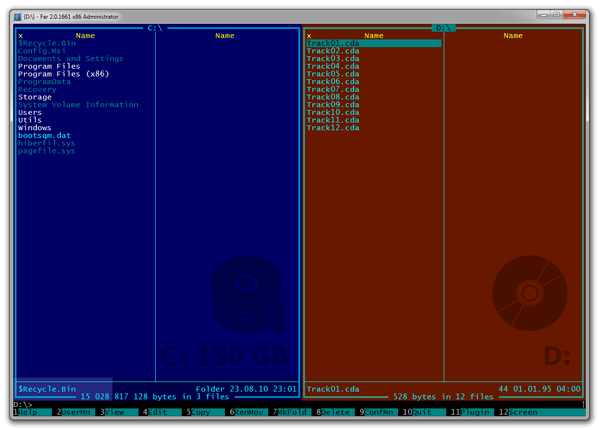
A screenshot for the seed:
But first, some lyrics:
I think everyone here is familiar with the FAR file manager and is unlikely to argue that it is one of the most powerful file managers on old Earth. However, many people are frightened by his console as a reminder of the DOS times, I want something more sympathetic.
My opinion on this score may seem unusual: if in the days of Windows 2000 and XP the FAR flat console somehow got out of the general visual range of window applications, when all the controls were emphasized convex and when the fashion for glossy icons went, then in modern times the interfaces become calmer and flatter, there is a tendency to minimize visual noise and focus on content, and FAR, surprisingly, against the background of the rest, the UI starts to look completely “in the stream” again.
Consistency is even a definite advantage of FAR from the point of view of the UI (for example, all plugins look like “native”), but it, of course, still limits the possibilities of expanding its functionality. Rather, it was so recently, until I found ConEmu.
Conemu- a console emulator that extends the capabilities of FAR: the ability to arbitrarily resize the window, support for ClearType, drag-n-drop files like in Explorer, the correct support for the Explorer context menu, the ability to expand the palette of available colors, tabs for different FAR windows, and much more. That is, FAR + ConEmu is already a very modern file manager, getting rid of the remnants of a purely console application.
One of ConEmu's features is the ability to set a background image for the console. And although this possibility in itself didn’t interest me very much, I suddenly realized that this was a chance to realize the very idea of visualization that I wrote about above.
After correspondence with the author ConEmu, a new version of this application with a special API that allows you to set the background of the picture from the outside appeared. Well, I wrote a plugin for FAR, which controls this background image.
So, we meet Panel Colorer :
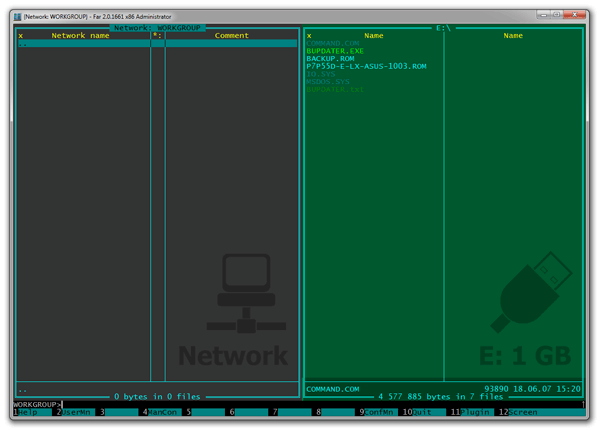
What does this plugin do?
It has a set of rules by which the panels are colored depending on their type.
What is all this for?
What's up?
Now the plugin has the status of experimental and is version 0.9, because it does not implement one very important point - the ability to configure rules and color schemes. This is planned to be done in version 1.0. In the meantime, the plugin has a basic set of "flashed" rules and is designed for the default color scheme FAR.
How to install?
Where then to look for updates?
The plugin (as well as the source code for it on Delphi under the GPL) is located in Google Code . A thread has also been created for discussing the plugin on the FAR manager forum.
Update : version 0.91 has been posted, which can already be configured through the config.js file in the plugin folder.
A screenshot for the seed:
But first, some lyrics:
I think everyone here is familiar with the FAR file manager and is unlikely to argue that it is one of the most powerful file managers on old Earth. However, many people are frightened by his console as a reminder of the DOS times, I want something more sympathetic.
My opinion on this score may seem unusual: if in the days of Windows 2000 and XP the FAR flat console somehow got out of the general visual range of window applications, when all the controls were emphasized convex and when the fashion for glossy icons went, then in modern times the interfaces become calmer and flatter, there is a tendency to minimize visual noise and focus on content, and FAR, surprisingly, against the background of the rest, the UI starts to look completely “in the stream” again.
Consistency is even a definite advantage of FAR from the point of view of the UI (for example, all plugins look like “native”), but it, of course, still limits the possibilities of expanding its functionality. Rather, it was so recently, until I found ConEmu.
Conemu- a console emulator that extends the capabilities of FAR: the ability to arbitrarily resize the window, support for ClearType, drag-n-drop files like in Explorer, the correct support for the Explorer context menu, the ability to expand the palette of available colors, tabs for different FAR windows, and much more. That is, FAR + ConEmu is already a very modern file manager, getting rid of the remnants of a purely console application.
One of ConEmu's features is the ability to set a background image for the console. And although this possibility in itself didn’t interest me very much, I suddenly realized that this was a chance to realize the very idea of visualization that I wrote about above.
After correspondence with the author ConEmu, a new version of this application with a special API that allows you to set the background of the picture from the outside appeared. Well, I wrote a plugin for FAR, which controls this background image.
So, we meet Panel Colorer :
What does this plugin do?
It has a set of rules by which the panels are colored depending on their type.
- For example, hard drives are blue, removable drives are green, CD / DVDs are orange, and network drives are magenta.
- In addition, a palette is formed within each type of disk (that is, the “C:” hard drive and the “D:” hard drive will have slightly different colors so that visually you can separate one drive from another).
- On each panel of the disk there is its schematic image (background image), size and scale, showing the percentage of its filling; moreover, the scale displays the filling dynamically, even while the FAR, for example, copies files from one drive to another.
- Plugins have their own background pictures and captions.
- There is support for special folders (for example, ".svn") for which your own style is set.
What is all this for?
- Firstly, it’s very convenient to distinguish discs by color. You can see right away when different drives on the panels are selected, it is more difficult to copy something to the wrong place or delete it from the wrong place.
- Secondly, the size and free space on the disk are graphically presented.
- It is easier to distinguish virtual file systems (for example, when you entered the archive or ISO image) from the real ones.
- The plugin can show in color which folder contains temporary files (which you can fearlessly delete), and in which - system ones that are best left untouched.
- Well, you see, it’s boring when all the panels are the same color.
What's up?
Now the plugin has the status of experimental and is version 0.9, because it does not implement one very important point - the ability to configure rules and color schemes. This is planned to be done in version 1.0. In the meantime, the plugin has a basic set of "flashed" rules and is designed for the default color scheme FAR.
How to install?
- If you do not already have FAR, then install it according to this direct link: FAR 2.0 (build 1661) x86 (x86 version of FAR 1661+ is required)
- Download the ConEmu archive from this direct link: ConEmu 100904 and unzip it directly to the directory where FAR is installed.
- Download the archive with the Panel Colorer plugin at this direct link: Panel Colorer 0.9 and unzip it into the Plugins subfolder of the FAR folder (the “PluginColorer” folder will be created automatically).
- Run the ConEmu.exe file from the FAR installation folder. ConEmu will load FAR automatically.
Where then to look for updates?
The plugin (as well as the source code for it on Delphi under the GPL) is located in Google Code . A thread has also been created for discussing the plugin on the FAR manager forum.
Update : version 0.91 has been posted, which can already be configured through the config.js file in the plugin folder.