
Talk about VPNs? Types of VPN connections. VPN Scaling
Colleagues, hello. My name is Vadim Semenov and I want to present an article on the issue of scalability of VPNs, and those VPNs that are available for configuration in a regular corporate network of the enterprise, and not from the provider. I hope this article will become a reference material that may be required when designing the network, or when upgrading it, or in order to refresh the memory of the principle of operation of a VPN.
At the beginning of the article, the main points of the IPSec protocol stack are described, since the use of this standard will be very common hereafter. At the end of the paragraph on IPSec, the most common causes of inoperability of the IPSec channel were included, as well as the main steps to eliminate them.
The VPNs that are available for configuration on the corporate network are systematized below. Technologies are distributed according to the level of channels provided to the client according to the OSI model (Fig. 1):

Just VPNs for corporate networks will be considered in this article.
VPN scheme regarding the ability to skip multicast and routing protocols (Fig. 2):

An additional structured VPN scheme is provided (Fig. 3), which can be provided by the provider, but they are not considered in detail in this article: The

result of work on VPN systematization and the study of their scalability was served by the final table, which entered general information on the type of VPN protocol, its features, and the most important thing that needs to be done if you connect one more to existing VPNs.
The table shows the results of the settings, the study of the received packet format, the configuration of the routing protocol (OSPF) via VPNs, and also discusses the issues of protocol scalability.
In the process of establishing a connection through IPSec, two participants in the secure channel need to agree on a significant number of parameters: if necessary, they must authenticate each other, generate and exchange shared keys (moreover through an untrusted medium), establish what traffic to encrypt (from which sender and to which recipient), and also agree through which protocols to encrypt, and using which protocols to authenticate. It is supposed to exchange a lot of official information, isn't it? For this reason, IPSec consists of a protocol stack whose responsibility is to ensure the establishment, operation and management of a secure connection. The connection establishment process consists of 2 phases: the first phase is established in order to ensure the safe exchange of ISAKMP messages in the second phase.
Main Mode (6 posts)
After installing IKE SA (that is, establishing the 1st phase), IPSEC is negotiated in quick mode (QM). Posts mode the Main-Mode (the MM):
- IKE_READY the New State = IKE_I_MM1
- IKE_I_MM1 the New State = IKE_I_MM2
- IKE_I_MM2 the New State = IKE_I_MM3
- IKE_I_MM3 the New State = IKE_I_MM4
- IKE_I_MM4 the New State = IKE_I_MM5
- IKE_I_MM5 the New State = IKE_I_MM6
Aggressive -Mode (3 posts)
The initiator puts in the first message a proposal for encryption, an authentication protocol for the IKE messages themselves, key lifetime, Diffie-Hellman key exchange messages (DH), session ID, its authentication.
Command for diagnosing this phase on Cisco equipment ** show crypto isakmp sa
It is not used in a standard peer-to-peer VPN connection, it is used when organizing remote connections.
It has two modes:
Xauth (User Authentication)
Mode config (Push Config)
IPsec SAs / SPIs
At this point, ISAKMP is responsible for exchanging session keys and negotiating security policies (SAs) to ensure the confidentiality and integrity of user traffic. In configuration (on Cisco IOS), the transform-set is responsible for this.
Quick mode
QM does everything that IPSec SAs / SPIs do for fewer overhead messages. Similar to Aggressive Mode.
Consider the example of messaging during the establishment of the IPSec tunnel. A working option.
PHASE 2
Now, I suggest looking at a couple of examples of IPSec inoperability.
“Old State = IKE_I_MM1 New State = IKE_I_MM1”
Reason # 1
Did not agree on the IKE proposal (proposed by IKE) in Phase 1. On one side is 3des, on the other aes.
The following status is displayed on the router:
Reason 2:
ACLs on the physical interface block ISAKMP traffic.
If transform set on one router one
... and on another router another
, then IPSEC SA will not converge (the number of encrypted and decrypted packets will not increase
If the preshared key is incorrectly specified on IPSec peers:
Then there will be a retransmitting phase 1 error MM_KEY_EXCH

Device Configuration:
Health Check
The SPI is transmitted in the IPSec packet so that when it is received by the peer, in this case the HUB, the HUB knows which SA (security association) to use, that is, which encryption protocol, which authentication protocol, etc. used as a package to decrypt. On HUB there is exactly the same SA with the same SPI.
Successful traffic flow through VPN on HUB-e
Now add another Spoke, see what changes we need to make
VPN Verification
The lack of connectivity before Spoke2 is not surprising - you need to enable the internal networks of the new remote office in the Crypto ACL; as a result, to ensure connectivity between the Spokes through the HUB, you need to add N networks to the Crypto ACL on N spoken.
An example of the IPSec configuration of multiple VPNs with remote offices with dynamic or static ip addresses, when each office accesses through the VPN HUB’s Internet channel, but all the remote networks are in the routing table and they are connected without using a NAT.

In this scheme and in this configuration, at remote offices, Crypto ACL is set as the destination network - ip any, i.e. traffic to any host will be wrapped in a tunnel, and when a new remote office is connected, there is no need to change all other Crypto ACLs in N remote offices.
Regardless of the connection method: Regular IPSec or (looking a little ahead, IPSec dynamic IP) in both cases we are faced with the task of ensuring accessibility between remote sites. As part of a connection of the type Regular IPSec and IPSec dynamic IP, you need to manually determine the networks in the crypto ACL, therefore, to reduce the configuration on the terminal devices after connecting another remote office, there are two ways to go:
Virtual Tunnel Interface provides a routing interface for terminating IPSec tunnels and an easier way to securely connect remote corporate networks. VTI supports only Unicast and multicast transmission through the tunnel, which allows dynamic routing protocols to work without the additional need to encapsulate a packet in GRE (additional 4 bytes). There are two types of virtual tunnel interfaces:
Static virtual interface - a point-to-point tunnel
Dynamic virtual interface - allows you to scale the solution for VPNs by terminating multiple tunnels to yourself from remote Spokes that can have a dynamic IP address. The only drawback is that only remote spoke routers can initiate the establishment of a tunnel (since only they have a specified tunnel destination HUB_ip).
When configuring DVTI on the HUB router, a virtual-template settings template is created, if the key exchange with the remote spoke is successful and a tunnel is established with it, a virtual-access interface is created from the "template" on the HUB, which is like the SVTI tunnel interface for this tunnel.
VTI Features:

Neighborhood Verification through OSPF over Static VTI
Traffic Selector for Static VTI ip any any, i.e. everything that we send to the tunnel through a static route or through a routing protocol will be encrypted / decrypted.
interface Tunnel0
ip address 10.1.1.254 255.255.255.0
ip ospf mtu-ignore
OSPF Neighbor verifies that the same MTU value is used on the interface. If the neighbor gets the MTU size in the DBD packet larger than the MTU of its inbound interface, then the neighborhood will not be established.
When you connect a second Spoke2, a second Tunnel (HUB-Spoke2) is configured, which has its own separate subnet.

Consider, for example, a circuit using Dynamic VTI on a HUB, Static VTI on spoke. They can also connect to Dynamic VTI with configured crypto maps.
Check the installed tunnels with two connected Spoke-s:
OSPF operation through tunnels:
Restoring the channel when the link falls
Turn off the Tunnel interface on Spoke, clear ipsec sessions and exchanged keys. After that, turn on the interface back:
Tunnel recovery was automatic.
The idea of Easy VPN technology is to facilitate the establishment of a VPN connection to regional routers due to the fact that some of the settings regarding IPSec are communicated to the VPN client by the VPN hub itself. To this end, an additional phase 1.5 was added to the Security Association Harmonization Protocol (ISAKMP). Through this phase, the VPN client can request information about the IP address, DNS, ACL for split tunnel. Most often, this technology is used in organizing remote connections through the Cisco VPN Client.
Three modes of operation of Easy VPN Remote [1] :
There are also features in the settings:
Cisco Easy VPN Remote does not support the transform set with security set without authentication (ESP-DES and ESP-3DES) or the transform-set that provides authentication without encryption (ESP-NULL ESP-SHA-HMAC and ESP-NULL ESP-MD5-HMAC)
If NAT / PAT is configured on the VPN client (router) before configuring Cisco Easy VPN Remote, then you must first delete the NAT rules (they will be created automatically later)

On the VPN client (router), the entire local network of the remote office undergoes NAT / PAT translation to the address that is issued by the server from the specified pool
Automatically register ip outside nat (ip nat inside we must register) and ACLs are added !
We’ll verify that NAT is configured automatically, the outgoing interface is registered, and ACL access control lists are added for the traffic of interest to us.
It can be seen that two access lists were added automatically. Let's see what type of traffic they determine
Gre is a transport for many types of other protocols, be it signaling messages of dynamic routing protocols (OSPF, EIGRP) or IPv6 packets. These packets are encapsulated in another IP packet (type 47) with a GRE header. GRE is easy to configure, although it was originally developed by Cisco, now it is an open standard RFC 2784.
GRE tunnel creates a point-to-point link with all the resulting scaling problems. In a real network, this results in the creation of each tunnel for each remote office (router) with a separate subnet.

OSPF Verification
Package format:
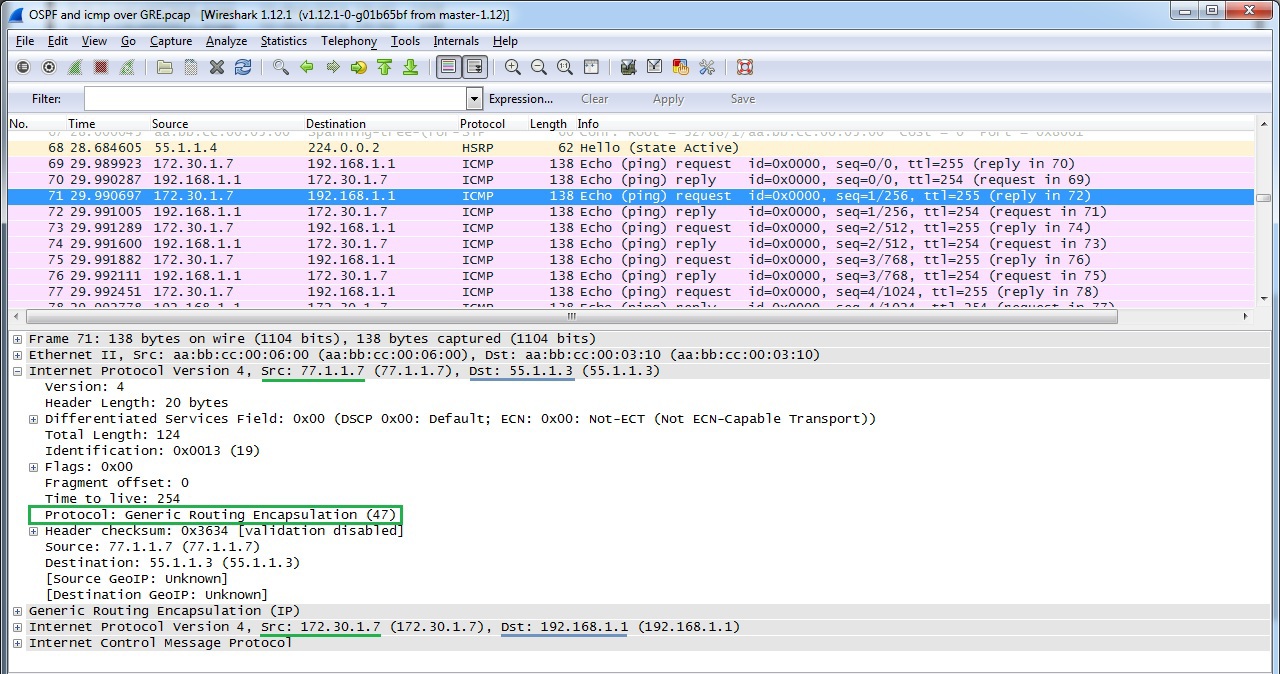
Verifying GRE over IPSec
Package format:

Work OSPF over GRE over IPSec
OSPF works in the standard configuration (as in the case of network type broadcast)
DMVPN implements multipoint GRE architecture, allowing, firstly, to use one address space for all vpn remote offices, secondly, to pass through the tunnel a large list of third-party protocols, as well as multicast, and thirdly, to dynamically establish tunnels between regional remote sites in case of traffic between them. However, there is one thing, this technology is only available on a single-vendor network on Cisco.

Configure HQ Router as DMVPN HUB, Spoke 1 as DMVPN Client
Verifying
DMVPN Operation Checking whether the tunnel has established to DMVPN HUBa.
Please note that NBMA address is the real HUBa address.
Creating a dynamic GRE tunnel from Spoke1 to Spoke2's remote office
At the beginning of the download, Spoke 1 had only 1 tunnel to the HUB. When generating traffic (ping) to Spoke2, a tunnel to Spoke2 was immediately created
At the moment, the network diagram (Fig. 13) will already look like this:

Having made the DMVPN settings and including the shared network for the VPN 10.5.5.0 in the OSPF process, we will observe how OSPF on the HUB will establish adjacent relations first with Spoke1 until it receives a hello packet with Spoke2, after which the relations collapse with Neighbor Down: Adjacency forced to reset error, because by default the interface Tunnel is set to point-to-point interface. For correct operation of OSPF, it is necessary to set the network type as broadcast. If you set broadcast only on HUBe, then the neighborhood will be established, but there will be no routes through OSPF on Spoks, so you need to set broadcast on both HUB and Spoke.
The following are OSPF behavior tables, depending on the selected network type value.
Turn off on the HUBe split-horizon
Let's get rid of the HUB as an intermediate device in the connection Spoke1 <-> Spoke2
PPTP has become a joint development of consortia of Microsoft, 3Com, Ascend Communication. Well scalable protocol. It can be used to connect offices on a point-to-point basis, but is most suitable for organizing remote connections using client-server architecture. It is enough to configure the central PPTP VPN HUB, and remote users connect through the PPTP client, which is implemented in all Windows OS, including MacOS and Linux distributions.
There are cryptographic problems in the authentication protocol MSCHAPv2 [https://technet.microsoft.com/en-us/library/security/2743314.aspx], so in most cases it is recommended to use L2TP over IPSec instead of PPTP even on the same Windows OS .
Only one protocol is used as encryptionMicrosoft Point-to-Point Encryption (128-bit key), as authentication - MSCHAPv2, PEAP (recommended).
In the course of its work, PPTP establishes 2 sessions: a PPP session using the GRE protocol and a TCP connection on port 1723 to serve the PPTP session.
Establishing a TCP session before establishing a PPP connection.

PPP packet format (Fig. 15)

Check established PPTP connections.
The cisco2 user is authorized and the session is established.
The user is given an ip address from the DHCP Pool and virtual-access is created
If a task arises for a particular PPTP client to issue an IP address belonging only to it, then you can resort to creating a TXT file listing all PPTP clients.
Setting up on the router:
The TXT file itself is static2.txt.
L2TP is an IETF standard that incorporates the best from Cisco L2F and PPTP from Microsoft. It does not offer data protection tools, so it is often used with IPSec.
L2TP is one of the few representatives of VPN protocols (which is also available for implementation on a corporate network) that can offer pseudowire technology - forwarding native vlan through an L3 network. Pseudowire technology supports only L2TP version 3. In addition, L2TPv3 supports the following L2 protocols, the payloads of which can be transparently transmitted through the L2TPv3 pseudo-tunnel:
The main difference between L2TPv3 and L2TPv2 is that L2TPv3 can tunnel different types of traffic (see above), while v2 is only PPP.
L2TPv3 uses two types of messages:
L2TPv3 signaling and data messages can be carried over IP (protocol ID 115), i.e. L2TPv3 uses less overhead
L2TPv2 encapsulates data in IP / UDP (UDP port 1701).
The following concepts are used in the L2TP architecture, as well as in the PPTP architecture:
The protocol operation model for L2TPv3 LNS is LNS, and for L2TPv2 LAC is LNS (see below for more details).
We create pseudowire between R5 in the Central Office and in R9 in the regional office, thereby expanding the network 192.168.1.x / 24 to the regional office.

Verify session establishment:
R7 теперь доступен без протоколов маршрутизации:
The neighborhood was established by default, enabling the network 192.168.1.0 on R7 and R10
Disadvantages:
If L2TP is created on the router as in our example, then the following L2 PDUs will not pass through pseudowire connections: CDP, STP, VTP, LLDP. To tunnel such protocols, you must create an L2TPv3 tunnel on the L3 switch.
The big minus - we have to remove the ip address on the router interface, which serves as the default route for all other stations. As a result, our PCs are left without communication with other networks.
L2 VPN works in two modes:
Mandatory tunnel mode refers to provider provisioning and in this mode the L2F, PPTP, and L2TP protocols work. In the mandatory tunnel mode through L2TP, remote users connect to the LAC via a regular PPP connection, the LAC terminates them and tunnels the PPP sessions to the LNS. Moreover, the remote user does not even suspect L2TP.

In a voluntary / client initiated tunnel, the remote host acts as a LAC, that is, it negotiates and establishes an L2TP session directly with the LNS.

In our example, Cisco R9 (44.1.1.9) will act as a LAC and establish an L2TP connection with Cisco R5 in the data center (55.1.1.1), which will act as the LNS.


The service channel has been established, now the channel for data ( PPP frames) is being installed .
It is worth noting that a single established tunnel can host many client sessions.

To establish a session for data, the LAC sends an ICRQ (Call-Request), if there are enough resources on the LNS, then the LNS responds with an ICRP (Call-Reply) message. To complete the session establishment, the LAC sends an ICCN Incoming-Call-Connected.
In our example, one tunnel was formed between the LAS and LNS and one user session.
Configuring L2TP in voluntary tunnel mode is very similar in configuring with mandatory tunnel mode. The difference in setting up a VPDN group is as follows:
On some types of routers it is not possible to create an interface virtual-ppp, therefore I bring as an alternative another working configuration through the creation of an interface Dialer. Configuration provided by AS IS.
L2TPv2 configuration via interface virtual-ppp

Verify the establishment of the tunnel and at the same time verify the session through ping from the internal network of the remote client (LAC) and view the statistics of session packets on the L2TP HUBe (LNS)
Packet format L2TPv2

Overhead UDP (8 bytes) + L2TPv2 (8 bytes) + PPP (4 bytes) + IPv4 (20 bytes) = 40 bytes
OSPF LSA over L2TPv2
Please pay attention to the resulting overhead.

Overhead UDP (8 bytes) + L2TPv2 (8 bytes) + PPP (4 bytes) + IPv4 (20 bytes) = 40 bytes
Verification of the established neighborhood

Configuring L2TPv3 is practically no different on remote clients, while configuring on a HUB VPN is very striking.
Checking an established L2TPv3 session on LNS
Verifying an Installed L2TPv3 Session on the LAC
L2TPv3

Overhead packet format L2TPv3 (4 bytes) + HDLC (4 bytes) = 8 bytes We verify the
session through ping from the internal network of the remote client (LAC) and view the statistics of session packets on the L2TP HUBe (LNS)
The L2TP protocol does not provide security for the data transmitted through it, therefore, to ensure the integrity and confidentiality of the data, we use the IPSec protocol suite. For security reasons, L2TP can offer authentication of the host that initializes the tunnel, as well as PPP authentication. Since L2TPv2 protocol is used in our example, which uses IP / UDP encapsulation, it is enough to determine only UDP traffic on port 1701 in crypto ACLs. IPSec configuration uses transport mode, rather than tunnel mode, to encrypt traffic from the end client to the end (in transport mode), rather than creating additional IP tunnel interfaces and encrypt traffic only between them (in tunnel mode).

Network diagram:

We verify the session through ping from the internal network of the remote client (LAC) and view statistics of session packets on the L2TP HUBe (LNS)
L2TPv2 over IPSec

packet format IP packet format | ESP header | UDP | L2TP | PPP | ESP trailer | Trailer Auth
Overhead ESP_header (8bayt) + UDP (8bayt) + L2TPv2 (8bayt) + PPP (4 bytes) + ESP_trailer (min 2bayta) + SHA_auth (160bit = 20 bytes) = 50 b a dm
Neighborhood through OSPF was not lost, hello packets still arrive every 10 seconds. Routes are advertised through a remote OSPF neighbor router.
Setup for LNS, i.e. for L2TPv2 HUBa is minimal - you just need to add a user for PPP CHAP authorization. If this is not done, then there will be the following error:
Add a second LAC

After that, there are already 2 tunnels on LNS
OSPF operation in L2TPv2
In the case of connecting remote offices via L2TPv2 - there are no restrictions on the use of dynamic routing protocols. To enable OSPF, we will start a loopback on the network on each remote router:
Check OSPF neighborhood and configured routes
If you do not use OSPF, each addition of a new regional office requires a static addition of routes on each existing router (both regional and L2TP HUBe) with the reach address - ip address of the ppp interface.
In the case of a good design for the distribution of IP addresses, we can limit ourselves to adding a summary route to the entire internal regional networks, for example, 192.168, once on regional routers. 25.0 / 24 on the interface virtual-ppp VPN HUBa, then when connecting a new subnet a la 192.168. 25.16 / 29 we don’t need to add anything on regional routers, it remains only on the VPN HUB to indicate which vitual-ppp interface of the new regional router this network is located:
HUB(conf) #ip route 192.168.25.16 255.255.255.248 16.16.16.16 (<- where 16.16.16.16 is the virtual-ppp interface of the new regional router, and which in the VPN routing table HUBa will look like directly connected:
Thanks to the most persistent and assiduous readers who have reached the end of this article for your attention and patience. As I noted at the beginning of the article, I would like this review to become a small collection and reference material, which is not necessary to remember by heart, but which you can always refer to. I hope that this will really help my colleagues in the “workshop” to take into account the nuances in building a high-quality, beautiful and competent network design, avoid pitfalls and, in general, do my job at the highest level! With you was Semenov Vadim.
PS
Well, for dessert: for curious and inquiring minds who want to familiarize themselves more deeply with the method of encapsulating a particular type of VPN, and better understand the format of various headers - it is possible to download dumps of packets collected by reviewing the above VPNshere .
I will be happy to answer your questions on the article.
At the beginning of the article, the main points of the IPSec protocol stack are described, since the use of this standard will be very common hereafter. At the end of the paragraph on IPSec, the most common causes of inoperability of the IPSec channel were included, as well as the main steps to eliminate them.
Types of VPN Connections
The VPNs that are available for configuration on the corporate network are systematized below. Technologies are distributed according to the level of channels provided to the client according to the OSI model (Fig. 1):
Just VPNs for corporate networks will be considered in this article.
VPN scheme regarding the ability to skip multicast and routing protocols (Fig. 2):
An additional structured VPN scheme is provided (Fig. 3), which can be provided by the provider, but they are not considered in detail in this article: The
result of work on VPN systematization and the study of their scalability was served by the final table, which entered general information on the type of VPN protocol, its features, and the most important thing that needs to be done if you connect one more to existing VPNs.
The table shows the results of the settings, the study of the received packet format, the configuration of the routing protocol (OSPF) via VPNs, and also discusses the issues of protocol scalability.
VPN table
| VPN Type | HUB setup | Configure Spoke | HUB setup when adding a new Spoke | Configure Spoke when adding another new Spoke | Using OSPF dynamic routing protocols, EIGRP | Features |
| Regular IPSec (crypto map) | isakmp crypto -map | isakmp crypto -map | Yes: isakmp, crypto-map: set peer, transform-set, crypto ACL | Yes: To ensure connectivity between Spokes, you need to add the routes of the new Spoke to the crypto ACL of all existing Spokes. | Not | Convenient for Spoke <5-10. To provide connectivity between Spoke-E through HUB requires adding a crypto ACL N networks in N spoke -s extremely scaleable. |
| Regular IPSec (Profile) | isakmp profile, IPSec Profile, crypto-map | isakmp profile, IPSec Profile, crypto-map | Yes: crypto-map: set peer, crypto ACL | Yes: Adding new routes to the crypto ACL | Not | Extremely scalable. Less configuration by combining typical settings in profile. |
| Regular IPSec (Profile, Static VTI) | isakmp profile, IPSec Profile, VTI (Virtual Tunnel Interface) | isakmp, IPSec Profile, VTI (Virtual Tunnel Interface) | Yes: isakmp, new VTI (Virtual Tunnel Interface) | Yes static route to networks ud. office | Yes | In a configuration, SVTI without IGP is extremely scalable. For each Spoke by SVTI. N spoke - N VTI and its own subnet. Spoke requires adding routes to remote Spoke's. Skips multicast! By default, for each SVTI, there is only one IPSec SA with traffic selector “IP any any.” There is no crypto ACL command. The networks that are defined through the static route on SVTI are wrapped in the tunnel. |
| Regular IPSec (Profile, Static VTI and IGP) | isakmp, IPSec Profile, VTI (Virtual Tunnel Interface) | isakmp, IPSec Profile, VTI (Virtual Tunnel Interface) | Yes: isakmp, new VTI (Virtual Tunnel Interface) | Not | Yes | Not scalable. For each Spoke by SVTI. N spoke - N VTI and its own subnet. Routes from the IGP fall into the tunnel. |
| IPSec with dynamic IP (Dynamic VTI and Static VTI and IGP) | keyring, isakmp policy, isakmp profile, ipsec profile, loopback for unnumbered interface (required), Virtual-Template type tunnel | keyring, isakmp policy, isakmp profile, ipsec profile, loopback for unnumbered interface, Static VTI | Not | Not | Yes | Very scalable. All spoke and hub are on the same network! Dynamic VTI (DVTIs) is also a point-to-point interface. In point-to-multipoint mode, the OSPF neighborhood is not established. Using Unnumbered IP as a DVTI Address Required |
| Easy VPN | AAA - for authorization of Isakmp clients , isakmp policy, isakmp profile, ipsec profile, interface, Virtual-Template type tunnel DHCP for clients | Minimum IPsec client configuration, indicating the VPN server, VPN group, user for aaa, Indication of internal and external interfaces. | Not | Not | Yes | Scalable. If NAT / PAT was previously configured, this configuration must be deleted before deploying EASY VPN. There are features in customizing the transform-set. |
| GRE | Interface Tunnel, Static route | Interface Tunnel, Static route | Yes Int tunnel, Static route | Yes static route | Yes | Not scalable. It forms a P2P link, each tunnel has its own subnet. Perfect for tunneling IGP protocols. |
| IGP over GRE | Interface Tunnel, Static route | Interface Tunnel, Static route | Yes int tunnel | Not | Yes | Not scalable. Each tunnel has its own subnet. IGP protocols work through the tunnel at default settings. |
| DMVPN (proprietary) | DMVPN phase 1 - convention only mGRE DMVPN phase 2 - configuration ipsec profile to protect traffic | Minimum: DMVPN phase 1 - convention only mGRE DMVPN phase 2 - configure ipsec profile to protect traffic | Not | No: when adding a new spoke - the tunnel to it is built automatically | Yes: EIGRP on the HUB turn off horizon splitting and save yourself as next-hop in route announcements | The most scalable protocol. GRE multipoint. Tunnels between remote offices are created dynamically. |
| PPTP | Vpdn-group, interface Virtual-Template, IP local pool, username / password for authorization, static route to ud.ofisa networks | service internal (to enable pptp client settings), vpdn-group, interface Dialer, dialer-list, static route to central networks., remote. office | Yes Static route for internal networks behind PPTP client | Yes Static route for new internal networks for the new PPTP client | Yes | Scalable with restrictions. Morally obsolete protocol, cryptography vulnerabilities in the authentication protocol MSCHAPv2. Most often used to create remote access. It is supported by many popular versions of Windows. Use only one protocol for encryption -MPPE (RC4 with 128-bit key). It supports multicast, as PPP are encapsulated in GRE. |
| IGP over PPTP | Vpdn-group, interface Virtual-Template, IP local pool, username / password for authorization, IGP protocol (router ospf process) | service internal (to enable client pptp settings), vpdn-group, interface Dialer, dialer-list, IGP protocol (router ospf process) | Not | Not | Yes | Scalable with restrictions. It supports multicast, as PPP are encapsulated in GRE. Deprecated protocol -> L2TP over IPSec alternative |
| L2TPv3 xconnect | pseudowire-class xconnect | pseudowire-class xconnect | Yes xconnect | Not | Yes | Not scalable. Great for exploiting the “native” L2 vlan through an IP network. But, you need a backup default gateway. By creating xconnect on the interface of the router, we must remove the IP address from its interface, thereby removing the default route for all devices within this network. |
| L2TPv2 / v3 | aaa new-model, username for authorization of the L2TP peer , VPDN-group, interface Virtual-Template, static route to ud networks office | username for authorization L2TP HUBa, interface virtual-ppp, pseudowire class, static route to central networks , remote . office | Yes: static route to remote office internal networks | Yes: static route to remote office internal networks | Yes | Scalable. L2TPv3 provides great advantages, allowing you to encapsulate not only PPP traffic like L2TPv2, but also transmit VLAN tags and encapsulate HDLC, Frame Relay. |
| IGP over L2TPv2 / v3 | aaa new-model, username for authorization of the L2TP peer , VPDN-group, interface Virtual-Template, IGP (router ospf process) | username for authorization L2TP HUBa, interface virtual-ppp, pseudowire class, IGP (router ospf process) | Not | Not | Yes | Very scalable. Allows you to configure the default routing protocols; remote offices communicate via the L2TPv2 / v3 HUB (at the central office). |
Establish IPSec, messages, operating modes.
In the process of establishing a connection through IPSec, two participants in the secure channel need to agree on a significant number of parameters: if necessary, they must authenticate each other, generate and exchange shared keys (moreover through an untrusted medium), establish what traffic to encrypt (from which sender and to which recipient), and also agree through which protocols to encrypt, and using which protocols to authenticate. It is supposed to exchange a lot of official information, isn't it? For this reason, IPSec consists of a protocol stack whose responsibility is to ensure the establishment, operation and management of a secure connection. The connection establishment process consists of 2 phases: the first phase is established in order to ensure the safe exchange of ISAKMP messages in the second phase.
IKE (Internet Key Exchange) mode of operation:
IKE Phase 1
- (optional) peer authentication
- IKE SA negotiation between peers
Main Mode (6 posts)
- [First exchange] The beginning of negotiations begins with a feast sending to each other proposals for supported encryption, authentication protocols for the IKE messages themselves, and the lifetime of the security associations. The feast selects the proposed SA and sends them to the proposed feast. These settings are defined in ISAKMP Policy.
- [Second exchange] Generation of shared shared keys through Diffie-Hellman public key exchange. Further messaging takes place with already encrypted messages.
- [Third exchange] Messaging for authentication of ISAKMP session (IKE_I_MM4 )
After installing IKE SA (that is, establishing the 1st phase), IPSEC is negotiated in quick mode (QM). Posts mode the Main-Mode (the MM):
- IKE_READY the New State = IKE_I_MM1
- IKE_I_MM1 the New State = IKE_I_MM2
- IKE_I_MM2 the New State = IKE_I_MM3
- IKE_I_MM3 the New State = IKE_I_MM4
- IKE_I_MM4 the New State = IKE_I_MM5
- IKE_I_MM5 the New State = IKE_I_MM6
Aggressive -Mode (3 posts)
The initiator puts in the first message a proposal for encryption, an authentication protocol for the IKE messages themselves, key lifetime, Diffie-Hellman key exchange messages (DH), session ID, its authentication.
Command for diagnosing this phase on Cisco equipment ** show crypto isakmp sa
IKE Phase 1.5
It is not used in a standard peer-to-peer VPN connection, it is used when organizing remote connections.
It has two modes:
Xauth (User Authentication)
- Additional user authentication within the IKE protocol. For this, the Extended Authentication protocol is used.
Mode config (Push Config)
- Additional information is transmitted to the client about the IP address, mask, DNS servers, etc.
IKE Phase 2
IPsec SAs / SPIs
At this point, ISAKMP is responsible for exchanging session keys and negotiating security policies (SAs) to ensure the confidentiality and integrity of user traffic. In configuration (on Cisco IOS), the transform-set is responsible for this.
Quick mode
QM does everything that IPSec SAs / SPIs do for fewer overhead messages. Similar to Aggressive Mode.
Consider the example of messaging during the establishment of the IPSec tunnel. A working option.
| ISAKMP: (1007): Old State = IKE_I_MM6 New State = IKE_I_MM6 * Sep 3 08: 59: 27.539: ISAKMP: (1007): Input = IKE_MESG_INTERNAL, IKE_PROCESS_COMPLETE * Sep 3 08: 59: 27.543: ISAKMP: (1007) State = IKE_I_MM6 New State = IKE_P1_COMPLETE |
PHASE 2
| * Sep 3 08: 59: 27.559: ISAKMP: (1007): beginning Quick Mode exchange, M-ID of 2551719066 * Sep 3 08: 59: 27.563: ISAKMP: (1007): QM Initiator gets spi * Sep 3 08:59 : 27.575: ISAKMP: (1007): sending packet to 192.168.0.2 my_port 500 peer_port 500 (I) QM_IDLE * Sep 3 08: 59: 27.575: ISAKMP: (1007): Sending an IKE IPv4 Packet . * Sep 3 08: 59: 27.583: ISAKMP: (1007): Node 2551719066, Input = IKE_MESG_INTERNAL, IKE_INIT_QM * Sep 3 08: 59: 27.587: ISAKMP: (1007): Old State = IKE_QM_READY New State = IKE_QM_I_QM1 * 3_QM1 : 59: 27.803: ISAKMP: (1007): Checking IPSec proposal 1 * Sep 3 08: 59: 27.803: ISAKMP: transform 1, ESP_AES * Sep 3 08: 59: 27.807: ISAKMP: attributes in transform : * Sep 3 08: 59: 27.807: ISAKMP: encaps is 1 (Tunnel) * Sep 3 08: 59: 27.811: ISAKMP: SA life type in seconds * Sep 3 08: 59: 27.815: ISAKMP: SA life duration (basic) of 3600 * Sep 3 08: 59: 27.815: ISAKMP: SA life type in kilobytes * Sep 3 08: 59: 27.819: ISAKMP: SA life duration (VPI) of 0x0 0x46 0x50 0x0 * Sep 3 08: 59: 27.827: ISAKMP: authenticator is HMAC-SHA * Sep 3 08: 59: 27.827: ISAKMP: key length is 128 * Sep 3 08: 59: 27.831: ISAKMP: (1007) : atts are acceptable. * Sep 3 08: 59: 27.855: ISAKMP: (1007): Old State = IKE_QM_I_QM1 New State = IKE_QM_IPSEC_INSTALL_AWAIT ISAKMP: (1007): Old State = IKE_QM_IPSEC_INSTALL_AWAIT New State = IKE_QM_PHASE2_COMPLETE |
Now, I suggest looking at a couple of examples of IPSec inoperability.
Case1
“Old State = IKE_I_MM1 New State = IKE_I_MM1”
Reason # 1
Did not agree on the IKE proposal (proposed by IKE) in Phase 1. On one side is 3des, on the other aes.
| Error while processing SA request: Failed to initialize SA * Sep 3 08: 36: 38.239: ISAKMP: Error while processing KMI message 0, error 2. * Sep 3 08: 36: 38.287: ISAKMP: (0): retransmitting phase 1 MM_NO_STATE ... * Sep 3 08: 40: 38.307: ISAKMP (0): incrementing error counter on sa, attempt 3 of 5: retransmit phase 1 * Sep 3 08: 40: 38.307: ISAKMP: (0): retransmitting phase 1 MM_NO_STATE * Sep 3 08: 37: 08.339: ISAKMP: (0): deleting SA reason "Death by retransmission P1" state (I) MM_NO_STATE (peer 192.168.0.2) * Sep 3 08: 41: 08.359: ISAKMP: (0): Input = IKE_MESG_INTERNAL, IKE_PHASE1_DEL * Sep 3 08: 41: 08.359: ISAKMP: (0): Old State = IKE_I_MM1 New State = IKE_DEST_SA |
The following status is displayed on the router:
| R7 # sh crypto isakmp sa IPv4 Crypto ISAKMP SA dst src state conn-id status 192.168.0.2 192.168.0.1 MM_NO_STATE 0 ACTIVE |
Reason 2:
ACLs on the physical interface block ISAKMP traffic.
Case2
If transform set on one router one
| R7 # sh run | i transform crypto ipsec transform-set TRANSFORM esp-aes esp-md5-hmac |
... and on another router another
| R10 # sh run | i transform crypto ipsec transform-set TRANSFORM esp-aes esp-sha-hmac |
, then IPSEC SA will not converge (the number of encrypted and decrypted packets will not increase
| * Sep 3 08: 56: 08.551: ISAKMP: (1006): IPSec policy invalidated proposal with error 256 * Sep 3 08: 56: 08.559: ISAKMP: (1006): phase 2 SA policy not acceptable! (local 192.168.0.1 remote 192.168.0.2) * Sep 3 08: 56: 08.563: ISAKMP: set new node -1456368678 to QM_IDLE * Sep 3 08: 56: 08.567: ISAKMP: (1006): Sending NOTIFY PROPOSAL_NOT_CHOSEN protocol 3 spi 1785687224 , message ID = 2838598618 * Sep 3 08: 56: 08.575: ISAKMP: (1006): sending packet to 192.168.0.2 my_port 500 peer_port 500 (I) QM_IDLE * Sep 3 08: 56: 08.579: ISAKMP: (1006): Sending an IKE IPv4 Packet. * Sep 3 08: 56: 08.583: ISAKMP: (1006): purging node -1456368678 * Sep 3 08: 56: 08.587: ISAKMP: (1006): deleting node 1350414148 error TRUE reason "QM rejected " * Sep 3 08: 56: 08.591: ISAKMP: (1006): Node 1350414148, Input = IKE_MESG_FROM_PEER, IKE_QM_EXCH * Sep 3 08: 56: 08.595: ISAKMP: (1006): Old State = IKE_QM_READY New State = IKE_M |
Case3
If the preshared key is incorrectly specified on IPSec peers:
| R7 #sh run | i isakmp key crypto isakmp key cisco123 address 172.16.1.2 |
| R10 #sh run | i isakmp key crypto isakmp key cisco address 0.0.0.0 0.0.0.0 |
Then there will be a retransmitting phase 1 error MM_KEY_EXCH
| *Sep 3 09:14:30.659: ISAKMP:(1010): retransmitting phase 1 MM_KEY_EXCH... *Sep 3 09:14:30.663: ISAKMP (1010): incrementing error counter on sa, attempt 3 of 5: retransmit phase 1 *Sep 3 09:14:30.663: ISAKMP:(1010): retransmitting phase 1 MM_KEY_EXCH *Sep 3 09:14:30.663: ISAKMP:(1010): sending packet to 192.168.0.2 my_port 500 peer_port 500 (I) MM_KEY_EXCH *Sep 3 09:14:30.663: ISAKMP:(1010):Sending an IKE IPv4 Packet. *Sep 3 09:14:30.711: ISAKMP (1010): received packet from 192.168.0.2 dport 500 sport 500 Global (I) MM_KEY_EXCH *Sep 3 09:14:30.715: ISAKMP:(1010): phase 1 packet is a duplicate of a previous packet. *Sep 3 09:14:50.883: ISAKMP:(1011): retransmitting due to retransmit phase 1 * Sep 3 09: 14: 51.383: ISAKMP: (1011): retransmitting phase 1 MM_KEY_EXCH ... * Sep 3 09: 14: 51.387: ISAKMP: (1011): peer does not do paranoid keepalives. * Sep 3 09: 14: 51.387: ISAKMP: (1011): deleting SA reason "Death by retransmission P1" state ® MM_KEY_EXCH (peer 192.168.0.2) * Sep 3 09: 14: 51.395: ISAKMP: (1011): Input = IKE_MESG_INTERNAL, IKE_PHASE1_DEL |
Regular IPSec
Setup via Crypto map
Device Configuration:
| Hub | Spoke1 |
| Настройка первой фазы IPSec для обмена сессионного ключа: crypto isakmp policy 1 hash md5 authentication pre-share group 5 crypto isakmp key cisco123 address 172.16.1.2 ! Настройка второй фазы IPSec c заданием алгоритма шифрования и аутентификации crypto ipsec transform-set Trans_HUB1_SP1 esp-aes 256 esp-md5-hmac ! crypto map HUB_SPOKEs 1 ipsec-isakmp set peer 172.16.1.2 set transform-set Trans_HUB1_SP1 match address TO_Spoke1 reverse-route static ! | crypto isakmp policy 1 hash md5 authentication pre-share group 5 crypto isakmp key cisco123 address 192.168.1.1 ! crypto ipsec transform-set Trans_SP1_HUB1 esp-aes 256 esp-md5-hmac ! crypto map SP1_HUB 1 ipsec-isakmp set peer 192.168.1.1 set transform-set Trans_SP1_HUB1 match address TO_HUB reverse-route static ! |
| Настройка заворачивания маршрутов в туннель | |
| ip access-list extended TO_Spoke1 permit ip 10.0.0.0 0.0.0.255 1.1.1.0 0.0.0.255 ! Interface Ethernet0/0 ip address 192.168.1.1 255.255.255.0 crypto map HUB_SPOKEs ! | ip access-list extended TO_HUB permit ip 1.1.1.0 0.0.0.255 10.0.0.0 0.0.0.255 ! Interface Ethernet0 / 0 ip address 172.16.1.1 255.255.255.0 crypto map SP1_HUB ! |
Health Check
| HUB #ping 1.1.1.1 source 10.0.0.1 . !!!! Success rate is 80 percent (4/5), round-trip min / avg / max = 4/4/5 ms | Spoke1 #ping 10.0.0.1 source 1.1.1.1 . !!!! Success rate is 80 percent (4/5), round-trip min / avg / max = 4/4/5 ms |
| VPN Convergence Check: | |
| Успешный обмен ключами: Spoke1#show crypto isakmp sa IPv4 Crypto ISAKMP SA dst src state conn-id status 192.168.1.1 172.16.1.2 QM_IDLE 1007 ACTIVE Успешное прохождение трафика через VPN: Spoke1#show crypto ipsec sa interface: Ethernet0/0 Crypto map tag: SP1_HUB, local addr 172.16.1.2 protected vrf: (none) local ident (addr/mask/prot/port): (1.1.1.0/255.255.255.0/256/0) remote ident (addr/mask/prot/port): (10.0.0.0/255.255.255.0/256/0) current_peer 192.168.1.1 port 500 PERMIT, flags={origin_is_acl,} #pkts encaps: 4, #pkts encrypt: 4, #pkts digest: 4 #pkts decaps: 4, #pkts decrypt: 4, #pkts verify: 4 #pkts compressed: 0, #pkts decompressed: 0 #pkts not compressed: 0, #pkts compr. failed: 0 #pkts not decompressed: 0, #pkts decompress failed: 0 #send errors 0, #recv errors 0 local crypto endpt.: 172.16.1.2, remote crypto endpt.: 192.168.1.1 path mtu 1500, ip mtu 1500, ip mtu idb Ethernet0/0 current outbound spi: 0xA7424886(2806139014) PFS (Y/N): N, DH group: none | |
The SPI is transmitted in the IPSec packet so that when it is received by the peer, in this case the HUB, the HUB knows which SA (security association) to use, that is, which encryption protocol, which authentication protocol, etc. used as a package to decrypt. On HUB there is exactly the same SA with the same SPI.
Successful traffic flow through VPN on HUB-e
| HUB#sho crypto ipsec sa interface: Ethernet0/0 Crypto map tag: HUB_SPOKEs, local addr 192.168.1.1 protected vrf: (none) local ident (addr/mask/prot/port): (10.0.0.0/255.255.255.0/256/0) remote ident (addr/mask/prot/port): (1.1.1.0/255.255.255.0/256/0) current_peer 172.16.1.2 port 500 PERMIT, flags={origin_is_acl,} #pkts encaps: 4, #pkts encrypt: 4, #pkts digest: 4 #pkts decaps: 4, #pkts decrypt: 4, #pkts verify: 4 #pkts compressed: 0, #pkts decompressed: 0 #pkts not compressed: 0, #pkts compr. failed: 0 #pkts not decompressed: 0, #pkts decompress failed: 0 #send errors 0, #recv errors 0 local crypto endpt .: 192.168.1.1, remote crypto endpt .: 172.16.1.2 path mtu 1500, ip mtu 1500, ip mtu idb Ethernet0 / 0 current outbound spi: 0x10101858 (269490264) PFS (Y / N): N, DH group : none inbound esp sas: spi: 0xA7424886 (2806139014) transform: esp-256-aes esp-md5-hmac, in use settings = {Tunnel,} conn id: 19, flow_id: SW: 19, sibling_flags 80000040, crypto map: HUB_SPOKEs sa timing: remaining key lifetime (k / sec): (4360017/2846) IV size: 16 bytes replay detection support: Y Status: ACTIVE (ACTIVE) |
Now add another Spoke, see what changes we need to make
| HUB setup | Tuning on the new Spoke |
| HUB# crypto isakmp policy 1 hash md5 authentication pre-share group 5 crypto isakmp key cisco123 address 172.16.1.2 crypto isakmp key cisco456 address 172.16.2.3 ! ! crypto ipsec transform-set Trans_HUB1_SP1 esp-aes 256 esp-md5-hmac ! crypto map HUB_SPOKEs 1 ipsec-isakmp set peer 172.16.1.2 set peer 172.16.2.3 set transform-set Trans_HUB1_SP1 match address TO_Spokes reverse-route static ! ip access-list extended TO_Spokes permit ip 10.0.0.0 0.0.0.255 1.1.1.0 0.0.0.255 permit ip 10.0.0.0 0.0.0.255 2.2.2.0 0.0.0.255 т.е. для добавления N spoke-ов, нужно 3N дополнительный строчек | Настройка такая же как и на первом Spoke1 (с учетом поправки внутренних сетей в ACL) Spoke2# crypto isakmp policy 1 hash md5 authentication pre-share group 5 crypto isakmp key cisco456 address 192.168.1.1 ! ! crypto ipsec transform-set Trans_SP2_HUB1 esp-aes 256 esp-md5-hmac ! crypto map SP2_HUB 1 ipsec-isakmp set peer 192.168.1.1 set transform-set Trans_SP2_HUB1 match address TO_HUB reverse-route static ! ip access-list extended TO_HUB permit ip 2.2.2.0 0.0.0.255 10.0.0.0 0.0.0.255 |
VPN Verification
| Checking the availability of the second remote office: HUB # ping 2.2.2.2 source 10.0.0.1 . !!!! Success rate is 80 percent (4/5), round-trip min / avg / max = 4/4/5 ms The HUB now has an additional key exchange session with the second Spoke: HUB # sho crypto isakmp sa IPv4 Crypto ISAKMP SA dst src state conn-id status 192.168.1.1 172.16.2.3 QM_IDLE 1009 ACTIVE 192.168.1.1 172.16.1.2 QM_IDLE 1008 ACTIVE However, there is no communication between offices (even via the HUB). Spoke1 # ping 2.2.2.2 source 1.1.1.1 ..... Success rate is 0 percent (0/5) |
The lack of connectivity before Spoke2 is not surprising - you need to enable the internal networks of the new remote office in the Crypto ACL; as a result, to ensure connectivity between the Spokes through the HUB, you need to add N networks to the Crypto ACL on N spoken.
Alternative. Multiple Crypto map.
An example of the IPSec configuration of multiple VPNs with remote offices with dynamic or static ip addresses, when each office accesses through the VPN HUB’s Internet channel, but all the remote networks are in the routing table and they are connected without using a NAT.
| HUB# crypto ipsec transform-set 3DES-MD5 esp-3des esp-md5-hmac mode tunnel ! crypto ipsec profile Spokes_VPN_Profile set security-association lifetime seconds 86400 set transform-set 3DES-MD5 set reverse-route distance 1 reverse-route ! crypto dynamic-map hq-vpn 30 set profile Spokes_VPN_Profile match address VPN33-32-TRAFFIC crypto dynamic-map hq-vpn 3348 set profile Spokes_VPN_Profile match address VPN3348-TRAFFIC crypto dynamic-map hq-vpn 50 set profile Spokes_VPN_Profile match address VPN33-64-TRAFFIC ! crypto map VPN 1 ipsec-isakmp dynamic hq-vpn ! interface GigabitEthernet1/0 ip address 55.1.1.5 255.255.255.0 crypto map VPN ! ip access-list extended VPN33-32-TRAFFIC permit ip any 192.168.33.32 0.0.0.15 ip access-list extended VPN33-48-TRAFFIC permit ip any 192.168.33.48 0.0.0.15 ip access-list extended VPN33-64-TRAFFIC permit ip any 192.168.33.64 0.0.0.15 | Spoke# crypto ipsec transform-set 3DES-MD5 esp-3des esp-md5-hmac mode tunnel ! crypto map VPN 1 ipsec-isakmp set peer 55.1.1.5 set transform-set 3DES-MD5 match address TO_HUB reverse-route static ! interface FastEthernet0/0 ip address negotiated crypto map VPN ! ip access-list extended TO_HUB permit ip 192.168.33.32 0.0.0.15 any |
In this scheme and in this configuration, at remote offices, Crypto ACL is set as the destination network - ip any, i.e. traffic to any host will be wrapped in a tunnel, and when a new remote office is connected, there is no need to change all other Crypto ACLs in N remote offices.
Regardless of the connection method: Regular IPSec or (looking a little ahead, IPSec dynamic IP) in both cases we are faced with the task of ensuring accessibility between remote sites. As part of a connection of the type Regular IPSec and IPSec dynamic IP, you need to manually determine the networks in the crypto ACL, therefore, to reduce the configuration on the terminal devices after connecting another remote office, there are two ways to go:
- Отойти от crypto map к VTI и настроить динамическую маршрутизацию.
- Для настройки динамического протокола маршрутизации (OSPF) перейдем от использования метода crypto map к такой же настройке, но только через VTI интерфейс (поддерживает unicast, multicast).
Настройка через Virtual Tunnel Interface + профайлы.
Virtual Tunnel Interface provides a routing interface for terminating IPSec tunnels and an easier way to securely connect remote corporate networks. VTI supports only Unicast and multicast transmission through the tunnel, which allows dynamic routing protocols to work without the additional need to encapsulate a packet in GRE (additional 4 bytes). There are two types of virtual tunnel interfaces:
Static virtual interface - a point-to-point tunnel
Dynamic virtual interface - allows you to scale the solution for VPNs by terminating multiple tunnels to yourself from remote Spokes that can have a dynamic IP address. The only drawback is that only remote spoke routers can initiate the establishment of a tunnel (since only they have a specified tunnel destination HUB_ip).
When configuring DVTI on the HUB router, a virtual-template settings template is created, if the key exchange with the remote spoke is successful and a tunnel is established with it, a virtual-access interface is created from the "template" on the HUB, which is like the SVTI tunnel interface for this tunnel.
VTI Features:
- Traffic selector (i.e. the traffic that will be wrapped in the tunnel) Static VTI always ip any any;
- Traffic selector у Dynamic VTI тоже по умолчанию ip any any и поддерживает только одну IPSec SA, но может принимать тот traffic selector, который предлагает ему инициатор;
- Не поддерживается Stateful Failover;
- Режим работы transform-set только в туннельном режиме.
| Настройка Static VTI через профайлы | |
| HUB# crypto isakmp policy 1 hash md5 authentication pre-share group 5 crypto isakmp key cisco123 address 172.16.1.2 ! crypto ipsec transform-set Trans_HUB_SP esp-aes esp-sha-hmac ! crypto ipsec profile P1 set transform-set Trans_HUB_SP ! interface Tunnel0 ip address 10.1.1.254 255.255.255.0 ip ospf mtu-ignore*(см.ниже) load-interval 30 tunnel source 192.168.1.1 tunnel mode ipsec ipv4 tunnel destination 172.16.1.2 tunnel protection ipsec profile P1 ! router ospf 1 network 10.0.0.0 0.0.0.255 area 0 network 10.1.1.0 0.0.0.255 area 0 | Spoke1# crypto isakmp policy 1 hash md5 authentication pre-share group 5 crypto isakmp key cisco123 address 192.168.1.1 ! crypto ipsec transform-set Trans_HUB_SP esp-aes esp-sha-hmac ! crypto ipsec profile P1 set transform-set Trans_HUB_SP ! interface Tunnel0 ip address 10.1.1.1 255.255.255.0 ip ospf mtu-ignore load-interval 30 tunnel source 172.16.1.2 tunnel mode ipsec ipv4 tunnel destination 192.168.1.1 tunnel protection ipsec profile P1 ! router ospf 1 network 1.1.1.0 0.0.0.255 area 0 network 10.1.1.0 0.0.0.255 area 0 |
Neighborhood Verification through OSPF over Static VTI
| HUB#sh ip ospf neighbor Neighbor ID Pri State Dead Time Address Interface 1.1.1.1 0 FULL/ - 00:00:33 10.1.1.1 Tunnel0 Сеть на Spoke 1 теперь доступна через туннель HUB#sh ip route 1.0.0.0/32 is subnetted, 1 subnets O 1.1.1.1 [110/1001] via 10.1.1.1, 00:02:56, Tunnel0 10.0.0.0/8 is variably subnetted, 6 subnets, 2 masks C 10.0.0.0/24 is directly connected, Loopback0 L 10.0.0.1/32 is directly connected, Loopback0 C 10.0.1.0/24 is directly connected, Loopback1 L 10.0.1.1/32 is directly connected, Loopback1 C 10.1.1.0/24 is directly connected, Tunnel0 L 10.1.1.254/32 is directly connected, Tunnel0 Checking network availability at the Central Office with Spoke 1 Spoke1 # ping 10.0.0.1 source 1.1.1.1 !!!!! Success rate is 100 percent (5/5), round-trip min / avg / max = 5/5/5 ms |
Traffic Selector for Static VTI ip any any, i.e. everything that we send to the tunnel through a static route or through a routing protocol will be encrypted / decrypted.
| Spoke1#sho crypto ipsec sa interface: Tunnel0 Crypto map tag: Tunnel0-head-0, local addr 172.16.1.2 protected vrf: (none) local ident (addr/mask/prot/port): (0.0.0.0/0.0.0.0/256/0) remote ident (addr/mask/prot/port): (0.0.0.0/0.0.0.0/256/0) current_peer 192.168.1.1 port 500 PERMIT, flags={origin_is_acl,} #pkts encaps: 76, #pkts encrypt: 76, #pkts digest: 76 #pkts decaps: 65, #pkts decrypt: 65, #pkts verify: 65 #pkts compressed: 0, #pkts decompressed: 0 #pkts not compressed: 0, #pkts compr. failed: 0 #pkts not decompressed: 0, #pkts decompress failed: 0 #send errors 0, #recv errors 0 |
interface Tunnel0
ip address 10.1.1.254 255.255.255.0
ip ospf mtu-ignore
OSPF Neighbor verifies that the same MTU value is used on the interface. If the neighbor gets the MTU size in the DBD packet larger than the MTU of its inbound interface, then the neighborhood will not be established.
When you connect a second Spoke2, a second Tunnel (HUB-Spoke2) is configured, which has its own separate subnet.
| HUB#sho ip ospf neighbor Neighbor ID Pri State Dead Time Address Interface 2.2.2.2 0 FULL/ - 00:00:31 10.1.2.2 Tunnel1 1.1.1.1 0 FULL/ - 00:00:30 10.1.1.1 Tunnel0 Маршруты на Spoke1 Spoke1#sh ip route Gateway of last resort is 172.16.1.5 to network 0.0.0.0 <...ommited...> C 1.1.1.0/24 is directly connected, Loopback0 L 1.1.1.1/32 is directly connected, Loopback0 2.0.0.0/32 is subnetted, 1 subnets O 2.2.2.2 [110/2001] via 10.1.1.254, 01:53:04, Tunnel0<-Сеть Spoke2 10.0.0.0/8 is variably subnetted, 5 subnets, 2 masks O 10.0.0.1/32 [110/1001] via 10.1.1.254, 02:04:11, Tunnel0 <-Сеть Головного офиса O 10.0.1.1/32 [110/1001] via 10.1.1.254, 02:04:11, Tunnel0 <-подсеть туннеля HUB-Spoke1 C 10.1.1.0/24 is directly connected, Tunnel0 L 10.1.1.1/32 is directly connected, Tunnel0 O 10.1.2.0/24 [110/2000] via 10.1.1.254, 01:53:14, Tunnel0 <-подсеть туннеля HUB-Spoke2 172.16.0.0/16 is variably subnetted, 2 subnets, 2 masks A message to the second remote office through the Central Office: Spoke1 #traceroute 2.2.2.2 Type escape sequence to abort. Tracing the route to 2.2.2.2 VRF info: (vrf in name / id, vrf out name / id) 1 10.1.1.254 5 msec 4 msec 5 msec 2 10.1.2.2 5 msec 10 msec * |
IPSec with Dynamic IP, Dynamic VTI
Consider, for example, a circuit using Dynamic VTI on a HUB, Static VTI on spoke. They can also connect to Dynamic VTI with configured crypto maps.
| HUB# crypto keyring KEY_Dynamic_connection pre-shared-key address 0.0.0.0 0.0.0.0 key cisco123 ! crypto isakmp policy 1 hash md5 authentication pre-share group 5 crypto isakmp profile DVTI keyring KEY_Dynamic_connection match identity address 0.0.0.0 virtual-template 1 ! crypto ipsec transform-set Trans_HUB_SP esp-aes esp-sha-hmac ! crypto ipsec profile P1 set transform-set Trans_HUB_SP set isakmp-profile DVTI ! interface Loopback1 ip address 10.1.1.254 255.255.255.0 ! interface Virtual-Template1 type tunnel ip unnumbered Loopback1 ip ospf mtu-ignore tunnel mode ipsec ipv4 tunnel protection ipsec profile P1 ! router ospf 1 network 10.0.0.0 0.0.0.255 area 0 network 10.1.1.0 0.0.0.255 area 0 | Spoke1# crypto keyring KEY_Dynamic_connection pre-shared-key address 0.0.0.0 0.0.0.0 key cisco123 ! crypto isakmp policy 1 hash md5 authentication pre-share group 5 crypto isakmp profile DVTI keyring KEY_Dynamic_connection match identity address 0.0.0.0 ! crypto ipsec transform-set Trans_HUB_SP esp-aes esp-sha-hmac ! crypto ipsec profile P1 set transform-set Trans_HUB_SP set isakmp-profile DVTI ! interface Loopback1 ip address 10.1.1.1 255.255.255.0 ! interface Tunnel0 ip unnumbered Loopback1 ip ospf mtu-ignore tunnel source Ethernet0 / 0 tunnel mode ipsec ipv4 tunnel destination 192.168.1.1 tunnel protection ipsec profile P1 ! router ospf 1 network 1.1.1.0 0.0.0.255 area 0 network 10.1.1.0 0.0.0.255 area 0 |
Check the installed tunnels with two connected Spoke-s:
| HUB#sh crypto isakmp sa IPv4 Crypto ISAKMP SA dst src state conn-id status 192.168.1.1 172.16.2.3 QM_IDLE 1047 ACTIVE 192.168.1.1 172.16.1.2 QM_IDLE 1046 ACTIVE HUB# sh ip int br Interface IP-Address OK? Method Status Protocol Ethernet0/0 192.168.1.1 YES NVRAM up up Ethernet0/1 unassigned YES manual up up Ethernet0/2 unassigned YES NVRAM down down Ethernet0/3 unassigned YES manual up up Loopback0 10.0.0.1 YES manual up up Loopback1 10.1.1.254 YES manual up up Virtual-Access1 10.1.1.254 YES unset up up Virtual-Access2 10.1.1.254 YES unset up up Virtual-Template1 10.1.1.254 YES manual up down HUB#sho crypto ipsec sa interface: Virtual-Access2 Crypto map tag: Virtual-Access2-head-0, local addr 192.168.1.1 protected vrf: (none) local ident (addr / mask / prot / port): (0.0.0.0/0.0.0.0/256/0) remote ident (addr / mask / prot / port): (0.0.0.0/0.0. 0.0 / 256/0 ) current_peer 172.16.1.2 port 500 interface: Virtual-Access1 Crypto map tag: Virtual-Access1-head-0, local addr 192.168.1.1 protected vrf: (none) local ident (addr / mask / prot / port ): (0.0.0.0/0.0.0.0/256/0) remote ident (addr / mask / prot / port): (0.0.0.0/0.0.0.0/256/0) current_peer 172.16.2.3 port 500 |
OSPF operation through tunnels:
| HUB#sh ip ospf neighbor Все spoke-и находятся в одной сети! Neighbor ID Pri State Dead Time Address Interface 1.1.1.1 0 FULL/ - 00:00:32 10.1.1.1 Virtual-Access2 2.2.2.2 0 FULL/ - 00:00:35 10.1.1.2 Virtual-Access1 Маршруты Центрального Офиса HUB#sh ip route Gateway of last resort is not set 1.0.0.0/32 is subnetted, 1 subnets O 1.1.1.1 [110/2] via 10.1.1.1, 00:05:00, Virtual-Access2 <-Сеть Spoke1 2.0.0.0/32 is subnetted, 1 subnets O 2.2.2.2 [110/2] via 10.1.1.2, 00:44:01, Virtual-Access1 <-Сеть Spoke2 10.0.0.0/8 is variably subnetted, 6 subnets, 2 masks C 10.0.0.0/24 is directly connected, Loopback0 L 10.0.0.1/32 is directly connected, Loopback0 C 10.1.1.0/24 is directly connected, Loopback1 O 10.1.1.1/32 [110/2] via 10.1.1.1, 00:05:00, Virtual-Access2 <-Туннельные интерфейсы Spoke1 O 10.1.1.2/32 [110/2] via 10.1.1.2, 00:44:01, Virtual-Access1 <-Туннельные интерфейсы Spoke2 L 10.1.1.254/32 is directly connected, Loopback1 172.16.0.0/24 is subnetted, 3 subnets 192.168.1.0/24 is variably subnetted, 2 subnets, 2 masks C 192.168.1.0/24 is directly connected, Ethernet0/0 L 192.168.1.1/32 is directly connected, Ethernet0/0 Маршруты на Spoke1: Spoke1#sh ip route Gateway of last resort is 172.16.1.5 to network 0.0.0.0 S* 0.0.0.0/0 [1/0] via 172.16.1.5 1.0.0.0/8 is variably subnetted, 2 subnets, 2 masks C 1.1.1.0/24 is directly connected, Loopback0 L 1.1.1.1/32 is directly connected, Loopback0 2.0.0.0/32 is subnetted, 1 subnets O 2.2.2.2 [110/1002] via 10.1.1.254, 00:05:38, Tunnel0 <-Сеть Spoke2 10.0.0.0/8 is variably subnetted, 5 subnets, 2 masks O 10.0.0.1/32 [110/1001] via 10.1.1.254, 00:05:38, Tunnel0 <- Сети Центрального офиса C 10.1.1.0/24 is directly connected, Loopback1 L 10.1.1.1/32 is directly connected, Loopback1 O 10.1.1.2/32 [110/1002] via 10.1.1.254, 00:05:38, Tunnel0 <-Туннельный интерфейс Spoke2 O 10.1.1.254/32 [110/1001] via 10.1.1.254, 00:02:26, Tunnel0 <-Туннельный интерфейс HUBa 172.16.0.0/16 is variably subnetted, 2 subnets, 2 masks C 172.16.1.0/24 is directly connected, Ethernet0 / 0 L 172.16.1.2/32 is directly connected, Ethernet0 / 0 Spoke1 #traceroute 2.2.2.2 1 10.1.1.254 5 msec 5 msec 5 msec 2 10.1.1.2 9 msec 5 msec * Spoke1 #traceroute 10.1.1.2 1 10.1.1.254 5 msec 5 msec 5 msec 2 10.1.1.2 5 msec 10 msec * |
Restoring the channel when the link falls
Turn off the Tunnel interface on Spoke, clear ipsec sessions and exchanged keys. After that, turn on the interface back:
| Spoke1 (config-if) #no shutdown * Aug 6 10: 02: 27.669:% CRYPTO-6-ISAKMP_ON_OFF: ISAKMP is ON * Aug 6 10: 02: 27.702 :% LINEPROTO-5-UPDOWN: Line protocol on Interface Tunnel0, changed state to up * Aug 6 10: 02: 27.713 :% OSPF-5-ADJCHG: Process 1, Nbr 10.0.0.1 on Tunnel0 from LOADING to FULL, Loading Done |
Tunnel recovery was automatic.
EASY VPN
The idea of Easy VPN technology is to facilitate the establishment of a VPN connection to regional routers due to the fact that some of the settings regarding IPSec are communicated to the VPN client by the VPN hub itself. To this end, an additional phase 1.5 was added to the Security Association Harmonization Protocol (ISAKMP). Through this phase, the VPN client can request information about the IP address, DNS, ACL for split tunnel. Most often, this technology is used in organizing remote connections through the Cisco VPN Client.
Three modes of operation of Easy VPN Remote [1] :
- client mode. In this case, on the VPN client (router), the entire local network of the remote office undergoes NAT / PAT translation to the address that is issued by the server from the specified pool
- режим сетевого расширения. В этом случае, все сетевые устройства, которые находятся за VPN-клиентом (маршрутизатором), получают IP-адреса и являются полноценными участниками IP-маршрутизации. В этом случае PAT не используется, что позволяет конечным рабочим станциям работать друг с другом напрямую.
- режим сетевого расширения «плюс». Аналогичен режиму простого сетевого расширения, но с дополнением в виде возможности запроса IP-адреса в процессе установления защищенного канала связи и его автоматической установки на доступный Loopback-интерфейс. Ассоциации безопасности IPsec для этого IP-адреса автоматически создаются Easy VPN Remote’ом. Этот IP чаще всего используется для устранения неисправностей (ping, telnet, ssh и т.д.).
There are also features in the settings:
Cisco Easy VPN Remote does not support the transform set with security set without authentication (ESP-DES and ESP-3DES) or the transform-set that provides authentication without encryption (ESP-NULL ESP-SHA-HMAC and ESP-NULL ESP-MD5-HMAC)
If NAT / PAT is configured on the VPN client (router) before configuring Cisco Easy VPN Remote, then you must first delete the NAT rules (they will be created automatically later)
Setting up Easy VPN in client mode
On the VPN client (router), the entire local network of the remote office undergoes NAT / PAT translation to the address that is issued by the server from the specified pool
| VPN_HUB# aaa new-model ! aaa authorization network LOCAL-AUTHOR local crypto isakmp policy 10 authentication pre-share group 2 ! crypto isakmp client configuration group VPN-CLIENT-GROUP key vpnclientcisco pool VPN-LOCAL-POOL acl 100 crypto isakmp profile PROFILE-ISAKMP match identity group VPN-CLIENT-GROUP isakmp authorization list LOCAL-AUTHOR client configuration address respond client configuration group VPN-CLIENT-GROUP virtual-template 1 ! crypto ipsec transform-set TRANSFORM-IPSEC esp-aes esp-sha-hmac ! crypto ipsec profile PROFILE-IPSEC set transform-set TRANSFORM-IPSEC set isakmp-profile PROFILE-ISAKMP interface Ethernet0/0 ip address 192.168.1.2 255.255.255.0 ip nat inside ip virtual-reassembly in ! interface Ethernet0/1 ip address 77.1.1.2 255.255.255.0 ip nat outside ip virtual-reassembly in ! interface Virtual-Template1 type tunnel ip unnumbered Ethernet0/1 ip nat inside ip virtual-reassembly in tunnel mode ipsec ipv4 tunnel protection ipsec profile PROFILE-IPSEC ! ip local pool VPN-LOCAL-POOL 172.16.40.1 172.16.40.100 ! ip nat inside source list TONAT interface Ethernet0/1 overload | (задаем ip адрес VPN HUBа, указываем VPN-группу, режим работы VPN-клиента и аутентификационные данные) VPN_Client# crypto ipsec client ezvpn EZVPN-CLIENT connect auto group VPN-CLIENT-GROUP key vpnclientcisco mode client peer 77.1.1.2 username cisco password cisco xauth userid mode local ! interface Ethernet0/0 ip address 172.16.1.7 255.255.255.0 crypto ipsec client ezvpn EZVPN-CLIENT ! interface Ethernet0/2 ip address 192.168.2.7 255.255.255.0 ip nat inside crypto ipsec client ezvpn EZVPN-CLIENT inside |
| Клиенту выдается автоматически IP VPN_Client#sh ip int br Interface IP-Address OK? Method Status Protocol Ethernet0/0 172.16.1.7 YES NVRAM up up Ethernet0/2 192.168.2.7 YES NVRAM up up Loopback0 7.7.7.7 YES NVRAM up up Loopback10000 172.16.40.49 YES TFTP up up NVI0 172.16.1.7 YES unset up up | |
Automatically register ip outside nat (ip nat inside we must register) and ACLs are added !
We’ll verify that NAT is configured automatically, the outgoing interface is registered, and ACL access control lists are added for the traffic of interest to us.
| VPN_Client#sh ip nat statistics Total active translations: 0 (0 static, 0 dynamic; 0 extended) Peak translations: 0 Outside interfaces: Ethernet0/0 Inside interfaces: Ethernet0/2 Hits: 0 Misses: 0 CEF Translated packets: 0, CEF Punted packets: 0 Expired translations: 0 Dynamic mappings: — Inside Source [Id: 106] access-list EZVPN-CLIENT_internet-list interface Ethernet0/0 refcount 0 [Id: 105] access-list EZVPN-CLIENT_enterprise-list pool EZVPN-CLIENT refcount 0 pool EZVPN-CLIENT: netmask 255.255.255.0 start 172.16.40.49 end 172.16.40.49 type generic, total addresses 1, allocated 0 (0%), misses 0 |
It can be seen that two access lists were added automatically. Let's see what type of traffic they determine
| VPN_Client#sh access-listsEZVPN-CLIENT_internet-list (не локальные сети пускать в инет) Extended IP access list EZVPN-CLIENT_internet-list 10 deny ip 192.168.2.0 0.0.0.255 192.168.1.0 0.0.0.255 20 deny ip 192.168.2.0 0.0.0.255 2.2.2.0 0.0.0.255 30 permit ip 192.168.2.0 0.0.0.255 any ! VPN_Client#sh access-lists EZVPN-CLIENT_enterprise-list (локальные сети натить в назначенный IP) Extended IP access list EZVPN-CLIENT_enterprise-list 10 permit ip 192.168.2.0 0.0.0.255 192.168.1.0 0.0.0.255 20 permit ip 192.168.2.0 0.0.0.255 2.2.2.0 0.0.0.255 |
GRE tunnel. OSPF over GRE
Gre is a transport for many types of other protocols, be it signaling messages of dynamic routing protocols (OSPF, EIGRP) or IPv6 packets. These packets are encapsulated in another IP packet (type 47) with a GRE header. GRE is easy to configure, although it was originally developed by Cisco, now it is an open standard RFC 2784.
GRE tunnel creates a point-to-point link with all the resulting scaling problems. In a real network, this results in the creation of each tunnel for each remote office (router) with a separate subnet.
| LNS # interface Tunnel1 ip address 10.3.7.3 255.255.255.0 tunnel source Ethernet0 / 1 tunnel destination 77.1.1.7 | LAC # interface Tunnel1 ip address 10.3.7.7 255.255.255.0 tunnel source Ethernet0 / 0 tunnel destination 55.1.1.3 |
| If we chose GRE, we will immediately take advantage of it and configure OSFP | |
| LNS # router ospf 1 network 10.3.9.0 0.0.0.255 area 0 network 10.3.7.0 0.0.0.255 area 0 network 192.168.1.0 0.0.0.255 area 0 | LAC # router ospf 1 network 10.3.7.0 0.0.0.255 area 0 network 172.30.1.0 0.0.0.255 area 0 |
OSPF Verification
| LAC#sh ip ospf neighbor Neighbor ID Pri State Dead Time Address Interface 3.3.3.3 0 FULL/ - 00:00:30 10.3.7.3 Tunnel1 Все маршруты, полученные через OSPF, теперь доступны через туннельный интерфейс. LAC#sh ip route ospf 10.3.9.0/8 is variably subnetted, 3 subnets, 2 masks O 10.3.9.0/24 [110/2000] via 10.3.7.3, 00:19:02, Tunnel1 < — подсеть туннеля R3 <-> R9 99.0.0.0/32 is subnetted, 1 subnets O 99.99.99.99 [110/2001] via 10.3.7.3, 00:19:02, Tunnel1 < — loopback на R9 O 192.168.1.0/24 [110/1010] via 10.3.7.3, 00:19:02, Tunnel1 <- local area network HQ LAC # ping 192.168.1.1 source 172.30.1.7 Type escape sequence to abort. Sending 5, 100-byte ICMP Echos to 192.168.1.1, timeout is 2 seconds: Packet sent with a source address of 172.30.1.7 !!!!! Success rate is 100 percent (5/5), round-trip min / avg / max = 1/1/1 ms |
Package format:
GRE over IPSec
| LNS# crypto isakmp policy 10 encr 3des authentication pre-share group 2 ! crypto isakmp key ipseckey123 address 77.1.1.7 ! crypto ipsec transform-set ESP-AES256-SHA1 esp-aes 256 esp-sha-hmac mode transport ! crypto map GREoverIPSec 5 ipsec-isakmp set peer 77.1.1.7 set transform-set ESP-AES256-SHA1 match address GRE ! ! Так как GRE помечается как тип трафика 47, то достаточно определить для шифрования весь трафик по порту 47 ip access-list extended GRE permit gre any any ! interface Ethernet0/1 ip address 55.1.1.3 255.255.255.0 crypto map GREoverIPSec | LAC # crypto isakmp policy 10 encr 3des authentication pre-share group 2 ! crypto isakmp key ipseckey123 address 55.1.1.3 ! crypto ipsec transform-set ESP-AES256-SHA1 esp-aes 256 esp-sha-hmac mode transport ! crypto map GREoverIPSec 5 ipsec-isakmp set peer 55.1.1.3 set transform-set ESP-AES256-SHA1 match address GRE ! ! ip access-list extended GRE permit gre any any ! interface Ethernet0 / 0 ip address 77.1.1.7 255.255.255.0 crypto map GREoverIPSec ! ! |
Verifying GRE over IPSec
| LAC#ping 192.168.1.1 source 172.30.1.7 Type escape sequence to abort. Sending 5, 100-byte ICMP Echos to 192.168.1.1, timeout is 2 seconds: Packet sent with a source address of 172.30.1.7 !!!!! Success rate is 100 percent (5/5), round-trip min/avg/max = 4/5/6 ms Проверка сходимости IPSec LAC#sh crypto isakmp sa IPv4 Crypto ISAKMP SA dst src state conn-id status 55.1.1.3 77.1.1.7 QM_IDLE 1001 ACTIVE Проверка установления политик безопасности (SA) LAC#sh crypto ipsec sa interface: Ethernet0/0 Crypto map tag: GREoverIPSec, local addr 77.1.1.7 protected vrf: (none) local ident (addr/mask/prot/port): (0.0.0.0/0.0.0.0/47/0) remote ident (addr/mask/prot/port): (0.0.0.0/0.0.0.0/47/0) current_peer 55.1.1.3 port 500 PERMIT, flags={origin_is_acl,} #pkts encaps: 109, #pkts encrypt: 28559, #pkts digest: 28559 #pkts decaps: 184, #pkts decrypt: 28784, #pkts verify: 28784 #pkts compressed: 0, #pkts decompressed: 0 #pkts not compressed: 0, #pkts compr. failed: 0 #pkts not decompressed: 0, #pkts decompress failed: 0 #send errors 0, #recv errors 0 local crypto endpt .: 77.1.1.7, remote crypto endpt .: 55.1.1.3 path mtu 1500, ip mtu 1500, ip mtu idb Ethernet0 / 0 current outbound spi: 0xBCF71DA2 (3170311586) PFS (Y / N): N, DH group : none |
Package format:
Work OSPF over GRE over IPSec
OSPF works in the standard configuration (as in the case of network type broadcast)
| LAC #sh ip ospf neighbor Neighbor ID Pri State Dead Time Address Interface 3.3.3.3 0 FULL / - 00:00:31 10.3.7.3 Tunnel1 |
DMVPN
DMVPN implements multipoint GRE architecture, allowing, firstly, to use one address space for all vpn remote offices, secondly, to pass through the tunnel a large list of third-party protocols, as well as multicast, and thirdly, to dynamically establish tunnels between regional remote sites in case of traffic between them. However, there is one thing, this technology is only available on a single-vendor network on Cisco.
Configure HQ Router as DMVPN HUB, Spoke 1 as DMVPN Client
| HUB# interface Tunnel1 description DMVPN_HUB /// настройка mGRE ip address 10.5.5.1 255.255.255.0 tunnel source FastEthernet0/0 tunnel mode gre multipoint tunnel key 111001 no ip redirects ip mtu 1416 /// настройка NHRP ip nhrp map multicast dynamic ip nhrp network-id 101 ip nhrp server-only ip tcp adjust-mss 1376 end | Spoke # interface Tunnel1 ip address 10.5.5.3 255.255.255.0 no ip redirects ip mtu 1416 ip nhrp map multicast dynamic ip nhrp map multicast 192.168.1.1 (physical address) ip nhrp map 10.5.5.1 192.168.1.1 ip nhrp network-id 101 ip nhrp nhs 10.5.5.1 (tunnel address) ip tcp adjust-mss 1380 keepalive 10 3 tunnel source FastEthernet0 / 0 tunnel mode gre multipoint tunnel key 111001 end |
Verifying
DMVPN Operation Checking whether the tunnel has established to DMVPN HUBa.
Please note that NBMA address is the real HUBa address.
| Spoke#sh dmvpn Legend: Attrb --> S — Static, D — Dynamic, I — Incomplete N — NATed, L — Local, X — No Socket # Ent --> Number of NHRP entries with same NBMA peer NHS Status: E --> Expecting Replies, R --> Responding, W --> Waiting UpDn Time --> Up or Down Time for a Tunnel ========================================================================== Interface: Tunnel1, IPv4 NHRP Details Type:Spoke, NHRP Peers:1, # Ent Peer NBMA Addr Peer Tunnel Add State UpDn Tm Attrb — — — — — ----- 1 192.168.1.1 10.5.5.254 UP 00:02:59 S На HUBe видны два подключенных удаленных офиса: HUB#sh dmvpn Legend: Attrb --> S — Static, D — Dynamic, I — Incomplete N — NATed, L — Local, X — No Socket # Ent --> Number of NHRP entries with same NBMA peer NHS Status: E --> Expecting Replies, R --> Responding, W --> Waiting UpDn Time --> Up or Down Time for a Tunnel ========================================================================== Interface: Tunnel1, IPv4 NHRP Details Type:Hub, NHRP Peers:2, # Ent Peer NBMA Addr Peer Tunnel Add State UpDn Tm Attrb — — — — — ----- 1 172.16.1.2 10.5.5.1 UP 00:04:08 D 1 172.16.2.3 10.5.5.2 UP 00:02:57 D Link of the tunnel address and the real (physical) HUB # sh ip nhrp brief Target Via NBMA Mode Intfc Claimed 10.5.5.1/32 10.5.5.1 172.16.1.2 dynamic Tu1 <> 10.5 .5.2 / 32 10.5.5.2 172.16.2.3 dynamic Tu1 <> |
Creating a dynamic GRE tunnel from Spoke1 to Spoke2's remote office
At the beginning of the download, Spoke 1 had only 1 tunnel to the HUB. When generating traffic (ping) to Spoke2, a tunnel to Spoke2 was immediately created
| Router#ping 10.5.5.2 Type escape sequence to abort. Sending 5, 100-byte ICMP Echos to 10.5.5.2, timeout is 2 seconds: !!!!! Success rate is 100 percent (5/5), round-trip min/avg/max = 1/4/5 ms Смотрим установленные туннели на данный момент: Router#sh dmvpn Legend: Attrb --> S — Static, D — Dynamic, I — Incomplete N — NATed, L — Local, X — No Socket # Ent --> Number of NHRP entries with same NBMA peer NHS Status: E --> Expecting Replies, R --> Responding, W --> Waiting UpDn Time --> Up or Down Time for a Tunnel ========================================================================== Interface: Tunnel1, IPv4 NHRP Details Type: Spoke, NHRP Peers: 2, # Ent Peer NBMA Addr Peer Tunnel Add State UpDn Tm Attrb - - - - - ----- 1 172.16.2.3 10.5.5.2 UP 00:04:04 D 1 192.168.1.1 10.5 .5.254 UP 00:09:31 S |
At the moment, the network diagram (Fig. 13) will already look like this:
Dynamic Routing Protocols via DMVPN
OSPF setup
Having made the DMVPN settings and including the shared network for the VPN 10.5.5.0 in the OSPF process, we will observe how OSPF on the HUB will establish adjacent relations first with Spoke1 until it receives a hello packet with Spoke2, after which the relations collapse with Neighbor Down: Adjacency forced to reset error, because by default the interface Tunnel is set to point-to-point interface. For correct operation of OSPF, it is necessary to set the network type as broadcast. If you set broadcast only on HUBe, then the neighborhood will be established, but there will be no routes through OSPF on Spoks, so you need to set broadcast on both HUB and Spoke.
The following are OSPF behavior tables, depending on the selected network type value.
| Hub | Spoke 1 | Spoke 2 |
| Broadcast | Broadcast | Broadcast |
| HUB#sh ip ospf neighbor Neighbor I Pri State Dead Time Address Interface 1.1.1.1 0 FULL/DROTHER 00:00:34 10.5.5.1 Tunnel1 2.2.2.2 0 FULL/DROTHER 00:00:31 10.5.5.2 Tunnel1 Spoke_1#sh ip ospf neighbor Neighbor ID Pri State Dead Time Address Interface 10.0.0.1 1 FULL/DR 00:00:36 10.5.5.254 Tunnel1 Spoke_1#sh ip ospf neighbor Neighbor ID Pri State Dead Time Address Interface 10.0.0.1 1 FULL/DR 00:00:36 10.5.5.254 Tunnel1 Известные маршруты на Spoke 1 через OSPF Spoke_1#sh ip route Gateway of last resort is 172.16.1.5 to network 0.0.0.0 S* 0.0.0.0/0 [1/0] via 172.16.1.5 1.0.0.0/32 is subnetted, 1 subnets C 1.1.1.1 is directly connected, Loopback1 2.0.0.0/32 is subnetted, 1 subnets O 2.2.2.2 [110/1001] via 10.5.5.3, 00:00:07, Tunnel1 < — внутренняя сеть Spoke2 10.0.0.0/8 is variably subnetted, 3 subnets, 2 masks O 10.0.0.0/24 [110/1001] via 10.5.5.254, 00:05:19, Tunnel1 < — внутренняя сеть Центрального офиса C 10.5.5.0/24 is directly connected, Tunnel1 L 10.5.5.1/32 is directly connected, Tunnel1 172.16.0.0/16 is variably subnetted, 2 subnets, 2 masks C 172.16.1.0/24 is directly connected, GigabitEthernet0/0 L 172.16.1.2/32 is directly connected, GigabitEthernet0/0 Связность между Spoke 1 и Spoke 2 осуществляется напрямую: Spoke_1#traceroute 2.2.2.2 source 1.1.1.1 Type escape sequence to abort. Tracing the route to 2.2.2.2 VRF info: (vrf in name/id, vrf out name/id) 1 10.5.5.3 216 msec 256 msec 216 msec | ||
DMVPN c EIGRP
| HUB (R1) | Spoke (R3) | Spoke (R4) |
| По умолчанию, маршруты на Spoke только HUB (из-за split-horizon не видны маршруты Spoke 2) | ||
| HUB#sh ip route eigrp 1.0.0.0/8 is variably subnetted, 2 subnets, 2 masks D 1.0.0.0/8 is a summary, 00:04:18, Null0 D 3.0.0.0/8 [90/409600] via 10.5.5.3, 00:04:24, Tunnel1 D 4.0.0.0/8 [90/409600] via 10.5.5.4, 00:03:51, Tunnel1 10.0.0.0/8 is variably subnetted, 3 subnets, 2 masks D 10.0.0.0/8 is a summary, 00:04:18, Null0 Нет маршрута до 4.4.4.4 Spoke_1#sh ip route eigrp D 1.0.0.0/8 [90/324096] via 10.5.5.1, 00:04:04, Tunnel4 3.0.0.0/8 is variably subnetted, 2 subnets, 2 masks D 3.0.0.0/8 is a summary, 00:04:11, Null0 10.0.0.0/8 is variably subnetted, 3 subnets, 2 masks D 10.0.0.0/8 is a summary, 00:04:11, Null0 | ||
Turn off on the HUBe split-horizon
| HUB (R1) | Spoke (R3) | Spoke (R4) |
| HUB (conf) # router eigrp 1 no ip split-horizon eigrp 1 | No add-on settings | No add-on settings |
| HUB#sh ip route eigrp 1.0.0.0/8 is variably subnetted, 2 subnets, 2 masks D 1.0.0.0/8 is a summary, 00:04:18, Null0 D 3.0.0.0/8 [90/409600] via 10.5.5.3, 00:04:24, Tunnel101 D 4.0.0.0/8 [90/409600] via 10.5.5.4, 00:03:51, Tunnel101 10.0.0.0/8 is variably subnetted, 3 subnets, 2 masks D 10.0.0.0/8 is a summary, 00:04:18, Null0 Маршрут на Spoke1 появился, но ведет через HUB Spoke_1#sh ip route eigrp D 1.0.0.0/8 [90/324096] via 10.5.5.1, 00:05:45, Tunnel4 3.0.0.0/8 is variably subnetted, 2 subnets, 2 masks D 3.0.0.0/8 is a summary, 00:00:26, Null0 D 4.0.0.0/8 [90/435200] via 10.5.5.1, 00:00:26, Tunnel4 10.0.0.0/8 is a variably subnetted, 3 subnets, 2 masks D 10.0.0.0/8 is a summary, 00:05:51, Null0 R3 # traceroute 4.4.4.4 source 3.3.3.3 Type escape sequence to abort. Tracing the route to 4.4.4.4 1 10.5.5.1 88 msec 92 msec 76 msec 2 10.5.5.4 128 msec * 140 msec | ||
Let's get rid of the HUB as an intermediate device in the connection Spoke1 <-> Spoke2
| HUB (R1) | Spoke (R3) | Spoke (R4) |
| HUB (conf) # router eigrp 1 no ip split-horizon eigrp 1 no ip next-hop-self eigrp 1 | No add-on settings | No add-on settings |
| Теперь маршрут до сети Spoke_2 ведет напрямую: R3#sh ip route eigrp 1 D 1.0.0.0/8 [90/324096] via 10.5.5.1, 00:00:06, Tunnel4 3.0.0.0/8 is variably subnetted, 2 subnets, 2 masks D 3.0.0.0/8 is a summary, 00:00:06, Null0 D 4.0.0.0/8 [90/435200] via 10.5.5.4, 00:00:04, Tunnel4 10.0.0.0/8 is variably subnetted, 3 subnets, 2 masks D 10.0.0.0/8 is a summary, 00:19:55, Null0 R3#traceroute 4.4.4.4 source 3.3.3.3 Type escape sequence to abort. Tracing the route to 4.4.4.4 1 10.5.5.4 84 msec * 72 msec | ||
PPTP
PPTP has become a joint development of consortia of Microsoft, 3Com, Ascend Communication. Well scalable protocol. It can be used to connect offices on a point-to-point basis, but is most suitable for organizing remote connections using client-server architecture. It is enough to configure the central PPTP VPN HUB, and remote users connect through the PPTP client, which is implemented in all Windows OS, including MacOS and Linux distributions.
There are cryptographic problems in the authentication protocol MSCHAPv2 [https://technet.microsoft.com/en-us/library/security/2743314.aspx], so in most cases it is recommended to use L2TP over IPSec instead of PPTP even on the same Windows OS .
Only one protocol is used as encryptionMicrosoft Point-to-Point Encryption (128-bit key), as authentication - MSCHAPv2, PEAP (recommended).
In the course of its work, PPTP establishes 2 sessions: a PPP session using the GRE protocol and a TCP connection on port 1723 to serve the PPTP session.
Establishing a TCP session before establishing a PPP connection.
PPP packet format (Fig. 15)
| PPTP_HUB # Username cisco2 password cisco2 ! interface Loopback1 ip address 192.168.2.2 255.255.255.0 ! vpdn enable ! vpdn-group 1 ! Default PPTP VPDN group accept-dialin protocol pptp virtual-template 1 ! interface Virtual-Template1 ip unnumbered Loopback1 ip mtu 1400 ip tcp adjust-mss 1360 peer default ip address pool PPTP-Pool ppp encrypt mppe auto ppp authentication ms-chap-v2 chap callin ! ip local pool PPTP-Pool 192.168.2.5 192.168.2.50 ! |
Check established PPTP connections.
The cisco2 user is authorized and the session is established.
| PPTP_HUB #sho vpdn session % No active L2TP tunnels PPTP Session Information Total tunnels 1 sessions 1 LocID RemID TunID Intf Username State Last Chg Uniq ID 55592 0 17168 Vi3 cisco2 estabd 00:04:13 6 |
The user is given an ip address from the DHCP Pool and virtual-access is created
| PPTP_HUB#sh ip int br Interface IP-Address OK? Method Status Protocol Ethernet0/0 unassigned YES NVRAM administratively down down GigabitEthernet0/0 192.168.1.3 YES NVRAM up up GigabitEthernet1/0 77.1.1.3 YES NVRAM up up Loopback0 3.3.3.3 YES NVRAM up up Loopback1 192.168.2.2 YES NVRAM up up Virtual-Access1 unassigned YES unset down down Virtual-Access2 unassigned YES unset up up Virtual-Access3 192.168.2.5 YES unset up down Virtual-Template1 192.168.2.5 YES unset up down |
If a task arises for a particular PPTP client to issue an IP address belonging only to it, then you can resort to creating a TXT file listing all PPTP clients.
Setting up on the router:
| ip dhcp pool STATIC import all origin file flash: /static2.txt default-router 192.168.2.2 dns-server 8.8.8.8 8.8.4.4 domain-name lab.local lease 3 ! interface Virtual-Template1 ip unnumbered Loopback1 ip mtu 1400 ip tcp adjust-mss 1360 peer default ip address pool STATIC (we no longer need PPTP-Pool) ppp encrypt mppe auto ppp authentication ms-chap-v2 chap callin |
The TXT file itself is static2.txt.
| *time* Mar 01 2002 12:23 AM *version* 2 !IP address Type Hardware address Lease expiration VRF 192.168.2.77 /25 1000c.2984.4f84 Infinite 192.168.2.17 /25 1000c.2946.1575 Infinite 192.168.2.18 /25 10000.0000.1111 Infinite |
L2TP
L2TP is an IETF standard that incorporates the best from Cisco L2F and PPTP from Microsoft. It does not offer data protection tools, so it is often used with IPSec.
L2TP is one of the few representatives of VPN protocols (which is also available for implementation on a corporate network) that can offer pseudowire technology - forwarding native vlan through an L3 network. Pseudowire technology supports only L2TP version 3. In addition, L2TPv3 supports the following L2 protocols, the payloads of which can be transparently transmitted through the L2TPv3 pseudo-tunnel:
- Ethernet
- Ethernet VLAN (802.1q)
- HDLC
- PPP
- MPLS
The main difference between L2TPv3 and L2TPv2 is that L2TPv3 can tunnel different types of traffic (see above), while v2 is only PPP.
L2TPv3 uses two types of messages:
- Signal (Control Connection)
- For data (Session data)
L2TPv3 signaling and data messages can be carried over IP (protocol ID 115), i.e. L2TPv3 uses less overhead
| IP_add_s_global IP_add_d_global Type 115 |
| L2TP_header |
| L2_sublayer |
| Data |
L2TPv2 encapsulates data in IP / UDP (UDP port 1701).
| IP_add_s_global IP_add_d_global |
| UDP_s_port UDP_d_port (1701) |
| L2TP_header |
| PPP_header |
| IP_add_s_local IP_add_d_local |
| Data |
L2TPv3 Pseudowire
The following concepts are used in the L2TP architecture, as well as in the PPTP architecture:
| Lac | L2TP access concentrator | The LAC accepts requests from the client and negotiates L2TP tunnel and session parameters with LNS and sends the LNS request |
| Lns | L2TP network server | LNS negotiates L2TP tunnel and session parameters with LAC |
| Lcce | L2TP Control Connection Endpoint | This is the LAC that is involved in the signaling connection. |
The protocol operation model for L2TPv3 LNS is LNS, and for L2TPv2 LAC is LNS (see below for more details).
We create pseudowire between R5 in the Central Office and in R9 in the regional office, thereby expanding the network 192.168.1.x / 24 to the regional office.
| R5 # pseudowire-class L2TP_Class encapsulation l2tpv3 protocol none (i.e. dynamic session establishment is not used) ip pmtu ip local interface GigabitEthernet1 / 0 ! interface GigabitEthernet0 / 0 no ip address xconnect 44.1.1.9 1 encapsulation l2tpv3 manual pw-class L2TP_Class l2tp id 1 2 l2tp cookie local 4 55111 l2tp cookie remote 44119 | R9 # pseudowire-class L2TP_Class encapsulation l2tpv3 protocol none (i.e. dynamic session establishment is not used) ip pmtu ip local interface GigabitEthernet0 / 0 ! interface GigabitEthernet1 / 0 no ip address xconnect 55.1.1.1 1 encapsulation l2tpv3 manual pw-class L2TP_Class l2tp id 2 1 l2tp cookie local 4 44119 l2tp cookie remote 4 55111 |
Verify session establishment:
| R5_VPN_HUB_Pr#sh l2tp session L2TP Session Information Total tunnels 0 sessions 1 LocID RemID TunID Username, Intf/ State Last Chg Uniq ID Vcid, Circuit 1 2 n/a 1, Gi0/0 est 00:00:03 1 R5_VPN_HUB_Pr#sh l2tp session all L2TP Session Information Total tunnels 0 sessions 1 Session id 1 is up, logical session id 33356, tunnel id n/a Remote session id is 2, remote tunnel id n/a Locally initiated session Unique ID is 4 Session Layer 2 circuit, type is Ethernet, name is GigabitEthernet0/0 Session vcid is 1 Circuit state is UP Local circuit state is UP Remote circuit state is UP Call serial number is 0 Remote tunnel name is Internet address is 44.1.1.9 Local tunnel name is Internet address is 55.1.1.5 IP protocol 115 Session is manually signaled Session state is established, time since change 02:29:58 1130 Packets sent, 1982 received 151213 Bytes sent, 197759 received Last clearing of counters never |
R7 теперь доступен без протоколов маршрутизации:
| R10 # ping 192.168.1.7 repeat 10 Type escape sequence to abort. Sending 10, 100-byte ICMP Echos to 192.168.1.7, timeout is 2 seconds: !!!!!!!!!! Success rate is 100 percent (10/10), round-trip min / avg / max = 128/142/180 ms |
OSPF over L2TP
The neighborhood was established by default, enabling the network 192.168.1.0 on R7 and R10
| R7_DATA_Center_Servers # sh ip ospf neighbor Neighbor ID Pri State Dead Time Address Interface 192.168.1.10 1 FULL / DR 00:00:37 192.168.1.10 GigabitEthernet0 / 0 R10 # sh ip ospf neighbor Neighbor ID Pri State Dead Time Address Interface 7.7.7.7 1 FULL / BDR 00:00:35 192.168.1.7 GigabitEthernet0 / 0 |
Disadvantages:
If L2TP is created on the router as in our example, then the following L2 PDUs will not pass through pseudowire connections: CDP, STP, VTP, LLDP. To tunnel such protocols, you must create an L2TPv3 tunnel on the L3 switch.
The big minus - we have to remove the ip address on the router interface, which serves as the default route for all other stations. As a result, our PCs are left without communication with other networks.
L2 VPN works in two modes:
- mandatory tunnel mode
- voluntary (optional) tunnel mode.
Mandatory tunnel mode refers to provider provisioning and in this mode the L2F, PPTP, and L2TP protocols work. In the mandatory tunnel mode through L2TP, remote users connect to the LAC via a regular PPP connection, the LAC terminates them and tunnels the PPP sessions to the LNS. Moreover, the remote user does not even suspect L2TP.
In a voluntary / client initiated tunnel, the remote host acts as a LAC, that is, it negotiates and establishes an L2TP session directly with the LNS.
In our example, Cisco R9 (44.1.1.9) will act as a LAC and establish an L2TP connection with Cisco R5 in the data center (55.1.1.1), which will act as the LNS.
| *Oct 20 19:52:55.861: L2X tnl 08287:________: Create logical tunnel *Oct 20 19:52:55.865: L2TP tnl 08287:________: Create tunnel *Oct 20 19:52:55.869: L2TP tnl 08287:________: version set to V2 (протокол L2TPv2) *Oct 20 19:52:55.873: L2TP tnl 08287:________: remote ip set to 44.1.1.9 *Oct 20 19:52:55.873: L2TP tnl 08287:________: local ip set to 55.1.1.1 *Oct 20 19:52:55.877: L2TP tnl 08287:00003073: FSM-CC ev Rx-SCCRQ (Start-Control-Connection-Request) LNS проверяет валидность отправителя и наличие собственных ресурсов, также на этом этапе согласуется список поддерживаемых типов pseudowire (Ethernet, FrameRelay) *Oct 20 19:52:55.877: L2TP tnl 08287:00003073: FSM-CC Idle->Proc-SCCRQ *Oct 20 19:52:55.877: L2TP tnl 08287:00003073: FSM-CC do Rx-SCCRQ *Oct 20 19:52:55.881: L2X _____:________: Tunnel author started for LAC *Oct 20 19:52:55.901: L2X _____:________: Tunnel author found *Oct 20 19:52:55.905: L2TP tnl 08287:00003073: Author reply, data source: "VPDN-L2TP" *Oct 20 19:52:55.909: L2X _____:________: class [AAA author, group "VPDN-L2TP"] *Oct 20 19:52:55.913: L2X _____:________: created *Oct 20 19:52:55.917: L2TP tnl 08287:00003073: FSM-CC ev SCCRQ-OK *Oct 20 19:52:55.917: L2TP tnl 08287:00003073: FSM-CC Proc-SCCRQ->Wt-SCCCN Start-Control-Connection-Connected (SCCCN) ожидаемсостояния Connected *Oct 20 19:52:55.917: L2TP tnl 08287:00003073: FSM-CC do Tx-SCCRP Start-Control-Connection-Reply (SCCRP) отправилиответноесообщение *Oct 20 19:52:55.917: L2X _____:________: l2x_open_socket: is called *Oct 20 19:52:55.921: L2TP tnl 08287:00003073: Open sock 55.1.1.1:1701->44.1.1.9:1701 Используется UDP с портом 1701 для служебных сообщений *Oct 20 19:52:55.925: L2TP tnl 08287:00003073: FSM-CC ev Sock-Ready *Oct 20 19:52:55.929: L2TP tnl 08287:00003073: FSM-CC in Wt-SCCCN *Oct 20 19:52:55.929: L2TP tnl 08287:00003073: FSM-CC do Ignore-Sock-Up *Oct 20 19:52:55.941: L2X _____:________: Disabled security for VPDN *Oct 20 19:52:56.053: L2TP tnl 08287:00003073: FSM-CC ev Rx-SCCCN *Oct 20 19:52:56.053: L2TP tnl 08287:00003073: FSM-CC Wt-SCCCN->Proc-SCCCN *Oct 20 19:52:56.053: L2TP tnl 08287:00003073: FSM-CC do Rx-SCCCN *Oct 20 19:52:56.053: L2TP tnl 08287:00003073: Got a response in SCCCN from LAC *Oct 20 19:52:56.057: L2TP tnl 08287:00003073: Tunnel Authentication success *Oct 20 19:52:56.061: L2TP tnl 08287:00003073: FSM-CC ev SCCCN-OK *Oct 20 19:52:56.065: L2TP tnl 08287:00003073: FSM-CC Proc-SCCCN->established *Oct 20 19:52:56.069: L2TP tnl 08287:00003073: FSM-CC do Established *Oct 20 19:52:56.073: L2TP tnl 08287:00003073: Control channel up *Oct 20 19:52:56.077: L2TP tnl 08287:00003073: 55.1.1.1<->44.1.1.9 |
The service channel has been established, now the channel for data ( PPP frames) is being installed .
It is worth noting that a single established tunnel can host many client sessions.
To establish a session for data, the LAC sends an ICRQ (Call-Request), if there are enough resources on the LNS, then the LNS responds with an ICRP (Call-Reply) message. To complete the session establishment, the LAC sends an ICCN Incoming-Call-Connected.
| *Oct 20 19:52:56.117: L2X _____:_____:________: Create logical session *Oct 20 19:52:56.121: L2TP _____:_____:________: Create session *Oct 20 19:52:56.121: L2TP _____:_____:________: Using ICRQ FSM Incoming-Call-Request (ICRQ) Здесьпередаетсятребуемый pseudowire тип, требуемыйдляуровня L2 *Oct 20 19:52:56.125: L2TP _____:_____:________: remote ip set to 44.1.1.9 *Oct 20 19:52:56.125: L2TP _____:_____:________: local ip set to 55.1.1.1 *Oct 20 19:52:56.129: L2TP tnl 08287:00003073: FSM-CC ev Session-Conn *Oct 20 19:52:56.129: L2TP tnl 08287:00003073: FSM-CC in established *Oct 20 19:52:56.129: L2TP tnl 08287:00003073: FSM-CC do Session-Conn-Est *Oct 20 19:52:56.129: L2TP tnl 08287:00003073: Session count now 1 *Oct 20 19:52:56.129: L2TP _____:08287:0000754C: Session attached *Oct 20 19:52:56.129: L2TP _____:08287:0000754C: FSM-Sn ev Rx-ICRQ *Oct 20 19:52:56.129: L2TP _____:08287:0000754C: FSM-Sn Idle->Proc-ICRQ *Oct 20 19:52:56.129: L2TP _____:08287:0000754C: FSM-Sn do Rx-ICRQ *Oct 20 19:52:56.129: L2TP _____:08287:0000754C: Chose application VPDN *Oct 20 19:52:56.133: L2TP _____:08287:0000754C: App type set to VPDN *Oct 20 19:52:56.133: L2TP tnl 08287:00003073: VPDN Session count now 1 *Oct 20 19:52:56.189: L2TP 00005:08287:0000754C: FSM-Sn ev ICRQ-OK *Oct 20 19:52:56.193: L2TP 00005:08287:0000754C: FSM-Sn Proc-ICRQ->Wt-Tx-ICRP *Oct 20 19:52:56.193: L2TP 00005:08287:0000754C: FSM-Sn do Tx-ICRP-Local-Check *Oct 20 19:52:56.193: L2TP 00005:08287:0000754C: FSM-Sn ev Local-Cont *Oct 20 19:52:56.193: L2TP 00005:08287:0000754C: FSM-Sn Wt-Tx-ICRP->Wt-Rx-ICCN *Oct 20 19:52:56.193: L2TP 00005:08287:0000754C: FSM-Sn do Tx-ICRP Incoming-Call-Reply (ICRP) *Oct 20 19:52:56.197: L2TP 00005:08287:0000754C: Open sock 55.1.1.1:1701->44.1.1.9:1701 *Oct 20 19:52:56.197: L2TP 00005:08287:0000754C: FSM-Sn in Wt-Rx-ICCN (ожидаем ICCN) *Oct 20 19:52:56.397: L2TP 00005:08287:0000754C: FSM-Sn ev Rx-ICCN (ICCN получили) *Oct 20 19:52:56.401: L2TP 00005:08287:0000754C: FSM-Sn Wt-Rx-ICCN->Proc-ICCN *Oct 20 19:52:56.405: L2TP 00005:08287:0000754C: FSM-Sn do Rx-ICCN *Oct 20 19:52:56.437: L2TP 00005:08287:0000754C: FSM-Sn ev ICCN-OK *Oct 20 19:52:56.441: L2TP 00005:08287:0000754C: FSM-Sn Proc-ICCN->established *Oct 20 19:52:56.445: L2TP 00005:08287:0000754C: FSM-Sn do Established *Oct 20 19:52:56.449: L2TP 00005:08287:0000754C: Session up ( Data set) * Oct 20 19: 52: 58.197: L2TP 00005: 08287: 0000754C: FSM-Sn in established * Oct 20 19: 52: 58.241:% LINEPROTO-5-UPDOWN: Line protocol on Interface Virtual -Access3, changed state to up * Oct 20 19: 52: 58.273:% LINK-3-UPDOWN: Interface Virtual-Access3, changed state to up |
In our example, one tunnel was formed between the LAS and LNS and one user session.
| ISP_NAT#sh l2tun tunnel L2TP Tunnel Information Total tunnels 1 sessions 1 LocTunID RemTunID Remote Name State Remote Address Sessn L2TP Class/ Count VPDN Group 30933 12403 LNS est 55.1.1.1 1 1 ISP_NAT#sh l2tp session L2TP Session Information Total tunnels 1 sessions 1 LocID RemID TunID Username, Intf/ State Last Chg Uniq ID Vcid, Circuit 32700 30028 30933 LNS, Vi1 est 00:51:35 0 |
Configuring L2TP in voluntary tunnel mode is very similar in configuring with mandatory tunnel mode. The difference in setting up a VPDN group is as follows:
- Terminate-from command not needed
- L2TP tunnel authentication disabled by no l2tp tunnel authentication command
Configure L2TPv2
On some types of routers it is not possible to create an interface virtual-ppp, therefore I bring as an alternative another working configuration through the creation of an interface Dialer. Configuration provided by AS IS.
| LNS# aaa new-model aaa authorization network default local ! vpdn enable vpdn-group VPDN-L2TP accept-dialin protocol l2tp virtual-template 2 lcp renegotiation on-mismatch terminate-from hostname LAC l2tp tunnel password 0 cisco123 ip pmtu ! interface Virtual-Template2 ip unnumbered GigabitEthernet0/0 autodetect encapsulation ppp peer default ip address pool L2TP-pool ppp authentication ms-chap-v2 | LAC# vpdn enable ! vpdn-group 1 request-dialin protocol l2tp pool-member 1 initiate-to ip 55.1.1.1 source-ip 44.1.1.9 local name LAC (имя должно совпадать с terminate-from на LNS) l2tp tunnel password 0 cisco123 ! interface Dialer1 ip address negotiated encapsulation ppp dialer pool 1 dialer idle-timeout 0 dialer string 123 dialer vpdn dialer-group 1 ppp authentication chap callin ppp chap hostname LNC ppp chap password 0 cisco123 ! ip route 192.168.1.0 255.255.255.0 Dialer1 |
L2TPv2 configuration via interface virtual-ppp
| LNS # aaa new-model ! aaa authorization network default local ! username LAC password 0 cisco123 ! vpdn enable vpdn-group VPDN-L2TP accept-dialin protocol l2tp virtual-template 2 terminate-from hostname LAC l2tp tunnel password 0 cisco123 ! interface Loopback0 ip address 3.3.3.3 255.255.255.255 ! interface Virtual-Template2 ip unnumbered Loopback0 autodetect encapsulation ppp no peer default ip address ppp authentication ms-chap-v2 ! ip route 172.30.1.0 255.255.255.0 7.7.7.7 ! добавляем статический маршрут до сети удаленного офиса R7 (P.S. маршрут до 7.7.7.7 добавляется автоматически при установлении сессии LNS#show ip route 7.0.0.0/32 is subnetted, 1 subnets C 7.7.7.7 is directly connected, Virtual-Access3 ) | LAC# username LNS password 0 cisco123 ! l2tp-class client.init.class authentication password cisco123 ! pseudowire-class pwclass1 encapsulation l2tpv2 protocol l2tpv2 client.init.class ip local interface Ethernet0/0 ! interface Loopback0 ip address 7.7.7.7 255.255.255.255 ! interface Virtual-PPP1 ip unnumbered loopback0 ppp authentication ms-chap-v2 no cdp enable pseudowire 55.1.1.3 1 pw-class pwclass1 ! ip route 192.168.1.0 255.255.255.0 Virtual-PPP1 ! добавляем статический маршрут до ЦО (PS route to 3.3.3.3 is added automatically when establishing a session 3.0.0.0/32 is subnetted, 1 subnets C 3.3.3.3 is directly connected, Virtual-PPP1) |
Verify the establishment of the tunnel and at the same time verify the session through ping from the internal network of the remote client (LAC) and view the statistics of session packets on the L2TP HUBe (LNS)
| LNS#show vpdn L2TP Tunnel and Session Information Total tunnels 1 sessions 1 LocTunID RemTunID Remote Name State Remote Address Sessn L2TP Class/ Count VPDN Group 60224 63290 LAC est 77.1.1.7 1 VPDN-L2TP LocID RemID TunID Username, Intf/ State Last Chg Uniq ID Vcid, Circuit 46580 40688 60224 LAC, Vi3 est 00:14:12 102 LAC#sho vpdn L2TP Tunnel and Session Information Total tunnels 1 sessions 1 LocTunID RemTunID Remote Name State Remote Address Sessn L2TP Class/ Count VPDN Group 63290 60224 LNS est 55.1.1.3 1 client.init.cla LocID RemID TunID Username, Intf/ State Last Chg Uniq ID Vcid, Circuit 40688 46580 63290 1, Vp1 est 00:20:54 8 |
| LNS#sh caller user LAC User: LAC, line Vi3, service PPPoVPDN Connected for 00:03:34, Idle for 00:00:04 Timeouts: Limit Remaining Timer Type — — - PPP: LCP Open, MS CHAP V2 (<-->), IPCP IP: Local 3.3.3.3, remote 7.7.7.7 Counts: 101 packets input, 2932 bytes, 0 no buffer 0 input errors, 0 CRC, 0 frame, 0 overrun 78 packets output, 3770 bytes, 0 underruns 0 output errors, 0 collisions, 0 interface resets <после прохождения всех ping-ов проверяем вновь> LNS#sh caller user LAC User: LAC, line Vi3, service PPPoVPDN Connected for 00:03:40, Idle for 00:00:02 Timeouts: Limit Remaining Timer Type — — - PPP: LCP Open, MS CHAP V2 (<-->), IPCP IP: Local 3.3.3.3, remote 7.7.7.7 Counts: 201 packets input, 13332 bytes, 0 no buffer 0 input errors, 0 CRC, 0 frame, 0 overrun 179 packets output, 15650 bytes, 0 underruns 0 output errors, 0 collisions, 0 interface resets | Check the availability of the Central Office Network ( LNS) with R7 LAC # ping 192.168.1.1 source 172.30.1.7 repeat 100 Type escape sequence to abort. Sending 100, 100-byte ICMP Echos to 192.168.1.1, timeout is 2 seconds: Packet sent with a source address of 172.30.1.7 !!!!!!!!!!!!!!!!!!!!!!! !!!!!!!!!!!!!!!!!!!!!!!!!!!!!!!!!!!!!!!!!!!!!!!!!!!!! !!!!!!!!!!!!!!!!!!!!!!!!!!!!!!!!! Success rate is 100 percent (100/100), round-trip min / avg / max = 1/4/6 ms |
Packet format L2TPv2
Overhead UDP (8 bytes) + L2TPv2 (8 bytes) + PPP (4 bytes) + IPv4 (20 bytes) = 40 bytes
OSPF operation through L2TPv2
| OSPF works as if through a broadcast LNS network # router ospf 1 network 3.3.3.3 0.0.0.0 area 0 network 192.168.1.0 0.0.0.255 area 0 default-information originate always | Declare the network 3.3.3.3 in ospf area 0 LAC # interface Loopback1 ip address 77.77.77.77 255.255.255.255 ! router ospf 1 network 3.3.3.3 0.0.0.0 area 0 network 77.77.77.77 0.0.0.0 area 0 |
OSPF LSA over L2TPv2
Please pay attention to the resulting overhead.
Overhead UDP (8 bytes) + L2TPv2 (8 bytes) + PPP (4 bytes) + IPv4 (20 bytes) = 40 bytes
Verification of the established neighborhood
| LNS #sh ip ospf neighbor Neighbor ID Pri State Dead Time Address Interface 7.7.7.7 0 FULL / - 00:00:30 7.7.7.7 Virtual-Access3 LAC #sh ip ospf neighbor Neighbor ID Pri State Dead Time Address Interface 3.3.3.3 0 FULL / - 00:00:35 3.3.3.3 Virtual-PPP1 |
Configure for L2TPv3
Configuring L2TPv3 is practically no different on remote clients, while configuring on a HUB VPN is very striking.
| LNS# username LAC password 0 cisco123 ! pseudowire-class client.init.pw encapsulation l2tpv3 protocol l2tpv3 client.inint.class ip local interface Ethernet0/1 ! interface Virtual-PPP1 ip unnumbered Loopback0 ppp authentication ms-chap-v2 pseudowire 77.1.1.7 1 pw-class client.init.pw ! interface Loopback0 ip address 3.3.3.3 255.255.255.255 ! interface Virtual-PPP1 ip unnumbered Loopback0 ppp authentication ms-chap-v2 pseudowire 77.1.1.7 1 pw-class client.init.pw ! ip route 172.30.1.0 255.255.255.0 Virtual-PPP1 | LAC # username LNS password 0 cisco123 ! pseudowire-class pwclass2 encapsulation l2tpv3 protocol l2tpv3 client.init.class ip local interface Ethernet0 / 0 ! interface Virtual-PPP1 ip address negotiated ppp authentication ms-chap-v2 no cdp enable pseudowire 55.1.1.3 1 pw-class pwclass2 ! ip route 192.168.1.0 255.255.255.0 Virtual-PPP1 |
Checking an established L2TPv3 session on LNS
| LNS#show vpdn L2TP Tunnel and Session Information Total tunnels 1 sessions 1 LocTunID RemTunID Remote Name State Remote Address Sessn L2TP Class/ Count VPDN Group 4168123058 3050381103 LAC est 77.1.1.7 1 client.inint.cl LocID RemID TunID Username, Intf/ State Last Chg Uniq ID Vcid, Circuit 2122433254 2810410257 4168123058 1, Vp1 est 00:16:22 53 Session in est ablished state, tunnel IDs match |
Verifying an Installed L2TPv3 Session on the LAC
| LAC#show vpdn L2TP Tunnel and Session Information Total tunnels 1 sessions 1 LocTunID RemTunID Remote Name State Remote Address Sessn L2TP Class/ Count VPDN Group 3050381103 4168123058 LNS est 55.1.1.3 1 client.init.cla LocID RemID TunID Username, Intf/ State Last Chg Uniq ID Vcid, Circuit 2810410257 2122433254 3050381103 1, Vp1 est 00:15:57 5 |
L2TPv3
Overhead packet format L2TPv3 (4 bytes) + HDLC (4 bytes) = 8 bytes We verify the
session through ping from the internal network of the remote client (LAC) and view the statistics of session packets on the L2TP HUBe (LNS)
| Проверка установления L2TPv3 сессии LNS#show caller user LAC User: LAC, line Vp1, service PPP Connected for 00:01:52, Idle for 00:01:52 Timeouts: Limit Remaining Timer Type - - - PPP: LCP Open, MS CHAP V2 (<-->), IPCP IP: Local 3.3.3.3, remote 7.7.7.7 Counts: 1241 packets input, 74748 bytes, 0 no buffer 0 input errors, 0 CRC, 0 frame, 0 overrun 1078 packets output, 78056 bytes, 0 underruns 0 output errors, 0 collisions, 0 interface resets <после прохождения всех ping-ов проверяем вновь> LNS#show caller user LAC User: LAC, line Vp1, service PPP Connected for 00:02:02, Idle for 00:02:02 Timeouts: Limit Remaining Timer Type - - - PPP: LCP Open, MS CHAP V2 (<-->), IPCP IP: Local 3.3.3.3, remote 7.7.7.7 Counts: 1343 packets input, 84976 bytes, 0 no buffer 0 input errors, 0 CRC, 0 frame, 0 overrun 1180 packets output, 88552 bytes, 0 underruns 0 output errors, 0 collisions, 0 interface resets | Пропингуем 100 пакетов удаленной сети через туннель LAC#ping 192.168.1.1 source 172.30.1.7 repeat 100 Type escape sequence to abort. Sending 100, 100-byte ICMP Echos to 192.168.1.1, timeout is 2 seconds: Packet sent with a source address of 172.30.1.7 !!!!!!!!!!!!!!!!!!!!!!!!!!!!!!!!!!!!!!!!!!!!!!!!!!!!!!!!!!!!!!!!!!!!!!!!!!!!!!!!!!!!!!!!!!!!!!!!!!!! Success rate is 100 percent (100/100), round-trip min/avg/max = 2/4/29 ms |
L2TPv2 over IPSec
The L2TP protocol does not provide security for the data transmitted through it, therefore, to ensure the integrity and confidentiality of the data, we use the IPSec protocol suite. For security reasons, L2TP can offer authentication of the host that initializes the tunnel, as well as PPP authentication. Since L2TPv2 protocol is used in our example, which uses IP / UDP encapsulation, it is enough to determine only UDP traffic on port 1701 in crypto ACLs. IPSec configuration uses transport mode, rather than tunnel mode, to encrypt traffic from the end client to the end (in transport mode), rather than creating additional IP tunnel interfaces and encrypt traffic only between them (in tunnel mode).
Network diagram:
| LNS# crypto isakmp policy 10 encr 3des authentication pre-share group 2 ! crypto isakmp key ipseckey123 address 77.1.1.7 ! crypto ipsec transform-set ESP-AES256-SHA1 esp-aes 256 esp-sha-hmac mode transport ! crypto map L2TP_VPN 10 ipsec-isakmp set peer 77.1.1.7 set transform-set ESP-AES256-SHA1 match address L2TP_TRAFFIC ! ! Так как мы используем L2TPv2, то достаточно! определить для шифрования весь UDP трафик! по порту 1701 ip access-list extended L2TP_TRAFFIC permit udp host 55.1.1.3 eq 1701 host 77.1.1.7 eq 1701 ! interface Ethernet0/1 ip address 55.1.1.3 255.255.255.0 crypto map L2TP_VPN | LAC# crypto isakmp policy 10 encr 3des authentication pre-share group 2 ! crypto isakmp key ipseckey123 address 55.1.1.3 ! crypto ipsec transform-set ESP-AES256-SHA1 esp-aes 256 esp-sha-hmac mode transport ! crypto map L2TP_VPN 10 ipsec-isakmp set peer 55.1.1.3 set transform-set ESP-AES256-SHA1 match address L2TP_TRAFFIC ! ! ip access-list extended L2TP_TRAFFIC permit udp host 77.1.1.7 eq 1701 host 55.1.1.3 eq 1701 ! interface Ethernet0/0 ip address 77.1.1.7 255.255.255.0 crypto map L2TP_VPN ! ! |
We verify the session through ping from the internal network of the remote client (LAC) and view statistics of session packets on the L2TP HUBe (LNS)
| Проверяем статистики L2TPv3 сессии LNS#sh caller user LAC User: LAC, line Vi3, service PPPoVPDN Connected for 00:04:10, Idle for 00:00:05 Timeouts: Limit Remaining Timer Type - - - PPP: LCP Open, MS CHAP V2 -->), IPCP IP: Local 3.3.3.3, remote 7.7.7.7 Counts: 247 packets input, 16456 bytes, 0 no buffer 0 input errors, 0 CRC, 0 frame, 0 overrun 129 packets output, 3846 bytes, 0 underruns 0 output errors, 0 collisions, 0 interface resets <после прохождения всех ping-ов проверяем вновь> LNS#sh caller user LAC User: LAC, line Vi3, service PPPoVPDN Connected for 00:04:45, Idle for 00:00:02 Timeouts: Limit Remaining Timer Type - - - PPP: LCP Open, MS CHAP V2 (ß>), IPCP IP: Local 3.3.3.3, remote 7.7.7.7 Counts: 327 packets input, 23288 bytes, 0 no buffer 0 input errors, 0 CRC, 0 frame, 0 overrun 188 packets output, 4226 bytes, 0 underruns 0 output errors, 0 collisions, 0 interface resets | Ping 100 packets of the remote network through the LAC # ping 192.168.1.1 tunnel repeat 100 source 172.30.1.7 Type escape sequence to abort. Sending 100, 100-byte ICMP Echos to 192.168.1.1, timeout is 2 seconds: !. !!!!!!!. !!!!!. !!!!!. !!!. !!!!!. .!. !!!!!!!!!!!!!. !!!!! .. !!!!. |
L2TPv2 over IPSec
packet format IP packet format | ESP header | UDP | L2TP | PPP | ESP trailer | Trailer Auth
Overhead ESP_header (8bayt) + UDP (8bayt) + L2TPv2 (8bayt) + PPP (4 bytes) + ESP_trailer (min 2bayta) + SHA_auth (160bit = 20 bytes) = 50 b a dm
Work OSPF over L2TPv2 over IPSec
Neighborhood through OSPF was not lost, hello packets still arrive every 10 seconds. Routes are advertised through a remote OSPF neighbor router.
| LNS#sh ip ospf neighbor Neighbor ID Pri State Dead Time Address Interface 7.7.7.7 0 FULL/ - 00:00:35 7.7.7.7 Virtual-Access3 192.168.1.1 1 FULL/DR 00:00:33 192.168.1.1 Ethernet0/0 LNS#sh ip route C 7.7.7.7 is directly connected, Virtual-Access3 O 77.77.77.77/32 [110/2] via 7.7.7.7, 21:54:59, Virtual-Access3 172.30.0.0/24 is subnetted, 1 subnets S 172.30.1.0 [1/0] via 7.7.7.7 192.168.1.0/24 is variably subnetted, 2 subnets, 2 masks |
Масштабирование. Подключение нового удаленного офиса через L2TPv2
Setup for LNS, i.e. for L2TPv2 HUBa is minimal - you just need to add a user for PPP CHAP authorization. If this is not done, then there will be the following error:
| * Nov 9 10: 31: 35.178: VPDN uid: 123 disconnect (AAA) IETF: 17 / user-error Ascend: 26 / PPP CHAP Fail * Nov 9 10: 31: 35.178: VPDN uid: 123 vpdn shutdown session, result = 2, error = 6, vendor_err = 0, syslog_error_code = 8, syslog_key_type = 1 |
Add a second LAC
| LNS # username LAC_9 password 0 cisco123 | LAC_9 # username LNS password 0 cisco123 ! l2tp-class client.init.class authentication password cisco123 ! pseudowire-class pwclass1 encapsulation l2tpv2 protocol l2tpv2 client.init.class ip local interface Ethernet0 / 0 ! interface Loopback0 ip address 9.9.9.9 255.255.255.255 ! interface Virtual-PPP1 ip address loopback0 ppp authentication ms-chap-v2 no cdp enable pseudowire 55.1.1.3 1 pw-class pwclass1 ! ip route 192.168.1.0 255.255.255.0 Virtual-PPP1 |
After that, there are already 2 tunnels on LNS
| LNS # sh vpdn tunnel L2TP Tunnel Information Total tunnels 2 sessions 2 LocTunID RemTunID Remote Name State Remote Address Sessn L2TP Class / Count VPDN Group 35949 21672 LAC est 77.1.1.7 1 VPDN-L2TP 49973 18492 LAC_9 est 44.1.1.9 1 VPDN-L2TP |
OSPF operation in L2TPv2
In the case of connecting remote offices via L2TPv2 - there are no restrictions on the use of dynamic routing protocols. To enable OSPF, we will start a loopback on the network on each remote router:
| LNS# interface Loopback0 ip address 3.3.3.3 255.255.255.255 router ospf 1 network 3.3.3.3 0.0.0.0 area 0 | LAC# interface Loopback0 ip address 7.7.7.7 255.255.255.255 ! interface Loopback1 ip address 77.77.77.77 255.255.255.255 ! router ospf 1 router-id 7.7.7.7 network 7.7.7.7 0.0.0.0 area 0 network 77.77.77.77 0.0.0.0 area 0 | LAC_9 # interface Loopback0 ip address 9.9.9.9 255.255.255.255 ! interface Loopback1 ip address 99.99.99.99 255.255.255.255 ! router ospf 1 router-id 9.9.9.9 network 9.9.9.9 0.0.0.0 area 0 network 99.99.99.99 0.0.0.0 area 0 |
Check OSPF neighborhood and configured routes
| LNS#sh ip ospf neighbor Neighbor ID Pri State Dead Time Address Interface 9.9.9.9 0 FULL/ - 00:00:39 9.9.9.9 Virtual-Access3 7.7.7.7 0 FULL/ - 00:00:39 7.7.7.7 Virtual-Access4 192.168.1.1 1 FULL/DR 00:00:39 192.168.1.1 Ethernet0/0 Все региональные офисы видят маршруты друг друга через R3 – L2TPv2 HUB LAC_9#sh ip route ospf (видны маршруты маршрутизатора R7) 7.0.0.0/32 is subnetted, 1 subnets O 7.7.7.7 [110/3] via 3.3.3.3, 00:02:14, Virtual-PPP1 77.0.0.0/32 is subnetted, 1 subnets O 77.77.77.77 [110/3] via 3.3.3.3, 00:02:14, Virtual-PPP1 Трассировка между удаленными офисами: LAC_9#traceroute 77.77.77.77 source 99.99.99.99 Type escape sequence to abort. Tracing the route to 77.77.77.77 VRF info: (vrf in name/id, vrf out name/id) 1 3.3.3.3 5 msec 2 msec 4 msec 2 7.7.7.7 5 msec 4 msec * |
If you do not use OSPF, each addition of a new regional office requires a static addition of routes on each existing router (both regional and L2TP HUBe) with the reach address - ip address of the ppp interface.
In the case of a good design for the distribution of IP addresses, we can limit ourselves to adding a summary route to the entire internal regional networks, for example, 192.168, once on regional routers. 25.0 / 24 on the interface virtual-ppp VPN HUBa, then when connecting a new subnet a la 192.168. 25.16 / 29 we don’t need to add anything on regional routers, it remains only on the VPN HUB to indicate which vitual-ppp interface of the new regional router this network is located:
HUB(conf) #ip route 192.168.25.16 255.255.255.248 16.16.16.16 (<- where 16.16.16.16 is the virtual-ppp interface of the new regional router, and which in the VPN routing table HUBa will look like directly connected:
| C 16.16.16.16 is directly connected, Virtual-Access4) |
Thanks to the most persistent and assiduous readers who have reached the end of this article for your attention and patience. As I noted at the beginning of the article, I would like this review to become a small collection and reference material, which is not necessary to remember by heart, but which you can always refer to. I hope that this will really help my colleagues in the “workshop” to take into account the nuances in building a high-quality, beautiful and competent network design, avoid pitfalls and, in general, do my job at the highest level! With you was Semenov Vadim.
PS
Well, for dessert: for curious and inquiring minds who want to familiarize themselves more deeply with the method of encapsulating a particular type of VPN, and better understand the format of various headers - it is possible to download dumps of packets collected by reviewing the above VPNshere .
I will be happy to answer your questions on the article.