VoCore Firmware Update: UART
Recently, my friends and I received several VoCore, which we ordered in the summer. We immediately began to study them and experiment in every way. In the course of my attempts to set up one, the system was killed and the mini-computer no longer booted. A few minutes later, several pages about VoCore were found, along with instructions for using kermit.
To reflash this device, we need a USB-UART converter and wires to connect it all. The picture below shows where the power and the UART port are located:
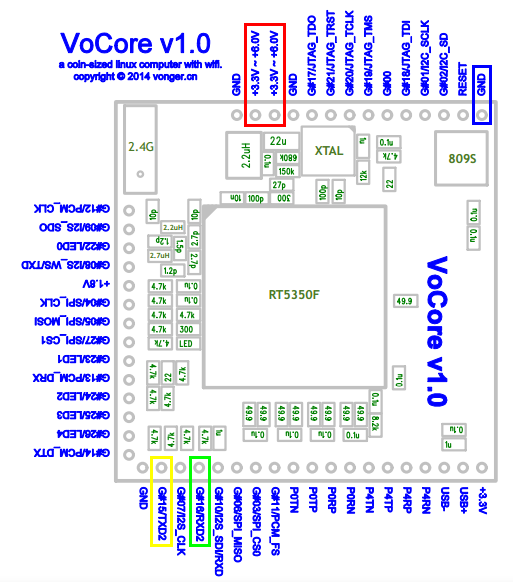
We stick in the installation wiring and bend the ends so as not to solder. Contact is stable.

There was such a problem that the board saw only 13M RAM instead of the 32M. The VoCore forum advised connecting a common wire to another GND pin, but that did not help. Therefore, my power comes directly from USB.

Next, turn on kermit, pass the parameters to it and connect:
Distort the power of the vocora and press 'x' (by default we have 1 second):
We translate the vocork into the data reception mode:
Now press Ctrl + \ and then C to return to the kermit menu. Fill the firmware :
While the firmware is being transmitted, you can go have a cup of tea, we have about 12 minutes to do it ...
After the firmware has downloaded, we reconnect to the console:
Compare the resulting size with the size of the source file - it should be the same. Remember it.
Next, we erase what we had:
We write your Linux (specify your size!):
If something went wrong and the OS did not boot, then WITHOUT PANIC, do it all over again. I did it the first time, which is what I wish for you.
If successful, the download will succeed:
After such an achievement, I told my story to friends. They, in turn, called me a fool and told me that you can restore the settings with the command:
To reflash this device, we need a USB-UART converter and wires to connect it all. The picture below shows where the power and the UART port are located:
We stick in the installation wiring and bend the ends so as not to solder. Contact is stable.
There was such a problem that the board saw only 13M RAM instead of the 32M. The VoCore forum advised connecting a common wire to another GND pin, but that did not help. Therefore, my power comes directly from USB.
Next, turn on kermit, pass the parameters to it and connect:
C-Kermit> set line /dev/ttyUSB0
C-Kermit> set speed 57600
C-Kermit> set serial 8N1
C-Kermit> set carrier-watch off
C-Kermit> set flow-control none
C-Kermit> set prefixing all
C-Kermit> set modem none
C-Kermit> set file type bin
C-Kermit> set file name lit
C-Kermit> connect
Connecting to /dev/ttyUSB0, speed 57600
 Escape character: Ctrl-\ (ASCII 28, FS): enabled
Type the escape character followed by C to get back,
or followed by ? to see other options.
----------------------------------------------------
Distort the power of the vocora and press 'x' (by default we have 1 second):
U-Boot for VoCore(based on RT5350)..
Version: May 30 2014 20:52:36
Press 'x' to console...
VoCore>
We translate the vocork into the data reception mode:
VoCore> loadb
## Ready for binary (kermit) download to 0x80100000 at 57600 bps...
Now press Ctrl + \ and then C to return to the kermit menu. Fill the firmware :
C-Kermit> send vocore.binWhile the firmware is being transmitted, you can go have a cup of tea, we have about 12 minutes to do it ...
After the firmware has downloaded, we reconnect to the console:
C-Kermit>  connect
Connecting to /dev/ttyUSB0, speed 57600
 Escape character: Ctrl-\ (ASCII 28, FS): enabled
Type the escape character followed by C to get back,
or followed by ? to see other options.
----------------------------------------------------
## Total Size = 0x00380004 = 3807876 Bytes## Start Addr = 0x80100000
Compare the resulting size with the size of the source file - it should be the same. Remember it.
Next, we erase what we had:
VoCore> erase linux
Erase linux kernel block !!
From 0x50000 length 0x7B0000
raspi_erase: offs:50000 len:7b0000
...........................................................................................................................
We write your Linux (specify your size!):
VoCore> cp.linux 380004
current count: 3407876
 Copy linux image[3807876 byte] to SPI Flash[0x00050000]....
raspi_write: to:50000 len:340004
.....................................................
VoCore>
If something went wrong and the OS did not boot, then WITHOUT PANIC, do it all over again. I did it the first time, which is what I wish for you.
If successful, the download will succeed:
U-Boot for VoCore(based on RT5350)..
Version: May 30 2014 20:52:36
Press 'x' to console...
Booting image at bc050000 .
   Image Name: MIPS OpenWrt Linux-3.10.36
   Created: 2014-07-21 20:50:55 UTC
   Image Type: MIPS Linux Kernel Image (lzma compressed)
   Data Size: 982138 Bytes = 959.1 kB
   Load Address: 80000000
   Entry Point: 80000000
   Load Kernel: ...............
   Verifying Checksum ... OK
   Uncompressing Kernel Image ... OK
After such an achievement, I told my story to friends. They, in turn, called me a fool and told me that you can restore the settings with the command:
firstboot








