 September 21, 2014 at 21:09
ThinkPads and Windows 8.x
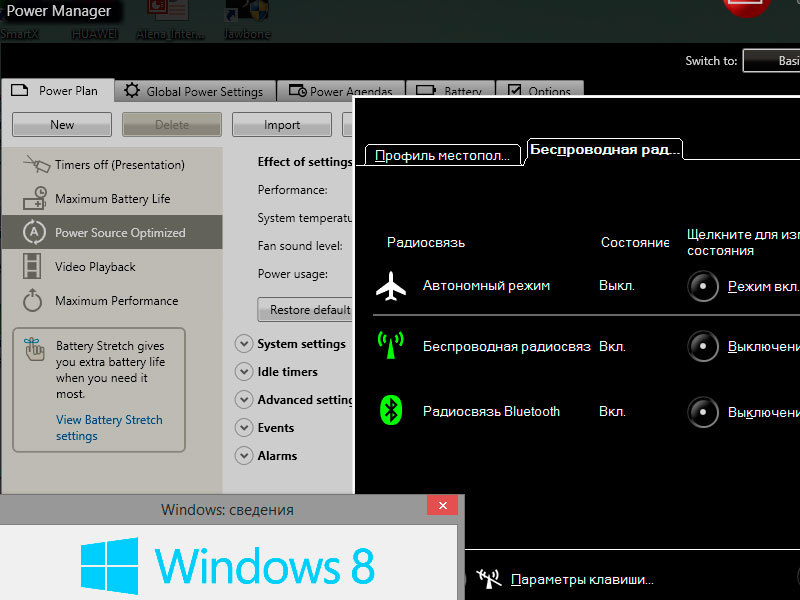
Hurrah! There is a solution how to fully screw the traditional ThinkPad software to Windows 8.x!
Here is an example of how you can install Power Manager with full functionality.
To get started, delete, if you already have, Lenovo Settings Dependecy Package and Lenovo Settings (metro).
You should have Lenovo Power Management Driver (at the time of writing article v1.67.04.05 gtku09ww.exe ).
Run the installation of Power Manager for Windows 7 (at the time of writing article v6.66.1 n10u408w.exe ).
The program will unpack the installation itself into the c: \ swtools \ readyapps \ pwrmgrv directory and at the end will offer to start it - refuse to run.
Now you needMicrosoft Application Compatibility Toolkit 5.6 .
Run the 32-bit version.

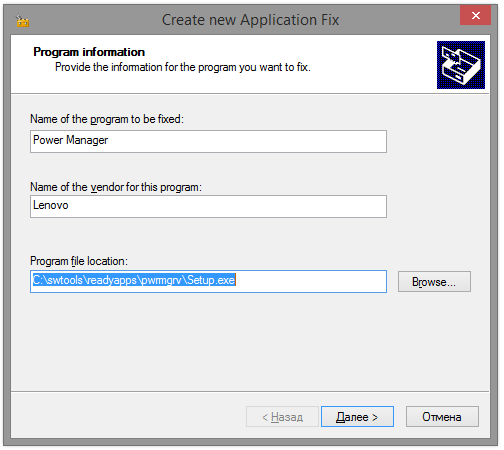
Create a new “fix”, specify the path to the file C: \ swtools \ readyapps \ pwrmgrv \ Setup.exe
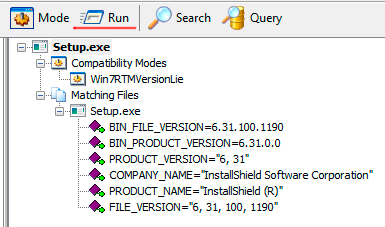
next, select only the Win7RTMVersionLie option

on the remaining screens, select “next” and “ready”.
Everything is "fix" ready, click Run !
Similarly, you can trick Hotkey Features Integration to get the standard hotkeys (Fn + Fx) working.
PS: Attention! If you use compatibility mode instead of the Microsoft Application Compatibility Toolkit, the installation will fail and the functionality will not be complete.
PSS: Do not judge strictly - this is my first post on the hub The problem is really very urgent for owners of ThinkPads. I even thought about returning to Windows 7 due to the lack of a full-fledged Power Manager (there was no battery management and battery reset). Having found a solution, I share it with everyone. Karma was enough to place only here.









