New life of the old synthesizer. Part 2
The continuation of the story about the old burned-out synthesizer, in which I am trying to breathe new life by completely replacing the hardware responsible for generating sound with a software synthesizer based on the EmbedSky E8 mini-computer with Linux on board. As often happens, much more time has passed between the publication of the first and second parts of the article than planned, but, nevertheless, we will continue.
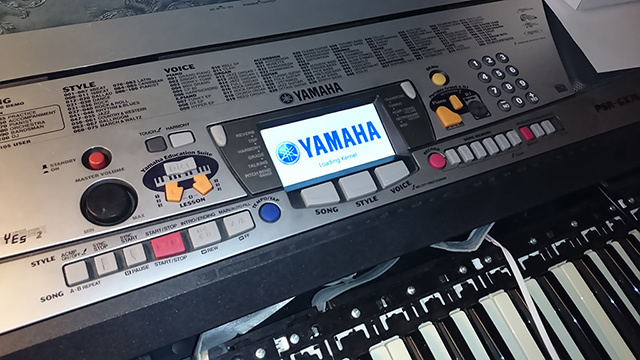
In the previous part, the process of choosing the hardware platform for the new “brain” of the synthesizer with the description of the technical characteristics of the solution was described, the assembly process of the necessary libraries and problems that had to be encountered in the process were briefly described. Now, with regard to iron, we will see how the keyboard matrix of the synthesizer is arranged, and then there will be more details on the software part.
The keyboard matrix of the synthesizer is very similar to the usual keyboard matrix, which many fans of microcontrollers have probably connected to their Arduino. For each synthesizer key, it provides from one (in the cheapest models) to two (in the bulk of the models) switches. Using two adjacent switches, one of which closes a little earlier when the key is pressed, the microcontroller can determine the conditional force, or rather the speed with which the key was pressed, so that subsequently a sound of the corresponding volume is reproduced. It looks like this:
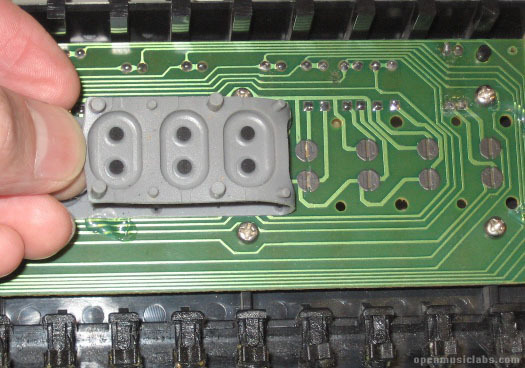
On the reverse side of the board there are diodes that prevent “false” reading of the keys pressed while pressing several keys at the same time. Here is a fragment of the circuit diagram of the keyboard matrix, on which these two switches and the diodes connected to them are visible:
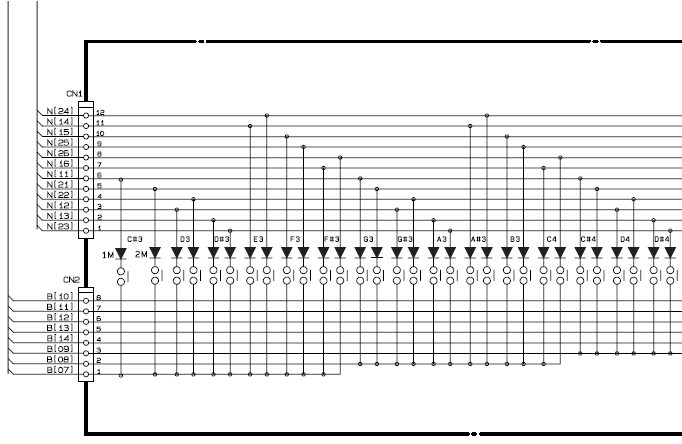
To scan the matrix, the microcontroller sequentially pulls the columns (pins labeled as N) to the power and checks the level on the rows (pins labeled B). If the level of any row turns out to be high, then the key corresponding to the currently active “column-row” combination is pressed. The diagram shows only part of the keyboard - there are 76 keys in total (13 lines and 6 x 2 columns, which gives a total of 156 possible options for scanning the matrix and 25 used outputs of the microcontroller). Scanning the entire keyboard is carried out several tens of times per second and is invisible to the performer.
In my synthesizer, the microcontroller responsible for scanning the keyboard was originally an 8-bit, one-time programmable Hitachi HD63B05V0 microcontroller operating at a frequency of 8 MHz and having 4 KB ROM and 192 bytes of RAM memory. Unfortunately, this controller turned out to be inoperative after the power incident described at the beginning of the first article. But, fortunately, it turned out to be almost compatible in conclusions with my ATmega162 controller, to which I replaced it by cutting and re-soldering only 2 tracks on the board, one of which is the RESET pin, which turned out to be in the wrong place like the HD63B05V0.
Since turning this controller on did not allow me to use the built-in UART (since it was also on other pins), I used this to display information about the keys pressedone-way (write only) serial port implementation. Also , the TinySafeBoot bootloader , which also uses the software implementation of the serial port, was poured into the microcontroller to enable future firmware updates. Since I chose Python + Qt5 as the language for the rapid development of all high-level synthesizer software, for TinySafeBoot I also wrote a Python module that allows you to read and write firmware to the AVR microcontroller. The AVR microcontroller itself is connected to the UART1 serial port on the EmbedSky E8 board and is powered by 3.3V to avoid the need for level conversion.
As a programmer for AVR, I first used the programmer based on the MSP430 Launchpad , of which I have available in a few pieces, then it is self-made miracle (good works, by the way), gave way to a newcomer from China programmer TL866CS MiniPro. The feeling of the new programmer is extremely positive.
Very detailed information on the keyboard synthesizer device and how to scan it, including one very original way to scan through the AVR microcontroller interface for connecting an external RAM chip, is described on the OpenMusicLabs website
Partly to gain more control over the scheduler and reduce latency when playing sound, and partly for sporting interest, I decided to use the kernel with the PREEPMT RT patch , one of the main features of which is that interrupts also become “processes” that can be preempted by the scheduler based on priority. The original core supplied by Samsung for the S5PV210 processor, on the basis of which the system is built, is based on the kernel version 3.0.8, apparently from Android. None of the RT_PREEMPT patches available on the project site for this kernel version (3.0.8) wanted to be superimposed on the source without conflicts, but in the end, resolving all the conflicts manually, we managed to apply the version 3.0.8-rt23 patch.
Due to the fact that such basic structures as spinlock and mutex also turned out to be modified in the kernel modified in this way, the proprietary drivers of some peripheral devices, such as video cameras, a capacitive touchscreen controller, and, what is most terrible, ceased to link with it were delivered as compiled object files audio codec. We will return to them later, and now turn them off and try for the first time to launch the board with a freshly assembled real-time kernel and ... we will get an instant kernel panic. It happened even before the kgdb debugger was launched (which, as it turned out later, would still not work, even if it started), so for debugging we had to insert printfs into a file
As I mentioned above, one of the side effects was that the module responsible for audio input / output stopped linking to the new kernel. This was partly because the kernel with PREEMPT RT supports (in version 3.0.8) only the SLAB memory management mechanism, and initially the module was compiled with the SLUB mechanism enabled, which is not supported by the new kernel. However, I was lucky to work at Kaspersky Lab, and I persuaded a colleague to decompile the driver and codec files for me using the Hex-Rays decompiler for ARM, after which I was able to almost completely recreate their source code. In practice, because as a result, the audio interface was determined with the “new” driver, however, due to some differences in the low-level procedure for initializing the WM8960 chip registers, the sound was played with artifacts. For some time I tried to tweak my driver, but then chose an easier way - I sent the Chinese company EmbedSky Tech, where I bought a mini-computer, my patch with PREEMPT_RT, and asked them to compile for me and send the audio driver files. The guys quickly responded and sent me the files with which the sound finally worked as expected.
By the way, while I was busy with my decompiled driver, I found that the kgdb debugger does not work with either my or the original kernel. As it turned out, it requires support for synchronous polling of a serial port, which was not available in the Samsung serial port driver (
Digging further. The second side effect of the new core turned out to be extremely low, with large “lags”, the speed of all four long-suffering serial ports of the system on the S5PV210 chip, as a result of which normal operation in the terminal through the serial port was impossible, and also did not work as the AVR controller flashing should be, polling keyboard synthesizer. For a long time I tried to understand what was the reason, but I only noticed that entering each character in the terminal led to the generation of several million serial port interrupts - the kernel did not seem to be in a hurry to process them. In the end, I solved this problem by using the aforementioned IRQF_NO_THREAD flag to make all serial port interrupts non-threaded. This solution was not very beautiful, because in addition to the Samsung driver, I had to make changes to the files
In the original kernel, which, as I said above, supports various peripheral devices, such as video cameras, hardware codecs, HDMI, etc., out of 512 MB of RAM, only about 390 MB were available, and the rest was reserved for the above devices , and always (even if they were disabled during the kernel configuration process). It’s very wasteful, especially considering that the extra 120 MB of RAM will not be in the way for the synthesizer to store samples. The memory was backed up in a file
The last change that was made to the kernel concerned the minimum buffer size for audio data, which in the original was equal to one page of memory, which at a sampling frequency of 44100 Hz, 2 channels of 16 bits each gave about 20 ms - a bit much. This value was changed in the file
Kernel source code with PREEMPT RT and all modifications on GitHub
AVR is connected to the serial port of the mini-computer board and spits out ready-made MIDI messages to its software UART. In order to eliminate the need to write drivers, it was decided to use the JACK server as a transport for all audio and MIDI data. A small application in C connects to the serial port, registers itself in JACK as MIDI-OUT and starts redirecting all received MIDI messages there, and JACK already delivers them to LinuxSampler. Cheap and cheerful.
This solution also allows you to play MIDI files through JACK with the help
Thanks to nefelim4ag's comment on a previous post, I found out about the existence of libhybris - a library that allows you to use Android drivers in a regular Linux system. After some dances with tambourines, all the details of which, unfortunately, I no longer remember, I managed to get libhybris in my system and rebuild Qt 5 and PyQt5 with support for OpenGL ES 2.0, EGLFS and Qt Quick 2.0. Now my user interface uses Qt Quick andlooks in line with the latest fashion trends mowing under Android 4.0.
A small demo is only audio so far, as the synthesizer is now in a half-sorted state. The video will be in the next post, which will most likely be born in August, after the motherboard ordered in China arrives, connecting all the parts of the synthesizer together. In addition, the next post will most likely be devoted not so much to low-level manipulations with the kernel, but to the process of bringing to mind the user part of the software on PyQt5 and QtQuick and, of course, a demonstration of this
if someone is interested:
If you need to collect something from this list and have problems, I will gladly share my experience. In addition, much of what is said here is true for another popular platform called FriendlyARM Tiny210, which is based on the same S5PV210 processor and, perhaps, someone will need to use a real-time core with it.
In the previous part, the process of choosing the hardware platform for the new “brain” of the synthesizer with the description of the technical characteristics of the solution was described, the assembly process of the necessary libraries and problems that had to be encountered in the process were briefly described. Now, with regard to iron, we will see how the keyboard matrix of the synthesizer is arranged, and then there will be more details on the software part.
Keyboard matrix
The keyboard matrix of the synthesizer is very similar to the usual keyboard matrix, which many fans of microcontrollers have probably connected to their Arduino. For each synthesizer key, it provides from one (in the cheapest models) to two (in the bulk of the models) switches. Using two adjacent switches, one of which closes a little earlier when the key is pressed, the microcontroller can determine the conditional force, or rather the speed with which the key was pressed, so that subsequently a sound of the corresponding volume is reproduced. It looks like this:
On the reverse side of the board there are diodes that prevent “false” reading of the keys pressed while pressing several keys at the same time. Here is a fragment of the circuit diagram of the keyboard matrix, on which these two switches and the diodes connected to them are visible:
To scan the matrix, the microcontroller sequentially pulls the columns (pins labeled as N) to the power and checks the level on the rows (pins labeled B). If the level of any row turns out to be high, then the key corresponding to the currently active “column-row” combination is pressed. The diagram shows only part of the keyboard - there are 76 keys in total (13 lines and 6 x 2 columns, which gives a total of 156 possible options for scanning the matrix and 25 used outputs of the microcontroller). Scanning the entire keyboard is carried out several tens of times per second and is invisible to the performer.
In my synthesizer, the microcontroller responsible for scanning the keyboard was originally an 8-bit, one-time programmable Hitachi HD63B05V0 microcontroller operating at a frequency of 8 MHz and having 4 KB ROM and 192 bytes of RAM memory. Unfortunately, this controller turned out to be inoperative after the power incident described at the beginning of the first article. But, fortunately, it turned out to be almost compatible in conclusions with my ATmega162 controller, to which I replaced it by cutting and re-soldering only 2 tracks on the board, one of which is the RESET pin, which turned out to be in the wrong place like the HD63B05V0.
Since turning this controller on did not allow me to use the built-in UART (since it was also on other pins), I used this to display information about the keys pressedone-way (write only) serial port implementation. Also , the TinySafeBoot bootloader , which also uses the software implementation of the serial port, was poured into the microcontroller to enable future firmware updates. Since I chose Python + Qt5 as the language for the rapid development of all high-level synthesizer software, for TinySafeBoot I also wrote a Python module that allows you to read and write firmware to the AVR microcontroller. The AVR microcontroller itself is connected to the UART1 serial port on the EmbedSky E8 board and is powered by 3.3V to avoid the need for level conversion.
Firmware source for AVR
#include
#include
#include
#include
#include "dbg_putchar.h"
#define MIDI_BASE			18
#define ZERO_BASE			28
#define KEYS_COUNT			76
#define hiz(port, dir) do { \
		(dir) = 0; \
		(port) = 0; \
	} while(0)
#define alow(port, dir) do { \
		(dir) = 0xff; \
		(port) = 0; \
	} while(0)
uint8_t keys[KEYS_COUNT];
/* Get state of a row by its index
 * starting from 1 to 13 */
uint8_t getRow(uint8_t idx)
{
	if (idx <= 8) {
		return (PINC & (1 << (8 - idx)));
	} else if (idx >= 9 && idx <= 11) {
		return (PINE & (1 << (11 - idx)));
	} else if (idx == 12) {
		return (PINA & (1 << PIN6));
	} else if (idx == 13) {
		return (PINA & (1 << PIN4));
	}
	return 0;
}
inline void activateColumn1(uint8_t idx)
{
	PORTD = 0x00 | (1 << (8 - idx));
	PORTB = 0x00;
}
void activateColumn2(uint8_t idx)
{
	if (idx <= 3) {
		PORTB = 0x00 | (1 << (idx + 4));
		PORTD = 0x00;
	} else if (idx == 4) {
		PORTB = 0x00 | (1 << PIN4);
		PORTD = 0x00;
	} else if (idx == 5 || idx == 6) {
		PORTD = 0x00 | (1 << (idx - 5));
		PORTB = 0x00;
	}
}
inline void deactivateColumns(void)
{
	PORTD = 0x00;
	PORTB = 0x00;
}
inline void initPorts(void)
{
	hiz(PORTA, DDRA);
	hiz(PORTC, DDRC);
	hiz(PORTE, DDRE);
	PORTB = 0x00;
	DDRB = 0xfe;
	DDRD = 0xff;
}
void resetRows(void)
{
	/* output low */
	alow(PORTC, DDRC);
	alow(PORTE, DDRE);
	/* don't touch PA7 & PA5 */
	DDRA |= 0x5f;
	PORTA &= ~0x5f;
	_delay_us(10);
	/* back to floating input */
	hiz(PORTC, DDRC);
	hiz(PORTE, DDRE);
	DDRA &= ~0x5f;
}
/* base MIDI note number is 25: C#0 */
int main(void)
{
	uint8_t row, col, layer;
	uint8_t note, offset;
	initPorts();
	memset(keys, 0, sizeof(keys));
	dbg_tx_init();
	dbg_putchar('O');
	dbg_putchar('K');
	while(1)
	{
		for (layer = 0; layer < 2; layer++)
		{
			for (col = 1; col <= 6; col++)
			{
				if (!layer)
					activateColumn1(col);
				else
					activateColumn2(col);
				for (row = 1; row <= 13; row++)
				{
					note = 6 * row + col + MIDI_BASE;
					offset = note - ZERO_BASE;
					if (getRow(row))
					{
						if (!layer)
						{
							/* increase velocity counter */
							if (keys[offset] < 254 && !(keys[offset] & 0x80))
								keys[offset]++;
						}
						else
						{
							if (!(keys[offset] & 0x80))
							{
								/* generate note-on event */
								dbg_putchar(0x90);
								dbg_putchar(note);
								/*dbg_putchar(keys[offset]);*/
								dbg_putchar(0x7f);
								/* stop counting */
								keys[offset] |= 0x80;
							}
						}
					}
					else
					{
						if (layer)
							continue;
						if (keys[offset] & 0x80)
						{
							/* generate note off event */
							dbg_putchar(0x90);
							dbg_putchar(note);
							dbg_putchar(0x00);
							/* reset key state */
							keys[offset] = 0x00;
						}
					}
				}
				deactivateColumns();
				resetRows();
			}
		}
	}
	return 0;
}
Python module for TinySafeBoot
import serial
import binascii
import struct
import intelhex
import sys
class TSB(object):
	CONFIRM = '!'
	REQUEST = '?'
	def __init__(self, port):
		self.port = serial.Serial(port, baudrate=9600, timeout=1)
		self.flashsz = 0
	def check(self):
		if not self.flashsz:
			raise Exception("Not activated")
	def activate(self):
		self.port.write("@@@")
		(self.tsb, self.version, self.status, self.sign, self.pagesz, self.flashsz, self.eepsz) = \
			struct.unpack("<3sHB3sBHH", self.port.read(14))
		self.port.read(2)
		self.pagesz *= 2
		self.flashsz *= 2
		self.eepsz += 1
		assert(self.port.read() == self.CONFIRM)
	def rflash(self, progress=None, size=0):
		self.check()
		self.port.write("f")
		self.addr = 0
		self.flash = ""
		size = self.flashsz if not size else size
		while self.addr < size:
			if progress is not None:
				progress("read", self.addr, size)
			self.port.write(self.CONFIRM)
			page = self.port.read(self.pagesz)
			if len(page) != self.pagesz:
				raise Exception("Received page too short: %d" % len(page))
			self.addr += len(page)
			self.flash += page
		return self.flash.rstrip('\xff')
	def wflash(self, data, progress=None):
		if len(data) % self.pagesz != 0:
			data = data + "\xff" * (self.pagesz - (len(data) % self.pagesz))
		assert(len(data) % self.pagesz == 0)
		self.check()
		self.port.write("F")
		self.addr = 0
		assert(self.port.read() == self.REQUEST)
		while self.addr < len(data):
			if progress is not None:
				progress("write", self.addr, len(data))
			self.port.write(self.CONFIRM)
			self.port.write(data[self.addr:self.addr + self.pagesz])
			self.addr += self.pagesz
			assert(self.port.read() == self.REQUEST)
		self.port.write(self.REQUEST)
		return self.port.read() == self.CONFIRM
	def vflash(self, data, progress=None):
		fw = self.rflash(progress, len(data))
		return fw == data
	def info(self):
		print "Tiny Safe Bootloader: %s" % self.tsb
		print "Page size:   %d" % self.pagesz
		print "Flash size:  %d" % self.flashsz
		print "EEPROM size: %d" % self.eepsz
if __name__ == "__main__":
	import argparse
	def progress(op, addr, total):
		sys.stdout.write("\r%s address: $%0.4x/$%0.4x" % (op, addr, total))
		sys.stdout.flush()
	parser = argparse.ArgumentParser()
	parser.add_argument("filename", help="firmware file in Intel HEX format")
	parser.add_argument("--device", help="Serial port to use for programming", default="/dev/ttyUSB0")
	args = parser.parse_args()
	tsb = TSB(args.device)
	tsb.activate()
	tsb.info()
	fw = intelhex.IntelHex(args.filename)
	assert(tsb.wflash(fw.tobinstr(), progress))
	assert(tsb.vflash(fw.tobinstr(), progress))
	print "\nOK\n"
As a programmer for AVR, I first used the programmer based on the MSP430 Launchpad , of which I have available in a few pieces, then it is self-made miracle (good works, by the way), gave way to a newcomer from China programmer TL866CS MiniPro. The feeling of the new programmer is extremely positive.
Very detailed information on the keyboard synthesizer device and how to scan it, including one very original way to scan through the AVR microcontroller interface for connecting an external RAM chip, is described on the OpenMusicLabs website
Cooking a kernel with Realtime Preemption support
Partly to gain more control over the scheduler and reduce latency when playing sound, and partly for sporting interest, I decided to use the kernel with the PREEPMT RT patch , one of the main features of which is that interrupts also become “processes” that can be preempted by the scheduler based on priority. The original core supplied by Samsung for the S5PV210 processor, on the basis of which the system is built, is based on the kernel version 3.0.8, apparently from Android. None of the RT_PREEMPT patches available on the project site for this kernel version (3.0.8) wanted to be superimposed on the source without conflicts, but in the end, resolving all the conflicts manually, we managed to apply the version 3.0.8-rt23 patch.
Due to the fact that such basic structures as spinlock and mutex also turned out to be modified in the kernel modified in this way, the proprietary drivers of some peripheral devices, such as video cameras, a capacitive touchscreen controller, and, what is most terrible, ceased to link with it were delivered as compiled object files audio codec. We will return to them later, and now turn them off and try for the first time to launch the board with a freshly assembled real-time kernel and ... we will get an instant kernel panic. It happened even before the kgdb debugger was launched (which, as it turned out later, would still not work, even if it started), so for debugging we had to insert printfs into a file
init/main.c, a functionstart_kernelto determine the place where everything collapses. Thus, it turned out that the last thing the kernel managed to do was to call a function hrtimers_init()that initializes high-resolution timers and interrupts them. This code is platform-specific, and in our case is located at arch/arm/plat-s5p/hr-time-rtc.c. As I said, one of the main features of the kernel with the PREEMPT RT patch is that interrupts become threads. This is possible in a regular kernel, but the kernel with PREEMPT RT by default tries to make almost all interrupts like that. Further analysis of the code showed that the kthreadd_task task is used to operate these threads, which is initialized at the very end of the functionstart_kernel- much later than the initialization of the timers. The fall was due to the fact that the kernel was trying to interrupt the timer by streaming, while kthreadd_task was still NULL. This is solved by setting for individual interrupts that should not be streamed under any circumstances, the IRQF_NO_THREAD flag which was added to the timer interrupt flags in hr-time-rtc.c. Hurrah! The kernel booted, but this is only the beginning ...As I mentioned above, one of the side effects was that the module responsible for audio input / output stopped linking to the new kernel. This was partly because the kernel with PREEMPT RT supports (in version 3.0.8) only the SLAB memory management mechanism, and initially the module was compiled with the SLUB mechanism enabled, which is not supported by the new kernel. However, I was lucky to work at Kaspersky Lab, and I persuaded a colleague to decompile the driver and codec files for me using the Hex-Rays decompiler for ARM, after which I was able to almost completely recreate their source code. In practice, because as a result, the audio interface was determined with the “new” driver, however, due to some differences in the low-level procedure for initializing the WM8960 chip registers, the sound was played with artifacts. For some time I tried to tweak my driver, but then chose an easier way - I sent the Chinese company EmbedSky Tech, where I bought a mini-computer, my patch with PREEMPT_RT, and asked them to compile for me and send the audio driver files. The guys quickly responded and sent me the files with which the sound finally worked as expected.
By the way, while I was busy with my decompiled driver, I found that the kgdb debugger does not work with either my or the original kernel. As it turned out, it requires support for synchronous polling of a serial port, which was not available in the Samsung serial port driver (
drivers/tty/serial/samsung.c). I added the required support to the driver based on this patch, after which the debugger worked.Digging further. The second side effect of the new core turned out to be extremely low, with large “lags”, the speed of all four long-suffering serial ports of the system on the S5PV210 chip, as a result of which normal operation in the terminal through the serial port was impossible, and also did not work as the AVR controller flashing should be, polling keyboard synthesizer. For a long time I tried to understand what was the reason, but I only noticed that entering each character in the terminal led to the generation of several million serial port interrupts - the kernel did not seem to be in a hurry to process them. In the end, I solved this problem by using the aforementioned IRQF_NO_THREAD flag to make all serial port interrupts non-threaded. This solution was not very beautiful, because in addition to the Samsung driver, I had to make changes to the files
serial_core.cand serial_core.haffecting all serial ports in general. Because in the kernel with PREEMPT RT, you cannot use spin_lock_t in drivers that are NO_THREAD, but you need to use raw_spinlock_t. In the original kernel, which, as I said above, supports various peripheral devices, such as video cameras, hardware codecs, HDMI, etc., out of 512 MB of RAM, only about 390 MB were available, and the rest was reserved for the above devices , and always (even if they were disabled during the kernel configuration process). It’s very wasteful, especially considering that the extra 120 MB of RAM will not be in the way for the synthesizer to store samples. The memory was backed up in a file
arch/arm/mach-s5pv210/mach-tq210.c, which is the main point of collecting all the information about the configuration and devices of a particular machine (in our case, the board). We comment on the allocation of memory - a function call s5p_reserve_bootmem, and we get 120 MB of additional memory for the synthesizer to work. The last change that was made to the kernel concerned the minimum buffer size for audio data, which in the original was equal to one page of memory, which at a sampling frequency of 44100 Hz, 2 channels of 16 bits each gave about 20 ms - a bit much. This value was changed in the file
sound/soc/samsung/dma.cto 128 bytes, after which the minimum buffer size was reduced to a few milliseconds without compromising stability and performance. Kernel source code with PREEMPT RT and all modifications on GitHub
How does the AVR microcontroller communicate with LinuxSampler
AVR is connected to the serial port of the mini-computer board and spits out ready-made MIDI messages to its software UART. In order to eliminate the need to write drivers, it was decided to use the JACK server as a transport for all audio and MIDI data. A small application in C connects to the serial port, registers itself in JACK as MIDI-OUT and starts redirecting all received MIDI messages there, and JACK already delivers them to LinuxSampler. Cheap and cheerful.
The source code of the bridge application between the serial port and the JACK
#include
#include
#include
#include
#include
#include
#include
#include
#include
#include
#include
#include
#include
#include
#define UART_SPEED	B9600
jack_port_t	*output_port;
jack_client_t *jack_client = NULL;
int input_fd;
void init_serial(int fd)
{
    struct termios termios;
    int res;
    res = tcgetattr (fd, &termios);
    if (res < 0) {
        fprintf (stderr, "Termios get error: %s\n", strerror(errno));
        exit (EXIT_FAILURE);
    }
    cfsetispeed (&termios, UART_SPEED);
    cfsetospeed (&termios, UART_SPEED);
    termios.c_iflag &= ~(IGNPAR | IXON | IXOFF);
    termios.c_iflag |= IGNPAR;
    termios.c_cflag &= ~(CSIZE | PARENB | CSTOPB | CREAD | CLOCAL);
    termios.c_cflag |= CS8;
    termios.c_cflag |= CREAD;
    termios.c_cflag |= CLOCAL;
    termios.c_lflag &= ~(ICANON | ECHO);
    termios.c_cc[VMIN] = 3;
    termios.c_cc[VTIME] = 0;
    res = tcsetattr (fd, TCSANOW, &termios);
    if (res < 0) {
        fprintf (stderr, "Termios set error: %s\n", strerror(errno));
        exit (EXIT_FAILURE);
    }
}
double
get_time(void)
{
    double		seconds;
    int		ret;
    struct timeval	tv;
    ret = gettimeofday(&tv, NULL);
    if (ret) {
        perror("gettimeofday");
        exit(EX_OSERR);
    }
    seconds = tv.tv_sec + tv.tv_usec / 1000000.0;
    return seconds;
}
double
get_delta_time(void)
{
    static double	previously = -1.0;
    double		now;
    double		delta;
    now = get_time();
    if (previously == -1.0) {
        previously = now;
        return 0;
    }
    delta = now - previously;
    previously = now;
    assert(delta >= 0.0);
    return delta;
}
static double
nframes_to_ms(jack_nframes_t nframes)
{
    jack_nframes_t sr;
    sr = jack_get_sample_rate(jack_client);
    assert(sr > 0);
    return (nframes * 1000.0) / (double)sr;
}
static double
nframes_to_seconds(jack_nframes_t nframes)
{
    return nframes_to_ms(nframes) / 1000.0;
}
static jack_nframes_t
ms_to_nframes(double ms)
{
    jack_nframes_t sr;
    sr = jack_get_sample_rate(jack_client);
    assert(sr > 0);
    return ((double)sr * ms) / 1000.0;
}
static jack_nframes_t
seconds_to_nframes(double seconds)
{
    return ms_to_nframes(seconds * 1000.0);
}
static void
process_midi_output(jack_nframes_t nframes)
{
    int t, res;
    void *port_buffer;
    char midi_buffer[3];
    jack_nframes_t	last_frame_time;
    port_buffer = jack_port_get_buffer(output_port, nframes);
    if (port_buffer == NULL) {
        printf("jack_port_get_buffer failed, cannot send anything.\n");
        return;
    }
    jack_midi_clear_buffer(port_buffer);
    last_frame_time = jack_last_frame_time(jack_client);
    t = seconds_to_nframes(get_delta_time());
    res = read(input_fd, midi_buffer, sizeof(midi_buffer));
    if (res < 0 && errno == EAGAIN)
        return;
    res = jack_midi_event_write(port_buffer, t, midi_buffer, 3);
    if (res != 0) {
        printf("jack_midi_event_write failed, NOTE LOST.");
    }
}
static int
process_callback(jack_nframes_t nframes, void *notused)
{
    if (nframes <= 0) {
        printf("Process callback called with nframes = 0; bug in JACK?");
        return 0;
    }
    process_midi_output(nframes);
    return 0;
}
int
connect_to_input_port(const char *port)
{
    int ret;
    ret = jack_port_disconnect(jack_client, output_port);
    if (ret) {
        printf("Cannot disconnect MIDI port.");
        return -3;
    }
    ret = jack_connect(jack_client, jack_port_name(output_port), port);
    if (ret) {
        printf("Cannot connect to %s.", port);
        return -4;
    }
    printf("Connected to %s.", port);
    return 0;
}
static void
init_jack(void)
{
    int i, err;
    jack_client = jack_client_open("midibridge", JackNullOption, NULL);
    if (jack_client == NULL) {
        printf("Could not connect to the JACK server; run jackd first?");
        exit(EXIT_FAILURE);
    }
    err = jack_set_process_callback(jack_client, process_callback, 0);
    if (err) {
        printf("Could not register JACK process callback.");
        exit(EXIT_FAILURE);
    }
    char port_name[32];
    snprintf(port_name, sizeof(port_name), "midi_out");
    output_port = jack_port_register(jack_client, port_name, JACK_DEFAULT_MIDI_TYPE, JackPortIsOutput, 0);
    if (output_port == NULL) {
        printf("Could not register JACK output port '%s'.", port_name);
        exit(EXIT_FAILURE);
    }
    if (jack_activate(jack_client)) {
        printf("Cannot activate JACK client.");
        exit(EXIT_FAILURE);
    }
}
static void
usage(void)
{
    fprintf(stderr, "usage: midibridge -a \n");
    exit(EXIT_FAILURE);
}
int
main(int argc, char *argv[])
{
    int		ch;
    char	*autoconnect_port_name = NULL;
    while ((ch = getopt(argc, argv, "a:")) != -1) {
        switch (ch) {
        case 'a':
            autoconnect_port_name = strdup(optarg);
            break;
        default:
            usage();
        }
    }
    input_fd = open("/dev/ttySAC1", O_RDWR | O_NOCTTY | O_NDELAY | O_NONBLOCK);
    if (input_fd < 0) {
        fprintf(stderr, "Cannot open serial port %s\n", strerror(errno));
        return EXIT_FAILURE;
    }
    init_serial (input_fd);
    init_jack();
    if (autoconnect_port_name) {
        if (connect_to_input_port(autoconnect_port_name)) {
            printf("Couldn't connect to '%s', exiting.", autoconnect_port_name);
            exit(EXIT_FAILURE);
        }
    }
    getc(stdin);
    return 0;
}
This solution also allows you to play MIDI files through JACK with the help
jack-smf-playerthat I compiled for ARM and WAV / MP3 via mplayer with support for audio output to JACK.Bonus
Thanks to nefelim4ag's comment on a previous post, I found out about the existence of libhybris - a library that allows you to use Android drivers in a regular Linux system. After some dances with tambourines, all the details of which, unfortunately, I no longer remember, I managed to get libhybris in my system and rebuild Qt 5 and PyQt5 with support for OpenGL ES 2.0, EGLFS and Qt Quick 2.0. Now my user interface uses Qt Quick and
In the end
A small demo is only audio so far, as the synthesizer is now in a half-sorted state. The video will be in the next post, which will most likely be born in August, after the motherboard ordered in China arrives, connecting all the parts of the synthesizer together. In addition, the next post will most likely be devoted not so much to low-level manipulations with the kernel, but to the process of bringing to mind the user part of the software on PyQt5 and QtQuick and, of course, a demonstration of this
if someone is interested:
List all software that has been cross-compiled for ARM
- alsa-lib-1.0.27.2
- alsa-utils-1.0.27.2
- libaudiofile-0.3.6
- dbus-1.8.0
- dropbear-2014.63
- fftw-3.3.3
- fluidsynth-1.1.6
- fontconfig-2.11.0
- freetype-2.5.3
- glib-2.34.3
- libicu-52.1
- jack-audio-connection-kit-0.121.3
- jack-smf-utils-1.0
- libffi-3.0.13
- libgig-3.3.0
- libgig-svn
- libhybris
- libsamplerate-0.1.8
- libsndfile-1.0.25
- linuxsampler-1.0.0
- linuxsampler-svn
- mplayer SVN-r36900-4.4.6
- openssl-1.0.0l
- psutil-1.2.1
- pajack-0.5.2
- PyQt-gpl-5.2
- pyserial-2.7
- Python 2.7.6
- strace-4.8
- tslib-1.4.1
If you need to collect something from this list and have problems, I will gladly share my experience. In addition, much of what is said here is true for another popular platform called FriendlyARM Tiny210, which is based on the same S5PV210 processor and, perhaps, someone will need to use a real-time core with it.