May 9, 2014 at 18:52
PHPCI: Continuous Integration System for PHP Projects
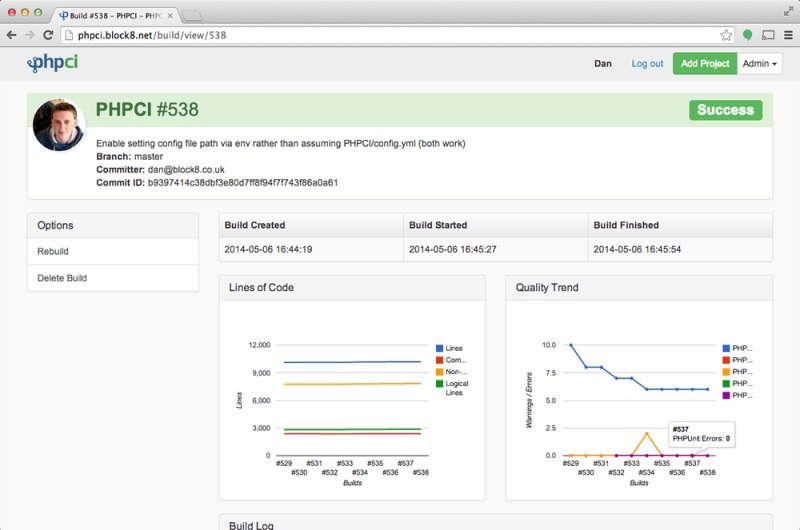
Most recently, a new continuous integration system for open source PHP projects, PHPCI (current version 1.1.0), has been released from the beta version . It was mentioned in passing in PHP digest No. 21 .
I’ve been experimenting with this system for some time, so I want to present you with a small overview of it, especially since there is not a single article about it on Habré.
Now PHPCI is available in two versions: rental by subscription, as well as self-hosted installation from the source code.
Plugins
The system is written in PHP and for PHP, so out of the box supports an impressive list of tools from the world of PHP through plugins:
- Atoum
- Behat
- Codeception
- Composer
- PDepend
- Phing
- PHP Code Sniffer
- PHP Copy / Paste Detector
- PHP Code Sniffer Fixer
- PHP Docblock Checker
- Php loc
- PHP Mess Detector
- PHP Parallel Lint
- PHP Spec
- PHP Unit
It also has several general-purpose plugins or non-PHP tools:
The project is quite modern and requires a PHP version of at least 5.3, uses PDO to connect to databases, and in general, in my opinion, it has simple and clear source code that uses namespaces for classes and PSR-2 style for code, which is undoubtedly very good .
Plugins are usually quite simple and small in terms of code size, so writing your own plugin for a tool that is not supported in the standard distribution will not be difficult.
Project Configuration
The system has a declarative style for describing the configuration of projects (using the YAML format), which is quite convenient, especially for small projects.
The phpci.yml configuration file is taken from the root of the project repository (or just the project’s working directory, if it is a local source), it is also possible to set the configuration directly in the PHPCI project when it is created.
Below is a small example phpci.yml configuration file:
build_settings:
    ignore:
        - "vendor"
        - "tests"
setup:
    composer:
        action: "install"
test:
    php_unit:
        config:
            - "phpunit.xml"
        coverage: "logs/tests_coverage"
        args:     "--stderr"
    php_mess_detector:
        allow_failures: true
    php_cpd:
        allow_failures: true
    php_loc:
        allow_failures: true
    php_parallel_lint:
        allow_failures: true
The configuration file has several root sections:
build_settings- project build settings (ignoring directories, database connection settings)setup- initialization section of the project assembly (installing dependencies, querying databases, migrating for databases)test- section for testing the finished assembly of the project (various plugins are launched over the assembly of the project, which return a success or not, failure usually leads to failure of the assembly, although for individual plugins this is not so and you can set the number of errors that lead to failure of the entire assembly)complete- section called by the system after testing, regardless of its resultsuccess- section called by the system after testing only in case of successful assembly and testing of the projectfailure- section called by the system after testing only in case of failure of assembly or testing of the project
Sources
The system supports as a source of projects: Github, Gitlab, Bitbucket, Git, Hg or a local directory. Svn is not yet supported (not sure if there are any plans for its support).
A spoon of tar
Despite all its attractiveness, PHPCI is very young and does not know how much (yet):
- as I wrote above, he does not know how to work with Svn
- cannot deploy on non-MySQL databases (although there is already a plugin for PostgreSQL for operations in projects)
- Can’t work when building with relational databases MSSQL, OracleSQL, SQLite, etc.
- Doesn’t know how to fully deploy a project using regular tools (although this can be achieved using the Shell plugin)
- not able to work with NoSQL databases
Summary
I personally see the project as very good and necessary, but so far a little damp. Using this system for large projects can still be problematic, but on the other hand, for small home projects PHPCI is great right now.
How to install the system can be found on the page in the official project wiki .