April 29, 2014 at 07:24
Configuring Apache to work with Caché DBMS on Linux
- Tutorial
Generally speaking, InterSystems Caché ships with the Apache embedded web server. The embedded server is designed to develop and administer the Caché instance and is built with some limitations . There are recipes to address these limitations, but a more general approach is to use a fully-fledged web server for production. This article describes how to configure Apache to work with Caché and organize https access. All actions were performed on Ubuntu, but the configuration on other Linux distributions is essentially the same.
We believe that you already have Caché installed in the / InterSystems / Cache directory (read how to install Caché on Linux here ).
Caché comes with a module for Apache, go to the / InterSystems / Cache / csp / bin folder and find one of the module files there:
Now you need to install Apache. We are looking for a suitable repository on the site , for example, CSPa24.so needs any version 2.4.x, and the repository http://ru.archive.ubuntu.com/ubuntu/ saucy main contains Apache version 2.4.6. Add it to the repository list:
Updating the list of packages:
Install Apache, add the necessary packages for this:
After installation, make sure that the installed version of Apache meets expectations:
You also need to make sure that there is mod_so in the list of Apache modules, the list of modules is displayed using:
So, Apache is installed and working. To check, type in the ip server browser address bar - a page should appear that looks something like this:

For this we need to change the configuration of Apache. Editing files:
Restart Apache:
Now at http: ///csp/sys/UtilHome.csp the system management portal should open:
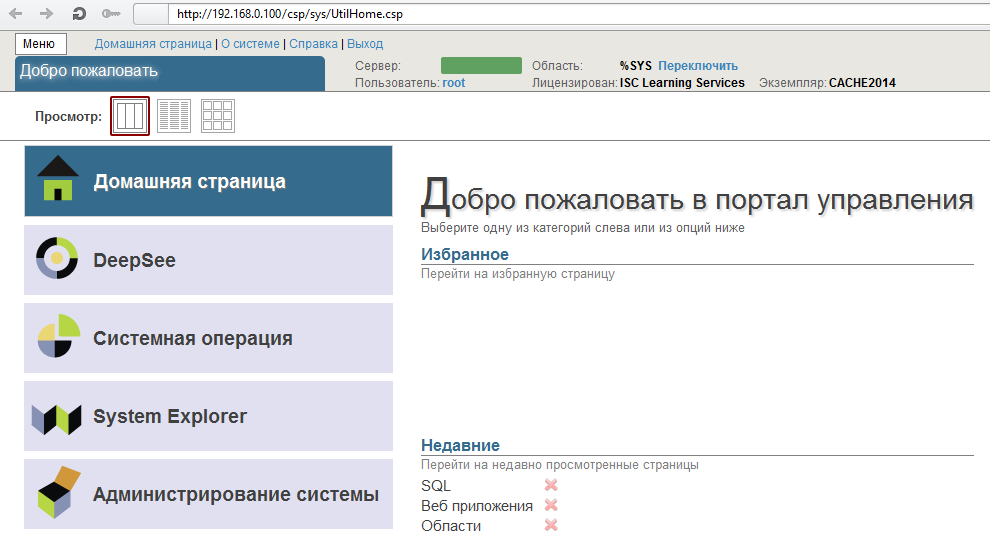
Next, add the ability to connect using ssl. To do this, we generate a server certificate, sign it ourselves (not recommended) or with CA. A very detailed guide here or here
As a result, we have 3 files: the private server key, server certificate and CA certificate.
Add the ssl module to Apache:
We create the file with the site configuration: etc / apache2 / sites-enabled / 001-ssl.conf and add to it:
Server Name must match the commonName parameter in the server certificate, you must also specify the correct paths for the server key files, server certificate and CA certificate - SSLCertificateKeyFile, SSLCertificateFile, SSLCACertificateFile, respectively.
Restart Apache:
Now at https: ///csp/sys/UtilHome.csp the system management portal should open:
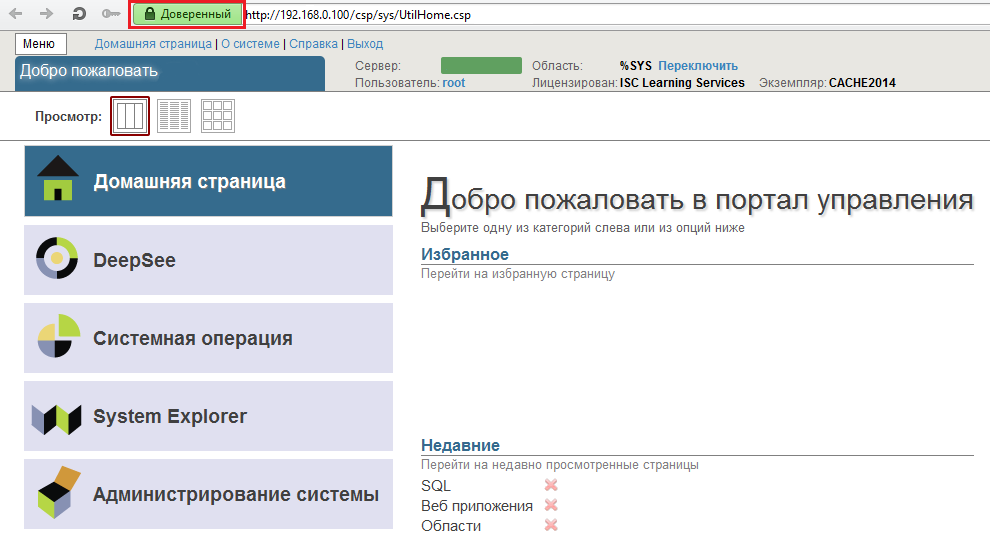
Apache configuration files
Documentation Caché
Caché and Apache
Caché and Apache for Windows
Caché and SSL
Choosing Apache
We believe that you already have Caché installed in the / InterSystems / Cache directory (read how to install Caché on Linux here ).
Caché comes with a module for Apache, go to the / InterSystems / Cache / csp / bin folder and find one of the module files there:
- CSPa22.so (Apache Version 2.2.x)
- CSPa24.so (Apache Version 2.4.x)
- CSPa20.so (Apache Version 2.0.x)
- CSPa.so (Apache Version 1.3.x)
Now you need to install Apache. We are looking for a suitable repository on the site , for example, CSPa24.so needs any version 2.4.x, and the repository http://ru.archive.ubuntu.com/ubuntu/ saucy main contains Apache version 2.4.6. Add it to the repository list:
nano /etc/apt/sources.list
deb http://ru.archive.ubuntu.com/ubuntu/ saucy main
Updating the list of packages:
apt-get update
Apache installation
Install Apache, add the necessary packages for this:
apt-get install apache2 zlib1g-dev
After installation, make sure that the installed version of Apache meets expectations:
apache2 -v
You also need to make sure that there is mod_so in the list of Apache modules, the list of modules is displayed using:
apache2 -l
So, Apache is installed and working. To check, type in the ip server browser address bar - a page should appear that looks something like this:
Connecting Caché and Apache
For this we need to change the configuration of Apache. Editing files:
- / etc / apache2 / envvars - contains environment variables. Set the values of the variables APACHE_RUN_USER and APACHE_RUN_GROUP to cacheusr
- /etc/apache2/apache2.conf - the main configuration file. Add lines in the module configuration section
CSPModulePath /InterSystems/Cache/csp/bin/ LoadModule csp_module_sa /InterSystems/Cache/csp/bin/CSPa24.so AddHandler csp-handler-sa csp cls cxw zen - /etc/apache2/sites-enabled/000-default.conf - site configuration.
    ServerName cachesys
    DocumentRoot "/InterSystems/Cache/csp"
    ErrorLog ${APACHE_LOG_DIR}/error.log
    CustomLog ${APACHE_LOG_DIR}/access.log combined
    LogLevel debug

        CSP On
        SetHandler csp-handler-sa

        SetHandler csp-handler-sa

        SetHandler csp-handler-sa

    DirectoryIndex  index.csp index.php index.html index.htm
Restart Apache:
service apache2 restartNow at http: //
SSL
Next, add the ability to connect using ssl. To do this, we generate a server certificate, sign it ourselves (not recommended) or with CA. A very detailed guide here or here
As a result, we have 3 files: the private server key, server certificate and CA certificate.
Add the ssl module to Apache:
a2enmod ssl
We create the file with the site configuration: etc / apache2 / sites-enabled / 001-ssl.conf and add to it:
    ServerName
    DocumentRoot /InterSystems/Cache/csp
    ErrorLog ${APACHE_LOG_DIR}/error.log
    CustomLog ${APACHE_LOG_DIR}/access.log combined

        CSP On
        SetHandler csp-handler-sa

        SetHandler csp-handler-sa

        SetHandler csp-handler-sa

    DirectoryIndex  index.csp index.php index.html index.htm
    SSLEngine on
    SSLCertificateKeyFile /InterSystems/Cache/mgr/SSLcert/server_key.pem
    SSLCertificateFile    /InterSystems/Cache/mgr/SSLcert/server_crt.crt
    SSLCACertificateFile  /InterSystems/Cache/mgr/SSLcert/cacert.crt
    SSLVerifyDepth  10
    SSLCipherSuite  TLSv1:SSLv3:!ADH:!LOW:!EXP:@STRENGTH
    SSLOptions +StdEnvVars
    DirectoryIndex index.csp index.php index.html index.htm
Server Name must match the commonName parameter in the server certificate, you must also specify the correct paths for the server key files, server certificate and CA certificate - SSLCertificateKeyFile, SSLCertificateFile, SSLCACertificateFile, respectively.
Restart Apache:
service apache2 restart
Now at https: //
useful links
Apache configuration files
Documentation Caché
Caché and Apache
Caché and Apache for Windows
Caché and SSL