Non-standard checkboxes
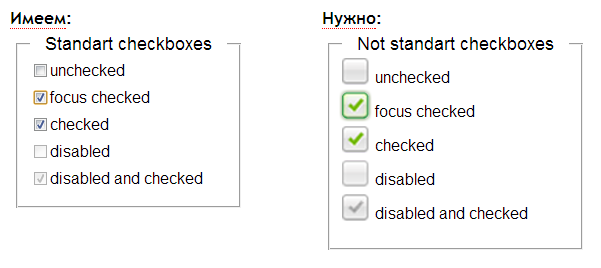
Task
Get the opportunity to style checkboxes with the full functionality of the standard ones, with the ability to leave the standard ones when javascript is turned off, and arm them with various callbacks and custom events. Have the ability to change the state of the checkbox group.
View jsfiddle example
Download source from github
Problem to be solved
It is necessary to be able to change one of the states of a stylized checkbox on the fly:
- check
- don't check
- in focus
- zeizeybleny
- zeizeybleny and cheknutiy
- hammered and in focus
At the same time, give some classes to him + to his parent (which would correspond to the design).
The ability to hold for each change of the checkbox the corresponding event and process it.
To work on all popular browsers.
How it works
HTML:
CSS:
A classb_nin styles should have a rule background-image:nonein order to save standard checkboxes when javascript is turned off.JS:
$(‘.frame-checks-not-standart’).nStCheck();
What else can i know
Options
All parameters have a default value.
The wrapper element by which the checkbox will be switched;wrapper(jQuery object)
The wrapper element, which will be used to display the various states of the checkbox;elCheckWrap(jQuery selector)
name of the class to be removed fromclassRemove$(elCheckWrap)(allows you to leave the standard or use a non-standard display of checkboxes).
If theevCond(boolean type)truemethod is calledtrigger, otherwise the method is calledafter;
when called, it receives four parameters:trigger(method)- the object in the context of which the plugin is called;
wrapper;elCheckWrap;- event object (event handler functions).
when called, gets the same parameters asafter(method)trigger. If used, then the state of the checkbox does not change, it can be changed directly in the function (this is necessary, for example, if we are waiting for a response from the server);
Methods
All methods accept a single parameter$(elCheckWrap)- if the method is called as a function. If the method is called in context$(elCheckWrap), then in the handler function it takes the value of the operatorthis.
Let me remind you an example of a method call:$(‘.niceCheck’).nStCheck(‘changeCheck’)
Also, the methods of this plugin can be called like this:$.nStCheck(‘changeCheck’)($(‘.niceCheck’))
The method sets the initial state (called when the plugin is initialized);_changeCheckStart
Sets a positive attribute valuecheckCheckedchecked, adds a classactivefor wrapper and$(elCheckWrap);
Sets a negative attribute valuecheckUnCheckedchecked, removes the classactiveforwrapperand$(elCheckWrap);
Specifies the negative value of the attributechangeCheckchecked, if it is positive, and vice versa (a kind of toogle);
Specifies a positive attribute valuecheckAllCheckscheckedfor all transferred objects;
Specifies a negative attribute valuecheckAllResetcheckedfor all transferred objects;
Sets a positive attribute valuecheckAllDisableddisabledfor all transferred objects, adds a classdisabledtowrapperand$(elCheckWrap);
Sets a negative attribute valuecheckAllEnableddisabledfor all transferred objects, removes the classdisabledfor wrapper and$(elCheckWrap);
Events
Hanging all events is used with namespace ( nstcheck )
The event handlerreset( form )checkAllResetinvokes the method for all previously not selected andcheckAllChecksfor previously selected;
An event handler overrides standard behavior and changes state;mousedown( input )
The handler invokes the methodclick( input )stopPropagation()on the event object;
Обработчик события отменяет стандартное поведение при нажатии клавиши «пробел» и изменяет состояние;keyup( input )
Обработчик события добавляет классfocus(input)focusдля$(elCheckWrap)иwrapper;
Обработчик события убирает классblur(input)focusдля$(elCheckWrap)иwrapper;
Обработчик события отменяет стандартное поведение;change(input)
Обработчик события “повешен” на элемент wrapper (изменяет состояние).click(wrapper)
Кастомные события
Навешивание всех кастомных событий происходит с namespace-ом (nstcheck)
Все кастомные события записывают в объект события одно свойство:
el ($(elCheckWrap));
Эти события можно повесить на какой-нибудьinput, который задействован в этом плагине, например так:$('input').on('nstcheck.cc', function(e){ console.log(this); // $('input') - объект, в контексте которого вызывается //событие console.log(e.el); // выведет $(elCheckWrap) });
Настает при вызове методаnstcheck.cccheckChecked;
Настает при вызове методаnstcheck.cuccheckUnChecked;
Настает при вызове методаnstcheck.adcheckAllDisabled;
Настает при вызове методаnstcheck.aecheckAllEnabled.
Заключение
The plugin is equipped with the full functionality of standard checkboxes, has a compact HTML structure - presentation in comparison with the standard structure, and is also equipped with custom events and callbacks. You can stylize any state that is in the standard ones, it works with Tab traversal, the standard reset button works .