November 14, 2013 at 17:57
Comparing bcache and btier
After my previous post about bcache , I was advised to use a faster btier. After some time, it became possible to try it in combat conditions. This post will be about comparing two different approaches to speeding up hard drives ...
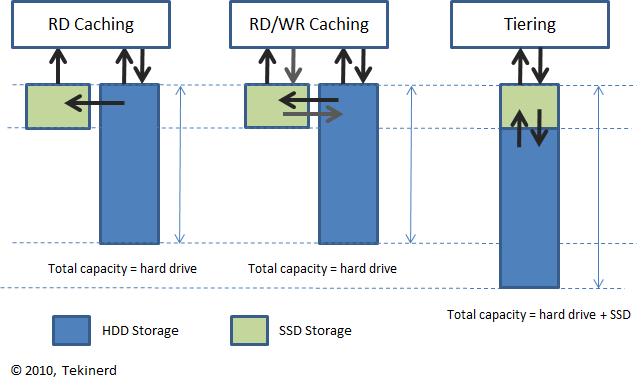
Bcacherelies on data caching. If the data was read one or more times, it will most likely settle in the cache and the next time it will be read from the cache. The main acceleration is obtained by caching random read operations. Because sequential read operations, according to bcache, are unlikely to be accelerated, and also a large file will not crowd out many small ones from the cache. But here the problem arises, how to determine if the read operation that has just begun will be sequential, or will there be many of them for different small files? You can, of course, cache the last N blocks for each process, and if all N + 1 blocks go in a row, do not cache this data. In this case, there will be a large load on the memory and a decision on the length of the read operation we will only get when this length has exceeded or has not exceeded some threshold. Bcache uses a different solution. For each process, the moving average length of the read operation is stored. If it is longer than the parametersequential_cutoff - the read process data will not get into the cache. Another interesting solution worth mentioning is the high load threshold. Suppose if a lot of requests for read operations came at the same time and all of them fall on data that is in the cache. The cache will be overloaded, and hdd will be idle. For such cases, there is a congested_read_threshold parameter that sets the time in milliseconds that a read operation waits in the cache queue, after which the request goes to hdd. The same parameter exists for the write operation. All this mechanics is configured or disabled at will, which is very useful when you need to adjust the bcache operation parameters to a difficult task.
Btier is a lot simpler, but that doesn't mean worse. :) It just uses a different approach to speed up data processing - multilayer disks (tell me a more accurate translation). The idea is very simple: the disks stick together among themselves from faster to slower. Data blocks that are used more often are transferred to a fast disk, data blocks that have not been used for a long time are transferred to a slow disk. Migration occurs at a configurable interval. But if someone actively uses the disk, the migration will not be performed. Blocks popularity statistics are accumulated over a period of time, and if there were no calls to a block, it migrates to the slowest disk. Everything is simple, fast enough and for some tasks very effective.
A universal solution does not exist. It also cannot be said that btier is better than bcache, or bcache is better than btier. They help in solving one problem. But their effectiveness is very dependent on the specific task. I import OpenStreetMap data into a database and try to speed up this process. Bcache is better suited for this task, as all work rests on iops and disk speed - it caches the necessary data faster on ssd and quickly adapts to the needs of the import process. On the other hand, after import, you have to perform a lot of queries on the resulting database, and these queries, partly rest on the processor, and part time on the disk. In this case, btier will be able to migrate popular blocks to ssd at the time the disk is idle and speed up the operation of queries that previously rested on the disk.
Bcache
Bcacherelies on data caching. If the data was read one or more times, it will most likely settle in the cache and the next time it will be read from the cache. The main acceleration is obtained by caching random read operations. Because sequential read operations, according to bcache, are unlikely to be accelerated, and also a large file will not crowd out many small ones from the cache. But here the problem arises, how to determine if the read operation that has just begun will be sequential, or will there be many of them for different small files? You can, of course, cache the last N blocks for each process, and if all N + 1 blocks go in a row, do not cache this data. In this case, there will be a large load on the memory and a decision on the length of the read operation we will only get when this length has exceeded or has not exceeded some threshold. Bcache uses a different solution. For each process, the moving average length of the read operation is stored. If it is longer than the parametersequential_cutoff - the read process data will not get into the cache. Another interesting solution worth mentioning is the high load threshold. Suppose if a lot of requests for read operations came at the same time and all of them fall on data that is in the cache. The cache will be overloaded, and hdd will be idle. For such cases, there is a congested_read_threshold parameter that sets the time in milliseconds that a read operation waits in the cache queue, after which the request goes to hdd. The same parameter exists for the write operation. All this mechanics is configured or disabled at will, which is very useful when you need to adjust the bcache operation parameters to a difficult task.
Advantages
- Flexible configuration options.
- Filling the cache during heavy tasks.
- Automatic initialization at boot time.
- It can work in cached mode as read, so read and write.
- Included in the kernel since version 3.10.
disadvantages
- Before the cache will be useful, it must be filled, and the increase in speed will not be instantaneous.
- If a process reads a large file and at the same time often refers to small files, these frequent small read operations will most likely not go to the cache, although they could seriously speed up the work.
- The cache cannot have multiple SSDs.
Btier
Btier is a lot simpler, but that doesn't mean worse. :) It just uses a different approach to speed up data processing - multilayer disks (tell me a more accurate translation). The idea is very simple: the disks stick together among themselves from faster to slower. Data blocks that are used more often are transferred to a fast disk, data blocks that have not been used for a long time are transferred to a slow disk. Migration occurs at a configurable interval. But if someone actively uses the disk, the migration will not be performed. Blocks popularity statistics are accumulated over a period of time, and if there were no calls to a block, it migrates to the slowest disk. Everything is simple, fast enough and for some tasks very effective.
Advantages
- You can combine multiple drives.
- The volume of ssd drives is added to the total volume.
- During btier growth, data is placed primarily on fast disks.
- High speed after starting work.
- Easy to assemble as a module to the current kernel.
disadvantages
- Reliability like RAID-0
- Migration occurs when btier is idle. During a hard disk task, you can not hope that the data will migrate to a faster disk.
- If for some time we started running heavy tasks on the btier partition, all the data gradually migrates to the slowest disk.
Total
A universal solution does not exist. It also cannot be said that btier is better than bcache, or bcache is better than btier. They help in solving one problem. But their effectiveness is very dependent on the specific task. I import OpenStreetMap data into a database and try to speed up this process. Bcache is better suited for this task, as all work rests on iops and disk speed - it caches the necessary data faster on ssd and quickly adapts to the needs of the import process. On the other hand, after import, you have to perform a lot of queries on the resulting database, and these queries, partly rest on the processor, and part time on the disk. In this case, btier will be able to migrate popular blocks to ssd at the time the disk is idle and speed up the operation of queries that previously rested on the disk.