 September 19, 2013 at 17:50
IM development for Pavel Durov’s contest using Xamarin
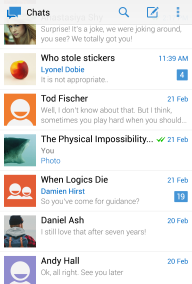
Good afternoon.
As many probably know, Pavel Durov is developing a new clone of the What's App and other popular instant messengers based on his own MTProto protocol.
Recently, an American company released an iOS client for this protocol called Telegram. In parallel with this, a competition is being held for developing an Android client .
Recently, the second stage was completed, the people sent their crafts, including myself. I will say right away, I did not go through the second stage.
Unlike many participants, for development I used the C # language and Xamarin about which I want to tell in more detail below, since on Xamarin we’ll say a little bit of information in RuNet.
Instead of entry
I am an affiliate. I have been working with children since the second version, when I was still a student, I know the capabilities and features of this platform well. Not so long ago, I wanted to develop the request “Android C #” on mobile devices and brought me to Xamarin - MonoDroid. But so far I wrote only playing with it, it was the first major Android project, I want to talk about it. Understanding this article requires knowledge of C #, .NET, and at least a primitive understanding of Android.
What is it - in a nutshell
Xamarin is a company (as well as a mobile platform) created by Nat Friedman and Miguel de Icaza , author of GNOME and Mono. Thus, Xamarin is the logical development of Mono.
Xamarin allows you to write native applications for Anroid and iOS in C # and this is great. I personally believe that the future lies with the hybrid cross-platform. And also a Mac. And they are actively voting for MonoBerry , which may someday become part of Xamarin.
Task
The tasks of the competition were to implement the provided MTProto protocol (first stage) and create a full-fledged application (second stage). At the third stage, revision.
The protocol as a whole is an implementation of RPC with all sorts of goodies such as advanced encryption and all sorts of different things.
Decision
Hereinafter I will talk about how I solved these problems. So let's get started.
Getting Xamarin
Xamarin costs $ 2000. Yes it is. If you want to write in your favorite studio, its price is $ 999 per platform. If you have enough of a good MonoDevelop environment - its cost is $ 299 per platform. In correspondence with the authors, I was able to beg for a discount of up to $ 799 per platform.
How can i get xamarin? Well, for starters, you can
Creating a solution structure
As I mentioned, Xamarin creates native code for each mobile OS. This means that each OS will have its own assembly, but the code between them must be divided. The creators of Xamarin offer three possible ways to do this, but for Visual Studio the easiest is the awesome Project Linker utility, which integrates directly into the environment.
A couple of mouse clicks and a cross-platform solution are ready:
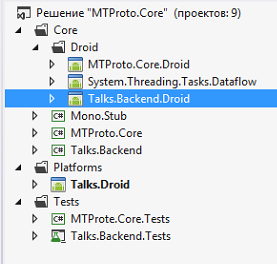
All files are connected as links, any changes in the main project will be displayed in all linked projects.
 |  |
The utility is installed from the "Extension Manager" studio.
Solution structure
The main assemblies are MTProto.Core and Talks.Backend . These are the usual assemblies for .net 4.5 and covered with Unit tests.
Mono.Stub are some specific classes from Mono, in particular I use BigInteger from there. Droid
folder - contains Android clones of projects, Dataflow - these are the sources of TPL.Dataflow from the github. I actively use the asynchronous features of C # 5.0 in my project. In the Platfrom folder - specific implementations for each platform. So far this is only Android.
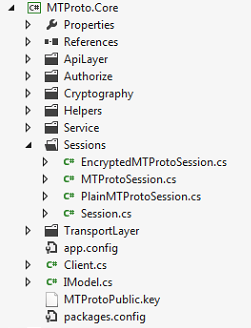
MTProto.Core
This is an implementation of the protocol. The protocol as a whole is an RPC with advanced encryption and some additional features, such as forming a container or sending / receiving files in pieces. Thus, to implement the IM client, we need to learn how to perform an RPC request, receive a response, and also process incoming system messages and status updates.
Of the features: async all the way and Dataflow.
async all the way
C # 5.0 introduced a couple of keywords that greatly simplify the development of asynchronous code based on Task Asynchronous Pattern (TAP). They are very well described on MSDN .
All IO operations should be asynchronous, it should be like a commandment.
public async Task RunAsync()
{
	await _cl.LoadSettings().ConfigureAwait(false);
	if (await _cl.CheckAndGenerateAuth().ConfigureAwait(false))
	{
		await _cl.RunAsync().ConfigureAwait(false);
	}
	if ((_cl.Settings.DataCenters == null) || (_cl.Settings.DataCenters.Count == 0))
	{
		await _cl.GetConfig().ConfigureAwait(false);
	}
	_db = await TalksDatabase.GetDatabase().ConfigureAwait(false);
	_ldm = new LocalDataManager(_db);
	_cl.ProcessUpdateAsync = ProcessUpdateAsync;
}
Stephen Cleary, one of the leading experts in asynchronous programming in C #, wrote several principles for using async-await that have already become de facto standards for its use. If you have not read, I advise.
The essence of the “async all the way” approach is that all methods on the call tree are asynchronous, starting with event and ending directly with the IO operation (in this case).
For example, if you need to process a click on a button asynchronously:
async void button_Click(object sender, EventArgs e)
{
     _button.Enabled = false;
     await _presenter.SendMessage();
}
Then you make all methods on the call tree in Presenter asynchronous:
The code
And in Core:
public Task SendMessage()
{
    return SendMessageToUser();
}
public async Task SendMessageToUser()
{
   ...
    try
    {
        _imv.AddMineMessage(msg);
        string msgText = _imv.PendingMessage;
        _imv.PendingMessage = "";
        // messages.sendMessage#4cde0aab peer:InputPeer message:string random_id:long = messages.SentMessage;
        var result = await _model.PerformRpcCall("messages.sendMessage",
            InputPeerFactory.CreatePeer(_model, PeerType.inputPeerContact, _imv.ChatId),
            msgText,
            LongRandom(r));
        if (result.Success)
        {
            // messages.sentMessage#d1f4d35c id:int date:int pts:int seq:int = messages.SentMessage;
            msg.Id = result.Answer.ExtractValue("id");
            ...
            msg.State = BL.Messages.MessageState.Sent;
            _imv.IvalidateList();
            await _model.ProcessSentMessage(result.Answer, _imv.ChatId, msg);
            return true;
        }
        else
        {
            msg.State = BL.Messages.MessageState.Failed;
            _imv.SendSmallMessage("Problem sending message: " + result.Error.ToString());
            return false;
        }
    }
    catch (Exception ex)
    {
         ...
    }
}
And in Core:
public Task PerformRpcCall(string combinatorName, params object[] pars)
{
	return _cl.PerformRpcCall(combinatorName, pars);
}
public async Task PerformRpcCall(string combinatorName, params object[] pars)
{
	try
	{
                /*...*/
		var confirm = CreateConfirm();
		// Буфер для ответа
		WriteOnceBlock answer = new WriteOnceBlock(e => e);
		IOutputCombinator oc;
		if (confirm != null)
		{
			var cntrn = new MsgContainer();
			cntrn.Add(rpccall);
			// прикрепим к RPC Call все ожидающие подтверждения
			cntrn.Add(confirm);
			cntrn.Combinator = _tlc.Decompose(0x73f1f8dc);
			// Добавим в общую очередь
			oc = new OutputMsgContainer(uniqueId, cntrn);
		}
		else // не используем контейнер
		{
			oc = new OutputTLCombinatorInstance(uniqueId, rpccall);
		}
		var uhoo = await SendRpcCallAsync(oc).ConfigureAwait(false);
		_inputAnswersBuffer.LinkTo(answer, new DataflowLinkOptions { MaxMessages = 1 },
			i => i.SessionId == _em.SessionId);
		return await answer.ReceiveAsync(TimeSpan.FromSeconds(60)).ConfigureAwait(false); // таймаут если ответа нету слишком долго
	}
	catch (Exception ex)
	{
                ...
	}
}
As you can see, not all methods are marked with async-await keywords. The general practice is this: if you do not need to do anything after an asynchronous call and if you have one asynchronous call, then it makes sense to simply return it as a Task from the method.
Another practice (also described in Cleary's article) is that asynchronous methods inside libraries should not capture the context and try to return to it after execution. Those. All asynchronous calls must contain
.ConfigureAwait(false)Made to prevent deadlocks. You can read more about this in the article above.Dataflow
TPL.Dataflow is a library designed to implement a Data Flow design pattern or processing pipeline. The source code of the library is available on the github, which allows you to use it on mobile devices. Those who wish to learn more about the capabilities of this library are sent to MSDN .
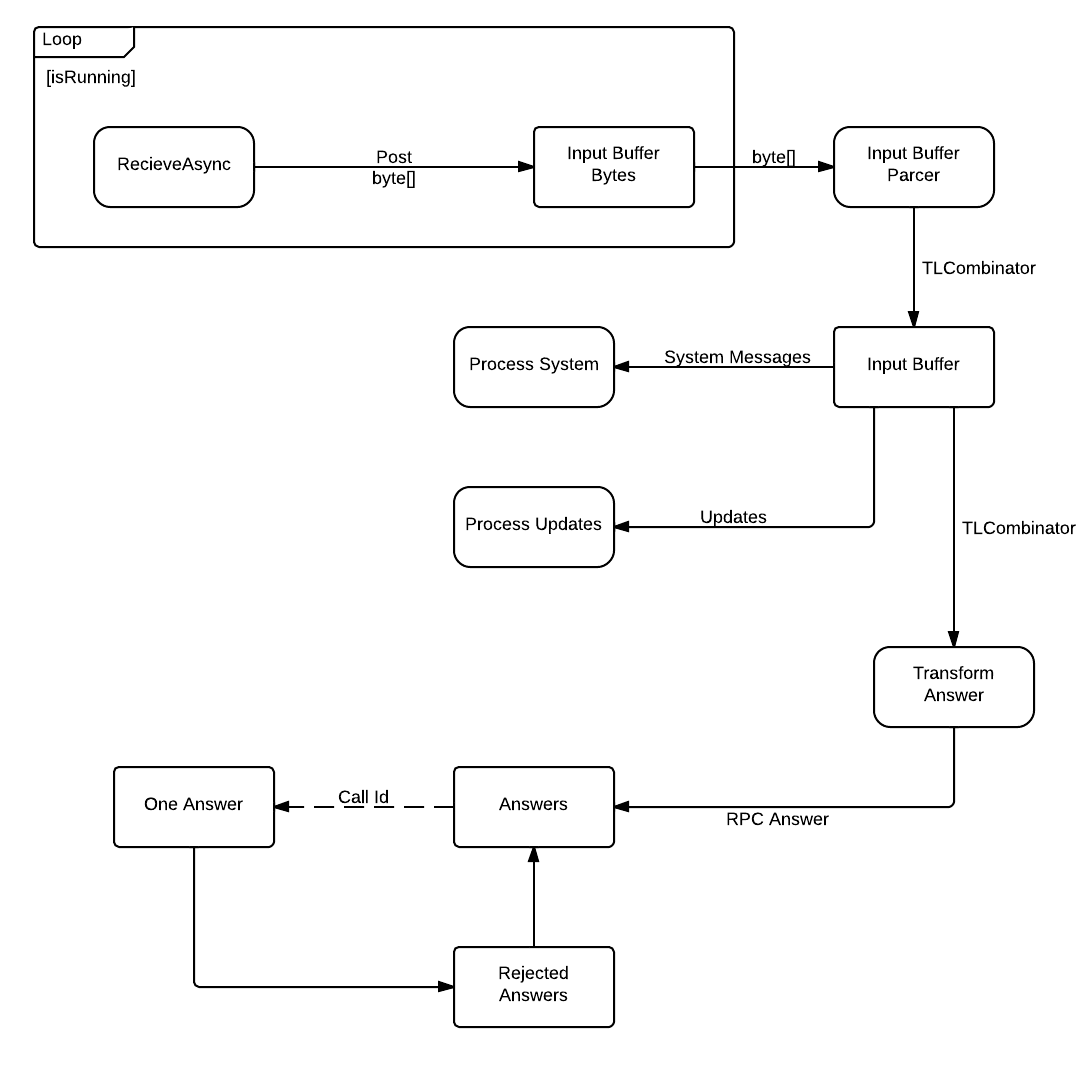
In a nutshell, the library allows you to build a pipeline consisting of data storage or processing units, linking them under some condition. Initially, in my project there were two such pipelines: for input and output packets. After refactoring, I decided to leave only one for incoming packages.
It looks like this:
and the creation process looks like this:
BufferBlock _inputBufferBytes = new BufferBlock();
BufferBlock _inputBuffer = new BufferBlock();
ActionBlock _inputBufferParcer;
ActionBlock _inputUpdates;
ActionBlock _inputSystemMessages;
TransformBlock _inputAnswers;
BufferBlock _inputAnswersBuffer = new BufferBlock();
BufferBlock _inputRejectedBuffer = new BufferBlock();
BufferBlock _inputUnsorted = new BufferBlock();
// --
// выходная сетка
_inputBufferParcer = new ActionBlock(bytes => ProcessInputBuffer(bytes));
_inputSystemMessages = new ActionBlock(tlci => ProcessSystemMessage(tlci));
_inputUpdates = new ActionBlock(tlci => ProcessUpdateAsync(tlci));
_inputAnswers = new TransformBlock(tlci => ProcessRpcAnswer(tlci));
// from [_inputBufferBytes] to [_inputBufferTransformer]
_inputBufferBytes.LinkTo(_inputBufferParcer);
// from [_inputBufferTransformer] to [_inputBuffer]
//_inputBufferTransformer.LinkTo(_inputBuffer);
// if System then from [_inputBuffer] to [_inputSystemMessages]
_inputBuffer.LinkTo(_inputSystemMessages, tlciw => _systemCalls.Contains(tlciw.Combinator.Name));
// if Updates then from [_inputBuffer] to [_inputUpdates]
_inputBuffer.LinkTo(_inputUpdates, tlciw => tlciw.Combinator.ValueType.Equals("Updates"));
// if rpc_result then from [_inputBuffer] to [_inputRpcAnswers]
_inputBuffer.LinkTo(_inputAnswers, tlciw => tlciw.Combinator.Name.Equals("rpc_result"));
// if rpc_result then from [_inputBuffer] to [_inputRpcAnswers]
//_inputBuffer.LinkTo(_inputUnsorted);
// and store it  [_inputAnswers] to [_inputAnswersBuffer] to process it
_inputAnswers.LinkTo(_inputAnswersBuffer);
_inputRejectedBuffer.LinkTo(_inputAnswersBuffer);
As you can see, input byte arrays are parsed, classified and laid out in buffers, from where they are parsed as needed. In particular, updates and systemMessages are processed immediately upon arrival at
ActionBlock, and rpcAnswers is first converted using TransformBlockand then added to BufferBlock. Classification of the type of package occurs internally BufferBlockbased on the conditions of binding blocks. Immediately after calling the method, we create WriteOnceBlock - a block where you can write only 1 value:
WriteOnceBlock answer = new WriteOnceBlock(e => e);
And link it to the RPC response buffer:
_inputAnswersBuffer.LinkTo(answer, new DataflowLinkOptions { MaxMessages = 1 },
			i => i.SessionId == _em.SessionId);
And then we wait asynchronously until the answer comes:
return await answer.ReceiveAsync(TimeSpan.FromSeconds(60)).ConfigureAwait(false); // таймаут если ответа нету слишком долго
I would also like to note separately that until this moment I have not written a single line of code for Android. All development and testing was carried out for normal assembly under .net 4.5
Talks.Backend
Customer backend. I decided to implement the client according to the MVP design pattern with IoC, and initially I aimed at the Passive View variation when the view does not contain any logic, but in the end I came to the conclusion that the Supervising Controller would work much better.
What problems did you have when creating the backend? Access to the notebook, access to the database, access to the file system (for storing photos). The rest of the backend is an ordinary implementation of MVP: a set of Presenter's and IView's
Access to notebook
To access the notebook, the Xamarin team has already come up with everything for us. They developed the Xamarin.Mobile library that encapsulates a set of functions on a mobile device - a notebook, GPS, camera, in a cross-platform manner. Also with full support for async-await.
Thus, access to the notebook is extremely simple:
#if __ANDROID__
public async Task GetAddressbook(Android.Content.Context context)
{
	contacts = new AddressBook(context);
#else
public async Task GetAddressbook()
{
	contacts = new AddressBook();
#endif
	if (!await contacts.RequestPermission())
	{
		Trace.WriteLineIf(clientSwitch.TraceInfo, "Permission for contacts denied", "[ContactsPresenter.PopulateAddressbook]");
		_view.SendSmallMessage("CONTACTS PERMISSON DENIED");
		return;
	}
	else
	{
		_icv.PlainContacts = new ListItemCollection( (from c in contacts
								where (c.Phones.Count() > 0)
								select new ListItemValue(c)).ToList());
	}
}
The compilation constant was
__ANDROID__introduced because context is required to get a contact list on Android, but not on other OSs. Here you can see one of the drawbacks of Passive View for cross-platform solutions. On assignment, we needed to group contacts by the first letter of the surname. For Android, this is done by creating the ListItemCollection class, which implements the grouping, a classic example of this is available on the Internet. On iOS, a completely different approach to creating such a grouping is that on WinPhone - I do not know. So it’s appropriate to receive and group contacts directly in View.
This is the main problem in hybrid cross-platform development in my opinion. You need to clearly understand where you need to abstract from the platform, and where not worth it. I think it comes with experience.
Access to the database
Xamarin recommends access to the database through a simple ORM SQLite.Net. Once I tried to ignore these recommendations and work with the database directly, through the driver, but in the end I realized that it was better to listen to the advice of more experienced developers.
I don’t see much point in describing how to work with SQLite.Net, I’ll just say that to test the assembly with SQlite.Net connected, you need to have sqlite binaries in the project, which are available on the official website www.sqlite.org/download.html
I ’ll separately note that SQLite. Net fully supports TAP and async-await.
I recommend expanding the SQLite.SQLiteAsyncConnection class with a set of Generic classes to simplify access to the database:
#region Public Methods
public Task> GetItemsAsync() where T : IBusinessEntity, new()
{
    return Table().ToListAsync();
}
public Task GetItemAsync(int id) where T : IBusinessEntity, new()
{
    return GetAsync(id);
}
public async Task CheckRowExistAsync(int id) where T : IBusinessEntity, new()
{
    string tblName = typeof(T).Name;
    return await ExecuteScalarAsync("select 1 from " + tblName + " where Id = ?", id).ConfigureAwait(false) == 1;
}
public async Task SaveItemAsync(T item) where T : IBusinessEntity, new()
{
    if (await CheckRowExistAsync(item.Id))
    {
        return await base.UpdateAsync(item).ConfigureAwait(false);
    }
    else
    {
        return await base.InsertAsync(item).ConfigureAwait(false);
    }
}
public Task DeleteItemAsync(int id) where T : IBusinessEntity, new()
{
    return DeleteAsync(new T() { Id = id });
}
#endregion
It is also worth remembering that the rules for accessing the file system on each OS are different.
Therefore, the path to the database can be obtained as follows:
public static string DatabaseFilePath
{
    get
    {
        var sqliteFilename = "TalksDb.db3";
#if SILVERLIGHT
// Windows Phone expects a local path, not absolute
var path = sqliteFilename;
#else
#if __ANDROID__
// Just use whatever directory SpecialFolder.Personal returns
string libraryPath = Environment.GetFolderPath(Environment.SpecialFolder.Personal);
#else
        // we need to put in /Library/ on iOS5.1 to meet Apple's iCloud terms
        // (they don't want non-user-generated data in Documents)
        string documentsPath= Environment.GetFolderPath(Environment.SpecialFolder.MyDocuments); // Documents folder
        string libraryPath = Path.Combine(documentsPath, "..", "Library"); // Library folder
#endif
        var path = Path.Combine(libraryPath, sqliteFilename);
#endif
        return path;
    }
}
File system access
One of the tasks of the competition was to receive and store pictures. To solve this problem, I took and finalized a cross-platform class of disk cache from here . In general, working with the file system is one of the least portable parts, since the requirements for working with files on all OSs are different. Partially, file system features are described in official Xamarin docks.
Talks.Droid
Android version of the application. Ideally, by the time you create a project on a specific platform, you may have a fully working and tested backend. In my version, this did not work out, but in the future I will strive for this.
The main difficulties begin here.
The application is based on the Bound Service, to which the App class is binding - a singleton that implements the "application". This is done so that any Activity can access the service using
App.Current.MainService. Inside the service, a Model is created in a separate thread, there is also a class with which Activities pick up their Presenters, something like this:
_presenter = App.Current.MainService.CreatePresenter(typeof(ChatListPresenter), this);
It should be remembered that Xamarin forms AndroidManifest on its own and does not allow you to directly edit it. All Activity parameters are recorded as attributes:
    [Activity(Label = "Settings", Theme = "@style/Theme.TalksTheme")]
    [MetaData("android.support.PARENT_ACTIVITY", Value = "talks.ChatListActivity")]
    public class SettingsActivity : SherlockActivity, IView
Basically, the Activity code is not much different from the java version, CamelCase, and some getters / setters are wrapped in properties
        protected override void OnCreate(Bundle bundle)
        {
            base.OnCreate(bundle);
            // Set our view from the "main" layout resource
            SetContentView(Resource.Layout.MessagesScreen);
            AndroidUtils.SetRobotoFont(this, (ViewGroup)Window.DecorView);
            _presenter = App.Current.MainService.CreatePresenter(typeof(MessagePresenter), this);
            _presenter.PlatformSpecificImageResize = AndroidResizeImage;
            this.ChatId = Intent.GetIntExtra("userid", 0);
            userName = Intent.GetStringExtra("username");
            _button = FindViewById(Resource.Id.bSendMessage);
            _button.Click += button_Click;
            _button.Enabled = false;
            _message = FindViewById(Resource.Id.etMessageToSend);
            _message.TextChanged += message_TextChanged;
            _lv = FindViewById(Resource.Id.lvMessages);
            _lv.Adapter = new Adapters.MessagesScreenAdapter(this, this.Messages);
        }
Login Activity
Login Activity should contain 3 points - entering the phone, receiving the code and entering it, registration. For convenience, this is done using fragments.
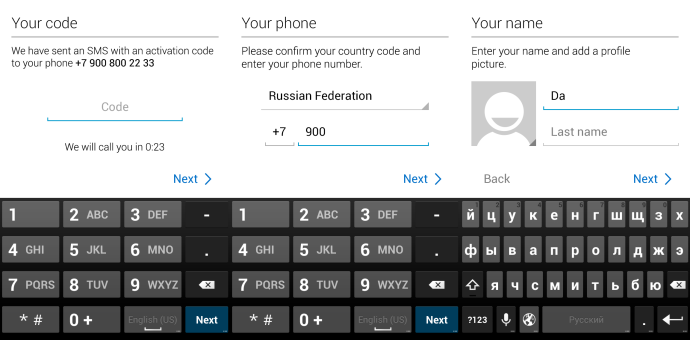
The easiest way to do this is with fragments. However, using fragments and MVP is completely unobvious !
As a result, I came to the conclusion that I made one presenter, and LoginActivity just wrapped the implementation of IView fragments:
PhoneFragment _pf = null;
CodeFragment _cf = null;
SignUpFragment _suf = null;
public string PhoneNumber
        {
            get
            {
                if (_pf != null)
                {
                    return _pf.Phone;
                }
                else
                {
                    return "";
                }
            }
        }
        public string AuthCode
        {
            get { return _cf.Code; }
        }
        public string Name
        {
            get { return _suf.FirstName; }
        }
        public string Surname
        {
            get { return _suf.Surname; }
        }
Shooting photo / video
An interesting and not obvious point. One of the tasks was to receive photo / video from the camera for sending it to the other person or setting it as an avatar.
This is done through the menu using Xamarin.Mobile.
  public override bool OnMenuItemSelected(int featureId, Xamarin.ActionbarSherlockBinding.Views.IMenuItem item)
        {
            switch (item.ItemId)
            {
                // Respond to the action bar's Up/Home button
                case Android.Resource.Id.Home:
                    NavUtils.NavigateUpFromSameTask(this);
                    return true;
                case Resource.Id.messages_action_takephoto:
                    _presenter.TakePhoto(this);
                    return true;
                case Resource.Id.messages_action_gallery:
                    _presenter.PickPhoto(this);
                    return true;
                case Resource.Id.messages_action_video:
                    _presenter.TakeVideo(this);
                    return true;
            }
            return base.OnMenuItemSelected(featureId, item);
        }
However, the event responsible for selecting the menu item returns bool, therefore we cannot apply the async-await construct to it. This is solved very simply, it should be remembered that async-await is just syntactic sugar that ultimately generates the same Continuation. And nothing prevents us from writing this as before:
#if __ANDROID__
///
/// Взятие фото с камеры
///
///
/// In addition to cross-platform, Xamarin offers the Component Store, where there are ports of popular Android and / or iOS libraries and components, both free and paid. In particular, ActionBar.Scherlok is present there and Android.Support.v7 has recently appeared, and the components can be installed directly from the environment, like in NuGet, which is very convenient.

In two clicks, you can get ActionBar support on devices with Android 2.3 and higher.
Publication
Publishing the application is carried out according to the scheme approved by Google.
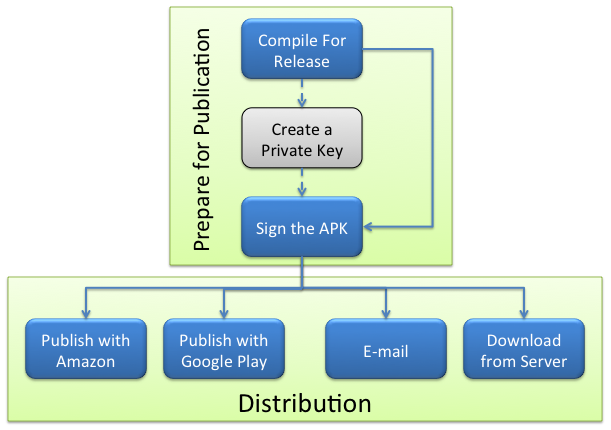
This includes quite a lot of actions. But especially for us, the team from Xamarin made a wizard built into VS that allows you to prepare the application for publication in a few steps.
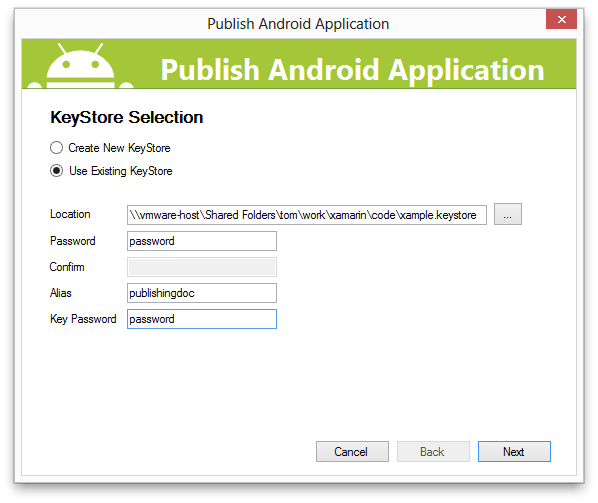
and it’s ready.
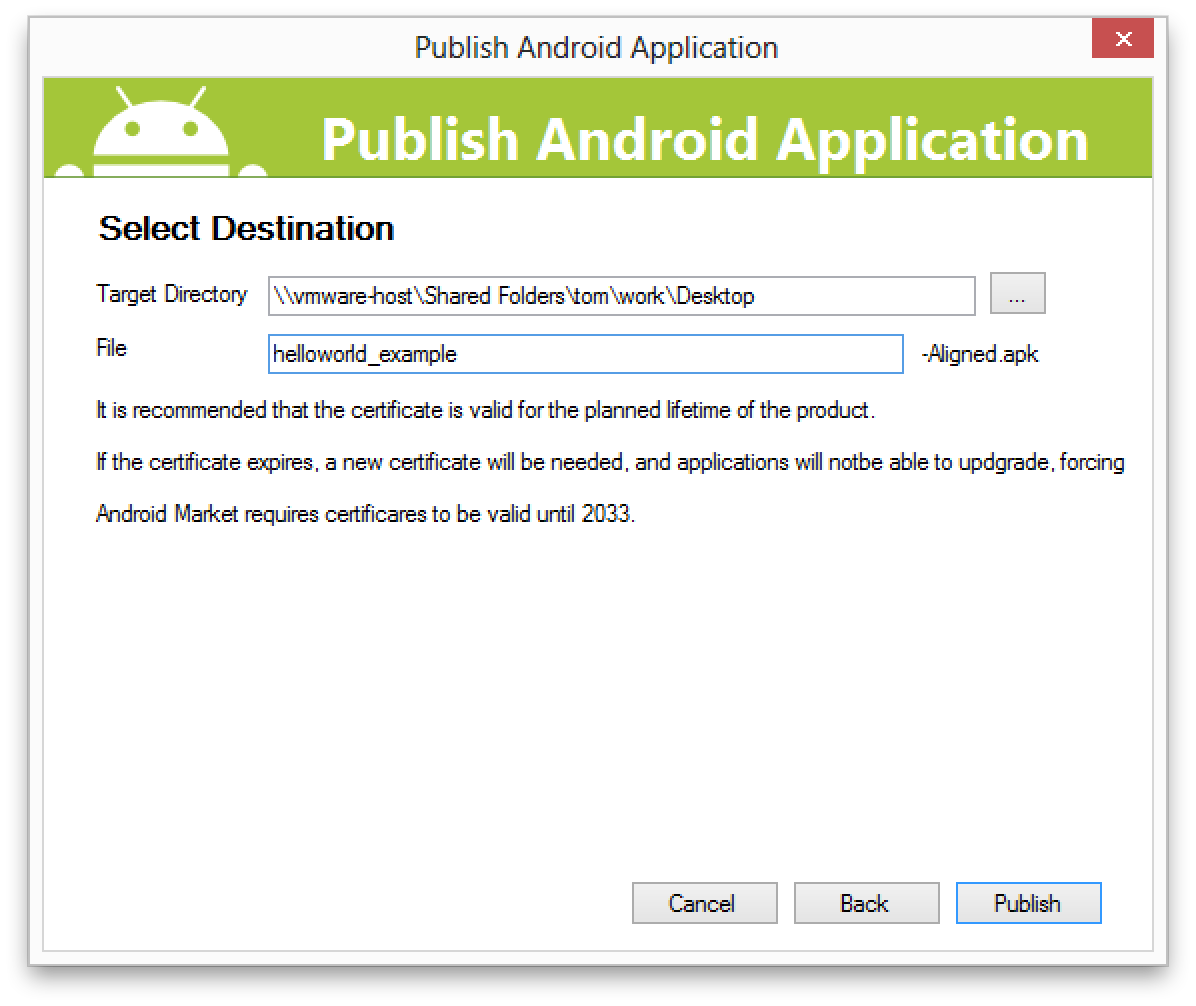
True, I could not immediately create a KeyStore using this wizard. Something with the lifetime of the key was. I had to create pens.
Testing
A small note on testing. Testing on an emulator is terrible and impossible. This should be discarded as soon as possible. The cheapest android costs now 3000 rubles, a Chinese tablet can be found at a similar price. At the beginning of the competition, I immediately bought my wife Fly with Android 4.0.1, because I only had an old HTC with 2.3.
As for testing and development for iOS, it’s more difficult. Of course, the best option is to take the cheapest macbook, this will be enough.
But to buy a pair of iPhone and iPAD for testing ... I do not know, not the best option. Now I am considering the possibility of MacInCloud and if everything goes well there, I will describe in detail the whole process.
Total
Now it’s hard to summarize. During the development process, I well studied the features of the Android platform,
developed a good, covered with tests and, most importantly, cross-platform backend.
They say that ahead will be a competition for WinPhone and iPad. Well, I can only draw the interfaces.
Error handling
"Note to self" as they say. Just comments on the future of what I did wrong.
1. Lack of design. I refactored MTProto.Core twice almost completely. The reason for this is that I did not sit down with a piece of paper and did not completely draw how this core should look. Many decisions were made spontaneously and without reckoning on the future.
2. Poor understanding of the Android platform. For a long time I tried to understand how to organize interaction with the Android service. Frankly, I still do not know the best way to ensure this interaction. You need to understand that the d.android.com guides are useless here, the service thing for android is specific, but we need to get rid of the platform and do something cross-platform.
3. Stubbornness and greed. I had the opportunity to attract another programmer, and perhaps together we would have shown a better result. But I myself, all by myself.









