 July 10, 2013 at 11:35
Cross compiling on OS X under Linux using crosstool-ng
- Tutorial
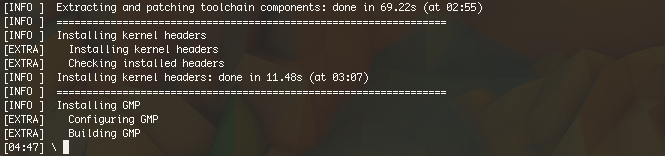
In this article, we will talk about a wonderful tool for automating the assembly of cross-toolchains crosstool-ng , an almost indispensable tool for any self-respecting embedded developer. If you had to seriously build software from x86-linux for arm-linux, then you probably heard about it.
This guide discusses not so much cross-compilation by architecture as cross-compilation by system - Linux build in Darwin .
Disclaimer
There are several articles on the Internet for building crosstool-ng under OS X, for example on benmont.com and in the official manual . Nevertheless, in some articles there are many errors and outdated information, while in others only general features are described. Here I will describe my path along which I successfully built the toolchain in July 2013.Training
This part depends on which package manager you use in OS X - MacPorts or Homebrew . I chose ports-way for myself a long time ago, so I will write based on this.1. Case-sensitive file system
Everything is simple here, OS X has the Disk Utility utility, we will use it to create a new partition. It will take 5+ GB.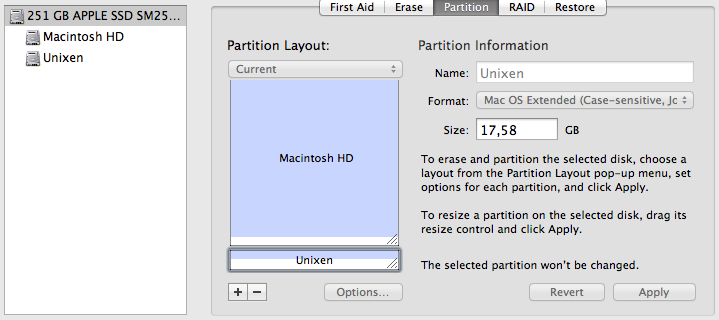
2. Tools
It is assumed that you have MacPorts installed. Install the following packages:ncurses
lzma
libtool
binutils
gsed
gawk
grep
gcc48
Let's check which versions of gcc are on the system: sudo port select --list gcc. We need mp-gcc48 - select by default with the sudo port select --set gcc mp-gcc48 command.
3. Installing crosstool-ng
Collecting the toolkit itself is quite simple, we will use the official instructions:hg clone http://crosstool-ng.org/hg/crosstool-ng
cd crosstool-ng
./bootstrap
Forced to interrupt the official instructions: in the kconfig / zconf.hash.c file there is not enough line
#include ./configure \
--with-objcopy=/opt/local/bin/gobjcopy \
--with-objdump=/opt/local/bin/gobjdump \
--with-readelf=/opt/local/bin/greadelf \
--with-sed=/opt/local/bin/gsed \
--with-libtool=/opt/local/bin/glibtool \
--with-grep=/opt/local/bin/grep \
--with-install=/opt/local/bin/ginstall
make
sudo make install
This will set ct-ng to
/usr/local/bin. Home directory ct-ng: /usr/local/lib/ct-ng.hg+default-2685dfa9de14depending on the revision. In this directory, edit the scripts / functions file, replacing the line for Darwin with the line from Linux:--- scripts/functions.orig 2013-07-09 22:15:12.000000000 +0400
+++ scripts/functions 2013-07-06 04:28:41.000000000 +0400
@@ -460,7 +460,7 @@
mode="$(stat -c '%a' "$(dirname "${dir}")")"
;;
Darwin|*BSD)
- mode="$(stat -f '%Lp' "$(dirname "${dir}")")"
+ mode="$(stat -c '%a' "$(dirname "${dir}")")"
;;
*)
CT_Abort "Unhandled host OS $CT_SYS_OS"
This is because ct-ng accidentally haws a version of gstat from the GNU set, instead of the original stat from OS X. Admire the beauty and elegance of the local code and close the file.
You can also copy the ct-ng.comp script for bash-completion, it works well.
Now you need to select a temporary folder in which our wonderful cross-toolchain and its sysroot will be forged. I have it
/Volumes/Unixen/ct-config, go to your folder and start the setup.Crosstool-ng setup
Before starting the configuration, we will inherit the configuration from the template. We are interested in x86_64-unknown-linux-gnu:cd /Volumes/Unixen/ct-config
ct-ng x86_64-unknown-linux-gnu
ct-ng menuconfig
After that, you see a menu in which we will configure our tools.
1. Paths and misc options
It is important to specify the options Local tarballs directory (/Volumes/Unixen/src) and Prefix directory ( /Volumes/Unixen/${CT_TARGET}), do not forget to create /Volumes/Unixen/src.2. C compiler
Here I turned off Java and Fortran support because I don’t know how GCC will behave when building with features enabled. Be sure to disable [] Link libstdc ++ statically into the gcc binary, otherwise there will be an errorcollect2: error: ld returned 1 exit status
ld: library not found for -lcrt0.o
3. Debug facilities
Here you will have to disable dmalloc and ltrace support, as otherwise there will be unsolvable problems. In the gdb section, disable [] Native gdb and, if not necessary, disable [*] Enable python scripting (problem with python, but the solution will be lower). I am using the gdb version (7.3.1).4. Companion libraries
The following library versions are strictly here, otherwise there will be compilation errors and autotools, I selected these versions by typing, and the selection of more recent ones often helped. * GMP version (5.0.2)
* MPFR version (3.1.2)
* PPL version (0.11.2)
* CLooG version (0.15.11)
* MPC version (1.0.1)
Toolchain assembly
Almost everything is ready. The following error may occur during the build process (the kernel version is mine):[ERROR] /Volumes/Unixen/ct-config/.build/src/linux-3.8.11/arch/x86/tools/relocs.c:8:17: fatal error: elf.h: No such file or directory
Therefore, we will take care of this in advance by taking elf.h from a trusted source. If not at hand, take my elf.h . Putting in
/usr/include. You also need to fix the limit of open files ( RE: Libc iconvdata compilation problem ):
ulimit -n 1024
If during build you get an error in gdb, if you have not disabled [*] Enable python scripting before:
configure: error: python is missing or unusable
then edit the .build / gdb - * / gdb / python / python-config.py file by commenting out the lines
#            if getvar('LINKFORSHARED') is not None:
#                libs.extend(getvar('LINKFORSHARED').split())
Everything seems ready.
ct-ng build
On the Macbook Air with i5, the assembly takes about 69 minutes, and most likely some errors will pop up in the middle. So moving away from the computer does not work.
Conclusion
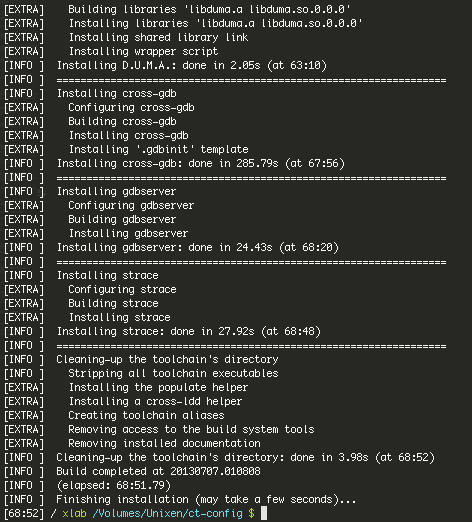
/ Volumes / Unixen $ du -csh ct-config /
4,0G    ct-config/
4,0G    итого
/ Volumes / Unixen $ x86_64-unknown-linux-gnu / bin / x86_64-unknown-linux-gnu-gcc -v
Using built-in specs.
COLLECT_GCC=x86_64-unknown-linux-gnu/bin/x86_64-unknown-linux-gnu-gcc
COLLECT_LTO_WRAPPER=/Volumes/Unixen/x86_64-unknown-linux-gnu/libexec/gcc/x86_64-unknown-linux-gnu/4.7.3/lto-wrapper
Configured with: /Volumes/Unixen/ct-config/.build/src/gcc-4.7.3/configure --build=x86_64-build_apple-darwin12.4.0 --host=x86_64-build_apple-darwin12.4.0 --target=x86_64-unknown-linux-gnu --prefix=/Volumes/Unixen/x86_64-unknown-linux-gnu --with-sysroot=/Volumes/Unixen/x86_64-unknown-linux-gnu/x86_64-unknown-linux-gnu/sysroot --enable-languages=c,c++ .....
Target: x86_64-unknown-linux-gnu
Thread model: posix
gcc version 4.7.3 (crosstool-NG hg+default-2685dfa9de14)
You can try to collect something:
cd linux-source-3.9
export PATH=$PATH:/Volumes/Unixen/x86_64-unknown-linux-gnu/bin
export C_INCLUDE_PATH=/usr/include:/opt/local/include:/Volumes/Unixen/x86_64-unknown-linux-gnu/x86_64-unknown-linux-gnu/sysroot/usr/include
make ARCH=x86_64 CROSS_COMPILE=x86_64-unknown-linux-gnu- all -j4
Good
luck , Xlab was there.









