
 May 31, 2013 at 12:48
We create a PC-based Apple media storage
Hello!
On a tip from a colleague from Twitter @ ripper2k, my story is about the implementation of the iTunes project and the DLNA media server and file storage for apple home infrastructure. Successful implementation .
A few words about the ingredients of my computer park:
As you can see, the actual computer subsystem is based on Macs, which have their own requirements for organizing file and media storage, which must be taken into account when implementing the project, of course:
I emphasize that AFP (Apple File Protocol) is the preferred choice in my situation, because it is the native file system for Mac OS, and secondly, it is practically established that the resources shared from Windows 7 are not friendly with Mac OS X (the version is installed on both Macs 10.8 - Mountain Lion). With Windows XP, everything is much simpler and friendlier, but the operating system imposes restrictions on the volume of hard drives.
iOS devices in the face of iPhones and Apple TV consoles also impose their limitations:
To the TV devices (in my set, at least), take out a separate DLNA server for access to the music library.
Well, the last point is my personal Wishlist:
So, the conditions of the problem are known, but what are the options for solving it? We list the main ones:
Of the undoubted advantages of ready-made NAS-solutions, I will highlight:
But all these nishtyaki are more than covered by the fact of the existence of proprietary operating systems on board; For example, a full-fledged iTunes server with support for the Home collection cannot be raised anymore, so we delete the NAS from the list. Well, a separate nuance is their price: instead of a device for 4 hard drives and software features for the above needs, you can quite safely buy a Mac mini + external Thunderbolt box for HDD and not take a steam bath with the choice.
Since the finished hardware does not suit us, we can create it ourselves! And such a scheme of advantages will have much more - this is the price, this is the ability to select components for specific needs, this is the scope for choosing a program shell, etc. In my case, this is the simplest PC desktop with a bunch of hard drives working in 7/24 mode and optionally connected to a TV.
But for such a hardware solution, you need to choose the right software, what do we have in this part?
As part of the search for the right solution, I installed FreeNAS on my media server, here are the impressions:
For about two months I had this distribution in the installed state, but in the end I abandoned it due to the following considerations:
Of course, it was possible to lift the Mac mini with an external Thunderbolt-box for hard drives ... but it is somehow in the future.
So, in the last iteration of the searches, I came to the final version of the solution, based on the Windows 7 hated by all labor users.
I found a suitable PC desktop, in which, with some difficulties, 3 data hard drives were mounted:
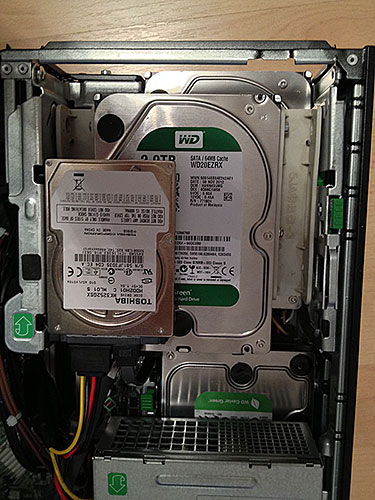
(Due to the limited engine compartment space was installed on a 2.5 ”laptop - a la hard drive“ our kolkhoz has perverts on our collective farm ”)
Hard drives - Western Digital green series, the terabyte from the kit has been working for the fifth year, and I have not the slightest comments on it. Nowadays, the fashionable red series, designed specifically for use in such systems, will be involved in subsequent system upgrades.
The software component was led by licensed Windows 7 and the following services were lifted:
Hard drives quite successfully took root in the new system:
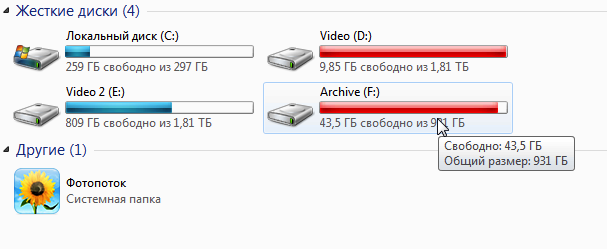
(I suggest docs to evaluate a certain reddening of Windows Explorer)
Practical experience in using the system proves the success of such a solution, coped with the tasks by 5 points. The server fits perfectly into the non-standard (from the point of view of epic Windows-storages) apple infrastructure, from Macs to iPhones.
For the future, I am considering the possibility of upgrading the hardware subsystem to the HP ProLiant MicroServer G7 N40L (in many respects inspired by the excellent overview on 3DNews), but such exoticism is not found in retail trade in our area, it must be ordered separately. But on the other hand, the hardware performance is still rather weak, and sometimes you have to load the system with all kinds of processing, so this fad is still in the deep alpha stage.
On a tip from a colleague from Twitter @ ripper2k, my story is about the implementation of the iTunes project and the DLNA media server and file storage for apple home infrastructure. Successful implementation .
A few words about the ingredients of my computer park:
- All-in-one Apple iMac MC813;
- Apple Macbook Air MD224;
- Philips LCD TV 40PFL8505H;
- Blu-ray player Pioneer BDP-140;
- prefix Apple TV 3 generations;
- IP Television from Rostelecom;
- iPhones
- ASUS DSL-N10 ADSL modem and Apple Airport Extreme Base Station router ( here we read a detailed story about network implementation );
microwave with Internet access and TV-in(just kidding).
As you can see, the actual computer subsystem is based on Macs, which have their own requirements for organizing file and media storage, which must be taken into account when implementing the project, of course:
- Time Machine software emulation (TM hereinafter) for creating backup copies of both home Macs;
- access to shared data through AFP.
I emphasize that AFP (Apple File Protocol) is the preferred choice in my situation, because it is the native file system for Mac OS, and secondly, it is practically established that the resources shared from Windows 7 are not friendly with Mac OS X (the version is installed on both Macs 10.8 - Mountain Lion). With Windows XP, everything is much simpler and friendlier, but the operating system imposes restrictions on the volume of hard drives.
iOS devices in the face of iPhones and Apple TV consoles also impose their limitations:
- the iTunes library of music and video must be picked up in a mandatory manner;
- as a separate item I make the importance of creating a “Home Collection” in iTunes and providing access to devices on the local network.
To the TV devices (in my set, at least), take out a separate DLNA server for access to the music library.
Well, the last point is my personal Wishlist:
- torrent and file rocking;
- general library of documents;
- music and video storage for home theater;
- the ability to fit and see at least three hard drives with data larger than 1 TB;
- remote access from anywhere in the world, even from a mobile device.
So, the conditions of the problem are known, but what are the options for solving it? We list the main ones:
Standalone NAS
Of the undoubted advantages of ready-made NAS-solutions, I will highlight:
- compactness;
- low consumption of electric energy;
- flexible options for installing additional hard drives;
- sufficiently large software features out of the box.
But all these nishtyaki are more than covered by the fact of the existence of proprietary operating systems on board; For example, a full-fledged iTunes server with support for the Home collection cannot be raised anymore, so we delete the NAS from the list. Well, a separate nuance is their price: instead of a device for 4 hard drives and software features for the above needs, you can quite safely buy a Mac mini + external Thunderbolt box for HDD and not take a steam bath with the choice.
Since the finished hardware does not suit us, we can create it ourselves! And such a scheme of advantages will have much more - this is the price, this is the ability to select components for specific needs, this is the scope for choosing a program shell, etc. In my case, this is the simplest PC desktop with a bunch of hard drives working in 7/24 mode and optionally connected to a TV.
But for such a hardware solution, you need to choose the right software, what do we have in this part?
Linux distributions
As part of the search for the right solution, I installed FreeNAS on my media server, here are the impressions:
- the project is free, based on FreeBSD and is constantly evolving;
- You can install it on an external USB-stick and boot from it;
- implementation of a large number of services I need: AFP, TM, iTunes (though without the Home collection);
- support for hard drives with large volumes of 2 TB or more;
- humane hardware requirements to run FreeNAS on fairly weak configurations.
For about two months I had this distribution in the installed state, but in the end I abandoned it due to the following considerations:
- I know Linux at the level of basic commands, and there is not the slightest desire to study it more deeply;
- no home collection;
- Hard drives must be reformatted to UFS for maximum compatibility and performance;
- inflexibility : as an IT geek, I still want to fully manage the system, not through a web browser (see paragraph 1).
Of course, it was possible to lift the Mac mini with an external Thunderbolt-box for hard drives ... but it is somehow in the future.
Attentive presenters will, of course, ask that I am attached to this Home collection? I answer: this technology allows iTunes to share data with Apple TV and broadcast video and music over the air to iOS devices - it’s painfully convenient not to store the library on an iPhone, but to catch it through the air
Final cut
So, in the last iteration of the searches, I came to the final version of the solution, based on the Windows 7 hated by all labor users.
I found a suitable PC desktop, in which, with some difficulties, 3 data hard drives were mounted:
(Due to the limited engine compartment space was installed on a 2.5 ”laptop - a la hard drive“ our kolkhoz has perverts on our collective farm ”)
Hard drives - Western Digital green series, the terabyte from the kit has been working for the fifth year, and I have not the slightest comments on it. Nowadays, the fashionable red series, designed specifically for use in such systems, will be involved in subsequent system upgrades.
The software component was led by licensed Windows 7 and the following services were lifted:
- access to data for Windows computers (standard sharing on a local network);
- access to -computers via AFP and the excellently running Time Machine for two Macs;
- An iTunes server with a Home collection that iPhones and Apple TV can see perfectly;
- free µTorrent and Free Download Manager you understand what for;
- “ Home media server (UPnP, DLNA, HTTP) ” for accessing TV devices via DLNA (an excellent program, by the way, I also want to praise the author separately!);
- due to the fact that the computer is connected via HDMI to the TV, it can be used as a computer, and as an XBMC- media center (this is rare);
- remote server management is carried out via RDP, both on the local network and outside; in addition, access for µTorrent WebUI is also ajar;
- due to the dynamic allocation of IP addresses by Rostelecom, the DynDNS service with the Dyn Updater program installed is used to automatically register the current IP address (the modem can also do this, but it is somehow crooked );
- on the server, various utilities such as MKVmerge and others are sometimes launched.
Hard drives quite successfully took root in the new system:
(I suggest docs to evaluate a certain reddening of Windows Explorer)
Conclusion, he is one, and he is
Practical experience in using the system proves the success of such a solution, coped with the tasks by 5 points. The server fits perfectly into the non-standard (from the point of view of epic Windows-storages) apple infrastructure, from Macs to iPhones.
For the future, I am considering the possibility of upgrading the hardware subsystem to the HP ProLiant MicroServer G7 N40L (in many respects inspired by the excellent overview on 3DNews), but such exoticism is not found in retail trade in our area, it must be ordered separately. But on the other hand, the hardware performance is still rather weak, and sometimes you have to load the system with all kinds of processing, so this fad is still in the deep alpha stage.