February 19, 2013 at 12:07
My democracy ends at the tip of your nose: collaborative editing in the cloud
The next stage of Formula 1. Intense race at exorbitant speeds. Pit stop, rubber replacement. A well-coordinated team of mechanics changes the wheels in a matter of seconds and the car continues the race. One professional is one task. Now imagine that one mechanic changes all the wheels, or each team has a whole team crumbling at a loss, all interfere with each other and give endless advice. The race is irrevocably lost.
So, let's imagine that in our case, the race is the collective editing of one object - a document (simple or multi-page, with drawings, tables and other attributes). As a rule, the subject of joint editing is voluminous documents requiring the attention of all departments of the organization: annual reports, business plans, draft budgets, regulations and agreements, development and risk management strategies, methodologies, etc. The choice of a reliable and professional co-editing tool is an important point when working with corporate documents.
The online document editor TeamLab , implemented on the basis of HTML5 technology, has long overtaken competitors in terms of editing functionality and is increasingly moving closer to desktop editors. The fact that it allows you to work with documents up to 5,000 pages and tables up to 400,000 cells, is already known to many, but not always seen remains a key, in our opinion, advantage, namely the ability to jointly edit files, which allows not only to improve usability, but and talk about Teamlab editor as a complete corporate solution.
Recently, many applications have appeared that allow you to work with documents in real time right in your browser (Google Docs, Office 365, Zoho, etc.). For such applications, one of the main and attractive features is the teamwork on the document. The benefits of collaborating on files in the cloud are undeniable:
Thus, the editing of documents should be the most thoughtful part of the corporate system aimed at creating a full-fledged office within the cloud service.
There are three approaches to implementing collaborative editing of documents.
First approach. Editing occurs strictly sequentially. It would seem ideal for the user and for the developer. One person makes their changes to the document, blocks it for writing, while colleagues can not make a single correction in the reading mode and wait for their turn. This situation is most often encountered by users when working with offline desktop editors. The disadvantages of this approach are obvious: a long working time, the inability to edit the same file in parallel, the occurrence of unnecessary communications with a request to release / close the document.
Second approach.Editing is done synchronously and character by character. At first glance, it might seem that this is the ideal solution, because the user has the feeling that the entire document belongs to him and only his edits are saved. Moreover, the solution seems optimal for the developer: work is underway with each character, additional algorithms for extracting and blocking file fragments, labeling them, and placing labels for the user are not needed. However, it is in this situation that one can easily encounter a number of problems and conflicts:
While working on the TeamLab editor , we came to the conclusion that the “golden mean” can be editing by groups (“pieces”) of data. This technology allows you to avoid a number of problems associated, for example, with the speed of applying edits from the point of view of the user or editing large documents.
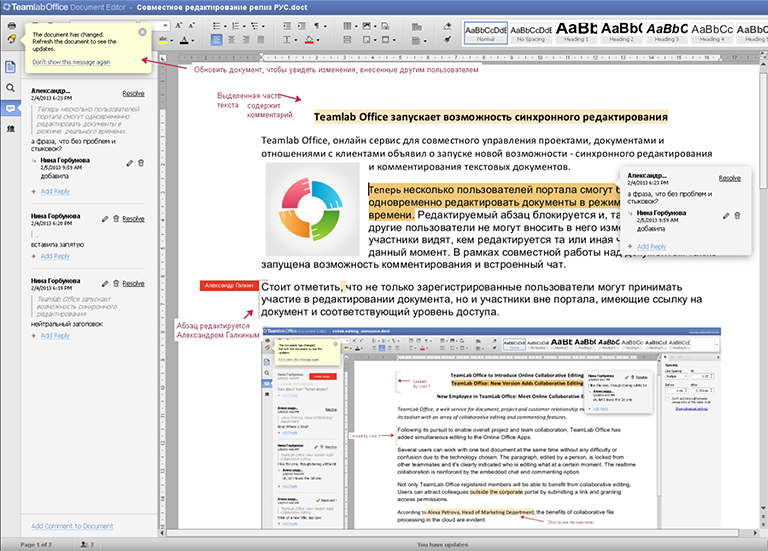
For the convenience of collaborative editing, the TeamLab editor considers a paragraph (picture, table, menu of table properties) to be blocked by writing a fragment of editing. During the editing process, you can easily see who has occupied the object right now and apply the changes, synchronizing the changes of all the editing participants in one click.
The possibilities of TeamLab during joint editing are impressive: the edits and “busy” sections of the document are visible, joint changes are made and very quickly saved even in very voluminous documents, it is clear which colleagues are involved in working with the file. An important role is also played by comments, which have a convenient interface, are visible both in the editing mode and in the viewing mode, may or may not be displayed depending on user settings. The commentary includes the text, the time, the author’s indication, and a response field is also provided. Saved comments allow you to additionally trace the history of document modification, as represent a kind of protocol of changes.

Unlike famous competitors TeamLab easily copes with a number of complex tasks that other editors cannot afford:

Making any actions, making changes and edits, editing tables and figures, the user practically does not notice the process of saving changes, continuing to work with his part of the document.
Not the last issue in co-editing is the versioning of the document. It is important to keep the original document and the ability to "roll back" to a particular version, depending on the circumstances. The TeamLab editor maintains a list of versions of any depth; an unlimited number of users can participate in the editing session. Users can forget that they need to look for additional tools to resolve version conflicts, to track actions and changes made by individual users.
In this version of the document are evaluated according to the following scheme:

The current session with the document ends when you exit the editing of the last user, and it is at this point that the version is formed. The next version appears at the end of the next editing session by one or more users. Versions are stored as a list as independent documents and can be accessed at any time. They are formed regardless of the user's instructions, and if versioning not included in Google Docs can result in the loss of valuable data, then in TeamLab even the most forgetful users will not miss a single file.
Speaking about collaboration in cloud services, special attention should be paid not only to editing itself, but also to the ability to work in various browsers - familiar and convenient for each user. For TeamLab, this is not a problem - it is cross-browser and works correctly in all existing browsers, while maintaining complete identity of functionality.
When working in the editor, users can consult or brainstorm - like in other services, TeamLab implements a convenient chat with highlighting the names and text of users. This solution allows you to see which of the colleagues is working with the document at a particular moment and exchange instant messages in real time. Agree, it’s convenient to solve a common problem, prepare a project and at the same time communicate with colleagues in one window. In addition, you can successfully engage a third-party user who is not registered on the portal to work together - just send him an invitation to participate in co-editing by any email and provide full access rights or the right to read the file. In the information about the document, available in one click, you can find out the number of versions, access rights,

The finished document can be saved and downloaded in various formats. So, for the text are available - PDF, DOC, TXT, DOCX, ODT, RTF, HTML, EPUB. Such a variety of available formats allows you to view ready-made documents outside the portal from many desktop and portable devices running various operating systems.
However, no software (especially commercial) can be competitive without continuous improvement and development of functionality. In the near future, the TeamLab editor is waiting for new transformations that will make life easier for users who are used to desktop editors and want to get the same "features" in cloud services.
When work is underway on the TeamLab editor , developers and managers care about functionality, speed, interesting “chips”, a convenient, beautiful and clear interface. The development of new versions of the editor, therefore, does not turn into the creation of a beautiful attractive toy for geek users and lovers of attractive interfaces, but into a real professional product created by professionals and for professionals. It is such a product, convenient, familiar and integrated into the cloud service, that allows you to look at the IT infrastructure of a business from another perspective and get closer to a new global trend - effective joint work on projects in a single cloud.
So, let's imagine that in our case, the race is the collective editing of one object - a document (simple or multi-page, with drawings, tables and other attributes). As a rule, the subject of joint editing is voluminous documents requiring the attention of all departments of the organization: annual reports, business plans, draft budgets, regulations and agreements, development and risk management strategies, methodologies, etc. The choice of a reliable and professional co-editing tool is an important point when working with corporate documents.
Benefits of Co-Editing
Recently, many applications have appeared that allow you to work with documents in real time right in your browser (Google Docs, Office 365, Zoho, etc.). For such applications, one of the main and attractive features is the teamwork on the document. The benefits of collaborating on files in the cloud are undeniable:
- reduction of working time and, consequently, decision making; increase productivity of employees and departments
- effective and efficient information exchange: no need for endless correspondence with voluminous investments
- extensive commenting capabilities as a convenient review tool
- the opportunity to discuss a task or project from the workplace of users of any geographical remoteness
- separation of viewing and editing rights for any user groups
Thus, the editing of documents should be the most thoughtful part of the corporate system aimed at creating a full-fledged office within the cloud service.
Implement co-editing
There are three approaches to implementing collaborative editing of documents.
First approach. Editing occurs strictly sequentially. It would seem ideal for the user and for the developer. One person makes their changes to the document, blocks it for writing, while colleagues can not make a single correction in the reading mode and wait for their turn. This situation is most often encountered by users when working with offline desktop editors. The disadvantages of this approach are obvious: a long working time, the inability to edit the same file in parallel, the occurrence of unnecessary communications with a request to release / close the document.
Second approach.Editing is done synchronously and character by character. At first glance, it might seem that this is the ideal solution, because the user has the feeling that the entire document belongs to him and only his edits are saved. Moreover, the solution seems optimal for the developer: work is underway with each character, additional algorithms for extracting and blocking file fragments, labeling them, and placing labels for the user are not needed. However, it is in this situation that one can easily encounter a number of problems and conflicts:
- simultaneous entry and deletion of the same characters by several different users, undo / redo conflict and lost data
- the author can enter the text with typos, sketch short abstracts and edit his part after the creation of the entire paragraph. Other users will see typos, the course of reasoning and be distracted by their commenting, correction, prompt notification of the author about them in the chat. This leads to a delay in the process of collaboration and distracts employees from the main thread of work with the document
- a whole group of problems related to the undo / redo process. With character-by-character editing, changes to all users are canceled / applied, or “joint” changes are skipped (depending on the editor’s developer policy) - this is an extremely inconvenient conflict of corrections, which can lead to the disappearance of important edits.
The third approach as the golden mean of co-editing
While working on the TeamLab editor , we came to the conclusion that the “golden mean” can be editing by groups (“pieces”) of data. This technology allows you to avoid a number of problems associated, for example, with the speed of applying edits from the point of view of the user or editing large documents.
For the convenience of collaborative editing, the TeamLab editor considers a paragraph (picture, table, menu of table properties) to be blocked by writing a fragment of editing. During the editing process, you can easily see who has occupied the object right now and apply the changes, synchronizing the changes of all the editing participants in one click.
The possibilities of TeamLab during joint editing are impressive: the edits and “busy” sections of the document are visible, joint changes are made and very quickly saved even in very voluminous documents, it is clear which colleagues are involved in working with the file. An important role is also played by comments, which have a convenient interface, are visible both in the editing mode and in the viewing mode, may or may not be displayed depending on user settings. The commentary includes the text, the time, the author’s indication, and a response field is also provided. Saved comments allow you to additionally trace the history of document modification, as represent a kind of protocol of changes.
Unlike famous competitors TeamLab easily copes with a number of complex tasks that other editors cannot afford:
- when working together with the inserted image, it is blocked for editing (moving, resizing, etc.) by one user, while others cannot perform any actions with the picture. In a similar situation, for example, in Google Docs, an image edited by several users freezes and then freezes and returns an error message and the entire editor
- The “locked” fragment is also the footers - the part of the document that requires special pedantry when making edits. At the same time, the user does not notice the process of correcting the headers and footers on the remaining pages of the document. These changes occur for him in the background, and the document does not freeze and does not limit its further actions.
- You can edit a file of almost any size at the same time by any number of users, while Google Docs already has difficulty working with a document exceeding 50-60 pages.
Making any actions, making changes and edits, editing tables and figures, the user practically does not notice the process of saving changes, continuing to work with his part of the document.
From version to version: data security
Not the last issue in co-editing is the versioning of the document. It is important to keep the original document and the ability to "roll back" to a particular version, depending on the circumstances. The TeamLab editor maintains a list of versions of any depth; an unlimited number of users can participate in the editing session. Users can forget that they need to look for additional tools to resolve version conflicts, to track actions and changes made by individual users.
In this version of the document are evaluated according to the following scheme:
The current session with the document ends when you exit the editing of the last user, and it is at this point that the version is formed. The next version appears at the end of the next editing session by one or more users. Versions are stored as a list as independent documents and can be accessed at any time. They are formed regardless of the user's instructions, and if versioning not included in Google Docs can result in the loss of valuable data, then in TeamLab even the most forgetful users will not miss a single file.
All for user convenience
Speaking about collaboration in cloud services, special attention should be paid not only to editing itself, but also to the ability to work in various browsers - familiar and convenient for each user. For TeamLab, this is not a problem - it is cross-browser and works correctly in all existing browsers, while maintaining complete identity of functionality.
When working in the editor, users can consult or brainstorm - like in other services, TeamLab implements a convenient chat with highlighting the names and text of users. This solution allows you to see which of the colleagues is working with the document at a particular moment and exchange instant messages in real time. Agree, it’s convenient to solve a common problem, prepare a project and at the same time communicate with colleagues in one window. In addition, you can successfully engage a third-party user who is not registered on the portal to work together - just send him an invitation to participate in co-editing by any email and provide full access rights or the right to read the file. In the information about the document, available in one click, you can find out the number of versions, access rights,
The finished document can be saved and downloaded in various formats. So, for the text are available - PDF, DOC, TXT, DOCX, ODT, RTF, HTML, EPUB. Such a variety of available formats allows you to view ready-made documents outside the portal from many desktop and portable devices running various operating systems.
Future Plans: Development Only
However, no software (especially commercial) can be competitive without continuous improvement and development of functionality. In the near future, the TeamLab editor is waiting for new transformations that will make life easier for users who are used to desktop editors and want to get the same "features" in cloud services.
- Already there are viewers for tablets, and very soon there will be new versions of the editor for mobile devices: for tablets on iOS, Windows, Android, these will be full versions suitable for individual and collaboration and editing, and for phones and communicators - convenient viewers that allow View documents of your TeamLab cloud office from anywhere in the world where there is mobile communication.
- An important and convenient autosave function will appear - moreover, it will be a parameter controlled by the user himself, who will be able to choose the frequency of autosave he needs in the edited document.
- Editors will also change functionally - with the release of new versions, formulas, autofigures, diagrams, SmartArt objects, footnotes and links, a table of contents and other desktop functionality familiar to the user will appear.
- The possibility of comparing different versions of the same document will be realized - this is very convenient for lawyers, developers, economists, managers at various levels.
When work is underway on the TeamLab editor , developers and managers care about functionality, speed, interesting “chips”, a convenient, beautiful and clear interface. The development of new versions of the editor, therefore, does not turn into the creation of a beautiful attractive toy for geek users and lovers of attractive interfaces, but into a real professional product created by professionals and for professionals. It is such a product, convenient, familiar and integrated into the cloud service, that allows you to look at the IT infrastructure of a business from another perspective and get closer to a new global trend - effective joint work on projects in a single cloud.