 November 26, 2012 at 12:15
Ultrabook Lenovo ThinkPad X1 Carbon: variations on the classic theme
In those blessed times, when IBM itself was engaged in the manufacture of computer equipment and components, I could afford only hard drives of this brand. For many years I looked at computers and especially laptops with the coveted logo as something from parallel reality. Just like in childhood, on Japanese video recorders and two-cassette players: you can admire and touch, but it is unlikely to take home.
I still got my own ThinkPad, but only at the end of 2010, when Lenovo was responsible for the release of this series for a good five years. All these years, according to the terms of the deal, IBM was directly involved in the design of the new ThinkPad models, and therefore somehow did not have to be surprised at the reasonableness of all the hardware and software elements of the purchased X201s. But for two years now, Lenovo has been developing the ThinkPad line completely independently, and therefore it was especially interesting to study the latest ThinkPad X1 Carbon ultrabook. By a good tradition, I examined it not only from the outside, but also looked deep inside. I'll start with the most important thing: the MATT screen.
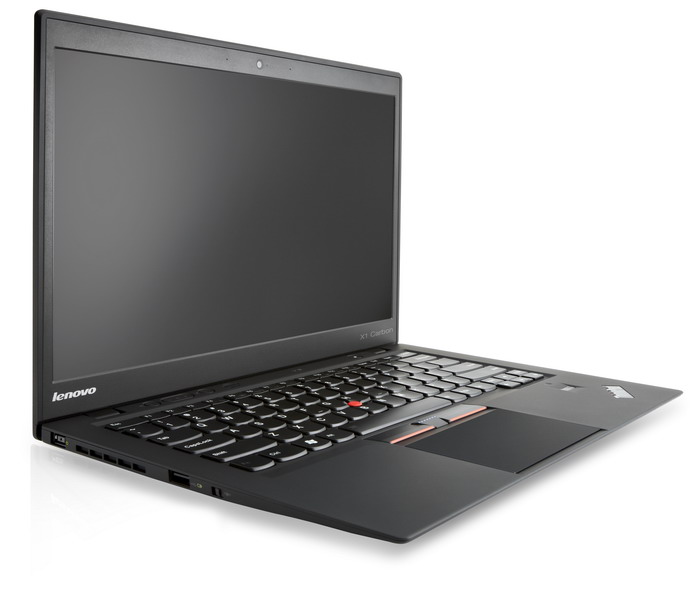
In general, of course, the ThinkPad design phenomenon is extremely entertaining. Since October 1992, when the first models 700, 700C and 700T were released, the approach to the design of mobile computers has changed completely and completely, at least three times. The reasons for this were both technical (increasing the diagonal of LCD matrices, reducing the physical dimensions of the battery, simplifying the cooling system, etc.) and “aesthetic” (using new materials, the desire to reduce weight at all costs, sometimes even at the cost of reducing strength and durability, new design trends). How many similarities will we find between modern HP or Apple laptops and their predecessors a decade ago? And the ThinkPad family traits have been wandering from model to model for 20 years, and for some reason they don’t bother. Of course, both IBM and Lenovo made design changes,

20 years ago no one even thought about mobile computers of such thickness (or even such thinness)
But in the case of the X1 Carbon, Lenovo designers had a truly puzzling task. Indeed, at a time when the ThinkPad was invented, they never heard of ultrabooks. And it was necessary to somehow combine the requirements for this new class of mobile computers with a classic exterior. It’s the same as Apple would try to make the new generation of MacBook Air outwardly indistinguishable from something like the 2001 PowerBook G4 Titanium. How to maintain similarity and not be accused of mediocre self-citation?
In my personal opinion, the balance was maintained in the X1 Carbon. At first glance it’s clear that this is not just another variation on the already mentioned MacBook Air, but the most ThinkPad. A radically black case made of durable carbon fiber with a coating resembling rubber to the touch, a “chopped” classic design, a familiar logo exactly where it should be.
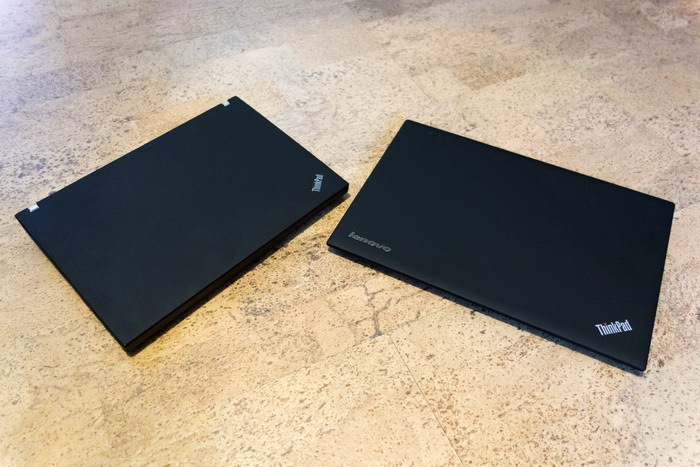
On the left is the ThinkPad X201s, on which there is not even a Lenovo logo, on the right is the X1 Carbon.

They are in the open.
On the left side there was a place for the usual mechanical WiFi and Bluetooth switch, and on the right - a card reader. We also have at our disposal one USB 3.0 and 2.0 port (the latter can be used to charge other devices, even if the X1 is turned off), as well as DisplayPort with audio support. There is a very correctly working fingerprint scanner, eliminating the need for a regular password entry. There is no need to talk about such a thing as TrackPoint: the red circle, which appeared 20 years ago, also did not disappear.
But something was missing. One loss is rather psychological. Owners of the MacBooks love to demonstrate how they lift the lid of their silver friend with one finger, without holding the battery pack and keyboard. According to many “makovodov”, only computers with a bitten apple do that, which I have repeatedly disappointed with, showing the same focus on the ThinkPad X201s. After that, if the floor was clean, I put a ThinkPad on it and stood on top, urging the other person to do the same with my miracle computer. For some reason, no one agreed ...
So on X1, these tricks are impossible. The “base” of this model is very light and therefore rises with the lid. I did not dare to get up on Carbon. Everything looks pretty reliable, but there is no duplicate magnesium case inside. And no matter how smart this smart machine rattled from my 85 kilograms ... We
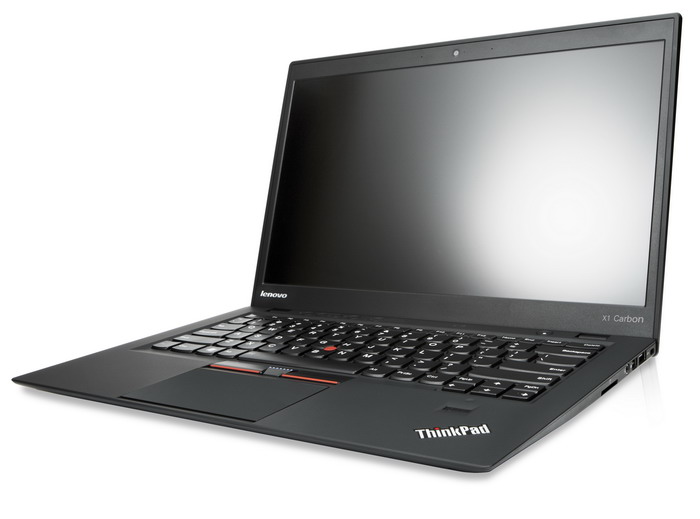
won’t worry much about the loss of the modem connector for connecting to the telephone line: since we had affordable EDGE / 3G, it would never occur to anyone to use such archaism. But the lack of an Ethernet port, of course, breaks the pattern: ThinkPad did not exist without it before. Everything is solved using one of the many USB-to-Ethernet adapters, but ... Users with experience will understand my sadness.
The sweet-hearted latch mechanism on the top cover also disappeared, but we have already encountered this in the ThinkPad line. Much more emotionally, many will react to the disappearance of the keyboard flashlight, which led the uninitiated to a tender, delighted state. Believe it or not, I deliberately turned off the lights several times in the room to work with it — a very cozy feeling arose. Instead of a flashlight, a keyboard backlight appeared with two brightness levels. She also looks great and, perhaps, even more practical. But the sensation of magic that arose when a completely invisible diode suddenly lit up the keyboard, the backlight did not reproduce ...
The screen size is 14 inches, but to be honest, I found out about it when I read the specifications. There is no feeling that the ultrabook turned out to be more than 13-inch counterparts, no. But the eyes look at a larger area, but with a resolution of 1600x900, much nicer than a traditional ultra-screen. You can, of course, complain that the matrix is not FullHD, but for me personally (for me) it becomes convenient to work with such a resolution only with a diagonal of 21 inches or more. And even on the 18-inch Acer desktop somehow ... too small. Under Windows 8, in “tiled” mode, FullHD looks good even on 11-inch matrices, but you get to the desktop and the game “hit the cross” starts ... Therefore, in my opinion, everything is optimal with this point in the X1 Carbon. Well, do not forget that the screen surface is matte: judging by the comments on my past reviews,
In addition to jokes, the mirror effect on the screen is really completely absent, but the TN + Film matrix itself. Therefore, X1 Carbon is unlikely to be suitable for professional photo editing. The viewing angles are sufficient so that the image can be viewed together, but if the deviation from the center is more than 50-55 degrees, the colors begin to fade and distort. However, I’m not at all sure that this is bad. Is it not enough that you will look at this ultrabook, originally intended for businessmen? It pisses me off a little when in a public place anyone can even perfectly see the image on the excellent iPad screen at a good angle. And here is a kind of natural defense against the curious. For work, I repeat, the matrix fits perfectly. It is moderately bright, with a uniform illumination that does not hit the eyes, and you can look at it for hours in a row without getting tired.
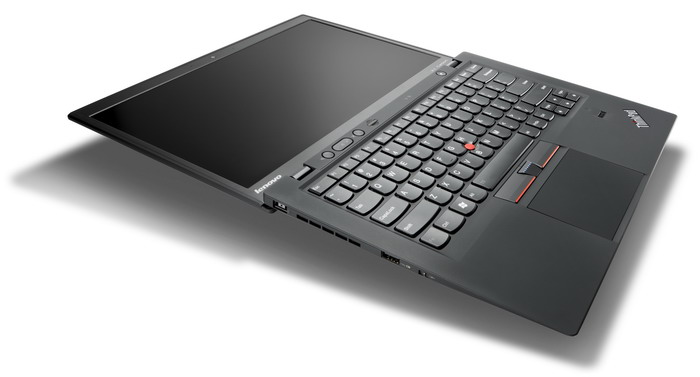
This is not a beautiful rendering. So X1 Carbon can actually.
By the way, the screen leans back as much as 180 degrees. I won’t know how to use it, it can facilitate / improve the work, but it looks extremely impressive.
I don’t even know what to say about the keyboard. They are considered a kind of standard in ThinkPad'ah, and in this case there is absolutely nothing to complain about. The location of the keys, their size and stroke, the sound of pressing - everything, in my opinion, is impeccable. The only thing that was slightly annoying was the unusual arrangement of the Fn and Ctrl keys. But their functionality can be changed in the BIOS, after which the irritation disappeared without a trace.
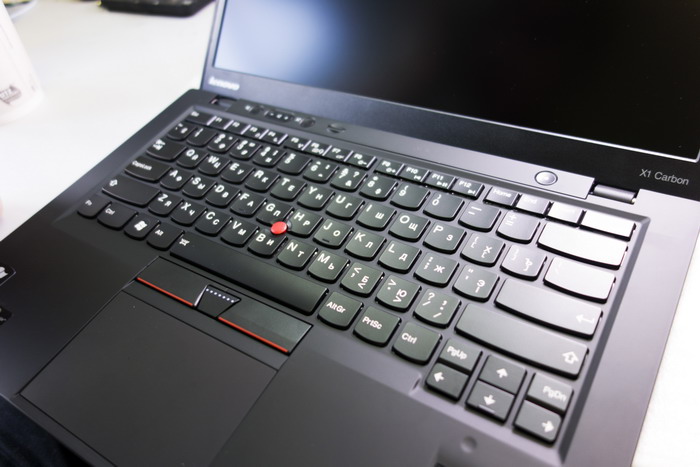
The touchpad is notable for the size of a PC, and, as it is now fashionable, it lacks hardware buttons (in fact, of course, they are, they simply hide in the lower corners). He understands gestures, like flipping with two fingers and zooming in / out, as if this is not a touchpad, but a smartphone screen. I still have a feeling that the driver of this module is still damp: periodically, the action is clearly monitored, but no action is taken. A few seconds pass - and once, everything is all right again. I think it will not dry out with the update: Lenovo regularly releases new versions of drivers even for relatively old ThinkPad models, and the iconic one for X1 Carbon will be finished with special zeal. The main thing is not to forget to run the ThinkVantage System Update utility from time to time.
Well, what, we studied the exterior, now we climb inside. Reminding only that the thickness of the case in the thickest place is 19 mm, and the weight of the entire structure is 1.3 kg. We dismantled the X1 Carbon
iron
with a seasoned repairman Sasha Levchenko, and he asked to be sure to mention that from the point of view of opening convenience and maintainability, this model is almost perfect in general. Indeed, no tricky bolts and latches, no suction cups to remove the screen - even a child can disassemble X1 Carbon, if, of course, someone allows him.
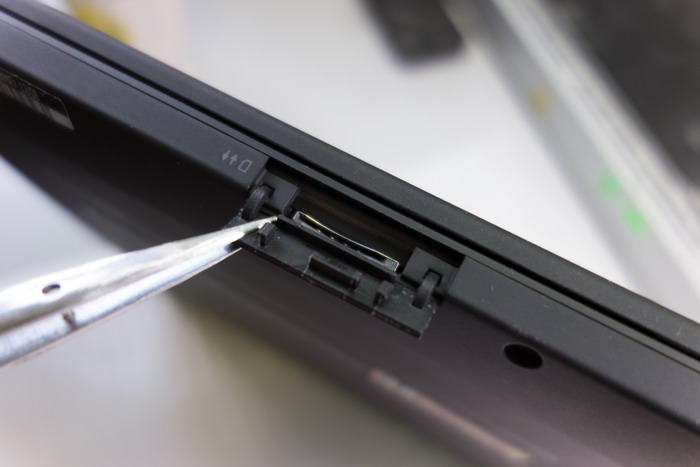
When they started to unscrew the screws, they found on the back of the case a hole for the SIM card, covered with a plug. Yes, indeed, there are X1 Carbon versions with a 3G module, but for analysis I was given the simplest one, devoid of such an important convenience. However, at some cost and skill the module can be added, but more on that later.
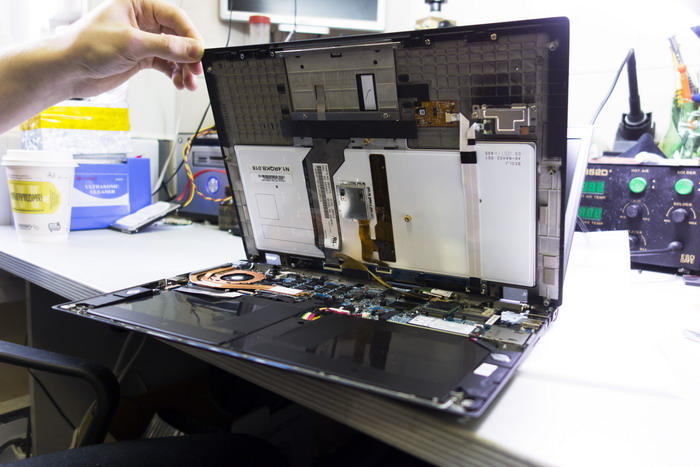
In the classic ThinkPad, the keyboard can be easily watered with water and other liquids, for the drain of which special through holes are provided. Here, the keyboard is moderately moisture resistant and is able to withstand, for example, half a glass of water (from sweet hot tea, according to rumors, it can get lousy).
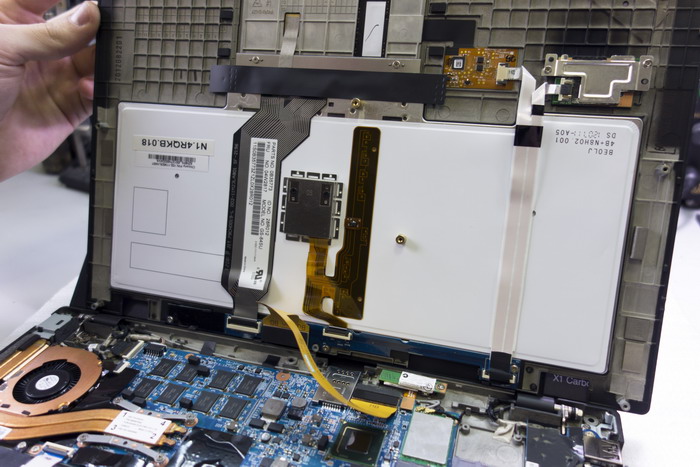
At the same time, the keyboard module from the back is completely sealed, and not a drop of moisture will fall on a delicate electronic filling. In the worst case, it is the keyboard that will suffer, but not the electronics and data.
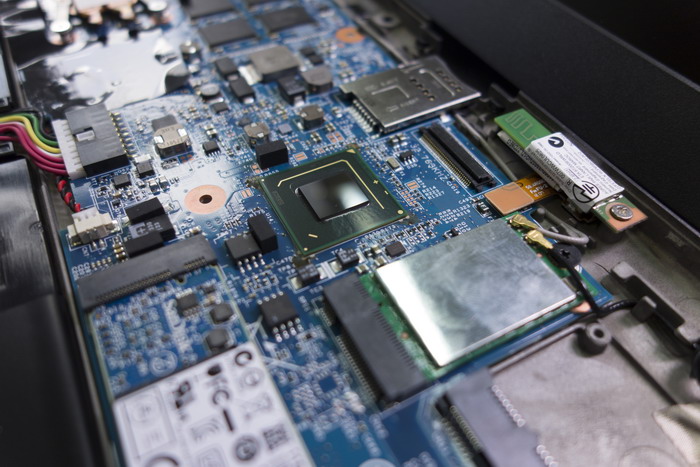
We begin to consider the motherboard. The North Bridge, as is customary for ultrabooks on Ivy Bridge, is deprived of not only active, but also passive cooling. Apparently, and so good.
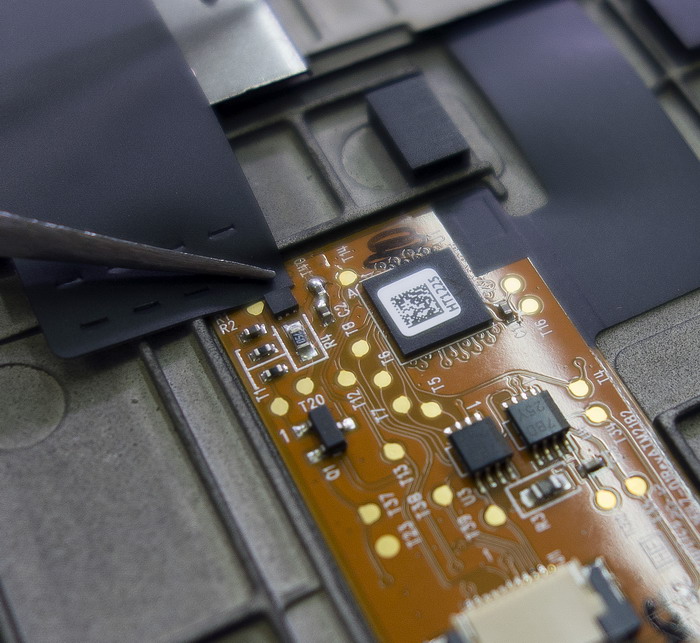
On one of the minor boards, the sharp-sighted eye of Sasha Levchenko noticed traces of post-refinement. Design changes were clearly made until the very last moment.
The SSD is not installed simple, but SanDisk, with a capacity of 128 GB and a standard mSATA interface. Its characteristics are quite decent: up to 418 MB / s read and up to 325 MB / s write. But if you are looking at the X1 Carbon, I highly recommend the version with 256 gigabytes on board. 128 GB is sparse in itself, and here another 13 and a half eats the service section, one and a half - a hidden section with drivers, another 8 gigs are forever hibernated ...
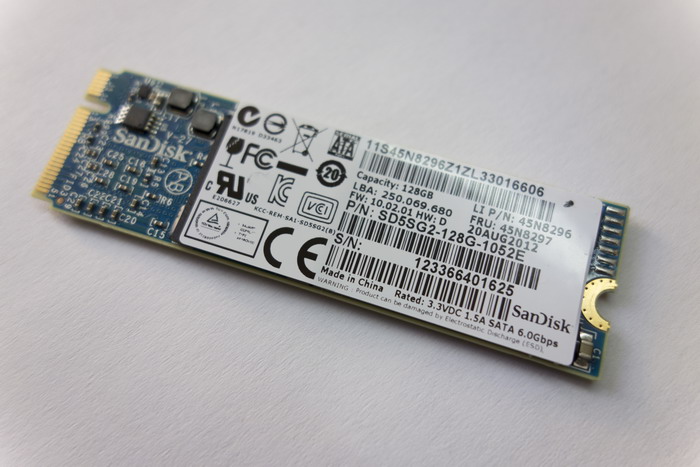
SSD from X1 Carbon
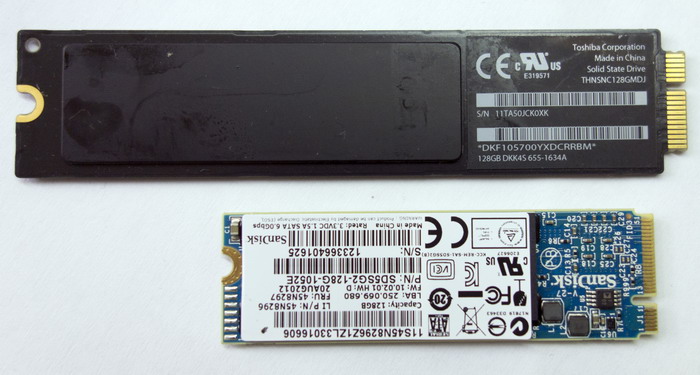
He is in the company with a brother of the same capacity from the MacBook Air sample 2010 year
In general, some nonsense remains. You can accelerate somewhat, but you feel as if you are on a strict diet. Especially clever guys can buy a model with 128 GB on board, and then order on eBay can not be such a quick, but certainly more capacious model. As far as I understand, there should not be any problems with the compatibility of the new hardware, as it happens in Lenovo and HP with WiFi adapters.

We initially suggested that behind this small hole on the back is the good old Reset. But no - this is an emergency power off
By the way, the WiFi adapter here is native, Intel (6205th model), which allows us to enjoy all the joys of WiDi, wireless connectivity to displays, TVs and other image-receiving devices. I, I confess, have such a smart TV in the collection, but in the future it is planned to be built everywhere, so one day WiDi can really come in handy. I draw attention to this because many manufacturers put Qualcomm-Atheros adapters in ultrabooks, which are no worse, but are not compatible with WiDi.
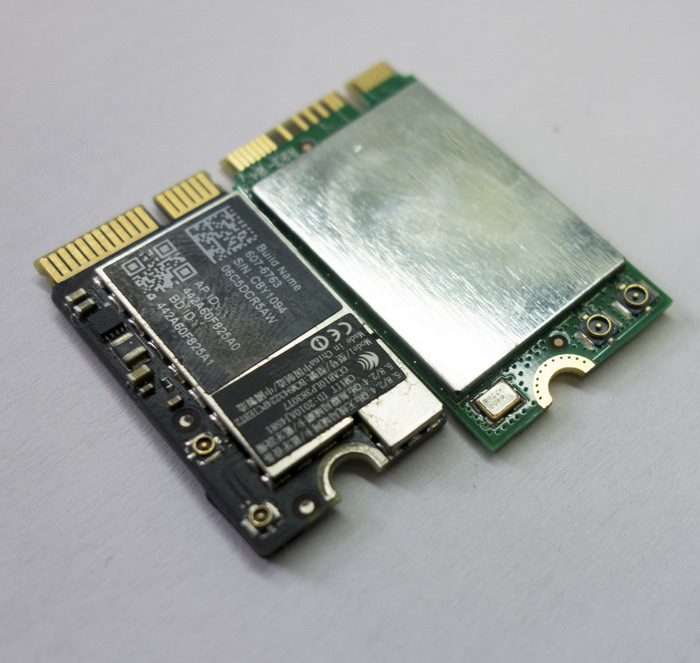
The WiFi adapter from X1 Carbon (above) and MacBook Air (we just have a disassembled copy at hand)
The Broadcom adapter is responsible for the operation of Bluetooth. In today's economical times, this is also rare: they are usually limited to a combined WiFi + Bluetooth adapter.
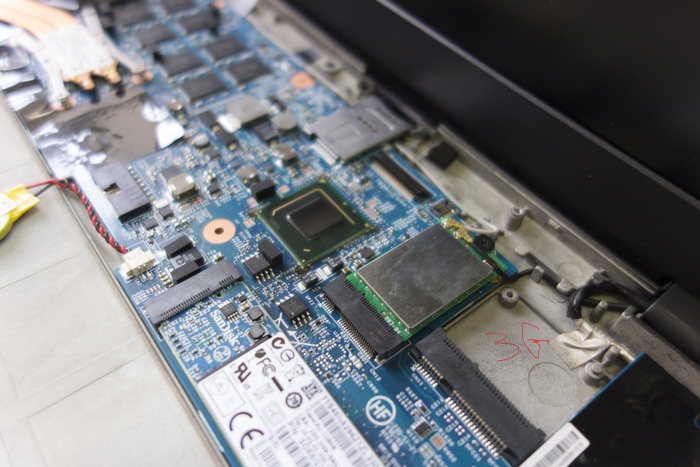
In place of the empty connector in the more expensive versions of the X1 Carbon there is a 3G module.
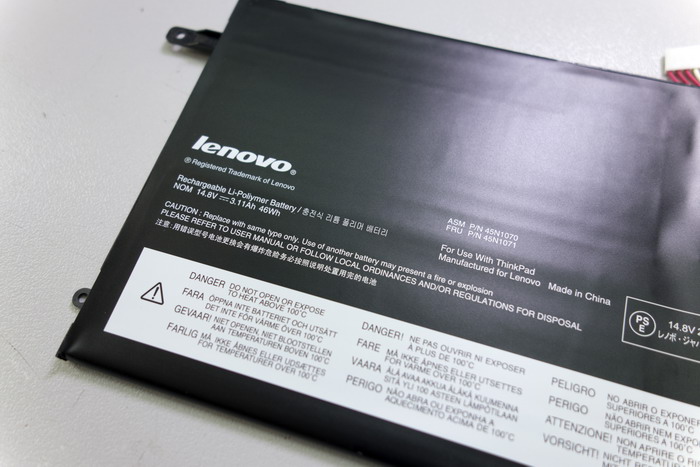
The battery capacity is 46 Wh * h. This is a good figure, but not a record: for example, the Lenovo IdeaPad U300s ultrabook, opened by me for fun, was 54 Wh * h. On the official Lenovo website, they promise us “more than 8 hours of work on a single charge,” and this is partly true. Partly, because such results can be achieved by simply placing Carbon on the table, twisting the brightness to a minimum and slowly flipping through a long text.
Yes, and do not forget to turn off all wireless interfaces. With a more realistic use model, when the brightness is 75%, WiFi is turned on, several browser windows are open (two of which are Facebook and Twitter) and text is typed in parallel, you can firmly count on four hours. If you're lucky, then for nearly five. Personally, this is quite enough for me, because I rarely work for a long time away from power sources. But seasoned workaholics, who are used to drawing presentations and arranging endless excavations in Excel databases for many hours in a row on transatlantic flights, will be disappointed. After all, neither a battery of increased capacity, nor a docking station can be connected. Hope is only for numerous external batteries, among which there are models that can power an ultrabook for almost 12 hours in a row. But here another obstacle arises - not a very standard power connector, remotely resembling a USB interface. As far as I know, the Chinese masters have not cloned it yet. Although, given their speed, another month or two and everything will be.
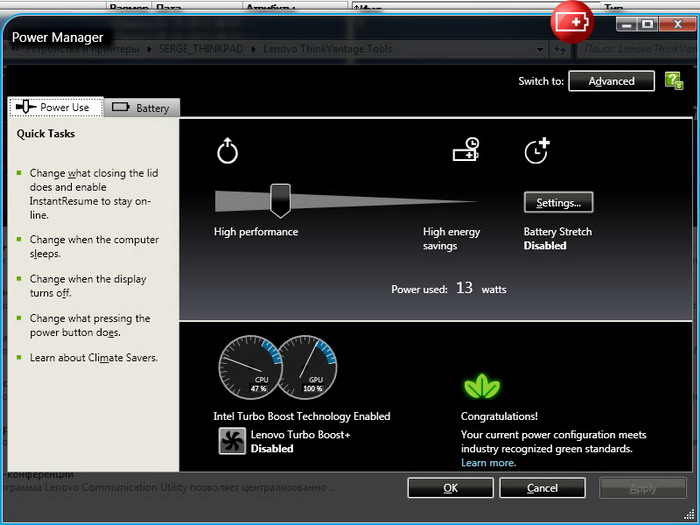
X1 Carbon knows how to measure its energy consumption and show the numbers to the owner. The
relative weakness of the built-in battery largely compensates for its charging speed. Thanks to RapidCharge technology, it takes forty minutes to charge from zero to 80%. And the battery is fully ready for battle in an hour. This means that you can thoroughly recharge when you visit a cafe or simply during a transfer at the airport, since the farther from Russia, the easier it is to find a free outlet in the waiting room.
We remove the battery and get close to the motherboard. As you can see, the RAM is wired directly to it and is not subject to independent upgrade. It’s a pity: for example, in the already mentioned U300s, not only was the memory on the standard soDIMM, there was also a free slot for the upgrade. Therefore, taking into account the steady growth of appetites of modern applications, it is better to immediately take the X1 Carbon version with 8 gigabytes on board. The margin for this is small (especially by Apple standards), and another 4 GB will not be superfluous.
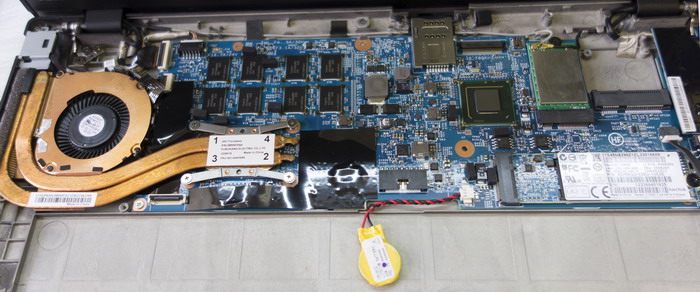
How do you like the size and security level of the BIOS battery?
Please note that all the connectors - USB, DisplayPort, headphones, power - are made on separate boards. This complicates the design, but it significantly simplifies and cheapens the repair, if such is suddenly required. If on most ultrabooks and on MacBook Air, if the USB port is burned, you need to change the entire motherboard (or try to restore the port using artisanal methods), then here you can replace a much cheaper module in a matter of seconds. Very thoughtful and user friendly, engineers deep respect.
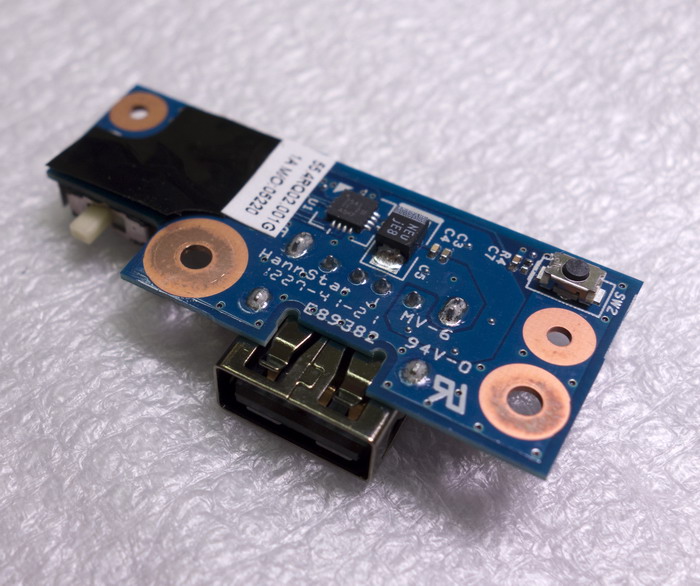
This scarf with a USB port and a switch for wireless interfaces is quite inexpensive ...
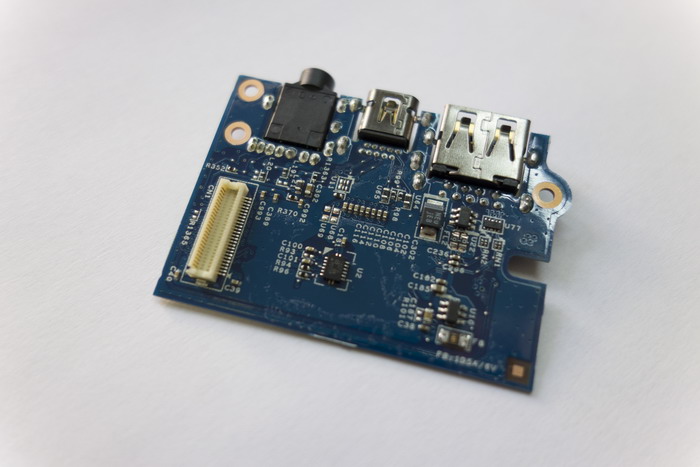
... but this one with a Display Port, USB 3.0 and a headphone jack is more expensive. Still, changing or fixing it is easier than the entire motherboard
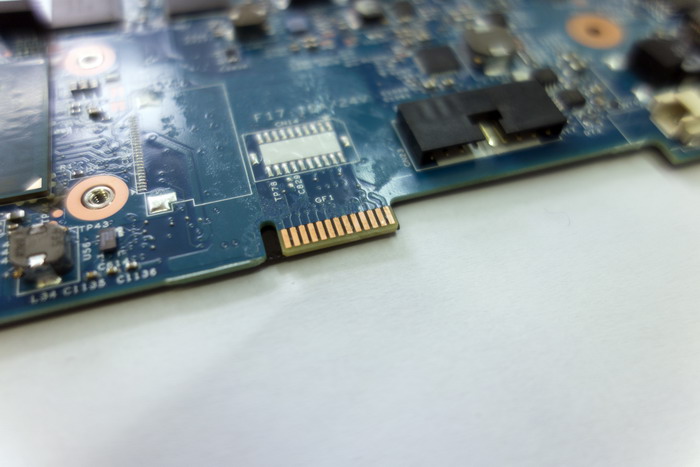
By the way, you rarely see a service interface on an ultrabook board. An
ultrabook based on the Intel Core i5-3317U processor works. This is a representative of the Ivy Bridge family, popular in ultrabooks. Two cores, 22 nanometers, support for Hyper-Threading, TDP 17 watts. Integrated graphics core - Intel HD Graphics 4000 with a peak frequency of 1.05 GHz.

I wrote about the performance of this bundle in the review of the Acer Aspire S5 ultrabookusing the same processor. In short: the processor speed is more than enough for any tasks that you can think of for an ultrabook. Even with the encoding of HD-video, it will cope well, thanks to the second version of QuickSync technology. Recently, from PC games, hands have only reached World of Tanks, so there you can firmly count 45 FPS at minimum settings. I note this at a resolution of 1600x900. For a really beautiful picture, of course, you need a discrete graphics chip, and even better - a powerful desktop computer, but as an option for several fights in a hotel room or with friends, it will do.
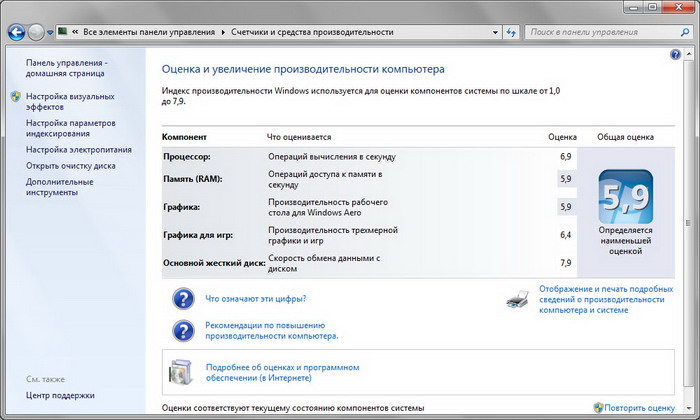
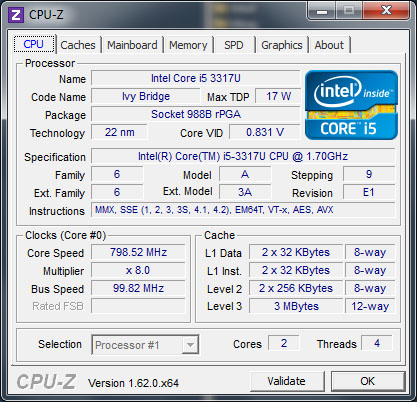
The cooling system deserves a separate compliment, because I simply did not see anything quieter in ultrabooks before X1 Carbon. It seemed that in such a thin case it was impossible to achieve noiselessness. But no! The cooler in this device can be heard only under a very serious load, like the same World of Tanks. And even then it’s not much - it’s about like brothers from other manufacturers in normal mode. During the execution of less "heavy" tasks, the cooler whistles slightly in the upper part of the middle range and does not cause irritation. At the same time, quiet operation does not mean ineffective: the temperature of the components is normal, the bottom cover is slightly warm.
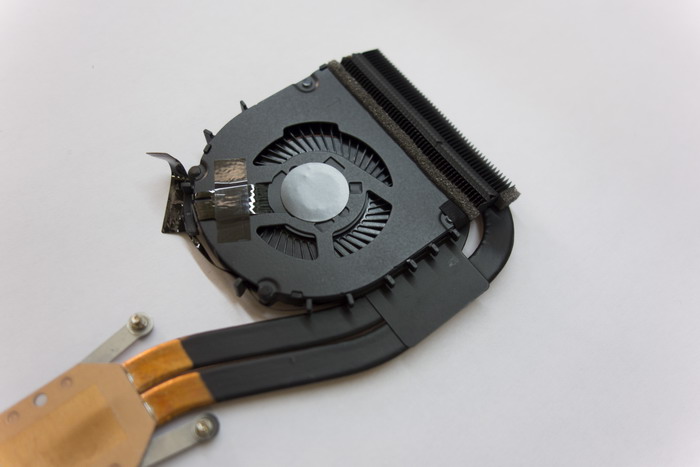
Small blades with the right design - the key to quiet operation. The main thing is that over time, no dust builds up between them.
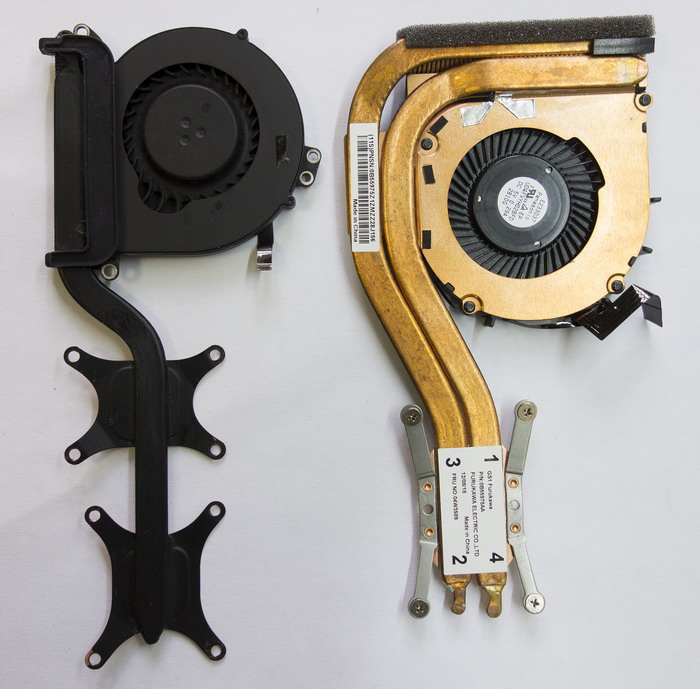
The X1 Carbon cooling system next to a colleague from the MacBook Air
The opening of the ultrabook explained the reasons for such a quiet operation: the cooling system was developed by the Japanese multidisciplinary company Furukawa Electric, founded already in 1884. And the propeller itself bears the label Panasonic, which is also very attractive to itself. Just like in a classic joke about the secret of delicious tea: "Jews, do not spare the tea leaves!".
Branded chips
As you know, ThinkPad is not only a special approach to hardware design, but also a number of extremely useful software add-ons. IBM and then Lenovo took care of everything - their own energy-saving mechanism, backup, automatic BIOS and driver updates, system diagnostic tools, etc. We met something similar with other manufacturers, but usually they immediately demolished it - away from sin. Everything is done here so conveniently and logically that thoughts of annihilation do not even arise. On the contrary, you use them without even thinking about alternative tools.
True, I was somewhat alarmed by the screen that opened when I pressed a button formerly called ThinkVantage. Previously, it called up a window with ThinkVantage Tools - probably not very beautiful in modern times, but extremely functional.
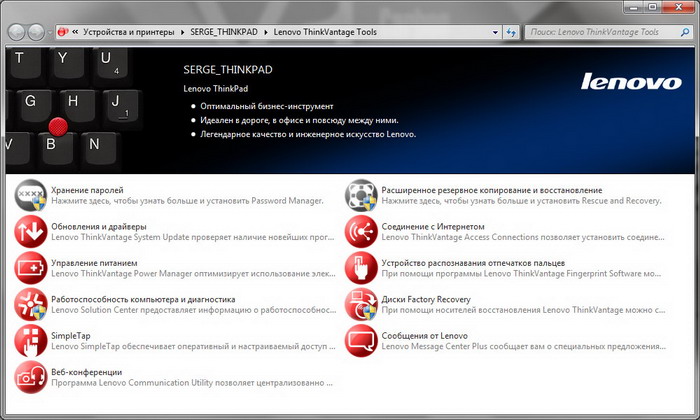
As it was
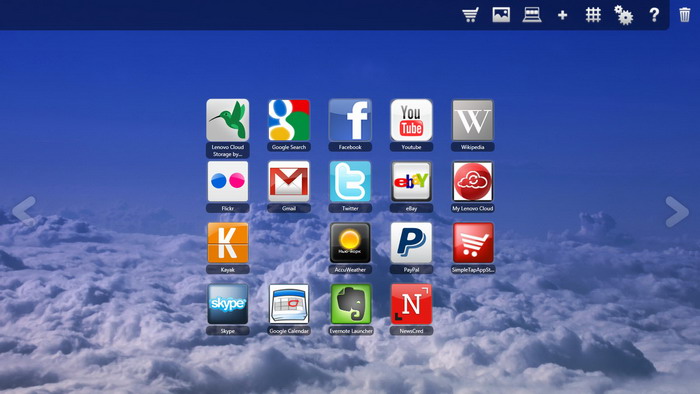
How it became
Now colorful colorful icons come out on the whole screen - Google Search, MTV, Groupon, Accuweather, Twitter, Kayak ... Everything is mixed up. All sorts of service icons settled on a separate screen - turning off WiFi, microphone settings, etc.
At first I didn’t understand at all what all this mottling was about. And then I guessed: bah, so it’s all under the touch screen imprisoned. It would be funny and useful to poke on these icons on it. But the X1 Carbon matrix is not sensory, ordinary. And with a mouse with a touchpad, the need for hefty icons is, frankly, dubious. Thank you, of course, for the future, but perhaps you should think about a design that now does not fit into the strict style of the ThinkPad.
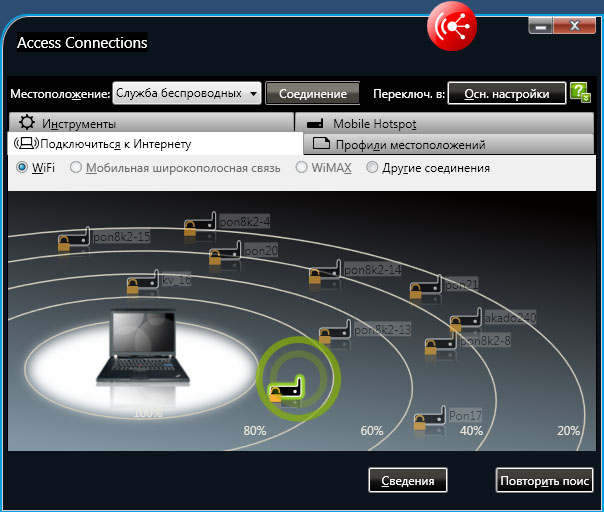
And ThinkVantage Tools, of course, has not disappeared - they just now need to be called up from the Control Panel or the "All Programs" menu.
Total
Good turned ultrabook. Comfortable, balanced and, most importantly, original. You won’t confuse business colleagues with all the desire.
I already wrote a lot about what I liked. Now about two, let’s say, small disharmonies.
Firstly, the soft touch coating attracts fingerprints more than usual. My previous Thinkpad was the same to the touch, but it looked neat, even if I hadn't wiped it for months. Here, it is better to walk with an alcohol napkin over the lid and around the keyboard at least once a week, otherwise the X1 Carbon will seem untidy.
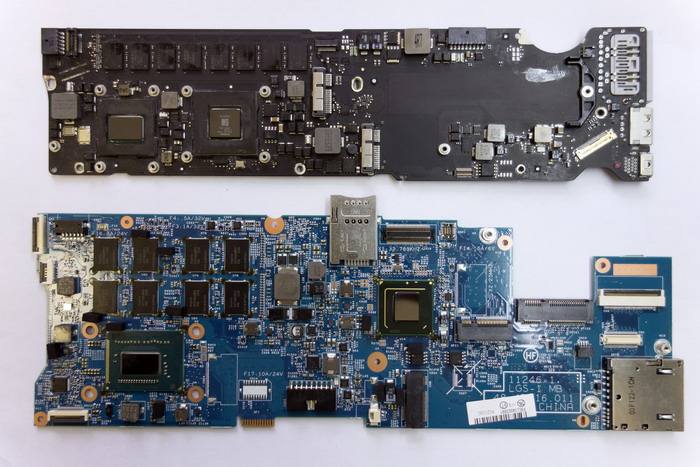
MacBook Air motherboards (above) and Lenovo ThinkPad X1 Carbon. It is worth noting that at X1 all the important components are located on one side and the back design is passive. Apple has a rear part of the RAM soldered
. Secondly, despite the surprising resemblance, the Lenovo ThinkPad X1 Carbon is still not quite a classic ThinkPad. If we draw parallels with cars, then we no longer have a mighty frame SUV, but a solid and comfortable crossover. It can be used to ride around the city and to the country with pleasure, but it is better not to storm the entrances to the village of Krasnenkoe after the October rainfall.
In the United States, the base model X1 Carbon (just the one I had in my experiments) costs $ 1299 (plus sales tax). By the way, it is not prohibitively expensive - on a par with the top models of other serious manufacturers. With us, it will cost about 50,000 rubles. Further, as is customary to put it, depends solely on your desires and financial capabilities. But I would not save on RAM and SSD - after all, the ThinkPad is usually bought for a year or even two. And the 3G module probably will not hurt.
By the way, there are more classic models for conservatives in the ThinkPad family. For example, the 12-inch X230 - it is not so thin, but it is made in accordance with all traditional patterns.
I will continue to watch with interest the development of the ultrabook ThinkPad line. I wonder if one day a model will appear in it, on which it will again be possible to jump?
I still got my own ThinkPad, but only at the end of 2010, when Lenovo was responsible for the release of this series for a good five years. All these years, according to the terms of the deal, IBM was directly involved in the design of the new ThinkPad models, and therefore somehow did not have to be surprised at the reasonableness of all the hardware and software elements of the purchased X201s. But for two years now, Lenovo has been developing the ThinkPad line completely independently, and therefore it was especially interesting to study the latest ThinkPad X1 Carbon ultrabook. By a good tradition, I examined it not only from the outside, but also looked deep inside. I'll start with the most important thing: the MATT screen.
In general, of course, the ThinkPad design phenomenon is extremely entertaining. Since October 1992, when the first models 700, 700C and 700T were released, the approach to the design of mobile computers has changed completely and completely, at least three times. The reasons for this were both technical (increasing the diagonal of LCD matrices, reducing the physical dimensions of the battery, simplifying the cooling system, etc.) and “aesthetic” (using new materials, the desire to reduce weight at all costs, sometimes even at the cost of reducing strength and durability, new design trends). How many similarities will we find between modern HP or Apple laptops and their predecessors a decade ago? And the ThinkPad family traits have been wandering from model to model for 20 years, and for some reason they don’t bother. Of course, both IBM and Lenovo made design changes,
20 years ago no one even thought about mobile computers of such thickness (or even such thinness)
But in the case of the X1 Carbon, Lenovo designers had a truly puzzling task. Indeed, at a time when the ThinkPad was invented, they never heard of ultrabooks. And it was necessary to somehow combine the requirements for this new class of mobile computers with a classic exterior. It’s the same as Apple would try to make the new generation of MacBook Air outwardly indistinguishable from something like the 2001 PowerBook G4 Titanium. How to maintain similarity and not be accused of mediocre self-citation?
In my personal opinion, the balance was maintained in the X1 Carbon. At first glance it’s clear that this is not just another variation on the already mentioned MacBook Air, but the most ThinkPad. A radically black case made of durable carbon fiber with a coating resembling rubber to the touch, a “chopped” classic design, a familiar logo exactly where it should be.
On the left is the ThinkPad X201s, on which there is not even a Lenovo logo, on the right is the X1 Carbon.
They are in the open.
On the left side there was a place for the usual mechanical WiFi and Bluetooth switch, and on the right - a card reader. We also have at our disposal one USB 3.0 and 2.0 port (the latter can be used to charge other devices, even if the X1 is turned off), as well as DisplayPort with audio support. There is a very correctly working fingerprint scanner, eliminating the need for a regular password entry. There is no need to talk about such a thing as TrackPoint: the red circle, which appeared 20 years ago, also did not disappear.
But something was missing. One loss is rather psychological. Owners of the MacBooks love to demonstrate how they lift the lid of their silver friend with one finger, without holding the battery pack and keyboard. According to many “makovodov”, only computers with a bitten apple do that, which I have repeatedly disappointed with, showing the same focus on the ThinkPad X201s. After that, if the floor was clean, I put a ThinkPad on it and stood on top, urging the other person to do the same with my miracle computer. For some reason, no one agreed ...
So on X1, these tricks are impossible. The “base” of this model is very light and therefore rises with the lid. I did not dare to get up on Carbon. Everything looks pretty reliable, but there is no duplicate magnesium case inside. And no matter how smart this smart machine rattled from my 85 kilograms ... We
won’t worry much about the loss of the modem connector for connecting to the telephone line: since we had affordable EDGE / 3G, it would never occur to anyone to use such archaism. But the lack of an Ethernet port, of course, breaks the pattern: ThinkPad did not exist without it before. Everything is solved using one of the many USB-to-Ethernet adapters, but ... Users with experience will understand my sadness.
The sweet-hearted latch mechanism on the top cover also disappeared, but we have already encountered this in the ThinkPad line. Much more emotionally, many will react to the disappearance of the keyboard flashlight, which led the uninitiated to a tender, delighted state. Believe it or not, I deliberately turned off the lights several times in the room to work with it — a very cozy feeling arose. Instead of a flashlight, a keyboard backlight appeared with two brightness levels. She also looks great and, perhaps, even more practical. But the sensation of magic that arose when a completely invisible diode suddenly lit up the keyboard, the backlight did not reproduce ...
The screen size is 14 inches, but to be honest, I found out about it when I read the specifications. There is no feeling that the ultrabook turned out to be more than 13-inch counterparts, no. But the eyes look at a larger area, but with a resolution of 1600x900, much nicer than a traditional ultra-screen. You can, of course, complain that the matrix is not FullHD, but for me personally (for me) it becomes convenient to work with such a resolution only with a diagonal of 21 inches or more. And even on the 18-inch Acer desktop somehow ... too small. Under Windows 8, in “tiled” mode, FullHD looks good even on 11-inch matrices, but you get to the desktop and the game “hit the cross” starts ... Therefore, in my opinion, everything is optimal with this point in the X1 Carbon. Well, do not forget that the screen surface is matte: judging by the comments on my past reviews,
In addition to jokes, the mirror effect on the screen is really completely absent, but the TN + Film matrix itself. Therefore, X1 Carbon is unlikely to be suitable for professional photo editing. The viewing angles are sufficient so that the image can be viewed together, but if the deviation from the center is more than 50-55 degrees, the colors begin to fade and distort. However, I’m not at all sure that this is bad. Is it not enough that you will look at this ultrabook, originally intended for businessmen? It pisses me off a little when in a public place anyone can even perfectly see the image on the excellent iPad screen at a good angle. And here is a kind of natural defense against the curious. For work, I repeat, the matrix fits perfectly. It is moderately bright, with a uniform illumination that does not hit the eyes, and you can look at it for hours in a row without getting tired.
This is not a beautiful rendering. So X1 Carbon can actually.
By the way, the screen leans back as much as 180 degrees. I won’t know how to use it, it can facilitate / improve the work, but it looks extremely impressive.
I don’t even know what to say about the keyboard. They are considered a kind of standard in ThinkPad'ah, and in this case there is absolutely nothing to complain about. The location of the keys, their size and stroke, the sound of pressing - everything, in my opinion, is impeccable. The only thing that was slightly annoying was the unusual arrangement of the Fn and Ctrl keys. But their functionality can be changed in the BIOS, after which the irritation disappeared without a trace.
The touchpad is notable for the size of a PC, and, as it is now fashionable, it lacks hardware buttons (in fact, of course, they are, they simply hide in the lower corners). He understands gestures, like flipping with two fingers and zooming in / out, as if this is not a touchpad, but a smartphone screen. I still have a feeling that the driver of this module is still damp: periodically, the action is clearly monitored, but no action is taken. A few seconds pass - and once, everything is all right again. I think it will not dry out with the update: Lenovo regularly releases new versions of drivers even for relatively old ThinkPad models, and the iconic one for X1 Carbon will be finished with special zeal. The main thing is not to forget to run the ThinkVantage System Update utility from time to time.
Well, what, we studied the exterior, now we climb inside. Reminding only that the thickness of the case in the thickest place is 19 mm, and the weight of the entire structure is 1.3 kg. We dismantled the X1 Carbon
iron
with a seasoned repairman Sasha Levchenko, and he asked to be sure to mention that from the point of view of opening convenience and maintainability, this model is almost perfect in general. Indeed, no tricky bolts and latches, no suction cups to remove the screen - even a child can disassemble X1 Carbon, if, of course, someone allows him.
When they started to unscrew the screws, they found on the back of the case a hole for the SIM card, covered with a plug. Yes, indeed, there are X1 Carbon versions with a 3G module, but for analysis I was given the simplest one, devoid of such an important convenience. However, at some cost and skill the module can be added, but more on that later.
In the classic ThinkPad, the keyboard can be easily watered with water and other liquids, for the drain of which special through holes are provided. Here, the keyboard is moderately moisture resistant and is able to withstand, for example, half a glass of water (from sweet hot tea, according to rumors, it can get lousy).
At the same time, the keyboard module from the back is completely sealed, and not a drop of moisture will fall on a delicate electronic filling. In the worst case, it is the keyboard that will suffer, but not the electronics and data.
We begin to consider the motherboard. The North Bridge, as is customary for ultrabooks on Ivy Bridge, is deprived of not only active, but also passive cooling. Apparently, and so good.
On one of the minor boards, the sharp-sighted eye of Sasha Levchenko noticed traces of post-refinement. Design changes were clearly made until the very last moment.
The SSD is not installed simple, but SanDisk, with a capacity of 128 GB and a standard mSATA interface. Its characteristics are quite decent: up to 418 MB / s read and up to 325 MB / s write. But if you are looking at the X1 Carbon, I highly recommend the version with 256 gigabytes on board. 128 GB is sparse in itself, and here another 13 and a half eats the service section, one and a half - a hidden section with drivers, another 8 gigs are forever hibernated ...
SSD from X1 Carbon
He is in the company with a brother of the same capacity from the MacBook Air sample 2010 year
In general, some nonsense remains. You can accelerate somewhat, but you feel as if you are on a strict diet. Especially clever guys can buy a model with 128 GB on board, and then order on eBay can not be such a quick, but certainly more capacious model. As far as I understand, there should not be any problems with the compatibility of the new hardware, as it happens in Lenovo and HP with WiFi adapters.
We initially suggested that behind this small hole on the back is the good old Reset. But no - this is an emergency power off
By the way, the WiFi adapter here is native, Intel (6205th model), which allows us to enjoy all the joys of WiDi, wireless connectivity to displays, TVs and other image-receiving devices. I, I confess, have such a smart TV in the collection, but in the future it is planned to be built everywhere, so one day WiDi can really come in handy. I draw attention to this because many manufacturers put Qualcomm-Atheros adapters in ultrabooks, which are no worse, but are not compatible with WiDi.
The WiFi adapter from X1 Carbon (above) and MacBook Air (we just have a disassembled copy at hand)
The Broadcom adapter is responsible for the operation of Bluetooth. In today's economical times, this is also rare: they are usually limited to a combined WiFi + Bluetooth adapter.
In place of the empty connector in the more expensive versions of the X1 Carbon there is a 3G module.
The battery capacity is 46 Wh * h. This is a good figure, but not a record: for example, the Lenovo IdeaPad U300s ultrabook, opened by me for fun, was 54 Wh * h. On the official Lenovo website, they promise us “more than 8 hours of work on a single charge,” and this is partly true. Partly, because such results can be achieved by simply placing Carbon on the table, twisting the brightness to a minimum and slowly flipping through a long text.
Yes, and do not forget to turn off all wireless interfaces. With a more realistic use model, when the brightness is 75%, WiFi is turned on, several browser windows are open (two of which are Facebook and Twitter) and text is typed in parallel, you can firmly count on four hours. If you're lucky, then for nearly five. Personally, this is quite enough for me, because I rarely work for a long time away from power sources. But seasoned workaholics, who are used to drawing presentations and arranging endless excavations in Excel databases for many hours in a row on transatlantic flights, will be disappointed. After all, neither a battery of increased capacity, nor a docking station can be connected. Hope is only for numerous external batteries, among which there are models that can power an ultrabook for almost 12 hours in a row. But here another obstacle arises - not a very standard power connector, remotely resembling a USB interface. As far as I know, the Chinese masters have not cloned it yet. Although, given their speed, another month or two and everything will be.
X1 Carbon knows how to measure its energy consumption and show the numbers to the owner. The
relative weakness of the built-in battery largely compensates for its charging speed. Thanks to RapidCharge technology, it takes forty minutes to charge from zero to 80%. And the battery is fully ready for battle in an hour. This means that you can thoroughly recharge when you visit a cafe or simply during a transfer at the airport, since the farther from Russia, the easier it is to find a free outlet in the waiting room.
We remove the battery and get close to the motherboard. As you can see, the RAM is wired directly to it and is not subject to independent upgrade. It’s a pity: for example, in the already mentioned U300s, not only was the memory on the standard soDIMM, there was also a free slot for the upgrade. Therefore, taking into account the steady growth of appetites of modern applications, it is better to immediately take the X1 Carbon version with 8 gigabytes on board. The margin for this is small (especially by Apple standards), and another 4 GB will not be superfluous.
How do you like the size and security level of the BIOS battery?
Please note that all the connectors - USB, DisplayPort, headphones, power - are made on separate boards. This complicates the design, but it significantly simplifies and cheapens the repair, if such is suddenly required. If on most ultrabooks and on MacBook Air, if the USB port is burned, you need to change the entire motherboard (or try to restore the port using artisanal methods), then here you can replace a much cheaper module in a matter of seconds. Very thoughtful and user friendly, engineers deep respect.
This scarf with a USB port and a switch for wireless interfaces is quite inexpensive ...
... but this one with a Display Port, USB 3.0 and a headphone jack is more expensive. Still, changing or fixing it is easier than the entire motherboard
By the way, you rarely see a service interface on an ultrabook board. An
ultrabook based on the Intel Core i5-3317U processor works. This is a representative of the Ivy Bridge family, popular in ultrabooks. Two cores, 22 nanometers, support for Hyper-Threading, TDP 17 watts. Integrated graphics core - Intel HD Graphics 4000 with a peak frequency of 1.05 GHz.
I wrote about the performance of this bundle in the review of the Acer Aspire S5 ultrabookusing the same processor. In short: the processor speed is more than enough for any tasks that you can think of for an ultrabook. Even with the encoding of HD-video, it will cope well, thanks to the second version of QuickSync technology. Recently, from PC games, hands have only reached World of Tanks, so there you can firmly count 45 FPS at minimum settings. I note this at a resolution of 1600x900. For a really beautiful picture, of course, you need a discrete graphics chip, and even better - a powerful desktop computer, but as an option for several fights in a hotel room or with friends, it will do.
The cooling system deserves a separate compliment, because I simply did not see anything quieter in ultrabooks before X1 Carbon. It seemed that in such a thin case it was impossible to achieve noiselessness. But no! The cooler in this device can be heard only under a very serious load, like the same World of Tanks. And even then it’s not much - it’s about like brothers from other manufacturers in normal mode. During the execution of less "heavy" tasks, the cooler whistles slightly in the upper part of the middle range and does not cause irritation. At the same time, quiet operation does not mean ineffective: the temperature of the components is normal, the bottom cover is slightly warm.
Small blades with the right design - the key to quiet operation. The main thing is that over time, no dust builds up between them.
The X1 Carbon cooling system next to a colleague from the MacBook Air
The opening of the ultrabook explained the reasons for such a quiet operation: the cooling system was developed by the Japanese multidisciplinary company Furukawa Electric, founded already in 1884. And the propeller itself bears the label Panasonic, which is also very attractive to itself. Just like in a classic joke about the secret of delicious tea: "Jews, do not spare the tea leaves!".
Branded chips
As you know, ThinkPad is not only a special approach to hardware design, but also a number of extremely useful software add-ons. IBM and then Lenovo took care of everything - their own energy-saving mechanism, backup, automatic BIOS and driver updates, system diagnostic tools, etc. We met something similar with other manufacturers, but usually they immediately demolished it - away from sin. Everything is done here so conveniently and logically that thoughts of annihilation do not even arise. On the contrary, you use them without even thinking about alternative tools.
True, I was somewhat alarmed by the screen that opened when I pressed a button formerly called ThinkVantage. Previously, it called up a window with ThinkVantage Tools - probably not very beautiful in modern times, but extremely functional.
As it was
How it became
Now colorful colorful icons come out on the whole screen - Google Search, MTV, Groupon, Accuweather, Twitter, Kayak ... Everything is mixed up. All sorts of service icons settled on a separate screen - turning off WiFi, microphone settings, etc.
At first I didn’t understand at all what all this mottling was about. And then I guessed: bah, so it’s all under the touch screen imprisoned. It would be funny and useful to poke on these icons on it. But the X1 Carbon matrix is not sensory, ordinary. And with a mouse with a touchpad, the need for hefty icons is, frankly, dubious. Thank you, of course, for the future, but perhaps you should think about a design that now does not fit into the strict style of the ThinkPad.
And ThinkVantage Tools, of course, has not disappeared - they just now need to be called up from the Control Panel or the "All Programs" menu.
Total
Good turned ultrabook. Comfortable, balanced and, most importantly, original. You won’t confuse business colleagues with all the desire.
I already wrote a lot about what I liked. Now about two, let’s say, small disharmonies.
Firstly, the soft touch coating attracts fingerprints more than usual. My previous Thinkpad was the same to the touch, but it looked neat, even if I hadn't wiped it for months. Here, it is better to walk with an alcohol napkin over the lid and around the keyboard at least once a week, otherwise the X1 Carbon will seem untidy.
MacBook Air motherboards (above) and Lenovo ThinkPad X1 Carbon. It is worth noting that at X1 all the important components are located on one side and the back design is passive. Apple has a rear part of the RAM soldered
. Secondly, despite the surprising resemblance, the Lenovo ThinkPad X1 Carbon is still not quite a classic ThinkPad. If we draw parallels with cars, then we no longer have a mighty frame SUV, but a solid and comfortable crossover. It can be used to ride around the city and to the country with pleasure, but it is better not to storm the entrances to the village of Krasnenkoe after the October rainfall.
In the United States, the base model X1 Carbon (just the one I had in my experiments) costs $ 1299 (plus sales tax). By the way, it is not prohibitively expensive - on a par with the top models of other serious manufacturers. With us, it will cost about 50,000 rubles. Further, as is customary to put it, depends solely on your desires and financial capabilities. But I would not save on RAM and SSD - after all, the ThinkPad is usually bought for a year or even two. And the 3G module probably will not hurt.
By the way, there are more classic models for conservatives in the ThinkPad family. For example, the 12-inch X230 - it is not so thin, but it is made in accordance with all traditional patterns.
I will continue to watch with interest the development of the ultrabook ThinkPad line. I wonder if one day a model will appear in it, on which it will again be possible to jump?









