Intel Pair & Share: Communicator Turns ...

One familiar editor-in-chief of one of the Russian gadget magazines once formulated the criterion for an interesting article, in his opinion: “the magazine always needs smartphones to test for the title of“ best TV ”,“ best golf club ”,“ best pacemaker with function a fan ”or a review of a laptop’s capabilities to meet the vital interests of a dentist, livestock engineer, female diver ...”. In other words, people (both readers and users) love unexpected approaches, love when they are surprised. In full accordance with the above covenants, today we will consider the Intel program for Android and Apple tablets and communicators, which turns these devices into wireless terminals for multimedia presentations.
So, Intel Pair & Share software , as the name implies, is used to establish communication between two computers running Windows and Android OS, respectively, and transfer from one to the other (only one way - from Android to Windows) graphic objects - pictures and a photo. However, the word "transfer" in this case is not entirely applicable, since the file does not physically transfer and it is impossible to detect it on a remote computer.
The system consists of two components for two operating systems. You can download the component for Windows from the Intel website; the host requirements are an Intel processor and Windows 7. The requirements, to be honest, amaze you with their severity, and if everything is clear with the processor, then the indispensable presence of the "seven" is difficult to fit in your head the first time - can it be that even Vista will not work?
The latest version available for download is dated October last year - the program is not new, but not too well-known, in my opinion, undeservedly.
The component for Android is downloaded from the Market, it is naturally free. There are almost no system requirements - Android 2.2 and higher, of course, Wi-Fi. There is also a version for Apple iOS (version 4.1 and higher). It is stipulated that both devices must work in the same Wi-Fi network, in fact, this is not necessary - for tests I used a stationary computer with a wired network connection.
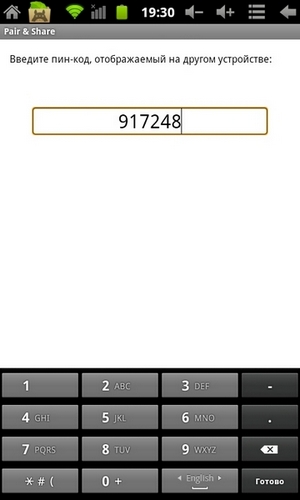

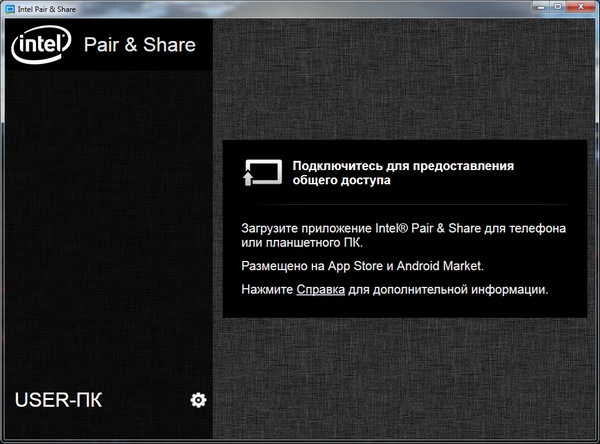
After installation and startup, the Windows client reports that it is waiting for a connection from the tablet; the client in the tablet, having scanned the network, finds a partner waiting for him and offers to enter a digital password, which at that time is displayed in LARGE LETTERS on the PC. After pairing, the program on the tablet scans the file system for the presence of graphic files, after which it shows everything found in the form of files and folders. The graphical interface is close to minimalism, in addition, screen rotation is not supported, only portrait orientation. There are practically no settings.
After scanning, the steam is ready to work. Tap on any image immediately causes it to appear on the display of a paired device, delays for files about hundreds of kilobytes in size are not noticeable at all. When not in use, the pair quickly breaks the connection; reinitialization is required, which, however, occurs instantly.

We can say that the functionality incorporated into the program is 100% efficient. What applications can she find, except to play and scare her work colleagues? At least two come to mind:
- Express viewing of photos taken by a communicator / tablet or dropped onto it, including on someone else's computer;
- Express presentation of slides exported to a graphic format. This option is also attractive because the speaker without any tricks and gains mobility free of charge in relation to the equipment showing the picture.
I have to admit that the restrictions on hard and software mentioned above reduce the vitality of both options.
If we talk about the pros and cons of the program, the merits include the ease of deploying clients, the lack of the need to configure anything in the systems (say, a firewall that never even squeaked at all), and finding a paired device quickly. As for the flaws, I would like to see the optimization of the file system scan up to the manual configuration of this process. Now scanning takes considerable time compared to other functions, especially the main one. There is still an incomprehensible moment associated with the use of the tablet’s camera. The Android interface has a camera button, but it is inactive. Either this is a global problem of the program, or compatibility with my specific plate is lame, unfortunately, I do not know.
Returning to the frivolous introduction, I would like to say that software developers still rarely write programs to surprise someone. As for the specific Intel Pair & Share, it’s easy to see the implementation of Intel’s strategy - the creation of a single communication field connecting absolutely all consumer digital devices with each other without additional intermediaries. Naturally, such a grandiose goal cannot be achieved in one step, and to "unity" is still very far away. However, steps are being taken in this direction, and software that implements this ideology will continue to be tested on this blog.









