Best Free GIF Animation Software for Windows
Animation attracts more attention, but it’s far from always convenient to use videos. They will be an excellent replacement for GIF-images, which are much easier to make.
Animated pictures, whether it be an advertising banner, a stylish avatar or a funny smiley face, are not only more attractive than static images, but also much more informative than them. However, the process of creating GIF animations in professional graphic editors like Adobe Photoshop is not so simple, because it requires certain skills. Fortunately, today, users have access to many specialized programs that allow even beginners to quickly and easily receive animated pictures.
Website: developer
Features: user-friendly interface, built-in graphical editor, a large selection of effects
By the way Beneton Movie GIF works a bit like a program for creating Microsoft PowerPoint presentations, only the result is saved in GIF format, not PPT. The first step is to create new slides. You can leave them empty at first, then paint them manually, or immediately insert ready-made images into them. Beneton Movie GIF, like some of the other applications reviewed in this review, supports all common BMP, GIF, JPEG, and PNG bitmap formats. In addition, it is possible to download AVI video, however, the required fragment of the clip will have to be cut in advance using another program - for example, VirtualDub. When loading large images are automatically reduced to a resolution of 667x500 pixels - this size is more than enough for advertising banners and avatars.
Website: Developer
Features: Drag & Drop support, the ability to reduce the number of colors to minimize the size of the final file
. Unlike the previous utility, GIF ANImator implements the ability to drag and drop files from Explorer using the mouse. The utility window is divided into two parts: thumbnails of the slides are displayed on the left, and settings for each of them are shown on the right. In the slide display options, you can set the time, as well as the offset in height or width, which allows you to show the edge of the previous frame. In addition, the effect of transparency and lowering the color to 16 shades or even monochrome are available for images, which reduces the size of the final file. To start a test demonstration of animation in GIF ANImator, you need to press the key combination “Ctrl + P”.
Website: Developer
Features: minimalistic interface, a large number of settings
Microsoft GIF Animator is distributed not only as a standalone application, but also part of another well-known package - FrontPage web page editor. Unfortunately, the program supports only two types of downloaded files - GIF and AVI. Due to the minimalistic interface, at first it may seem that the capabilities of the utility are too scarce. But in reality, Microsoft GIF Animator offers to change the set of animation parameters to your liking. The settings menu is divided into three tabs: “Options”, “Animation” and “Image”. The first one contains general settings, the second contains animation display options, and the third contains image settings. You can use any modern web browser to view the created animation.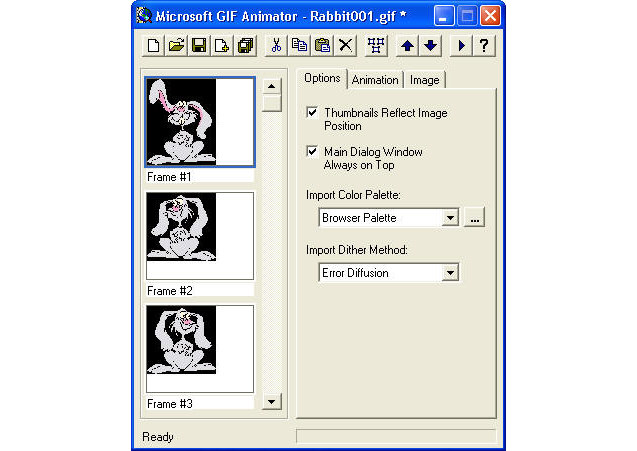 "
"
In the era of the Internet, most tasks can be performed directly in the browser, using web services instead of regular applications. The process of creating GIF animations is no exception. Therefore, if you do not want to clog your computer with a lot of software, you can go the other way. One of the best Internet services for solving this problem can be called GIFup (gifup.com). It allows you to download images from a computer, other sites, and even from a webcam. You can add text comments and image filters to selected pictures. After that, it is proposed to save the result on a PC or share it with friends on social networks.
The choice is yours!
Animated pictures, whether it be an advertising banner, a stylish avatar or a funny smiley face, are not only more attractive than static images, but also much more informative than them. However, the process of creating GIF animations in professional graphic editors like Adobe Photoshop is not so simple, because it requires certain skills. Fortunately, today, users have access to many specialized programs that allow even beginners to quickly and easily receive animated pictures.
Beneton Movie GIF: Convenience First
Website: developer
Features: user-friendly interface, built-in graphical editor, a large selection of effects
By the way Beneton Movie GIF works a bit like a program for creating Microsoft PowerPoint presentations, only the result is saved in GIF format, not PPT. The first step is to create new slides. You can leave them empty at first, then paint them manually, or immediately insert ready-made images into them. Beneton Movie GIF, like some of the other applications reviewed in this review, supports all common BMP, GIF, JPEG, and PNG bitmap formats. In addition, it is possible to download AVI video, however, the required fragment of the clip will have to be cut in advance using another program - for example, VirtualDub. When loading large images are automatically reduced to a resolution of 667x500 pixels - this size is more than enough for advertising banners and avatars.
Maximys GIF ANImator: More Features
Website: Developer
Features: Drag & Drop support, the ability to reduce the number of colors to minimize the size of the final file
. Unlike the previous utility, GIF ANImator implements the ability to drag and drop files from Explorer using the mouse. The utility window is divided into two parts: thumbnails of the slides are displayed on the left, and settings for each of them are shown on the right. In the slide display options, you can set the time, as well as the offset in height or width, which allows you to show the edge of the previous frame. In addition, the effect of transparency and lowering the color to 16 shades or even monochrome are available for images, which reduces the size of the final file. To start a test demonstration of animation in GIF ANImator, you need to press the key combination “Ctrl + P”.
Microsoft GIF Animator: Easy and Fast
Website: Developer
Features: minimalistic interface, a large number of settings
Microsoft GIF Animator is distributed not only as a standalone application, but also part of another well-known package - FrontPage web page editor. Unfortunately, the program supports only two types of downloaded files - GIF and AVI. Due to the minimalistic interface, at first it may seem that the capabilities of the utility are too scarce. But in reality, Microsoft GIF Animator offers to change the set of animation parameters to your liking. The settings menu is divided into three tabs: “Options”, “Animation” and “Image”. The first one contains general settings, the second contains animation display options, and the third contains image settings. You can use any modern web browser to view the created animation.
"Alternative option
In the era of the Internet, most tasks can be performed directly in the browser, using web services instead of regular applications. The process of creating GIF animations is no exception. Therefore, if you do not want to clog your computer with a lot of software, you can go the other way. One of the best Internet services for solving this problem can be called GIFup (gifup.com). It allows you to download images from a computer, other sites, and even from a webcam. You can add text comments and image filters to selected pictures. After that, it is proposed to save the result on a PC or share it with friends on social networks.
The choice is yours!