May 1, 2012 at 14:27
Convert text to speech on Android
- Transfer
Android provides a useful feature that converts text to speech (TTS) and plays text in different languages. This guide explains how to create this feature. In this lesson, I will also explain how to change the type of language, volume and speed level.
Sources
Below I presented a video of the final result.
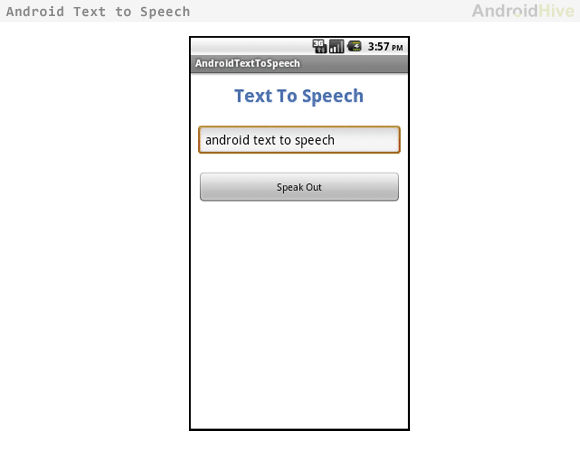
I developed a simple interface with one input field and a button to trigger an event that will receive text from the input field and play the given text.
1. Create a new project by choosing File ⇒ New Android Project and fill in the required data.
2. Implementing your main activity class from TextToSpeech.OnInitListener
3. Now add the following code to the main class.
4. And run the project.
You can change the language using the SetLanguage () function . Many languages are currently supported.
You can change the volume level using the setPitch () function . The default value is 1.0.
Playback frequency can be set using the setSpeechRate () function . The default value is 1.0.
Sources
Below I presented a video of the final result.
I developed a simple interface with one input field and a button to trigger an event that will receive text from the input field and play the given text.
1. Create a new project by choosing File ⇒ New Android Project and fill in the required data.
2. Implementing your main activity class from TextToSpeech.OnInitListener
public class AndroidTextToSpeechActivity extends Activity implements TextToSpeech.OnInitListener {
3. Now add the following code to the main class.
package com.androidhive.texttospeech;
import java.util.Locale;
import android.app.Activity;
import android.os.Bundle;
import android.speech.tts.TextToSpeech;
import android.util.Log;
import android.view.View;
import android.widget.Button;
import android.widget.EditText;
public class AndroidTextToSpeechActivity extends Activity implements
        TextToSpeech.OnInitListener {
    /** Called when the activity is first created. */
    private TextToSpeech tts;
    private Button btnSpeak;
    private EditText txtText;
    @Override
    public void onCreate(Bundle savedInstanceState) {
        super.onCreate(savedInstanceState);
        setContentView(R.layout.main);
        tts = new TextToSpeech(this, this);
        btnSpeak = (Button) findViewById(R.id.btnSpeak);
        txtText = (EditText) findViewById(R.id.txtText);
        // button on click event
        btnSpeak.setOnClickListener(new View.OnClickListener() {
            @Override
            public void onClick(View arg0) {
                speakOut();
            }
        });
    }
    @Override
    public void onDestroy() {
        // Don't forget to shutdown tts!
        if (tts != null) {
            tts.stop();
            tts.shutdown();
        }
        super.onDestroy();
    }
    @Override
    public void onInit(int status) {
        if (status == TextToSpeech.SUCCESS) {
            int result = tts.setLanguage(Locale.US);
            if (result == TextToSpeech.LANG_MISSING_DATA
                    || result == TextToSpeech.LANG_NOT_SUPPORTED) {
                Log.e("TTS", "This Language is not supported");
            } else {
                btnSpeak.setEnabled(true);
                speakOut();
            }
        } else {
            Log.e("TTS", "Initilization Failed!");
        }
    }
    private void speakOut() {
        String text = txtText.getText().toString();
        tts.speak(text, TextToSpeech.QUEUE_FLUSH, null);
    }
}
4. And run the project.
Change language
You can change the language using the SetLanguage () function . Many languages are currently supported.
tts.setLanguage(Locale.CHINESE); // Chinese languageVolume change
You can change the volume level using the setPitch () function . The default value is 1.0.
tts.setPitch(0.6);Speed change
Playback frequency can be set using the setSpeechRate () function . The default value is 1.0.
tts.setSpeechRate(2);