 April 26, 2012 at 07:31
Fez Panda 2 reading iButton
Good afternoon.
I apologize if I put it in the wrong topic, but it seemed like this was suitable, and there is not enough karma for others.
Long time ago I bought for myself Fez Panda 2 (ordered on dfrobot )
Pampered and abandoned. This device caught my eye last night, and next to it are the keys to the “tablet” from the intercom. So I decided to try to read the data from it. It works on the 1-Wire interface (which, according to the description of the panda “available on any IO”)
, I won’t paint its work, anyone interested can read it here.
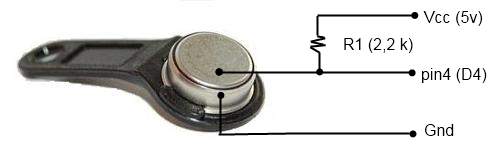
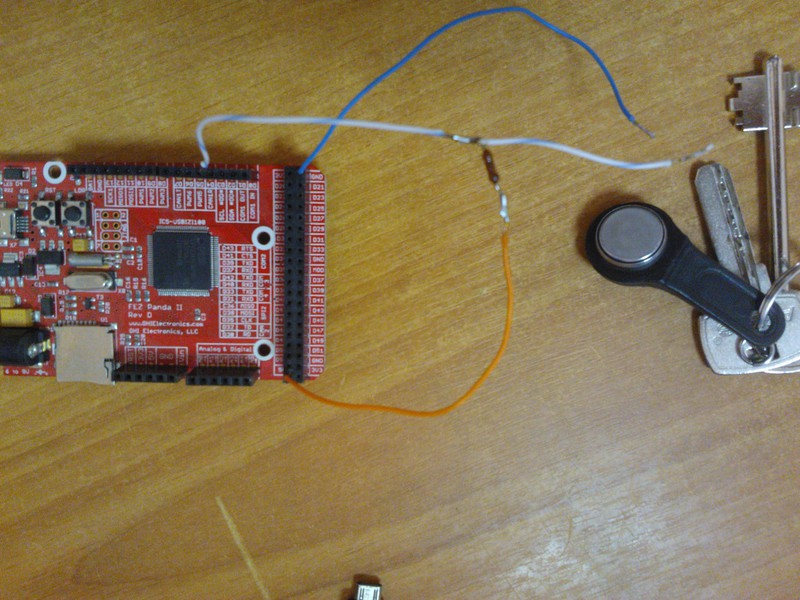
For work, we need to solder / twist this diagram:
Application code looks like this: If in the near future buy a blank key then try to program it with the available data.
I apologize if I put it in the wrong topic, but it seemed like this was suitable, and there is not enough karma for others.
Long time ago I bought for myself Fez Panda 2 (ordered on dfrobot )
| Title | Model | Price |
| 2A Dual Motor Controller | DRI0002 | $ 17.00 |
| FEZ Panda II- A .NET Micro Framework Controller | DFR0142 | $ 39.90 |
| Bluetooth bee | TEL0023 | $ 26.00 |
| IO Expansion Shield For Arduino (V5) | DFR0088 | $ 18.00 |
| HKBRAM - without insurance (weight 235.00 g): | $ 7.00 | |
| Total: | $ 107.90 | |
Pampered and abandoned. This device caught my eye last night, and next to it are the keys to the “tablet” from the intercom. So I decided to try to read the data from it. It works on the 1-Wire interface (which, according to the description of the panda “available on any IO”)
, I won’t paint its work, anyone interested can read it here.
For work, we need to solder / twist this diagram:
Application code looks like this: If in the near future buy a blank key then try to program it with the available data.
using System;

using System.Threading;


using Microsoft.SPOT;

using Microsoft.SPOT.Hardware;


using GHIElectronics.NETMF.FEZ;

using GHIElectronics.NETMF.Hardware;


namespace iButton

{

  public class Program

  {

    static OneWire ow = new OneWire((Cpu.Pin)FEZ_Pin.Digital.Di4);

    static OutputPort led = new OutputPort((Cpu.Pin)FEZ_Pin.Digital.LED, false);


    public static void Main()

    {

      bool ledState = false;


      while (true)

      {

        byte[] readall = new byte[8];


        if (ow.Search_GetNextDevice(readall))

        {

          string hex = ByteArrayToString(readall);

          Debug.Print("========================");

          if (readall[0] != 0x01)

          {

            Debug.Print("Device is not a DS1990A family device.");

          }

          Debug.Print(hex);


          for (int i = 0; i < 6; i++)

          {

            Thread.Sleep(200);

            ledState = !ledState;

            led.Write(ledState);

          }

        }

      }

    }


    public static string ByteArrayToString(byte[] ba)

    {

      string hex = string.Empty;

      for (int i = ba.Length - 1; i >= 0; i--)

      {

        hex += " " + ByteToHex(ba[i]);

      }


      return hex;

    }


    public static string ByteToHex(byte b)

    {

      const string hex = "0123456789ABCDEF";

      int lowNibble = b & 0x0F;

      int highNibble = (b & 0x0F0) >> 4;

      string s = new string(new char[] { hex[highNibble], hex[lowNibble] });


      return s;

    }

  }

}


* This source code was highlighted with Source Code Highlighter.









