March 22, 2012 at 09:48
New SPS Pravo.ru for mobile applications
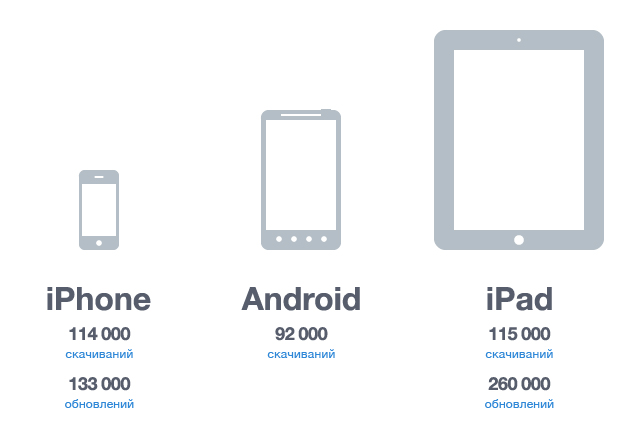
In the last publication, we talked about the latest news of the web-version of SPS Pravo.ru and shared the statistics of downloads of mobile applications for iPhone, iPad and Android.
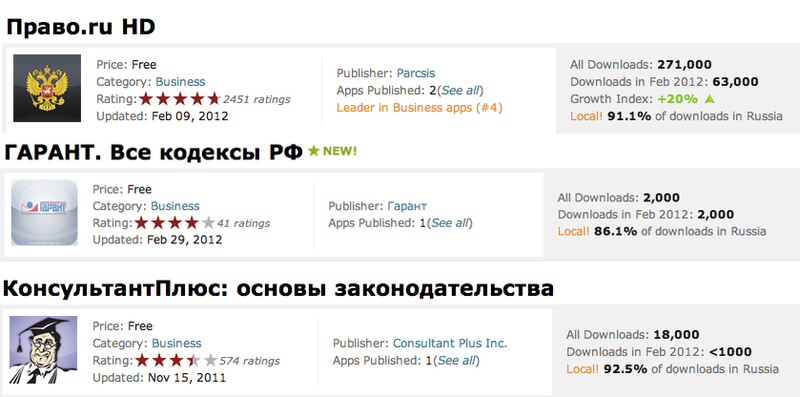
For two years of the system’s existence, it’s precisely the SPS Pravo.ru mobile applications that are in special demand, because there are no more such informative and convenient services for working with documents. Proof of this is the data from the AppStore for February. Below in order are data on applications for the iPad from the PCA "Pravo.ru" and competitors:
Every day we get a lot of different reviews, there are constructive ones, but there are just emotional and positive ones, and most of them are. In our work, we try to take into account all the wishes. Today we will tell you what of the proposed implemented in mobile applications SPS Pravo.ru.
1. Now users can add notes to one or another part of the document. For example, you decided to indicate in which edition the paragraph was changed - just click on its text and select the appropriate item from the context menu that appears.
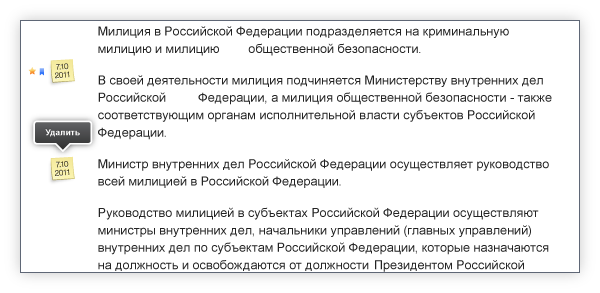
In this case, the application automatically puts a date for each note left. If the note is no longer relevant, you can easily erase it - with a long press on its text, the “ Delete ” button appears . Notes are stored on your tablet and are available without an internet connection.
2. Now you can get acquainted with the list of documents to which the text you are viewing refers, ie with related documents. To do this, just click on the corresponding icon, which is located to the right of the paragraph:
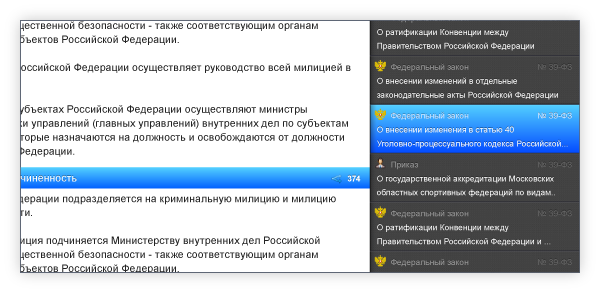
This will open the side panel with a complete list of related documents, which you can filter by selecting the category of interest from the ones offered at the bottom of the panel:
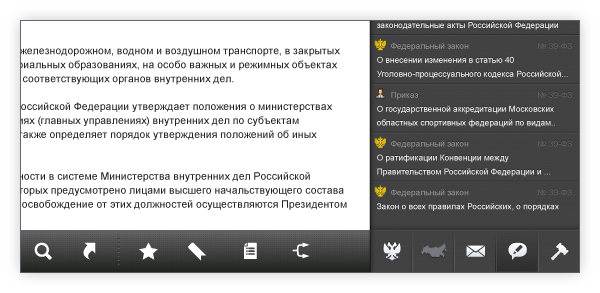
You can add the desired document from the list to " Favorites ”or make a bookmark , which in the future will allow you to quickly find it. At the same time, the text of such a document will be saved on your tablet, which will allow you to work with its text without an Internet connection.
notethat documents added to Favorites are not automatically updated. For example, you added the first edition of the law, and then the second one came out that you do not need. In the general database of application documents, the law will be displayed in the current edition, and in the "Favorites" will remain in the first.
3. Now the application stores the history of viewing documents, which can be opened at any time when working with text by sliding two fingers on the screen from left to right.
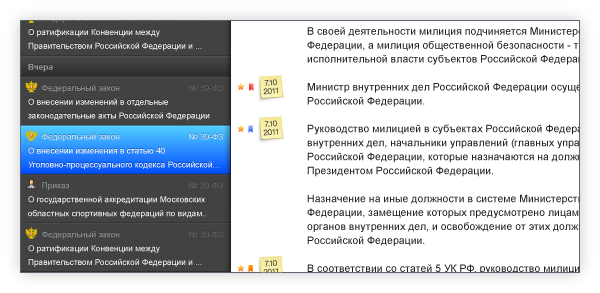
You can find a specific document from the history using the search bar, or view each using the navigation. The animation is similar to “ turning over ” images in the photo gallery on iPhone / iPad: using “ turning over ” to go to the previous document" from left to right. Reverse movement leads to the last viewed document.
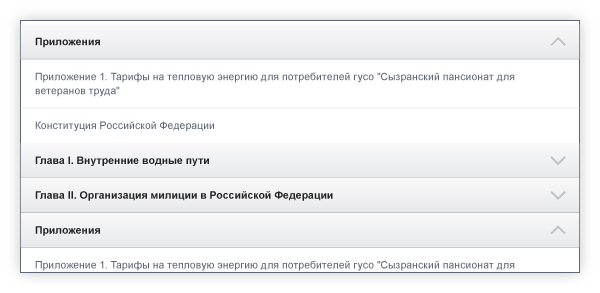
4. For more convenient navigation through the document, you can hide the detailed content of key points, leaving only their names. To do this, just click on the "arrow" next to the heading. You can always re-open the detailed content by clicking again:
5. Now, with the help of the SPS Pravo.ru application, you can read the blogs of experts in the field of jurisprudence, as well as follow legal news . To do this on the main page added to the relevant sections:
(
also separately on the main rendered all the Resolution of the RF :
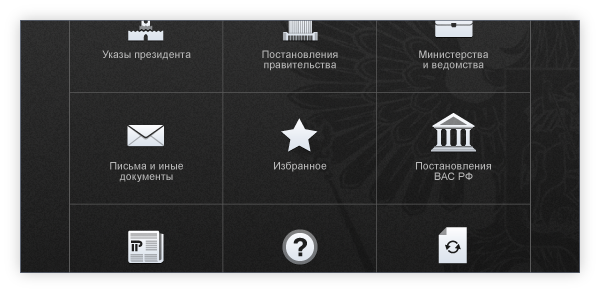
1. The design has changed , and now the SPS Pravo.ru applications for iPhone and Android are made in the same style.
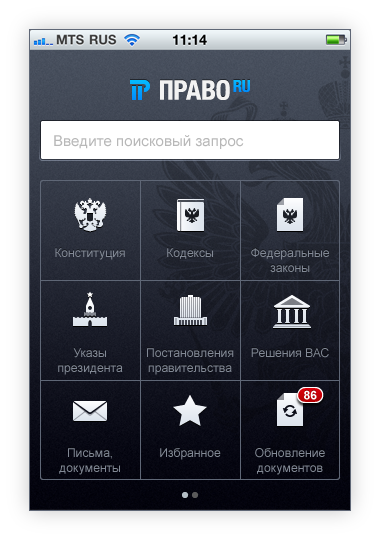
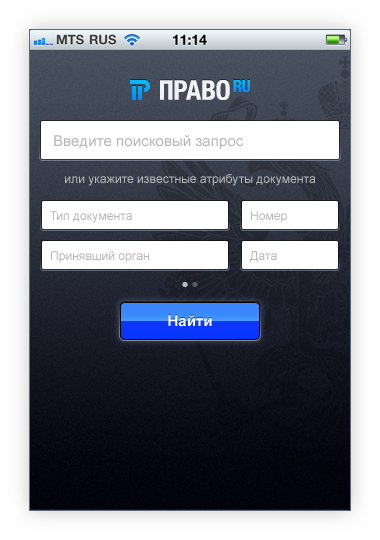
2. Now, to search for a document, it is not necessary to know which category it belongs to. You can indicate the name or legal problem in the line on the main page of the application, and also use the “ Advanced Search ” function , indicating all known parameters:
3. As in the Android version, new sections have become available: “ Decisions of the Supreme Arbitration Court of the Russian Federation ”, “ Blog ” and " Legal News ", allowing you to work with documents of the Supreme Arbitration Court, read the blogs of specialists and keep abreast of news.
For two years of the system’s existence, it’s precisely the SPS Pravo.ru mobile applications that are in special demand, because there are no more such informative and convenient services for working with documents. Proof of this is the data from the AppStore for February. Below in order are data on applications for the iPad from the PCA "Pravo.ru" and competitors:
Every day we get a lot of different reviews, there are constructive ones, but there are just emotional and positive ones, and most of them are. In our work, we try to take into account all the wishes. Today we will tell you what of the proposed implemented in mobile applications SPS Pravo.ru.
Let's start with the Android and iPad tablets :
1. Now users can add notes to one or another part of the document. For example, you decided to indicate in which edition the paragraph was changed - just click on its text and select the appropriate item from the context menu that appears.
In this case, the application automatically puts a date for each note left. If the note is no longer relevant, you can easily erase it - with a long press on its text, the “ Delete ” button appears . Notes are stored on your tablet and are available without an internet connection.
2. Now you can get acquainted with the list of documents to which the text you are viewing refers, ie with related documents. To do this, just click on the corresponding icon, which is located to the right of the paragraph:
This will open the side panel with a complete list of related documents, which you can filter by selecting the category of interest from the ones offered at the bottom of the panel:
You can add the desired document from the list to " Favorites ”or make a bookmark , which in the future will allow you to quickly find it. At the same time, the text of such a document will be saved on your tablet, which will allow you to work with its text without an Internet connection.
notethat documents added to Favorites are not automatically updated. For example, you added the first edition of the law, and then the second one came out that you do not need. In the general database of application documents, the law will be displayed in the current edition, and in the "Favorites" will remain in the first.
3. Now the application stores the history of viewing documents, which can be opened at any time when working with text by sliding two fingers on the screen from left to right.
You can find a specific document from the history using the search bar, or view each using the navigation. The animation is similar to “ turning over ” images in the photo gallery on iPhone / iPad: using “ turning over ” to go to the previous document" from left to right. Reverse movement leads to the last viewed document.
4. For more convenient navigation through the document, you can hide the detailed content of key points, leaving only their names. To do this, just click on the "arrow" next to the heading. You can always re-open the detailed content by clicking again:
5. Now, with the help of the SPS Pravo.ru application, you can read the blogs of experts in the field of jurisprudence, as well as follow legal news . To do this on the main page added to the relevant sections:
(
also separately on the main rendered all the Resolution of the RF :
Updates have also been released for the mobile application on the iPhone :
1. The design has changed , and now the SPS Pravo.ru applications for iPhone and Android are made in the same style.
2. Now, to search for a document, it is not necessary to know which category it belongs to. You can indicate the name or legal problem in the line on the main page of the application, and also use the “ Advanced Search ” function , indicating all known parameters:
3. As in the Android version, new sections have become available: “ Decisions of the Supreme Arbitration Court of the Russian Federation ”, “ Blog ” and " Legal News ", allowing you to work with documents of the Supreme Arbitration Court, read the blogs of specialists and keep abreast of news.