March 15, 2012 at 16:19
Taobao.com. Instructions for use
So, for those who don’t know, Taobao is the largest Chinese online auction similar to the American Ebay. There are a lot of all kinds of things, and sooo everything is incomprehensible, but insanely interesting. Now we will try to understand a bit of the hieroglyphs and draw up an action plan for a successful Chinese Internet orientation.
The first thing to do is install Google Chrome, if one is not already installed. This will significantly increase the speed of translating a page into more or less Russian. I do not know how other browsers cope with similar tasks, this one makes everything simple and fast.
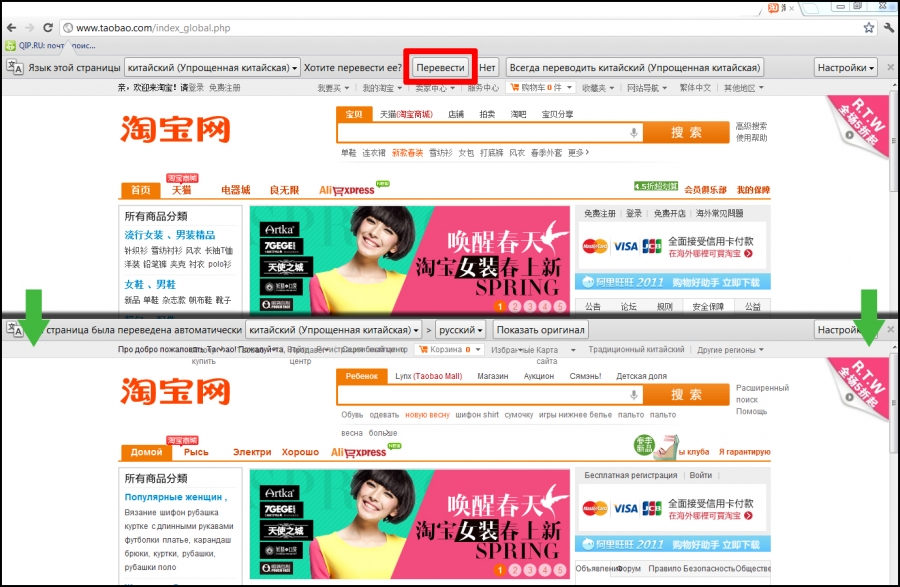
Like this: As you can see, the situation has become somewhat wiser.
How to find something here?
Go to the full taobao product catalogand select the desired category. Let's say it will be a “short sleeve t-shirt” from the men's section of clothing.
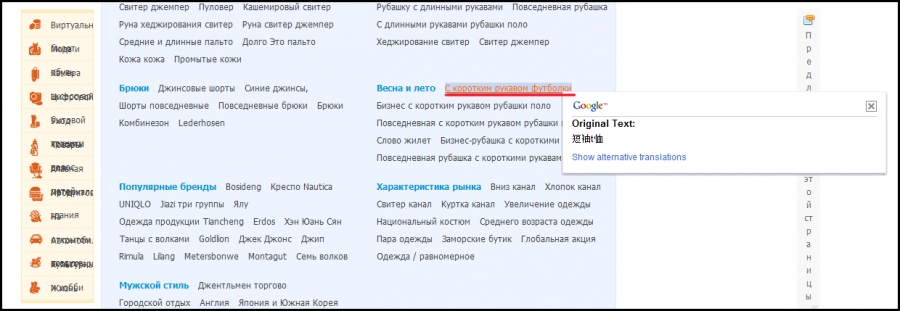
Further we will appear on endless pages with t-shirts. Well, at least most of them will be T-shirts =). To refine your query, use the advanced search. In Russian-Chinese, it sounds “Using Multiple Choice”.
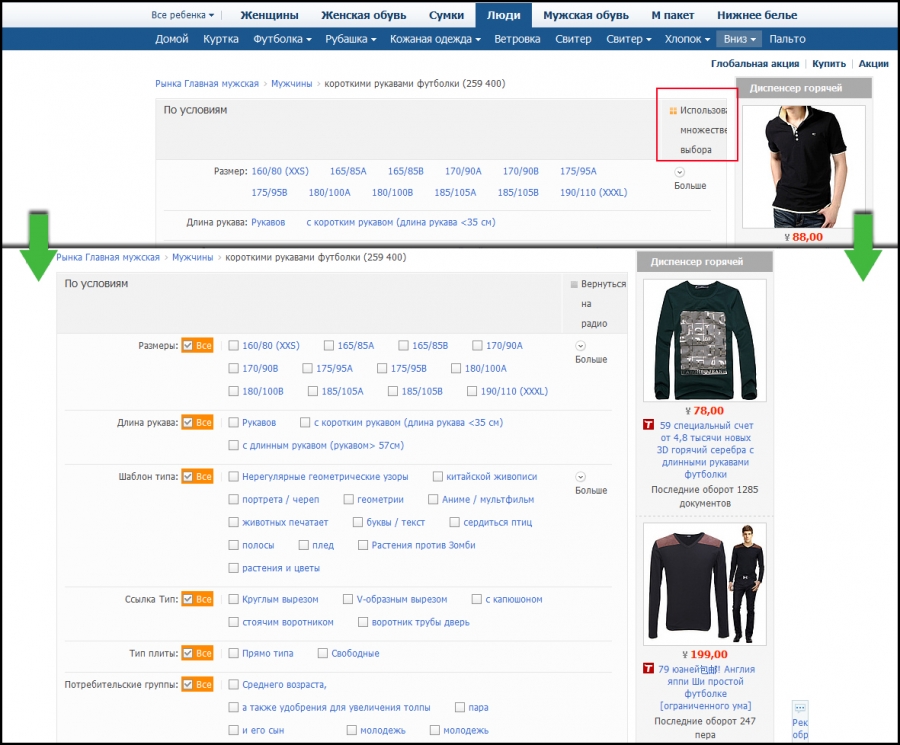
After the manipulation, we can only enter the necessary parameters and click “search” at the end of the list of criteria. They are translated quite clearly, if desired, you can make a translation into English. What if something becomes clearer?
And now another way, it may be not much different from the first, but to me they seem different. Maybe all because some points are still incomprehensible in these Chinese wilds.
On the main page in the search bar we need to enter a query. This can be done in Chinese or English. The first is preferable, because it will give out exactly what you wanted. The second is more unexpected, but sometimes there are interesting results. In general, there will be time, experiment. In the meantime, we will stop at the hieroglyphs. To write a request in Russian and translate it into the desired language will help Google translator .
For example, we look for “women's boots”, translate, get “女 靴”. We drive the characters into the search bar, press Enter. A lot of lots will fall out on us, if all is well, choose from them. If you need a more specific search, select the desired category from the list.
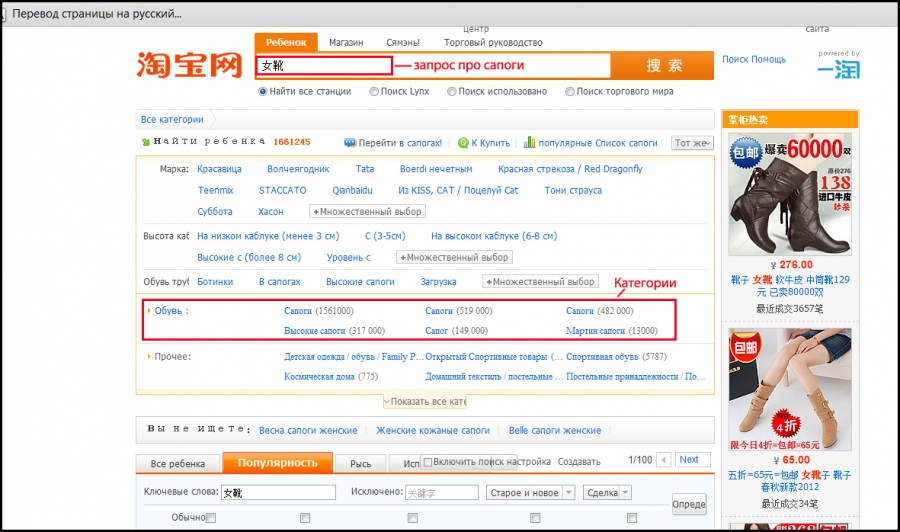
So, from the categories we selected “High boots”, but again the wisest Chinese gave us ugg boots in large numbers, and not what we were looking for. We will continue our suffering, but already in the section of high boots. To do this, select the category that appears in the main search bar. And then click on the parameter of interest to us (in this case, the height of the heel is 8 cm). Sometimes there are even illustrations, this greatly facilitates the search.

Thus, without forgetting to put in the main line the section on which you want to search, you can find what you want.
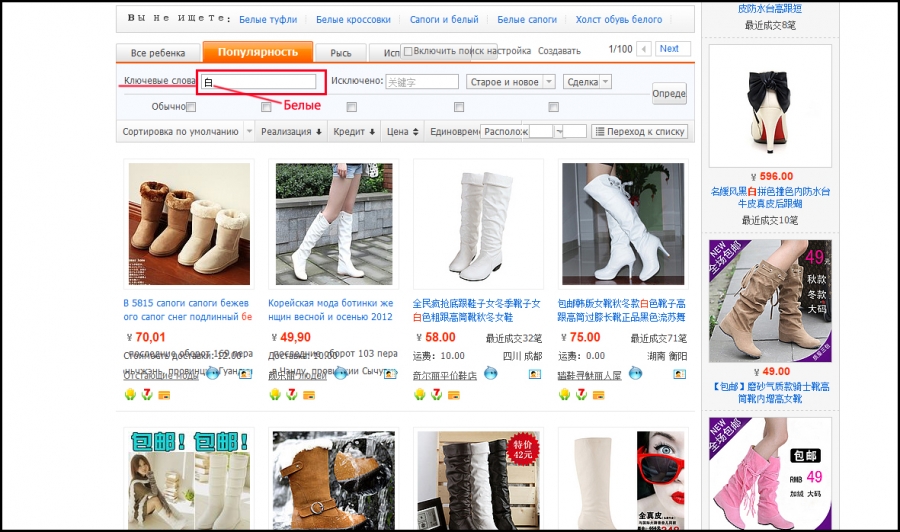
Alternatively, you can not click on all the subsections, but just do a search for keywords in the required category. We also expose it in the main one and enter it in Chinese in white (didn’t you forget how to translate?) In this field, for example, the word “white” → “白”. Hit Enter, and you're done!
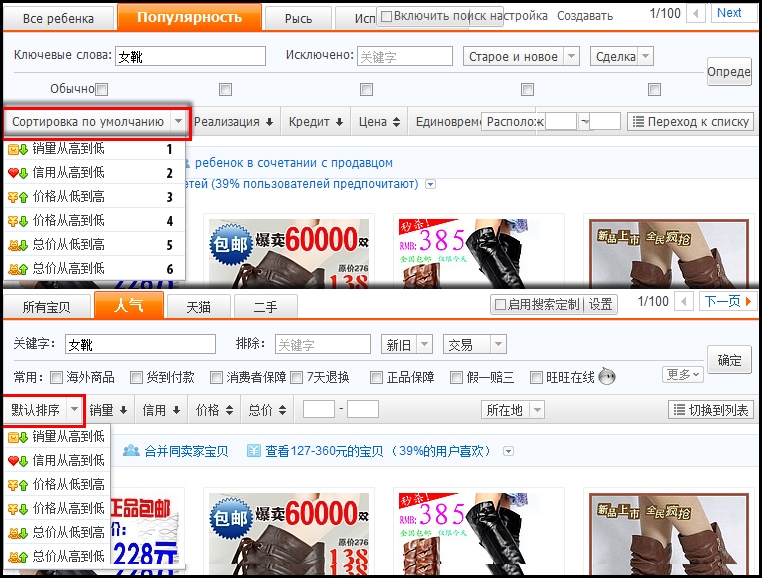
Another point, often unclear to many, is the sorting of objects. In the picture below, take a look at the magic button and the equally magical characters that cannot be translated. Items found can be sorted in several ways:
1. Suitcase. Sorting by product popularity, from larger to smaller.
2. Heart. Sort by seller rating, from larger to smaller.
3. Yuan, up. Sort by price increase.
4. Yuan, down. Sort in descending order of price.
5. An incomprehensible animal, down. Sorting in decreasing order by auction.
6. An incomprehensible animal, up. Sort ascending maximum price at auction.
So, sort of sorted out the search. Let's move on to the next pressing issue.
What is a product card?
So, with the help of dark forces or without it, we still found the goods. More precisely, we like his picture, it's time to learn more about him. We click, look, and now we decrypt.
At the top is the original name of the product, if it interests you greatly.
The price in RMB is written in bold orange. When translating a page, as many have noticed, they turn into dollars. Do not believe your eyes and the cunning Google translator, this is still the yuan. Just “In Chinese, the yuan is the base unit of any currency, for example, the US dollar is the mei yuan (美元)” (wiki).
Further, what is highlighted in blue is the delivery methods in the country and their cost. As you can see, Chinese express mail costs 15 yuan, and EMS costs 20.
Well, with the size, color, number of views and purchases, I hope it’s clear (see the picture below). The green box indicates the quantity of goods available to the seller. Two big beautiful and incomprehensible buttons are:
orange - go to the checkout;
blue - add the product to the basket.
In principle, you do not need either one or the other, unless of course you have found a simple way to pay for Taobai purchases yourself, it is better to leave the payment to the intermediary. But more on that later.

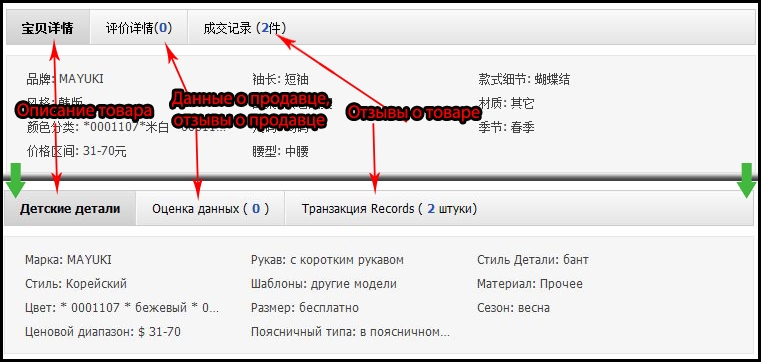
What else we may be interested in here is a detailed description and feedback. They are a little lower. The translation, as you see, is not so hot, but you can draw something useful from it. As a rule, scrolling down the page, you will find a lot of information. Starting from large photos of the product from all angles, ending with a full catalog of products from this seller and calendars of discount days. It happens that in all this abundance it is difficult to find one small, but very interesting parameter. Know, this is like a gopher, no one sees it, but it is. So buy pills in the pharmacy for patience and look.
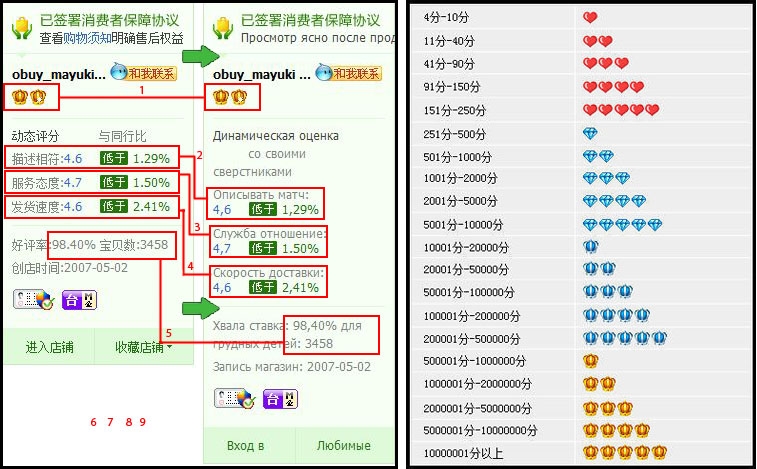
It's time to ask about the seller’s rating. Information on it was placed on the right side of the page, and it looks like this:
1. Seller's reputation. It is expressed somewhat unusual for users, at least of the same Ebay. Here they are icons, the type and quantity of which are all determined. The table shows everything quite clearly. The number of completed transactions corresponds to its own icon.
2. Rating matching photos and descriptions of real goods.
3. Rating of seller-buyer relationship.
4. The speed of sending the goods by the seller.
5. The percentage of successful transactions and their total number.
Experts in commercial matters with representatives of the Middle Kingdom do not recommend concluding transactions with a seller whose rating on points 2, 3 and 4 is lower than 4.5. As for the rest, as usual, the higher the seller’s reputation, the more reliable the receipt of goods, the better it is, etc.
Now about the most important thing, there is practically no way to independently make purchases on TaoBao, since the payment system does not imply the use of banks and payment systems other than Chinese people. Of course, you can negotiate with the seller yourself, for payment, for example, in dollars through PayPal ... But then forget about the complaint and the refund, if you suddenly do not send the goods to you, or the marriage is sent, or they delay the terms for a couple of years. However, all transactions easily pass through an intermediary.
TaoBao and EbayToday
The EBTD website has a partially translated catalog of the auction we are preparing. Partly because only categories and highlights have been translated. To do this completely help already known to us Chrome or Google translate. First things first.
The names of the sections of the catalog are translated into Russian and painted in alphabetical order. Click the TaoBao button on the main one, get into the illustrated directory, if we don’t see the desired category, click “show more” and select it from the list.


When we found the necessary product, it must somehow be ordered. Here it’s easier nowhere, on the product card, click the “Buy” button. Filling almost nothing is needed, everything is done automatically. Add goods, pay and wait for delivery. If you found the goods on the original TaoBao, then placing an order will not become more difficult. Click the “Place an order” button, enter the link, and then everything is as in the first version.

This is how the order form on EbayToday.ru looks like. After entering the link, everything that is not marked with red rectangles is filled automatically. It remains only to note those points that are highlighted in the picture above: the method of delivery in the country, the amount of purchased goods, color, if choice and additional services are available.
Remember that TaoBao is primarily famous for the low cost of the products offered. Of course, there is a risk of running into dishonestly manufactured things, so do not cooperate with sellers who have a low rating. Start with those who have five blue crystals.
Successful development of the east! =)
The first thing to do is install Google Chrome, if one is not already installed. This will significantly increase the speed of translating a page into more or less Russian. I do not know how other browsers cope with similar tasks, this one makes everything simple and fast.
Like this: As you can see, the situation has become somewhat wiser.
How to find something here?
Go to the full taobao product catalogand select the desired category. Let's say it will be a “short sleeve t-shirt” from the men's section of clothing.
Further we will appear on endless pages with t-shirts. Well, at least most of them will be T-shirts =). To refine your query, use the advanced search. In Russian-Chinese, it sounds “Using Multiple Choice”.
After the manipulation, we can only enter the necessary parameters and click “search” at the end of the list of criteria. They are translated quite clearly, if desired, you can make a translation into English. What if something becomes clearer?
And now another way, it may be not much different from the first, but to me they seem different. Maybe all because some points are still incomprehensible in these Chinese wilds.
On the main page in the search bar we need to enter a query. This can be done in Chinese or English. The first is preferable, because it will give out exactly what you wanted. The second is more unexpected, but sometimes there are interesting results. In general, there will be time, experiment. In the meantime, we will stop at the hieroglyphs. To write a request in Russian and translate it into the desired language will help Google translator .
For example, we look for “women's boots”, translate, get “女 靴”. We drive the characters into the search bar, press Enter. A lot of lots will fall out on us, if all is well, choose from them. If you need a more specific search, select the desired category from the list.
So, from the categories we selected “High boots”, but again the wisest Chinese gave us ugg boots in large numbers, and not what we were looking for. We will continue our suffering, but already in the section of high boots. To do this, select the category that appears in the main search bar. And then click on the parameter of interest to us (in this case, the height of the heel is 8 cm). Sometimes there are even illustrations, this greatly facilitates the search.
Thus, without forgetting to put in the main line the section on which you want to search, you can find what you want.
Alternatively, you can not click on all the subsections, but just do a search for keywords in the required category. We also expose it in the main one and enter it in Chinese in white (didn’t you forget how to translate?) In this field, for example, the word “white” → “白”. Hit Enter, and you're done!
Another point, often unclear to many, is the sorting of objects. In the picture below, take a look at the magic button and the equally magical characters that cannot be translated. Items found can be sorted in several ways:
1. Suitcase. Sorting by product popularity, from larger to smaller.
2. Heart. Sort by seller rating, from larger to smaller.
3. Yuan, up. Sort by price increase.
4. Yuan, down. Sort in descending order of price.
5. An incomprehensible animal, down. Sorting in decreasing order by auction.
6. An incomprehensible animal, up. Sort ascending maximum price at auction.
So, sort of sorted out the search. Let's move on to the next pressing issue.
What is a product card?
So, with the help of dark forces or without it, we still found the goods. More precisely, we like his picture, it's time to learn more about him. We click, look, and now we decrypt.
At the top is the original name of the product, if it interests you greatly.
The price in RMB is written in bold orange. When translating a page, as many have noticed, they turn into dollars. Do not believe your eyes and the cunning Google translator, this is still the yuan. Just “In Chinese, the yuan is the base unit of any currency, for example, the US dollar is the mei yuan (美元)” (wiki).
Further, what is highlighted in blue is the delivery methods in the country and their cost. As you can see, Chinese express mail costs 15 yuan, and EMS costs 20.
Well, with the size, color, number of views and purchases, I hope it’s clear (see the picture below). The green box indicates the quantity of goods available to the seller. Two big beautiful and incomprehensible buttons are:
orange - go to the checkout;
blue - add the product to the basket.
In principle, you do not need either one or the other, unless of course you have found a simple way to pay for Taobai purchases yourself, it is better to leave the payment to the intermediary. But more on that later.
What else we may be interested in here is a detailed description and feedback. They are a little lower. The translation, as you see, is not so hot, but you can draw something useful from it. As a rule, scrolling down the page, you will find a lot of information. Starting from large photos of the product from all angles, ending with a full catalog of products from this seller and calendars of discount days. It happens that in all this abundance it is difficult to find one small, but very interesting parameter. Know, this is like a gopher, no one sees it, but it is. So buy pills in the pharmacy for patience and look.
It's time to ask about the seller’s rating. Information on it was placed on the right side of the page, and it looks like this:
1. Seller's reputation. It is expressed somewhat unusual for users, at least of the same Ebay. Here they are icons, the type and quantity of which are all determined. The table shows everything quite clearly. The number of completed transactions corresponds to its own icon.
2. Rating matching photos and descriptions of real goods.
3. Rating of seller-buyer relationship.
4. The speed of sending the goods by the seller.
5. The percentage of successful transactions and their total number.
Experts in commercial matters with representatives of the Middle Kingdom do not recommend concluding transactions with a seller whose rating on points 2, 3 and 4 is lower than 4.5. As for the rest, as usual, the higher the seller’s reputation, the more reliable the receipt of goods, the better it is, etc.
Now about the most important thing, there is practically no way to independently make purchases on TaoBao, since the payment system does not imply the use of banks and payment systems other than Chinese people. Of course, you can negotiate with the seller yourself, for payment, for example, in dollars through PayPal ... But then forget about the complaint and the refund, if you suddenly do not send the goods to you, or the marriage is sent, or they delay the terms for a couple of years. However, all transactions easily pass through an intermediary.
TaoBao and EbayToday
The EBTD website has a partially translated catalog of the auction we are preparing. Partly because only categories and highlights have been translated. To do this completely help already known to us Chrome or Google translate. First things first.
The names of the sections of the catalog are translated into Russian and painted in alphabetical order. Click the TaoBao button on the main one, get into the illustrated directory, if we don’t see the desired category, click “show more” and select it from the list.
When we found the necessary product, it must somehow be ordered. Here it’s easier nowhere, on the product card, click the “Buy” button. Filling almost nothing is needed, everything is done automatically. Add goods, pay and wait for delivery. If you found the goods on the original TaoBao, then placing an order will not become more difficult. Click the “Place an order” button, enter the link, and then everything is as in the first version.
This is how the order form on EbayToday.ru looks like. After entering the link, everything that is not marked with red rectangles is filled automatically. It remains only to note those points that are highlighted in the picture above: the method of delivery in the country, the amount of purchased goods, color, if choice and additional services are available.
Remember that TaoBao is primarily famous for the low cost of the products offered. Of course, there is a risk of running into dishonestly manufactured things, so do not cooperate with sellers who have a low rating. Start with those who have five blue crystals.
Successful development of the east! =)