February 10, 2012 at 16:58
How to make a website fly and save tens of hours of system administration
 The speed of your site, its stability and fault tolerance always depend on three components:
 1. Platform (CMS) and its settings that affect performance (caching options, etc.)
2. Server configuration (real physical or virtual) and settings system software (web server, database, etc.)
3. Quality of development, code, integration with the platform.
Often a web developer can write good quality code, but it doesn’t make much sense in system administration and server configuration. A good sysadmin is rarely part-time also a cool programmer.
In general, this is completely normal, everyone should do his own thing. But, unfortunately, in small web studios, which are the majority, there are rarely admins in the state. Hosting settings are given little attention. In the best case, they rely on the host’s support and “default” settings.
As a result, the site may be “lame” due to problems and bottlenecks in any of the components: CMS, hosting, development. The client does not delve into the nuances and remains not satisfied with the project as a whole. His negativity carries over to everyone: “Brake hosting! Awful system! Developers can’t do anything! ”
Such a picture, of course, never suited us. And we decided that something needs to be done ... The
capabilities of the 1C-Bitrix platform itself regarding performance are really huge (this is also a performance monitor, and debugging tools, and several caching options, and support for web-based cluster systems , and much more) and require a separate article. We already wrote about a lot, about something - we will tell in the near future.
Today's post is about hosting, servers, VPS and their administration.
 The simplest and, seemingly, the most obvious solution is to write a good detailed guide on configuring web systems, give it to everyone. And all will be well.
 And we just started with this - we wrote detailed documentation (it seemed, it seems, 6 or 7 years ago). Then, based on it, several free training courses were released, which were constantly improved and adapted. As a result, now they are summarized in the general "Course for Hosters" .
Despite the name and the fact that it was released by 1C-Bitrix, the course is relevant and extremely useful for all hosters in general and for administrators serving a particular fleet of web servers. Having become acquainted with it and, moreover, having answered the security questions at the end, we can hope that there will be no more grave mistakes in configuring the web server.
But, unfortunately, even the availability of the most complete documentation and practical recommendations for setting up servers does not solve the performance problem for most projects! Good - right! - There are still very few configurations.
There are many reasons for this ...
- Many administrators have no time to “fine-tune” the system. Delivered, performed basic configuration - already good ...
- Low qualification of technical specialists - even in order to do everything “according to the manual”, you need some kind of technical background and understanding of the processes.
- "Historical heritage" - the use of configurations 3-5- ... years ago, at best - software upgrade. Strict adherence to the principle of "work - do not touch." Which, as it turns out, is not always applicable.
- Template configurations for all projects.
- Etc.
As a result, as our practice shows, many typical problems remain that almost always reduce the speed of the site.
I’ll digress from the initial topic of the post and try to describe the most common problems that we have encountered over the years. I hope that even if you find out your own web server somewhere, understanding of the essence will help you a bit ...
PHP as CGI
Fortunately, this mode of PHP is becoming a rarity. Nevertheless, about a year ago there were a lot of such configurations.
Why is CGI bad? The fact that each call to the script runs a separate PHP process. It is long and resource intensive.
open_basedir
This parameter in PHP is responsible for restricting script access to certain directories. Very useful for configurations in which sites of different clients can operate on the same server. The good goal is security, but at the same time a solution is implemented, to put it mildly, “not very” ...
First, there are many options to “circumvent” the restrictions set in open_basedir .
Secondly, setting this parameter (even to the “empty” value) has a very negative effect on the speed of PHP (file operations, for example, include). On an empty unloaded server, page generation speed may decrease by 20-30%, and with a high load - by 2-3 times.
There are many alternatives to open_basedir. Starting with a separate copy of the web server for each client, ending with the use of chroot.
The PHP
APC precompiler , eAccelerator , XCache is not installed ... I hope these words are familiar to you.
The precompiler serves to optimize and speed up the execution of PHP scripts (precompiles the interpreted code, caches the result, and then executes the already precompiled code).
The difference in performance on different projects can reach several times.
There is not enough memory for the precompiler. The
precompiler can be installed, but, for example, all settings are left “by default”. How could this be fraught? For example, because too little memory is allocated for cached scripts, accessing new scripts will crowd out old data, and all the work of the precompiler will be inefficient.
Missing FrontEnd (nginx) The
two-level architecture “Backend - Frontend” is an almost mandatory requirement for the stable operation of any more or less loaded web project.
This work scheme solves several problems:
- all the statics are quickly given away by “light” (with minimal memory consumption) processes;
- backend is busy processing only “heavy” requests to scripts;
- on slow channels with clients, the backend is not busy delivering content to the final client - it gives it to the frontend and is free to process subsequent requests.
The value of MaxClients in Apache is not adjusted
On non-threaded servers, this parameter is responsible for the maximum number of processes that can be started to process client requests in parallel.
Many people think that the more the better. In many configurations, you can see the values of 50, and 150, and 256.
What does this mean in practice. Suppose a single Apache process can consume 40 MB of RAM. If MaxClients is set to 150, then at peak load (DDoS, Habraeffect, development errors, etc.), all processes will require approximately 6 GB of RAM. Only under Apache.
If this amount of memory is not available, a swap will begin to be used. And the general degradation of the whole system will begin. And even those requests that could be processed quickly will take a very long time to process.
It is much better to limit MaxClients to a reasonable value. If the number of requests is greater, then they simply “queue” and will be processed when busy processes are freed. The system will be stable.
* * * The
list of such typical errors can be continued for a very long time ...
In our practice, we have come across them very often.
And as a result, in 2009, we acted in a rather atypical role for ourselves - not developers, but system administrators. And they released the free product 1C-Bitrix: Virtual Machine .
What it is?
VMBitrix (as we briefly call a virtual machine) is a ready-made image of the VMWare Virtual Appliance that can be run on a wide variety of VMware products (VMWare Server, VMWare ESX and ESXi, VMWare Workstation, VMWare Player, VMWare Fusion).
To be implemented in this image?
- Of course, the operating system has already been installed (the first images were on Ubuntu, in the future - CentOS).
- Configured a two-level configuration of the web server (Apache + Nginx).
- The Zend Optimizer + precompiler included in the Zend Server CE package is installed. According to the results of stress tests, he showed the best performance.
- Installed and configured MySQL.
Initially, we did not plan to widely disseminate this image. The very first versions were not even public, but were used only for internal purposes.
VMbitrix essentially served as a reference environment, which could be guided by deploying your own system.
Nevertheless, “1C-Bitrix: Virtual Machine” turned out to be very popular. Hosters who could provide VMware-based tariffs began to use our image for new tariffs focused on placing projects on the 1C-Bitrix platform.
Gradually, the requests “make the same image for Hyper-V”, “and make the template for Virtuozzo” began to appear ...
Gradually, we began to support almost all common virtualization environments.
Supporting all current versions eventually began to require quite a noticeable effort, and as a result, after about a year, another free product appeared - 1C-Bitrix: Web Environment (Linux) .
In essence, this is an RPM package that can be automatically deployed to CentOS (5, 6), Fedora (12-16), Red Hat Enterprise Linux (5, 6). Both 32- and 64-bit architecture are supported.
Thus, it doesn’t matter and doesn’t matter if you use a real physical server, or you rented a virtual machine (from Amazon , Scalaxy , Clodo.Ru or someone else), or bought a regular VPS .
On a bare system, it is enough to do:
# wget repos.1c-bitrix.ru/yum/bitrix-env.sh

# chmod +x bitrix-env.sh

# ./bitrix-env.sh
... and answer yes several times during the installation process. :)
(By the way, the modern versions of the virtual machine, which continues to be supported, are assembled this way - from the 1C-Bitrix: Web Environment package).
Actually, that’s all! After such a simple installation, you get a "Web environment" - now version 3.1.
How the product has evolved and what it “knows how to do” now (with what it can do right away, “out of the box”). I will describe some of the most interesting, in my opinion, “chips”.
Convenient installer of any 1C-Bitrix products
After installing the web environment, when you log in to the server via HTTP, you will be greeted by a very simple wizard that allows you to deploy an existing site from a backup or install a new one using any product - be it Site Management, Corporate Portal, or different circulation decision.
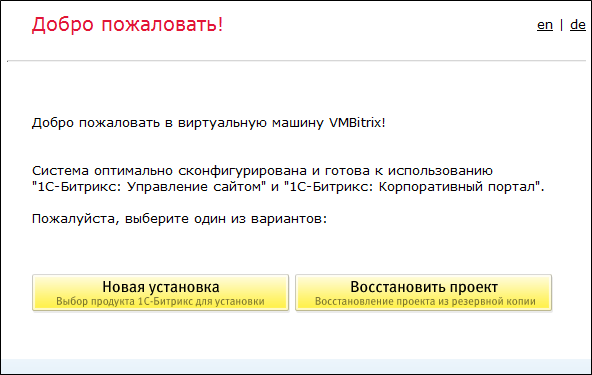
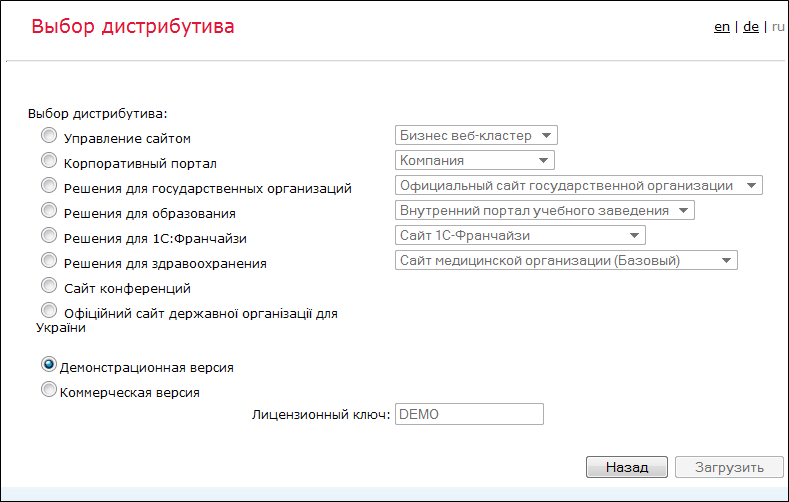
The wizard is available in three languages - Russian, English and German.
At the same time, the connection to the MySQL database is already fully configured (in the /home/bitrix/www/bitrix/php_interface/dbconn.php file), therefore, the installation of any product goes through the “shortened” procedure: the system parameters are not checked (we know in advance that it satisfies the technical requirements), database connection parameters are not requested (everything is already configured).
Startup Menu
Here you will see such a menu if you go to the machine via SSH:
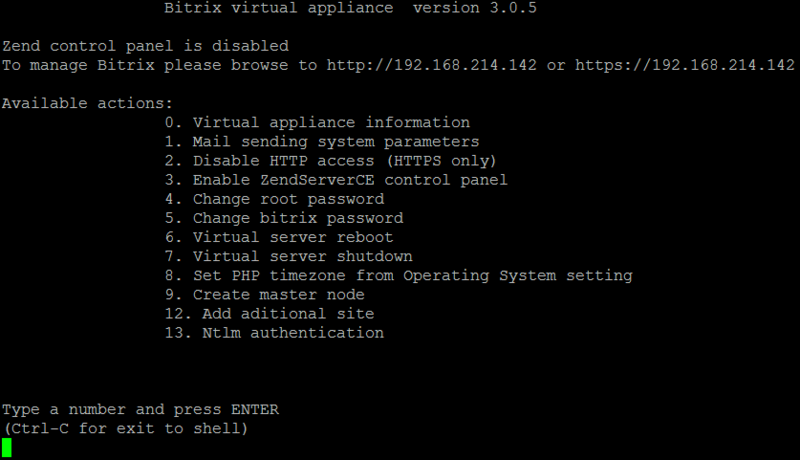
Of course, it looks somewhat ascetic compared to modern beautiful web interfaces. :) Probably someday we will make them for the web environment and virtual machine - and in the end we will get a full-fledged hosting control panel a la ISPmanager, cPanel or Plesk. :)
But even in this version - it is a very powerful and convenient tool.
Web Cluster
For about a year now, the 1C-Bitrix platform has existed and is actively developing the Web Cluster module , which allows you to deploy any project not on one but on several servers, thereby ensuring its scaling with increasing load and fault tolerance upon exit failure of one or more servers.
We have a detaileda guide for setting up a web cluster , everyone can read it.
But in order to save your time, you can use the wizard, which is part of the web environment:
- It will configure and start MySQL replication.
- Configures nginx as a balancer for several nodes;
- Configure the memcached server pool for the distributed data cache
- configure and start synchronization of web server data using csync2 utility.
The setup process is something like this:
- We start a virtual machine or deploy a web environment.
- We install through the wizard in the browser “1C-Bitrix: Site Management” one of the two senior editions (which includes the “web cluster” module).
- We start the setup of the master node through the menu.
- We start one more virtual machine (or we deploy a web environment on the second server).
- Through the menu of the first machine, add a slave node.
Further, all settings will be performed automatically.
At a recent partner conference, Denis Sharomov, the head of technical support, clearly demonstrated the entire process of deploying a small test cluster in just 10-15 minutes.
In the same place, he demonstrated another remarkable opportunity - switching any slave to master mode in the event of an accident on the master node.
You have a wonderful opportunity to watch all this practically live - video recordings of reports have been posted on the conference website , including the report “Virtual Machine 3.0: How to Launch a Web Cluster in 15 Minutes with Practical Examples”.
Corporate Portal
“1C-Bitrix: Web Environment” is maximally adapted for any projects developed on the “1C-Bitrix” platform (at the same time, any websites using PHP and MySQL will work fine on it).
But at the same time there are a number of separate "chips" specially designed for working with the "Corporate Portal" .
For example, catdoc and xpdf utilities are automatically installed and configured in the product, which allow indexing and making documents of the most popular formats (MS Word, Excel, PowerPoint, Adobe Acrobat) available on the portal for search on the portal.
The web server is immediately configured to work over both HTTP and HTTPS. You can simply replace the self signed certificate with your purchased one - and work in a secure environment.
Next ... WebDAV is supported right out of the box for connecting network drives.
Separately, you can mention the NTLM authorization configuration wizard:
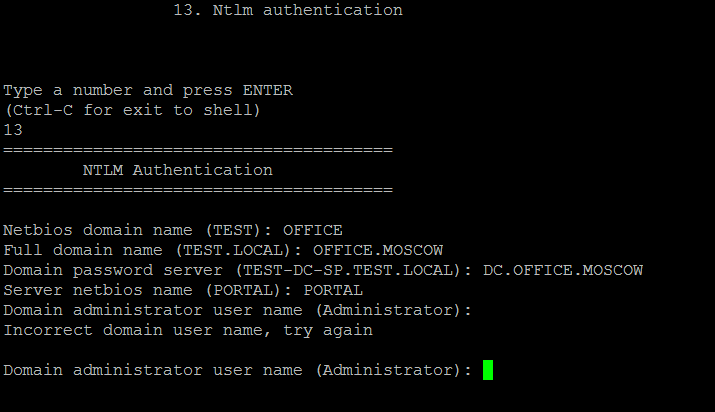
If the company uses Active Directory, and AD users are allowed to log in to the portal, then in addition to the portal settings, it often requires a lot of “dancing with a tambourine” around the Apache and Nginx configs for NTLM authentication to work correctly.
Now this is not required, the whole process is automated!
(The entire configuration process is described in detail in the blog of Nikolai Ryzhonin .)
Automatic configuration depending on available resources
The web environment has a tricky script /etc/init.d/bvat.
Starting at the system startup, it determines the amount of available resources (RAM) and, depending on them, automatically optimally configures:
- MySQL (buffer sizes, number of connections, temporary tables, etc.);
- MaxClients and related parameters in Apache;
- Amount of memory available for Zend Optimizer +.
If after installing a virtual machine or web environment you want to perform fine-tuning specifically for your tasks, turn off this script so that it does not work with every server reboot.
* * *
We somehow tried to calculate, but how much time would be needed in the “man-hours” :) to fully configure all the software, deploy the cluster, configure NTLM authorization ... It turned out at least 200 hours! :)
Of course, this is an upper estimate. Nevertheless, even if, for example, you need to configure VPS for the stable operation of a regular site, it will take 1-2 days to install, configure and test everything.
With the "Web Environment" or "Virtual Machine" "1C-Bitrix" this time can be saved and spent on something else. :)
PS We are often asked to lay out a detailed description of the web environment: with examples of scripts, configs, etc.
Such a “description” is the web environment itself . It is absolutely free. Put it on any machine or download our virtual machine . Visit her on ssh - and learn! All configs, all scripts - everything is completely open and accessible. :)