October 21, 2011 at 19:41
Making releases using Maven in Java
What is this article about?
This article is about:
- What is a release?
- How are releases numbered?
- Why do you need brunch when you release?
- Why is the release more than just jar (war, ear, zip, etc)?
- What is maven-release-plugin?
- Make brunch using release: branch.
- Preparing for a release with release: prepare.
- Releasing a release using release: perform.
To read and understand this article, I recommend brushing up on Maven. Many terms may not be understood without understanding this technology.
The first few sections are devoted to the general concept of releases and their numbering. If you are experienced enough, skip it!
What is a release and what does it eat with
For myself , I define release as fixing a certain set of functionality. By consolidating the functionality, you say: “This version of the product contains the ability to create a new document, turn pages with your finger or launch rockets into space.” It’s good practice to maintain a list of fixed functionality in the bug tracking system, allowing the guys from QA to quickly and easily determine what your release is capable of, and what it cannot, say that where an error has crept into your system and so on and so forth.
Consider an example of a small project. Imagine that the city zoo ordered us to develop a system for monitoring the state of animals: in which cages they live, which caretaker takes care of them. It is also necessary to inform the caretaker via sms that the animal needs care.
Let the project be done for the Web and has the following structure: The release for us will be war, which we can deploy to the web server, and zip with a small server that receives messages from sensors in aviaries with animals.
zoo

|---zoo-web

|---zoo-sensor-server
Release Numbering
“A large number of software version numbering schemes have been created to track software changes,” Wikipedia tells us .
And this is truly so. Most projects, companies, products, and individual developers use their own versioning method.
Maven suggests that we use the more or less generally accepted xyz numbering scheme , where:
- x - number of the main release functionality
- y - number of additional release functionality
- z - bug fix number
For example, 1.3.23, 0.7.7 and 1.4.112. We will use it for our zoo.
Meanwhile at the zoo
So, we agreed on the management of the zoo that before launching a full-fledged product, we will give them three intermediate versions. The first one will contain the implementation of a server that collects information from sensors in aviaries. The web part will be very simple, displaying metrics in an unprepared form. The second one will contain a full screen with information on aviaries, sorting options, and more. The third - will contain the functionality of notifying employees about the necessary actions via SMS. And only when we collect everything, and the client will like everything, we will release the final release.
0.y.0
Give each of the intermediate versions the names 0.1.0, 0.2.0, 0.3.0, respectively.
The first digit is 0, because our main release has not yet been released, this is only an intermediate result.
The second digit is equal to the delivery number. The third is 0, because we believe that there are no bugs at the time of assembly.
When the third digit is 0, it is often not written: 0.1, 0.2, 0.3 .

Alpha, Beta and other RC
Before delivering the release to the client, even intermediate, he must go through the QA process. Test release release approaches may also vary, but in my projects I try to use the concept of Release Candidate.
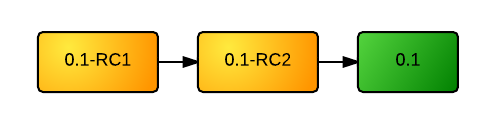
Before releasing the xy release, you build xy-RC1, xy-RC2, and so on, until QA tells you that the release is stable and ready in UAT or Production.
Then the last RC becomes the very long-awaited release.
0.1.x
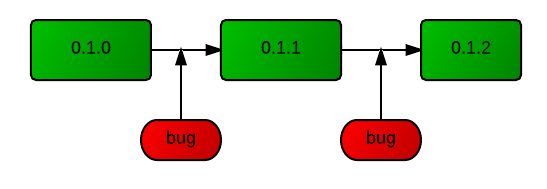
There are errors in any code. And the user will happily find them. In the process of support, new bugs are started, you edit them and must provide a version with corrections. For this, bug fix releases are collected.
For example, you released version 0.1.0, and in the course of real work it turned out that the temperature sensor data is not processed correctly. Release 0.1.1 is released, which corrects an annoying misunderstanding.
Final release and beyond
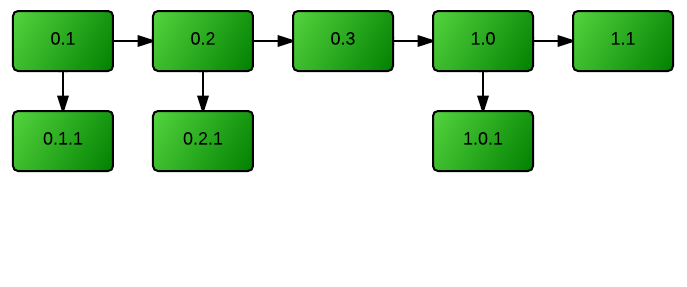
After a series of intermediate deliveries, you build 1.0-RC, complete the QA process, and build 1.0. If subsequently the customer wants the functionality of automatic opening of the cells at night, so that the animals can frolic, and you write and collect 1.1. It will find a
If he suddenly wants to write everything anew, prettier and cooler, then you will most likely need 2.0, then 2.1.45 and so on and so on.
Release brunch
So, release is a consolidation of functionality. That is, we have created a server for collecting data from sensors in aviaries. Made a simple web interface. We tested and gave it all to the zoo, let them put the sensors. We will begin to make a beautiful and friendly interface. And of course, we will deal with this.
There are several questions:
- Where should the new friendly interface code be written?
- Where will we correct the error in processing information from the sensor if it is suddenly found in the zoo?
In the trunk, of course, we must correct the error. But we cannot collect a new version in a few days and give it to the zoo. We've sorted it all out for a beautiful interface.
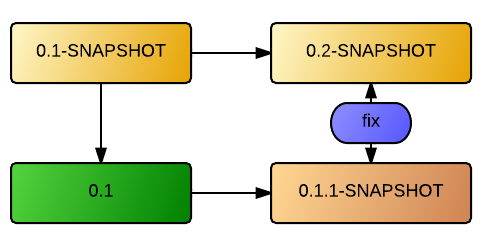
Therefore, usually, the release of a release with basic or additional functionality is accompanied by the creation of a branch in VCS (brunch). This branch will contain a fix for bugs found in the current production version of the client. In the trunk, you can do anything. And at the same time, you always have stable code that contains only bug fixes.
Typically, such a brunch is called <project name> -0.1.x , that is, a brunch from release 0.1, which contains fix bugs for this version.
Why release is more than war assembly
The end product is not just war in your hands. The product has a life cycle. It must be available for other products. We can reassemble the release if all the assemblies were lost as a result of a fire in the server zoo.
A release must perform two tasks:
- Securing and ensuring the availability of the collected product.
- Fixing the source code of the release, in case of re-assembly or the beginning of a new branch from this release.
Thus, you need to find where the assembled war and zip for the zoo will lie, and also remember at the VCS level that this particular state of the code corresponds to the release.

Remember the state of the code
Tags are used for this. Tags in the version control system, this is the name assigned to the revision. For a custom look, a tag is the same source folder, but its state is fixed at the time the tag was created. And don't use tags like brunches.
Spread the assembled product
To store and provide access to the assembled product, you can even use the ball on an external server. Maven brings the concept of repository to industrial development. Artifacts are stored in repositories, you can take an artifact from the repository. The repository structures artifacts by group, name and version.
Together
We need to do:
- If this is a release of basic or additional functionality, make a branch for fixing bugs.
- Make a tag to remember the state of the code at the time of release.
- Build the product and put it out for public access.
maven-release-plugin
maven-release-plugin is an interaction tool between the version control system and the repository, which allows you to release with a few commands. The plugin performs for you the entire release process from start to finish.
Plugin configuration
For the plugin to work, it needs the following information in pom.xml of the main module of your project:
Version Control Information
First, we need to indicate where the source code of the project is stored. To do this, use the standard Maven tag:
scm:svn:http://svn.zoo.com/zoo/trunk scm: svn: http stands for: use the scm protocolto interact with the svn repositoryalong the http: path. SCM is a Maven protocol for working with version control systems.
If we are going to write a zoo using Mercurial, we need to write the following:
scm:hg:http://svn.zoo.com/zoo/trunk Build Settings
In order to set the parameters of the release, the plug-in connection to the section is used.
.
org.apache.maven.plugins maven-release-plugin svn://svn.zoo.com/zoo/tags svn://svn.zoo.com/zoo/branches clean install deploy true In configuration:
- tagBase - the path to the folder in your repository where the tags will be stored.
- branchBase - the path to the folder in your repository where the branches will be stored.
- preparationGoals - tasks to be performed in preparation for the release, before creating the tag. This is usually a standard build cycle.
- goals - tasks that need to be done with the release itself. Usually these are integration tests and deployment to a common repository.
- autoVersionSubmodules is a useful setting that allows you to specify a new version for all modules in a project at once.
The plugin also uses the project version:
0.1-SNAPSHOT General requirements
To create a release, you also need to have a client for VCS installed on the system . It should be accessible from the console and be in PATH (svn, hg, git).
Also, the plugin will not allow you to create a release if you have local modifications in the code. And rightly so!
To create a release, the plugin needs write access to the version control system. Make sure that the authorization cache on your machine has the necessary information or use -Duser =
Create zoo-0.1 release
We will collect the release of the first delivery for our zoo. We are holding a trunk with version 0.1-RC3-SNAPSHOT. The QA team informed us that RC2 was good enough for us to release.
Creating a brunch for release - release: branch
This item should be completed only if you are building a release with basic or additional functionality. If we were collecting bug fix release zoo-0.1.2, then we would skip this point.
If we collect Release Candidate, then we skip this step as well.
To create a brunch you need to do:
mvn release:branch -DbranchName=zoo-0.1.x
At run time, Maven will ask us what is the next version for the trunk, by default offering 0.2-SNAPSHOT.
What is the new working copy version for "Zoo"? (com.zoo:zoo) 0.2-SNAPSHOT:
Preparing for release - release: prepare
The pre-release phase in terms of maven-release-plugin includes project validation (compilation, tests, assembly) and tag creation in VCS . Tags will be created in the folder specified during configuration.
We’ll release from the created brunch, after selecting it from the repository. At the previous step, Trunk began to live a new life and we no longer touch him.
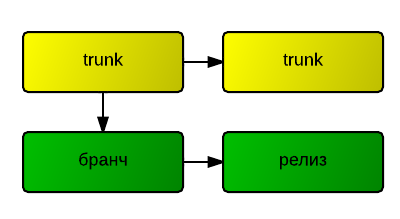
If we collect a bug-fix release, then you do not need to choose anything. We are already in the branch for bug fixes.
If you collect Release Candidate, then we are performing this phase from the trunk.
Run the following command:
mvn release:prepare
Maven will consistently ask us the version number to be collected, the name for the tag, and the next version number:
We will answer 0.1.1-SNAPSHOT to the last question, because this is the first future bugfix release.
Release release - release: perform
The release execution phase includes checking the source code from the tag and building it (usually before the deploy phase). Yes, exactly so, they check out the source code from the tag. Why is this necessary if we already have the source code for a working copy? Because Maven wants to be sure that this assembly will be identical to that which can then be done by selecting the tag manually.
To complete the release, you must complete:
mvn release:perform
This time they won’t ask you anything, they’ll just do whatever it takes. The result will be a release laid out in a common repository of artifacts.
If something went wrong.
If in the process of using the plugin something breaks, then you have three options:
- If this happened due to external factors, for example, a server with a version control system was unavailable, then run the task again. The plugin remembers the last successful action and will try to continue.
- If the plug-in during the error of the assembly itself occurred, for example, the integration test did not pass, use release: rollback , this command will roll back all version changes and remove the failed tags from the version control system
- If you’re sure there’s nothing to roll back and just want to start over, use release: clean