 March 15, 2011 at 11:26
Setting a DataContext to nested non-visual objects in WPF / Silverlight

When developing DXScheduler for WPF, we received a script from the user that used the MVVM template.
The user-defined object was assigned to the DataContext property of our scheduler, and in the XAML markup, "binding" to the corresponding properties of the object was carried out using Binding expressions .
But there was a problem - the scheduler contained a non-visual Storage object that stored a set of settings for the data. In the form in which the Binding expressions were written, the properties of the store object were not updated.
You will learn more about how this problem was solved below ...
The article provides a simplified solution that demonstrates the scenario described above. Therefore, I will not complicate the given code with full implementations of the MVVM template, heap up INotifyPropertyChanged interfaces, etc. Our task is to make the example as simple as possible reflect the essence of the issue.
So, let's start with the visual control, which will be a representation of the model.
View class
The visual control that contains the property for the nested DataStore object. It will be created and assigned in XAML.
public class SomeVisualControl : Control {
    public static readonly DependencyProperty InnerDataStoreProperty =
        DependencyProperty.Register("InnerDataStore", typeof(DataStore), typeof(SomeVisualControl), new PropertyMetadata(null));
    public DataStore InnerDataStore {
        get { return (DataStore)GetValue(InnerDataStoreProperty); }
        set { SetValue(InnerDataStoreProperty, value); }
     }
 }
Class datastore
A non-visual data store created in XAML and contained as an internal property in SomeVisualControl.
In DXScheduler, a similar internal object was the descendant of DependencyObject and, by definition, did not contain a DataContext. As a result, Binding expressions on the properties of this object did not work. Therefore, the first thing that comes to mind is to inherit this object from the class containing the DataContext, and the problem will be solved.
Such a class is FrameworkElement, and we will use it as a base class.
public class DataStore : FrameworkElement {
    public static readonly DependencyProperty ConnectionStringProperty =
        DependencyProperty.Register("ConnectionString", typeof(string), typeof(DataStore), new PropertyMetadata(string.Empty));
     public string ConnectionString {
         get { return (string)GetValue(ConnectionStringProperty); }
         set { SetValue(ConnectionStringProperty, value); }
     }
}
Now define user level objects.
Model Class
Defines a custom object. The ConnectionString property will be “associated” with the property of the internal visual control storage.
public class DataStoreModel {
    public string ConnectionString { get; set; }
    public DataStoreModel(string connection) {
         ConnectionString = connection;
    }
}
ModelView Class
Defines the representation of the user object model. Following the requirements of the MVVM template, this class must implement INotifyPropertyChanged , but this is not necessary in our example.
public class DataStoreViewModel {
    DataStoreModel dataStore;
    public DataStoreViewModel(DataStoreModel dataStore) {
        if (dataStore == null)
             throw new ArgumentNullException("dataStore");
        this.dataStore = dataStore;
    }
    public string ModelConnectionString { get { return dataStore.ConnectionString; } }
}
The diagram of the obtained classes is given below:
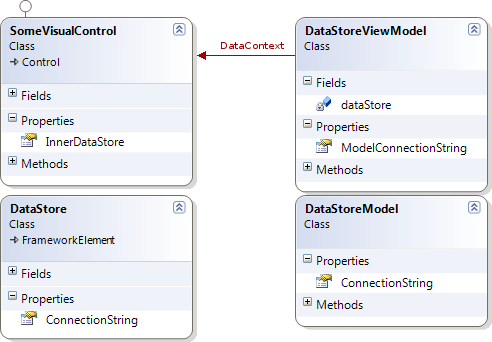
So, we pose the problem: to connect the property of the internal non-visual object with the property of the model .
Let's move on to the application and create the necessary controls in the XAML markup
    xmlns="http://schemas.microsoft.com/winfx/2006/xaml/presentation"

    xmlns:x="http://schemas.microsoft.com/winfx/2006/xaml"

    xmlns:local="clr-namespace:DataContextWpfSample"

    Loaded="Window_Loaded"

    Title="MainWindow" Height="350" Width="525">


* This source code was highlighted with Source Code Highlighter.
Let's set the name MyVisualControl to our control - this will be necessary to access it from the code-behind file of the window. We define a display template and display the properties we are interested in to make sure that they were correctly received from the model object.
The model initialization code in the window class file is as follows:
public partial class MainWindow : Window {
    public MainWindow() {
        InitializeComponent();
    }
    private void Window_Loaded(object sender, RoutedEventArgs e) {
        string connection = @"Provider=Microsoft.Jet.OLEDB.4.0;Data Source=|DataDirectory|\MyDB.mdb;Persist Security Info=True";
        DataStoreModel sourceData = new DataStoreModel(connection);
        DataStoreViewModel sourceDataModel = new DataStoreViewModel(sourceData);
        this.MyVisualControl.DataContext = sourceDataModel;
}
We especially note the last line - assigning a DataContext will thus “link” the properties of the control with the properties of the model using binding expressions.
We start the application, but instead of the expected connection string, we see an empty one.
We will use the SNOOP utility and make sure that the DataContext of the storage object is not assigned:
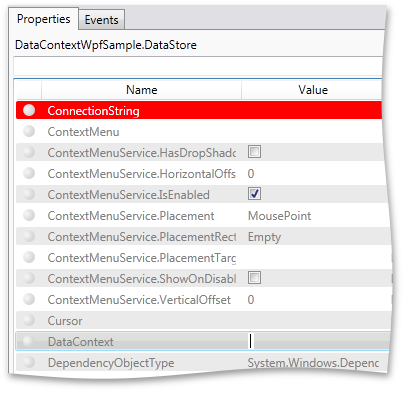
It seems that this is due to the fact that:
The DataStore object is NOT in the visual tree, and therefore the parent context is NOT set on it .
Purpose of DataContext
Thus, we need to determine when the DataContext is assigned in the visual control, and set this value to the internal DataStore.
The FrameworkContentElement class contains a DataContextChanged event .
We will use this and, having written a simple code, we will get the correct result.
public class SomeVisualControl : Control {
    // ...
    public SomeVisualControl() {
        this.DataContextChanged += new DependencyPropertyChangedEventHandler(SomeVisualControl_DataContextChanged);
    }
    void  SomeVisualControl_DataContextChanged(object sender, DependencyPropertyChangedEventArgs e) {
        InnerDataStore.DataContext = e.NewValue;
    }
}
Unfortunately, there is one BUT ...
If you use WPF, then you can very well use this approach. The thing is that the current version of Silverlight does not contain a DataContextChanged event .
And since we are writing general code for WPF and SL controls, it was necessary to write a universal solution.
So how do you know when the DataContext of the visual control changes?
You can use the following approach ...
Frankly, the idea is not new. I just tried to generalize it so that it could be used in different classes and for classes with a hierarchy of nested non-visual objects.
The essence of the idea is that DependencyProperty is created and binding is done, where the created property is associated with the DataContext property of the control in which you want to know about the context change. In this case, when registering DependencyProperty, you must specify PropertyChangedCallback . This callback function will be called when the value of the DataContext property changes. And it is here that you can assign a context to all the necessary objects, in our case, an InnerDataStore object.
Looking ahead, I’ll say that we will define an interface that will report that the DataContext property has changed and should be assigned to nested objects.
public interface IDataContextOwner {
    object DataContext { get; }
    void UpdateInnerDataContext(object dataContext);
}
We implement the class described above containing binding on the DataContext and PropertyChangedCallback method.
At the same time, we will pass to the class constructor an object that implements the IDataContextOwner interface (in our case it will be SomeVisualControl) and call the interface method UpdateInnerDataContext to tell our visual control that it is time to update the context of its internal storage.
public class DataContextBinder : DependencyObject {
    IDataContextOwner owner;
    public DataContextBinder(IDataContextOwner owner) {
        if (owner == null)
            throw new ArgumentNullException("owner");
        this.owner = owner;
        InitializeBinding();
    }
    protected virtual void InitializeBinding() {
        Binding binding = new Binding("DataContext");
        binding.Source = owner;
        binding.Mode = BindingMode.OneWay;
        BindingOperations.SetBinding(this, DataContextProperty, binding);
    }
    public object DataContext {
        get { return (object)GetValue(DataContextProperty); }
        set { SetValue(DataContextProperty, value); }
    }
    public static readonly DependencyProperty DataContextProperty =
        DependencyProperty.Register("DataContext", typeof(object), typeof(DataContextBinder), new PropertyMetadata(null, new PropertyChangedCallback(OnDataContextChanged)));
    public static void OnDataContextChanged(DependencyObject d, DependencyPropertyChangedEventArgs e) {
        ((DataContextBinder)d).OnDataContextChanged(e.OldValue, e.NewValue);
    }
    private void OnDataContextChanged(object oldValue, object newValue) {
        owner.UpdateInnerDataContext(newValue);
    }
}
Now let's write a fairly simple implementation of the IDataContextOwner interface in our View (SomeVisualControl):
public class SomeVisualControl : Control, IDataContextOwner {
    // ...
    object IDataContextOwner.DataContext {
         get { return DataContext; }
    }
    void IDataContextOwner.UpdateInnerDataContext(object dataContext) {
        if (InnerDataStore != null)
            InnerDataStore.DataContext = dataContext;
    }
}
The last thing to do is create an instance of the DataContextBinder inside the View.
You can do this directly in the class constructor:
public SomeVisualControl() {
    this.dataContextBinder = new DataContextBinder(this);
}
Run the application and make sure that the context is assigned to the internal object and the line from the model is correctly set to the DataStore object. Now the application window displays data from a user-defined model.

conclusions
This implementation is not tied to a specific class and can be applied where there is a need to assign a DataContext to an object that cannot be received by "regular" means.
At the same time, when there is a need to pass the context deeper into the hierarchy of non-visual objects, you simply create an object of the DataContextBinder class and implement the IDataContextOwner interface.
This frees you from the cumbersome writing of dependency properties and the definition of binding between them in each of the classes. The DataContextBinder encapsulates the functionality and at some point notifies the owner of the need to set a new context value on nested objects.
Sample sources are available here:
WPF and Silverlight









