All inclusive
More and more users are trying to get rid of bulky system units - the same laptops are becoming more and more popular, due to their compact size and sufficient performance for most tasks.
But, as they say, a person is not full of laptops alone - there is something else interesting besides the “books”. Have you thought about tablets? No, how much can you talk about them ... let's talk about monoblocks better. From me - an overview (with analysis!) Of a new device from Foxconn, from you - thoughts about this class of devices, application scenarios and other ideas for getting rid of "dust collectors")
I will not beat around the bush, but immediately turn to the specifications - as you asked to do. Let's begin!

Processor : Intel Core i7-640M (two cores, 2.8 GHz, 4 MB L3, 32 nm, TDP 35 W, Intel 64)
Chipset : Intel H55
Graphics : ATI Mobility Radeon HD 5450 (1024 MB GDDR3)
RAM : 4096 MB , DDR3 PC3-10700 (667 MHz), two slots
Storage : 2.5 '' Western Digital hard drive with 500 GB + 1.8 '' Toshiba SSD with 30 GB.
Operating system : Microsoft Windows 7
Display : 21.5 ", 1920x1080 (16: 9, FullHD), glossy, touch (capacitive)
Drive : SlimType DVD drive with slot loading
Connectors: 6xUSB (2.0), eSATA, VGA, HDMI, RJ-45, DC-in, SPDIF-out, TV tuner, YPrPb, Audio R / L, headphone and microphone jacks.
Wireless interfaces : Bluetooth (2.1 + EDR), Wi-Fi (802.11b / g / n)
Card reader : MMC / SD (SDHC)
Camera : 1.3 MP
Additionally : remote control, wall mount option (VESA)
Case material : plastic
Dimensions : 542 x 374 x 48 mm
Weight : 7 kg I will
warn in advance: most likely a slightly different series of devices that will be built on a different chipset will go on sale - not on Intel H55 , but on Intel H61. Accordingly, the processor will be different - Intel Core i3 / i5 (Sandy Bridge) and the name of the candy bar (presumably Ai6100 ). There will be several modifications, but I do not have exact specifications yet.
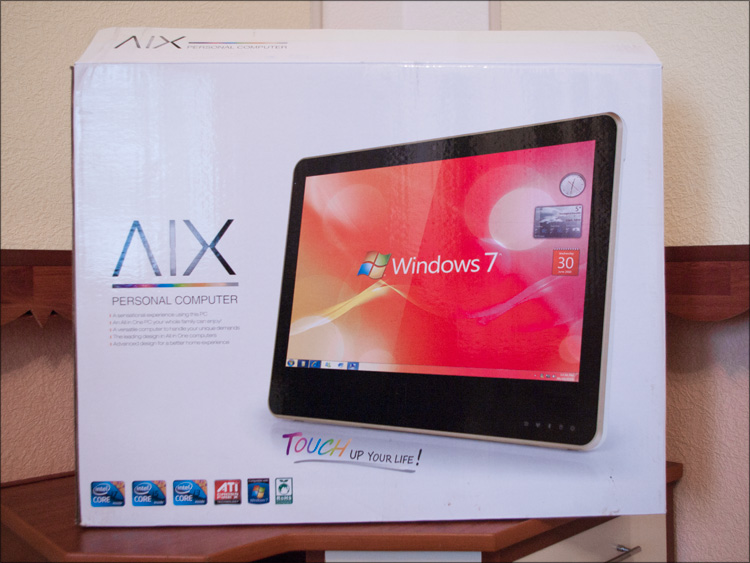
The box is large - it is quite possible to use this after unpacking on the farm. And initially it contained:
- Monoblock
- Adapter from DVI to HDMI
- Adapter for TV antenna
- Network adapter and power cable
- Remote control and 2 batteries
- VESA mount
- Fibercloth
- Software disk
- Manual

There was no mouse or keyboard in the kit ... I dare to assume that there are two options - either the manufacturer made some elegant solution for entering data via the touch screen, or the right to choose peripherals was left to the buyers ’conscience. The second option from the very beginning was a little predictable ... so it happened.
The entire front panel is completely and completely glossy - even when I was just getting the device out of the box, I felt chunks of salt pouring onto my wounds) And my fears were not without reason - the screen was very glare, so the matte film would not hurt here. Where to get a matte film of this size? A good question - most likely you will have to do it on order, since this is also possible.
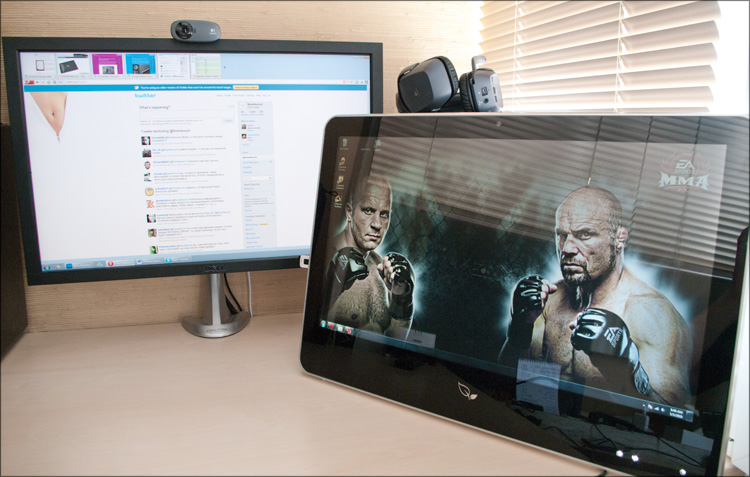
But the fingerprint resistance of the panel is completely in order - if the iPad (without a film) can be wiped at least every 10 minutes, then there were practically no fingerprints in two days.
Around the screen there is a fairly thick black frame, but it is under the glass, so there are no obstacles to care for the display. Above is the camera.
At the bottom is a logo of two leaves; It looks pretty pretty, but to be honest, I see such a logo for the first time - the Google Foxconn logo request in Google did not confirm my guesses. It turned out a little later that in front of me was a product from the category “To be filled by OEM”, that is, in the first place we can expect the appearance of this device in retail under the brands of other companies. And with the "leaflets", perhaps, unbranded barebone versions of the candy bar without a hard drive, tuner and memory will appear on sale.

Along the entire perimeter of the front panel there is a thin plastic edge that smoothly passes into the back cover. The case itself is made of plastic - also glossy) But there is no question of fingerprints at all - firstly, fingerprints are almost never visible on white plastic (there will be modifications with other colors, such as blue or orange), and secondly, the back cover everyday use can be classified as hard-to-reach places, so you have to look there only once, during the first connection.
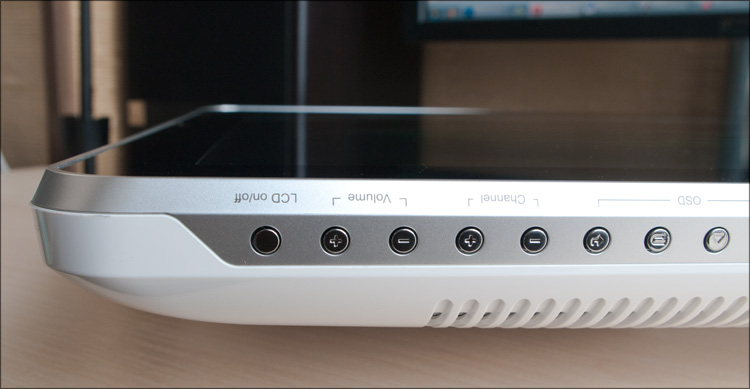
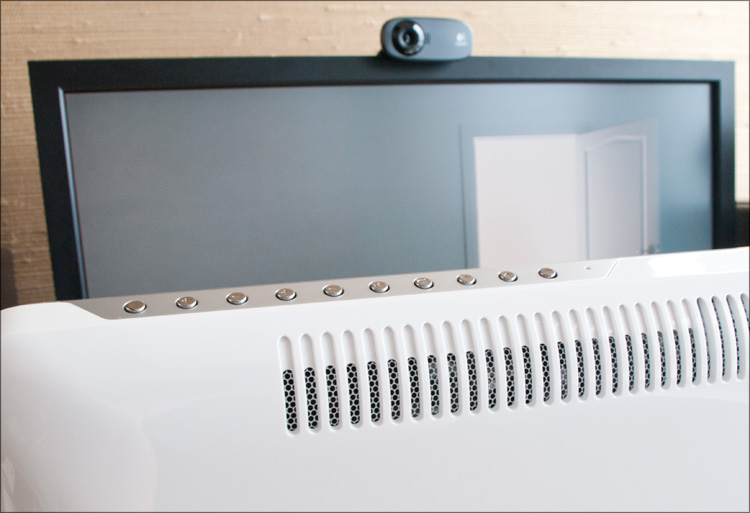
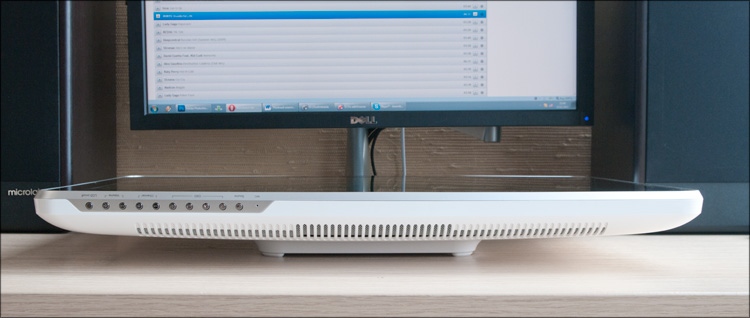
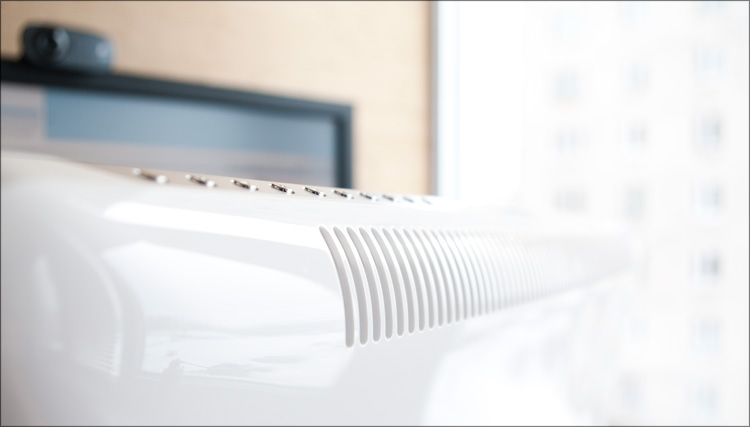
At the top there are 10 buttons divided into groups (Source, 4xOSD, 2xChannel, 2xVolume and LCD off); next to them is a built-in microphone.
On the right (when viewed from the front) is the drive slot, and on the left are the interfaces most in demand in everyday use.

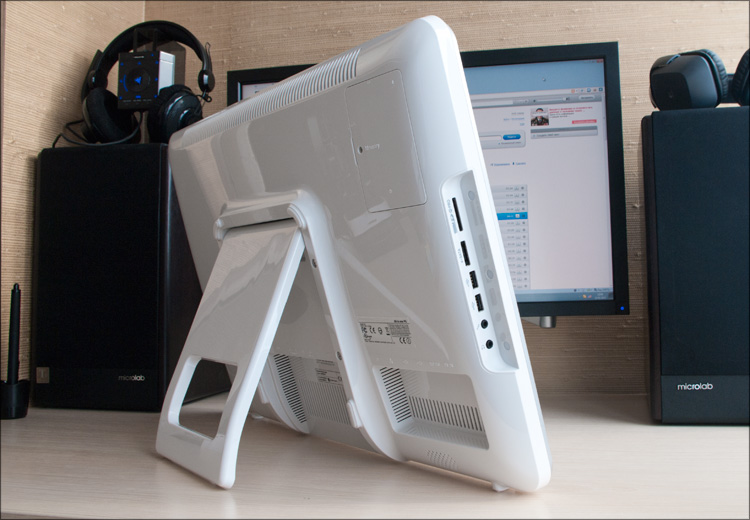
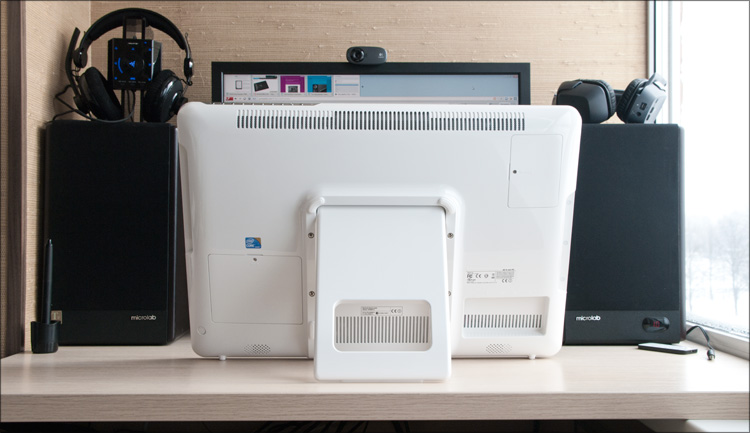
The remaining connectors of the device are located on the rear side and are divided into two groups. The first group is in a small depression on the right:
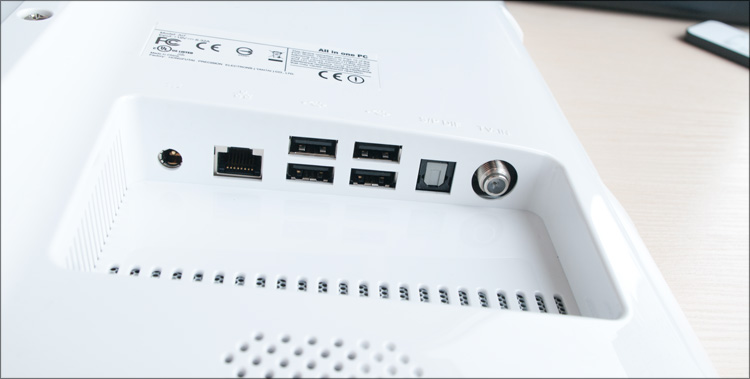
And the second is under support.

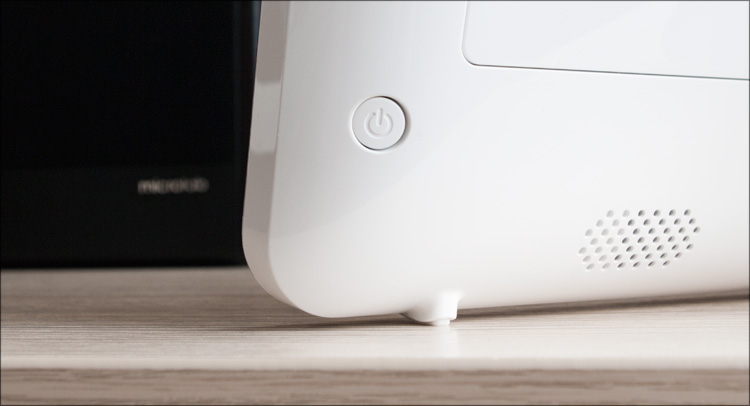
The monoblock power button is located on the back side, closer to the right edge - it is inconspicuous, but you get used to its location after 2-3 power-ups.
By the way, as the first launch of the system showed, the front panel also contains several rather bright white LEDs:
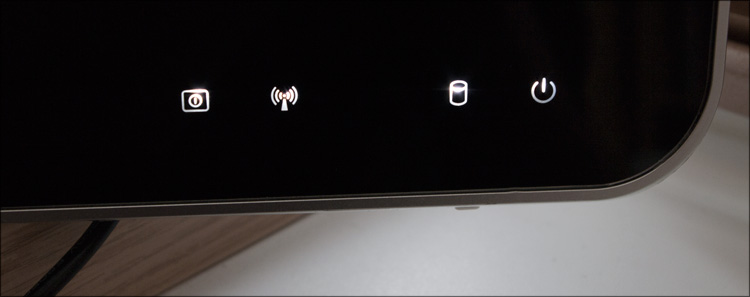
During operation, they light up depending on the status of the filling (Wi-Fi, Bluetooth, Power, etc.) and the first time I did not leave the feeling that these are touch buttons. But no, you can’t press them, and turning them off with regular means will also fail.
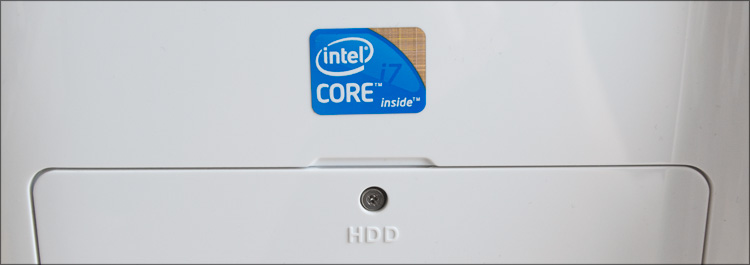
On the rear side there are also two system compartment covers, behind which everything is pretty predictable. But there is a little surprise in those parts ... no, you won’t guess ... I offer 100 rubles and we don’t open the white box) In general, I’ll tell you about everything below, but you could already notice something if you carefully read the specs at the beginning of the article.
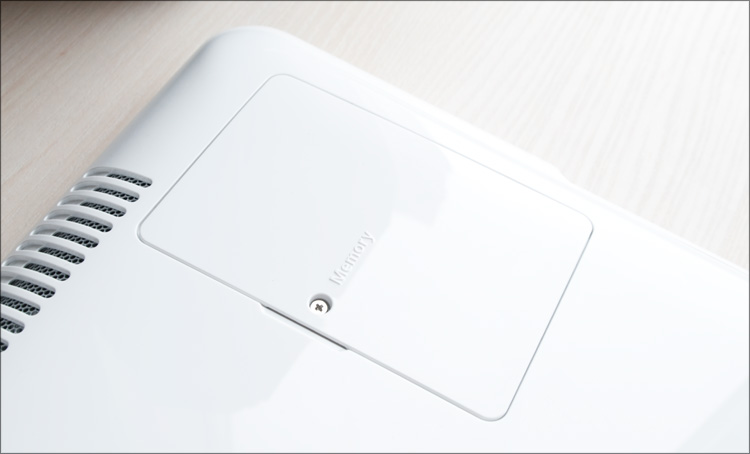
Well, two more points. The monoblock leg is quite massive and allows you to put the device at different angles.

I almost started writing about the battery and battery life ... In general, everything works here through the adapter (input: 100-240V ~ 1.8A 50-60Hz, output: 19V, 6.32A), which has very large sizes. But a long network wire allows you to hide it anywhere.
At the request of the workers, I try to look inside each device - what to hide, it’s interesting for me myself) And I decided not to bypass this candy bar.
The back cover rests on 9 screws (4 large and 5 small) - some of them are behind the white plugs, and one under the void sticker. As it turned out, the lid is made of a single piece of plastic (molds for such products are always difficult for me to imagine), on the inside of which a metal frame is reliably fixed - for fastening the monoblock to the wall.

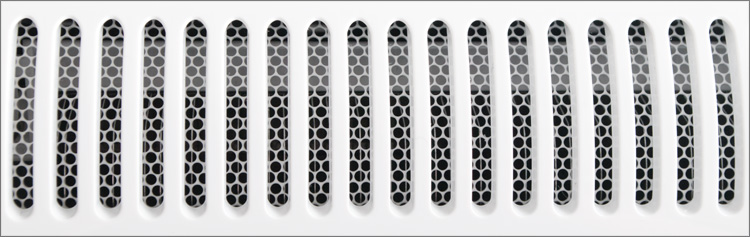
A superficial study of the insides made it clear that only the upper holes are used for ventilation - there is blowing warm air from the processor and video card; accordingly, part of the holes in the lower part can be safely glued so that the dust inside does not accumulate so quickly.
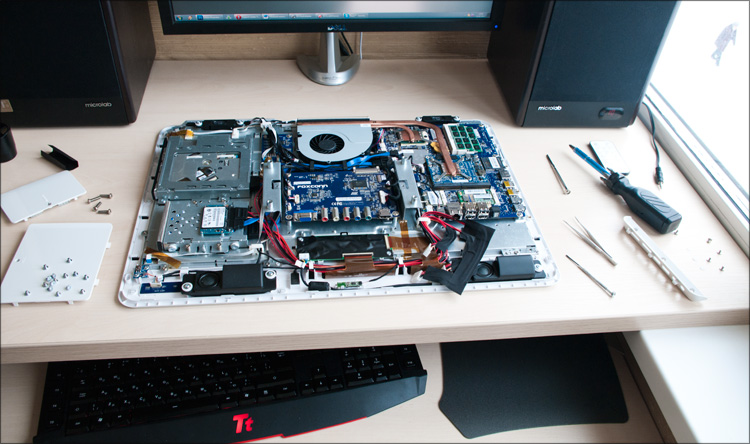
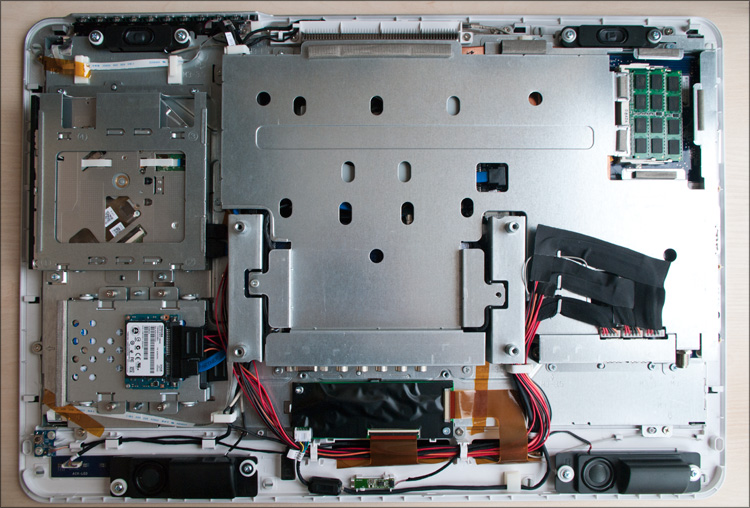
General view of the filling:
A small tour of the details. Here is the power button and front panel indicators (if you remove the small scarf and place a small translucent gasket in front of it, the front panel indicators will not be so bright):

Next to them is one of the speakers - it is fixed to the case through a rubber washer, which, throughout visibility, should damp vibrations and other artifacts of the sound source:

The second speaker is on the other side. In the middle there is a loop to the screen (sort of like) and a light sensor:

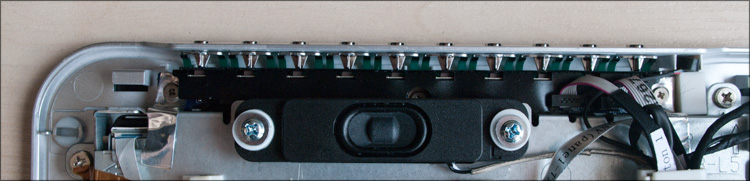
Top panel buttons:
Interface wires are isolated from each other and fixed to the device’s metal frame for order:
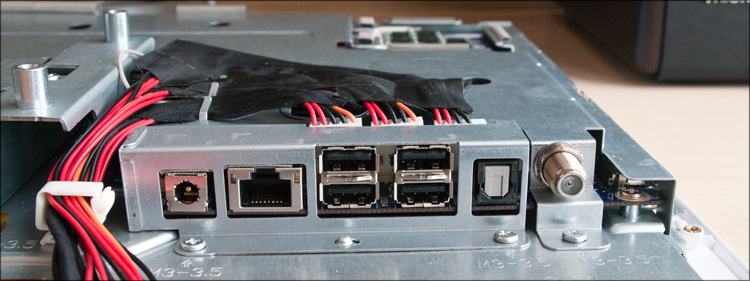
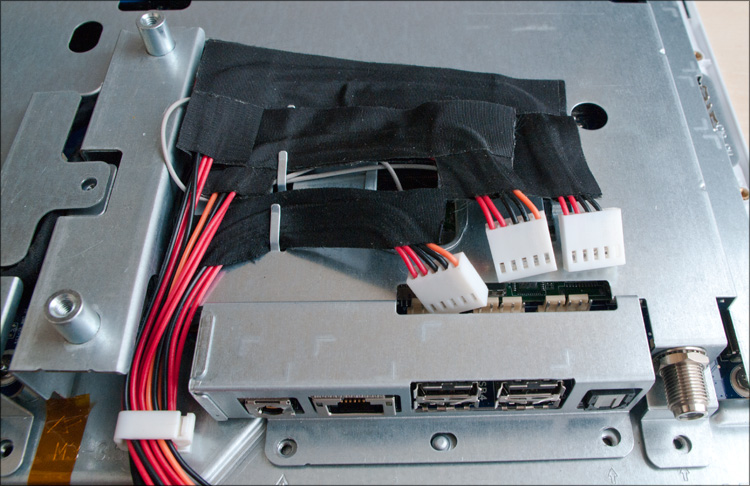

If you remove another 15 screws, you can remove the protective metal frame - it’s located behind it most interesting: The
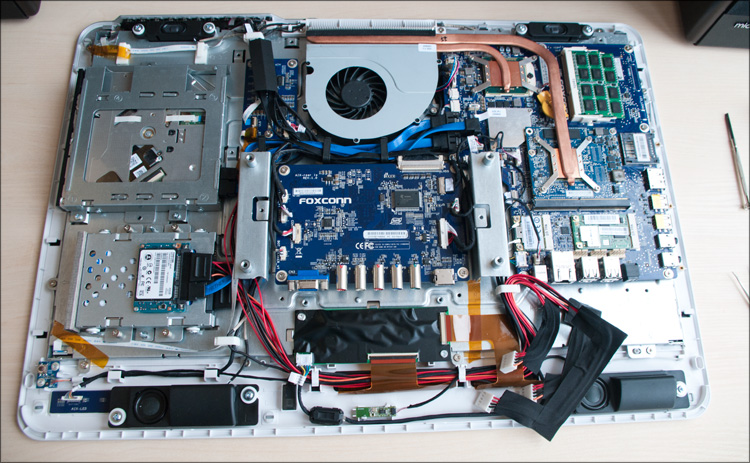
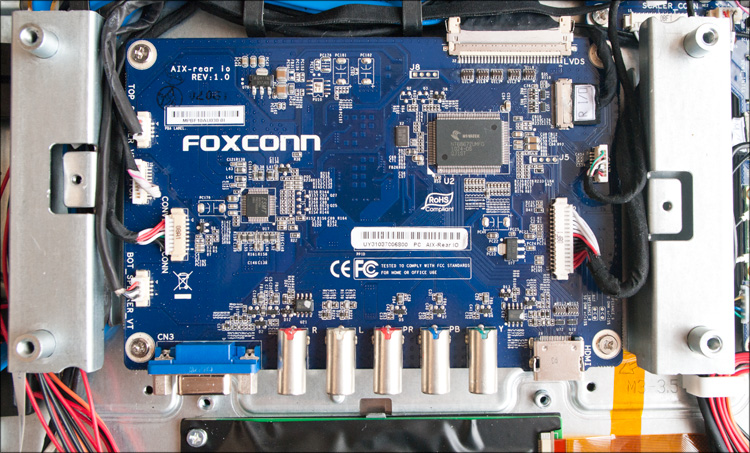
multimedia board from Foxconn itself:
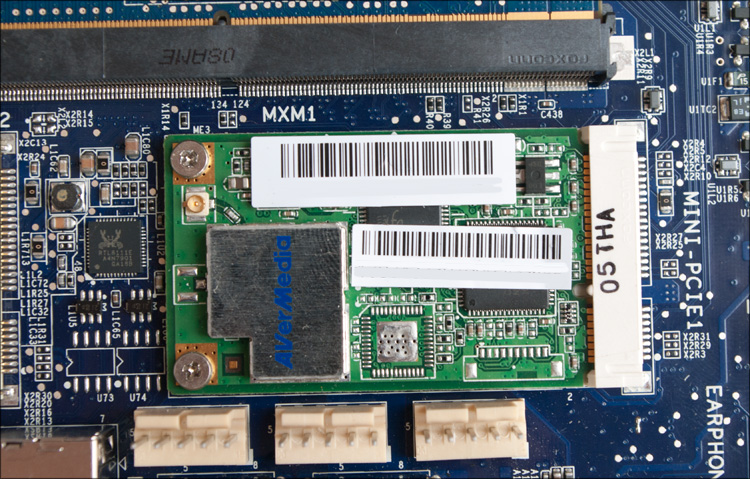
Two mini PCIe slots, one of which has a Wi-Fi module, and the other has a TV tuner from AVerMedia:

To a single system cooler ...
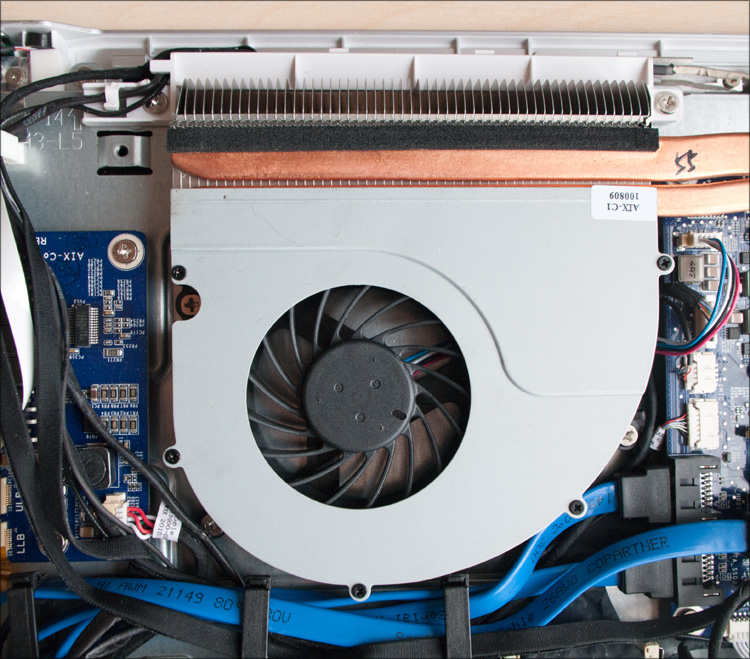
... two copper heat pipes come from the processor:

... and vi deocards:
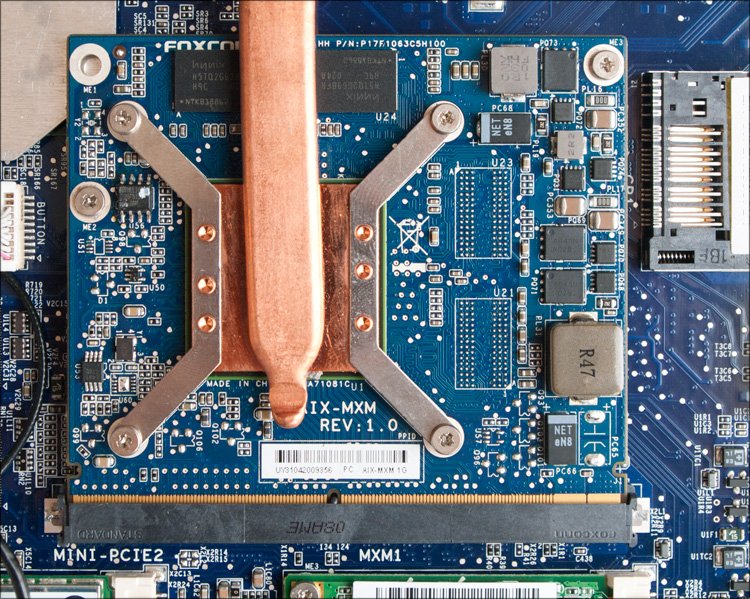
Both the processor and the video card are not soldered on the board, so there is a chance that in the future the monoblock system can be slightly upgraded ... although finding the right components, IMHO, will be very difficult.
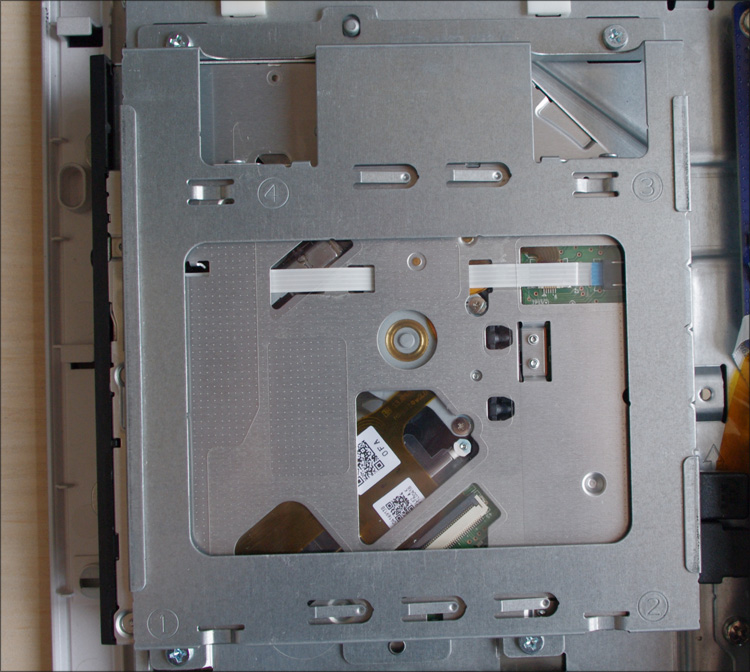
Slot drive. Disks as a data carrier are slowly starting to die, at least I stopped using them for a long time ... but here the device is not superfluous - it will be easier to rearrange Windows without bothering with creating a bootable USB flash drive.
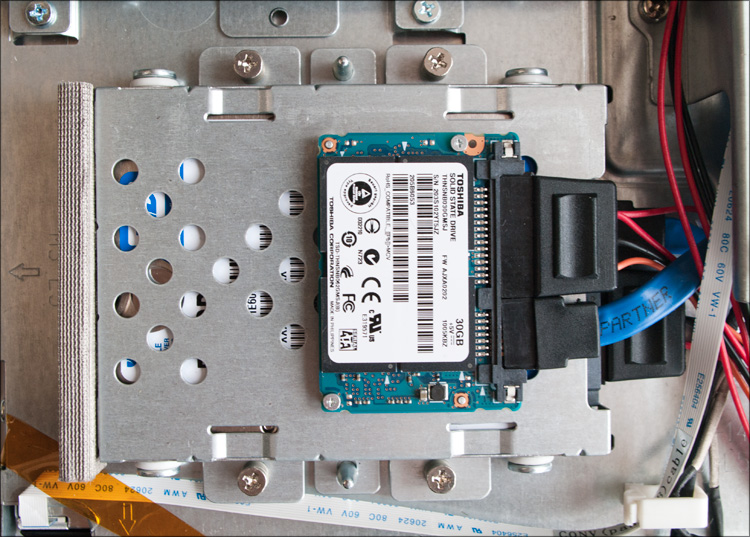
Actually, the hard drive (from WD) and the 30-gigabyte SSD “parasite” from Toshiba sticking to it) There are no more free SATA connectors in the system.
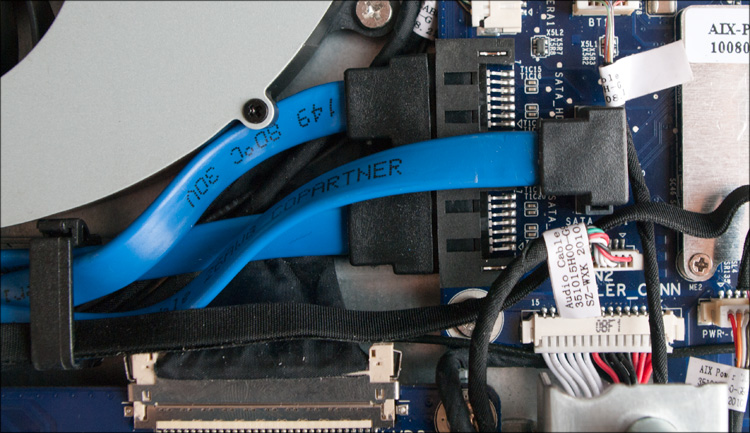
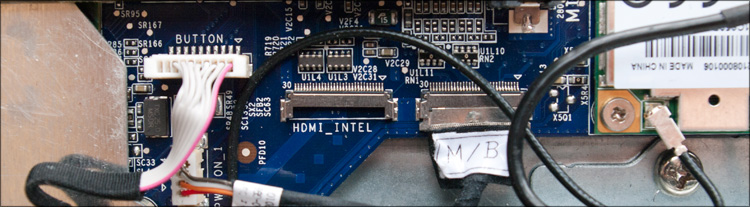
... but there is an unused HDMI connector, which, unfortunately, in this model is in no way connected with the outside world. Perhaps it will turn into a second HDMI-connector in any of the monoblock modifications:
In general, everything was done very carefully, honestly ... although rare fingerprints are visible in some places :) Given the seals on the device, these are definitely fingerprints of the Chinese from the factory, and not colleagues from the “iron” party ( , and I know them all from fingerprints)).
Honestly, I was surprised at how this device works and how it turns on. You press the power button on the back side ... you hear a one-time crunch of the drive ... iii ... and that's all, you hear nothing more! Monoblock Foxconn Ai6100 is very quiet, for which I put a plus in the notebook.
This is an engineering model of the device, so I closed my eyes to some “shortcomings”. So, for example, initially it did not have an operating system ... more precisely, it was (Windows 7 Pro), but it had to be "deployed" from the hard drive, which took about 15 minutes.
From the moment you press the power button until the operating system is fully loaded, it takes 20-25 seconds - commendable. The desktop is pretty deserted (with the exception of three shortcuts from CyberLink - YouCam, YouMemo and YouPaint), as well as the taskbar - it's a pity, but as a rule, on devices for sale everything is much more running.
The system performance index is 4.6 points, all due to the "Graphics" - all other characteristics are higher by a point or even two. It’s easier to see once: It is
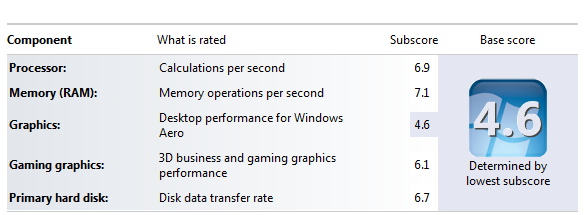
commendable - as practice shows, on systems with similar ratings (even if this index is quite abstract) there are HD movies without problems - looking ahead, I was not mistaken.
As a processor in this modification of the device, a rather productive dual-core Intel Core i7-640M is usedwith a standard clock frequency of 2.8 GHz (up to 3.46 GHz in Turbo Boost mode). The role of the video card went to ATI Mobility Radeon HD 5450 , on board which is a gigabyte of memory. This is an entry-level card that supports DirectX 11 - according to 3DMark benchmarks, it is an analog of the GeForce GT 415M . In principle, for most tasks this card is more than enough, but for games this is not the best choice - the same Crysis, NFS Shift and Left 4 Dead will go only at medium detail settings, or even at low.

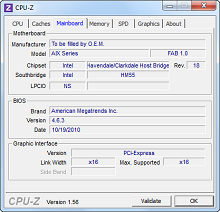
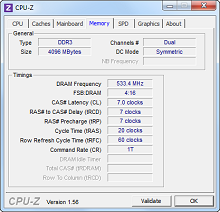


As I already said, this device uses a symbiosis of a regular hard drive (500 GB for storing junk) and a solid state drive (30 GB). The second, as you might guess, is used for the operating system - hence the fast boot time and high scores in evaluating the system ... perhaps this combination is currently the most profitable and very cool that Foxconn knows about it. Offhand, I don’t even remember devices from the same ASUS where a similar configuration would be used.
For completeness, a couple of screenshots with the speed characteristics of both discs. WD: Toshiba:
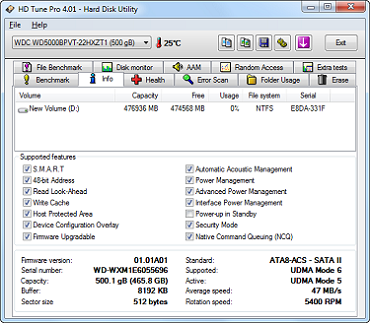
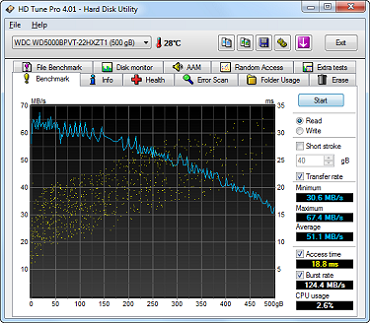


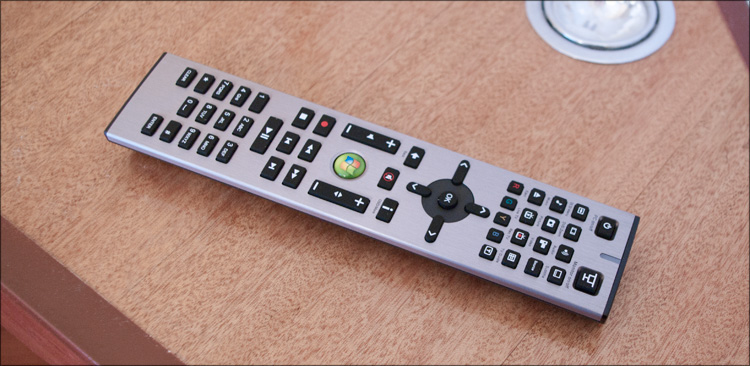
There are really no problems with FullHD video, moreover, full-time speakers are quite enough for family watching movies or for listening to music. The remote control in this regard is not superfluous, though there is nothing outstanding in it; ordinary, very high-quality remote control - with a metal top and a rubberized "belly". Initially, the all-in-one has Windows Media Center, but if one wonders about third-party software, the device can be completely hung on the wall of one of the rooms, turning the all-in-one into a multimedia processor.
The rest is an ordinary computer, so it’s hardly worth focusing on anything else. Although no, a couple of paragraphs about the touch screen and I will be rounded off.
More recently, I did a review of the touch tabletrunning on the operating system Windows 7 - then I was indignant about the inconvenience of managing the system ... no finger optimized interface and so on. So ... apparently, the matter is in the device’s diagonal) On a 10-inch tablet, working with your fingers was really inconvenient - typing an offer on the on-screen keyboard (which occupied almost the entire screen) was a feat. In the case of the all-in-one ... 21 inches give a chance to take a walk - it was much more convenient to drive here! It’s easier to get into the link, it’s easier to type text - you can stretch the keyboard to such a size that you can print with boxing gloves. But not ... there is a capacitive screen.
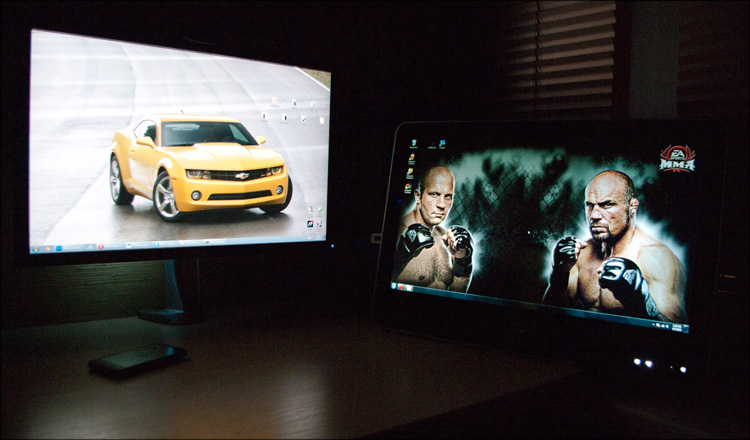
And still Fedor the best of the best!
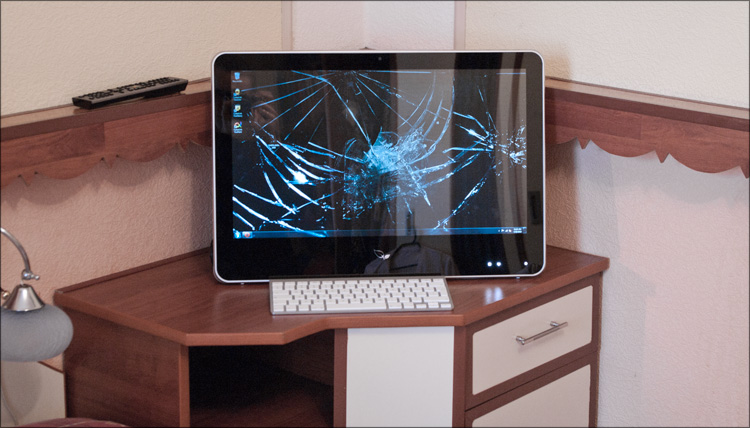
In general, it will be more convenient with a mouse and keyboard, but when they are not at hand, you can poke your finger. I didn’t have a second wired keyboard during the test, so I hooked on Apple’s wireless keyboard - everything worked like a clock.
 Large touch screen.
Wall mountable.
Remote control available.
Many different interfaces and connectors.
Separate SSD-drive for the operating system.
High performance.
Quiet.
 Fully glossy, housing and screen!
Low brightness of the display.
Perhaps the price
. Unfortunately, I can’t say anything about the price of this device yet - this is an engineering sample that has not yet appeared on sale. But I dare to assume that the price for the top-end configuration will be up to $ 1500, and the configs are simpler - from $ 1000.
I have repeatedly seen devices of a similar form factor, but I just saw them - I really managed to get to know each other only now, thanks to this device. It’s a fortunate combination of circumstances - you couldn’t even know that Foxconn did take monoblocks at all :) And now there’s at least an idea of what kind of dishes they are and what kind of sauces they eat.
In general, the device caused only good emotions - even the glossy screen could not spoil the experience, as it turned out to be quite practical in terms of resistance to fingerprints. Accordingly, if you work with the mouse and keyboard, the only problem remains glare, but you can also fight them.
An uncommon (as yet) alternative to the system unit, which, in my opinion, is quite promising. Agree, it will be difficult (if at all possible) to find a laptop with a screen diagonal of 21 ``, also with sensory properties. And the candy bar has a large screen, and connectors for all occasions, and performance, and the ability to upgrade, and ... And you can type on any keyboard, and not on the one that is built in. In short, there is freedom for the flight of fancy, unless in a rucksack such a “TV” can be especially dragged. You can find a lot of applications for this monoblock - from the “TV in the bedroom” to the “multimedia center in the hall”. Play, watch movies, TV and photos, listen to music, chat on Skype and surf the Internet - a godsend for those who do not want to delegate this entire list to all kinds of media players, tablets and other music centers. That is, this is an option for those who need everything at once, with a minimalist design and for less than the cost of iMac)
During the test, it was difficult for me to figure out where I would put such a unit - precisely for the reason that I use different devices for different tasks, and I got used to working just behind the uncompromising system unit. But the wife on this account had a different opinion - she almost wanted a similar unit in the corner in the kitchen) Imagine - you are waiting for guests and you need to cook something - right at the stove you look for a recipe for some exotic salad on the net and start cooking. They started to wash the fruits and with a single dry finger decide that it will be much tastier to cook under the Black Eyed Peas - click and you're done! You don’t need either mice or keyboards ... and, you see, endless online spaces will be much more convenient even for the most sophisticated cookbook!
But, as they say, a person is not full of laptops alone - there is something else interesting besides the “books”. Have you thought about tablets? No, how much can you talk about them ... let's talk about monoblocks better. From me - an overview (with analysis!) Of a new device from Foxconn, from you - thoughts about this class of devices, application scenarios and other ideas for getting rid of "dust collectors")
I will not beat around the bush, but immediately turn to the specifications - as you asked to do. Let's begin!
Specifications Foxconn Ai7
Processor : Intel Core i7-640M (two cores, 2.8 GHz, 4 MB L3, 32 nm, TDP 35 W, Intel 64)
Chipset : Intel H55
Graphics : ATI Mobility Radeon HD 5450 (1024 MB GDDR3)
RAM : 4096 MB , DDR3 PC3-10700 (667 MHz), two slots
Storage : 2.5 '' Western Digital hard drive with 500 GB + 1.8 '' Toshiba SSD with 30 GB.
Operating system : Microsoft Windows 7
Display : 21.5 ", 1920x1080 (16: 9, FullHD), glossy, touch (capacitive)
Drive : SlimType DVD drive with slot loading
Connectors: 6xUSB (2.0), eSATA, VGA, HDMI, RJ-45, DC-in, SPDIF-out, TV tuner, YPrPb, Audio R / L, headphone and microphone jacks.
Wireless interfaces : Bluetooth (2.1 + EDR), Wi-Fi (802.11b / g / n)
Card reader : MMC / SD (SDHC)
Camera : 1.3 MP
Additionally : remote control, wall mount option (VESA)
Case material : plastic
Dimensions : 542 x 374 x 48 mm
Weight : 7 kg I will
warn in advance: most likely a slightly different series of devices that will be built on a different chipset will go on sale - not on Intel H55 , but on Intel H61. Accordingly, the processor will be different - Intel Core i3 / i5 (Sandy Bridge) and the name of the candy bar (presumably Ai6100 ). There will be several modifications, but I do not have exact specifications yet.
The box is large - it is quite possible to use this after unpacking on the farm. And initially it contained:
- Monoblock
- Adapter from DVI to HDMI
- Adapter for TV antenna
- Network adapter and power cable
- Remote control and 2 batteries
- VESA mount
- Fibercloth
- Software disk
- Manual
There was no mouse or keyboard in the kit ... I dare to assume that there are two options - either the manufacturer made some elegant solution for entering data via the touch screen, or the right to choose peripherals was left to the buyers ’conscience. The second option from the very beginning was a little predictable ... so it happened.
Appearance
The entire front panel is completely and completely glossy - even when I was just getting the device out of the box, I felt chunks of salt pouring onto my wounds) And my fears were not without reason - the screen was very glare, so the matte film would not hurt here. Where to get a matte film of this size? A good question - most likely you will have to do it on order, since this is also possible.
But the fingerprint resistance of the panel is completely in order - if the iPad (without a film) can be wiped at least every 10 minutes, then there were practically no fingerprints in two days.
Around the screen there is a fairly thick black frame, but it is under the glass, so there are no obstacles to care for the display. Above is the camera.
At the bottom is a logo of two leaves; It looks pretty pretty, but to be honest, I see such a logo for the first time - the Google Foxconn logo request in Google did not confirm my guesses. It turned out a little later that in front of me was a product from the category “To be filled by OEM”, that is, in the first place we can expect the appearance of this device in retail under the brands of other companies. And with the "leaflets", perhaps, unbranded barebone versions of the candy bar without a hard drive, tuner and memory will appear on sale.
Along the entire perimeter of the front panel there is a thin plastic edge that smoothly passes into the back cover. The case itself is made of plastic - also glossy) But there is no question of fingerprints at all - firstly, fingerprints are almost never visible on white plastic (there will be modifications with other colors, such as blue or orange), and secondly, the back cover everyday use can be classified as hard-to-reach places, so you have to look there only once, during the first connection.
At the top there are 10 buttons divided into groups (Source, 4xOSD, 2xChannel, 2xVolume and LCD off); next to them is a built-in microphone.
On the right (when viewed from the front) is the drive slot, and on the left are the interfaces most in demand in everyday use.
The remaining connectors of the device are located on the rear side and are divided into two groups. The first group is in a small depression on the right:
And the second is under support.
The monoblock power button is located on the back side, closer to the right edge - it is inconspicuous, but you get used to its location after 2-3 power-ups.
By the way, as the first launch of the system showed, the front panel also contains several rather bright white LEDs:
During operation, they light up depending on the status of the filling (Wi-Fi, Bluetooth, Power, etc.) and the first time I did not leave the feeling that these are touch buttons. But no, you can’t press them, and turning them off with regular means will also fail.
On the rear side there are also two system compartment covers, behind which everything is pretty predictable. But there is a little surprise in those parts ... no, you won’t guess ... I offer 100 rubles and we don’t open the white box) In general, I’ll tell you about everything below, but you could already notice something if you carefully read the specs at the beginning of the article.
Well, two more points. The monoblock leg is quite massive and allows you to put the device at different angles.
I almost started writing about the battery and battery life ... In general, everything works here through the adapter (input: 100-240V ~ 1.8A 50-60Hz, output: 19V, 6.32A), which has very large sizes. But a long network wire allows you to hide it anywhere.
Showdown
At the request of the workers, I try to look inside each device - what to hide, it’s interesting for me myself) And I decided not to bypass this candy bar.
The back cover rests on 9 screws (4 large and 5 small) - some of them are behind the white plugs, and one under the void sticker. As it turned out, the lid is made of a single piece of plastic (molds for such products are always difficult for me to imagine), on the inside of which a metal frame is reliably fixed - for fastening the monoblock to the wall.
A superficial study of the insides made it clear that only the upper holes are used for ventilation - there is blowing warm air from the processor and video card; accordingly, part of the holes in the lower part can be safely glued so that the dust inside does not accumulate so quickly.
General view of the filling:
A small tour of the details. Here is the power button and front panel indicators (if you remove the small scarf and place a small translucent gasket in front of it, the front panel indicators will not be so bright):
Next to them is one of the speakers - it is fixed to the case through a rubber washer, which, throughout visibility, should damp vibrations and other artifacts of the sound source:
The second speaker is on the other side. In the middle there is a loop to the screen (sort of like) and a light sensor:
Top panel buttons:
Interface wires are isolated from each other and fixed to the device’s metal frame for order:
If you remove another 15 screws, you can remove the protective metal frame - it’s located behind it most interesting: The
multimedia board from Foxconn itself:
Two mini PCIe slots, one of which has a Wi-Fi module, and the other has a TV tuner from AVerMedia:
To a single system cooler ...
... two copper heat pipes come from the processor:
... and vi deocards:
Both the processor and the video card are not soldered on the board, so there is a chance that in the future the monoblock system can be slightly upgraded ... although finding the right components, IMHO, will be very difficult.
Slot drive. Disks as a data carrier are slowly starting to die, at least I stopped using them for a long time ... but here the device is not superfluous - it will be easier to rearrange Windows without bothering with creating a bootable USB flash drive.
Actually, the hard drive (from WD) and the 30-gigabyte SSD “parasite” from Toshiba sticking to it) There are no more free SATA connectors in the system.
... but there is an unused HDMI connector, which, unfortunately, in this model is in no way connected with the outside world. Perhaps it will turn into a second HDMI-connector in any of the monoblock modifications:
In general, everything was done very carefully, honestly ... although rare fingerprints are visible in some places :) Given the seals on the device, these are definitely fingerprints of the Chinese from the factory, and not colleagues from the “iron” party ( , and I know them all from fingerprints)).
Inclusion and work
Honestly, I was surprised at how this device works and how it turns on. You press the power button on the back side ... you hear a one-time crunch of the drive ... iii ... and that's all, you hear nothing more! Monoblock Foxconn Ai6100 is very quiet, for which I put a plus in the notebook.
This is an engineering model of the device, so I closed my eyes to some “shortcomings”. So, for example, initially it did not have an operating system ... more precisely, it was (Windows 7 Pro), but it had to be "deployed" from the hard drive, which took about 15 minutes.
From the moment you press the power button until the operating system is fully loaded, it takes 20-25 seconds - commendable. The desktop is pretty deserted (with the exception of three shortcuts from CyberLink - YouCam, YouMemo and YouPaint), as well as the taskbar - it's a pity, but as a rule, on devices for sale everything is much more running.
The system performance index is 4.6 points, all due to the "Graphics" - all other characteristics are higher by a point or even two. It’s easier to see once: It is
commendable - as practice shows, on systems with similar ratings (even if this index is quite abstract) there are HD movies without problems - looking ahead, I was not mistaken.
As a processor in this modification of the device, a rather productive dual-core Intel Core i7-640M is usedwith a standard clock frequency of 2.8 GHz (up to 3.46 GHz in Turbo Boost mode). The role of the video card went to ATI Mobility Radeon HD 5450 , on board which is a gigabyte of memory. This is an entry-level card that supports DirectX 11 - according to 3DMark benchmarks, it is an analog of the GeForce GT 415M . In principle, for most tasks this card is more than enough, but for games this is not the best choice - the same Crysis, NFS Shift and Left 4 Dead will go only at medium detail settings, or even at low.

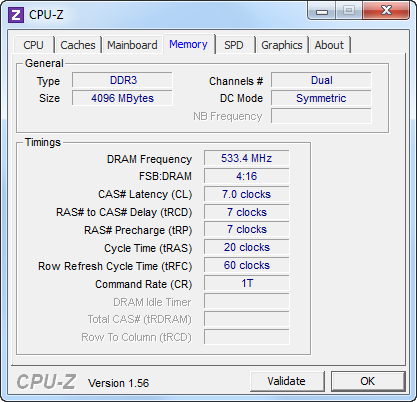
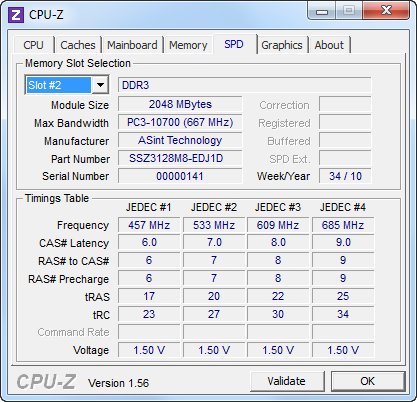
As I already said, this device uses a symbiosis of a regular hard drive (500 GB for storing junk) and a solid state drive (30 GB). The second, as you might guess, is used for the operating system - hence the fast boot time and high scores in evaluating the system ... perhaps this combination is currently the most profitable and very cool that Foxconn knows about it. Offhand, I don’t even remember devices from the same ASUS where a similar configuration would be used.
For completeness, a couple of screenshots with the speed characteristics of both discs. WD: Toshiba:

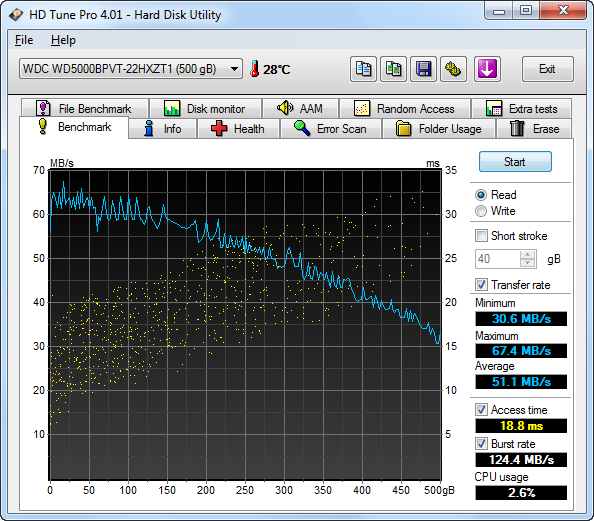
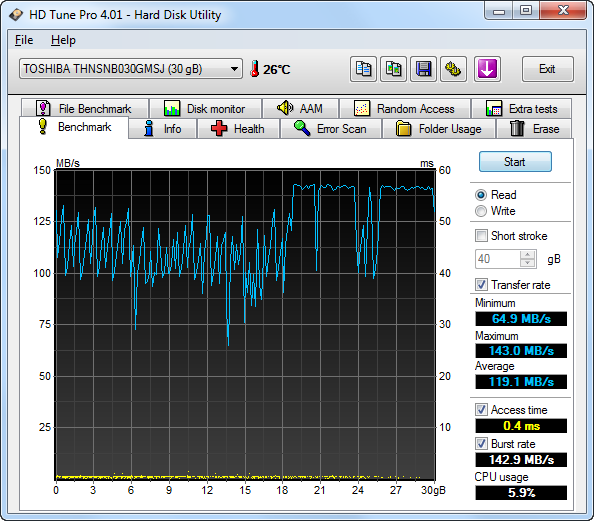
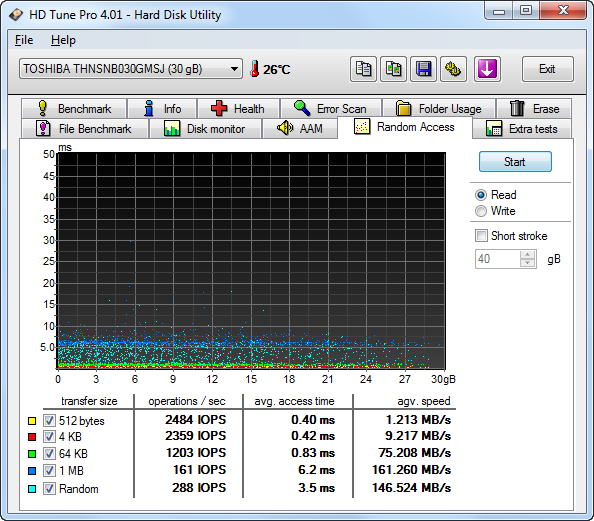

There are really no problems with FullHD video, moreover, full-time speakers are quite enough for family watching movies or for listening to music. The remote control in this regard is not superfluous, though there is nothing outstanding in it; ordinary, very high-quality remote control - with a metal top and a rubberized "belly". Initially, the all-in-one has Windows Media Center, but if one wonders about third-party software, the device can be completely hung on the wall of one of the rooms, turning the all-in-one into a multimedia processor.
The rest is an ordinary computer, so it’s hardly worth focusing on anything else. Although no, a couple of paragraphs about the touch screen and I will be rounded off.
More recently, I did a review of the touch tabletrunning on the operating system Windows 7 - then I was indignant about the inconvenience of managing the system ... no finger optimized interface and so on. So ... apparently, the matter is in the device’s diagonal) On a 10-inch tablet, working with your fingers was really inconvenient - typing an offer on the on-screen keyboard (which occupied almost the entire screen) was a feat. In the case of the all-in-one ... 21 inches give a chance to take a walk - it was much more convenient to drive here! It’s easier to get into the link, it’s easier to type text - you can stretch the keyboard to such a size that you can print with boxing gloves. But not ... there is a capacitive screen.
And still Fedor the best of the best!
In general, it will be more convenient with a mouse and keyboard, but when they are not at hand, you can poke your finger. I didn’t have a second wired keyboard during the test, so I hooked on Apple’s wireless keyboard - everything worked like a clock.
 Advantages and disadvantages
Large touch screen. Wall mountable. Remote control available. Many different interfaces and connectors. Separate SSD-drive for the operating system. High performance. Quiet. Fully glossy, housing and screen! Low brightness of the display. Perhaps the price . Unfortunately, I can’t say anything about the price of this device yet - this is an engineering sample that has not yet appeared on sale. But I dare to assume that the price for the top-end configuration will be up to $ 1500, and the configs are simpler - from $ 1000.
The end
I have repeatedly seen devices of a similar form factor, but I just saw them - I really managed to get to know each other only now, thanks to this device. It’s a fortunate combination of circumstances - you couldn’t even know that Foxconn did take monoblocks at all :) And now there’s at least an idea of what kind of dishes they are and what kind of sauces they eat.
In general, the device caused only good emotions - even the glossy screen could not spoil the experience, as it turned out to be quite practical in terms of resistance to fingerprints. Accordingly, if you work with the mouse and keyboard, the only problem remains glare, but you can also fight them.
An uncommon (as yet) alternative to the system unit, which, in my opinion, is quite promising. Agree, it will be difficult (if at all possible) to find a laptop with a screen diagonal of 21 ``, also with sensory properties. And the candy bar has a large screen, and connectors for all occasions, and performance, and the ability to upgrade, and ... And you can type on any keyboard, and not on the one that is built in. In short, there is freedom for the flight of fancy, unless in a rucksack such a “TV” can be especially dragged. You can find a lot of applications for this monoblock - from the “TV in the bedroom” to the “multimedia center in the hall”. Play, watch movies, TV and photos, listen to music, chat on Skype and surf the Internet - a godsend for those who do not want to delegate this entire list to all kinds of media players, tablets and other music centers. That is, this is an option for those who need everything at once, with a minimalist design and for less than the cost of iMac)
During the test, it was difficult for me to figure out where I would put such a unit - precisely for the reason that I use different devices for different tasks, and I got used to working just behind the uncompromising system unit. But the wife on this account had a different opinion - she almost wanted a similar unit in the corner in the kitchen) Imagine - you are waiting for guests and you need to cook something - right at the stove you look for a recipe for some exotic salad on the net and start cooking. They started to wash the fruits and with a single dry finger decide that it will be much tastier to cook under the Black Eyed Peas - click and you're done! You don’t need either mice or keyboards ... and, you see, endless online spaces will be much more convenient even for the most sophisticated cookbook!