February 18, 2011 at 00:48
Virtualization SCO OpenServer 5.0.7V under Hyper-V
I finally got my hands on how to virtualize SCO OpenServer.
When I decided to virtualize this OS, many colleagues were wondering what kind of fly bit me. It is clear that you periodically talk about the life of Linux and Unix under Hyper-V , but why take up such antiquity as systems from SCO? Some young IT professionals were even surprised that SCO is still alive and feeling quite normal. They thought that after protracted litigation, a war with the community and other Unix manufacturers, and bankruptcy in 2007, the company ceased to exist.
The answer to these questions is very simple.
SCO HistoryIt has more than a dozen years and contains traces of ups and dizzying falls. For a long time SCO was one of the main suppliers of Unix OS for the largest companies of this planet. As a result of SCO's activities, its operating systems have been introduced and are still operating in 87 countries. The total number of currently running OpenServer servers is approximately 2 million. Traditionally, consumers of this company's products are financial institutions, law enforcement agencies, government organizations and telecom companies.
In Russia, for example, SCO OpenServer still uses one of the largest banks. The one with the logo in the form of an inverted packman. :)
I think you will agree that the above organizations are very conservative and often are not inclined to spend money in pursuit of new trends in the IT industry. Therefore, many of them still have SCO OpenServer or SCO UnixWare. Under these operating systems, a lot of software has been written that works successfully. Nobody is going to rewrite it. Moreover, the situation often arises that migration to more modern operating systems and software porting will require such costs that the undertaking becomes economically unprofitable.
But there is one problem: the hardware of the servers on which the OpenServer OS is installed is gradually deteriorating and deteriorating. Finding replacement parts is not so easy, and prices for SCO certified equipment do not look cheap. Meanwhile, hardware manufacturers based on servers with the x86 processor architecture are not in vain eating their bread and releasing more and more powerful server configurations, constantly lowering prices. It turns out that it is more convenient to consolidate instances of operating systems from SCO on more powerful equipment using virtualization. In addition to the hardware benefits, we get backups using SC DPM, failover clustering with Live migration, and centralized management using SC VMM.
This is done quite easily. Read the document herehttp://www.sco.com/products/openserver507v/hyperv/
Download the reference image of the SCO OpenServer 5.0.7V virtual machine for Hyper-V
Note the letter V in the version name, it means that this version of the OS contains the drivers necessary for working under virtualization system management.
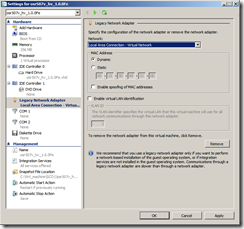
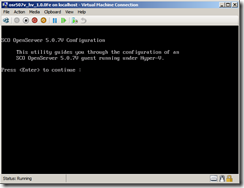
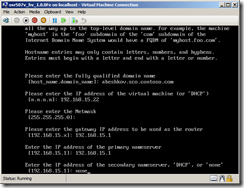
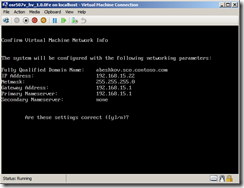
After downloading, unpack the virtual machine and import it into Hyper-V. As you can see, by default there are quite few resources allocated to it. Version 5.0.7V supports up to 4GB of RAM, so if more memory is needed to complete your tasks, give it to the virtual machine. After starting, the system starts auto-configuration. Network settings can be set statically or using DHCP. Both methods work equally well.



Then you need to configure the security system, create passwords and, if desired, install additional languages. This is done very simply so I will not dwell on this.
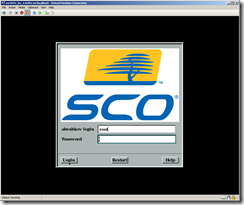
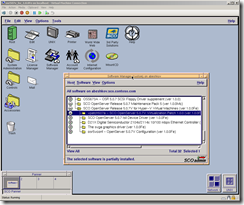
After the installation is completed and reboot, we will see the following on the screen. Network, video and other devices work quite reliably and do their job perfectly.

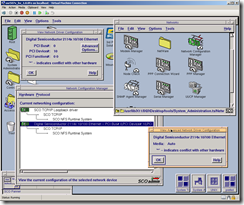
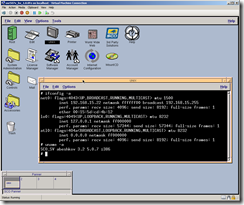
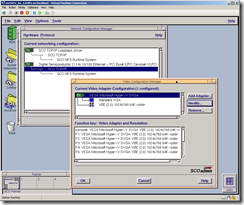
I tested the network by wandering around the Microsoft site. Then I installed the Samba package and using it transferred several tens of gigabytes of different files between SCO OpenServer and Windows. It was necessary to spend quite an impressive amount of time because a network adapter with a bandwidth of 100 Mbps is available inside the virtual machine, which is enough for most tasks. Most of the applications running so far in this system are made based on text mode. But now I can say that the network subsystem works like a clock.
Please note that CPU consumption is minimal. How to migrate an application from existing servers in your infrastructure to virtual is described here http://ds45.blogspot.com/2009/07/sco-p2v-in-real-life.html

You can end the story about SCO OpenServer virtualization here. I hope it comes in handy if you decide to save on support for legacy Unix systems.
When I decided to virtualize this OS, many colleagues were wondering what kind of fly bit me. It is clear that you periodically talk about the life of Linux and Unix under Hyper-V , but why take up such antiquity as systems from SCO? Some young IT professionals were even surprised that SCO is still alive and feeling quite normal. They thought that after protracted litigation, a war with the community and other Unix manufacturers, and bankruptcy in 2007, the company ceased to exist.
The answer to these questions is very simple.
SCO HistoryIt has more than a dozen years and contains traces of ups and dizzying falls. For a long time SCO was one of the main suppliers of Unix OS for the largest companies of this planet. As a result of SCO's activities, its operating systems have been introduced and are still operating in 87 countries. The total number of currently running OpenServer servers is approximately 2 million. Traditionally, consumers of this company's products are financial institutions, law enforcement agencies, government organizations and telecom companies.
In Russia, for example, SCO OpenServer still uses one of the largest banks. The one with the logo in the form of an inverted packman. :)
I think you will agree that the above organizations are very conservative and often are not inclined to spend money in pursuit of new trends in the IT industry. Therefore, many of them still have SCO OpenServer or SCO UnixWare. Under these operating systems, a lot of software has been written that works successfully. Nobody is going to rewrite it. Moreover, the situation often arises that migration to more modern operating systems and software porting will require such costs that the undertaking becomes economically unprofitable.
But there is one problem: the hardware of the servers on which the OpenServer OS is installed is gradually deteriorating and deteriorating. Finding replacement parts is not so easy, and prices for SCO certified equipment do not look cheap. Meanwhile, hardware manufacturers based on servers with the x86 processor architecture are not in vain eating their bread and releasing more and more powerful server configurations, constantly lowering prices. It turns out that it is more convenient to consolidate instances of operating systems from SCO on more powerful equipment using virtualization. In addition to the hardware benefits, we get backups using SC DPM, failover clustering with Live migration, and centralized management using SC VMM.
This is done quite easily. Read the document herehttp://www.sco.com/products/openserver507v/hyperv/
Download the reference image of the SCO OpenServer 5.0.7V virtual machine for Hyper-V
Note the letter V in the version name, it means that this version of the OS contains the drivers necessary for working under virtualization system management.
After downloading, unpack the virtual machine and import it into Hyper-V. As you can see, by default there are quite few resources allocated to it. Version 5.0.7V supports up to 4GB of RAM, so if more memory is needed to complete your tasks, give it to the virtual machine. After starting, the system starts auto-configuration. Network settings can be set statically or using DHCP. Both methods work equally well.


Then you need to configure the security system, create passwords and, if desired, install additional languages. This is done very simply so I will not dwell on this.
After the installation is completed and reboot, we will see the following on the screen. Network, video and other devices work quite reliably and do their job perfectly.


I tested the network by wandering around the Microsoft site. Then I installed the Samba package and using it transferred several tens of gigabytes of different files between SCO OpenServer and Windows. It was necessary to spend quite an impressive amount of time because a network adapter with a bandwidth of 100 Mbps is available inside the virtual machine, which is enough for most tasks. Most of the applications running so far in this system are made based on text mode. But now I can say that the network subsystem works like a clock.
Please note that CPU consumption is minimal. How to migrate an application from existing servers in your infrastructure to virtual is described here http://ds45.blogspot.com/2009/07/sco-p2v-in-real-life.html

You can end the story about SCO OpenServer virtualization here. I hope it comes in handy if you decide to save on support for legacy Unix systems.