
 January 6, 2011 at 19:15
Comet – application for Mochiweb with a load of 1,000,000 users. Part 2/3
- Transfer
Part 1
Part 3
In part 1 we created a (slightly useless) mochiweb application that sends a message to clients every 10 seconds. We set up the Linux kernel, and created a tool to establish many connections for checking memory usage. We found out that approximately 45 Kb is required for each connection.
In part 2, we will turn our application into something useful, and reduce memory consumption:
• Implementing a message router with login / logout / send API;
• Update mochiweb applications for working with the router;
• Installing a distributed erlang system, so we can run the router on various nodes;
• Creating a router testing tool with a large number of messages;
• Schedule memory usage for 24 hours, optimizing mochiweb application to save memory.
This means that we will separate the message delivery logic and the mochiweb application. In tandem with the floodtest utility from Part 1, we can test the application in conditions close to industrial.
Router implementation of a message
The router API contains only 3 functions:
• login (Id, Pid) registers the process for receiving messages;
• logout (Pid) stops receiving messages;
• send (Id, Msg) sends messages to the client.
Note that for one process it is possible to log in with different Id.
This example router module uses 2 ets tables to store bidirectional maps between Pids and Ids. (pid2id and id2pid in #state entry):
Let's assume that the user is represented by an integer Id based on the URL that it connects to mochiweb and uses this identifier to register with the message router. Instead of being blocked every 10 seconds, mochiweb is blocked when receiving messages from the router, and sends an HTTP message to the client for each request that the router sends to it:
• The client connects to mochiweb via http: // localhost: 8000 / test / 123 ;
• Mochiweb application registers the Pid for this connection with the identifier '123' in the message router;
• If you send a message to the router at the address '123', it will be sent to the correct mochiweb process and will appear in the browser for this user.
Here is the updated version of mochiconntest_web.erl:
Now let's put everything in order - we will use 2 erlang shells, one for mochiweb and one for the router. Modify start-dev.sh used to start mochiweb, and add the following additional parameters to erl:
• -sname n1 to name erlang node 'n1'
• + K true to enable kernel-poll.
• + P 134217727 - the maximum number of processes that you can spawn is 32768. We need one process for each connection, but I don’t know how much will be needed specifically. 134 217 727 - maximum value according to “man erl”.
Now do make && ./start-dev.sh and you should see a greeting: (n1 @ localhost) 1> - Your mochiweb application now works, and the erlang node has a name.
Now run another erlang shell:
At the moment, those two erlang nodes do not know about each other, fix this:
Now compile and start the router:
Now for fun, open http: // localhost: 8000 / test / 123 in your browser (or use lynx --source " http: // localhost: 8000 / test / 123 " from the console). Check the shell in which you started the router, you should see that one user has logged in.
You can now send messages to the router and watch how they appear in your browser. For now, use only strings, because we use the ~ s parameter for output, and the atom will result in an error:
Check your browser, you have received a message :)
It makes sense to run a router and mochiweb on different machines. Suppose you have several spare machines for testing, you should run erlang shells as distributed nodes, that is, use -name n1@host1.example.com instead of -sname n1 (and the same for n2). Make sure they can see each other with net_adm: ping (...) as in the example above.
Note that on line 16 in router.erl, the router process name ('router') is registered globally, which is why we use the following macro to identify the location of the router in gen_server calls, even on a distributed system:
A global name registry for processes in a distributed system is just one of many things you get for free with Erlang.
In a real environment, we might see a pattern like “long-tail” with some very active users and many passive users. However, for this test we will send fake messages indiscriminately to random users.
This code will send Num messages to random user IDs between 1 and Max every Interval ms.
You can see this in action if you start the router and mochiweb application, go to http: // localhost: 8000 / test / 3 and run:
20 messages will be sent to random Identifiers between 1 and 5, every 10 ms, one message each. Perhaps you are lucky and you will receive several messages.
We can even run several of them in parallel to model multiple sources for messages. Here is an example of 10 processes, each sends 20 messages to identifiers 1-5 with a delay of 100 ms between each message:
We have all parts for the test on a wider scale; clients connect to our mochiweb application, which registers them with a message router. We can generate a large volume of fake messages to send to the router, which will send them to any registered customers. Let's check the 10,000 concurrent connections again from Part 1, but this time we will leave all the clients connected, while we run a lot of messages through the system.
Suppose you followed the instructions in Part 1 to configure your kernel, etc. You already have a mochiweb application and router running, so let's put in more traffic to them.
Without connected clients, mochiweb uses approximately 40 MB of memory:
I came up with this disgusting command to display the time, the current memory usage of the mochiweb application, and the number of connections established every 60 seconds:
If anyone knows the best way to graphically depict memory usage for a single process, over time, please leave a comment.
Now run the floodtest from Part 1 in the new erl shell:
Check memory usage:
10,000 concurrent connections have been reached (plus the one I opened in firefox), and mochiweb's memory consumption is approximately 90 MB (90964 KB).
Now send some messages:
100 processes send a million messages at 10 messages per second to random Id from 1 to 10,000. This means that the router processes 1000 messages per second, and on average each of our 10 k clients will receive one message every 10 seconds.
Check the output of floodtest, and you will see that clients receive http messages (remember that these are {NumConnected, NumClosed, NumChunksRecvd}):
A million messages of 10 per second for each process will take 27 hours to work. Below is the memory usage in the first 10 minutes:
You can see that the size has already grown from 40 MB to 90 MB, when all 10 k clients have been connected, and up to 125 MB after some time.
It should be noted that floodtest uses almost no CPU, msggen uses 2% of the CPU, and the router and mochiweb are less than 1%.
The application worked for 24 hours while monitoring the memory usage of the mochiweb process. 10,000 connected clients, 1000 messages per second sent to random clients.
The following trick was used to force gnuplot to draw a graph:
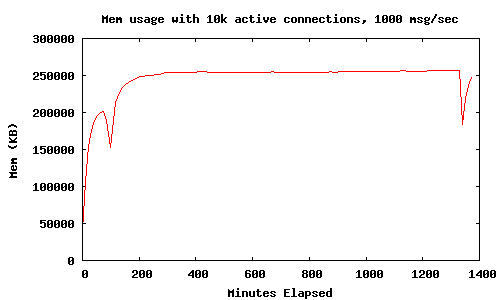
This graph shows that memory usage (with 10k active connections and 1000 msg / sec) is aligned within 250 MB over a 24-hour period. Two lower extremes appeared due to the fact that I performed for interest:
This forces all processes to collect garbage, and free up approximately 100 MB of memory. We are now exploring ways to preserve memory without resorting to manually forcing garbage collection.
Note, the mochiweb application only sends messages and then immediately forgets them, memory usage should not increase with the number of messages sent.
I'm a newbie when it comes to Erlang memory management, but I'm going to suggest that if I can force it to collect garbage more often, it will allow us to redirect most of that memory, and ultimately allow us to serve more users with an empty system memory.
An examination of the documentation gave some results:
erlang: system_flag (fullsweep_after, Number)
Intriguing, but this only applies to new processes and affects all processes in the VM, not only our mochiweb processes.
Next:
erlang: system_flag (min_heap_size, MinHeapSize)
It might be useful, but I'm pretty sure our mochiweb processes need more heap than the default value anyway. I would like to avoid the need to change the mochiweb source code.
Nearby, I noticed:
erlang: hibernate (Module, Function, Args)
Sounds reasonable - let's try to go to sleep after each message and see what happens.
Edit mochiconntest_web.erl and change the following:
• Change the last line of the feed (Response, Id, N) function so that it goes into sleep mode instead of invoking itself;
• Call hibernate () to immediately send a message to the router, instead of being blocked on receive;
• Remember to export feed / 3.
Updated mochiconntest_web.erl with hibernation between messages:
I made these changes, rebuilt mochiweb, then did the same test again.
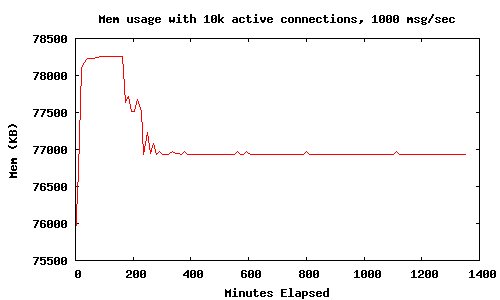
Using hibernate () means that the mochiweb application memory is aligned at 78 MB with 10 k connections, much better than the 450 MB we saw in Part 1. There was no significant increase in CPU usage.
We created a Comet application for Mochiweb that allows us to send arbitrary messages to users identified by integer IDs. After driving 1000 messages per second for 24 hours, with 10,000 connected users, we observed the use of 80 MB of memory, or 8 KB per user. We even made nice graphics.
This is truly progress.
In part 3, I will increase the number of users to 1 million. I will conduct tests on a multiprocessor machine with enough memory. I will also show some additional tricks and tweaks to simulate 1 million connections.
The application will evolve into a kind of “pub-sub” system, where subscriptions are associated with users ’id and saved by the application. We will use a typical set of social network data: friends. This will allow the user to log in with their user ID and automatically receive any event generated by one of their friends.
Part 3
In part 1 we created a (slightly useless) mochiweb application that sends a message to clients every 10 seconds. We set up the Linux kernel, and created a tool to establish many connections for checking memory usage. We found out that approximately 45 Kb is required for each connection.
In part 2, we will turn our application into something useful, and reduce memory consumption:
• Implementing a message router with login / logout / send API;
• Update mochiweb applications for working with the router;
• Installing a distributed erlang system, so we can run the router on various nodes;
• Creating a router testing tool with a large number of messages;
• Schedule memory usage for 24 hours, optimizing mochiweb application to save memory.
This means that we will separate the message delivery logic and the mochiweb application. In tandem with the floodtest utility from Part 1, we can test the application in conditions close to industrial.
Router implementation of a message
The router API contains only 3 functions:
• login (Id, Pid) registers the process for receiving messages;
• logout (Pid) stops receiving messages;
• send (Id, Msg) sends messages to the client.
Note that for one process it is possible to log in with different Id.
This example router module uses 2 ets tables to store bidirectional maps between Pids and Ids. (pid2id and id2pid in #state entry):
-module(router).
-behaviour(gen_server).
-export([start_link/0]).
-export([init/1, handle_call/3, handle_cast/2, handle_info/2,
   terminate/2, code_change/3]).
-export([send/2, login/2, logout/1]).
-define(SERVER, global:whereis_name(?MODULE)).
% will hold bidirectional mapping between id <–> pid
-record(state, {pid2id, id2pid}).
start_link() ->
  gen_server:start_link({global, ?MODULE}, ?MODULE, [], []).
% sends Msg to anyone logged in as Id
send(Id, Msg) ->
  gen_server:call(?SERVER, {send, Id, Msg}).
login(Id, Pid) when is_pid(Pid) ->
  gen_server:call(?SERVER, {login, Id, Pid}).
logout(Pid) when is_pid(Pid) ->
  gen_server:call(?SERVER, {logout, Pid}).
init([]) ->
  % set this so we can catch death of logged in pids:
  process_flag(trap_exit, true),
  % use ets for routing tables
  {ok, #state{
			  pid2id = ets:new(?MODULE, [bag]),
			  id2pid = ets:new(?MODULE, [bag])
			 }
  }.
handle_call({login, Id, Pid}, _From, State) when is_pid(Pid) ->
  ets:insert(State#state.pid2id, {Pid, Id}),
  ets:insert(State#state.id2pid, {Id, Pid}),
  link(Pid), % tell us if they exit, so we can log them out
  io:format("~w logged in as ~w\n",[Pid, Id]),
  {reply, ok, State};
handle_call({logout, Pid}, _From, State) when is_pid(Pid) ->
  unlink(Pid),
  PidRows = ets:lookup(State#state.pid2id, Pid),
  case PidRows of
	  [] ->
		  ok;
	  _ ->
		  IdRows = [ {I,P} || {P,I} <- PidRows ], % invert tuples
		  % delete all pid->id entries
		  ets:delete(State#state.pid2id, Pid),
		  % and all id->pid
		  [ ets:delete_object(State#state.id2pid, Obj) || Obj <- IdRows ]
  end,
  io:format("pid ~w logged out\n",[Pid]),
  {reply, ok, State};
handle_call({send, Id, Msg}, _From, State) ->
  % get pids who are logged in as this Id
  Pids = [ P || { _Id, P } <- ets:lookup(State#state.id2pid, Id) ],
  % send Msg to them all
  M = {router_msg, Msg},
  [ Pid ! M || Pid <- Pids ],
  {reply, ok, State}.
% handle death and cleanup of logged in processes
handle_info(Info, State) ->
  case Info of
	  {‘EXIT’, Pid, _Why} ->
		  % force logout:
		  handle_call({logout, Pid}, blah, State);
	  Wtf ->
		  io:format("Caught unhandled message: ~w\n", [Wtf])
  end,
  {noreply, State}.
handle_cast(_Msg, State) ->
  {noreply, State}.
terminate(_Reason, _State) ->
  ok.
code_change(_OldVsn, State, _Extra) ->
  {ok, State}.
Mochiweb application update
Let's assume that the user is represented by an integer Id based on the URL that it connects to mochiweb and uses this identifier to register with the message router. Instead of being blocked every 10 seconds, mochiweb is blocked when receiving messages from the router, and sends an HTTP message to the client for each request that the router sends to it:
• The client connects to mochiweb via http: // localhost: 8000 / test / 123 ;
• Mochiweb application registers the Pid for this connection with the identifier '123' in the message router;
• If you send a message to the router at the address '123', it will be sent to the correct mochiweb process and will appear in the browser for this user.
Here is the updated version of mochiconntest_web.erl:
-module(mochiconntest_web).
-export([start/1, stop/0, loop/2]).
%% External API
start(Options) ->
  {DocRoot, Options1} = get_option(docroot, Options),
  Loop = fun (Req) ->
				 ?MODULE:loop(Req, DocRoot)
		 end,
  % we’ll set our maximum to 1 million connections. (default: 2048)
  mochiweb_http:start([{max, 1000000}, {name, ?MODULE}, {loop, Loop} | Options1]).
stop() ->
  mochiweb_http:stop(?MODULE).
loop(Req, DocRoot) ->
  "/" ++ Path = Req:get(path),
  case Req:get(method) of
	  Method when Method =:= ‘GET’; Method =:= ‘HEAD’ ->
		  case Path of
			  "test/" ++ Id ->
				  Response = Req:ok({"text/html; charset=utf-8",
									[{"Server","Mochiweb-Test"}],
									chunked}),
				  % login using an integer rather than a string
				  {IdInt, _} = string:to_integer(Id),
				  router:login(IdInt, self()),
				  feed(Response, IdInt, 1);
			  _ ->
				  Req:not_found()
		  end;
	  ‘POST’ ->
		  case Path of
			  _ ->
				  Req:not_found()
		  end;
	  _ ->
		  Req:respond({501, [], []})
  end.
feed(Response, Id, N) ->
  receive
  {router_msg, Msg} ->
	  Html = io_lib:format("Recvd msg #~w: ‘~s’", [N, Msg]),
	  Response:write_chunk(Html)
  end,
  feed(Response, Id, N+1).
%% Internal API
get_option(Option, Options) ->
  {proplists:get_value(Option, Options), proplists:delete(Option, Options)}.
It is working!
Now let's put everything in order - we will use 2 erlang shells, one for mochiweb and one for the router. Modify start-dev.sh used to start mochiweb, and add the following additional parameters to erl:
• -sname n1 to name erlang node 'n1'
• + K true to enable kernel-poll.
• + P 134217727 - the maximum number of processes that you can spawn is 32768. We need one process for each connection, but I don’t know how much will be needed specifically. 134 217 727 - maximum value according to “man erl”.
Now do make && ./start-dev.sh and you should see a greeting: (n1 @ localhost) 1> - Your mochiweb application now works, and the erlang node has a name.
Now run another erlang shell:
erl -sname n2
At the moment, those two erlang nodes do not know about each other, fix this:
(n2@localhost)1> nodes().
[]
(n2@localhost)2> net_adm:ping(n1@localhost).
pong
(n2@localhost)3> nodes().
[n1@localhost]
Now compile and start the router:
(n2@localhost)4> c(router).
{ok,router}
(n2@localhost)5> router:start_link().
{ok,<0.38.0>}
Now for fun, open http: // localhost: 8000 / test / 123 in your browser (or use lynx --source " http: // localhost: 8000 / test / 123 " from the console). Check the shell in which you started the router, you should see that one user has logged in.
You can now send messages to the router and watch how they appear in your browser. For now, use only strings, because we use the ~ s parameter for output, and the atom will result in an error:
(n2@localhost)6> router:send(123, "Hello World").
(n2@localhost)7> router:send(123, "Why not open another browser window too?").
(n2@localhost)8> router:send(456, "This message will go into the void unless you are connected as /test/456 too").
Check your browser, you have received a message :)
Running a distributed erlang system
It makes sense to run a router and mochiweb on different machines. Suppose you have several spare machines for testing, you should run erlang shells as distributed nodes, that is, use -name n1@host1.example.com instead of -sname n1 (and the same for n2). Make sure they can see each other with net_adm: ping (...) as in the example above.
Note that on line 16 in router.erl, the router process name ('router') is registered globally, which is why we use the following macro to identify the location of the router in gen_server calls, even on a distributed system:
-define(SERVER, global:whereis_name(?MODULE)).
A global name registry for processes in a distributed system is just one of many things you get for free with Erlang.
Generate a large number of messages
In a real environment, we might see a pattern like “long-tail” with some very active users and many passive users. However, for this test we will send fake messages indiscriminately to random users.
-module(msggen).
-export([start/3]).
start(0, _, _) -> ok;
start(Num, Interval, Max) ->
  Id = random:uniform(Max),
  router:send(Id, "Fake message Num = " ++ Num),
  receive after Interval -> start(Num -1, Interval, Max) end.
This code will send Num messages to random user IDs between 1 and Max every Interval ms.
You can see this in action if you start the router and mochiweb application, go to http: // localhost: 8000 / test / 3 and run:
erl -sname test
(test@localhost)1> net_adm:ping(n1@localhost).
pong
(test@localhost)2> c(msggen).
{ok,msggen}
(test@localhost)3> msggen:start(20, 10, 5).
ok
20 messages will be sent to random Identifiers between 1 and 5, every 10 ms, one message each. Perhaps you are lucky and you will receive several messages.
We can even run several of them in parallel to model multiple sources for messages. Here is an example of 10 processes, each sends 20 messages to identifiers 1-5 with a delay of 100 ms between each message:
[ spawn(fun() -> msggen:start(20, 100, 5), io:format("~w finished.\n", [self()]) end) || _ <- lists:seq(1,10) ].
[<0.97.0>,<0.98.0>,<0.99.0>,<0.100.0>,<0.101.0>,<0.102.0>,
<0.103.0>,<0.104.0>,<0.105.0>,<0.106.0>]
<0.101.0> finished.
<0.105.0> finished.
<0.106.0> finished.
<0.104.0> finished.
<0.102.0> finished.
<0.98.0> finished.
<0.99.0> finished.
<0.100.0> finished.
<0.103.0> finished.
<0.97.0> finished.
C10k
We have all parts for the test on a wider scale; clients connect to our mochiweb application, which registers them with a message router. We can generate a large volume of fake messages to send to the router, which will send them to any registered customers. Let's check the 10,000 concurrent connections again from Part 1, but this time we will leave all the clients connected, while we run a lot of messages through the system.
Suppose you followed the instructions in Part 1 to configure your kernel, etc. You already have a mochiweb application and router running, so let's put in more traffic to them.
Without connected clients, mochiweb uses approximately 40 MB of memory:
$ ps -o rss= -p `pgrep -f 'sname n1'`
40156
I came up with this disgusting command to display the time, the current memory usage of the mochiweb application, and the number of connections established every 60 seconds:
$ MOCHIPID=`pgrep -f 'name n1'`; while [ 1 ] ; do NUMCON=`netstat -n | awk '/ESTABLISHED/ && $4=="127.0.0.1:8000"' | wc -l`; MEM=`ps -o rss= -p $MOCHIPID`; echo -e "`date`\t`date +%s`\t$MEM\t$NUMCON"; sleep 60; done | tee -a mochimem.log
If anyone knows the best way to graphically depict memory usage for a single process, over time, please leave a comment.
Now run the floodtest from Part 1 in the new erl shell:
erl> floodtest:start("/tmp/mochi-urls.txt", 10).
Это установит 100 новых соединений в секунду, пока все 10 000 клиентов не будут соединены.
Stats: {825,0,0}
Stats: {1629,0,0}
Stats: {2397,0,0}
Stats: {3218,0,0}
Stats: {4057,0,0}
Stats: {4837,0,0}
Stats: {5565,0,0}
Stats: {6295,0,0}
Stats: {7022,0,0}
Stats: {7727,0,0}
Stats: {8415,0,0}
Stats: {9116,0,0}
Stats: {9792,0,0}
Stats: {10000,0,0}
...
Check memory usage:
Mon Oct 20 16:57:24 BST 2008 1224518244 40388 1
Mon Oct 20 16:58:25 BST 2008 1224518305 41120 263
Mon Oct 20 16:59:27 BST 2008 1224518367 65252 5267
Mon Oct 20 17:00:32 BST 2008 1224518432 89008 9836
Mon Oct 20 17:01:37 BST 2008 1224518497 90748 10001
Mon Oct 20 17:02:41 BST 2008 1224518561 90964 10001
Mon Oct 20 17:03:46 BST 2008 1224518626 90964 10001
Mon Oct 20 17:04:51 BST 2008 1224518691 90964 10001
10,000 concurrent connections have been reached (plus the one I opened in firefox), and mochiweb's memory consumption is approximately 90 MB (90964 KB).
Now send some messages:
erl> [ spawn(fun() -> msggen:start(1000000, 100, 10000) end) || _ <- lists:seq(1,100) ].
[<0.65.0>,<0.66.0>,<0.67.0>,<0.68.0>,<0.69.0>,<0.70.0>,
<0.71.0>,<0.72.0>,<0.73.0>,<0.74.0>,<0.75.0>,<0.76.0>,
<0.77.0>,<0.78.0>,<0.79.0>,<0.80.0>,<0.81.0>,<0.82.0>,
<0.83.0>,<0.84.0>,<0.85.0>,<0.86.0>,<0.87.0>,<0.88.0>,
<0.89.0>,<0.90.0>,<0.91.0>,<0.92.0>,<0.93.0>|...]
100 processes send a million messages at 10 messages per second to random Id from 1 to 10,000. This means that the router processes 1000 messages per second, and on average each of our 10 k clients will receive one message every 10 seconds.
Check the output of floodtest, and you will see that clients receive http messages (remember that these are {NumConnected, NumClosed, NumChunksRecvd}):
...
Stats: {10000,0,5912}
Stats: {10000,0,15496}
Stats: {10000,0,25145}
Stats: {10000,0,34755}
Stats: {10000,0,44342}
...
A million messages of 10 per second for each process will take 27 hours to work. Below is the memory usage in the first 10 minutes:
Mon Oct 20 16:57:24 BST 2008 1224518244 40388 1
Mon Oct 20 16:58:25 BST 2008 1224518305 41120 263
Mon Oct 20 16:59:27 BST 2008 1224518367 65252 5267
Mon Oct 20 17:00:32 BST 2008 1224518432 89008 9836
Mon Oct 20 17:01:37 BST 2008 1224518497 90748 10001
Mon Oct 20 17:02:41 BST 2008 1224518561 90964 10001
Mon Oct 20 17:03:46 BST 2008 1224518626 90964 10001
Mon Oct 20 17:04:51 BST 2008 1224518691 90964 10001
Mon Oct 20 17:05:55 BST 2008 1224518755 90980 10001
Mon Oct 20 17:07:00 BST 2008 1224518820 91120 10001
Mon Oct 20 17:08:05 BST 2008 1224518885 98664 10001
Mon Oct 20 17:09:10 BST 2008 1224518950 106752 10001
Mon Oct 20 17:10:15 BST 2008 1224519015 114044 10001
Mon Oct 20 17:11:20 BST 2008 1224519080 119468 10001
Mon Oct 20 17:12:25 BST 2008 1224519145 125360 10001
You can see that the size has already grown from 40 MB to 90 MB, when all 10 k clients have been connected, and up to 125 MB after some time.
It should be noted that floodtest uses almost no CPU, msggen uses 2% of the CPU, and the router and mochiweb are less than 1%.
Results after completion within 24 hours
The application worked for 24 hours while monitoring the memory usage of the mochiweb process. 10,000 connected clients, 1000 messages per second sent to random clients.
The following trick was used to force gnuplot to draw a graph:
(echo -e "set terminal png size 500,300\nset xlabel \"Minutes Elapsed\"\nset ylabel \"Mem (KB)\"\nset title \"Mem usage with 10k active connections, 1000 msg/sec\"\nplot \"-\" using 1:2 with lines notitle" ; awk 'BEGIN{FS="\t";} NR%10==0 {if(!t){t=$2} mins=($2-t)/60; printf("%d %d\n",mins,$3)}' mochimem.log ; echo -e "end" ) | gnuplot > mochimem.png
This graph shows that memory usage (with 10k active connections and 1000 msg / sec) is aligned within 250 MB over a 24-hour period. Two lower extremes appeared due to the fact that I performed for interest:
erl> [erlang:garbage_collect(P) || P <- erlang:processes()].
This forces all processes to collect garbage, and free up approximately 100 MB of memory. We are now exploring ways to preserve memory without resorting to manually forcing garbage collection.
Reduce memory usage in mochiweb
Note, the mochiweb application only sends messages and then immediately forgets them, memory usage should not increase with the number of messages sent.
I'm a newbie when it comes to Erlang memory management, but I'm going to suggest that if I can force it to collect garbage more often, it will allow us to redirect most of that memory, and ultimately allow us to serve more users with an empty system memory.
An examination of the documentation gave some results:
erlang: system_flag (fullsweep_after, Number)
Intriguing, but this only applies to new processes and affects all processes in the VM, not only our mochiweb processes.
Next:
erlang: system_flag (min_heap_size, MinHeapSize)
It might be useful, but I'm pretty sure our mochiweb processes need more heap than the default value anyway. I would like to avoid the need to change the mochiweb source code.
Nearby, I noticed:
erlang: hibernate (Module, Function, Args)
Sounds reasonable - let's try to go to sleep after each message and see what happens.
Edit mochiconntest_web.erl and change the following:
• Change the last line of the feed (Response, Id, N) function so that it goes into sleep mode instead of invoking itself;
• Call hibernate () to immediately send a message to the router, instead of being blocked on receive;
• Remember to export feed / 3.
Updated mochiconntest_web.erl with hibernation between messages:
-module(mochiconntest_web).
-export([start/1, stop/0, loop/2, feed/3]).
%% External API
start(Options) ->
  {DocRoot, Options1} = get_option(docroot, Options),
  Loop = fun (Req) ->
				 ?MODULE:loop(Req, DocRoot)
		 end,
  % we’ll set our maximum to 1 million connections. (default: 2048)
  mochiweb_http:start([{max, 1000000}, {name, ?MODULE}, {loop, Loop} | Options1]).
stop() ->
  mochiweb_http:stop(?MODULE).
loop(Req, DocRoot) ->
  "/" ++ Path = Req:get(path),
  case Req:get(method) of
	  Method when Method =:= ‘GET’; Method =:= ‘HEAD’ ->
		  case Path of
			  "test/" ++ IdStr ->
				  Response = Req:ok({"text/html; charset=utf-8",
									[{"Server","Mochiweb-Test"}],
									chunked}),
				  {Id, _} = string:to_integer(IdStr),
				  router:login(Id, self()),
				  % Hibernate this process until it receives a message:
				  proc_lib:hibernate(?MODULE, feed, [Response, Id, 1]);
			  _ ->
				  Req:not_found()
		  end;
	  ‘POST’ ->
		  case Path of
			  _ ->
				  Req:not_found()
		  end;
	  _ ->
		  Req:respond({501, [], []})
  end.
feed(Response, Id, N) ->
  receive
  {router_msg, Msg} ->
	  Html = io_lib:format("Recvd msg #~w: ‘~w’
", [N, Msg]),
	  Response:write_chunk(Html)
  end,
  % Hibernate this process until it receives a message:
  proc_lib:hibernate(?MODULE, feed, [Response, Id, N+1]).
%% Internal API
get_option(Option, Options) ->
  {proplists:get_value(Option, Options), proplists:delete(Option, Options)}.
I made these changes, rebuilt mochiweb, then did the same test again.
Results after execution within 24 hours with proc_lib: hibernate ()
Using hibernate () means that the mochiweb application memory is aligned at 78 MB with 10 k connections, much better than the 450 MB we saw in Part 1. There was no significant increase in CPU usage.
So...
We created a Comet application for Mochiweb that allows us to send arbitrary messages to users identified by integer IDs. After driving 1000 messages per second for 24 hours, with 10,000 connected users, we observed the use of 80 MB of memory, or 8 KB per user. We even made nice graphics.
This is truly progress.
Next steps
In part 3, I will increase the number of users to 1 million. I will conduct tests on a multiprocessor machine with enough memory. I will also show some additional tricks and tweaks to simulate 1 million connections.
The application will evolve into a kind of “pub-sub” system, where subscriptions are associated with users ’id and saved by the application. We will use a typical set of social network data: friends. This will allow the user to log in with their user ID and automatically receive any event generated by one of their friends.