 December 26, 2010 at 01:14
Grammar of arithmetic or write a calculator on ANTLR
When the question arises of how to calculate an arithmetic expression, then, probably, many think from the reverse Polish notation. Therefore, in this topic I would like to talk about how you can compose a grammar of an arithmetic expression and construct a lexical and syntactic analyzer using ANTLR.
To begin, consider the necessary tools. We will need:
Everything related to ANTLR, that is, the first three points, can be downloaded from the official website http://www.antlr.org/download.html for free, that is, for nothing.
Now a few words, actually, about ANTLR (we turn to Wikipedia). ANTLR (Another Tool For Language Recognition) is a parser generator that allows you to automatically create a parser program (like a lexical analyzer) in one of the target programming languages (C ++, Java, C #, Python, Ruby) according to the description of LL (*) - grammar in a language close to RBNF. The author of this project is Professor Terence Parr from the University of San Francisco. I must say that the project is open source and distributed under the BSD license.
Within the framework of this topic, we will write a program in C #, which from the console will read arithmetic expressions separated by a line feed, and then output the result of the calculations. As arithmetic operations will be supported: addition, subtraction, multiplication, division. For simplicity, all operations will be performed on integers. As a bonus, our calculator (let's call it a project) will support working with variables, and, accordingly, the assignment operation.
It is time to launch ANTLRWorks and create a project with our grammar. When launched, ANTLRWorks will ask what type of document we want to create. Select "ANTLR 3 Grammar (* .g)." In the window that appears, enter the name of the grammar (let's call it “Calc”), leave the type by default (“Combined Grammar”). This means that in one file we will have both the grammar rules of the lexical and parser. To avoid further disagreements, let us call the lexical analyzer the Lexer, and the syntax the parser. If you look at other options in the drop-down list, then you will understand the notation entered. Let me remind you that a lexer extracts tokens (tokens) from a stream of characters: integers, identifiers, strings, etc., and the parser checks whether tokens are in the correct order in the token stream. I also recommend ticking Identifier and Integer so that our grammar already has rules for identifiers and integers. The result should be the following:

Press the “Ok” button and get a grammar with two automatically added lexer rules. Let's look at how the rules for the lexer are written using the example of the INT rule. A rule begins with a name (in this case, INT). Names for lexer rules must begin with a capital letter. After the name is the symbol ":", followed by the so-called alternatives . Alternatives are separated by sivol "|" and must end with the symbol ";".
Let us now look at the only alternative for the INT rule. The entry '0' .. '9' + in ANTLR means that INT is a sequence of digits in which there is at least one digit. If instead of the symbol '+' there was, for example, a sivol '*', then this would mean that the sequence of digits may be empty. The ID rule is somewhat more complex and means that an ID is a sequence of characters consisting of lowercase and uppercase Latin letters, numbers, underscores, and starting with a letter or underscore.
Well, now we will write on our own the first rule for the parser or in the scientific axiom , that is, the rule from which the parser will begin to check the stream of tokens. So:
As you can see, the rules for the parser do not differ in structure from the rules for the lexer, except that the name must begin with a lowercase letter. In this case, we tell the parser that the input token stream is a non-empty sequence of statements. Since the parser is not clairvoyant, it needs to know what statement is. Tell him:
Those who have forgotten what alternatives are, on this rule canlearn to remember what kind of animal it is. An alternative is simply one of the possible token ordering options. That is, statement is ANY expression (expr) ending with line feeds (NEWLINE), OR an assignment operation ending with line feed, OR simply a line feed. Yes, by the way, do not forget to add the NEWLINE rule to the lexer rules, which I recommend placing at the end of the grammar file:
The sign "?" means that the character '\ r' must be present in the sentence either 1 time or not at all.
Now consider a rule in which two alternatives are combined into one:
In the ANTLR language, this means that expr is an arbitrary sequence of terms with arbitrary signs. For example, multExpression-multExpression + multExpression-multExpression-multExpression + multExpression.
I will not consider the remaining rules (besides, there are only two of them left), but simply bring them as is:
If you write the rules into a grammar file as you read, you probably already noticed that for each rule ANTLRWorks draws a graph. Have you noticed? Excellent! Now I don’t have to comment on every rule:
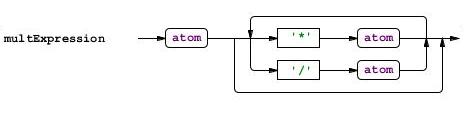
This is where the grammar ends. Is it really simple?
Well, we have developed a grammar. It is time to generate a parser and lexer in C #. Since ANTLRWorks is more Java oriented, it will be easier to generate code manually (for me personally) than using the visual environment. But more on that later. First, add a couple of lines to the grammar file. Immediately after the first line with the grammar name, add the following:
These lines will tell ANTLR that we want to get C # code, and also want the parser and lexer classes to be in the Generated namespace. All, you can generate the code. To do this, create a .bat file in which we add the following contents:
Please note that in my case the .bat file is in the same directory as the antlr-3.2.jar and Calc.g files.
The "-o" switch specifies the path to the folder in which the generated files will lie. The pause is made solely for convenience - so that in case of errors we can find out about it.
We launch the .bat file and rather look in the Generated folder. There we see three files:
To start the parser, I created a console application in Visual Studio and added two received .cs files to it. For convenience, the namespace is called Generated, so as not to write any using'i. It is important not to forget to add reference to the C # runtime distribution to the project (Antlr3.Runtime.dll file in the DOT-NET-runtime-3.1.1.zip archive downloaded from the ANTLR project site). Add the following code to the Main () function:
Done !!! Compile and run.

Note that input ends when the end of file (EOF) character is encountered. To put this character on Windows, press CTRL + Z.
Everything is almost great. You probably noticed that no result is displayed on the screen. Mess! To fix the annoying imperfection, you need to conjure again with the grammar. Not yet closed ANTLRWorks?
The time has come for the fun part. To get started, let's configure ANTLR a bit more by adding the following snippet to the top of the
grammar file :
I will explain. @members tells ANTLR that it is necessary to add a private memory member to the parser class (to store the values of variables) and, accordingly, header says which namespaces must be connected in order to use Hashtable. Now you can add C # code to our grammar. Let's start with the statement rule:
The code is written in braces {}. If statement is the first alternative, then we print to the screen the value of the arithmetic expression, if the second - then we store the variable name and its value in memory so that we can get it later. Everything is extremely simple here, however, the question arises, where does the value of the expression $ expr.value come from? And it is taken from here:
Nothing complicated here either. We tell ANTLR that the expr rule returns a value called value of type int. Please note that in both entries "$ expr.value" and "returns [int value]" value does not appear by chance. If we write:
and then turn to $ expr.value, then ANTLR will throw an error.
I allowed some liberty of speech, saying that “the rule returns meaning”, but to put it differently, without losing meaning, is difficult enough in my opinion.
Another subtlety. Consider the statement rule, for example, the first alternative. In the code corresponding to this alternative, we refer to the expr rule directly ($ expr.value). But in the statement rule this will not work, because it contains two multExpression rules at once, that is, in order to distinguish them, you need to give them names. In this case, these are me1 and me2. It seems that all the details were
discussed, now closer to the point.
In the expr rule, two alternatives are written to one through the character '|'. This is clearly seen in part 2 of this topic. Let me remind you that expr is a sentence of the form multExpression-multExpression + multExpression-multExpression-multExpression + multExpression. Now, let's look at the code in curly brackets and see that first the value of the first term is assigned to the returned value value, and then, depending on the operation, the values of subsequent terms are added or subtracted. The
multExpression rule looks similar:
The last rule of the atom parser remains. There should be no problems with it:
If atom is an identifier (ID), then return its value taken from memory. If atom is an integer, then simply return the number obtained from its string representation. And finally, if atom is an expression in parentheses, then we simply return the value of the expression.
It remains to generate the parser and lexer using the .bat file. Even the code of the Main () function does not have to be changed. We launch our calculator and play.
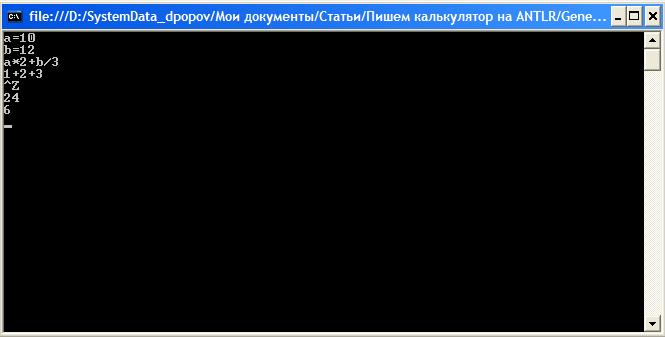
It is interesting that the generated parser can report syntax errors and, moreover, recover from them. To see this, try typing some expression, for example, with spaces (after all, we did not handle spaces, tabs, etc.):

The parser detected errors, but nevertheless correctly calculated the result. You can even write something like “2 ++ 3” and get 5.
The time has come to summarize. The solution that we got, it seems to me, is fully consistent with the task. Does the expression program read? Yes. Does the result compute? Yes. This, perhaps, can be finished. I really hope, dear habro-man, that you liked this topic and you want to learn how to use the ANTLR grammar to build parse trees and use the same ANTLR to get around them. If you have a dream to write your own programming language, then with ANTLR it has become much closer to implementation!
To begin, consider the necessary tools. We will need:
- ANTLRWorks - Grammar development and debugging environment
- ANTLR v3 - ANTLR itself (at the time of writing, the latest version is 3.2)
- C # runtime distribution (Antlr3.Runtime.dll) - .NET library for working with generators
- Visual Studio - any other tool for compiling and debugging C # code
- Java runtime - since ANTLR and ANTLRWorks are written in Java
Everything related to ANTLR, that is, the first three points, can be downloaded from the official website http://www.antlr.org/download.html for free, that is, for nothing.
Now a few words, actually, about ANTLR (we turn to Wikipedia). ANTLR (Another Tool For Language Recognition) is a parser generator that allows you to automatically create a parser program (like a lexical analyzer) in one of the target programming languages (C ++, Java, C #, Python, Ruby) according to the description of LL (*) - grammar in a language close to RBNF. The author of this project is Professor Terence Parr from the University of San Francisco. I must say that the project is open source and distributed under the BSD license.
1. Statement of the problem
Within the framework of this topic, we will write a program in C #, which from the console will read arithmetic expressions separated by a line feed, and then output the result of the calculations. As arithmetic operations will be supported: addition, subtraction, multiplication, division. For simplicity, all operations will be performed on integers. As a bonus, our calculator (let's call it a project) will support working with variables, and, accordingly, the assignment operation.
2. Grammar development
It is time to launch ANTLRWorks and create a project with our grammar. When launched, ANTLRWorks will ask what type of document we want to create. Select "ANTLR 3 Grammar (* .g)." In the window that appears, enter the name of the grammar (let's call it “Calc”), leave the type by default (“Combined Grammar”). This means that in one file we will have both the grammar rules of the lexical and parser. To avoid further disagreements, let us call the lexical analyzer the Lexer, and the syntax the parser. If you look at other options in the drop-down list, then you will understand the notation entered. Let me remind you that a lexer extracts tokens (tokens) from a stream of characters: integers, identifiers, strings, etc., and the parser checks whether tokens are in the correct order in the token stream. I also recommend ticking Identifier and Integer so that our grammar already has rules for identifiers and integers. The result should be the following:
Press the “Ok” button and get a grammar with two automatically added lexer rules. Let's look at how the rules for the lexer are written using the example of the INT rule. A rule begins with a name (in this case, INT). Names for lexer rules must begin with a capital letter. After the name is the symbol ":", followed by the so-called alternatives . Alternatives are separated by sivol "|" and must end with the symbol ";".
Let us now look at the only alternative for the INT rule. The entry '0' .. '9' + in ANTLR means that INT is a sequence of digits in which there is at least one digit. If instead of the symbol '+' there was, for example, a sivol '*', then this would mean that the sequence of digits may be empty. The ID rule is somewhat more complex and means that an ID is a sequence of characters consisting of lowercase and uppercase Latin letters, numbers, underscores, and starting with a letter or underscore.
Well, now we will write on our own the first rule for the parser or in the scientific axiom , that is, the rule from which the parser will begin to check the stream of tokens. So:
calc
	: statement +
	;
As you can see, the rules for the parser do not differ in structure from the rules for the lexer, except that the name must begin with a lowercase letter. In this case, we tell the parser that the input token stream is a non-empty sequence of statements. Since the parser is not clairvoyant, it needs to know what statement is. Tell him:
statement
	: expr NEWLINE
	| ID '=' expr NEWLINE
	| NEWLINE
	;
Those who have forgotten what alternatives are, on this rule can
NEWLINE: '\ r'? '\ n'
	;
The sign "?" means that the character '\ r' must be present in the sentence either 1 time or not at all.
Now consider a rule in which two alternatives are combined into one:
expr
	: multExpression ('+' multExpression | '-' multExpression) *
	;
In the ANTLR language, this means that expr is an arbitrary sequence of terms with arbitrary signs. For example, multExpression-multExpression + multExpression-multExpression-multExpression + multExpression.
I will not consider the remaining rules (besides, there are only two of them left), but simply bring them as is:
multExpression
	: a1 = atom ('*' a2 = atom | '/' a2 = atom) *
	;
atom
	: ID
	| INT
	| '(' expr ')'
	;
If you write the rules into a grammar file as you read, you probably already noticed that for each rule ANTLRWorks draws a graph. Have you noticed? Excellent! Now I don’t have to comment on every rule:
This is where the grammar ends. Is it really simple?
3. Generation and launch of the parser and lexer
Well, we have developed a grammar. It is time to generate a parser and lexer in C #. Since ANTLRWorks is more Java oriented, it will be easier to generate code manually (for me personally) than using the visual environment. But more on that later. First, add a couple of lines to the grammar file. Immediately after the first line with the grammar name, add the following:
options
{
	language = CSharp2;
}
@parser :: namespace {Generated}
@lexer :: namespace {Generated}
These lines will tell ANTLR that we want to get C # code, and also want the parser and lexer classes to be in the Generated namespace. All, you can generate the code. To do this, create a .bat file in which we add the following contents:
java -jar antlr-3.2.jar -o Generated Calc.g
pause
Please note that in my case the .bat file is in the same directory as the antlr-3.2.jar and Calc.g files.
The "-o" switch specifies the path to the folder in which the generated files will lie. The pause is made solely for convenience - so that in case of errors we can find out about it.
We launch the .bat file and rather look in the Generated folder. There we see three files:
- CalcLexer.cs - lexer code
- CalcParser.cs - parser code
- Calc.tokens - utility file with a list of tokens
To start the parser, I created a console application in Visual Studio and added two received .cs files to it. For convenience, the namespace is called Generated, so as not to write any using'i. It is important not to forget to add reference to the C # runtime distribution to the project (Antlr3.Runtime.dll file in the DOT-NET-runtime-3.1.1.zip archive downloaded from the ANTLR project site). Add the following code to the Main () function:
try
{
	// Set console input as character input
	ANTLRReaderStream input = new ANTLRReaderStream (Console.In);
	// Set up the lexer on this thread
	CalcLexer lexer = new CalcLexer (input);
	// Create a lexer-based token stream
	CommonTokenStream tokens = new CommonTokenStream (lexer);
	// Create a parser
	CalcParser parser = new CalcParser (tokens);
	// And run the first grammar rule !!!
	parser.calc ();
}
catch (Exception e)
{
	Console.WriteLine (e.Message);
}
Console.ReadKey ();
Done !!! Compile and run.
Note that input ends when the end of file (EOF) character is encountered. To put this character on Windows, press CTRL + Z.
Everything is almost great. You probably noticed that no result is displayed on the screen. Mess! To fix the annoying imperfection, you need to conjure again with the grammar. Not yet closed ANTLRWorks?
4. Adding calculator functionality to the grammar
The time has come for the fun part. To get started, let's configure ANTLR a bit more by adding the following snippet to the top of the
grammar file :
@header {
	using System;
	using System.Collections;
}
@members {
	Hashtable memory = new Hashtable ();
}
I will explain. @members tells ANTLR that it is necessary to add a private memory member to the parser class (to store the values of variables) and, accordingly, header says which namespaces must be connected in order to use Hashtable. Now you can add C # code to our grammar. Let's start with the statement rule:
statement
	: expr NEWLINE {Console.WriteLine ($ expr.value); }
	| ID '=' expr NEWLINE {memory.Add ($ ID.text, $ expr.value); }
	| NEWLINE
	;
The code is written in braces {}. If statement is the first alternative, then we print to the screen the value of the arithmetic expression, if the second - then we store the variable name and its value in memory so that we can get it later. Everything is extremely simple here, however, the question arises, where does the value of the expression $ expr.value come from? And it is taken from here:
expr returns [int value]
	: me1 = multExpression {$ value = me1;}
	('+' me2 = multExpression {$ value + = $ me2.value;}
	| '-' me2 = multExpression {$ value - = $ me2.value;}) *
	;
Nothing complicated here either. We tell ANTLR that the expr rule returns a value called value of type int. Please note that in both entries "$ expr.value" and "returns [int value]" value does not appear by chance. If we write:
expr returns [int tratata]
...
	;
and then turn to $ expr.value, then ANTLR will throw an error.
I allowed some liberty of speech, saying that “the rule returns meaning”, but to put it differently, without losing meaning, is difficult enough in my opinion.
Another subtlety. Consider the statement rule, for example, the first alternative. In the code corresponding to this alternative, we refer to the expr rule directly ($ expr.value). But in the statement rule this will not work, because it contains two multExpression rules at once, that is, in order to distinguish them, you need to give them names. In this case, these are me1 and me2. It seems that all the details were
discussed, now closer to the point.
In the expr rule, two alternatives are written to one through the character '|'. This is clearly seen in part 2 of this topic. Let me remind you that expr is a sentence of the form multExpression-multExpression + multExpression-multExpression-multExpression + multExpression. Now, let's look at the code in curly brackets and see that first the value of the first term is assigned to the returned value value, and then, depending on the operation, the values of subsequent terms are added or subtracted. The
multExpression rule looks similar:
multExpression returns [int value]
	: a1 = atom {$ value = $ a1.value;}
	('*' a2 = atom {$ value * = $ a2.value;}
	| '/' a2 = atom {$ value / = $ a2.value;}) *
	;
The last rule of the atom parser remains. There should be no problems with it:
atom returns [int value]
	: ID {$ value = (int) memory [$ ID.text];}
	| INT {$ value = int.Parse ($ INT.text);}
	| '(' expr ')' {$ value = $ expr.value;}
	;
If atom is an identifier (ID), then return its value taken from memory. If atom is an integer, then simply return the number obtained from its string representation. And finally, if atom is an expression in parentheses, then we simply return the value of the expression.
It remains to generate the parser and lexer using the .bat file. Even the code of the Main () function does not have to be changed. We launch our calculator and play.
It is interesting that the generated parser can report syntax errors and, moreover, recover from them. To see this, try typing some expression, for example, with spaces (after all, we did not handle spaces, tabs, etc.):
The parser detected errors, but nevertheless correctly calculated the result. You can even write something like “2 ++ 3” and get 5.
5. Conclusion
The time has come to summarize. The solution that we got, it seems to me, is fully consistent with the task. Does the expression program read? Yes. Does the result compute? Yes. This, perhaps, can be finished. I really hope, dear habro-man, that you liked this topic and you want to learn how to use the ANTLR grammar to build parse trees and use the same ANTLR to get around them. If you have a dream to write your own programming language, then with ANTLR it has become much closer to implementation!
6. Recommended reading
- Definite ANTLR Reference, Terence Parr, 2007.
ISBN-10: 0-9787392-5-6, ISBN-13: 978-09787392-4-9 - Language Implementation Patterns, Terence Parr, 2010.
ISBN-10: 1-934356-45-X, ISBN-13: 978-1-934356-45-6









