 October 12, 2010 at 10:18
DirectAccess on Windows 7. Part 1
In my previous post, I mentioned two, from my point of view, the most interesting innovations of Windows 7 - BranchCache and DirectAccess. BranchCache technology was reviewed last time. It is the turn of DirectAccess. However, along the way, it became clear that the material went beyond the scope of one post. Therefore, for starters, I will focus on the features of DirectAccess and some issues regarding the use of IPv6.
What is DirectAccess?
DirectAccess - technology for remote access to corporate network resources. From the consumer point of view, the essence of the technology can be expressed as follows: “As soon as my computer connected to the Internet, I immediately got access to the Internet and the entire corporate network.” In technical terms, when connected to the Internet, a user computer configured as a DirectAccess client (DA client) automatically establishes a tunnel to the DirectAccess server (DA server) and through it gains access to the entire corporate network. Does this differ fundamentally from traditional VPN solutions? Let's look at the features of DirectAccess and the technological basis of this solution, after which, I think, everyone will be able to answer this question for himself.
DirectAccess Features
The first very important feature is that no additional actions are required from the user. The tunnel between the client and the DirectAccess server is automatically established, and, as will be shown later, in fact, two tunnels are created: one for computer authentication, the second for user authentication. And this process is completely transparent to the user. No need to start any VPN connections, no credentials - login and password, PIN for a smart card, etc. Moreover, if the Internet connection is lost for a while, and the tunnel naturally breaks , and then it is restored (for example, an unstable WiFi signal), then again, the tunnel to the corporate network is automatically restored without user intervention.
The second feature follows from the first, although perhaps this is not very obvious. As long as there is an Internet connection and a tunnel exists, the client computer is available for management by the company's IT services. In other words, thanks to DirectAccess, not only the user can constantly work with corporate resources, there would be a connection with the outside world, but other employees, especially IT specialists, have access to the user's computer. The user is always “under the hood” of IT services, which probably doesn’t suit him himself, but the IT staff is very happy. :) From a practical point of view, this fact makes it possible to monitor the client machine — checking anti-virus databases, recent updates, the included firewall, etc. — even if it is located outside the corporate network. On the other hand, manually breaking the DA tunnel is not as easy as with a VPN connection, which is usually visually displayed in network connections. That is, of course you can, but you need to know how.
And finally, by default, DirectAccess provides different routes to local, external and corporate resources (see Figure 1). In many implementations, when establishing a VPN connection, the default gateway address changes, and all traffic is chased to the VPN server, and from there to the Internet or corporate network. On the one hand, this slows down the speed of working with Internet resources; on the other hand, it can create certain problems with routing in the local network. DirectAccess is flexible enough to configure, so you can configure split tunnel (by default) as well as wrap all traffic on the DA server.
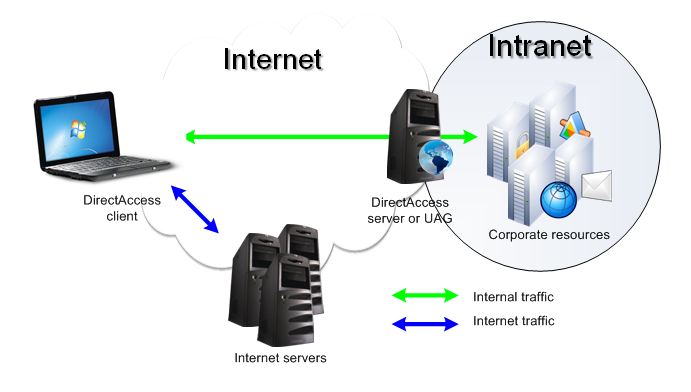
Fig. 1
Technology Foundation
Let's now look at the technology solutions that underlie DirectAccess. In fact, there are three of them:
1. IPv6 protocol for connecting a DA client with a DA server and Intranet computers.
2. IPSec over IPv6 for secure data transfer over the Internet / Intranet.
3. Name Resolution Policy Table (NRPT) for the correct resolution of internal (corporate) and external names.
The latter, by the way, allows the user, while on the Internet, to access internal resources by short names, for example: \\ corp-srv1 \ docs. We discuss successively all three of these components.
IPv6
DirectAccess requires a configured IP version 6 protocol, at least on DA clients and DA servers. Do not rush to immediately finish reading, this does not mean that DirectAccess is not applicable in the current conditions of the virtually undivided reign of IPv4 in the vastness of our, and not only our Internet.
Why was IPv6 betted at all? This protocol has a lot of advantages, the main of which is the lack of disadvantages of the good old IPv4. :) Seriously, in relation to our topic, I would note the following features of IPv6.
The first is a huge address space. What does this really give? Now all or almost all companies use one or more public IPv4 addresses in the perimeter network, while the computers on the internal network are configured to any of the private address ranges (10.0.0.0/8, 172.16.0.0/12, 192.168.0.0 /16). It is likely that when connecting to the Internet through NAT, the remote computer will receive an address from the same range, which will make the use of split tunnel mode very difficult. A similar problem can occur when connecting through a VPN two remote offices using the same private IP subnet. The IPv6 address space allows you to assign a unique IPv6 address to any company host, and it is unique not only within the corporate network, but throughout the Internet.
How secure is it without NAT? I understand that the issue is more than debatable. But still. Let's recall that NAT is primarily designed to solve the problem of a lack of public IPv4 addresses. This problem is not present in IPv6. The second consequence of using NAT is to hide internal IP addressing. Hosts on the Internet only see IP addresses on the external interface of a NAT device. In case of refusal from NAT, the company will “light up” the real IPv6 addresses of the corporate network. Is this a security risk? Generally yes. The less an attacker knows about my network, the less potential disasters they can do. However, on the other hand, we are talking about remote access of clients to corporate resources. Firewalls have not been canceled, they still allow only certain traffic and are probably equipped with intrusion detection systems, prevent port scans, etc. In addition, hardly anyone will organize a tunnel for remote access without encryption. And here we need to remember about IPSec over IPv6. The DA server only accepts IPSec traffic. Default. You can always reconfigure. And when an IPSec connection is established, the server and the client mutually authenticate, first at the computer account level using digital certificates, then at the user account level using the mechanism specified by the corporate policy (password, smart card, fingerprints, etc.). Accordingly, knowing the specific IP address of the internal server is unlikely to greatly facilitate the task of penetrating the internal network. And here we need to remember about IPSec over IPv6. The DA server only accepts IPSec traffic. Default. You can always reconfigure. And when an IPSec connection is established, the server and the client mutually authenticate, first at the computer account level using digital certificates, then at the user account level using the mechanism specified by the corporate policy (password, smart card, fingerprints, etc.). Accordingly, knowing the specific IP address of the internal server is unlikely to greatly facilitate the task of penetrating the internal network. And here we need to remember about IPSec over IPv6. The DA server only accepts IPSec traffic. Default. You can always reconfigure. And when an IPSec connection is established, the server and the client mutually authenticate, first at the computer account level using digital certificates, then at the user account level using the mechanism specified by the corporate policy (password, smart card, fingerprints, etc.). Accordingly, knowing the specific IP address of the internal server is unlikely to greatly facilitate the task of penetrating the internal network. then at the user account level through the mechanism specified by the corporate policy (password, smart card, fingerprints, etc.). Accordingly, knowing the specific IP address of the internal server is unlikely to greatly facilitate the task of penetrating the internal network. then at the user account level through the mechanism specified by the corporate policy (password, smart card, fingerprints, etc.). Accordingly, knowing the specific IP address of the internal server is unlikely to greatly facilitate the task of penetrating the internal network.
Conversely, abandoning NAT leads to another useful feature of using IPv6 - the possibility of secure point-to-point connections. Indeed, the standard solution in the case of NAT is a scheme (see Fig. 2), in which an encrypted tunnel is established from, in this case, the DA client to the DA server. On the internal network, traffic is already transmitted in open form (red arrows), or again encrypted, but not by the client, but by the DA server.

Fig.2
In the case of global IPv6 routing, an encrypted channel can be established between the DA client and the destination server, and the DirectAccess server only passes (routes) such traffic through itself (see Figure 3). This allows you to configure access rights to servers at the computer level and at the user level, additionally "tightening the security" nuts. The difficulty in implementing such a scheme when using address translation is that each IPSec packet has a digital signature, which is violated when the NAT device tries to modify the packet. Although a solution to this problem exists, not every NAT device supports it.

Fig. 3
Well and one more important point connected with NAT. Applications You can easily come across programs that do not work or work crookedly through NAT. Including, due to incorrect resolution of internal and external names. The lack of NAT allows developers to forget about address translation issues and focus on the business logic of the application, and administrators to get rid of additional settings and applications, and firewalls.
Thus, the “openness” of the IP addressing of your network and the advantages of the “world without NAT” that I tried to identify are on the scale. The choice, as always, is yours.
In the next post I will finish the discussion of the technological foundation of DirectAccess. It will be about using IPv6 in an IPv4 environment, IPSec over IPv6 applications, and NRPT implementation features.
What is DirectAccess?
DirectAccess - technology for remote access to corporate network resources. From the consumer point of view, the essence of the technology can be expressed as follows: “As soon as my computer connected to the Internet, I immediately got access to the Internet and the entire corporate network.” In technical terms, when connected to the Internet, a user computer configured as a DirectAccess client (DA client) automatically establishes a tunnel to the DirectAccess server (DA server) and through it gains access to the entire corporate network. Does this differ fundamentally from traditional VPN solutions? Let's look at the features of DirectAccess and the technological basis of this solution, after which, I think, everyone will be able to answer this question for himself.
DirectAccess Features
The first very important feature is that no additional actions are required from the user. The tunnel between the client and the DirectAccess server is automatically established, and, as will be shown later, in fact, two tunnels are created: one for computer authentication, the second for user authentication. And this process is completely transparent to the user. No need to start any VPN connections, no credentials - login and password, PIN for a smart card, etc. Moreover, if the Internet connection is lost for a while, and the tunnel naturally breaks , and then it is restored (for example, an unstable WiFi signal), then again, the tunnel to the corporate network is automatically restored without user intervention.
The second feature follows from the first, although perhaps this is not very obvious. As long as there is an Internet connection and a tunnel exists, the client computer is available for management by the company's IT services. In other words, thanks to DirectAccess, not only the user can constantly work with corporate resources, there would be a connection with the outside world, but other employees, especially IT specialists, have access to the user's computer. The user is always “under the hood” of IT services, which probably doesn’t suit him himself, but the IT staff is very happy. :) From a practical point of view, this fact makes it possible to monitor the client machine — checking anti-virus databases, recent updates, the included firewall, etc. — even if it is located outside the corporate network. On the other hand, manually breaking the DA tunnel is not as easy as with a VPN connection, which is usually visually displayed in network connections. That is, of course you can, but you need to know how.
And finally, by default, DirectAccess provides different routes to local, external and corporate resources (see Figure 1). In many implementations, when establishing a VPN connection, the default gateway address changes, and all traffic is chased to the VPN server, and from there to the Internet or corporate network. On the one hand, this slows down the speed of working with Internet resources; on the other hand, it can create certain problems with routing in the local network. DirectAccess is flexible enough to configure, so you can configure split tunnel (by default) as well as wrap all traffic on the DA server.
Fig. 1
Technology Foundation
Let's now look at the technology solutions that underlie DirectAccess. In fact, there are three of them:
1. IPv6 protocol for connecting a DA client with a DA server and Intranet computers.
2. IPSec over IPv6 for secure data transfer over the Internet / Intranet.
3. Name Resolution Policy Table (NRPT) for the correct resolution of internal (corporate) and external names.
The latter, by the way, allows the user, while on the Internet, to access internal resources by short names, for example: \\ corp-srv1 \ docs. We discuss successively all three of these components.
IPv6
DirectAccess requires a configured IP version 6 protocol, at least on DA clients and DA servers. Do not rush to immediately finish reading, this does not mean that DirectAccess is not applicable in the current conditions of the virtually undivided reign of IPv4 in the vastness of our, and not only our Internet.
Why was IPv6 betted at all? This protocol has a lot of advantages, the main of which is the lack of disadvantages of the good old IPv4. :) Seriously, in relation to our topic, I would note the following features of IPv6.
The first is a huge address space. What does this really give? Now all or almost all companies use one or more public IPv4 addresses in the perimeter network, while the computers on the internal network are configured to any of the private address ranges (10.0.0.0/8, 172.16.0.0/12, 192.168.0.0 /16). It is likely that when connecting to the Internet through NAT, the remote computer will receive an address from the same range, which will make the use of split tunnel mode very difficult. A similar problem can occur when connecting through a VPN two remote offices using the same private IP subnet. The IPv6 address space allows you to assign a unique IPv6 address to any company host, and it is unique not only within the corporate network, but throughout the Internet.
How secure is it without NAT? I understand that the issue is more than debatable. But still. Let's recall that NAT is primarily designed to solve the problem of a lack of public IPv4 addresses. This problem is not present in IPv6. The second consequence of using NAT is to hide internal IP addressing. Hosts on the Internet only see IP addresses on the external interface of a NAT device. In case of refusal from NAT, the company will “light up” the real IPv6 addresses of the corporate network. Is this a security risk? Generally yes. The less an attacker knows about my network, the less potential disasters they can do. However, on the other hand, we are talking about remote access of clients to corporate resources. Firewalls have not been canceled, they still allow only certain traffic and are probably equipped with intrusion detection systems, prevent port scans, etc. In addition, hardly anyone will organize a tunnel for remote access without encryption. And here we need to remember about IPSec over IPv6. The DA server only accepts IPSec traffic. Default. You can always reconfigure. And when an IPSec connection is established, the server and the client mutually authenticate, first at the computer account level using digital certificates, then at the user account level using the mechanism specified by the corporate policy (password, smart card, fingerprints, etc.). Accordingly, knowing the specific IP address of the internal server is unlikely to greatly facilitate the task of penetrating the internal network. And here we need to remember about IPSec over IPv6. The DA server only accepts IPSec traffic. Default. You can always reconfigure. And when an IPSec connection is established, the server and the client mutually authenticate, first at the computer account level using digital certificates, then at the user account level using the mechanism specified by the corporate policy (password, smart card, fingerprints, etc.). Accordingly, knowing the specific IP address of the internal server is unlikely to greatly facilitate the task of penetrating the internal network. And here we need to remember about IPSec over IPv6. The DA server only accepts IPSec traffic. Default. You can always reconfigure. And when an IPSec connection is established, the server and the client mutually authenticate, first at the computer account level using digital certificates, then at the user account level using the mechanism specified by the corporate policy (password, smart card, fingerprints, etc.). Accordingly, knowing the specific IP address of the internal server is unlikely to greatly facilitate the task of penetrating the internal network. then at the user account level through the mechanism specified by the corporate policy (password, smart card, fingerprints, etc.). Accordingly, knowing the specific IP address of the internal server is unlikely to greatly facilitate the task of penetrating the internal network. then at the user account level through the mechanism specified by the corporate policy (password, smart card, fingerprints, etc.). Accordingly, knowing the specific IP address of the internal server is unlikely to greatly facilitate the task of penetrating the internal network.
Conversely, abandoning NAT leads to another useful feature of using IPv6 - the possibility of secure point-to-point connections. Indeed, the standard solution in the case of NAT is a scheme (see Fig. 2), in which an encrypted tunnel is established from, in this case, the DA client to the DA server. On the internal network, traffic is already transmitted in open form (red arrows), or again encrypted, but not by the client, but by the DA server.
Fig.2
In the case of global IPv6 routing, an encrypted channel can be established between the DA client and the destination server, and the DirectAccess server only passes (routes) such traffic through itself (see Figure 3). This allows you to configure access rights to servers at the computer level and at the user level, additionally "tightening the security" nuts. The difficulty in implementing such a scheme when using address translation is that each IPSec packet has a digital signature, which is violated when the NAT device tries to modify the packet. Although a solution to this problem exists, not every NAT device supports it.
Fig. 3
Well and one more important point connected with NAT. Applications You can easily come across programs that do not work or work crookedly through NAT. Including, due to incorrect resolution of internal and external names. The lack of NAT allows developers to forget about address translation issues and focus on the business logic of the application, and administrators to get rid of additional settings and applications, and firewalls.
Thus, the “openness” of the IP addressing of your network and the advantages of the “world without NAT” that I tried to identify are on the scale. The choice, as always, is yours.
In the next post I will finish the discussion of the technological foundation of DirectAccess. It will be about using IPv6 in an IPv4 environment, IPSec over IPv6 applications, and NRPT implementation features.









