GLGDI + or “switch from GDI + to OpenTK”
I think many had to deal with the problem that GDI + slows down, but slows down, because it is not accelerated by iron.
So I once wrote a level editor
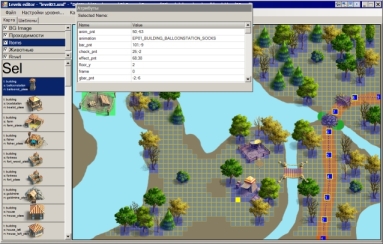
and realized that I no longer need GDI +, I need to switch to something accelerated, and in a minimal amount of time. Googling a bit, I decided to opt for the OpenTK library.
Why did you choose OpenTK? First, OpenTK provides the GLControl class (which is a direct descendant of UserControl), which makes it easier to switch to this library. Secondly, the bundle includes the TextPrinter class, which allows you to quite easily display text on the screen. Thirdly, during google, I found a small “Engine.zip” archive with a set of classes for 2D rendering, OpenGL initialization, and other amenities.
At first, I planned to describe what pitfalls I met when switching to OpenTK, but remembering that the issue of switching from GDI + to something fast is quite popular, I decided to write a small library that mimics GDI + and put it in the public domain. I called her GLGDI +. Remember that this is a lightweight library and contains only the most necessary minimum and does not try to fully copy the GDI + API. It contains the classes GLGraphics, GLImage, and GLMultiImage. GLGraphics contains the following methods:
I will nevertheless describe some points that I had to face when using OpenTK. There are good tutorials on the OpenTK website that I certainly have not read, if I had read them, there would have been fewer problems. But, what was, was:
The library is on GoogleCode , under the BSD license. If anyone needs it, use it for health. To understand how to work with the library, look at the source code of the sample that comes with it, it is very simple:
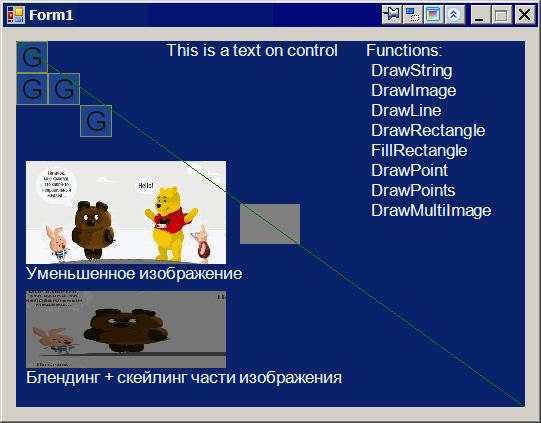
All the “moments” described above are taken into account.
I would not recommend using this library for products aimed at the mass user - it is too young for this, but it is quite suitable for use in utilities.
At the moment, I have no plans for the development of the library - I have enough of its functionality. But bug fixes and patches are welcome :)
Judging by what I read on the OpenTK forum, TextPrinter (used to display text) will be excluded from the library in the future, but possibly in a separate project. So his fate is still vague. It is now in Deprecated state, so it gives warnings when compiling the library.
Now the map editor works much faster and does not slow down anything, which is what I wish for you!
UPD: forgot to specify a link to the OpenTK site UPD2
: fixed a bug with paths in the source code of the sample (both in the archive and in SVN)
So I once wrote a level editor
and realized that I no longer need GDI +, I need to switch to something accelerated, and in a minimal amount of time. Googling a bit, I decided to opt for the OpenTK library.
OpenTK (Open Toolkit) is a low-level library that is a wrapper for OpenGL, OpenGL ES, OpenCL and OpenAL. This library is designed for games, scientific applications, as well as for any other applications that require 3D-graphics, audio and computing functionality. OpenTK is a cross-platform library and runs on both Mono and .NET.
Why did you choose OpenTK? First, OpenTK provides the GLControl class (which is a direct descendant of UserControl), which makes it easier to switch to this library. Secondly, the bundle includes the TextPrinter class, which allows you to quite easily display text on the screen. Thirdly, during google, I found a small “Engine.zip” archive with a set of classes for 2D rendering, OpenGL initialization, and other amenities.
At first, I planned to describe what pitfalls I met when switching to OpenTK, but remembering that the issue of switching from GDI + to something fast is quite popular, I decided to write a small library that mimics GDI + and put it in the public domain. I called her GLGDI +. Remember that this is a lightweight library and contains only the most necessary minimum and does not try to fully copy the GDI + API. It contains the classes GLGraphics, GLImage, and GLMultiImage. GLGraphics contains the following methods:
- DrawString - displays text
- DrawImage - draws a GLImage
- DrawLine - draws a line
- DrawRectangle - draws a rectangle
- FillRectangle - draws a filled rectangle
- DrawPoint - draws a point
- DrawPoints - draws multiple dots
- DrawMultiImage - draws GLMultiImage (to draw several identical images at once - it is much faster than drawing one at a time, if there are many such images)
Some moments
I will nevertheless describe some points that I had to face when using OpenTK. There are good tutorials on the OpenTK website that I certainly have not read, if I had read them, there would have been fewer problems. But, what was, was:
- The first thing I came across: the control did not redraw at startup, it was simple, you just need to remember to call the SwapBuffers method at the end of OnPaint, GLControl already has DoubleBuffer functionality built in, you just need to switch the buffer
- The next point that I stumbled upon is black rectangles instead of images. It was solved by calling image.SetBlending () before rendering, now in the library all images are drawn with blending, so there should be no problems with this
- When I transferred the second control to OpenTK rails, it turned out that the first control then ceased to fulfill its functions, was decided by calling the MakeCurrent method in OnPaint before drawing the elements
- TextPrinter (the basis for DrawString) sometimes crashes when text is displayed, there's nothing to be done - the class is buggy and on certain combinations of rendering quality, font and font size it crashes, I had to choose the font and size
- You also need to track that the control has loaded and only after that work with OpenTK / GLGraphics, and also verify that the control is not in form designer mode
- When resizing the control, remember to call GLGraphics.Resize (Width, Height)
Conclusion
The library is on GoogleCode , under the BSD license. If anyone needs it, use it for health. To understand how to work with the library, look at the source code of the sample that comes with it, it is very simple:
All the “moments” described above are taken into account.
I would not recommend using this library for products aimed at the mass user - it is too young for this, but it is quite suitable for use in utilities.
At the moment, I have no plans for the development of the library - I have enough of its functionality. But bug fixes and patches are welcome :)
Judging by what I read on the OpenTK forum, TextPrinter (used to display text) will be excluded from the library in the future, but possibly in a separate project. So his fate is still vague. It is now in Deprecated state, so it gives warnings when compiling the library.
Now the map editor works much faster and does not slow down anything, which is what I wish for you!
UPD: forgot to specify a link to the OpenTK site UPD2
: fixed a bug with paths in the source code of the sample (both in the archive and in SVN)