June 23, 2010 at 09:25
Development of .NET-applications for AutoCAD within the framework of MVC architecture
It is no secret that today AutoCAD is the most popular CAD system that is used in many sectors of human activity. In the basic supply, it allows you to perform drawing work for any purpose using only regular means.
However, pure AutoCAD - as the graphics core in the basic configuration - is gradually losing its relevance. This happens because today it is important for the user to design interconnected objects of the subject area (walls, railroad profiles, wheels ...), and not graphic primitives in the drawing (points, lines, circles ...); moreover, design quickly, efficiently and in accordance with the standards in force in a particular country and industry.
Naturally, Autodesk could not include everything that was required by end users in all countries in the AutoCAD system; therefore, programming tools were introduced in AutoCAD that allowed users to adapt it to their own needs [1].
AutoCAD Development Tools. These tools can be divided into the following groups:
LISP and Visual Basic for Applications languages for automating some routine operations on drawings.
ObjectARX technology, based on the C ++ programming language and giving the opportunity to create your own commands and primitives.
Support for Microsoft .NET technology, which allows you to load and execute arbitrary program code in Autocad written in any of the .NET-compatible programming languages.
The latter technology is the most powerful, because it is not based on a private development of Autodesk, but on a progressive, recognized Microsoft .NET Framework.
At the same time, we note that none of these solutions in its original form is capable of linking the drawing with the objects that it displays, that is, with the domain model. In turn, the most common and successful software architecture that implements this behavior is the MVC (Model-View-Controller) pattern.
Model-View-Controller. This is a software architecture in which the application data model, user interface, and control logic are divided into three separate components, so that modifying one of the components has minimal impact on the other components (Fig. 1).
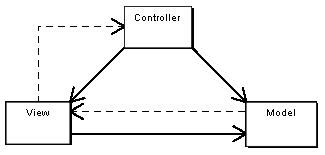
Fig. 1 - Architecture MVC
Model (Model). The model provides data (usually for the View), and also responds to requests (usually from the controller), changing its state.
Presentation (View). Responsible for displaying information (user interface).
Controller Interprets the data entered by the user and informs the model and the idea of the need for an appropriate reaction.
It is important to note that both presentation and behavior are model dependent. However, the model does not depend on either representation or behavior. This is one of the key advantages of this separation. It allows you to build a model regardless of the visual representation, as well as create several different representations for one model [2].
We will determine the possibility of applying the MVC architecture, considering the tools provided by AutoCAD when programming using .NET. Below (Fig. 2) is a simplified diagram of AutoCAD classes through which the interaction of user code with CAD is implemented.
The structure of AutoCAD classes.
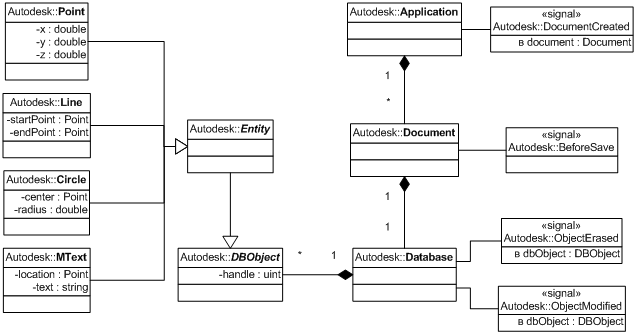
Fig. 2 - Simplified AutoCAD Class Diagram
The core is the Application class, which is a Wrapper directly above an AutoCAD application. A set of documents can be opened in an application, each of which can be represented as an object of the Document class. Each document, in turn, is associated with a Database (Database), which stores all the information on the drawing (styles, primitives, blocks ...) in the form of DBObject objects with unique identifiers (Handle). The most interesting for us are precisely the primitives (Entity), with the help of which the drawing is built. Primitives in AutoCAD are objects: a point (Point3d), a line (Line), a polyline (Polyline), a circle (Circle), text (MText), etc. - inherited from the abstract class Entity.
Any changes to an AutoCAD document are made as part of the transactions that are open to its database. In addition to ensuring the integrity of information, this transactional approach is also used to implement the Undo and Redo user interface functions, in which either the rollback or application of the latter occurs in the transaction stack, respectively. This feature must be taken into account when designing the data model of the subject area.
Using AutoCAD transactions in our own managed .Net-code, we are able to build drawings by creating records in the database of the document about the corresponding primitives. Therefore, we can use an AutoCAD document as a component of the View architecture MVC.
Now we need to determine the possibility of the correct behavior of the system when the user changes the drawing in order to modify the Model component accordingly. One of the possible solutions is to respond to events generated by AutoCAD when the drawing elements change:
Database.ObjectModified - generated when any DBObject in the document database changes.
Database.ObjectErased - generated when any object is deleted from the document database.
By subscribing to these events, we get the opportunity to track any changes in the drawing and respond to them, respectively changing the components of the model. Using the terminology of the MVC architecture, we can say that the functions of the Controller component in this implementation are taken over by both AutoCAD, acting as the generator of the primitive change event, and .NET code, which makes changes to the model based on this event.
Thus, it is possible to present the MVC architecture as applied to AutoCAD in the following form (Fig. 3):
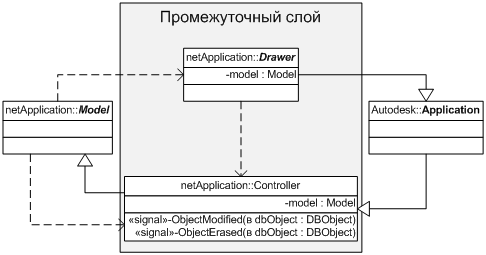
Fig. 3 - Implementation of MVC architecture
Serialization. The next question that needs to be considered is how to ensure the storage of model data between work sessions. The most common approach to solving this problem in the .NET Framework is serialization.
We note two obvious facts:
Saving data in the database (serialization) must be performed immediately before saving the document itself.
Data recovery from the database (deserialization) should be performed immediately after loading the document associated with the domain model.
Turning to fig. 2, we see that these actions can be implemented by subscribing to the following events from AutoCAD:
Document.BeforeSave, which is generated before the AutoCAD document is saved to the media.
Application.DocumentCreated, which is generated after opening or creating a document.
Transactional. As mentioned above, any changes to an AutoCAD document are performed as part of a transaction, which ensures both the integrity of the information and the ability to perform custom undo and redo functions. The term "transaction" here means a sequence of operations that are performed when the database of a document is transferred from one consistent state to another [5].
But since in the case under consideration AutoCAD performs the functions of presentation and controller, and the main information is stored in the domain model implemented in .NET, it is required:
To ensure the specified model is transactional.
Ensure synchronization of creation, opening, recording and rollback of transactions for the data model and AutoCAD database.
These requirements, on the one hand, guarantee the integrity and consistency of the link between the model and the database of the document; on the other hand, they make it possible to use standard AutoCAD user interface functions to cancel and redo commands.
The implementation of a data domain model with transaction support is beyond the scope of this article; it is enough to indicate only the direction in which such a solution can be developed - this is the use of the “Command” design template [6].
Ensuring the synchronization of transactions of both types can be divided between the objects of the intermediate layer (Fig. 3). Controller initiates the simultaneous launch of both transactions in response to the actions performed, makes the necessary changes to the model, and also monitors the call of the cancel and redo commands. In this case, Drawer, displaying the drawing in the AutoCAD document, changes the records of the document database in the transaction already opened by the controller.
Results. Based on the principles described in the article, the following were developed:
The basic model, on the basis of which it is possible to build models of various subject areas. It includes: components of the subject area, the relationships between them, the constraints imposed on the components and relationships; also implements a transactional approach.
The base classes of the middle layer between the domain model and the Autocad drawing, which, on the one hand, whenever the model changes, update the drawing and, on the other hand, send to the model all the drawing changes made by the user.
The main components of an additional user interface that allows you to edit model data directly, bypassing the drawing.
Thus, to build CAD based on AutoCAD using this development, it is necessary to:
Define (program) a specific model of the subject area in terms of the base model.
Define (program) the graphic view of the components of the model in the drawing and describe their behavior when the drawing changes.
Describe the behavior of the additional user interface, if one is needed.
The resulting approach is characterized by: A
high degree of integration of AutoCAD, the middle layer and the model.
Concealment of features of functioning of AutoCAD for the programmer.
The relative ease of development.
Ease of use.
REFERENCES
1. Zuev, S. A. and Poleshchuk, N. N. CAD based on AutoCAD - how it is done. St. Petersburg: BHV-Petersburg, 2004.
2. Model-View-Controller. Wikipedia [On the Internet] ru.wikipedia.org/wiki/Model-View-Controller
3. Serialization. Wikipedia [On the Internet] ru.wikipedia.org/wiki/Serialization
4. Basics of serialization in the .Net Framework. Microsoft Developer Network [In the Internet]msdn.microsoft.com/en-us/library/ms233836.aspx
5. Horafas , D. and Legg, S. Design databases. [transl.] D.F. Mironov. M .: Engineering, 1990.
6. Command. Wikipedia [Online] en.wikipedia.org/wiki/Command
However, pure AutoCAD - as the graphics core in the basic configuration - is gradually losing its relevance. This happens because today it is important for the user to design interconnected objects of the subject area (walls, railroad profiles, wheels ...), and not graphic primitives in the drawing (points, lines, circles ...); moreover, design quickly, efficiently and in accordance with the standards in force in a particular country and industry.
Naturally, Autodesk could not include everything that was required by end users in all countries in the AutoCAD system; therefore, programming tools were introduced in AutoCAD that allowed users to adapt it to their own needs [1].
AutoCAD Development Tools. These tools can be divided into the following groups:
LISP and Visual Basic for Applications languages for automating some routine operations on drawings.
ObjectARX technology, based on the C ++ programming language and giving the opportunity to create your own commands and primitives.
Support for Microsoft .NET technology, which allows you to load and execute arbitrary program code in Autocad written in any of the .NET-compatible programming languages.
The latter technology is the most powerful, because it is not based on a private development of Autodesk, but on a progressive, recognized Microsoft .NET Framework.
At the same time, we note that none of these solutions in its original form is capable of linking the drawing with the objects that it displays, that is, with the domain model. In turn, the most common and successful software architecture that implements this behavior is the MVC (Model-View-Controller) pattern.
Model-View-Controller. This is a software architecture in which the application data model, user interface, and control logic are divided into three separate components, so that modifying one of the components has minimal impact on the other components (Fig. 1).
Fig. 1 - Architecture MVC
Model (Model). The model provides data (usually for the View), and also responds to requests (usually from the controller), changing its state.
Presentation (View). Responsible for displaying information (user interface).
Controller Interprets the data entered by the user and informs the model and the idea of the need for an appropriate reaction.
It is important to note that both presentation and behavior are model dependent. However, the model does not depend on either representation or behavior. This is one of the key advantages of this separation. It allows you to build a model regardless of the visual representation, as well as create several different representations for one model [2].
We will determine the possibility of applying the MVC architecture, considering the tools provided by AutoCAD when programming using .NET. Below (Fig. 2) is a simplified diagram of AutoCAD classes through which the interaction of user code with CAD is implemented.
The structure of AutoCAD classes.
Fig. 2 - Simplified AutoCAD Class Diagram
The core is the Application class, which is a Wrapper directly above an AutoCAD application. A set of documents can be opened in an application, each of which can be represented as an object of the Document class. Each document, in turn, is associated with a Database (Database), which stores all the information on the drawing (styles, primitives, blocks ...) in the form of DBObject objects with unique identifiers (Handle). The most interesting for us are precisely the primitives (Entity), with the help of which the drawing is built. Primitives in AutoCAD are objects: a point (Point3d), a line (Line), a polyline (Polyline), a circle (Circle), text (MText), etc. - inherited from the abstract class Entity.
Any changes to an AutoCAD document are made as part of the transactions that are open to its database. In addition to ensuring the integrity of information, this transactional approach is also used to implement the Undo and Redo user interface functions, in which either the rollback or application of the latter occurs in the transaction stack, respectively. This feature must be taken into account when designing the data model of the subject area.
Using AutoCAD transactions in our own managed .Net-code, we are able to build drawings by creating records in the database of the document about the corresponding primitives. Therefore, we can use an AutoCAD document as a component of the View architecture MVC.
Now we need to determine the possibility of the correct behavior of the system when the user changes the drawing in order to modify the Model component accordingly. One of the possible solutions is to respond to events generated by AutoCAD when the drawing elements change:
Database.ObjectModified - generated when any DBObject in the document database changes.
Database.ObjectErased - generated when any object is deleted from the document database.
By subscribing to these events, we get the opportunity to track any changes in the drawing and respond to them, respectively changing the components of the model. Using the terminology of the MVC architecture, we can say that the functions of the Controller component in this implementation are taken over by both AutoCAD, acting as the generator of the primitive change event, and .NET code, which makes changes to the model based on this event.
Thus, it is possible to present the MVC architecture as applied to AutoCAD in the following form (Fig. 3):
Fig. 3 - Implementation of MVC architecture
Serialization. The next question that needs to be considered is how to ensure the storage of model data between work sessions. The most common approach to solving this problem in the .NET Framework is serialization.
We note two obvious facts:
Saving data in the database (serialization) must be performed immediately before saving the document itself.
Data recovery from the database (deserialization) should be performed immediately after loading the document associated with the domain model.
Turning to fig. 2, we see that these actions can be implemented by subscribing to the following events from AutoCAD:
Document.BeforeSave, which is generated before the AutoCAD document is saved to the media.
Application.DocumentCreated, which is generated after opening or creating a document.
Transactional. As mentioned above, any changes to an AutoCAD document are performed as part of a transaction, which ensures both the integrity of the information and the ability to perform custom undo and redo functions. The term "transaction" here means a sequence of operations that are performed when the database of a document is transferred from one consistent state to another [5].
But since in the case under consideration AutoCAD performs the functions of presentation and controller, and the main information is stored in the domain model implemented in .NET, it is required:
To ensure the specified model is transactional.
Ensure synchronization of creation, opening, recording and rollback of transactions for the data model and AutoCAD database.
These requirements, on the one hand, guarantee the integrity and consistency of the link between the model and the database of the document; on the other hand, they make it possible to use standard AutoCAD user interface functions to cancel and redo commands.
The implementation of a data domain model with transaction support is beyond the scope of this article; it is enough to indicate only the direction in which such a solution can be developed - this is the use of the “Command” design template [6].
Ensuring the synchronization of transactions of both types can be divided between the objects of the intermediate layer (Fig. 3). Controller initiates the simultaneous launch of both transactions in response to the actions performed, makes the necessary changes to the model, and also monitors the call of the cancel and redo commands. In this case, Drawer, displaying the drawing in the AutoCAD document, changes the records of the document database in the transaction already opened by the controller.
Results. Based on the principles described in the article, the following were developed:
The basic model, on the basis of which it is possible to build models of various subject areas. It includes: components of the subject area, the relationships between them, the constraints imposed on the components and relationships; also implements a transactional approach.
The base classes of the middle layer between the domain model and the Autocad drawing, which, on the one hand, whenever the model changes, update the drawing and, on the other hand, send to the model all the drawing changes made by the user.
The main components of an additional user interface that allows you to edit model data directly, bypassing the drawing.
Thus, to build CAD based on AutoCAD using this development, it is necessary to:
Define (program) a specific model of the subject area in terms of the base model.
Define (program) the graphic view of the components of the model in the drawing and describe their behavior when the drawing changes.
Describe the behavior of the additional user interface, if one is needed.
The resulting approach is characterized by: A
high degree of integration of AutoCAD, the middle layer and the model.
Concealment of features of functioning of AutoCAD for the programmer.
The relative ease of development.
Ease of use.
REFERENCES
1. Zuev, S. A. and Poleshchuk, N. N. CAD based on AutoCAD - how it is done. St. Petersburg: BHV-Petersburg, 2004.
2. Model-View-Controller. Wikipedia [On the Internet] ru.wikipedia.org/wiki/Model-View-Controller
3. Serialization. Wikipedia [On the Internet] ru.wikipedia.org/wiki/Serialization
4. Basics of serialization in the .Net Framework. Microsoft Developer Network [In the Internet]msdn.microsoft.com/en-us/library/ms233836.aspx
5. Horafas , D. and Legg, S. Design databases. [transl.] D.F. Mironov. M .: Engineering, 1990.
6. Command. Wikipedia [Online] en.wikipedia.org/wiki/Command