
 June 8, 2010 at 08:32
Cyrillic in .NET applications under Mono
.Net applications using WinForms may well work under Mono, but in some Linux distributions, instead of Russian fonts, users see slender rows of squares and a split interface.
The study of the problem showed that in different Linux distributions on the same version of mono (in particular, 2.4.2.3) the program was both with a normal interface and with squares. The search for a solution on the Internet led to a description of the problem with the driver for Intel graphics cards in Ubuntu xserver-xorg-video-intel. Dozens of different topics on English-language forums describing this solution using the latest driver. For example, here and here . However, in practice, updating the drivers did not solve the problem.
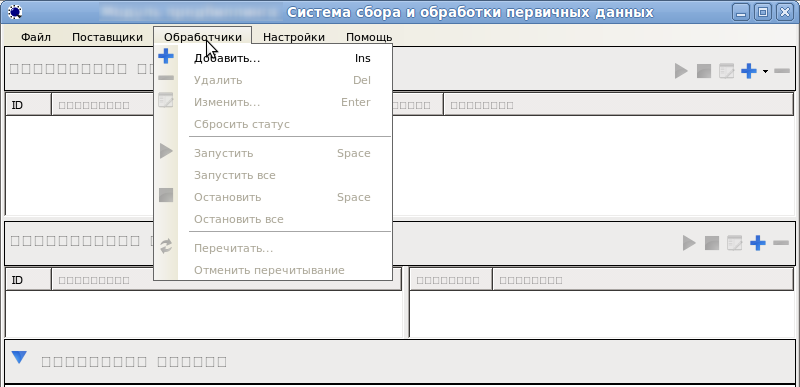
The second most popular tip - installing the font package msttcorefonts did not help either. However, digging a little to the side, we found that if the program explicitly uses simple fonts, such as Arial, then the problem of squares disappears. It turned out that the “Ms Sans Serif” font, which is used by default for all forms on WinForms, is “to blame”. Apparently, the font that replaces it in Ubuntu 9.04 contains Cyrillic, but starting from 9.10 this font is already without Cyrillic.
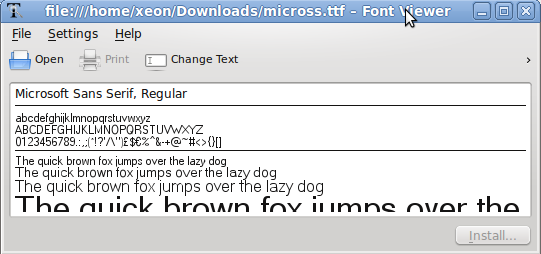
If the program is yours, then it is completely possible to change the font in it to Arial, or another one available in your distribution, although under Windows the application will look different from the rest. If there is no source code or desire to change the application, then installing additional fonts will help. If you have Windows itself, it will be much easier to take the micross.ttf file from C: \ Windows \ Fonts and put it in any / usr / share / fonts / truetype / subdirectory (I named my winfonts and collected all the windows fonts in it). You can also use the FontViewer application, which is associated with .ttf files and install the font using it. After installing the fonts, you just need to restart our application and everything falls into place
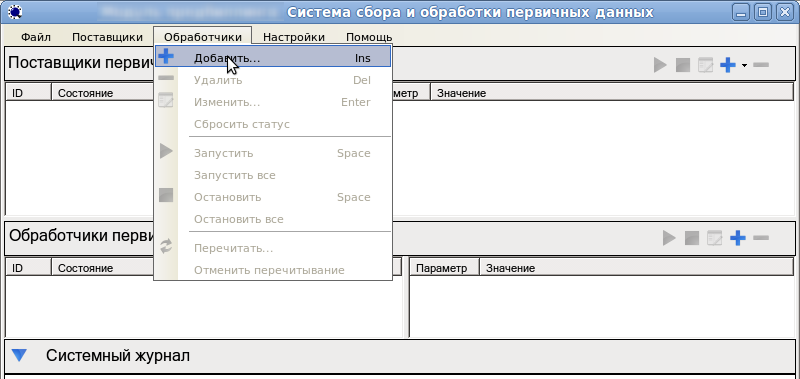
We hope this simple solution helps you,% username%. We didn’t experiment with other solutions for a long time, but we’ll be happy to find out how you can still solve this problem by holding the source code of the application. Maybe mono has the ability to specify the fonts used in the configuration?
We will be glad to hear comments and suggestions. An ideal solution - without the need for user participation and global font change in all forms and controls.
Upd1: There is another way.
- opened DejaVu Sans using FontForge
- changed the font name in the ttf info section to Microsoft Sans Serif
- clicked Generate ttf
- copied the result to the font directory.
This method solves the problem of having a license for Windows.
PS We are xeon and my colleague fo2rist who at the moment does not have an invite on habrahabr. If you have a free invite and a desire to help, write me in private messages. Thanks.
The second most popular tip - installing the font package msttcorefonts did not help either. However, digging a little to the side, we found that if the program explicitly uses simple fonts, such as Arial, then the problem of squares disappears. It turned out that the “Ms Sans Serif” font, which is used by default for all forms on WinForms, is “to blame”. Apparently, the font that replaces it in Ubuntu 9.04 contains Cyrillic, but starting from 9.10 this font is already without Cyrillic.
If the program is yours, then it is completely possible to change the font in it to Arial, or another one available in your distribution, although under Windows the application will look different from the rest. If there is no source code or desire to change the application, then installing additional fonts will help. If you have Windows itself, it will be much easier to take the micross.ttf file from C: \ Windows \ Fonts and put it in any / usr / share / fonts / truetype / subdirectory (I named my winfonts and collected all the windows fonts in it). You can also use the FontViewer application, which is associated with .ttf files and install the font using it. After installing the fonts, you just need to restart our application and everything falls into place
We hope this simple solution helps you,% username%. We didn’t experiment with other solutions for a long time, but we’ll be happy to find out how you can still solve this problem by holding the source code of the application. Maybe mono has the ability to specify the fonts used in the configuration?
We will be glad to hear comments and suggestions. An ideal solution - without the need for user participation and global font change in all forms and controls.
Upd1: There is another way.
- opened DejaVu Sans using FontForge
- changed the font name in the ttf info section to Microsoft Sans Serif
- clicked Generate ttf
- copied the result to the font directory.
This method solves the problem of having a license for Windows.
PS We are xeon and my colleague fo2rist who at the moment does not have an invite on habrahabr. If you have a free invite and a desire to help, write me in private messages. Thanks.