
 May 3, 2010 at 23:37
WEB SQL DB Administration in Chrome
After reading this post once , after rummaging around in the drafts of w3c , I began to quietly try to figure it out.
Immediately make a reservation that the storage technology on the client side is not a new thing. And in this version, it’s also, to a greater extent, webkit ( webkit ) and even under html5, so it can scare away many.
I won’t tell how it works (there are links just above, everything is described in detail there), but I would like to pay attention to DB administration using the Chrome browser ...
Well, let's get started. Let me remind you that to launch our “admin panel” just press Ctrl + Shift + I
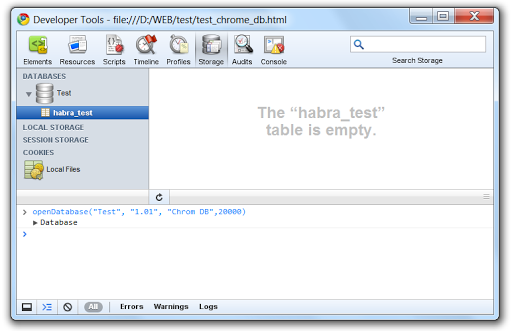
The window is divided into 3 parts: in the left - a list of databases with tables, in the right - a window for entering sql-scripts, in the bottom - a window for entering js-scripts
In order to create (or connect our previously created database), you need to write the following js script to the console
openDatabase("Test", "1.01", "Chrome DB",20000)(more about syntax here )
and then by a simple algorithm:
create a table

as we see it is a little empty ...
... fill it by writing regular insert
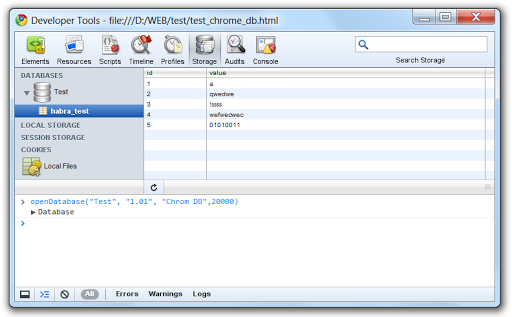
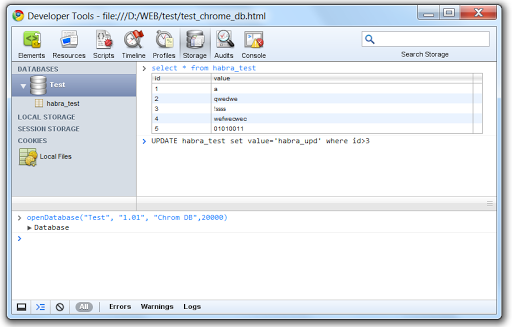
When the table is ready, we can perform various manipulations with it (select, update ...)
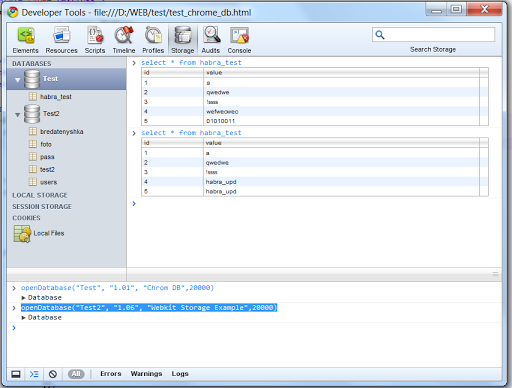
In addition to creating, with the same command, we can attach a previously created database with ready-made “worksheets”
Files from the database are stored in XP at the address It
C:\Documents and Settings\user\Local Settings\Application Data\Google\Chrome\User Data\Default\databases\file__0\ 's so easy to administer (albeit so loudly, but the term is the term) web sql db using our favorite chrome.
I hope this little knowledge will help you create interesting local applications for your purposes, as well as beautiful, powerful extensions.
Thanks for attention!