Unlocking mistakenly locked jobs in DataStage
When working with an IBM WebSphere DataStage client, the client application crashes quite often, which entails blocking the job (we will call Job that way, avoiding the more Russian, but at the same time, more general term etl-procedure or data transfusion procedure ). If the job is locked, it cannot be recompiled, as the DataStage client will report the impossibility of exclusive control over the resources of the job.
In this section I will tell you how to unlock the job without restarting the DataStage server.
To perform all of the above operations, you will need to start the DataStage Administrator, select the project in it and switch to command mode.

Then, you need to list all blocked resources. To do this, enter the following command in the Command field:
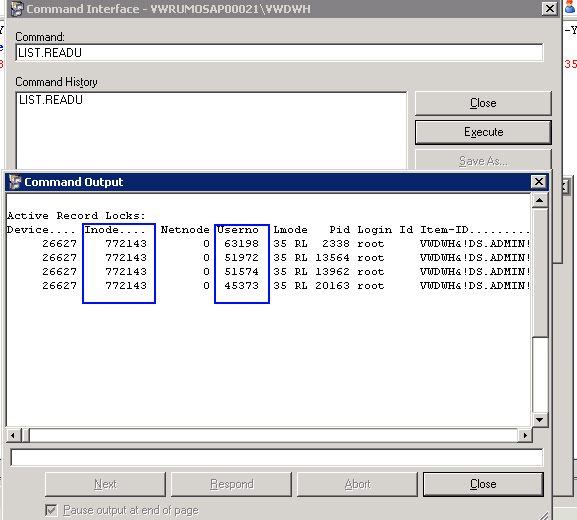
In the Command Output window that appears, we are interested in two columns: Inode and Userno. It is with these identifiers that you can unlock the job using the commands
or You
may not complete these commands successfully . In this case, you need to unlock the commands that are locked for the current project by default (only once for each project is enough).
Like this:
In this section I will tell you how to unlock the job without restarting the DataStage server.
To perform all of the above operations, you will need to start the DataStage Administrator, select the project in it and switch to command mode.
Then, you need to list all blocked resources. To do this, enter the following command in the Command field:
LIST.READUIn the Command Output window that appears, we are interested in two columns: Inode and Userno. It is with these identifiers that you can unlock the job using the commands
UNLOCK INODE НОМЕР_INODE ALLor You
UNLOCK USER НОМЕР_USERNO ALLmay not complete these commands successfully . In this case, you need to unlock the commands that are locked for the current project by default (only once for each project is enough).
Like this:
SET.FILE UV VOC UV.VOC

COPY FROM UV.VOC TO VOC UNLOCK