February 15, 2010 at 18:33
Asus O! Play HD Player. Current functionality and general view compared to other players
What do we do when we choose a phone, player, HD player? Right, read the reviews. Usually, these reviews appear simultaneously with the start of sales of the device on the market. But is that right?
Popular wisdom says: a new car model should be bought only after it is let out at least a year. During this time, they will also get rid of childhood diseases and break in technology. The situation is similar in the gadget market. Manufacturers seek to throw iron on the market and then polish the functionality with firmware for a long time. Therefore, focusing on the first reviews, it is easy to fall into error.
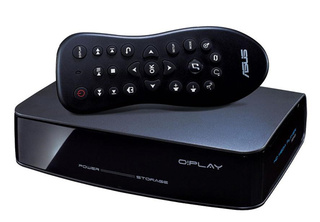
This post is about the Asus O! Play multimedia player SUV. He has already been considered by the respected Boomburum(actually, thanks to him, I drew attention to this player). But, firstly, it was a review of the player on the first firmware, and secondly, this player spent only a couple of weeks at the bumburum. I have Asus lying on the shelf for about a month, and I carefully follow all the updates. So, the current functionality, as well as the comparison of this player with WD TV Live, will be all of the following.
So, like many, I doubted for a long time and chose between Asus and WD TV Live. More precisely, at the sight I had a few more players, but in the end I settled on this pair. Here then I explain why, of Egreat EG-R1, Seagate FreeAgent Theater +, Asus O! Play HDP-R1 and have the aforementioned WD TV Live, I chose the Asus. If anyone is interested, welcome to the link .
In order not to repeat, I will write brief conclusions. Of all the above, only Asus and WD really interested me. WD looked interesting for several reasons:
- a little more omnivorous.
- the presence of network services (Youtube, Flickr, network radio).
- The prospect of returning Dolby TrueHD sound.
For all these bells and whistles in the shops of my city they asked for exactly a thousand rubles (the difference between Asus O! Play and WD TV Live). I thought, thought, and decided not to overpay. Actually, why (let's go from the end):
1. I do not need Dolby TrueHD sound - I do not have a receiver that understands it. And in rips with such a track, as a rule, there is always DTS. Again, at WD, he officially disappeared somewhere.
2. Network services - a profitable thing. In the current firmware for Asus (1.21P), support for TV, radio, weather, Flickr has already appeared. Youtube is also there, but more on that below.
3. Omnivore. Honestly, WD behaves slightly better on crooked rips. But, during the operation, I came across only one film, which Asus could not lose. The rest of the files, about a hundred, were played without problems. Again, to illustrate the omnivorous player, I’ll give a small tablet passing different HD-test players.

Asus, Asus is not much different from WD. The only film mentioned above, which asus did not eat, turned out to be a crookedly assembled matryoshka. I remixed it and got a perfectly playable file at the output. I don’t think that WD would have eaten it without preliminary conversion.
Now let's go directly to the firmware. I will not go over all the points in detail - this has been done so many times before me. I will single out only the general things and changes that have appeared with the new firmware:
1. The omnivorous video and audio formats.
Everything has remained unchanged:
Containers: vob, .mp4, .mov, .xvid, .avi, .divx, .asf, .wmv, .mkv, .rm, .rmvb, .flv, .ts, .m2ts ,. dat, .mpg
Codecs: MPEG1 / 2/4, H.264, VC-1, RM / RMVB
Audio: MP3, WAV, AAC, OGG, FLAC, AIFF, Dolby Digital AC3, Dolby Digital Plus, DTS Digital Surround
Photos: JPEG, BMP, PNG, GIF, TIFF
Subtitles: SRT, SUB, SMI, SSA (added txt support)
By video codecs - the player is not always friendly with the mp4 and wmv container. But personally, I did not find any problem files. As already mentioned above, inedible files of any formats were practically never seen.
What I liked especially: support for playing DVD and BD. DVDs, if files are played from the video_ts folder, have menu support. If you play from an iso image - menus, alas, no. If you enter the Video_ts folder, the player asks whether to play the disc, or show the structure of the folder. It is very comfortable. Every time you don’t have to look for an info file to start a DVD.
Immediately make a reservation, an external DVD-drive is not supported, so you need to write files to the screw, or run over the network.
About BD. The menu, of course, does not show (except for the dune, in general, no one shows it, but the dune costs twice as much). Video from iso is playing. A video from the folder also plays. Moreover, even if the structure is complex (as in the case of the presence on the disk of the regular and directorial versions), the playlist catches and shows normally.
By the way, in the discussion of boomburum's post, a certain comrade asmarty blurted out: “I have the latest firmware, DTS HD is on and DD True HD too.” So, this is all rubbish. Asus does not understand either format (as, however, many other players do not understand it). I take this opportunity, I convey my sincere greetings and huge request to asmarty not to mislead people.
2. Convenience of management:
The most important thing that makes me extremely happy in this player is the ability to jump in the movie for a given time period (I have 10 minutes skipped) and the ability to immediately go from the movie to the menu for setting color, contrast, saturation, etc. of things. On WD, if not mistaken, no.
When playing a file with an acceleration of 1.5-2, the player tries to recount the sound track. It is very convenient, especially when you are looking for the right moment in scenes with long dialogs.
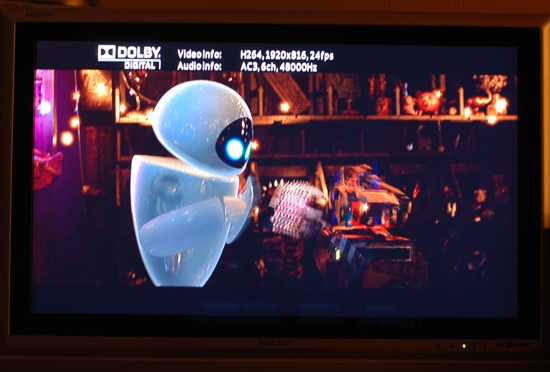
(I apologize for the quality of the photos - I shot at night, and could not get rid of spurious movements. If the public asks, I will shoot and fill in the photos)
Realtek chip players are often blamed for not showing the soundtrack index. On Asus and with this, full order. When switching, you can always see which soundtrack is playing right now. Management, I think, at 5.
3. Networking.
We turn to the most interesting: since the torrent player itself does not know how to download, the video for it needs to be worn somehow. You can, of course, write video to an external screw. But you need to pull it out of the player, plug it into the computer, then plug it into the player again. In general, not technological. Again, the nests are loosening.
It is much easier to either copy the video over the network to the screw (the player copies itself, and the speed stays in the region of 20-30Mbit / s), or watch directly on the network.


In general, the performance is enough to look directly at the grid is not too heavy rips. Unfortunately, you can’t get through to the player from the computer. But on the contrary - easily.
On the forums, people noted problems with the connection under Windows 7, but the latest firmware has corrected this matter for the most part. Under Windows XP, I did not have these problems initially.
4. Network services
Support for network services in the player appeared only in the latest firmware. Not everything is smooth, but it works more than tolerably well.

I will go through the points:

Radio. Let's just say that, in order to listen to something interesting, I had to turn on the desktop and listen to the radio via the Internet. Somehow dysfunctional. Now I have the radio function assigned to the player. More convenient at times.

Flickr - allows you to view photos with the highest ratings, as well as search by tags. Very comfortably. You know, it's nice sometimes, lying on the couch, to see good photos.

Weather. Well, everything is clear here. By the way, it is clear that the firmware is still damp: the forecast for tomorrow, etc. written in English. But the map is scaled from Google :)
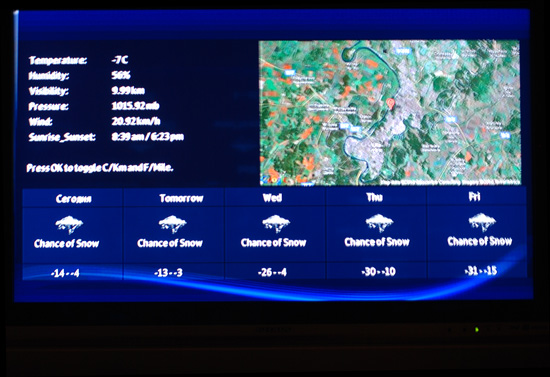
TV - television is mainly imported.
5. Alternative firmware
Here the situation is paradoxical. As far as I know, asus is the only manufacturer that has posted the firmware sources in open access. And O! Play, again, is the only popular player that does not have alternative firmware. So asus owners do not have a torrent rocking chair yet. But attempts are being made to do something similar. In the latest firmware, for example, it is possible to connect YouTube, but this function is blocked by the developer. Our craftsmen circumvented this ban.
Rumor has it that the Spaniards managed to stick firmware from PlayOn! HD into the player. True, not everything went smoothly and you need another remote.
In general, the work is in full swing.
UPD
According to the request made in the commentary, I’ll tell you about adding youtube
HereThere is a link to the firmware mod from LnrMn. Youtube appears, the ability to add your own radio stations. Also, the Optware mount point has been added to the firmware, which allows you to put your programs on an external flash drive (the process is familiar to Asus WL500G owners).
Warning: before you install the mod, please read the entire thread on the forum. There are several subtleties, the failure of which is fraught with the death of the player. In addition, the author of the mod himself notes that youtube works with glitches (which is probably why it is not available in the official firmware).
Conclusions:
For what I like the player:
1. The quality of the picture. Very very nice.
2. The presence of an eSata connector. Those. speed problems are not expected in principle. Again, it is convenient to connect an external screw.
3. Convenient navigation inside the movie
4. Support DVD (including menus)
5. Copy function over the network. I use it constantly.
6. Omnivore. True omnivore.
7. The ability to play music without turning on the TV.
What would I change / redo / add
1. I do not really like the text menu. This is still a multimedia player. While we are in the main menu - there is a convenient graphic carousel. It is worth digging a little deeper - endless text items appear. This became especially noticeable when the network stations were connected.
2. (follows from the first) There is no cover mode for films, music and radio stations. Selecting on the cover would be more convenient than on a long list of files.
3. Would replace a regular screensaver. For example, from photographs of flickr (since they’ve added).
4. Added information about the song played on the radio.
And, in general, that’s all :)
And the last, would I now change this player to WD TV Live? No, the player suits me 100%. And those few shortcomings that I described are easily fixed by firmware. And most importantly, the price suits me. Today it stays in the region of 4.5-5 thousand rubles.
All the best ...
PS is ready in the comments to answer all your questions
Popular wisdom says: a new car model should be bought only after it is let out at least a year. During this time, they will also get rid of childhood diseases and break in technology. The situation is similar in the gadget market. Manufacturers seek to throw iron on the market and then polish the functionality with firmware for a long time. Therefore, focusing on the first reviews, it is easy to fall into error.
This post is about the Asus O! Play multimedia player SUV. He has already been considered by the respected Boomburum(actually, thanks to him, I drew attention to this player). But, firstly, it was a review of the player on the first firmware, and secondly, this player spent only a couple of weeks at the bumburum. I have Asus lying on the shelf for about a month, and I carefully follow all the updates. So, the current functionality, as well as the comparison of this player with WD TV Live, will be all of the following.
So, like many, I doubted for a long time and chose between Asus and WD TV Live. More precisely, at the sight I had a few more players, but in the end I settled on this pair. Here then I explain why, of Egreat EG-R1, Seagate FreeAgent Theater +, Asus O! Play HDP-R1 and have the aforementioned WD TV Live, I chose the Asus. If anyone is interested, welcome to the link .
In order not to repeat, I will write brief conclusions. Of all the above, only Asus and WD really interested me. WD looked interesting for several reasons:
- a little more omnivorous.
- the presence of network services (Youtube, Flickr, network radio).
- The prospect of returning Dolby TrueHD sound.
For all these bells and whistles in the shops of my city they asked for exactly a thousand rubles (the difference between Asus O! Play and WD TV Live). I thought, thought, and decided not to overpay. Actually, why (let's go from the end):
1. I do not need Dolby TrueHD sound - I do not have a receiver that understands it. And in rips with such a track, as a rule, there is always DTS. Again, at WD, he officially disappeared somewhere.
2. Network services - a profitable thing. In the current firmware for Asus (1.21P), support for TV, radio, weather, Flickr has already appeared. Youtube is also there, but more on that below.
3. Omnivore. Honestly, WD behaves slightly better on crooked rips. But, during the operation, I came across only one film, which Asus could not lose. The rest of the files, about a hundred, were played without problems. Again, to illustrate the omnivorous player, I’ll give a small tablet passing different HD-test players.
Asus, Asus is not much different from WD. The only film mentioned above, which asus did not eat, turned out to be a crookedly assembled matryoshka. I remixed it and got a perfectly playable file at the output. I don’t think that WD would have eaten it without preliminary conversion.
Now let's go directly to the firmware. I will not go over all the points in detail - this has been done so many times before me. I will single out only the general things and changes that have appeared with the new firmware:
1. The omnivorous video and audio formats.
Everything has remained unchanged:
Containers: vob, .mp4, .mov, .xvid, .avi, .divx, .asf, .wmv, .mkv, .rm, .rmvb, .flv, .ts, .m2ts ,. dat, .mpg
Codecs: MPEG1 / 2/4, H.264, VC-1, RM / RMVB
Audio: MP3, WAV, AAC, OGG, FLAC, AIFF, Dolby Digital AC3, Dolby Digital Plus, DTS Digital Surround
Photos: JPEG, BMP, PNG, GIF, TIFF
Subtitles: SRT, SUB, SMI, SSA (added txt support)
By video codecs - the player is not always friendly with the mp4 and wmv container. But personally, I did not find any problem files. As already mentioned above, inedible files of any formats were practically never seen.
What I liked especially: support for playing DVD and BD. DVDs, if files are played from the video_ts folder, have menu support. If you play from an iso image - menus, alas, no. If you enter the Video_ts folder, the player asks whether to play the disc, or show the structure of the folder. It is very comfortable. Every time you don’t have to look for an info file to start a DVD.
Immediately make a reservation, an external DVD-drive is not supported, so you need to write files to the screw, or run over the network.
About BD. The menu, of course, does not show (except for the dune, in general, no one shows it, but the dune costs twice as much). Video from iso is playing. A video from the folder also plays. Moreover, even if the structure is complex (as in the case of the presence on the disk of the regular and directorial versions), the playlist catches and shows normally.
By the way, in the discussion of boomburum's post, a certain comrade asmarty blurted out: “I have the latest firmware, DTS HD is on and DD True HD too.” So, this is all rubbish. Asus does not understand either format (as, however, many other players do not understand it). I take this opportunity, I convey my sincere greetings and huge request to asmarty not to mislead people.
2. Convenience of management:
The most important thing that makes me extremely happy in this player is the ability to jump in the movie for a given time period (I have 10 minutes skipped) and the ability to immediately go from the movie to the menu for setting color, contrast, saturation, etc. of things. On WD, if not mistaken, no.
When playing a file with an acceleration of 1.5-2, the player tries to recount the sound track. It is very convenient, especially when you are looking for the right moment in scenes with long dialogs.
(I apologize for the quality of the photos - I shot at night, and could not get rid of spurious movements. If the public asks, I will shoot and fill in the photos)
Realtek chip players are often blamed for not showing the soundtrack index. On Asus and with this, full order. When switching, you can always see which soundtrack is playing right now. Management, I think, at 5.
3. Networking.
We turn to the most interesting: since the torrent player itself does not know how to download, the video for it needs to be worn somehow. You can, of course, write video to an external screw. But you need to pull it out of the player, plug it into the computer, then plug it into the player again. In general, not technological. Again, the nests are loosening.
It is much easier to either copy the video over the network to the screw (the player copies itself, and the speed stays in the region of 20-30Mbit / s), or watch directly on the network.
In general, the performance is enough to look directly at the grid is not too heavy rips. Unfortunately, you can’t get through to the player from the computer. But on the contrary - easily.
On the forums, people noted problems with the connection under Windows 7, but the latest firmware has corrected this matter for the most part. Under Windows XP, I did not have these problems initially.
4. Network services
Support for network services in the player appeared only in the latest firmware. Not everything is smooth, but it works more than tolerably well.
I will go through the points:
Radio. Let's just say that, in order to listen to something interesting, I had to turn on the desktop and listen to the radio via the Internet. Somehow dysfunctional. Now I have the radio function assigned to the player. More convenient at times.
Flickr - allows you to view photos with the highest ratings, as well as search by tags. Very comfortably. You know, it's nice sometimes, lying on the couch, to see good photos.
Weather. Well, everything is clear here. By the way, it is clear that the firmware is still damp: the forecast for tomorrow, etc. written in English. But the map is scaled from Google :)
TV - television is mainly imported.
5. Alternative firmware
Here the situation is paradoxical. As far as I know, asus is the only manufacturer that has posted the firmware sources in open access. And O! Play, again, is the only popular player that does not have alternative firmware. So asus owners do not have a torrent rocking chair yet. But attempts are being made to do something similar. In the latest firmware, for example, it is possible to connect YouTube, but this function is blocked by the developer. Our craftsmen circumvented this ban.
Rumor has it that the Spaniards managed to stick firmware from PlayOn! HD into the player. True, not everything went smoothly and you need another remote.
In general, the work is in full swing.
UPD
According to the request made in the commentary, I’ll tell you about adding youtube
HereThere is a link to the firmware mod from LnrMn. Youtube appears, the ability to add your own radio stations. Also, the Optware mount point has been added to the firmware, which allows you to put your programs on an external flash drive (the process is familiar to Asus WL500G owners).
Warning: before you install the mod, please read the entire thread on the forum. There are several subtleties, the failure of which is fraught with the death of the player. In addition, the author of the mod himself notes that youtube works with glitches (which is probably why it is not available in the official firmware).
Conclusions:
For what I like the player:
1. The quality of the picture. Very very nice.
2. The presence of an eSata connector. Those. speed problems are not expected in principle. Again, it is convenient to connect an external screw.
3. Convenient navigation inside the movie
4. Support DVD (including menus)
5. Copy function over the network. I use it constantly.
6. Omnivore. True omnivore.
7. The ability to play music without turning on the TV.
What would I change / redo / add
1. I do not really like the text menu. This is still a multimedia player. While we are in the main menu - there is a convenient graphic carousel. It is worth digging a little deeper - endless text items appear. This became especially noticeable when the network stations were connected.
2. (follows from the first) There is no cover mode for films, music and radio stations. Selecting on the cover would be more convenient than on a long list of files.
3. Would replace a regular screensaver. For example, from photographs of flickr (since they’ve added).
4. Added information about the song played on the radio.
And, in general, that’s all :)
And the last, would I now change this player to WD TV Live? No, the player suits me 100%. And those few shortcomings that I described are easily fixed by firmware. And most importantly, the price suits me. Today it stays in the region of 4.5-5 thousand rubles.
All the best ...
PS is ready in the comments to answer all your questions