Smart greenhouse in Telegram
Good day. On our site there is a greenhouse. Its main problem is overheating in hot weather, because designed primarily for the Siberian spring. The only way out is to constantly open / close doors and windows in order to maintain the temperature. But this is not always possible. And if this is not done, the temperature rises to +50 degrees, which is clearly not good. In the evening everything can be frozen. And so began its automation.
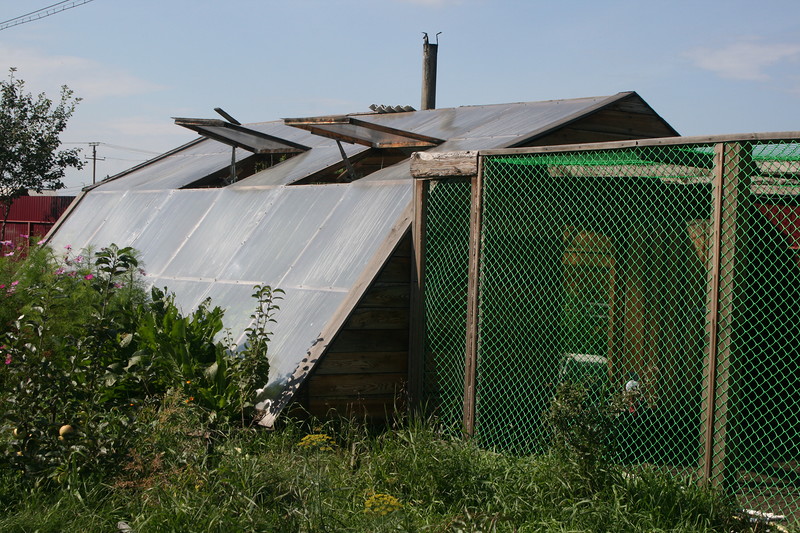
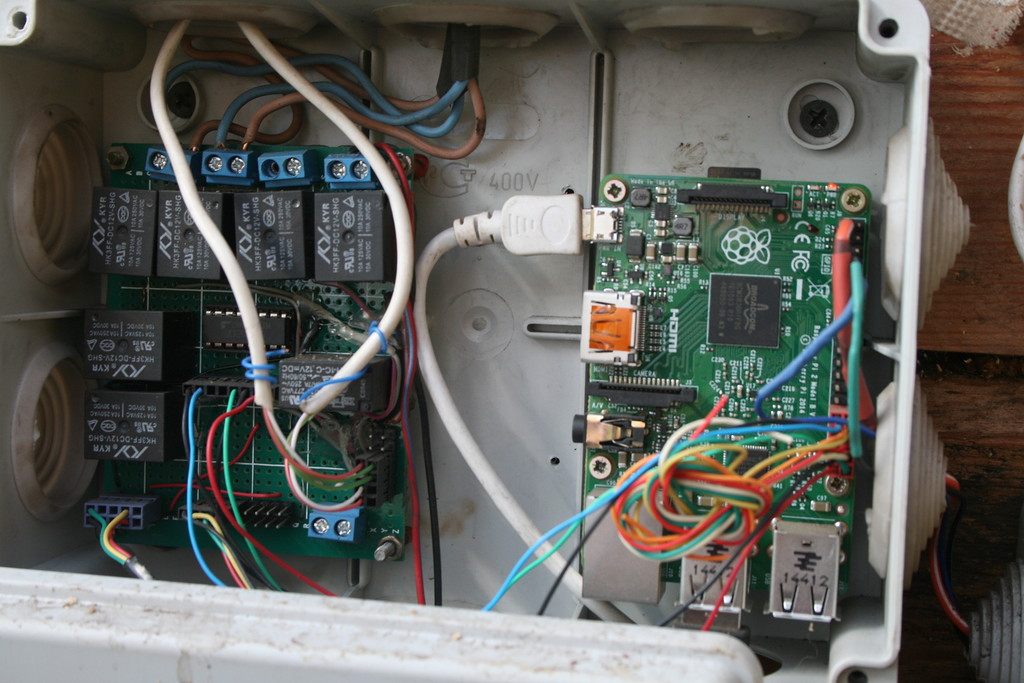
First of all, we bought the Raspberry Pi 2. Having dealt with it, we connected the DS18B20 sensor for this article . Then there were bought two used car windows. Like all DC motors, they move according to polarity. Therefore, we connect two relays to each engine: one for opening, the other for closing. These relays are already connected through transistors to the GPIO ports themselves. And we feed this whole thing with a 12V battery. Also, in order not to burn the engines, limit switches were installed in the extreme positions of the window, and if the window was opened / closed, the network was completely torn.

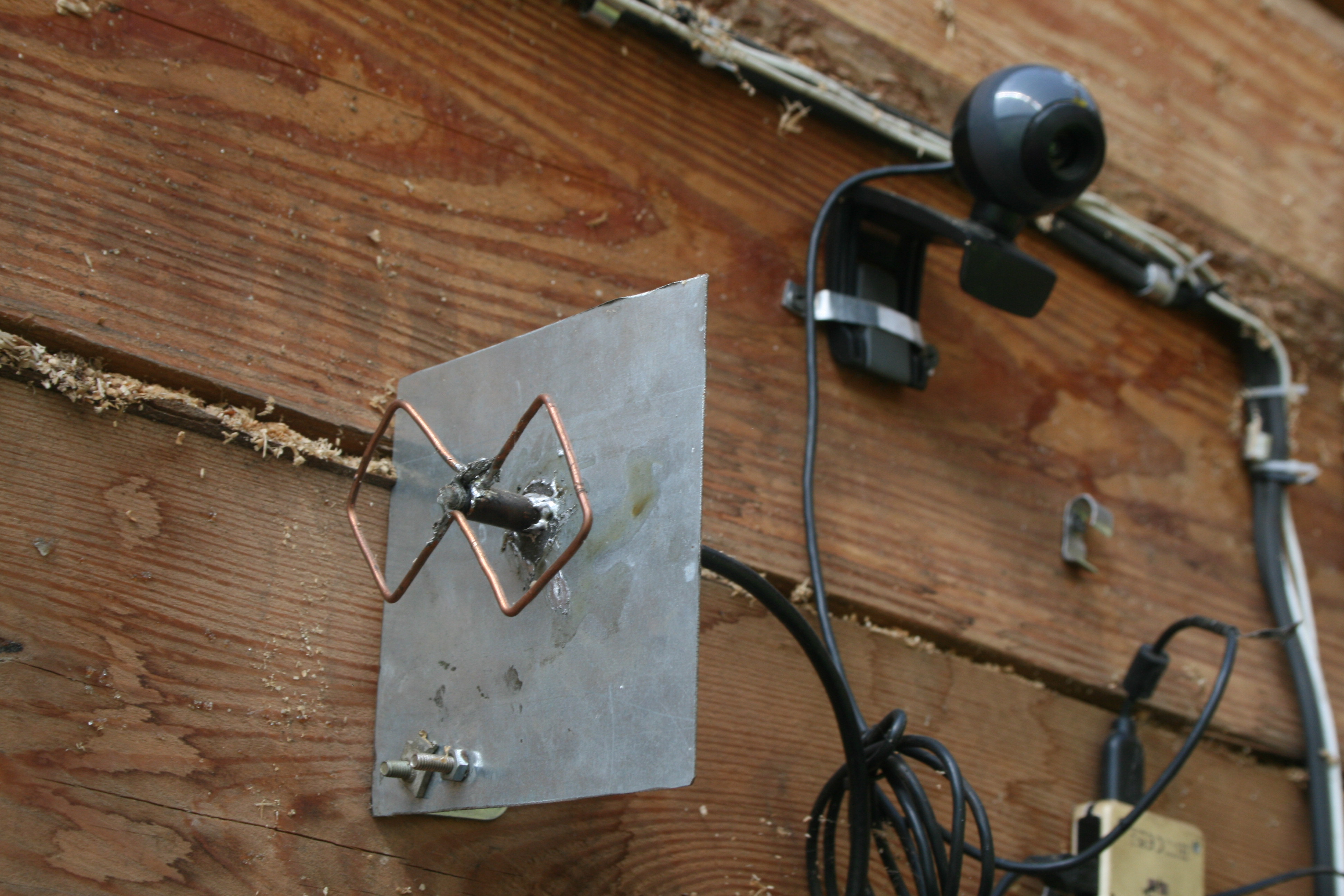
And for communication, we use a TP-LINK WiFi adapter with an enhanced Dual Square antenna for confident reception ofneighboring WIFIhome WIFI router, which is located at a distance of 40 meters.
Now we are writing a program to control these drives. Python language was chosen, since it has normal support for Raspberry Pi and specifically GPIO ports. In order to open the window, we need to apply + 3.3V to the transistor, which activates the relay, and then it will start to open the window. To close it, we do the same, only in this case, our relay is connected opposite to the drive. But on the Raspberry, we simply supply current to one port, then to another. We decided that if the temperature is greater than 26 we open the window within 1 second. Then wait 3 minutes. If it's hot again, then open the second window for a second. Waiting again for 3 minutes, and doing it again. The same with closing, only here the temperature should be below 24 degrees. And here is the code:
And now the show begins for those who are not interested in physics.
Having installed Apache on the Raspbian distribution, for a month we could not reach the page from the Internet. That just did not do. We set up ports, opened them, nothing helped. And in the local network, everything worked. Then we learned the sad truth: we are behind NAT. Our operator does not provide services on a dedicated IP (Hello to Telecom Region employees). Took over a lot of workarounds, but nothing came of it. I tried to make a web interface on a hosting, but I also need an IP to synchronize the database. The IPv6 broker has already closed by then. And to make VPN is expensive, because you want everything for free. And then they decided to use Telegram bot. As it turned out, it has two modes: constant polling of the server and sending messages directly to us. The first option came up, because does not require an IP address from us. Having rummaged on the Internet found library: pytelegrambotapi. And he began to write the code. True, there were problems. MySQL's barely found library refused to write to the database, but at that it read everything is fine from it. I had to make a crutch: transfer data to a file stored in RAM, then run a bash script that reads the data and writes it to the database.
Make the file config.ini, throw there:
Do not forget to replace the data with your own.
Create the python_mysql_dbconfig.py file, with the following contents:
We also need to create the python_mysql_connect2.py file, with the following content:
Now we have prepared everything for working with the database.
Let us digress a little from the database and proceed directly to communicating with the bot. Well, as usual, we write @BotFather, and take a token from it. Create a file config.py, and write two lines to it:
I decided to implement three functions in the bot:
With the first one everything is simple, upon request we read the file with the temperature, and send it to the user.
With pictures more difficult. I use the Motion utility. In its parameters, ask to put the images in the folder in the RAM, well, let's say every 30 seconds. And we make files with the same name, and they just replace each other. And then, upon request, send the file to the user.
Well, the third, the most difficult module: window management. My main task is for the automation to work, but if necessary, we can disable it. I did it like this. Created another file in RAM. When we send a request for opening / closing, opening a window, closing a window or turning the automation on / off, the bot writes the command number to this file. Every five seconds, the window manager reads this file, and if it recognizes the command, executes it. After doing the same file, it says that everything went well. The bot reads the file again, and notifies us that the command is completed.
Well, now the source code. First, the same program for opening windows, only already converted for a bot (temp.py):
But now let's talk about the bot itself. As I said, I use the PyTelegramBotApi library. If you refer to the documentation on GitHub , you can understand that the bot uses handlers for processing commands. A handler is an event in our program that defines an action. In our case, this is a specific phrase in the message. And the action is all we can do in the python language. In this case, we will send the user some information to the user or write commands for windows to a file. Basically, our program consists of these very handles and a server polling command.
But I also wrote and added another interesting thing myself: an authorization block. Well, as the name implies, it is made to protect our greenhouse from unauthorized access. It works simply. When you first connect to the bot, he asks us for a password. If we enter it correctly, the bot adds us to the database, and with the following connections, we do not need to authorize. The bot recognizes us with chat-id. Chat-id of the last user is stored in a variable, so as not to pull the base all the time.
Now create the daba.py file and write this:
Also let's do some more auxiliary scripts right away. Create a file newuser.sh and write to it:
And create two scripts to start the bot and the windows program:
And one more:
“Why are we doing this?” You ask. And here the matter is that sometimes due to an unstable Internet connection, or an error on the Telegram server, the program may crash. And the script drives it in an eternal cycle: it flew out - launched after 5 seconds again. And for the windows I did it for every fireman: suddenly, too, because of a malfunction, the program will fly out, but we are not in the greenhouse, we will come back and we will have tomato soup or tomato ice cream.
Well, now the most important thing is the bot script itself:
Do not forget to specify here the sensor id, chat-id and the path to the partition in RAM. Now we have almost everything ready. We download this dump , and upload the database to our server, and do not forget to mount the partition in RAM, I think 10 MB is enough. Run our two starter scripts and rejoice. The default password is telbot. We change it in the table tkey database.
Also made an SMS informing in case of overheating. Create the sms.py file:
We register on sms.ru and take an API-key there in the section for programmers. Just do not forget to specify your phone number in the script.
In the window manager, we declare a variable:
Then we insert this code into the perpetual loop:
At the moment, the threshold temperature 32, sms will be sent in case of high temperature once an hour, until it drops.
PS The future plans to install a controlled heater and make automatic watering.
Thanks to all those who read to the end.
First of all, we bought the Raspberry Pi 2. Having dealt with it, we connected the DS18B20 sensor for this article . Then there were bought two used car windows. Like all DC motors, they move according to polarity. Therefore, we connect two relays to each engine: one for opening, the other for closing. These relays are already connected through transistors to the GPIO ports themselves. And we feed this whole thing with a 12V battery. Also, in order not to burn the engines, limit switches were installed in the extreme positions of the window, and if the window was opened / closed, the network was completely torn.
And for communication, we use a TP-LINK WiFi adapter with an enhanced Dual Square antenna for confident reception of
Now we are writing a program to control these drives. Python language was chosen, since it has normal support for Raspberry Pi and specifically GPIO ports. In order to open the window, we need to apply + 3.3V to the transistor, which activates the relay, and then it will start to open the window. To close it, we do the same, only in this case, our relay is connected opposite to the drive. But on the Raspberry, we simply supply current to one port, then to another. We decided that if the temperature is greater than 26 we open the window within 1 second. Then wait 3 minutes. If it's hot again, then open the second window for a second. Waiting again for 3 minutes, and doing it again. The same with closing, only here the temperature should be below 24 degrees. And here is the code:
temp.py
import RPi.GPIO as GPIO
import time
import os
import datetime
GPIO.setmode(GPIO.BOARD)
GPIO.cleanup()
GPIO.setup(31, GPIO.OUT)
GPIO.setup(33, GPIO.OUT)
GPIO.setup(35, GPIO.OUT)
GPIO.setup(37, GPIO.OUT)
#Получаем температуруdefgettemp():if os.path.isdir("id датчика"): #Если датчик подключён, то считываем значение
    tfile2=open("/sys/bus/w1/devices/id датчика")
    ttext2=tfile2.read()
    tfile2.close()
    temp2=ttext2.split("\n")[1].split(" ")[9]
    t2=float(temp2[2:])/1000print t2
  else: #если нет, то задаём дефолтноеprint ('File not found')
    t2==24return t2
t2=24#Задаём дефолтное значение для датчикаwhileTrue: вечный цикл
t2=gettemp()
  if    t2<24: #Если температура меньше 24, то закрываем окно в течение секунды
        GPIO.output(37, 1)
        print ("close1")
        time.sleep(1)
        GPIO.output(37, 0)
  elif  t2>26: #Если больше 26, то открываем окно в течение секунды
        GPIO.output(35, 1)
        print ("open1")
        time.sleep(2)
        GPIO.output(35, 0)
  else: #Иначе ничего не делаемprint ("none1")
  time.sleep(180)#Ждём 3 минуты#Опять читаем температуру
t2=gettemp()
#Всё то же самое, только со вторым окном.if    t2<24:
        GPIO.output(33, 1)
        print ("close2")
        time.sleep(1)
        GPIO.output(33, 0)
  elif  t2>26:
        GPIO.output(31, 1)
        print ("open2")
        time.sleep(1)
        GPIO.output(31, 0)
  else:
        print ("none2")
#Опять ждём 3 минуты
  time.sleep(180)
And now the show begins for those who are not interested in physics.
Having installed Apache on the Raspbian distribution, for a month we could not reach the page from the Internet. That just did not do. We set up ports, opened them, nothing helped. And in the local network, everything worked. Then we learned the sad truth: we are behind NAT. Our operator does not provide services on a dedicated IP (Hello to Telecom Region employees). Took over a lot of workarounds, but nothing came of it. I tried to make a web interface on a hosting, but I also need an IP to synchronize the database. The IPv6 broker has already closed by then. And to make VPN is expensive, because you want everything for free. And then they decided to use Telegram bot. As it turned out, it has two modes: constant polling of the server and sending messages directly to us. The first option came up, because does not require an IP address from us. Having rummaged on the Internet found library: pytelegrambotapi. And he began to write the code. True, there were problems. MySQL's barely found library refused to write to the database, but at that it read everything is fine from it. I had to make a crutch: transfer data to a file stored in RAM, then run a bash script that reads the data and writes it to the database.
Make the file config.ini, throw there:
[mysql]
host = localhost
database = telegram
user = root
password = secret
Do not forget to replace the data with your own.
Create the python_mysql_dbconfig.py file, with the following contents:
from configparser import ConfigParser
defread_db_config(filename='config.ini', section='mysql'):""" Read database configuration file and return a dictionary object
    :param filename: name of the configuration file
    :param section: section of database configuration
    :return: a dictionary of database parameters
    """# create parser and read ini configuration file
    parser = ConfigParser()
    parser.read(filename)
    # get section, default to mysql
    db = {}
    if parser.has_section(section):
        items = parser.items(section)
        for item in items:
            db[item[0]] = item[1]
    else:
        raise Exception('{0} not found in the {1} file'.format(section, filename))
    return db
We also need to create the python_mysql_connect2.py file, with the following content:
from mysql.connector import MySQLConnection, Error
from python_mysql_dbconfig import read_db_config
defconnect():""" Connect to MySQL database """
    db_config = read_db_config()
    try:
        print('Connecting to MySQL database...')
        conn = MySQLConnection(**db_config)
        if conn.is_connected():
            print('connection established.')
        else:
            print('connection failed.')
    except Error as error:
        print(error)
    finally:
        conn.close()
        print('Connection closed.')
if __name__ == '__main__':
    connect()
Now we have prepared everything for working with the database.
Let us digress a little from the database and proceed directly to communicating with the bot. Well, as usual, we write @BotFather, and take a token from it. Create a file config.py, and write two lines to it:
# -*- coding: utf-8 -*-
token = 'Ваш токен'
I decided to implement three functions in the bot:
- Getting the temperature
- Taking pictures
- Window management
With the first one everything is simple, upon request we read the file with the temperature, and send it to the user.
With pictures more difficult. I use the Motion utility. In its parameters, ask to put the images in the folder in the RAM, well, let's say every 30 seconds. And we make files with the same name, and they just replace each other. And then, upon request, send the file to the user.
Well, the third, the most difficult module: window management. My main task is for the automation to work, but if necessary, we can disable it. I did it like this. Created another file in RAM. When we send a request for opening / closing, opening a window, closing a window or turning the automation on / off, the bot writes the command number to this file. Every five seconds, the window manager reads this file, and if it recognizes the command, executes it. After doing the same file, it says that everything went well. The bot reads the file again, and notifies us that the command is completed.
Well, now the source code. First, the same program for opening windows, only already converted for a bot (temp.py):
temp.py
import RPi.GPIO as GPIO
import time
import os
import datetime
GPIO.setmode(GPIO.BOARD)
GPIO.cleanup()
GPIO.setup(31, GPIO.OUT)
GPIO.setup(33, GPIO.OUT)
GPIO.setup(35, GPIO.OUT)
GPIO.setup(37, GPIO.OUT)
#Пишем в файл, что готовы к работе
f = open('/mnt/raw/wind', 'w')
f.write('OK')
f.close()
#Пишем, что автоматика включена
f = open('/mnt/raw/pos', 'w')
f.write('1')
f.close()
#получаем температуруdefgettemp():if os.path.isdir("/sys/bus/w1/devices/id датчика"): #Если датчик подключён, то считываем значение
    tfile2=open("/sys/bus/w1/devices/id датчика/w1_slave")
    ttext2=tfile2.read()
    tfile2.close()
    temp2=ttext2.split("\n")[1].split(" ")[9]
    t2=float(temp2[2:])/1000print t2
  else: #если нет, то задаём дефолтноеprint ('File not found')
    t2==24return t2
#Включаем автоматику по дефолту
i=1#Дефолтная температура
t2=24#Читаем команды от ботаdefinfo():
    f = open('/mnt/raw/wind')
    com = f.read()
    f.close()
    return com
#Отвечаем боту, что всё успешноdefans():
    f = open('/mnt/raw/wind', 'w')
    f.write('OK')
    f.close()
    print ("OK")
#Анализируем командыdefrob():
    c = info()
    if c=="10":
        GPIO.output(37, 1)
        print ("close1")
        time.sleep(3)
        GPIO.output(37, 0)
        ans()
    elif c=="11":
        GPIO.output(35, 1)
        print ("open1")
        time.sleep(2)
        GPIO.output(35, 0)
        ans()
    elif c=="12":
        GPIO.output(37, 1)
        print ("close1")
        time.sleep(3)
        GPIO.output(37, 0)
        ans()
    elif c=="13":
        GPIO.output(35, 1)
        print ("open1")
        time.sleep(1)
        GPIO.output(35, 0)
        ans()
    elif c=="20":
        GPIO.output(33, 1)
        print ("close2")
        time.sleep(3)
        GPIO.output(33, 0)
        ans()
    elif c=="21":
        GPIO.output(31, 1)
        print ("open2")
        time.sleep(3)
        GPIO.output(31, 0)
        ans()
    elif c=="22":
        GPIO.output(33, 1)
        print ("close2")
        time.sleep(1)
        GPIO.output(33, 0)
        ans()
    elif c=="23":
        GPIO.output(31, 1)
        print ("open2")
        time.sleep(1)
        GPIO.output(31, 0)
        ans()
    elif c=="30":
        global i
        i=0
        ans()
        f = open('/mnt/raw/pos', 'w')
        f.write('0')
        f.close()
        print('30')
        global i
        i=0
        ans()
    elif c=="31":
        f = open('/mnt/raw/pos', 'w')
        f.write('1')
        f.close()
        print('31')
        global i
        i=1
        ans()
whileTrue:
#Читаем и выполняем команды
 rob()
#Проверяем, включена ли автоматикаif i==1:
  gettemp()
  if    t2<24:
        GPIO.output(37, 1)
        print ("close1")
        time.sleep(1)
        GPIO.output(37, 0)
  elif  t2>26:
        GPIO.output(35, 1)
        print ("open1")
        time.sleep(2)
        GPIO.output(35, 0)
  else:
        print ("none1")
  #Ожидаем 3 минуты, и в течение этого времени читаем команды
  j=0while(j<36):
      rob()
      time.sleep(5)
      j=j+1if i==0:
          break
  gettemp()
  if    t2<24:
        GPIO.output(33, 1)
        print ("close2")
        time.sleep(1)
        GPIO.output(33, 0)
  elif  t2>26:
        GPIO.output(31, 1)
        print ("open2")
        time.sleep(1)
        GPIO.output(31, 0)
  else:
        print ("none2")
  j=0while(j<36):
      rob()
      time.sleep(5)
      j=j+1if i==0:
          break
But now let's talk about the bot itself. As I said, I use the PyTelegramBotApi library. If you refer to the documentation on GitHub , you can understand that the bot uses handlers for processing commands. A handler is an event in our program that defines an action. In our case, this is a specific phrase in the message. And the action is all we can do in the python language. In this case, we will send the user some information to the user or write commands for windows to a file. Basically, our program consists of these very handles and a server polling command.
But I also wrote and added another interesting thing myself: an authorization block. Well, as the name implies, it is made to protect our greenhouse from unauthorized access. It works simply. When you first connect to the bot, he asks us for a password. If we enter it correctly, the bot adds us to the database, and with the following connections, we do not need to authorize. The bot recognizes us with chat-id. Chat-id of the last user is stored in a variable, so as not to pull the base all the time.
Now create the daba.py file and write this:
daba.py
from mysql.connector import MySQLConnection, Error
from python_mysql_dbconfig import read_db_config
import time
defgetkey():#Читаем пароль для ботаtry:
        dbconfig = read_db_config()
        conn = MySQLConnection(**dbconfig)
        cursor = conn.cursor()
        cursor.execute("SELECT key2 FROM tkey where id=0")
        row = cursor.fetchone()
        return row
        print(row)
    except Error as e:
        print(e)
    finally:
        cursor.close()
        conn.close()
defsendup():#Отправляем время запуска бота (не работает)
    stime=time.time()
    query = "INSERT INTO uptime(datetime, also) " \
    "VALUES(now(), 20)"
    args=(stime)
    try:
        dbconfig = read_db_config()
        conn = MySQLConnection(**dbconfig)
        cursor = conn.cursor()
        cursor.execute(query)
        row = cursor.fetchone()
        return(row)
        print(row)
    except Error as e:
        print(e)
    finally:
        cursor.close()
        conn.close()
defgetid(idi):#проверяем есть ли id пользователя в базе
    query="SELECT accecpt FROM users WHERE chatid ='"+str(idi)+"'"try:
        dbconfig = read_db_config()
        conn = MySQLConnection(**dbconfig)
        cursor = conn.cursor()
        cursor.execute(query)
        row = cursor.fetchone()
        #print (str(row))if str(row)=="None":
            return0;
            print (0)
        else:
            return20;
    except Error as e:
        print(e)
    #finally:#cursor.close()#conn.close()defnewuser(idi):#Добавляем пользователя в базу данных
    query = ("INSERT INTO users SET `chatid`='12345'")
    try:
        dbconfig = read_db_config()
        conn = MySQLConnection(**dbconfig)
        cursor = conn.cursor()
        cursor.execute(query)
        row = cursor.fetchone()
        print(row)
    except Error as e:
        print(e)
        return(e)
    finally:
        cursor.close()
        conn.close()
if __name__ == '__main__':
    query_with_fetchone()
Also let's do some more auxiliary scripts right away. Create a file newuser.sh and write to it:
#!/bin/bash
a=`cat /mnt/raw/user`
cat /dev/null > /mnt/raw/user
mysql -u root -pkoshak << EOF
use telegram;
INSERT INTO users(chatid) VALUES('$a');
EOF
And create two scripts to start the bot and the windows program:
#!/bin/bash
i=0
while [ $i = 0 ]
doecho New python
sleep 5
python3 bot.py
done
And one more:
#!/bin/bash
i=0
while [ $i = 0 ]
doecho New python
sleep 5
python3 temp.py
done
“Why are we doing this?” You ask. And here the matter is that sometimes due to an unstable Internet connection, or an error on the Telegram server, the program may crash. And the script drives it in an eternal cycle: it flew out - launched after 5 seconds again. And for the windows I did it for every fireman: suddenly, too, because of a malfunction, the program will fly out, but we are not in the greenhouse, we will come back and we will have tomato soup or tomato ice cream.
Well, now the most important thing is the bot script itself:
bot.py
# -*- coding: utf-8 -*-import config
import telebot
import subprocess
import time
from telebot import types
import datetime
import os
from daba import getkey
from daba import sendup
from daba import getid
#from daba import newuser#from temp import tepimport os
#Создаём файл
f = open('/mnt/raw/user', 'tw', encoding='utf-8')
f.close()
global par
par=0#Текст для неавторизированного пользователяglobal a
a="Вы не авторизированны. Пройдите авторизацию командой /auth [пароль]"#Функция получение температурыdefget_temp():if os.path.isdir("/sys/bus/w1/devices/id датчика"):
    tfile2=open("/sys/bus/w1/devices/id датчика/w1_slave")
    ttext2=tfile2.read()
    tfile2.close()
    temp2=ttext2.split("\n")[1].split(" ")[9]
    t2=float(temp2[2:])/1000return t2
  else:
    print ('File not found')
#Пароль
keyword=str(getkey())[2:-3]
#Конфигурация токена
bot = telebot.TeleBot(config.token)
print (sendup())
#Создание кастомной клавиатуры#########################Клавиатура авторизации##########################################
markup2 = types.ReplyKeyboardMarkup(row_width=1, resize_keyboard=True) #Активация, название, колва кнопок в одной ряду
markdown = types.ReplyKeyboardHide() #Деактивация
itembtn5 = types.KeyboardButton(' Авторизация') #Название кнопки 5
markup2.add(itembtn5) #Занесение кнопок в матрицу#########################Клавиатура авторизации###################################################################Клавиатура главного меню##########################################
markup = types.ReplyKeyboardMarkup(row_width=3, resize_keyboard=True) #Активация, название, колва кнопок в одной ряду
itembtn1 = types.KeyboardButton(' Прислать снимок') #Название кнопки 1
itembtn4 = types.KeyboardButton(' Управление окнами')
itembtn2 = types.KeyboardButton(' Прислать температуру') #Название кнопки 2
markup.add(itembtn1, itembtn4, itembtn2) #Занесение кнопок в матрицу#########################Клавиатура главного меню###################################################################Ещё кнопки##########################################
markup3 = types.ReplyKeyboardMarkup(row_width=2, resize_keyboard=True) #Активация, название, колва кнопок в одной ряду
itembtn10 = types.KeyboardButton(' Выключить автоматику ') #Название кнопки 10
itembtn11 = types.KeyboardButton('️ Ручное управление')
itembtn12 = types.KeyboardButton(' Назад')
markup3.add(itembtn10, itembtn11, itembtn12) #Занесение кнопок в матрицу
markup4 = types.ReplyKeyboardMarkup(row_width=2, resize_keyboard=True) #Активация, название, колва кнопок в одной ряду
itembtn13 = types.KeyboardButton(' Включить автоматику ') #Название кнопки 13
markup4.add(itembtn13, itembtn11, itembtn12) #Занесение кнопок в матрицу
markup5 = types.ReplyKeyboardMarkup(row_width=2, resize_keyboard=True) #Активация, название, колва кнопок в одной ряду
itembtn14 = types.KeyboardButton(' Первое окно') #Название кнопки 14
itembtn15 = types.KeyboardButton(' Второе окно') #Название кнопки 15
itembtn16 = types.KeyboardButton('️ Назад') #Название кнопки 16
markup5.add(itembtn14, itembtn15, itembtn16) #Занесение кнопок в матрицу
markup6 = types.ReplyKeyboardMarkup(row_width=2, resize_keyboard=True) #Активация, название, колва кнопок в одной ряду
itembtn17 = types.KeyboardButton('️ Открыть окно ') #Название кнопки 17
itembtn18 = types.KeyboardButton('️ Закрыть окно ') #Название кнопки 18
itembtn19 = types.KeyboardButton(' Приоткрыть окно ') #Название кнопки 19
itembtn20 = types.KeyboardButton(' Призакрыть окно ') #Название кнопки20
itembtn21 = types.KeyboardButton('️ Назад') #Название кнопки 21
markup6.add(itembtn17, itembtn18, itembtn19, itembtn20, itembtn21) #Занесение кнопок в матрицу
markup7 = types.ReplyKeyboardMarkup(row_width=2, resize_keyboard=True) #Активация, название, колва кнопок в одной ряду
itembtn22 = types.KeyboardButton('️ Открыть окно ') #Название кнопки 22
itembtn23 = types.KeyboardButton('️ Закрыть окно ') #Название кнопки 23
itembtn24 = types.KeyboardButton(' Приоткрыть окно ') #Название кнопки24
itembtn25 = types.KeyboardButton(' Призакрыть окно ') #Название кнопки25
markup7.add(itembtn22, itembtn23, itembtn24, itembtn25, itembtn21) #Занесение кнопок в матрицу#########################Ещё кнопки##########################################
bot.send_message(45215125, "Перезагрузка")#Вставьте сюда ваш chat-id#Узнаем состояние автоматики оконdefpos():
    f = open('/mnt/raw/pos')
    com = f.read()
    f.close()
    return com
#Авторизацияdefavtor(idi):global par#Если пользователь храниться в переменной возвращаем нольif par==idi:
            return0else:#Запрашиваем наличие пользователя в БД, если он там есть, возвращаем 0if getid(str(idi))==20:
                par=idi#Заносим пользователя в переменнуюreturn0else:#Пишем что мы не знаем пользователя
                bot.send_message(idi, "Вы не авторизированны. Пройдите авторизацию командой /auth [пароль]", reply_markup=markup2)
                return1@bot.message_handler(regexp=" Авторизация")defauth(message):
    bot.send_message(message.chat.id, "Введите /auth [пароль]")
#Тоже аворизация@bot.message_handler(commands=['auth'])defstart2(message):if message.text[6:]==keyword:#Вырезаем пароль из сообщенияif getid(str(message.chat.id))==20:#Проверяем пароль в базе данных, если пользователь там уже есть нам вернётся код 20
        bot.send_message(message.chat.id, "Вы уже авторизированы")
      else:
        global par
        bot.send_message(message.chat.id, "Успешно", reply_markup=markup)
        par=message.chat.id
        #Отправляем chat-id в базу данных
        f = open('/mnt/raw/user', 'w')
        f.write(str(message.chat.id))
        f.close()
        os.system('newuser.sh')
        print (message.chat.id)
        print (par)
    else:
        bot.send_message(message.chat.id, "Неверно")
        print (keyword)
        print (message.text[6:])
        print (message.chat.id)
# Команда /start@bot.message_handler(commands=['start'])defstart(message):global par
     if avtor(message.chat.id)!=0:
         print (par)
         bot.send_message(message.chat.id, " Вы не авторизированны. Пройдите авторизацию командой /auth [пароль]", reply_markup=markup2)
     else:
	     bot.send_message(message.chat.id, " Вы авторизированный пользователь. Наберите /help, для того, чтобы узнать список команд.")
#Команда запроса помощи - /help@bot.message_handler(commands=['help'])defhelp(message):if avtor(message.chat.id)==0:
     mas=' Данный бот управляет теплицей на моём участке. \n Список команд для помощи, в управление этим ботом:  \n Получить справку - /help \n Остальное всё управляется при помощи клавиатуры :)'
     bot.send_message(message.chat.id, mas, reply_markup=markup)
     print (message.chat.id, message.text)
#Заменить интерфейс командной строки на клавиатуру@bot.message_handler(commands=['show'])defshow(message):if avtor(message.chat.id)==0:
     mas='Клавиатура включена'
     bot.send_message(message.chat.id, mas, reply_markup=markup)
     print (message.chat.id, message.text)
#получить температуру@bot.message_handler(regexp=" Прислать температуру")deftemp(message):if avtor(message.chat.id)==0:
     tp=get_temp()
     mas='  Температура в теплице: '+str(tp)+'°C'
     bot.send_message(message.chat.id, mas)
     print (message.chat.id, message.text)
#прислать снимок@bot.message_handler(regexp=" Прислать снимок")defphoto(message):if avtor(message.chat.id)==0:
         path='/mnt/raw/photo/foto.jpg'#Путь к папку со снимкомtry:
             f = open(path, 'rb') #Открытия файла - снимка
             bot.send_photo(message.chat.id, f) #Отправка снимкаprint (message.chat.id, message.text)
         except:
             bot.send_message(message.chat.id, "Фоток нет :(")
#Переход в меню окон@bot.message_handler(regexp=" Управление окнами")defwindows(message):if avtor(message.chat.id)==0:
       print ("window")
       print (pos())
       if str(pos())[0]=='1':
           bot.send_message(message.chat.id, "Ок", reply_markup=markup3)#Если автоматика включена, то выводим клавиатуру с надписью «Выключить автоматику»else:
           bot.send_message(message.chat.id, "Ок", reply_markup=markup4)#А здесь всё с точность наоборот#Кнопка назад@bot.message_handler(regexp=" Назад")defwindows(message):if avtor(message.chat.id)==0:
       bot.send_message(message.chat.id, "Ок",  reply_markup=markup)
#Выключение автоматики@bot.message_handler(regexp=" Выключить автоматику ")defwindows(message):if avtor(message.chat.id)==0:
       f = open('/mnt/raw/wind', 'w')#Открываем файл
       f.write('30')#Пишем туда код команды, в данный момент это 30
       f.close()#Закрываем файл
       k="No"#Дефолтное значение переменнойwhile k[0:2]!="OK":#Проверяем ответ
           time.sleep(5)#Ждём 5 секунд
           f = open('/mnt/raw/wind')#Открываем файл
           k = f.read()#Читаем ответ
           f.close()#Закрывает
           print(k[0:2])
       bot.send_message(message.chat.id, "Успешно",  reply_markup=markup4)
@bot.message_handler(regexp=" Включить автоматику ")defwindows(message):if avtor(message.chat.id)==0:
       f = open('/mnt/raw/wind', 'w')
       f.write('31')
       f.close()
       k="No"while k[0:2]!="OK":
           time.sleep(5)
           f = open('/mnt/raw/wind')
           k = f.read()
           f.close()
           print(k[0:2])
       bot.send_message(message.chat.id, "Успешно",  reply_markup=markup3)
@bot.message_handler(regexp="️ Ручное управление")defwindows(message):if avtor(message.chat.id)==0:
       bot.send_message(message.chat.id, "Ок",  reply_markup=markup5)
@bot.message_handler(regexp="️ Назад")defwindows(message):if avtor(message.chat.id)==0:
       if str(pos())[0]=='1':
           bot.send_message(message.chat.id, "Ок", reply_markup=markup3)
       else:
           bot.send_message(message.chat.id, "Ок", reply_markup=markup4)
@bot.message_handler(regexp="️ Назад")defwindows(message):if avtor(message.chat.id)==0:
       bot.send_message(message.chat.id, "Ок",  reply_markup=markup5)
#Бегаем по меню@bot.message_handler(regexp=" Первое окно")defwindows(message):if avtor(message.chat.id)==0:
       bot.send_message(message.chat.id, "Ок",  reply_markup=markup6)
@bot.message_handler(regexp=" Второе окно")defwindows(message):if avtor(message.chat.id)==0:
       bot.send_message(message.chat.id, "Ок",  reply_markup=markup7)
@bot.message_handler(regexp="️ Открыть окно ")defwindows(message):if avtor(message.chat.id)==0:
       f = open('/mnt/raw/wind', 'w')
       f.write('11')
       f.close()
       k="No"while k[0:2]!="OK":
           time.sleep(5)
           f = open('/mnt/raw/wind')
           k = f.read()
           f.close()
           print(k[0:2])
       bot.send_message(message.chat.id, "Успешно",  reply_markup=markup6)
@bot.message_handler(regexp="️ Закрыть окно ")defwindows(message):if avtor(message.chat.id)==0:
       f = open('/mnt/raw/wind', 'w')
       f.write('10')
       f.close()
       k="No"while k[0:2]!="OK":
           time.sleep(5)
           f = open('/mnt/raw/wind')
           k = f.read()
           f.close()
           print(k[0:2])
       bot.send_message(message.chat.id, "Успешно",  reply_markup=markup6)
@bot.message_handler(regexp=" Приоткрыть окно ")defwindows(message):if avtor(message.chat.id)==0:
       f = open('/mnt/raw/wind', 'w')
       f.write('13')
       f.close()
       k="No"while k[0:2]!="OK":
           time.sleep(5)
           f = open('/mnt/raw/wind')
           k = f.read()
           f.close()
           print(k[0:2])
       bot.send_message(message.chat.id, "Успешно",  reply_markup=markup6)
@bot.message_handler(regexp=" Призакрыть окно ")defwindows(message):if avtor(message.chat.id)==0:
       f = open('/mnt/raw/wind', 'w')
       f.write('12')
       f.close()
       k="No"while k[0:2]!="OK":
           time.sleep(5)
           f = open('/mnt/raw/wind')
           k = f.read()
           f.close()
           print(k[0:2])
       bot.send_message(message.chat.id, "Успешно",  reply_markup=markup6)
@bot.message_handler(regexp="️ Открыть окно ")defwindows(message):if avtor(message.chat.id)==0:
       f = open('/mnt/raw/wind', 'w')
       f.write('21')
       f.close()
       k="No"while k[0:2]!="OK":
           time.sleep(5)
           f = open('/mnt/raw/wind')
           k = f.read()
           f.close()
           print(k[0:2])
       bot.send_message(message.chat.id, "Успешно",  reply_markup=markup7)
@bot.message_handler(regexp="️ Закрыть окно ")defwindows(message):if avtor(message.chat.id)==0:
       f = open('/mnt/raw/wind', 'w')
       f.write('20')
       f.close()
       k="No"while k[0:2]!="OK":
           time.sleep(5)
           f = open('/mnt/raw/wind')
           k = f.read()
           f.close()
           print(k[0:2])
       bot.send_message(message.chat.id, "Успешно",  reply_markup=markup7)
@bot.message_handler(regexp=" Приоткрыть окно ")defwindows(message):if avtor(message.chat.id)==0:
       f = open('/mnt/raw/wind', 'w')
       f.write('23')
       f.close()
       k="No"while k[0:2]!="OK":
           time.sleep(5)
           f = open('/mnt/raw/wind')
           k = f.read()
           f.close()
           print(k[0:2])
       bot.send_message(message.chat.id, "Успешно",  reply_markup=markup7)
@bot.message_handler(regexp=" Призакрыть окно ")defwindows(message):if avtor(message.chat.id)==0:
       f = open('/mnt/raw/wind', 'w')
       f.write('22')
       f.close()
       k="No"while k[0:2]!="OK":
           time.sleep(5)
           f = open('/mnt/raw/wind')
           k = f.read()
           f.close()
           print(k[0:2])
       bot.send_message(message.chat.id, "Успешно",  reply_markup=markup7)
#Реакция на команды, не приведённые выше@bot.message_handler(content_types=["text"])defrepeat_all_messages(message):if avtor(message.chat.id)==0:
         bot.send_message(message.chat.id, "Я не знаю такой команды. Набери /help, чтобы получить список команд")
         print (message.chat.id, message.text)
#Отпрашиваем сервер на наличие новых сообщенийif __name__ == '__main__':
        bot.polling()
Do not forget to specify here the sensor id, chat-id and the path to the partition in RAM. Now we have almost everything ready. We download this dump , and upload the database to our server, and do not forget to mount the partition in RAM, I think 10 MB is enough. Run our two starter scripts and rejoice. The default password is telbot. We change it in the table tkey database.
SMS informing
Also made an SMS informing in case of overheating. Create the sms.py file:
sms.py
#!/usr/bin/env python# -*- coding: utf8 -*-""" Автор Титов А.В. [email protected] 17.02.2015 """""" Скрипт предназначен для отправки СМС через сайт sms.ru """""" Принимает следующие аргументы:"""""" -i или --idsender - id пользователя на sms.ru"""""" -t или --to - номер телефона получателя в формате 79219996660"""""" -s или --subject - текст сообщения на латинице"""from urllib2 import urlopen
from optparse import OptionParser
defsendsms(idsender,subject,to):
    subject = subject.replace(" ","+")
    url="http://sms.ru/sms/send?api_id=%s&text=%s&to=%s" %(idsender,subject,to)
    res=urlopen(url)
if __name__ == '__main__':
    parser = OptionParser()
    parser.add_option("-i", "--ваш ключ", dest="idsender", default="ваш ключ", help="ID user on sms.ru", metavar="IDSENDER")
    parser.add_option("-t", "--ваш телефон", dest="to", default="ваш телефон", help="to telephone number", metavar="TO")
    parser.add_option("-s", "--temperatyra 32", dest="subject", default="Jara tut, otkroy okno", help="Name of subject", metavar="SUBJECT")
    (options, args) = parser.parse_args()
    sendsms(options.idsender,options.subject,options.to)
We register on sms.ru and take an API-key there in the section for programmers. Just do not forget to specify your phone number in the script.
In the window manager, we declare a variable:
Vr=0Then we insert this code into the perpetual loop:
d = datetime.today()
V = d.strftime('%H')
V = int(V)
 if    (t2>32and Vr!=V):
        print (V)
        Vr=V
        os.system('/home/samba/sms.py')
At the moment, the threshold temperature 32, sms will be sent in case of high temperature once an hour, until it drops.
PS The future plans to install a controlled heater and make automatic watering.
Thanks to all those who read to the end.