Dual band repeater. Is it necessary?
In the second half of 2016, when not all routers moved to the 5 GHz band, I dare to say that the repeater must be dual-band (2.4 GHz and 5 GHz). And it's not even that such a repeater "forwards" the network of its range further, but that it can receive the grid in one range, but forward it further into another, without clogging its channel and combining the best of the properties of its ranges .

I have been picking with several models for more than a month and I can say that the dual-band is the best that I came across from devices of this kind. Yes, such a repeater is more expensive than single-band counterparts, but the price of the device, imho, is fully justified.
Lyrical digression: I have a small blog where I test the technique. Accordingly, for him I did a comparison of two repeaters, when there was a problem with network coverage in the office. Immediately I say that this is not advertising and the specific brand does not matter, because we are talking about the general principle of operation of dual-band. I just had these particular repeaters and measurements I conducted on them. Repeaters of other companies should show similar results.
So, we take the Tp-Link Re850, a very massive and popular model, and a dual-band. - Tp-Link Re350, working, as mentioned above, in two networks. Setup is standard. We turn on the repeater to the outlet, then connect to the device either by wire or via Wi-Fi. Next, go to the address tplinkrepeater.net, and then we get into the quick setup wizard. We scan the network and see a lot of networks in the 2.4 GHz band and one or two in 5 gigahertz. We select the networks we need, prescribe a password and reboot.

All, now we have two networks of the desired range, which overlap each other and amplify the signal.

We proceed to the tests. Since we wanted unambiguous results, and in the office the signal quality behaves differently, we solve the problem radically - we take routers home, buy beer and go to our floor neighbor. As a result, there are two thin walls and one capital brick, 40 cm thick, between the router and the laptop on which the speed is measured. In a typical situation, the router has no chance. The network is caught and immediately falls off. Measuring speed is impossible in principle. And now let's see how the repeater does.

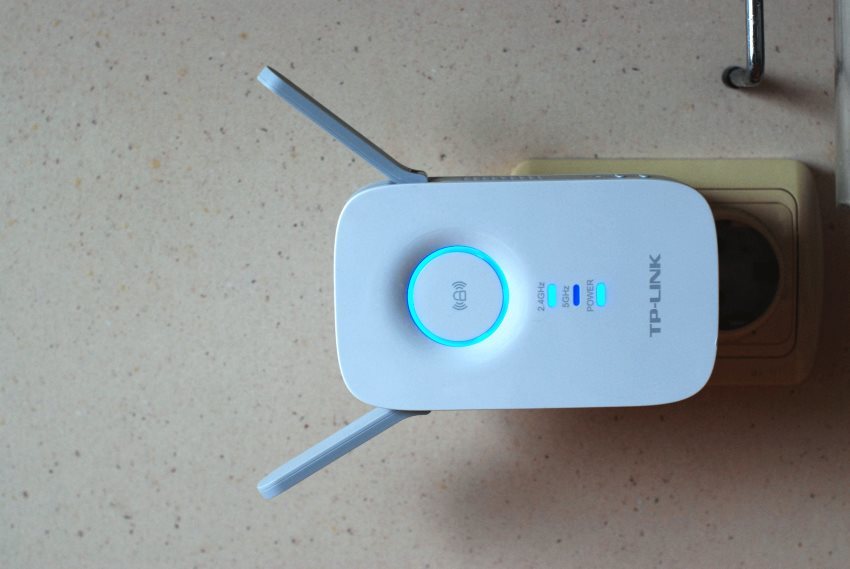
What is particularly good about the model Re350 - it has a LED indicator ring showing the signal level. If the ring glows blue - the signal of the parent network is powerful enough. If it glows red, the signal level is weak and the repeater should be moved closer to the router. In our case, we place the repeater immediately behind the main wall. After measurements in the same place we connect the usual one-band repeater. As a result, a distance of 5 meters and two walls between the router and the repeater are normal and capital. Up to the laptop - four meters and one regular wall.
We take measurements in two tools - the iPerf3 program, which determines the maximum speed over the local network and the standard speed meter Internet Speedtest.net. In the first, we get a “clean” speed inside the local network. So we exclude the influence of the provider and estimate the net speed. In the second, we use the familiar many tools. I specifically excluded the Download speed, because in some cases it is cut by my provider. Upload speed is not limited and values are close to iPerf measurements.
Measurements are conducted on a laptop HP ProBook G1. Router - Zyxel Kennetik Giga 3. On the main computer, Iperf3 is running in server mode, the computer is connected with a gigabit network card to the router. To begin, connect to the 5-GHz network near the router and run a speed test. The connection on the wire shows 901 Mbps. Wi-Fi we have a good figure of 147 Mbit / s. Then go to the starting position for the three walls.
Test one - the Re350 repipetr caught both networks from the router and transmits them further, in essence, “clogging” its own channel in each band. We have the following numbers.
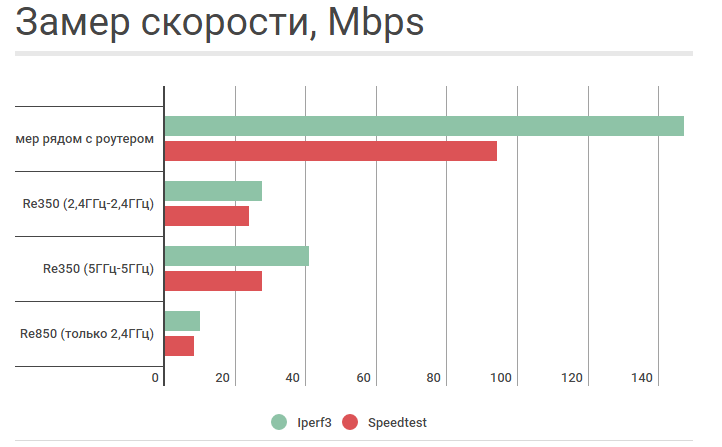
Yes, the 5 GHz network has quite good speed results. Pay attention to how the usual Re850 behaves. Not only is the speed small, it also floats (from 9.5 to 19 Mbps), which means that the signal is unstable. So, the Re350 will still be a good match even in the 2.4 GHz band. It would seem that you can put an end to this.
But, we will try the most interesting thing - to catch the network in one range, and to forward further in another, in order to avoid clogging of its own channel. So, we measured the second one, we connect at 5 GHz, we forward the network further to 5 and 2.4 GHz.
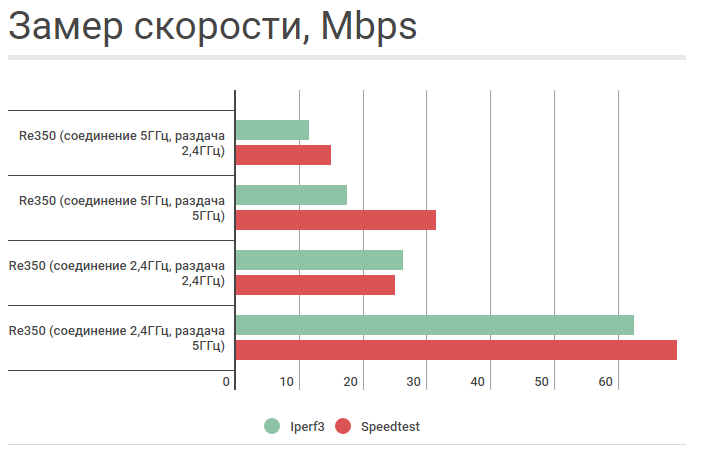
Normal performance, slightly worse than when the repeater "forwards" both networks. And now the most interesting thing is to connect at 2.4 GHz (which has more coverage than 5 GHz) and forward the network at 5 GHz. See what speed? Those. reliable reception of a 2.4 GHz signal allows you to keep high speed and forward it further to 5 GHz, avoiding interference from the 2.4 band. Thus, the combination of the two ranges makes it possible to win great in both long range and data rate.
Theoretically, you can choose the location of the repeater in such a way that the 5 GHz network is caught confidently (after all, not all houses have solid brick walls one third of a meter thick) and the network in the 2.4 GHz band is passed on. This should give an even greater increase in speed, but in the described conditions I was not able to achieve such a result. In any case, the measurements shown make it safe to say that a modern repeater should be dual-band, even if the router, the signal of which is going to be amplified, works only in the 2.4 GHz band. The performance gain is obvious.
I have been picking with several models for more than a month and I can say that the dual-band is the best that I came across from devices of this kind. Yes, such a repeater is more expensive than single-band counterparts, but the price of the device, imho, is fully justified.
Lyrical digression: I have a small blog where I test the technique. Accordingly, for him I did a comparison of two repeaters, when there was a problem with network coverage in the office. Immediately I say that this is not advertising and the specific brand does not matter, because we are talking about the general principle of operation of dual-band. I just had these particular repeaters and measurements I conducted on them. Repeaters of other companies should show similar results.
So, we take the Tp-Link Re850, a very massive and popular model, and a dual-band. - Tp-Link Re350, working, as mentioned above, in two networks. Setup is standard. We turn on the repeater to the outlet, then connect to the device either by wire or via Wi-Fi. Next, go to the address tplinkrepeater.net, and then we get into the quick setup wizard. We scan the network and see a lot of networks in the 2.4 GHz band and one or two in 5 gigahertz. We select the networks we need, prescribe a password and reboot.
All, now we have two networks of the desired range, which overlap each other and amplify the signal.
We proceed to the tests. Since we wanted unambiguous results, and in the office the signal quality behaves differently, we solve the problem radically - we take routers home, buy beer and go to our floor neighbor. As a result, there are two thin walls and one capital brick, 40 cm thick, between the router and the laptop on which the speed is measured. In a typical situation, the router has no chance. The network is caught and immediately falls off. Measuring speed is impossible in principle. And now let's see how the repeater does.
What is particularly good about the model Re350 - it has a LED indicator ring showing the signal level. If the ring glows blue - the signal of the parent network is powerful enough. If it glows red, the signal level is weak and the repeater should be moved closer to the router. In our case, we place the repeater immediately behind the main wall. After measurements in the same place we connect the usual one-band repeater. As a result, a distance of 5 meters and two walls between the router and the repeater are normal and capital. Up to the laptop - four meters and one regular wall.
We take measurements in two tools - the iPerf3 program, which determines the maximum speed over the local network and the standard speed meter Internet Speedtest.net. In the first, we get a “clean” speed inside the local network. So we exclude the influence of the provider and estimate the net speed. In the second, we use the familiar many tools. I specifically excluded the Download speed, because in some cases it is cut by my provider. Upload speed is not limited and values are close to iPerf measurements.
Measurements are conducted on a laptop HP ProBook G1. Router - Zyxel Kennetik Giga 3. On the main computer, Iperf3 is running in server mode, the computer is connected with a gigabit network card to the router. To begin, connect to the 5-GHz network near the router and run a speed test. The connection on the wire shows 901 Mbps. Wi-Fi we have a good figure of 147 Mbit / s. Then go to the starting position for the three walls.
Test one - the Re350 repipetr caught both networks from the router and transmits them further, in essence, “clogging” its own channel in each band. We have the following numbers.
Yes, the 5 GHz network has quite good speed results. Pay attention to how the usual Re850 behaves. Not only is the speed small, it also floats (from 9.5 to 19 Mbps), which means that the signal is unstable. So, the Re350 will still be a good match even in the 2.4 GHz band. It would seem that you can put an end to this.
But, we will try the most interesting thing - to catch the network in one range, and to forward further in another, in order to avoid clogging of its own channel. So, we measured the second one, we connect at 5 GHz, we forward the network further to 5 and 2.4 GHz.
Normal performance, slightly worse than when the repeater "forwards" both networks. And now the most interesting thing is to connect at 2.4 GHz (which has more coverage than 5 GHz) and forward the network at 5 GHz. See what speed? Those. reliable reception of a 2.4 GHz signal allows you to keep high speed and forward it further to 5 GHz, avoiding interference from the 2.4 band. Thus, the combination of the two ranges makes it possible to win great in both long range and data rate.
Theoretically, you can choose the location of the repeater in such a way that the 5 GHz network is caught confidently (after all, not all houses have solid brick walls one third of a meter thick) and the network in the 2.4 GHz band is passed on. This should give an even greater increase in speed, but in the described conditions I was not able to achieve such a result. In any case, the measurements shown make it safe to say that a modern repeater should be dual-band, even if the router, the signal of which is going to be amplified, works only in the 2.4 GHz band. The performance gain is obvious.