July 9, 2019 at 12:06
Mobile Application Test Automation: Tool Comparison
Test automation helps solve several problems at once - including when it comes to mobile applications. Instead of manually performing routine labor-intensive procedures, specialists can delegate a significant part of them to the frameworks. Automation simplifies testing and helps speed up regression testing, and also makes it possible to use previously inaccessible types of testing.
We will compare several tools that have established themselves in the market and continue to develop. This knowledge will help you choose which solution to use for testing a particular mobile application.
This article is unlikely to open new horizons for professionals, but it can be useful for beginners who decide to learn the basics of mobile testing, and to some extent, mid-level specialists.
The first thing you should build on is the platform on which the application runs. Based on this, we classify the list of tools as follows:
Android
iOS
Universal
Powerful testing tool with advanced external integration. This means that this framework not only allows you to test the application itself, but is also able to “communicate” with the operating system and other applications - for example, activate and deactivate Wi-Fi, GPS, open the settings menu during the test and make other external interactions.
The purpose of UI Automator is black-box testing. This means that the analysis is performed from the position of an external user without access to the code.
Key features include:
Link to the documentation .
A lighter tool than UI Automator, not suitable for interacting with external applications, but convenient for testing a “white box” (white-box) with access to the source code of a specific application or testing a “gray box” (gray-box), which has access to some internal processes and structure.
However, Espresso stands out with its powerful API https://github.com/hamcrest . The interface adds convenient methods for checks in autotests, for example:
assert_that (1, less_or_equal (2)). For testing webview, special methods are used.
UI Automator and Espresso are mutually complementary and can be used in combination within the same project.
Link to the documentation .
A tool for black-box testing without accessing the application code. It works only with native products - unfortunately, cross-app tests will not work.
On the other hand, the native nature of the framework is an advantage from the point of view that when using XCUITest, the degree of mutual understanding of developers and testers is at a much higher level than in cases where one and the other use different languages.
A useful addition is the test recorder, which makes it possible to write tests by recording actions in the application even to those who do not work with the code.
The tool allows you to avoid common mistakes and unnecessary, inaccessible to the user, manipulations with the code. However, XCUITest also has some disadvantages.
XCUITest, unlike Espresso, works in a separate thread, during testing you need to wait for the appearance of certain elements and parameters. The current state of the application is not read, and delays in updating data may lead to the inability to detect the requested elements.
XCTest and XCUITest documentation .
EarlGrey's emphasis is on reproducing the user experience. As long as the elements on the screen are not visually presented, the simulation of working with the application does not start.
At the same time, a number of amenities and advantages are noted. First of all, experts like the way the framework synchronizes requests, UIs and threads. No waitforview and wait are needed.
Secondly, as already mentioned, special attention is paid to tracking the visibility of elements. The tool has an additional layer for checking interface loading and reproduces user gestures - swipe, clicks - directly at the application event level.
Repository links: github.com/google/EarlGrey and google.github.io/EarlGrey .
Universal tools (or “combines”) allow you not to limit your choice only to Android or iOS, but to work with both platforms.
Such tools are applicable for testing applications of the following types:
In our opinion, Detox is convenient for applications written in React Native. Tests are written in JavaScript, while iOS and Android applications are generated from the same JavaScript code and are as similar as possible. This allows you to use the same tests for both platforms.
A key feature of Detox is gray-box testing. In this case, the framework has some access to internal mechanisms, which allows you to correlate the external behavior of the application with what happens at a deeper level.
Detox can access memory and track running processes. The gray-box principle helps to combat the instability, which is reflected in the fact that during end-to-end testing:
Oddly enough, the “gray box” shows not only better stability, but also a higher speed compared to the “black box”. Avoiding all kinds of pauses, waitUntil, gray-box can be 5-10 times faster.
Detox does not need WebDriver, working with the native driver through JSON. It uses native methods directly on the device. Inside this framework, EarlGrey for iOS and Espresso for Android are used.
The framework works with both emulators and physical devices.
Link to the documentation .
The advantage of Appium is that it is possible to write tests for each platform using a single API, without resorting to converting the application into any special form compatible with the framework.
When testing, frameworks from vendors are used - that is, you are working with the original application. For Android 4.2+, respectively, UiAutomator / UiAutomator2 is used, and for iOS 9.3+ - XCUITest. WebDriver (aka Selenium WebDriver) is used as a framework framework.
Appium Principles:
Using Appium is justified when you need a tool to automate testing on multiple platforms at once. It is useful if you have specialists with experience in testing web applications, but no experience in automating testing of mobile applications.
In general, this is a flexible tool that can be modified to fit the needs of the project without the need to adapt to a limited set of development languages.
Link to the documentation .
Paid comprehensive tool for testing desktop, mobile and web applications. It allows testing both using programming and without using scripts at all. Provides the ability to test not only through emulators, but also on live devices.
The tool allows you to create and configure tests, as well as manage them centrally. You can create a test in the control center and run it in various external environments and on any devices.
Easily integrates with your existing CI environment: with application management systems such as Jira and TFS, as well as version control systems such as Git and SVN.
Ranorex has data-driven testing with data loading from SQL, CSV, and Excel.
The tool is suitable for absolutely any device, supports parallel testing on each of them.
It combines all three testing approaches: black-box, white-box and gray-box.
Link to the documentation .
Paid environment for testing automation of mobile, web and desktop applications. It supports Android and iOS, and in the context of application types: native, web applications and hybrid.
Focused mainly on functional and unit testing, the tool also provides the ability to conduct many other types of testing:
There is a Recorder in TestComplete - in it tests are created by recording actions and setting commands in the editor. Then they can be launched either directly in the tool itself or exported to third-party applications.
This tool recognizes objects and controls by offering special commands to emulate user interaction with them. Integrates with Jenkins, Git, and Jira, allowing you to run continuous seamless testing.
Link to the documentation .
When planning to test this or that mobile application, pay attention to the tools listed above. Each of them has its own characteristics, and sometimes limitations.
Let's look at an example. If you are faced with the task of testing a small application in a short time, you first need to consider factors such as the type of application you are testing and the experience of your experts. If a developer writes tests, it is better to choose a native language and a tool for its platform (see the table below). If the tests are carried out by SDET specialists who are familiar with other languages (Java, JavaScript, Python, etc.) and have worked with Selenium, it is convenient to use Appium. If there is no experienced SDET in the team, and QA specialists will write tests, it is better to choose paid frameworks, as they have utilities for recording tests and more stable technical support than open source frameworks.
From our practice:
We worked with one online store, which had two mobile applications - on iOS and Android. To test the main user scenarios with tests, we chose Appium for several reasons:
As a result, Appium fully met expectations, we successfully conducted tests for iOS and Android. It should be borne in mind that such end-to-end tests with Appium are not carried out on every merge request, since it takes a lot of time.
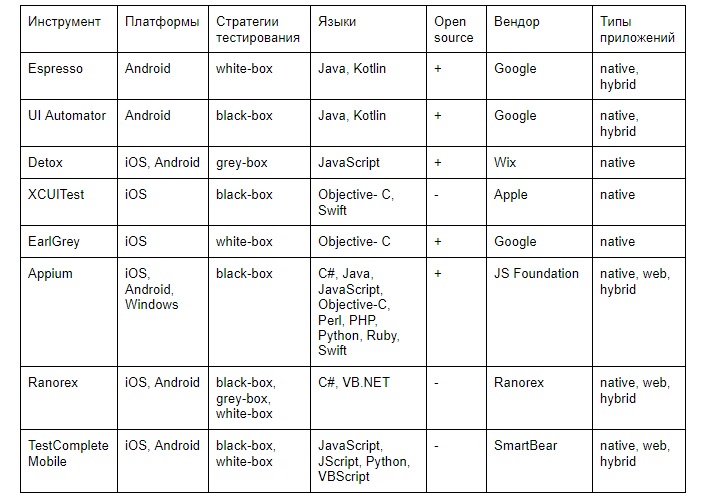
In conclusion, we bring to your attention a table that will help you choose the tool for your project. It should be noted that in some cases, the division in the table is conditional. Somewhere for simplicity, a generalization is made and only the most basic parameters are given. Testing tools are constantly evolving, so when choosing a framework it is important to check the current documentation.
Thanks for attention!
We will compare several tools that have established themselves in the market and continue to develop. This knowledge will help you choose which solution to use for testing a particular mobile application.
This article is unlikely to open new horizons for professionals, but it can be useful for beginners who decide to learn the basics of mobile testing, and to some extent, mid-level specialists.
Tool classification
The first thing you should build on is the platform on which the application runs. Based on this, we classify the list of tools as follows:
Android
- Espresso
- UI Automator
iOS
- XCUITest
- Earlgrey
Universal
- Detox
- Appium
- Ranorex
- TestComplete Mobile
Android Application Test Automation
UI Automator
Powerful testing tool with advanced external integration. This means that this framework not only allows you to test the application itself, but is also able to “communicate” with the operating system and other applications - for example, activate and deactivate Wi-Fi, GPS, open the settings menu during the test and make other external interactions.
The purpose of UI Automator is black-box testing. This means that the analysis is performed from the position of an external user without access to the code.
Key features include:
- UI Automator Viewer for tracking and analyzing components displayed on the screen during the test. It provides information on elements and their properties, which makes it easier to create more relevant tests.
- API for obtaining information about the status of the device and running processes on it.
- UI Automator APIs for cross-platform testing.
Link to the documentation .
Espresso
A lighter tool than UI Automator, not suitable for interacting with external applications, but convenient for testing a “white box” (white-box) with access to the source code of a specific application or testing a “gray box” (gray-box), which has access to some internal processes and structure.
However, Espresso stands out with its powerful API https://github.com/hamcrest . The interface adds convenient methods for checks in autotests, for example:
assert_that (1, less_or_equal (2)). For testing webview, special methods are used.
UI Automator and Espresso are mutually complementary and can be used in combination within the same project.
Link to the documentation .
Test Automation for iOS Applications
XCUITest
A tool for black-box testing without accessing the application code. It works only with native products - unfortunately, cross-app tests will not work.
On the other hand, the native nature of the framework is an advantage from the point of view that when using XCUITest, the degree of mutual understanding of developers and testers is at a much higher level than in cases where one and the other use different languages.
A useful addition is the test recorder, which makes it possible to write tests by recording actions in the application even to those who do not work with the code.
The tool allows you to avoid common mistakes and unnecessary, inaccessible to the user, manipulations with the code. However, XCUITest also has some disadvantages.
XCUITest, unlike Espresso, works in a separate thread, during testing you need to wait for the appearance of certain elements and parameters. The current state of the application is not read, and delays in updating data may lead to the inability to detect the requested elements.
XCTest and XCUITest documentation .
Earlgrey
EarlGrey's emphasis is on reproducing the user experience. As long as the elements on the screen are not visually presented, the simulation of working with the application does not start.
At the same time, a number of amenities and advantages are noted. First of all, experts like the way the framework synchronizes requests, UIs and threads. No waitforview and wait are needed.
Secondly, as already mentioned, special attention is paid to tracking the visibility of elements. The tool has an additional layer for checking interface loading and reproduces user gestures - swipe, clicks - directly at the application event level.
Repository links: github.com/google/EarlGrey and google.github.io/EarlGrey .
Universal tools
Universal tools (or “combines”) allow you not to limit your choice only to Android or iOS, but to work with both platforms.
Such tools are applicable for testing applications of the following types:
- Native apps (native apps) - written directly under the Android, iOS and Windows SDK.
- Mobile web apps — Available through a mobile browser, such as Safari or Chrome.
- Hybrid apps (hybrid apps) - the user works with the shell of the web application, that is, interacts with web content through the interface of the native application.
Detox
In our opinion, Detox is convenient for applications written in React Native. Tests are written in JavaScript, while iOS and Android applications are generated from the same JavaScript code and are as similar as possible. This allows you to use the same tests for both platforms.
A key feature of Detox is gray-box testing. In this case, the framework has some access to internal mechanisms, which allows you to correlate the external behavior of the application with what happens at a deeper level.
Detox can access memory and track running processes. The gray-box principle helps to combat the instability, which is reflected in the fact that during end-to-end testing:
- The test can randomly crash even without changes in the code;
- The results are not deterministic - due to the large number of heterogeneous functionalities and processes within the application, the results of each launch can differ unpredictably from each other.
- Testers are forced to synchronize manually, which entails a decrease in the reliability and quality of the results.
Oddly enough, the “gray box” shows not only better stability, but also a higher speed compared to the “black box”. Avoiding all kinds of pauses, waitUntil, gray-box can be 5-10 times faster.
Detox does not need WebDriver, working with the native driver through JSON. It uses native methods directly on the device. Inside this framework, EarlGrey for iOS and Espresso for Android are used.
The framework works with both emulators and physical devices.
Link to the documentation .
Appium
The advantage of Appium is that it is possible to write tests for each platform using a single API, without resorting to converting the application into any special form compatible with the framework.
When testing, frameworks from vendors are used - that is, you are working with the original application. For Android 4.2+, respectively, UiAutomator / UiAutomator2 is used, and for iOS 9.3+ - XCUITest. WebDriver (aka Selenium WebDriver) is used as a framework framework.
Appium Principles:
- No need to recompile the application or modify it to automate testing.
- It is not necessary to be attached to one language or framework.
- It’s not necessary to reinvent the wheel when it comes to automation APIs.
Using Appium is justified when you need a tool to automate testing on multiple platforms at once. It is useful if you have specialists with experience in testing web applications, but no experience in automating testing of mobile applications.
In general, this is a flexible tool that can be modified to fit the needs of the project without the need to adapt to a limited set of development languages.
Link to the documentation .
Ranorex
Paid comprehensive tool for testing desktop, mobile and web applications. It allows testing both using programming and without using scripts at all. Provides the ability to test not only through emulators, but also on live devices.
The tool allows you to create and configure tests, as well as manage them centrally. You can create a test in the control center and run it in various external environments and on any devices.
Easily integrates with your existing CI environment: with application management systems such as Jira and TFS, as well as version control systems such as Git and SVN.
Ranorex has data-driven testing with data loading from SQL, CSV, and Excel.
The tool is suitable for absolutely any device, supports parallel testing on each of them.
It combines all three testing approaches: black-box, white-box and gray-box.
Link to the documentation .
Testcomplete
Paid environment for testing automation of mobile, web and desktop applications. It supports Android and iOS, and in the context of application types: native, web applications and hybrid.
Focused mainly on functional and unit testing, the tool also provides the ability to conduct many other types of testing:
- Regression;
- Data-driven testing;
- Distributed testing and more.
There is a Recorder in TestComplete - in it tests are created by recording actions and setting commands in the editor. Then they can be launched either directly in the tool itself or exported to third-party applications.
This tool recognizes objects and controls by offering special commands to emulate user interaction with them. Integrates with Jenkins, Git, and Jira, allowing you to run continuous seamless testing.
Link to the documentation .
To summarize
When planning to test this or that mobile application, pay attention to the tools listed above. Each of them has its own characteristics, and sometimes limitations.
Let's look at an example. If you are faced with the task of testing a small application in a short time, you first need to consider factors such as the type of application you are testing and the experience of your experts. If a developer writes tests, it is better to choose a native language and a tool for its platform (see the table below). If the tests are carried out by SDET specialists who are familiar with other languages (Java, JavaScript, Python, etc.) and have worked with Selenium, it is convenient to use Appium. If there is no experienced SDET in the team, and QA specialists will write tests, it is better to choose paid frameworks, as they have utilities for recording tests and more stable technical support than open source frameworks.
From our practice:
We worked with one online store, which had two mobile applications - on iOS and Android. To test the main user scenarios with tests, we chose Appium for several reasons:
- cross-platform, the ability to partially reuse the code
- suitable for end-to-end tests, can work with web
- the presence in the team of specialists who are well aware of Selenium, which serves as the shell of this framework.
As a result, Appium fully met expectations, we successfully conducted tests for iOS and Android. It should be borne in mind that such end-to-end tests with Appium are not carried out on every merge request, since it takes a lot of time.
In conclusion, we bring to your attention a table that will help you choose the tool for your project. It should be noted that in some cases, the division in the table is conditional. Somewhere for simplicity, a generalization is made and only the most basic parameters are given. Testing tools are constantly evolving, so when choosing a framework it is important to check the current documentation.
Thanks for attention!