 June 26, 2019 at 10:00
Dynamically create robots.txt for ASP.NET Core sites
- Transfer
Now I am in the process of transferring some of the old WebForms of my site, which are still bare metal, to ASP.NET Core and Azure application services. In the process, I realized that I want to make sure that my sites are not indexed by Google, Yandex, Bing and other search engines.
I already have a robots.txt file, but I want one to serve only for production, and the other for development. I was thinking of several ways to solve this problem. I could have a static robots.txt file, a robots-staging.txt file and conditionally copy one on top of the other in my Azure DevOps CI / CD pipeline.
Then I realized that the simplest thing is to make robots.txt dynamic. I was thinking of writing my own middleware, but it seemed like a troublesome task with lots of code. I wanted to see how simple it can be.

- You can implement this as embedded middleware: just lambda, func and linq in one line
- You can write your own middleware and make many options, then activate it in an environment env.IsStaging () or another
- You can create a single Razor Page with a TegHelpers environment
The last option seemed the simplest and meant that I could change cshtml without completely recompiling, so I created a single Razor Page RobotsTxt.cshtml. Then I used the built-in tagged environment helper to conditionally generate parts of the file. Also note that I forced the mime type to be text / plain and do not use the Layout page, since it must be self-contained.
@page
@{
Layout = null;
this.Response.ContentType = "text/plain";
}
# /robots.txt file for http://www.hanselman.com/
User-agent: *
Disallow: / Disallow: /blog/private
Disallow: /blog/secret
Disallow: /blog/somethingelse Then I check to see if the ASPNETCORE_ENVIRONMENT variables are set correctly on my staging and / or production systems.
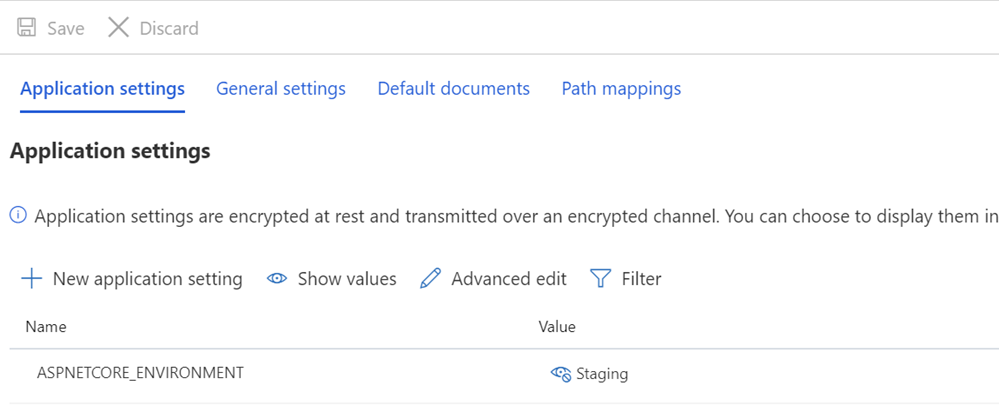
I also want to point out how an odd spacing might look and how some text rests on TagHelpers. Remember that the TagHelper tag sometimes “disappears” (is deleted) when it does its job, but gaps remain around it. So I want the User-agent: * to have a line, and then Disallow will immediately appear on the next line. Although the source code may be prettier if it starts on a different line, then it will be the wrong file. I want the result to be correct. This is for understanding:
User-agent: *
Disallow: /This gives me the robots.txt file in / robotstxt, but not in /robots.txt. See the mistake? Robots.txt is a (fake) file, so I need to map the route from the request to /robots.txt to the Razor page named RobotsTxt.cshtml.
Here I add RazorPagesOptions to my Startup.cs with a custom PageRoute that maps /robots.txt to / robotstxt. (I always found this API annoying, as the parameters, in my opinion, should be changed to ("from", "to"), so make sure that you do not spend ten extra minutes, as I just did) .
public void ConfigureServices(IServiceCollection services)
{
    services.AddMvc()
        .AddRazorPagesOptions(options =>
    {
        options.Conventions.AddPageRoute("/robotstxt", "/Robots.Txt");
    });
}
And it's all! Simple and transparent.
You can also add caching, if you wish, as a larger middleware or even on a cshtml page, for example
context.Response.Headers.Add("Cache-Control", $"max-age=SOMELARGENUMBEROFSECONDS");but I will leave this little optimization as an exercise for you.
UPDATE: When I finished, I found this middleware robots.txt and NuGet on GitHub. I am still happy with my code and do not mind the absence of external dependency (external independence is not important to me), but it’s nice to keep it for future more complex tasks and projects.









