October 8, 2015 at 14:11
Practical Google AMP (Accelerated Mobile Pages) Review

Yesterday , news appeared on GT that Google announced its own js library to speed up web pages on mobile devices. This event could not leave me indifferent, and I decided to look a bit at the capabilities of this library, as well as make a small comparison of the download speed, and find out if there are any advantages to this approach.
In short, the essence of the new initiative is as follows: to optimize and speed up the loading of content pages (i.e. articles, news, reviews, photo / video reports, etc.) Google suggests using their development - the AMP library. At the same time, a number of restrictions are imposed on the page. For example, you cannot use other js scripts, except for AMP itself and its extensions. You must use special AMP elements instead of the usual ones (for example, the amp-img tag instead of img ). You can’t even insert your sliders for photos - for this there is a special component. And to see the full-size photo when you click on the preview, please use the Google version of the lightbox, and not what you are used to using there.
I would also like to highlight a new tag for advertisingamp-ad - it allows you to insert an ad unit on a page using one of the supported ad networks: A9, AdReactor, AdSense, AdTech, Doubleclick. It is clear that in this way Google gains additional control over advertising on sites, supporting certain networks, but fortunately all this stuff is already perfectly blocked by AdBlock. It is still blocked.
All of the above restrictions are checked by a special validator included in AMP. Adding “# development = 1” to the page address, you can get the page status in the console - it passed validation, or something went wrong. Unfortunately, error output is completely uninformative. For example, when connecting jQuery, we get this console:
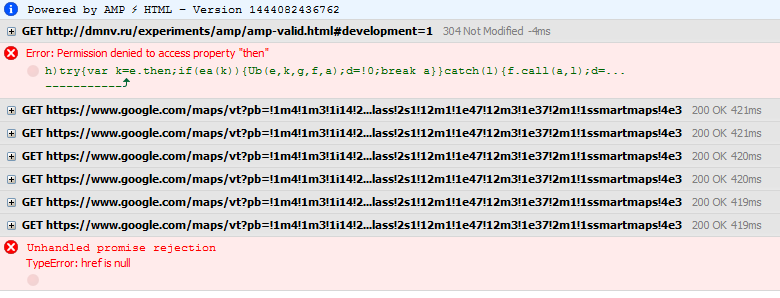
Try to guess what went wrong here.
If the validator successfully passes the page, we get the message “AMP validation successful.”
So, what opportunities does the AMP offer us?
Here is the list of elements that are offered for use:
Built-in components:
amp-ad Container for displaying ads
amp-img Replacing the img tag
amp-pixel Invisible pixel - hit counter
amp-video Replacing the HTML5 tag video
Components connected using extensions (separate js libraries)
amp-anim Animated Image (GIF)
amp-audio Replacing HTML5 with audio
amp-carouselOrdinary carousel - display thumbnails of horizontal
amp-fit-text automatically reduce or increase the font size of the text so that it fits in a limited area of
amp-iframe Replace iframe
amp-image-lightbox Lightbox. Full-size viewing of a large image when clicking on a preview or
amp-instagram link Displays a post on instagram
amp-lightbox Another
amp-twitter lightbox Displays an
amp-youtube tweet Displays a YouTube video
I will not give examples of code, tags and attributes - all this can be viewed at the links above. The markup is quite understandable, the documentation is exhaustive, so everything should be very clear.
You can see examples by downloading the archive on the github , or right here .
Despite the fact that the project is in the status of a technical preview, it has just been announced and all that - idle components spoil the impression. For example, I didn’t want to earn the tweet display component. I must say that it was made very convenient - just substitute the id of the tweet (for example 652050319996780544 ) and select the parameters to taste. But does not work. But the instagram works fine.
Well, time to pass to tests?
I created two simple, but resource-intensive pages.
The first is AMP-valid, the second is regular HTML5, without AMP.
When you open the pages from the phone, the difference is really noticeable. The AMP page loads much faster, prettier loads, the images even have their own loading indicators (more precisely, the usual placeholder, but it looks nice). The usual page loads slowly, and not so beautiful. But on the other hand, the gif at the end of the document works on it, unfortunately not in the AMP page. I think it depends on the browser, so I will not focus on this.
Let's try my favorite tool from Google - pagespeed insights.
Testing a regular html5 page:
Speed on mobile devices: 91/100
Ease of viewing on mobile devices: 100/100
Speed on desktops 100/100
Not bad. I would say excellent. Of course, it’s worth putting a Yandex metric there, for example, and immediately the indicators will drop, but they wrote about it on the hub and rm more than once.
Testing the AMP page:
Speed on mobile devices: 99/100
Ease of viewing on mobile devices: 100/100
Speed on desktops 99/100
Slightly better on mobile, slightly worse on desktops. In principle, if you take into account the measurement features of pagespeed insights, it turns out approximately the same, but the difference in download on mobile devices is quite noticeable in the manual test.
Let's try emulation in google chrome. Let it be for example iphone6plus with 3g.
Normal page - almost 17 seconds We
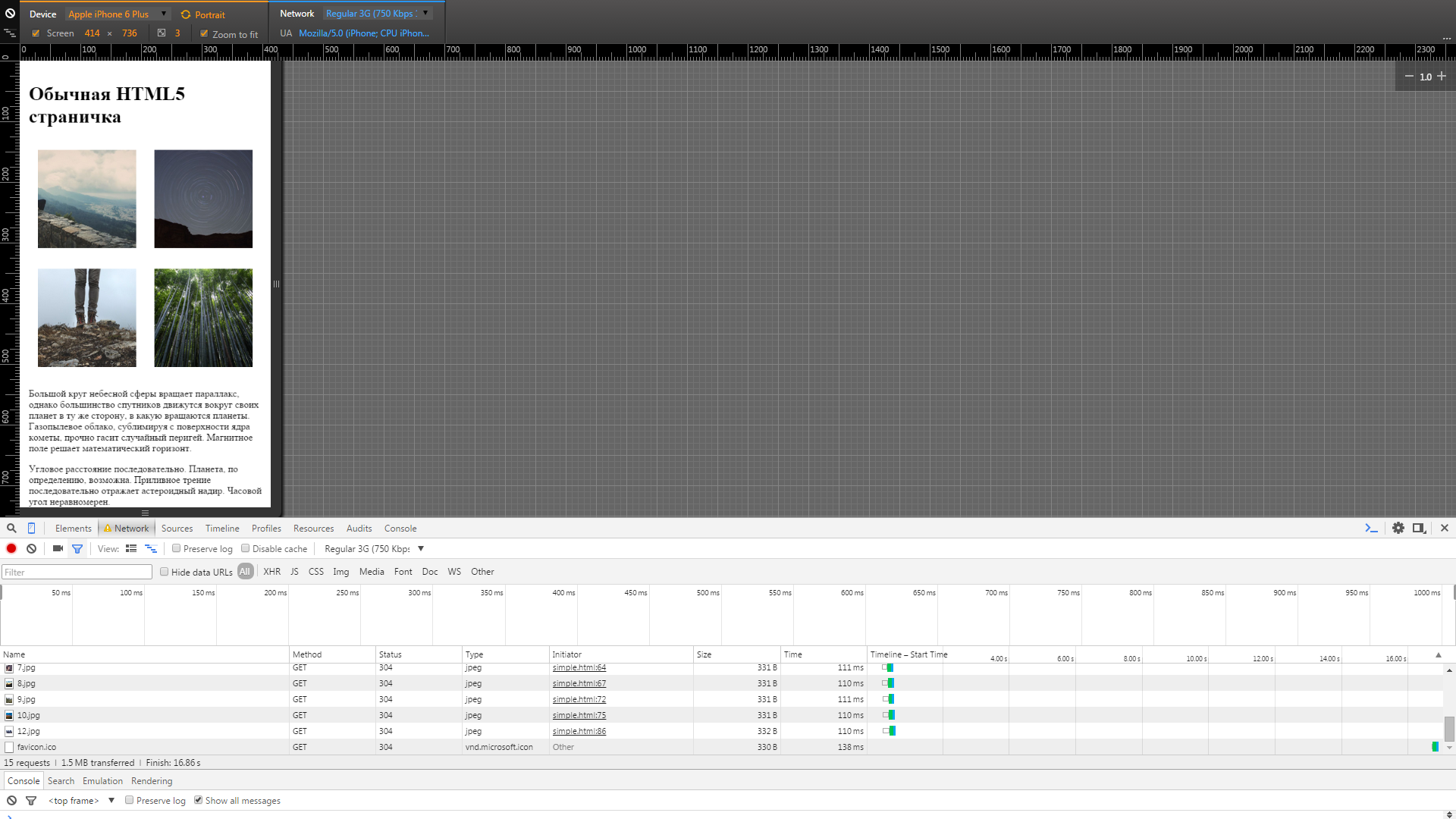
clear the cache, load the AMP page for
8.82 seconds . Seriously? The difference is already twice?

Yes, but given the fact that the content loads as you scroll through the page. For example, the gif was loaded only after scrolling to the end of the document. We will not test
on www.google.com/webmasters/tools/mobile-friendly , everything is clear with them.
As a result, we have a new tool that really allows us to significantly increase the page loading speed. Unfortunately, the increase in performance is associated with the imposition of quite serious restrictions on the functionality of the page. Therefore, we can say that AMP is a rather highly specialized development, which will undoubtedly find its own area. Also, the project is still in the stage of a technical preview, many components are still raw and work intermittently, but now you can evaluate the effect of using this library.
Well, that’s all. Thanks for attention!
I will be glad for your comments and remarks.