Sat.tv: TV program with an individual approach for free TV channels of the HOT BIRD satellite + interview with the developer
The television program in the form of a newspaper or magazine is now bought, perhaps, only by the most loyal viewers of paper media. Those who do not want to spend money and save up waste paper prefer to recognize the program via the Internet. The most advanced download special mobile applications. One of them is Sat.tv, created for users of the satellite channels of the HOT BIRD package. The application was released at the end of April 2016. Its main features are a personalized approach to each viewer, as well as very detailed information provided about channels and programs.
Let's take a closer look at Sat.tv's work, evaluate how convenient it is to use, and determine how it differs from its own kind. Well, as a bonus - right after the review - you will find an interview with Nicholas Mulin-Fornier, head of Eutelsat's Connected TV Program division. HOT BIRD satellites belong to the latter. The company broadcasts 1,100 television channels, more than 300 of them are free. More than 66 million families worldwide use the services of the HOT BIRD satellite family. And the Sat.tv application itself views just the very 300-odd free TV channels in 34 languages. To get lost in such a variety is very simple. Therefore, in the Connected TV Program division, they also took care of creating the guide Sat.tv. It was developed by Wiztivi by order of Eutelsat, which provided the application concept and wishes for its development.
Sat.tv is available for free download on the App Store and Google Play . In this review, we will consider the operation of the application on iOS. If you wish, you can even get a download link via SMS - to do this, go to the official website of the application www.watchsat.tv .

We followed a simple path and installed Sat.tv through the App Store on the iPhone 5S.

Immediately after installing and opening the program, the company logo of the application is downloaded and the slogan is Free to choose (in the free translation “Freedom of choice”). After loading the main data with the application, the screen prompts you to register on the site - in other words, just create an account. It also explains in detail why registration is generally needed.
To register, you must specify your e-mail and come up with a password to enter. After that, a letter with an activator link comes to the mailbox, by clicking on which the user saves his account. The activation principle is exactly the same as in most other applications from the App Store. After all these procedures, you can enter the program under your username.


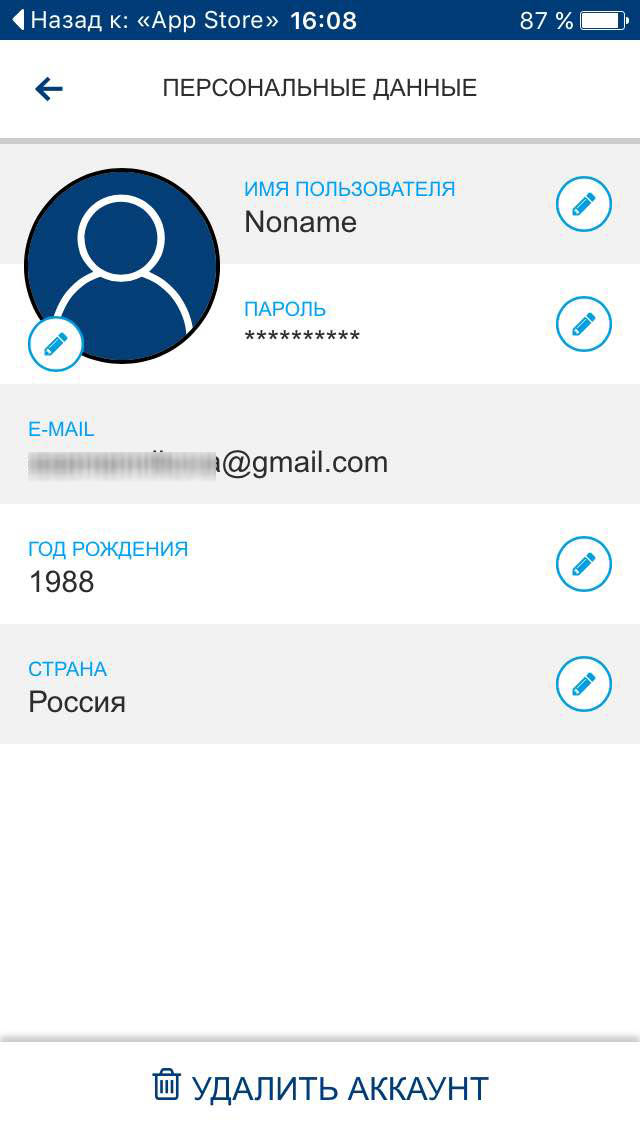
Working in Sat.tv under a personal login is really much more interesting than as a guest. In your personal account (the icon with a person in the upper right corner of the application) we see two tabs - “Personal data” and “Options”. In the first, you can change the username, year of birth, country or password.

Much more interesting is “digging” in the menu of the “Options” tab. Here you can configure the application language (there are a lot of them - HOT BIRD broadcasts almost all over the world), the language of the channels, enable or disable alerts, define your own prime time (it can be your own in different countries and on different channels) and so on.

But that is not all. The most interesting thing is to check the boxes “Selected types of programs” and “Selected genres of programs”. Both there and there are plenty of options, so the most demanding viewer will find something for himself.


Marked genres and types of programs will be taken as a basis when selecting television programs for the user. That is, those programs on the TV channels of the package that meet the tastes of a particular person will be offered for viewing - this is the very individual approach. Nevertheless, we advise you not to be lazy and scroll through all the options in order to note the maximum number of interesting ones.
Using Sat.tv is extremely simple - even an absolute kettle would do. This is because from the very first launch of the application, tips and tips pop up on the screen, clearly showing which icon is responsible for what. Developers call this a quick learning mode - and it really takes less than a minute to learn.


Despite the fact that the program in every possible way helps the user not to get lost, we will dwell on its main functions. So, first of all, “TV Guide” appears on the screen, the corresponding tab is active at startup. Here the tape from the channels in the given language and with the specified parameters is displayed (if there are none, the tape consists of the transmissions of all channels, of which, we recall, about 300).

A tooltip pops up immediately, which tells you that moving your finger across the screen vertically shows a list of channels, horizontally - an opinion on the channel’s programs.

An opinion (or short description) about the channel’s programs is easy to find by clicking on a given program. Expanded transfer information will appear in a new window.


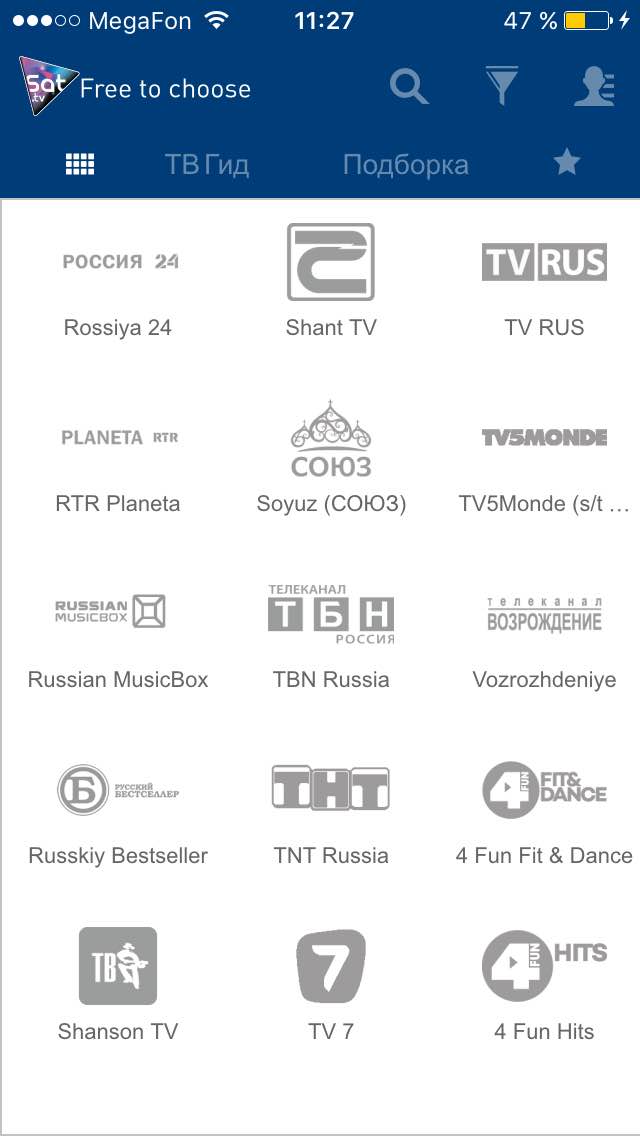
You can view a list of all channels by clicking on the tile icon to the left of the TV Guide icon. A list of channels with company logos appears on the screen, the list scrolls horizontally. To learn more about the channel and watch the channel’s television program for today, you just need to click on the logo. The information here is provided in the broadcast language of the channel.

In the “Selection” tab (to the right of the “TV Guide”), a selection of the programs most interesting to the user is offered, not only for today, but also for several days in advance. The list is formed on the basis of the specified types and genres of programs.
The tab marked with an asterisk (to the right of “Collections”) is a list of TV shows that the user has marked as favorites. To do this, again, having selected the gear, press the asterisk.
In addition to this option, there is also a reminder (a kind of alarm clock) about the release of the selected TV program on the air.

In order to receive a notification, you need to make the bell icon active, as shown in the photo. And at the right time, a warning about the start of the program will appear on the smartphone screen. The “Share” icon sends us to social networks where you can express your opinion on the program and find out the opinions of other viewers.

Let's go back to the main sections of the menu in the upper right corner. Next to the personal settings icon there is an icon similar to a funnel. Under it is a menu for quickly changing program selection parameters. Here you can see which types and genres are selected, as well as select new ones.

The magnifying glass icon traditionally hides the ability to search for programs.
As you can see, navigation is extremely simple. The main actions with the application are performed by clicking on one or two icons. The TV program is scrolled by simply sliding a finger across the screen. At the same time, the capabilities of Sat.tv are quite wide. The main advantage of this application is a personal approach to each viewer: a lot of settings where you can limit the type and type of programs so as not to skip for hours a good hundred channels. Plus program reminders, it’s now hard to miss your favorite TV show. It is clear that the channel list is limited to the HOT BIRD package. For example, there are about five pieces of widespread Russian channels here. In this regard, there is much to grow, however, this is more likely to apply to the entire Eutelsat satellite broadcast service, and not specifically to this application. In general, this TV guide is an excellent assistant to
And now, as promised at the beginning, an interview with Nicholas Mulin-Fornier, head of Eutelsat's Connected TV Program division. We asked Mr. Mulin-Fornier about plans for the future, the integration of Sat.tv with domestic social networks, the release of the application on other platforms and much more.

1. The Sat.tv application is a guide to more than 300 free TV channels from the Hot Bird package, while it includes about 440 free TV channels. Are there any plans to integrate data on all 440 TV channels into the application? By what principle are the 300 channels available in it selected?
The purpose of the Sat.tv application is to support all open access television channels on the HOT BIRD satellite, as long as they provide comprehensive information about their broadcasts.
The application is ready to support several hundred television channels. And we are pleased to note that now in Sat.tv there is information about the broadcasts of 7 Russian-language channels: 1 channel, TNT, STS, 8 channel, Euronews, Russian Musicbox, Union. There is also support for the TV5Monde Europe channel, whose broadcasts are subtitled in Russian.
2. Are there any plans to release Sat.tv for other operating systems? For example, for Modern UI operating systems of the Windows family? In my opinion, this would be quite convenient: to view data on upcoming broadcasts, for example, on a working computer, in order to know in advance which broadcast can be watched in the evening.
In the near future - within a few weeks - the Sat.tv service will be launched in the browser version. And this means that PC users will be able to access it.
3. Are there any plans to create versions of Sat.tv for smart TVs? Such an application would look very appropriate not only on a smartphone or tablet, but also on the TV itself. Meanwhile, the developers of TVs - Samsung, LG and so on - offer catalogs of applications in which Sat.tv could be placed.
We are sure that it is mobile devices - for example, smartphones - that are the best option for working with the Sat.tv application. Because it is very convenient: you watch TV, and in your hands you hold a small tablet, on the screen of which information about the programs is displayed. Nevertheless, we are considering the possibility of creating versions of the Sat.tv application for smart TVs. True, the task is complicated by the fact that all TV manufacturers have different software and service platforms. In addition, navigating through our widest catalog of TV channels using a conventional TV remote control will be quite difficult. However, we still work in this direction, we are considering various options. Perhaps this issue will be resolved using HbbTV technology.
4. Are there any plans for further localization of the application? It is Russified very well, but I’m talking about something else: Sat.tv has integration with global social networks, for example, Facebook. However, in Russia, the audience of television is much more popular than VKontakte and Odnoklassniki. Are there any plans for integration with them?
The main problem that we encountered when creating Sat.tv is the orientation of this application to a huge number of users from different countries, speaking different languages and belonging to different cultures. Sat.tv currently supports 5 languages and is available in 70 countries. Therefore, initially we integrated the application with the most popular global social networks, and then we will take up local ones. By the way, an advertising campaign will be launched on VKontakte next week, the purpose of which is to tell Russian users about the existence of Sat.tv and the advantages of this application.
5. It would be great if Sat.tv could watch at least short video previews of TV shows - to understand the presenter's style, transmission structure, sound, translation quality and so on. Is there a technical possibility to create such an option? Or maybe it is already planned for the next Sat.tv updates?
The principle of Sat.tv is the cooperation of the company: the owner of the satellites - Eutelsat - and the television channels that provide the content.
You can find the preview of the programs in the information about the broadcasts of the TV channels in Sat.tv. In a word, there is a technical possibility for this, moreover, it is implemented in Sat.tv. Next word for channels - and some of them already use this option. For example, TV5Monde Europe provides relevant links to movie promotions. We hope that in the future their number will increase.
6. The site watchSat.tv, which also contains information about channels from the Hot Bird package (actually, in a more convenient form and provides the Sat.tv application) is available only in French and English. Are there any plans to translate the site into Russian? in a press release on the release of the Sat.tv application, it was stated that the site is a kind of alternative to applications, but in Russia not everyone knows English and French.
Already now everyone is available an updated version of the site, which is offered in Russian (in total, 9 languages are supported). In the coming weeks, we will update the site again by adding presentations to the television channels, and they will also be available in several languages.
7. What are the plans for Sat.tv developers for the next app updates? What features are planned to be implemented in these updates? Which platform do you plan to give preference to when releasing updates - Android or iOS?
Currently, we are equally focused on Android and iOS, because these are the most popular mobile platforms in the world. As for the plans for the development of the application, there are a lot of them: we are working on ways of interaction between the TV and mobile devices (for example, on using the latter as a control panel); displaying personal recommendations not only on a smartphone, but also on a TV; the ability to view content from satellite on mobile devices and so on.
Let's take a closer look at Sat.tv's work, evaluate how convenient it is to use, and determine how it differs from its own kind. Well, as a bonus - right after the review - you will find an interview with Nicholas Mulin-Fornier, head of Eutelsat's Connected TV Program division. HOT BIRD satellites belong to the latter. The company broadcasts 1,100 television channels, more than 300 of them are free. More than 66 million families worldwide use the services of the HOT BIRD satellite family. And the Sat.tv application itself views just the very 300-odd free TV channels in 34 languages. To get lost in such a variety is very simple. Therefore, in the Connected TV Program division, they also took care of creating the guide Sat.tv. It was developed by Wiztivi by order of Eutelsat, which provided the application concept and wishes for its development.
Installation
Sat.tv is available for free download on the App Store and Google Play . In this review, we will consider the operation of the application on iOS. If you wish, you can even get a download link via SMS - to do this, go to the official website of the application www.watchsat.tv .
We followed a simple path and installed Sat.tv through the App Store on the iPhone 5S.
Beginning of work
Immediately after installing and opening the program, the company logo of the application is downloaded and the slogan is Free to choose (in the free translation “Freedom of choice”). After loading the main data with the application, the screen prompts you to register on the site - in other words, just create an account. It also explains in detail why registration is generally needed.
To register, you must specify your e-mail and come up with a password to enter. After that, a letter with an activator link comes to the mailbox, by clicking on which the user saves his account. The activation principle is exactly the same as in most other applications from the App Store. After all these procedures, you can enter the program under your username.
Personal settings
Working in Sat.tv under a personal login is really much more interesting than as a guest. In your personal account (the icon with a person in the upper right corner of the application) we see two tabs - “Personal data” and “Options”. In the first, you can change the username, year of birth, country or password.
Much more interesting is “digging” in the menu of the “Options” tab. Here you can configure the application language (there are a lot of them - HOT BIRD broadcasts almost all over the world), the language of the channels, enable or disable alerts, define your own prime time (it can be your own in different countries and on different channels) and so on.
But that is not all. The most interesting thing is to check the boxes “Selected types of programs” and “Selected genres of programs”. Both there and there are plenty of options, so the most demanding viewer will find something for himself.
Marked genres and types of programs will be taken as a basis when selecting television programs for the user. That is, those programs on the TV channels of the package that meet the tastes of a particular person will be offered for viewing - this is the very individual approach. Nevertheless, we advise you not to be lazy and scroll through all the options in order to note the maximum number of interesting ones.
Navigation and useful "chips"
Using Sat.tv is extremely simple - even an absolute kettle would do. This is because from the very first launch of the application, tips and tips pop up on the screen, clearly showing which icon is responsible for what. Developers call this a quick learning mode - and it really takes less than a minute to learn.
Despite the fact that the program in every possible way helps the user not to get lost, we will dwell on its main functions. So, first of all, “TV Guide” appears on the screen, the corresponding tab is active at startup. Here the tape from the channels in the given language and with the specified parameters is displayed (if there are none, the tape consists of the transmissions of all channels, of which, we recall, about 300).
A tooltip pops up immediately, which tells you that moving your finger across the screen vertically shows a list of channels, horizontally - an opinion on the channel’s programs.
An opinion (or short description) about the channel’s programs is easy to find by clicking on a given program. Expanded transfer information will appear in a new window.
You can view a list of all channels by clicking on the tile icon to the left of the TV Guide icon. A list of channels with company logos appears on the screen, the list scrolls horizontally. To learn more about the channel and watch the channel’s television program for today, you just need to click on the logo. The information here is provided in the broadcast language of the channel.
In the “Selection” tab (to the right of the “TV Guide”), a selection of the programs most interesting to the user is offered, not only for today, but also for several days in advance. The list is formed on the basis of the specified types and genres of programs.
The tab marked with an asterisk (to the right of “Collections”) is a list of TV shows that the user has marked as favorites. To do this, again, having selected the gear, press the asterisk.
In addition to this option, there is also a reminder (a kind of alarm clock) about the release of the selected TV program on the air.
In order to receive a notification, you need to make the bell icon active, as shown in the photo. And at the right time, a warning about the start of the program will appear on the smartphone screen. The “Share” icon sends us to social networks where you can express your opinion on the program and find out the opinions of other viewers.
Let's go back to the main sections of the menu in the upper right corner. Next to the personal settings icon there is an icon similar to a funnel. Under it is a menu for quickly changing program selection parameters. Here you can see which types and genres are selected, as well as select new ones.
The magnifying glass icon traditionally hides the ability to search for programs.
As you can see, navigation is extremely simple. The main actions with the application are performed by clicking on one or two icons. The TV program is scrolled by simply sliding a finger across the screen. At the same time, the capabilities of Sat.tv are quite wide. The main advantage of this application is a personal approach to each viewer: a lot of settings where you can limit the type and type of programs so as not to skip for hours a good hundred channels. Plus program reminders, it’s now hard to miss your favorite TV show. It is clear that the channel list is limited to the HOT BIRD package. For example, there are about five pieces of widespread Russian channels here. In this regard, there is much to grow, however, this is more likely to apply to the entire Eutelsat satellite broadcast service, and not specifically to this application. In general, this TV guide is an excellent assistant to
And now, as promised at the beginning, an interview with Nicholas Mulin-Fornier, head of Eutelsat's Connected TV Program division. We asked Mr. Mulin-Fornier about plans for the future, the integration of Sat.tv with domestic social networks, the release of the application on other platforms and much more.
1. The Sat.tv application is a guide to more than 300 free TV channels from the Hot Bird package, while it includes about 440 free TV channels. Are there any plans to integrate data on all 440 TV channels into the application? By what principle are the 300 channels available in it selected?
The purpose of the Sat.tv application is to support all open access television channels on the HOT BIRD satellite, as long as they provide comprehensive information about their broadcasts.
The application is ready to support several hundred television channels. And we are pleased to note that now in Sat.tv there is information about the broadcasts of 7 Russian-language channels: 1 channel, TNT, STS, 8 channel, Euronews, Russian Musicbox, Union. There is also support for the TV5Monde Europe channel, whose broadcasts are subtitled in Russian.
2. Are there any plans to release Sat.tv for other operating systems? For example, for Modern UI operating systems of the Windows family? In my opinion, this would be quite convenient: to view data on upcoming broadcasts, for example, on a working computer, in order to know in advance which broadcast can be watched in the evening.
In the near future - within a few weeks - the Sat.tv service will be launched in the browser version. And this means that PC users will be able to access it.
3. Are there any plans to create versions of Sat.tv for smart TVs? Such an application would look very appropriate not only on a smartphone or tablet, but also on the TV itself. Meanwhile, the developers of TVs - Samsung, LG and so on - offer catalogs of applications in which Sat.tv could be placed.
We are sure that it is mobile devices - for example, smartphones - that are the best option for working with the Sat.tv application. Because it is very convenient: you watch TV, and in your hands you hold a small tablet, on the screen of which information about the programs is displayed. Nevertheless, we are considering the possibility of creating versions of the Sat.tv application for smart TVs. True, the task is complicated by the fact that all TV manufacturers have different software and service platforms. In addition, navigating through our widest catalog of TV channels using a conventional TV remote control will be quite difficult. However, we still work in this direction, we are considering various options. Perhaps this issue will be resolved using HbbTV technology.
4. Are there any plans for further localization of the application? It is Russified very well, but I’m talking about something else: Sat.tv has integration with global social networks, for example, Facebook. However, in Russia, the audience of television is much more popular than VKontakte and Odnoklassniki. Are there any plans for integration with them?
The main problem that we encountered when creating Sat.tv is the orientation of this application to a huge number of users from different countries, speaking different languages and belonging to different cultures. Sat.tv currently supports 5 languages and is available in 70 countries. Therefore, initially we integrated the application with the most popular global social networks, and then we will take up local ones. By the way, an advertising campaign will be launched on VKontakte next week, the purpose of which is to tell Russian users about the existence of Sat.tv and the advantages of this application.
5. It would be great if Sat.tv could watch at least short video previews of TV shows - to understand the presenter's style, transmission structure, sound, translation quality and so on. Is there a technical possibility to create such an option? Or maybe it is already planned for the next Sat.tv updates?
The principle of Sat.tv is the cooperation of the company: the owner of the satellites - Eutelsat - and the television channels that provide the content.
You can find the preview of the programs in the information about the broadcasts of the TV channels in Sat.tv. In a word, there is a technical possibility for this, moreover, it is implemented in Sat.tv. Next word for channels - and some of them already use this option. For example, TV5Monde Europe provides relevant links to movie promotions. We hope that in the future their number will increase.
6. The site watchSat.tv, which also contains information about channels from the Hot Bird package (actually, in a more convenient form and provides the Sat.tv application) is available only in French and English. Are there any plans to translate the site into Russian? in a press release on the release of the Sat.tv application, it was stated that the site is a kind of alternative to applications, but in Russia not everyone knows English and French.
Already now everyone is available an updated version of the site, which is offered in Russian (in total, 9 languages are supported). In the coming weeks, we will update the site again by adding presentations to the television channels, and they will also be available in several languages.
7. What are the plans for Sat.tv developers for the next app updates? What features are planned to be implemented in these updates? Which platform do you plan to give preference to when releasing updates - Android or iOS?
Currently, we are equally focused on Android and iOS, because these are the most popular mobile platforms in the world. As for the plans for the development of the application, there are a lot of them: we are working on ways of interaction between the TV and mobile devices (for example, on using the latter as a control panel); displaying personal recommendations not only on a smartphone, but also on a TV; the ability to view content from satellite on mobile devices and so on.