November 12, 2014 at 16:03
Lytro Illum Camera - First Meet
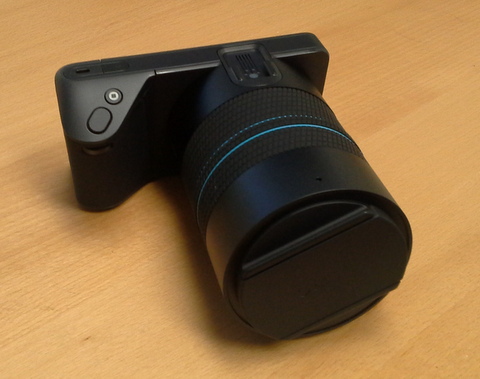
Less than six months later, I still met with the second-generation Lytro camera ordered back in June (to be honest, it was sent back in September, but at that time I was on another continent). So now I understand what Lytro has been able to achieve since the release of the first camera.
Equipment
There were three boxes

in the package : one large and two small: Small boxes were not included in the standard package - they came as compensation for the delay in sending (initially, they promised to send the camera in August. However, this would not help me).
In the boxes were a camera strap (signed as Premium) and a strange-shaped battery:

In the big box was the camera itself, pieces of 6 small boxes and two books - “Quick start guide” and “Product information guide”. In the first book it is written how to turn on the camera, in the second - safety precautions and, in case the user is interested in the details of working with the camera, a link to the site on the page http://manuals.lytro.com/illum/

The following set appeared in small boxes :
- another battery;
- charger with cable;
- USB 3.0 cable;
- neutral filter 72 mm;
- a large hood;
- a cloth for cleaning the screen;
- Another strap and 4 parts for attaching it to the camera.

How the strap differs from "Premium", I still do not understand.
Appearance
The camera itself is large, but it feels light. Made of hard and very black plastic. On the case you can see 7 buttons, two wheels and two covers. Under one slot for the battery, under the other - a place for a card and a USB connector. It is curious that there is no battery eject button or eject spring - it must be pulled out of the socket.


Buttons, by default, have the following functions:
- inclusion;
- shutter;
- fixing shutter speed and ISO;
- two buttons to switch screen modes;
- two focus control buttons: autofocus and hyperfocal focusing. Things like autofocus when you press the shutter are not provided.
The wheels are used to control shutter speed and ISO, their meaning is different in different modes.
There are also two rings on the lens - zoom and focus. Zoom from 30 to 250 mm (35 mm equivalent). Focusing is necessary because, despite all the technology of the light field, the achievable depth of field is limited: at EGF = 30 mm, it is from about 1 meter to infinity, and at 250 mm it is from about 10 meters to infinity (when setting to other distances, the ranges will be appropriate). The current sharpness range is shown on a special scale on the screen.
Camera control occurs mainly with the help of a touchscreen and is not very different from others, but there are a couple of features.
Firstly, the aperture value is constant: f / 2.0. Therefore, the exposure coupler does not consist of shutter speed and aperture, but shutter speed and ISO. Accordingly, instead of the usual set of PASM modes, the abbreviation PISM is used here. ISO changes from 80 to 3200, shutter speed - from 1/4000 to 32.
Secondly, when you press one of the buttons (Lytro button), a live range histogram appears next to the distance scale, allowing you to select the correct focus. At the same time, “close” and “distant” objects are highlighted on the screen, as well as areas that do not fall into the zone of sharpness.

(picture from lytro.com)
What the minimum distance to the subject is equal to, I still do not understand. Approximately 10-15 cm with EGF = 30 mm. A special “macro mode” could not be found.
What's inside?
The size of the matrix is 7728 * 5368, which is approximately 41 megapixels. The pixel size is 1.4 microns, i.e. the total size is 10.8 * 7.5 mm, which gives the crop factor 3.3. The step of microlenses is 20 microns, in total about 230,000 are obtained (the first-generation camera had half as much). But the pictures on the output have a size of 2450 * 1634.
The camera is rather greedy in terms of memory consumption. One photo on the card occupies 52.5 MB (this is a 10-bit raw file), plus 1.7 GB goes to the file with information about the camera itself (this is not a typo - it really is more than a gigabyte. The file contains 34 calibration RAW images, 50 MB each Fortunately, it is common to all photos on the card). Thus, on an 8-gigabyte card fits a little more than a hundred photos. The situation on the computer is even worse - a set of files related to one processed image takes 120 MB.
A “live” image after preliminary processing is presented in the form of 7 photographs: they approximately correspond to the view from the center of the lens and from 6 points along the edge. The size of the photographs is 2022 * 1404 (for comparison: the first-generation camera held 37 photographs in size 360 * 360). In addition, there is a range map 541 * 376 in size (exactly one point on the microlens), but I have not yet checked which photograph it refers to. Most likely to the central one. Photos can be seen using regular tools without understanding the file structure: they are created as tiff files by the Export Living Picture command in Lytro Desktop - they can be edited with a third-party editor and uploaded to Lytro Desktop (however, I haven’t tried).
What can I get
There are several additional features to processing photos.
Firstly, in addition to standard means of changing brightness, contrast, etc., there is a simulator for setting the diaphragm. It can be selected from 1/1 to 1/16. 1/16 - the “all in focus” mode, in this mode you can slightly shift the point of view. 1/1 - mode with depth of field, even smaller than in the original photos. Here you can change the focus point - focus on different distances. The focus slider was never done - the program selects positions from the depth map.
At intermediate aperture values, to a certain extent, one can do both refocusing and changing the point of view.


Another unusual opportunity is the implementation of a “tilt sensor”, when in different parts of the image focusing occurs at different distances. At the same time, the calculations are honest, and not due to blurring the upper and lower edges.
After selecting the parameters, the picture can be exported as jpeg. It is possible to export a stereo pair (two pictures from f / 16, "shot" from different edges of the lens). A stereo pair is created in the form of cyan / red, or in the form of two images for “parallel” viewing (when the eyes are wide apart). But, as it turned out, it’s better to assemble a stereo pair from two tiff files - the result of automatic export has some problems with sharpness.

Since one picture can be watched in different modes, it is possible to do animation - with a smooth change of focus, depth of field, position, and even crop. True, it’s not at all easy to manage, it’s difficult to get even the simplest things.
You can upload finished photos, as before, to the pictures.lytro.com gallery and share them on Facebook. As it turned out, the current state of the animation is downloaded along with the photo, so users are encouraged to think through the “story” that they want to tell with their photo.