 December 3, 2017 at 22:57
Configuring Authentication in SAP Netweaver AS Java (Part 3 of 3)
Introduction
The first part of the series, “Configuring Authentication in SAP Netweaver AS Java,” talked about various approaches to configuring authentication in applications running on the SAP NW AS Java software platform. It also identified the areas of responsibility of various project teams (developers, functional consultants, SAP Basis specialists) for performing authentication settings.
The second part described the structure of the web.xml and web-j2ee-engine.xml descriptors, as well as the structure of the authschemes.xml XML file.
In the general scheme, introduced in the first part, I designated the elements that I will consider now - these are Policy Configurations.
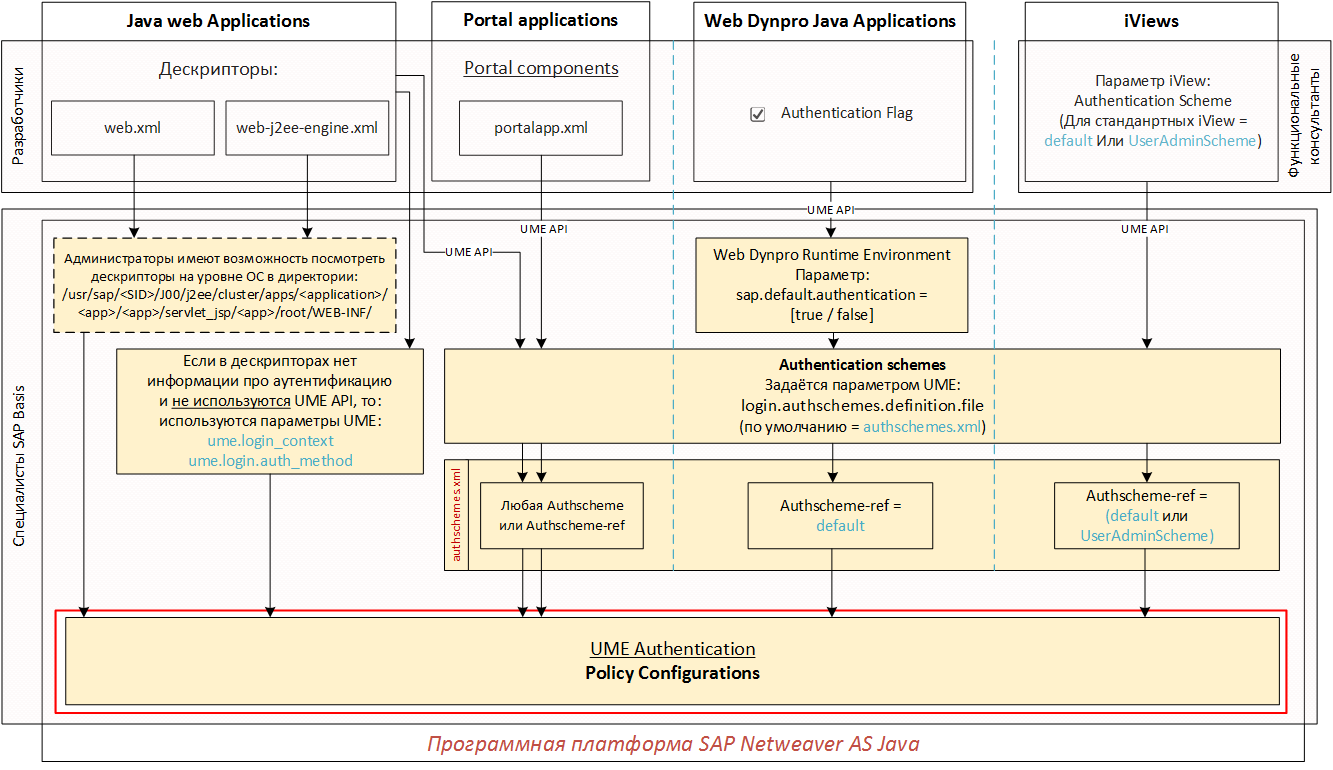
Policy Configurations. General structure
As we have already found out, for different types of applications, we can describe in different ways how user authentication will be performed:
- In the web.xml descriptor, we describe an authentication method that is inextricably linked to the policy configuration (for example, the authentication method “FORM” is associated with the policy configuration “form”);
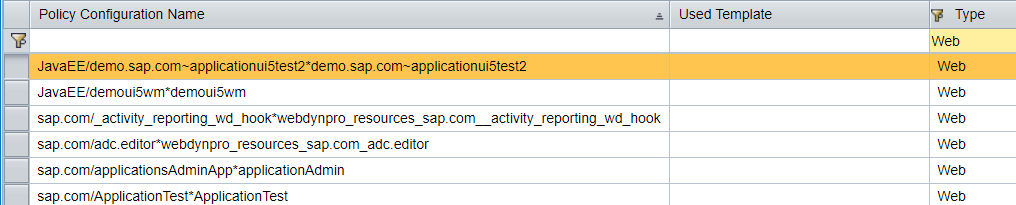
- In the web-j2ee-engine.xml descriptor for Java web applications, we even describe the policy configuration itself with all Login modules. By the way, Policy configurations for such applications are displayed with the Web type (see the figure below). Most Web policy configurations are listed, since each Java application for which the developer created the web-j2ee-engine.xml or web.xml descriptor will be displayed as a separate Policy configuration.
- For Portal applications, Web Dynpro Java Applications and iViews, we use Authschemes and Authschemes-refs, which also appear in the form of Policy configurations, but with the Other type.
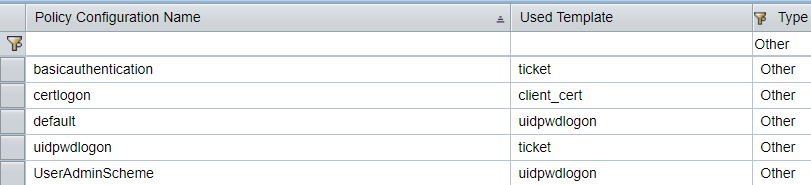
We can also create our own Policy configurations through the editor in the SAP Netweaver Administrator (NWA) and bind them to applications in the form of Templates or set them in the UME parameters described in the first two articles. Policy configurations created through the editor will be of type Custom.
So, Policy Configuration is an entity that has a set of properties and includes an Authentication Stack.
In Propertiescharacteristics such as: realm_name, policy_domain, priority, template, frontendtarget, auth_method, etc. are displayed. If the Policy configuration is created manually through the editor, then, if necessary, we can also add properties manually. If this is done through the web.xml or web-j2ee-engine.xml descriptors, then we will see in the properties what the developer specified in these descriptors.
Authentication Stack is an entity that consists of the elements shown in the following image:
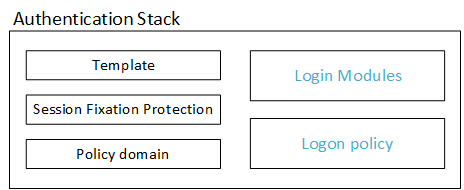
Template. As a template for newly created Authentication Stacks, you can use the ready-made Authentication Stack with the type “Template” or “Custom”. In this case, the new Authentication Stack will inherit the Login Modules and Session Fixation Protection settings from the template. Logon policy settings are not inherited.
Session Fixation Protection . It may happen that the client software calls two applications with different Authentication stacks almost simultaneously (with a difference of no more than 2 seconds). This is a rare case and it is unlikely that this can happen in the standard. But if this happens, the server may throw error 403 - "Possible session fixation attack detected! Contact your system administrator with a reference to SAP Note 1417679!".
If we are sure that we do not have such applications, then Session Fixation Protection must be set to Strict (it is used by default). If two different applications with different Authentication stacks should be called in parallel, and this is the only solution in your particular case (which is better not to be allowed), the Session Fixation Protection parameter must be set to Grace Period for the application that generates error 403 - “Possible session fixation attack detected! ... ".
Policy domain - it was already described in detail in the second part , so I won’t repeat it.
Login Modules and Logon Policy- Both of these elements are the most interesting for us in terms of setting up the authentication stack. Login Modules are directly related to authentication (i.e., client authentication). Logon Policy is a set of rules that allow or prohibit the user to use Authentication Stack by any criteria when accessing the application (for example, if the user is not a member of the Administrators group, then authentication is prohibited).
Login Modules
The login module is a software module that allows the SAP system to verify the authentication information provided by the user. In the standard delivery of SAP Netweaver AS Java 7.40, I counted 21 Login Module and each of them has its own special settings for fine-tuning. The description of each such module separately deserves a separate article, so I will only give a few of the most frequently used modules and give a brief description for them:
- BasicPasswordLoginModule - authenticates the user according to the credentials provided through the FORM or BASIC authentication methods (login and password);
- CreateTicketLoginModule - creates an SAP Logon Ticket (that is, in fact it creates a session cookie for the client’s web browser), which under certain conditions and for a certain period of time will be your “passport” for entering applications;
- EvaluateTicketLoginModule - performs authentication on the SAP Logon Ticket obtained using the CreateTicketLoginModule module;
- ClientCertLoginModule - Authenticates a user using a client certificate.
The Login Modules tool makes it possible to compose individual modules into a sequence of executable modules to provide a flexible authentication process in the system.
I propose to consider the following sequence of modules:
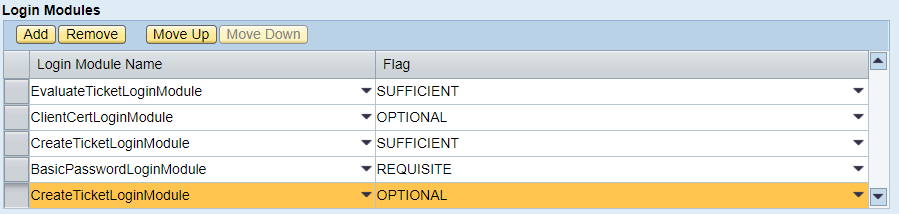
The figure shows that for each Login Module from this sequence a flag is specified that determines the behavior of the module being executed. In the above sequence, the following will happen:
- The login module EvaluateTicketLoginModule is executed. If the user's web browser has a valid SAP Logon Ticket system, the subsequent modules will not be executed, because the SUFFICIENT flag is set (i.e., this module is sufficient for user authentication and no further modules are required). If authentication is not successful, then execution is passed to the next module - ClientCertLoginModule;
- The ClientCertLoginModule module, receiving data, as a rule, from the CLIENT-CERT authentication method, checks this data. The figure shows that the OPTIONAL flag is set for this module. This means that regardless of the success or failure of authentication verification by this module, we will move on to the next module (in our example, CreateTicketLoginModule), but the result of the ClientCertLoginModule check will be available to the next module in the list, i.e. CreateTicketLoginModule module;
- The CreateTicketLoginModule module will receive the result of verification by the previous module. In case of successful authentication on the previous module, an SAP Logon Ticket will be generated and transmitted for the user's web browser. CreateTicketLoginModule will also authenticate against the SAP Logon Ticket issued (it will of course be successful) and, considering that the SUFFICIENT flag is set for this module, control will be transferred back to the program (subsequent modules will not be executed). In case of authentication failure by the previous module, the CreateTicketLoginModule module will not issue an SAP Logon Ticket to the user and, of course, will not even check it and, as a result, simply transfer control to the next module (BasicPasswordLoginModule);
- In our example, the BasicPasswordLoginModule module has the REQUISITE flag. This means that in case of unsuccessful authentication by this module, subsequent modules will not be executed and control will immediately be transferred back to the program with the result - “unsuccessful authentication”. In case of successful authentication, the next module will be executed. Those. in case of successful authentication by login and password, control will be transferred to the CreateTicketLoginModule module, the operation of which we have already described.
In our example, for the BasicPasswordLoginModule module, we could set the OPTIONAL flag - absolutely nothing would have changed. And for the fifth module (CreateTicketLoginModule) - the SUFFICIENT flag or leaving the same OPTIONAL - the result of the entire stack would be the same ...
There is another flag that is not in the example - this is the REQUIRED flag. For any result of executing a module with this flag, control will be transferred to the next module. But, if the authentication performed by this module is not successful, then the result of executing the entire stack of modules will also not be successful.
Logon policy
As mentioned earlier, Logon Policy is a set of rules that allow or prohibit the user to use Authentication Stack by any criteria when accessing the application.
By default, this functionality is not active in the SAP system. Therefore, if you decide to use it, then you need to set the UME: ume.logon.apply_logon_policies parameter to true.
Creating and editing Logon policies is available in the SAP Netweaver Administrator (NWA): Configuration -> Authentication and Single Sign-On. Authentication Tab -> Logon Policies).
The structure of the Logon policy is as follows (see the figure below):
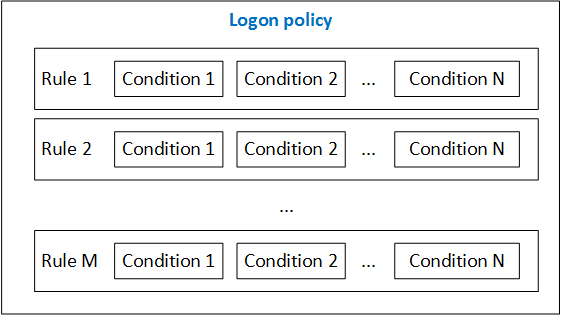
Logon policy can contain many rules (Rules), and each rule must contain the conditions for the implementation of this rule - Conditions.
The capabilities of Logon Policies are best seen in the following example. Let the following task be in a fictional project: to certain applications it is necessary to allow access only to the Administrators group from IP addresses 10.1.4.0/32. And in general, let the Administrators work only during working hours - from Monday to Friday, from 8:00 to 18:00. For these purposes, we will create a Logon Policy (for example, MyOwnLogonPolicy) with one rule (for example, MyOwnRule1) and four conditions (see the figure below), which will determine our requirements for our fictional project.
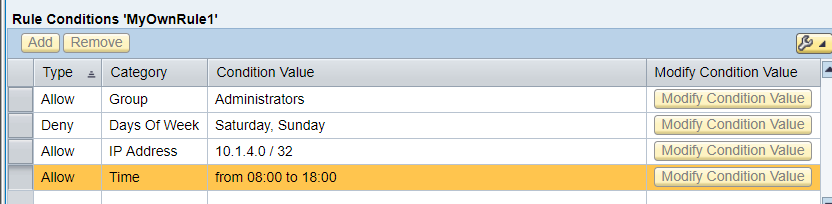
In addition to the categories that we identified in our example (Group, Days Of Week, IP Address, Time), there are other equally interesting categories that you can use:
- User - allows or denies authentication to specific users of the system;
- Role - allows or denies authentication for users with specific roles;
- HTTP Header - allows or denies authentication to users whose HTTP request header contains certain values. In particular, regular expressions can be used for HTTP header values. (see picture below).

Thus, using the HTTP Header category you can significantly expand the capabilities of Logon Policies.
Conclusion
So, we got acquainted with the approaches and tools that are available in SAP Netweaver AS Java for configuring authentication in various types of applications. I hope you were interested, and this information will simplify the process of setting up authentication in SAP Netweaver AS Java applications.









