September 11, 2017 at 11:34
Monetize apps in iOS 11: target in-app purchases in the new App Store
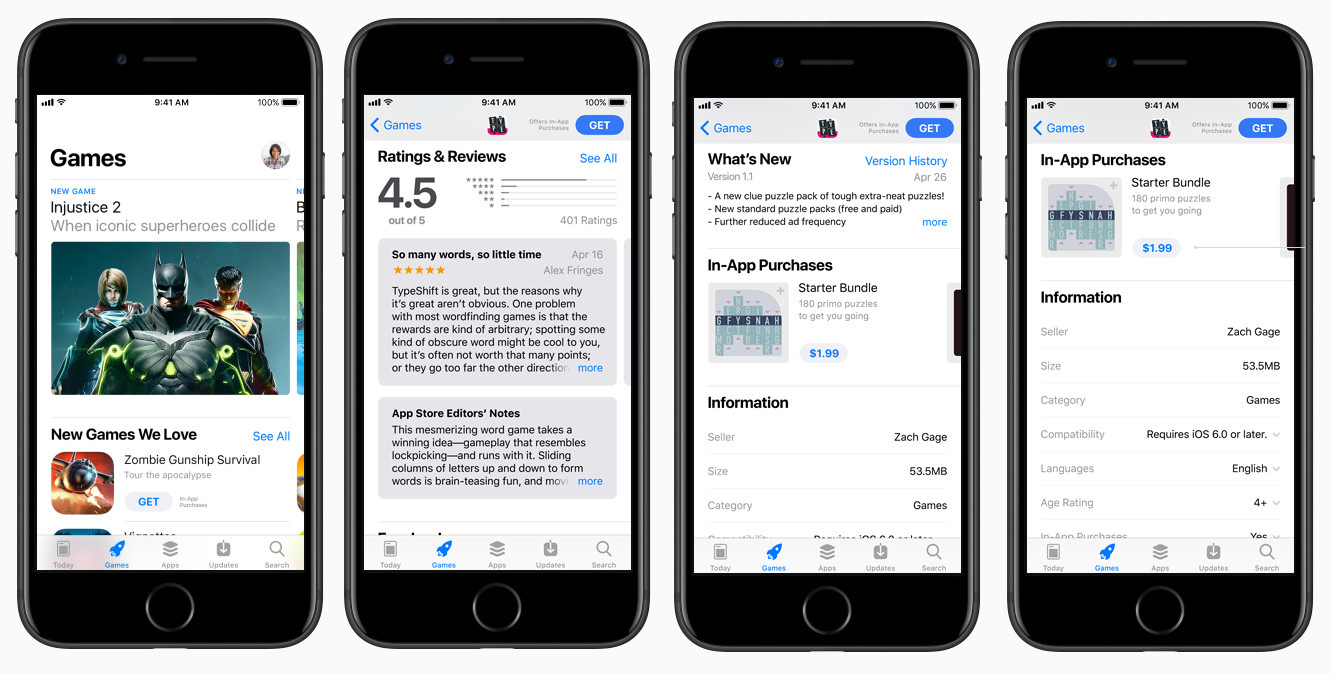
At WWDC'17, Apple showed the updated App Store interface and introduced a number of innovations. Among them were promoted in-app purchases, which with the release of iOS 11 will be displayed directly in search and editorial collections along with applications.
In our case, this is a particularly urgent thing, since in the current War Robots project we use built-in purchases, which for us have become the most optimal way to monetize. Therefore, in several new games that are currently under development, we are also going to use them.
One of the main differences - now the user will be able to make a built-in purchase right in the store, after which the application will be installed and the purchase information will be reported at startup. To do this, the SKPaymentTransactionObserver delegate must implement a special method:
- (BOOL)paymentQueue:(SKPaymentQueue *)queue
shouldAddStorePayment:(SKPayment *)payment
          forProduct:(SKProduct *)product;
Until this method is implemented in the application, promoted in-app purchases cannot be purchased from the App Store. But they will be displayed in a special section on the application page.
In order to make an integrated purchase promoted, you need to fill out special metadata recently appeared in iTunes Connect: an advertising image, a title and a short description. After passing review changes, the purchase will appear in the new section “Promotion on the App Store”, where you can change the default visibility values for all users at any time and their order of display on the application page in the App Store. So you can promote up to 20 built-in purchases at the same time and keep an unlimited number of purchases ready to turn on.


All of these visibility and order values will be used for users who have not yet installed the application.
The most important component of the innovation is the ability to programmatically change the order and visibility of promoted in-app purchases. Now we can adapt to each user of the application: display a handful of crystals in the top to the player who has them at zero; Offer a premium account to an active user or open a new level to a player who has completed all the main content. Or, in general, to make a special very favorable offer to buy premium currency visible to the player only at the moment when he faced an acute shortage of resources, but did not take advantage of the main offer to purchase it. You can arrange A / B testing to find the optimal order.
More specifically?
Consider the new API methods provided by Apple for performing these manipulations.
Let's promote two built-in app purchases. Before installation and after launch, if nothing is done, they will be displayed to the user in accordance with the settings from iTunes Connect:

To change the order and visibility of these purchases, we need to get the purchase objects by their sku through SKProductsRequest:
- (void)requestProducts
{
    SKProductsRequest* productRequest = [[SKProductsRequest alloc] initWithProductIdentifiers:[NSSet setWithObject:@"gold.iap.example.com"]];
    productRequest.delegate = self;
    [productRequest start];
}
- (void)productsRequest:(SKProductsRequest *)request didReceiveResponse:(SKProductsResponse *)response
{
    NSArray* products = response.products;
    // do some stuff
}
Actions with promoted purchases are done through SKProductStorePromotionController, which will be implemented in version iOS 11. Therefore, further calls are wrapped by checking for the availability of this version. There are only four methods, you can execute them at any time when the application is running. Let's consider each of them.
- (void)productsRequest:(SKProductsRequest *)request didReceiveResponse:(SKProductsResponse *)response
{
    if (@available(iOS 11.0, *)) {
        NSArray* products = response.products;
        [[SKProductStorePromotionController defaultController] updateStorePromotionOrder:products completionHandler:^(NSError * _Nullable error) {
            if(error != nil) {
                NSLog(@"Update store promotion order failed with error: %@", [error description]);
            } else {
                NSLog(@"Success");
            }
        }];
    } else {
        // Fallback on earlier versions
    }
}
After execution, we will close and re-open the application page in the store, and take a look at the built-in purchases section:
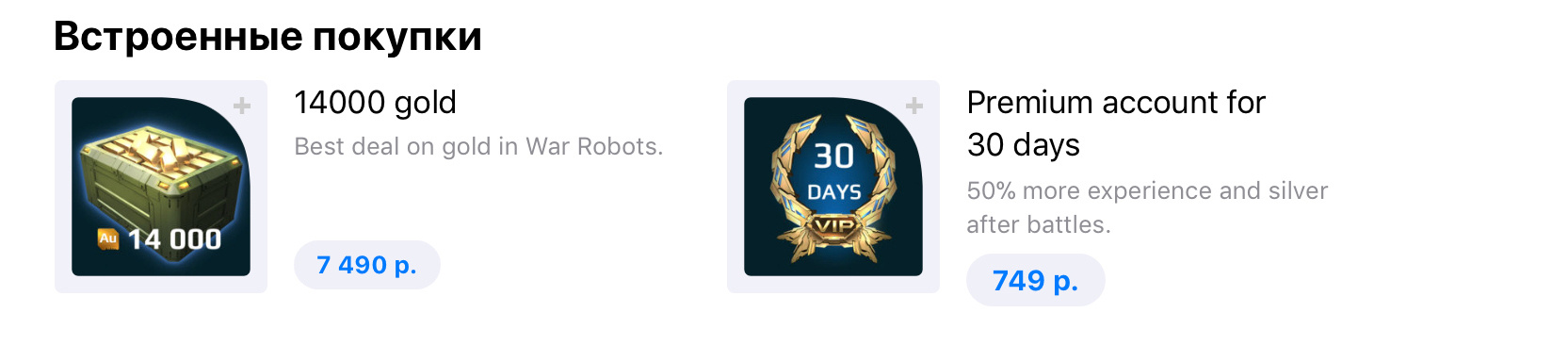
The order has changed. With this call, we have set the priority for the gold.iap.example.com product. Now it is shown first.
If we transferred several goods, they would be displayed in the order in which we transferred them. Next are the rest of the products in their default order (that is, specified in iTunes Connect). If you pass nil as the list of goods, the redefinition will be reset and all goods will return to their original position. You can get the current set order by calling:
- (void)fetchPromotionOrder
{
    if (@available(iOS 11.0, *)) {
        [[SKProductStorePromotionController defaultController] fetchStorePromotionOrderWithCompletionHandler:^(NSArray * _Nonnull storePromotionOrder, NSError * _Nullable error) {
            if(error != nil) {
                NSLog(@"Fetch store promotion order failed with error: %@", [error description]);
            } else {
                NSMutableString* productIds = [NSMutableString string];
                for (SKProduct* product in storePromotionOrder) {
                    [productIds appendString:product.productIdentifier];
                    [productIds appendString:@"; "];
                }
                NSLog(@"Got promotion order: %@", productIds);
            }
        }];
    } else {
        // Not supported
    }
}
The method will return only those goods whose order has been redefined in the order of their redefinition.
Another pair of methods available interacts with the visibility of products. By executing the following code, we redefine the visibility of the transferred item gold.iap.example.com (in these methods only one item is transferred):
- (void)productsRequest:(SKProductsRequest *)request didReceiveResponse:(SKProductsResponse *)response
{
    if (@available(iOS 11.0, *)) {
        SKProduct* product = [response.products objectAtIndex:0];
        [[SKProductStorePromotionController defaultController] updateStorePromotionVisibility:SKProductStorePromotionVisibilityHide forProduct:product completionHandler:^(NSError * _Nullable error) {
            if(error != nil) {
                NSLog(@"Update store promotion visibility failed with error: %@", [error description]);
            } else {
                NSLog(@"Success");
            }
        }];
    } else {
        // Fallback on earlier versions
    }
}
Our priority product has disappeared from the list on the store page.

Another method is to get the current installed product visibility:
- (void)productsRequest:(SKProductsRequest *)request didReceiveResponse:(SKProductsResponse *)response
{
    if (@available(iOS 11.0, *)) {
        SKProduct* product = [response.products objectAtIndex:0];
        [[SKProductStorePromotionController defaultController] fetchStorePromotionVisibilityForProduct:product completionHandler:^(SKProductStorePromotionVisibility storePromotionVisibility, NSError * _Nullable error) {
            if(error != nil) {
                NSLog(@"Fetch store promotion visibility failed with error: %@", [error description]);
            } else {
                NSLog(@"Promotion visibility %ld", (long)storePromotionVisibility);
            }
        }];
    } else {
        // Fallback on earlier versions
    }
}
Enum SKProductStorePromotionVisibility has the following available values: Show (the product is visible), Hide (the product is hidden), Default (the visibility value is taken from iTunes Connect).
Thus, the list of built-in purchases can be adjusted for each specific user as you wish. The tool is in the hands of the developer, the most important thing remains: to think over the display rules, because it is on them that the success of sales of certain built-in purchases and the income from the application as a whole depend. All this demonstrates Apple's desire to make the App Store a real place to shop, and not a trivial service for storing and searching applications.
Apple documentation link: developer.apple.com/app-store/promoting-in-app-purchases