September 7, 2017 at 12:02
V8 internal mechanisms and quick work with object properties
- Transfer
This material focuses on how the internal mechanisms of V8 work with the properties of JavaScript objects. If we consider the properties from the point of view of JavaScript, then their different types differ from each other not so much. Say, JS objects usually behave like dictionaries with string keys and arbitrary objects as values. However, if you read the language specification, you can find out, for example, that properties of different types behave differently when enumerated. In other cases, the behavior of the properties of various species basically looks the same.
It would seem that the implementation of the mechanism for working with properties, given their similarity, is not such a large-scale task, however, in the bowels of V8, several different ways of representing properties are used. This is done, firstly, to ensure high performance, and secondly - for the sake of saving memory. In this article we want to talk about how V8 achieves high performance when processing dynamically added properties of objects. Knowledge of the features of the mechanism of working with properties is necessary for understanding the essence of ways to optimize JavaScript execution in V8, such as, for example, built-in caches .

Here we’ll talk about how V8 handles named properties and properties indexed by integers. After that, we will consider the features of the functioning of hidden classes when adding new named properties to the object, which allows you to quickly identify the shape of the object. Then we continue the story about the internal mechanisms of V8, show optimizations aimed, depending on the features of using hidden properties, for quick access to them, or for their quick modification. After reviewing the last section, you will learn how V8 handles properties indexed by integers or array elements to which indexes are assigned.
Let's start by analyzing a very simple object. For example, let it be something like
The following illustration shows how a regular JavaScript object looks in memory.

Named and indexed properties
Elements and properties are stored in various data structures. This increases the efficiency of operations for adding new properties and elements and for accessing them for various templates for working with them.
Elements are mainly used for various Array.prototype methods , such as
Later we will talk about situations in which we switch to using the dictionary mechanism for storing indexed properties to save memory. In particular, we are talking about replacing sparse arrays with dictionaries.
Named properties are stored similarly in separate arrays. However, unlike elements, we cannot use keys to find out their positions in the property store. We need additional metadata. In V8, every JavaScript object has a hidden class (HiddenClass) associated with it. A hidden class stores information about the shape of the object, and, among other things, information about the correspondence of property names to indexes in the property store. For complex work scenarios, we sometimes use dictionaries to store properties, rather than simple arrays. In the corresponding section, we dwell on this in more detail.
After we figured out what the main difference between elements and named properties is, we need to take a look at how hidden classes work in V8.
Hidden classes store meta-information about objects, including the number of properties of the object and a link to its prototype. Hidden classes are conceptually similar to classes in a typical object-oriented programming language. However, in a prototype-based language, such as JavaScript, it is usually not possible to know in advance about object classes. As a result, in this case in V8, hidden classes are created, as they say, on the fly, and are dynamically updated when the object is updated.
Hidden classes serve as identifiers for the shape of an object; as a result, they are a very important part of the optimizing V8 compiler and the built-in cache mechanism. An optimizing compiler, for example, can take advantage of embedding property values in an appropriate data structure if it can guarantee the compatibility of the hidden class with the structure of objects.
Take a look at the important parts of the hidden classes.
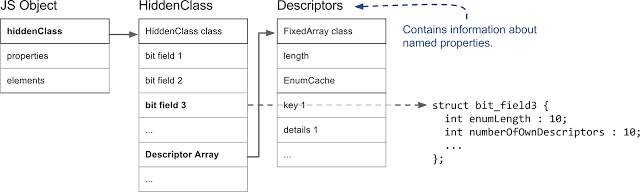
JS object, hidden class, and descriptors that contain information about named properties
In V8, the first field of a JS object points to a hidden class. (Actually, this is the case for any object that resides on the V8 heap and is managed by the garbage collector). From the point of view of working with properties, the most important is the field, indicated in the figure as
Assigning hidden classes to objects, V8 proceeds from the assumption that objects with the same structure, that is, with the same named properties in the same order, will have the same hidden class. In order to achieve this, when a new property is added to an object, a new hidden class is assigned to it. In the following example, we start with an empty object and add three named properties to it.
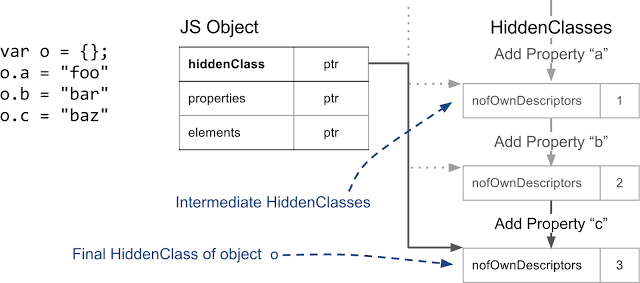
Creating intermediate hidden classes when adding named properties to an object
Each time a new property is added, the hidden class of the object changes. V8 creates a transition tree that connects hidden classes. V8 knows which hidden class to take when you add, for example, a property
The following example shows that even if simple indexable properties are added to the object, the transition tree will turn out to be the same.

Adding Named and Indexed Properties to an Object
However, if you create a new object in which some other named property is added, in this case

Building various transition trees for objects with a different set of properties
After we described how V8 uses hidden classes to support information about the shape of objects, let's talk about how named properties are actually stored. As shown above, there are two fundamental kinds of properties: named and indexed. Here we talk more about named properties.
A simple object, such as
V8 supports the so-called internal properties of objects that are stored directly in the objects themselves. These are the fastest properties used in V8, as they can be accessed without performing additional actions. The number of internal properties of an object is determined by the initial size of the object. If more properties are added than the space in the object allows, they will be placed in the property store. The property store adds an extra layer of abstraction, but its size can increase regardless of the object.

The number of properties that you work with the fastest is predetermined by the initial size of the object. Property values, which are also handled fairly quickly, are stored in a simple property array
The next thing that is important to pay attention to is the difference between “fast” and “slow” properties. We usually call “fast” properties that are stored in a linear property store. Such properties are accessed by index in the repository. In order to go from the name of a property to its position in the repository, it is necessary, as shown above, to access an array of descriptors.
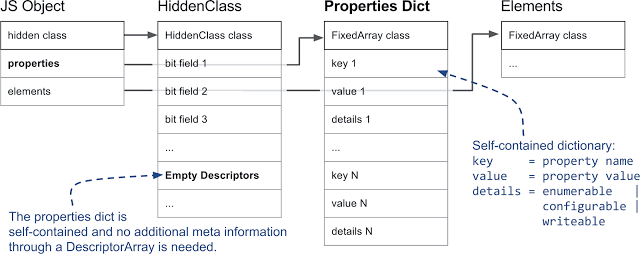
The dictionary of properties is self-sufficient, when working with it, additional meta-information from descriptor arrays is not needed
However, if there are many operations to add and remove properties of an object, supporting an array of descriptors and hidden classes may require too much additional time and memory. Therefore, V8, in addition, supports the so-called slow properties. An object with slow properties uses a self-contained dictionary as a property store. All property meta-information is no longer stored in an array of descriptors in a hidden class; instead, it is placed directly in the property dictionary. As a result, properties can be added and removed without updating the hidden class. Since the built-in caches do not work with properties that are stored in the dictionary, working with such properties is usually slower than working with “fast” properties.
So far, we talked about named properties, now it's time to deal with properties indexed by integers, which are usually used when working with arrays. Supporting such properties is no less complicated than supporting named properties. Indexed properties are always located in a separate repository of elements, however, it complicates the fact that there are 20 different types of elements!
The first major difference in how you work with array elements is whether a solid or sparse array will be used as their storage. Empty spaces, or “holes” in the repository will appear when indexed items are deleted, or, for example, if there are items that have not been defined. A simple example of an array with a “hole” is

Problems that arise when using a sparse array to store elements.
If you describe this in a nutshell, it turns out that if the property is not in the object that we are accessing, we need to go through the prototype chain. Given that the elements of arrays are self-sufficient, that is, we do not store information about existing indexed properties in a hidden class, we need a special value, which is called
The next sign by which you can separate the elements of arrays is the speed of working with them, depending on their internal representation. "Slow" items are stored in the dictionary. Work with “fast” elements is carried out using ordinary internal arrays of a virtual machine. Here, the item index is mapped to the index in the item store. However, such a simple representation of arrays is too economical for very large sparse arrays, in which only a relatively small number of cells are occupied. In such cases, we use a dictionary based array representation. This saves memory at the cost of slowing access to items:
In this example, allocating memory for an array with 10,000 entries will prove rather wasteful in terms of memory usage. Instead, V8 creates an array where view triplets are stored
In this example, we added a non-configurable element to the array. This information is stored in that part of the triplet of the slow vocabulary element that is related to the descriptor. It is important to note that object functions
In V8, fast elements are delimited by yet another feature. For example, if you store
What we talked about above allowed us to describe 7 out of 20 different types of array elements. In order not to complicate the story, we did not describe 9 types of elements for typed arrays and two more for string wrappers. In addition, we did not talk about two special kinds of elements for argument objects. They, although we mentioned them last, are no less important than other types of elements.
We think it is quite understandable that we are not very keen to rewrite in C ++ all functions for an object
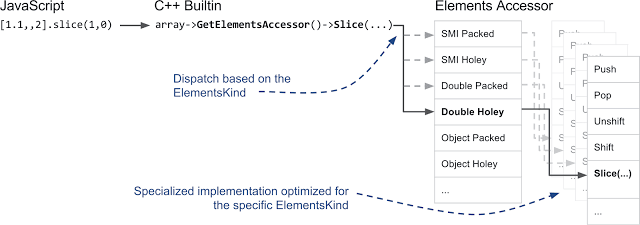
Element-based call forwarding and custom implementation optimized for a particular element view
Understanding how properties work in V8 is the key to many optimizations. JS developers do not interact directly with the mechanisms described here. However, knowing how to work with properties in V8 helps to understand why some development templates provide faster code than others. For example, changing the property type of an object or an element of an array usually leads to the fact that V8 creates a new hidden class, which can lead to "clogging" of types and prevent V8 from generating optimized code.
Dear readers! Tell me, have you encountered an incomprehensible decline in the performance of JS-code, which can be explained and corrected using this material?
It would seem that the implementation of the mechanism for working with properties, given their similarity, is not such a large-scale task, however, in the bowels of V8, several different ways of representing properties are used. This is done, firstly, to ensure high performance, and secondly - for the sake of saving memory. In this article we want to talk about how V8 achieves high performance when processing dynamically added properties of objects. Knowledge of the features of the mechanism of working with properties is necessary for understanding the essence of ways to optimize JavaScript execution in V8, such as, for example, built-in caches .
Here we’ll talk about how V8 handles named properties and properties indexed by integers. After that, we will consider the features of the functioning of hidden classes when adding new named properties to the object, which allows you to quickly identify the shape of the object. Then we continue the story about the internal mechanisms of V8, show optimizations aimed, depending on the features of using hidden properties, for quick access to them, or for their quick modification. After reviewing the last section, you will learn how V8 handles properties indexed by integers or array elements to which indexes are assigned.
Comparison of named properties and array elements
Let's start by analyzing a very simple object. For example, let it be something like
{a: "foo", b: "bar"}. This object has two named properties: aand b. This object has no integer indices for property names. Indexed properties, more commonly known as elements, are characteristic of arrays. For example, an array ["foo", "bar"]has two indexed properties: 0with a value foo, and 1with a value bar. We just described the first major difference between the implementation of representing named and indexed properties in V8. The following illustration shows how a regular JavaScript object looks in memory.
Named and indexed properties
Elements and properties are stored in various data structures. This increases the efficiency of operations for adding new properties and elements and for accessing them for various templates for working with them.
Elements are mainly used for various Array.prototype methods , such as
popor slice. Given that these functions work with properties that follow one after another, their internal representation in V8, in most cases, looks like a simple array. Later we will talk about situations in which we switch to using the dictionary mechanism for storing indexed properties to save memory. In particular, we are talking about replacing sparse arrays with dictionaries.
Named properties are stored similarly in separate arrays. However, unlike elements, we cannot use keys to find out their positions in the property store. We need additional metadata. In V8, every JavaScript object has a hidden class (HiddenClass) associated with it. A hidden class stores information about the shape of the object, and, among other things, information about the correspondence of property names to indexes in the property store. For complex work scenarios, we sometimes use dictionaries to store properties, rather than simple arrays. In the corresponding section, we dwell on this in more detail.
▍ Conclusions
- Indexed properties are stored in a separate item store.
- Named properties are stored in their own property store.
- Repositories of elements and properties can be either arrays or dictionaries.
- Each JS object has a hidden class associated with it that stores information about the shape of the object.
Hidden classes and descriptor arrays
After we figured out what the main difference between elements and named properties is, we need to take a look at how hidden classes work in V8.
Hidden classes store meta-information about objects, including the number of properties of the object and a link to its prototype. Hidden classes are conceptually similar to classes in a typical object-oriented programming language. However, in a prototype-based language, such as JavaScript, it is usually not possible to know in advance about object classes. As a result, in this case in V8, hidden classes are created, as they say, on the fly, and are dynamically updated when the object is updated.
Hidden classes serve as identifiers for the shape of an object; as a result, they are a very important part of the optimizing V8 compiler and the built-in cache mechanism. An optimizing compiler, for example, can take advantage of embedding property values in an appropriate data structure if it can guarantee the compatibility of the hidden class with the structure of objects.
Take a look at the important parts of the hidden classes.
JS object, hidden class, and descriptors that contain information about named properties
In V8, the first field of a JS object points to a hidden class. (Actually, this is the case for any object that resides on the V8 heap and is managed by the garbage collector). From the point of view of working with properties, the most important is the field, indicated in the figure as
bit field 3, which stores the number of properties and a pointer to an array of descriptors. The descriptor array contains information about named properties, in particular, the name of the property and the position where the value is stored. Please note that we do not work here with properties indexed by integers, therefore there is no corresponding entry in the descriptor array.Assigning hidden classes to objects, V8 proceeds from the assumption that objects with the same structure, that is, with the same named properties in the same order, will have the same hidden class. In order to achieve this, when a new property is added to an object, a new hidden class is assigned to it. In the following example, we start with an empty object and add three named properties to it.
Creating intermediate hidden classes when adding named properties to an object
Each time a new property is added, the hidden class of the object changes. V8 creates a transition tree that connects hidden classes. V8 knows which hidden class to take when you add, for example, a property
ato an empty object. This transition tree allows us to ensure that when objects are constructed identically, they will receive the same hidden class. The following example shows that even if simple indexable properties are added to the object, the transition tree will turn out to be the same.
Adding Named and Indexed Properties to an Object
However, if you create a new object in which some other named property is added, in this case
d, V8 will create a separate branch for the new hidden classes.Building various transition trees for objects with a different set of properties
▍ Conclusions
- Objects with the same structure (that is, with the same properties in the same order) will have the same hidden class.
- By default, each new named property added to an object creates a new hidden class.
- When adding indexed properties, the creation of new hidden classes does not occur.
Three kinds of named properties
After we described how V8 uses hidden classes to support information about the shape of objects, let's talk about how named properties are actually stored. As shown above, there are two fundamental kinds of properties: named and indexed. Here we talk more about named properties.
A simple object, such as
{a: 1, b: 2}, can have various internal representations in V8. Although it may seem that the behavior of JS objects is more or less similar to the behavior of simple dictionaries, V8 tries to avoid representing them in the form of dictionaries, as this makes it difficult to perform certain optimizations, such as built-in caching , that are worthy of a separate discussion.▍Comparison of internal and ordinary properties of objects
V8 supports the so-called internal properties of objects that are stored directly in the objects themselves. These are the fastest properties used in V8, as they can be accessed without performing additional actions. The number of internal properties of an object is determined by the initial size of the object. If more properties are added than the space in the object allows, they will be placed in the property store. The property store adds an extra layer of abstraction, but its size can increase regardless of the object.
The number of properties that you work with the fastest is predetermined by the initial size of the object. Property values, which are also handled fairly quickly, are stored in a simple property array
▍Comparison of fast and slow properties
The next thing that is important to pay attention to is the difference between “fast” and “slow” properties. We usually call “fast” properties that are stored in a linear property store. Such properties are accessed by index in the repository. In order to go from the name of a property to its position in the repository, it is necessary, as shown above, to access an array of descriptors.
The dictionary of properties is self-sufficient, when working with it, additional meta-information from descriptor arrays is not needed
However, if there are many operations to add and remove properties of an object, supporting an array of descriptors and hidden classes may require too much additional time and memory. Therefore, V8, in addition, supports the so-called slow properties. An object with slow properties uses a self-contained dictionary as a property store. All property meta-information is no longer stored in an array of descriptors in a hidden class; instead, it is placed directly in the property dictionary. As a result, properties can be added and removed without updating the hidden class. Since the built-in caches do not work with properties that are stored in the dictionary, working with such properties is usually slower than working with “fast” properties.
▍ Conclusions
- There are three types of named properties: internal properties of an object, fast properties, and slow (dictionary) properties.
- The internal properties of the object are stored directly in the object, work with them is carried out most quickly.
- Quick properties are placed in the property store, their meta-information is stored in an array of descriptors in a hidden class.
- Slow properties are stored in a self-contained property dictionary; their meta-information is no longer stored in other structures of the hidden class.
- Slow properties allow efficient operations to add and remove properties, but access to them is not as fast as to properties of other types.
Elements or Indexed Properties
So far, we talked about named properties, now it's time to deal with properties indexed by integers, which are usually used when working with arrays. Supporting such properties is no less complicated than supporting named properties. Indexed properties are always located in a separate repository of elements, however, it complicates the fact that there are 20 different types of elements!
▍Solid and sparse arrays of elements
The first major difference in how you work with array elements is whether a solid or sparse array will be used as their storage. Empty spaces, or “holes” in the repository will appear when indexed items are deleted, or, for example, if there are items that have not been defined. A simple example of an array with a “hole” is
[1,,3]. In this case, the array does not have a second element. The following example illustrates this problem:const o = ["a", "b", "c"];
console.log(o[1]); // Вывод "b".
delete o[1]; // В хранилище элементов оказывается «дырка».
console.log(o[1]); // Вывод "undefined"; свойство 1 не существует.
o.__proto__ = {1: "B"}; // Определяем свойство 1 в прототипе.
console.log(o[0]); // Вывод "a".
console.log(o[1]); // Вывод "B".
console.log(o[2]); // Вывод "c".
console.log(o[3]); // Вывод undefinedProblems that arise when using a sparse array to store elements.
If you describe this in a nutshell, it turns out that if the property is not in the object that we are accessing, we need to go through the prototype chain. Given that the elements of arrays are self-sufficient, that is, we do not store information about existing indexed properties in a hidden class, we need a special value, which is called
the_hole, which marks non-existent values. This has a very bad effect on the performance of object functions Array. If we know that there are no “holes” in the repository, that is, the element repository does not contain information about missing values in the array, we can perform local operations without the need for a slow search in the prototype chain.▍Quick and vocabulary elements
The next sign by which you can separate the elements of arrays is the speed of working with them, depending on their internal representation. "Slow" items are stored in the dictionary. Work with “fast” elements is carried out using ordinary internal arrays of a virtual machine. Here, the item index is mapped to the index in the item store. However, such a simple representation of arrays is too economical for very large sparse arrays, in which only a relatively small number of cells are occupied. In such cases, we use a dictionary based array representation. This saves memory at the cost of slowing access to items:
const sparseArray = [];
sparseArray[9999] = "foo"; // Создание массива, элементы которого хранятся в словаре
In this example, allocating memory for an array with 10,000 entries will prove rather wasteful in terms of memory usage. Instead, V8 creates an array where view triplets are stored
ключ-значение-дескриптор. The key in this case will be 9999, the value is the foostandard descriptor. In addition, it should be noted that given that we don’t have a way to store descriptor details in a hidden class, V8 goes on to use the slow way to store elements whenever we set indexed properties with our own descriptor:const array = [];
Object.defineProperty(array, 0, {value: "fixed", configurable: false});
console.log(array[0]); // Вывод "fixed".
array[0] = "other value"; // Невозможно переопределить элемент с индексом 0.
console.log(array[0]); // Снова выводится "fixed".In this example, we added a non-configurable element to the array. This information is stored in that part of the triplet of the slow vocabulary element that is related to the descriptor. It is important to note that object functions
Arraywork much slower with arrays whose elements are stored in dictionaries.▍ Smi and Double Elements
In V8, fast elements are delimited by yet another feature. For example, if you store
Arrayonly integers in an object of the type , and this happens often, the garbage collector does not need to parse the array, since integers are directly encoded into so-called small integers (small integer, smi). Another special case is arrays that contain only double precision numbers. Unlike small integers, floating point numbers are usually represented as an integer object, occupying a few words. However, V8 stores the usual double-precision numbers in the form of arrays of the type Doublein order to avoid unnecessary memory load and not to occupy the computer with unnecessary calculations. The following example shows four options for arrays with Smi and Double elements:const a1 = [1, 2, 3]; // Smi, сплошной массив
const a2 = [1, , 3]; // Smi, разреженный массив, нужно проверить существование элемента a2[1] в прототипе
const b1 = [1.1, 2, 3]; // Double, сплошной массив
const b2 = [1.1, , 3]; // Double, разреженный массив, нужно проверить существование элемента b2[1] в прототипе▍ Some other kinds of elements
What we talked about above allowed us to describe 7 out of 20 different types of array elements. In order not to complicate the story, we did not describe 9 types of elements for typed arrays and two more for string wrappers. In addition, we did not talk about two special kinds of elements for argument objects. They, although we mentioned them last, are no less important than other types of elements.
▍ElementAccessor
We think it is quite understandable that we are not very keen to rewrite in C ++ all functions for an object
Array20 times - according to the number of types of elements. This is where some of the special features of C ++ appear. Instead of creating many functions for the object Array, we created ElementAccessorwhere we, mainly, need to implement only simple functions that access the elements from the store. ElementAccessoruses the CRTP technique to create specialized versions of functions for an object Array. Therefore, if you call something like a method for an array slice, the built-in mechanism written in C ++ is activated in V8 and the transition is made through a ElementAccessorspecialized version of the function:Element-based call forwarding and custom implementation optimized for a particular element view
▍ Conclusions
- There are fast, array-based, and slower, dictionary-based, indexed properties.
- Quick properties can be represented by solid arrays, or, when deleting elements, by sparse arrays.
- Elements are specialized in content to speed up object functions
Arrayand reduce the load on the system that the garbage collector creates.
Summary
Understanding how properties work in V8 is the key to many optimizations. JS developers do not interact directly with the mechanisms described here. However, knowing how to work with properties in V8 helps to understand why some development templates provide faster code than others. For example, changing the property type of an object or an element of an array usually leads to the fact that V8 creates a new hidden class, which can lead to "clogging" of types and prevent V8 from generating optimized code.
Dear readers! Tell me, have you encountered an incomprehensible decline in the performance of JS-code, which can be explained and corrected using this material?