 September 1, 2017 at 11:05
1 September is the day of knowledge. Learn everything you need about neural networks
Friends!
We congratulate all our subscribers on the day of knowledge and wish that there is more knowledge, their acquisition is interesting, and the knowledge itself is more useful.
To bring these wishes to life, we offer you a video of the course “ One-day immersion in neural networks ”, which we conducted in the summer as part of the closed school DevCon . This course will allow you to plunge into the topic of neural networks in a few hours and learn how to use them for image recognition, speech synthesis and other interesting tasks from scratch. For successful mastering of the course, the ability to program in Python and basic knowledge of mathematics will be useful. Course materials and practice papers are available on GitHub .

The materials presented consist of two main parts: videos (recording intense) and lectures (with examples) and assignments in Azure Notebooks . Therefore, we recommend that you open the video in one window, and lectures or assignments in another, in order to simultaneously independently verify all the demonstrated examples.
Azure Notebooks is a Jupyter- based technology that allows you to combine natural language text and code in a single programming language in a single document. To work with Azure Notebooks you will need a Microsoft Account - if you do not have one, create a new mailbox for yourself on Outlook.com .
The final example of training a neural network to recognize cats or dogs is best done on a virtual machine with a GPU, otherwise it will take too long. You can create such a machine in the Microsoft Azure cloud if you have a subscription (just keep in mind that with a free Azure Trial subscription it is not always possible to create a machine with a GPU).
It is very important in the process of watching the video to try examples in parallel, and after watching the course - come up with some kind of task to consolidate knowledge. Since the materials are not an online course (we haven’t gotten our hands on it yet), we cannot check your work or your knowledge. But we strongly recommend not to watch the video “just like that”, as this may turn out to be wasted time. Running and trying the examples is easy!
To get started, go to the course material library on Azure Notebooks and click the Clone button. Thus, you will receive your copy of all materials, and you will be able to make changes to the code on the fly and see what happens. Open the library in a separate window, and start watching the video.
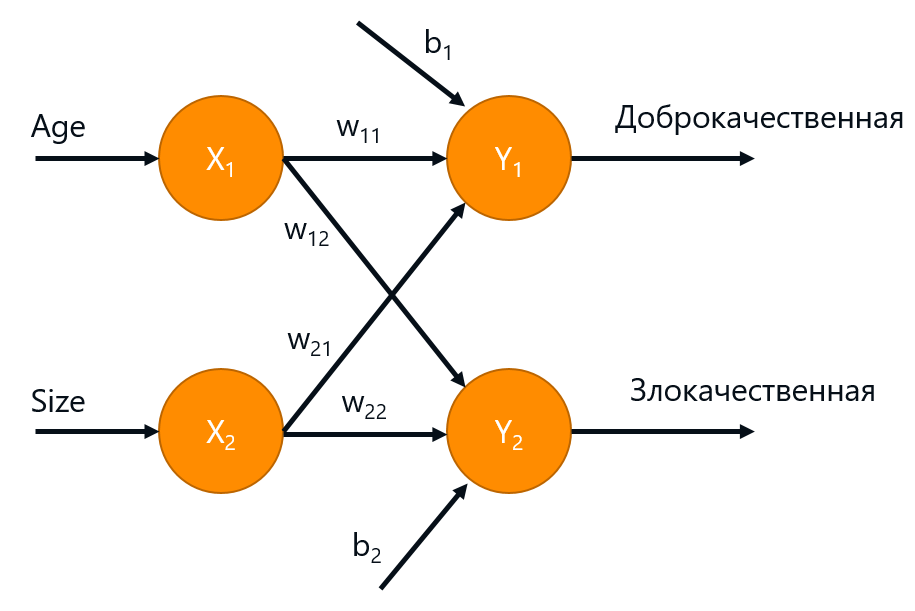
CNTK-type neural network frameworks allow us to set up a network configuration in the form of a “computation graph”, essentially writing this formula:
After that, the framework allows us to apply one of the training algorithms, adjusting the weights of the matrix W so that the neural network begins to work better on the training sample. Moreover, according to the given formula, the framework takes on all the difficulties in calculating the derivatives necessary for the error propagation method to work.
Similarly, we can specify configurations for more complex networks, for example, for a two-layer network with a hidden layer:
Using a higher-level syntax, the same thing can be written more compactly as a composition of layers:
This part also discusses important issues about retraining networks, and how to choose the “capacity” of a network depending on the amount of training data in such a way as to avoid retraining.
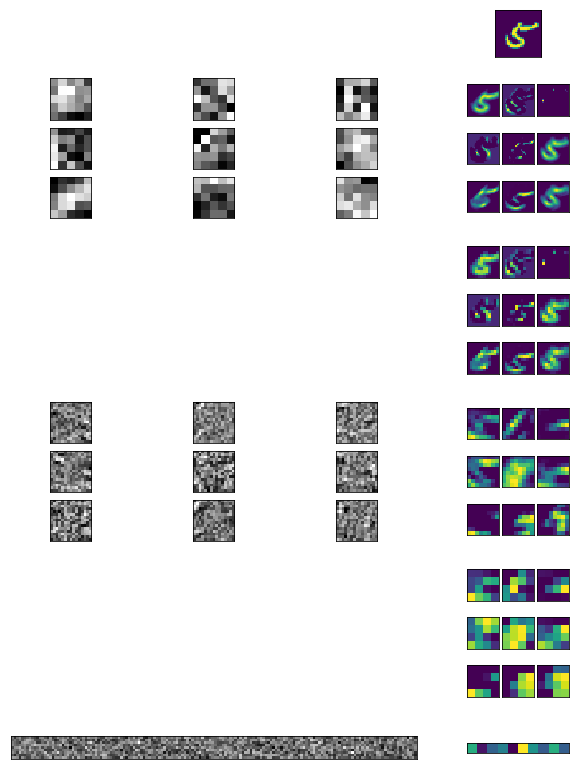
For example, in convolutional neural networks (CNN) used for image analysis, a small window running through the image (3x3 or 5x5) is used, which seems to be fed to the input of a small neural network that selects important features from the image fragment. From these signs, an “image” of the next layer is obtained, which is processed in a similar way - while this layer is responsible for the signs of a higher level. By combining in this way a multitude (tens and hundreds) of layers, we get networks capable of recognizing objects in an image with an accuracy not much inferior to human. Here, for example, how a multilayer convolution network sees the number 5:
In the second half of the video, Andrey Ustyuzhanin, Project Manager at Yandex-CERN and Lambda HSE Lab, talks about some techniques for building more complex neural network configurations for specific tasks, as well as optimization techniques for teaching deep networks, without which it is impossible to significantly increase the number of layers and parameters.
Here, for example, what texts the neural network generates from the example we are considering after 3 minutes of training on the texts of the English-language Wikipedia:
I hope we inspired you to learn about neural networks! After viewing the course, it's time to come up with some kind of task or project: for example, make a generator of poems or pseudo-scientific articles, or analyze what photographs people are present with their eyes closed. The main thing is to try to put knowledge into practice!
You can train simple networks directly in Azure Notebooks, use the Data Science Virtual Machine in the Azure cloud, or install CNTK on your computer . More information about CNTK is available at http://cntk.ai , including training model examples .
I wish all readers a warm autumn and will be happy to answer all your questions in the comments!
We congratulate all our subscribers on the day of knowledge and wish that there is more knowledge, their acquisition is interesting, and the knowledge itself is more useful.
To bring these wishes to life, we offer you a video of the course “ One-day immersion in neural networks ”, which we conducted in the summer as part of the closed school DevCon . This course will allow you to plunge into the topic of neural networks in a few hours and learn how to use them for image recognition, speech synthesis and other interesting tasks from scratch. For successful mastering of the course, the ability to program in Python and basic knowledge of mathematics will be useful. Course materials and practice papers are available on GitHub .
Alert: These videos are a recording of the intensity, mainly aimed at the audience present in the room. Therefore, the videos are somewhat less dynamic than in online courses, and longer, not cut into thematic fragments. Nevertheless, many viewers found them very useful for themselves, so we decided to share with a wide audience. I hope that the opportunity to learn something new causes you the same genuine joy as my daughter in the photo.
What is required
The materials presented consist of two main parts: videos (recording intense) and lectures (with examples) and assignments in Azure Notebooks . Therefore, we recommend that you open the video in one window, and lectures or assignments in another, in order to simultaneously independently verify all the demonstrated examples.
Azure Notebooks is a Jupyter- based technology that allows you to combine natural language text and code in a single programming language in a single document. To work with Azure Notebooks you will need a Microsoft Account - if you do not have one, create a new mailbox for yourself on Outlook.com .
The final example of training a neural network to recognize cats or dogs is best done on a virtual machine with a GPU, otherwise it will take too long. You can create such a machine in the Microsoft Azure cloud if you have a subscription (just keep in mind that with a free Azure Trial subscription it is not always possible to create a machine with a GPU).
Beginning of work
It is very important in the process of watching the video to try examples in parallel, and after watching the course - come up with some kind of task to consolidate knowledge. Since the materials are not an online course (we haven’t gotten our hands on it yet), we cannot check your work or your knowledge. But we strongly recommend not to watch the video “just like that”, as this may turn out to be wasted time. Running and trying the examples is easy!
To get started, go to the course material library on Azure Notebooks and click the Clone button. Thus, you will receive your copy of all materials, and you will be able to make changes to the code on the fly and see what happens. Open the library in a separate window, and start watching the video.
Video
Part I
[0:00] Introduction to artificial intelligence in general, cognitive services, Bot Framework, Azure Machine Learning. This is not directly related to neural networks, but is useful for overall development.For those who can’t wait to get down to business immediately, I recommend watching from 1:10, where we begin to use the Cognitive Toolkit to implement a simple classification task. The main idea is as follows: the neural network, which is schematically depicted in the figure below, can be mathematically represented as the product of the weight matrix W by the input values x, taking into account the shift b: y = Wx + b.
[0:27] Introduction to Azure Notebooks and basic Python features that will be important to us.
[0:48] A single-layer perceptron and the implementation of a simple “manually” neural network.
[1:10] Implementation of the simplest neural network on the Microsoft Cognitive Toolkit (CNTK). Error back propagation algorithm.
[1:48] Laboratory work: classification of irises.
[2:27] Lab: Recognizing handwritten numbers.
CNTK-type neural network frameworks allow us to set up a network configuration in the form of a “computation graph”, essentially writing this formula:
features = input_variable(input_dim, np.float32)
label = input_variable(output_dim, np.float32)
W = parameter(shape=(input_dim, output_dim))
b = parameter(shape=(output_dim))
z = times(features,W)+b
After that, the framework allows us to apply one of the training algorithms, adjusting the weights of the matrix W so that the neural network begins to work better on the training sample. Moreover, according to the given formula, the framework takes on all the difficulties in calculating the derivatives necessary for the error propagation method to work.
Similarly, we can specify configurations for more complex networks, for example, for a two-layer network with a hidden layer:
hidden_dim = 5
W1 = parameter(shape=(input_dim, hidden_dim),init=cntk.uniform(1))
b1 = parameter(shape=(hidden_dim),init=cntk.uniform(1))
y = cntk.sigmoid(times(features,W1)+b1)
W2 = parameter(shape=(hidden_dim, output_dim),init=cntk.uniform(1))
b2 = parameter(shape=(output_dim),init=cntk.uniform(1))
z = times(y,W2)+b2
Using a higher-level syntax, the same thing can be written more compactly as a composition of layers:
z = Sequential([
    Dense(hidden_dim,init=glorot_uniform(),activation=sigmoid),
    Dense(output_dim,init=glorot_uniform(),activation=None)
])(features)
This part also discusses important issues about retraining networks, and how to choose the “capacity” of a network depending on the amount of training data in such a way as to avoid retraining.
Part II
[0:00] Handwriting recognition.The main idea of this part is to tell how more complex neural network architectures can be assembled from basic blocks (neural layers, activation functions, etc.) to solve specific problems, using an example of image analysis. Toolkits (such as the Cognitive Toolkit / CNTK, Tensorflow, Caffe, etc.) provide basic functional blocks that can then be combined with each other.
[0:04] Convolutional neural networks for image recognition.
[0:49] Lab: improving recognition accuracy using the convolution network.
[1:07] Subtleties of training: batch normalization, dropout, etc. Sophisticated network architectures for specific tasks. Auto Encoders The use of neural networks in real projects.
For example, in convolutional neural networks (CNN) used for image analysis, a small window running through the image (3x3 or 5x5) is used, which seems to be fed to the input of a small neural network that selects important features from the image fragment. From these signs, an “image” of the next layer is obtained, which is processed in a similar way - while this layer is responsible for the signs of a higher level. By combining in this way a multitude (tens and hundreds) of layers, we get networks capable of recognizing objects in an image with an accuracy not much inferior to human. Here, for example, how a multilayer convolution network sees the number 5:
In the second half of the video, Andrey Ustyuzhanin, Project Manager at Yandex-CERN and Lambda HSE Lab, talks about some techniques for building more complex neural network configurations for specific tasks, as well as optimization techniques for teaching deep networks, without which it is impossible to significantly increase the number of layers and parameters.
Part III
[0:00] Recursive neural networks.The most important thing in this section is the recurrent neural networks, which are described by Mikhail Burtsev, head of the MIPT deep learning laboratory. This is such a network architecture in which the network output is fed to it as input. This allows you to analyze sequences of variable length - for example, one letter of a text or one word of a sentence is processed in one pass, while the "meaning" is stored in a "state" transmitted recursively. Based on this approach, machine translation systems, text generators, time series forecasting systems, etc.
[1:09] Training neural networks in the Microsoft Azure cloud through Azure Batch.
[1:36] Recognition of images of “cats against dogs” and answers to questions.
Here, for example, what texts the neural network generates from the example we are considering after 3 minutes of training on the texts of the English-language Wikipedia:
used to the allow do one nine two city feature of demaware boake associet ofte
rinoming have of the landization to stares as decudith vellant turking or a to t
jectional ray storemy to one or countries a russiarnawe it and sentio edaph lawe
t of while artell out prodication american scot their and statesly processed for
zer to a revereing time in the music follows two two one kelanish liter
Instead of a conclusion
I hope we inspired you to learn about neural networks! After viewing the course, it's time to come up with some kind of task or project: for example, make a generator of poems or pseudo-scientific articles, or analyze what photographs people are present with their eyes closed. The main thing is to try to put knowledge into practice!
You can train simple networks directly in Azure Notebooks, use the Data Science Virtual Machine in the Azure cloud, or install CNTK on your computer . More information about CNTK is available at http://cntk.ai , including training model examples .
I wish all readers a warm autumn and will be happy to answer all your questions in the comments!









