Back to Home

Zabbix: LLD Monitoring FlexLM Services (UPDATED)

This article is a more detailed study of the previous one. Now the template is unified for use in both Windows (PowerShell) and Linux (Bash). If you used the previous template · then all ...

Zabbix: LLD Monitoring FlexLM Services (UPDATED)

    image

    This article is a more detailed study of the previous one . Now the template is unified for use in both Windows (PowerShell) and Linux (Bash). If you used the previous template, then everything should stand up.

    What it can do: find servers / licenses, read server statuses, read the total and used number of licenses, in case of errors, transmit status codes (description line) and report about them.

    The scheme is still the same:

    • Template
    • Scripts (PowerShell / Bash)
    • Proper agent setup


    Template


    Everything is simple here: imported and forgot. The template was designed in Zabbix version 3.2, keep this in mind.

    As last time, for readability, the macros of the construction {$ {# ID}} in the names of elements and triggers are used. The template already contains a number of macros, you just add your transforms based on the elements found.

    Also inside there are already several basic triggers for monitoring the status of servers and individual licenses.

    Template
    <? xml version = " 1.0 " encoding = " UTF-8 " ?>
    <zabbix_export>
    <version>3.2</version>
    <date>2017-08-27T16:36:39Z</date>
    <groups>
    <group>
    <name>Templates</name>
    </group>
    </groups>
    <templates>
    <template>
    <template>Software - FlexLm</template>
    <name>Software - FlexLm</name>
    <description>Шаблон для систем лицензирования FlexLm.&#13;
    Обнаруживает службы, доступное и выданное количество лицензий.&#13;
    &#13;
    UserParameter:&#13;
    UserParameter=ZScript[*],powershell C:\System\Zabbix\Scripts\$1.ps1 $2 $3&#13;
    UserParameter=ZScript[*],bash /etc/zabbix/scripts/$1.sh $2 $3&#13;
    &#13;
    Необходимые скрипты:&#13;
    flex.ps1 -&gt; C:\System\Zabbix\Scripts\&#13;
    flex.sh -&gt; /etc/zabbix/scripts/&#13;
    &#13;
    Дополнительно для Windows:&#13;
    Необходимо прописать системные переменные среды (Path) до lmutil.exe.&#13;
    Пример: C:\Program Files (x86)\CSoft\CS License Server&#13;
    &#13;
    Дополнительно для Linux:&#13;
    Дать права на исполнение flex.sh</description>
    <groups>
    <group>
    <name>Templates</name>
    </group>
    </groups>
    <applications>
    <application>
    <name>FlexLm</name>
    </application>
    </applications>
    <items/>
    <discovery_rules>
    <discovery_rule>
    <name>Обнаружение серверов</name>
    <type>0</type>
    <snmp_community/>
    <snmp_oid/>
    <key>ZScript[flex,discovery2]</key>
    <delay>3600</delay>
    <status>0</status>
    <allowed_hosts/>
    <snmpv3_contextname/>
    <snmpv3_securityname/>
    <snmpv3_securitylevel>0</snmpv3_securitylevel>
    <snmpv3_authprotocol>0</snmpv3_authprotocol>
    <snmpv3_authpassphrase/>
    <snmpv3_privprotocol>0</snmpv3_privprotocol>
    <snmpv3_privpassphrase/>
    <delay_flex/>
    <params/>
    <ipmi_sensor/>
    <authtype>0</authtype>
    <username/>
    <password/>
    <publickey/>
    <privatekey/>
    <port/>
    <filter>
    <evaltype>0</evaltype>
    <formula/>
    <conditions/>
    </filter>
    <lifetime>7</lifetime>
    <description/>
    <item_prototypes>
    <item_prototype>
    <name>Статус сервера {${#ID}}</name>
    <type>0</type>
    <snmp_community/>
    <multiplier>0</multiplier>
    <snmp_oid/>
    <key>ZScript[flex,{#ID},status]</key>
    <delay>60</delay>
    <history>90</history>
    <trends>0</trends>
    <status>0</status>
    <value_type>1</value_type>
    <allowed_hosts/>
    <units/>
    <delta>0</delta>
    <snmpv3_contextname/>
    <snmpv3_securityname/>
    <snmpv3_securitylevel>0</snmpv3_securitylevel>
    <snmpv3_authprotocol>0</snmpv3_authprotocol>
    <snmpv3_authpassphrase/>
    <snmpv3_privprotocol>0</snmpv3_privprotocol>
    <snmpv3_privpassphrase/>
    <formula>1</formula>
    <delay_flex/>
    <params/>
    <ipmi_sensor/>
    <data_type>0</data_type>
    <authtype>0</authtype>
    <username/>
    <password/>
    <publickey/>
    <privatekey/>
    <port/>
    <description/>
    <inventory_link>0</inventory_link>
    <applications>
    <application>
    <name>FlexLm</name>
    </application>
    </applications>
    <valuemap/>
    <logtimefmt/>
    <application_prototypes/>
    </item_prototype>
    </item_prototypes>
    <trigger_prototypes>
    <trigger_prototype>
    <expression>{Software - FlexLm:ZScript[flex,{#ID},status].regexp(^UP.*)}&lt;&gt;1</expression>
    <recovery_mode>0</recovery_mode>
    <recovery_expression/>
    <name>FLEXLM-сервер {${#ID}} упал на {HOST.NAME}</name>
    <correlation_mode>0</correlation_mode>
    <correlation_tag/>
    <url/>
    <status>0</status>
    <priority>3</priority>
    <description/>
    <type>0</type>
    <manual_close>0</manual_close>
    <dependencies/>
    <tags/>
    </trigger_prototype>
    </trigger_prototypes>
    <graph_prototypes/>
    <host_prototypes/>
    </discovery_rule>
    <discovery_rule>
    <name>Обнаружение лицензий</name>
    <type>0</type>
    <snmp_community/>
    <snmp_oid/>
    <key>ZScript[flex,discovery]</key>
    <delay>3600</delay>
    <status>0</status>
    <allowed_hosts/>
    <snmpv3_contextname/>
    <snmpv3_securityname/>
    <snmpv3_securitylevel>0</snmpv3_securitylevel>
    <snmpv3_authprotocol>0</snmpv3_authprotocol>
    <snmpv3_authpassphrase/>
    <snmpv3_privprotocol>0</snmpv3_privprotocol>
    <snmpv3_privpassphrase/>
    <delay_flex/>
    <params/>
    <ipmi_sensor/>
    <authtype>0</authtype>
    <username/>
    <password/>
    <publickey/>
    <privatekey/>
    <port/>
    <filter>
    <evaltype>0</evaltype>
    <formula/>
    <conditions/>
    </filter>
    <lifetime>7</lifetime>
    <description/>
    <item_prototypes>
    <item_prototype>
    <name>{${#ID}} - Использовано</name>
    <type>0</type>
    <snmp_community/>
    <multiplier>0</multiplier>
    <snmp_oid/>
    <key>ZScript[flex,{#ID},active]</key>
    <delay>60</delay>
    <history>30</history>
    <trends>90</trends>
    <status>0</status>
    <value_type>0</value_type>
    <allowed_hosts/>
    <units/>
    <delta>0</delta>
    <snmpv3_contextname/>
    <snmpv3_securityname/>
    <snmpv3_securitylevel>0</snmpv3_securitylevel>
    <snmpv3_authprotocol>0</snmpv3_authprotocol>
    <snmpv3_authpassphrase/>
    <snmpv3_privprotocol>0</snmpv3_privprotocol>
    <snmpv3_privpassphrase/>
    <formula>1</formula>
    <delay_flex/>
    <params/>
    <ipmi_sensor/>
    <data_type>0</data_type>
    <authtype>0</authtype>
    <username/>
    <password/>
    <publickey/>
    <privatekey/>
    <port/>
    <description/>
    <inventory_link>0</inventory_link>
    <applications>
    <application>
    <name>FlexLm</name>
    </application>
    </applications>
    <valuemap/>
    <logtimefmt/>
    <application_prototypes/>
    </item_prototype>
    <item_prototype>
    <name>{${#ID}} - Всего</name>
    <type>0</type>
    <snmp_community/>
    <multiplier>0</multiplier>
    <snmp_oid/>
    <key>ZScript[flex,{#ID},total]</key>
    <delay>1800</delay>
    <history>30</history>
    <trends>90</trends>
    <status>0</status>
    <value_type>0</value_type>
    <allowed_hosts/>
    <units/>
    <delta>0</delta>
    <snmpv3_contextname/>
    <snmpv3_securityname/>
    <snmpv3_securitylevel>0</snmpv3_securitylevel>
    <snmpv3_authprotocol>0</snmpv3_authprotocol>
    <snmpv3_authpassphrase/>
    <snmpv3_privprotocol>0</snmpv3_privprotocol>
    <snmpv3_privpassphrase/>
    <formula>1</formula>
    <delay_flex/>
    <params/>
    <ipmi_sensor/>
    <data_type>0</data_type>
    <authtype>0</authtype>
    <username/>
    <password/>
    <publickey/>
    <privatekey/>
    <port/>
    <description/>
    <inventory_link>0</inventory_link>
    <applications>
    <application>
    <name>FlexLm</name>
    </application>
    </applications>
    <valuemap/>
    <logtimefmt/>
    <application_prototypes/>
    </item_prototype>
    </item_prototypes>
    <trigger_prototypes>
    <trigger_prototype>
    <expression>{Software - FlexLm:ZScript[flex,{#ID},active].last()}&lt;0</expression>
    <recovery_mode>0</recovery_mode>
    <recovery_expression/>
    <name>Проблема с лицензией {${#ID}} на {HOST.NAME}</name>
    <correlation_mode>0</correlation_mode>
    <correlation_tag/>
    <url/>
    <status>0</status>
    <priority>3</priority>
    <description/>
    <type>0</type>
    <manual_close>0</manual_close>
    <dependencies/>
    <tags/>
    </trigger_prototype>
    </trigger_prototypes>
    <graph_prototypes/>
    <host_prototypes/>
    </discovery_rule>
    </discovery_rules>
    <httptests/>
    <macros>
    <macro>
    <macro>{$ACD_2006_0F}</macro>
    <value>AutoCAD 2013</value>
    </macro>
    <macro>
    <macro>{$ACD_2013_0F}</macro>
    <value>AutoCAD 2006</value>
    </macro>
    <macro>
    <macro>{$ADSKFLEX}</macro>
    <value>Autodesk</value>
    </macro>
    <macro>
    <macro>{$CSOFT}</macro>
    <value>CSoft</value>
    </macro>
    <macro>
    <macro>{$NANOCONSTRSUITE}</macro>
    <value>NanoCAD Конструкции</value>
    </macro>
    <macro>
    <macro>{$NANOCONSTRSUITE_FOUND}</macro>
    <value>NanoCAD Конструкции (Фундамент)</value>
    </macro>
    <macro>
    <macro>{$NANOCONSTRSUITE_RFCONCR}</macro>
    <value>NanoCAD Конструкции (КЖ)</value>
    </macro>
    <macro>
    <macro>{$NANOELS}</macro>
    <value>NanoCAD Электро</value>
    </macro>
    <macro>
    <macro>{$NANOSOFT}</macro>
    <value>NanoSoft</value>
    </macro>
    <macro>
    <macro>{$SPDS}</macro>
    <value>СДПС Graphics</value>
    </macro>
    </macros>
    <templates/>
    <screens/>
    </template>
    </templates>
    </zabbix_export>


    Script for windows


    The script for Windows was written under Windows 7 SP1 on PSv4, it does not work on XP . Of course, the server should be allowed to run PowerShell scripts ( Set-ExecutionPolicy Unrestricted ).

    flex.ps1
    # 2017/08/24 AcidVenom v3
    # Скрипт для обнаружения защиты FlexLm для Zabbix
    param($1,$2)
    # Автообнаружение лицензий FlexLm
    # Ключ: discovery
    if ($1-eq"discovery") {
    $items= lmutil lmstat -a |? {$_-match"Users of "}
    if ($items-eq$null) {exit}
    else {
    write-host-NoNewline "{`"data`":["
    $n=0
    foreach ($objin$items) {
    $n=$n+1
    $obj=$obj.trimstart("Users of ")
    $obj=$obj.substring(0,$obj.IndexOf(":")).ToUpper()
    $line="{`"{#ID}`":`""+$obj+"`"}"
    If ($n-lt$items.Count) { $line="$line,"}
    write-host-NoNewline $line
    }
    write-host-NoNewline "]}"
    }
    }
    # Автообнарежение установленных сернверов FlexLm
    # Ключ: discovery2
    elseif ($1-eq"discovery2") {
    $items= lmutil lmstat -vg |? {$_-match"^\s"-and$_-notmatch"status"-and$_-notmatch"license"}
    if ($items-eq$null) {exit}
    else {
    write-host-NoNewline "{`"data`":["
    $n=0
    foreach ($objin$items) {
    $n=$n+1
    $obj=$obj.substring(0,$obj.IndexOf(":")).trim( ).ToUpper()
    $line="{`"{#ID}`":`""+$obj+"`"}"
    If ($n-lt$items.Count) { $line="$line,"}
    write-host-NoNewline $line
    }}
    write-host-NoNewline "]}"
    }
    # Запрос количества лицензий и статус сервера
    # Ключи: от discovery
    else {
    if ($2-eq"status") {
    $out= lmutil lmstat -vg
    $error=$out-match"license server UP"
    if ($error-ne$False) {
    $obj=$out-match"$1`:"
    $obj=$obj.trim( )
    $obj=$obj.substring($obj.IndexOf(":")+2,$obj.Length-$obj.IndexOf(":")-2)
    }
    else {
    $obj=$out-match"Error"
    $obj=$obj.substring($obj.IndexOf(":")+2,$obj.Length-$obj.IndexOf(":")-2)
    }
    }
    else {
    $out= lmutil lmstat -a |? {$_-match"Users of $1`:"}
    $error=$out-match"Error"
    if ($error-eq$False) {
    if ($2-eq"active") {
    $obj=$out.substring($out.LastIndexOf("Total of")+9,$out.LastIndexOf("license")-$out.LastIndexOf("Total of")-9)
    }
    elseif ($2-eq"total") {
    $obj=$out.substring($out.IndexOf("Total of")+9,$out.IndexOf("license")-$out.IndexOf("Total of")-9)
    }
    }
    else {
    $obj=-1
    }
    }
    Write-Output$obj
    }
    view rawflex.ps1 hosted with ❤ by GitHub


    The performance of the licensing server is taken from the lmutil.exe utility , which is included in the distributions of different vendors. For the script to work properly, it is necessary to register the path to it in the system environment variables in the Path variable without quotes. For example, the default folder for CSoft v11.5 is “ C: \ Program Files (x86) \ CSoft \ CS License Server ”, and for Autodesk v11.13.1 it is “ C: \ Autodesk \ Network License Manager ”. Use the ";" sign as a separator.

    If you are using an Autodesk license server, then look at the feature under the spoiler.
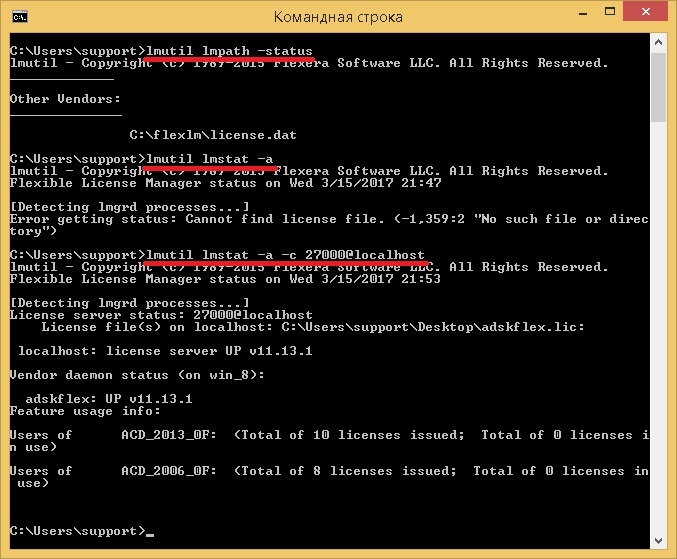
    Spoiler
    С этим разработчиком оказалось не все так просто. «Из коробки» lmutil отдает ошибку -1,359. Хотя если указать порт@хост, то все нормально.


    Связано такое поведение скорее всего с тем, что в старших версиях FLEXlm lmutil сопоставляет пути переменных LM_LICENSE_FILE и VENDOR_LICENSE_FILE. Пути эти стандартные и по умолчанию не существуют.

    Для решения достаточно взять lmutil.exe версии 11.5 из произвольного пакета (CSoft/Nanosoft). Или выполнить на хосте команду вида

    lmutil lmpath -override all «путь_к_файлу_вашей_лицензии»


    Аналогичным образом можно использовать команду

    lmutil lmpath -add «произвольное_имя_вендора» «путь_к_файлу_вашей_лицензии»

    Команды эти нужно выполнить от имени системной учетной записи, иначе Zabbix-агент так и не сможет работать с утилитой. Сделать это можно с помощью утилиты PsExec с ключом -s: psexec -s cmd и в открывшее окно командной строки внести нужные команды.

    Подробнее об этих и других командах вы можете узнать из инструкции по лицензированию, рекомендую к прочтению при дебаге.

    Script for linux


    And this script was written under Ubuntu. To learn how to install Autodesk licensing server on Ubuntu step by step, see below (Ubuntu is not officially supported).

    Copy the script to an arbitrary folder on the server (specify the path in the agent’s config, more on that below), do not forget to give the appropriate rights to execute it.

    It is also necessary to specify the directory of the lmutil utility in the "User Variables" section in the script .

    flex.sh (updated 2017/10/26)
    Исправлены регулярки для обнаружения количества лицензий
    Исправлено обнаружение серверов, когда их >=2
    #!/bin/bash
    # 2017/10/26 AcidVenom v2.1
    # Скрипт для обнаружения защиты FlexLm для Zabbix
    # Пользовательские переменные
    lmutil="/opt/flexnetserver/lmutil"
    # Служебные переменные
    IFS=$'\n'
    JSON="{\"data\":["
    SEP=""
    # Обнаружение лицензий
    # Ключ: discovery
    if [ "$1"="discovery" ]
    then
    licenses=`$lmutil lmstat -a | grep "Users of "`
    forlicensein$licenses
    do
    ID=`echo $license| sed 's/:.*$\|Users of //g'| sed 's/ //g'| sed 's/[[:lower:]]/\u&/g'`
    JSON=$JSON"$SEP{\"{#ID}\":\"$ID\"}"
    SEP=", "
    done
    JSON=$JSON"]}"
    echo$JSON
    # Обнаружение серверов лицензий
    # Ключ: discovery2
    elif [ "$1"="discovery2" ]
    then
    servers=`$lmutil lmstat -vg | grep "^\s"| grep -vi "license"`
    forserverin$servers
    do
    ID=`echo $server| sed "s/ \|:.*//g"| sed 's/[[:lower:]]/\u&/g'`
    JSON=$JSON"$SEP{\"{#ID}\":\"$ID\"}"
    SEP=", "
    done
    JSON=$JSON"]}"
    echo$JSON
    # Запрос количества лицензий и статус сервера
    # Ключи: от discovery
    else
    if [ "$2"="status" ]
    then
    out=`$lmutil lmstat -vg`
    error=`echo "$out"| grep "license server UP"`
    if [ -n"$error" ]
    then
    status=`echo "$out"| grep -i "$1:"| sed 's/^.*: //'`
    echo$status
    else
    status=`echo "$out"| grep "Error"| sed 's/^.*: //'`
    echo$status
    fi
    else
    out=`$lmutil lmstat -a | grep -i "Users of $1:"`
    error=`echo "$out"| grep "Error"`
    if [ -n"$error" ]
    then
    echo"-1"
    else
    if [ "$2"="active" ]
    then
    active=`echo "$out"| sed 's/^.*; *Total of \| license.*//g'`
    echo$active
    elif [ "$2"="total" ]
    then
    total=`echo "$out"| sed 's/ license.*\|.*(Total of //g'`
    echo$total
    fi
    fi
    fi
    fi
    view rawflex.sh hosted with ❤ by GitHub


    Zabbix Agent Configuration


    The simultaneous operation of different systems from one template allows the correct configuration of the agent, or rather part of it UserParameter. This method is also allowed to forget once and for all about restarting the agent in case of adding new functionality in the form of scripts. This is important for heavily loaded servers, where when you restart the agent, you may lose some of the metrics.

    So, in this case, the line is used:

    for Windows - UserParameter = ZScript [*], powershell C: \ Zabbix \ Scripts \ $ 1.ps1 $ 2 $ 3 $ 4

    for Linux - UserParameter = ZScript [*], bash / etc / zabbix / scripts / $ 1.sh $ 2 $ 3 $ 4
    Paths and the number of variables indicate yours. Variables can be specified with a margin, it will not be superfluous. And you can access the necessary scripts using the ZScript key [$ 1, $ 2, $ 3, $ 4].

    Thanks for attention!

    Acknowledgments
    Хочется поблагодарить моего работодателя за мотивацию к написанию статьи. Если бы не вы, то мне бы не пришлось оптимизировать нагрузку на наших слабых серверах, переводя сервисы на Ubuntu Server!


    Update! 2017/12/26


    In connection with the latest trends, I decided to rewrite everything under the server version of work without user parameters and scripts on clients. You will need a template and a script in the external verification directory (for Ubuntu - / usr / lib / zabbix / externalscripts ). Do not forget to give the appropriate rights to execute this file. Template exported from version 3.4.4. From innovations: now Zabbix receives the list of active users of this or that license.
    Software - FlexLM.xml

    Read Next

    <?xml version="1.0" encoding="UTF-8"?>
    <zabbix_export>
    <version>3.4</version>
    <date>2017-12-26T07:45:55Z</date>
    <groups>
    <group>
    <name>Templates</name>
    </group>
    </groups>
    <templates>
    <template>
    <template>Software - FlexLM</template>
    <name>Software - FlexLM</name>
    <description>Обнаружение серверов и лицензий FlexLM (серверный вариант)&#13;
    &#13;
    Необходимы zabbix_get и flexlm.sh во внешние проверки.</description>
    <groups>
    <group>
    <name>Templates</name>
    </group>
    </groups>
    <applications>
    <application>
    <name>FlexLM</name>
    </application>
    </applications>
    <items/>
    <discovery_rules>
    <discovery_rule>
    <name>Обнаружение лицензий</name>
    <type>10</type>
    <snmp_community/>
    <snmp_oid/>
    <key>flexlm.sh[{HOST.CONN},discoveryl]</key>
    <delay>1h</delay>
    <status>0</status>
    <allowed_hosts/>
    <snmpv3_contextname/>
    <snmpv3_securityname/>
    <snmpv3_securitylevel>0</snmpv3_securitylevel>
    <snmpv3_authprotocol>0</snmpv3_authprotocol>
    <snmpv3_authpassphrase/>
    <snmpv3_privprotocol>0</snmpv3_privprotocol>
    <snmpv3_privpassphrase/>
    <params/>
    <ipmi_sensor/>
    <authtype>0</authtype>
    <username/>
    <password/>
    <publickey/>
    <privatekey/>
    <port/>
    <filter>
    <evaltype>0</evaltype>
    <formula/>
    <conditions/>
    </filter>
    <lifetime>3d</lifetime>
    <description/>
    <item_prototypes>
    <item_prototype>
    <name>{${#LICENSE}} - Количество выданных лицензий</name>
    <type>10</type>
    <snmp_community/>
    <snmp_oid/>
    <key>flexlm.sh[{HOST.CONN},{#LICENSE},active]</key>
    <delay>2m</delay>
    <history>90d</history>
    <trends>365d</trends>
    <status>0</status>
    <value_type>0</value_type>
    <allowed_hosts/>
    <units/>
    <snmpv3_contextname/>
    <snmpv3_securityname/>
    <snmpv3_securitylevel>0</snmpv3_securitylevel>
    <snmpv3_authprotocol>0</snmpv3_authprotocol>
    <snmpv3_authpassphrase/>
    <snmpv3_privprotocol>0</snmpv3_privprotocol>
    <snmpv3_privpassphrase/>
    <params/>
    <ipmi_sensor/>
    <authtype>0</authtype>
    <username/>
    <password/>
    <publickey/>
    <privatekey/>
    <port/>
    <description/>
    <inventory_link>0</inventory_link>
    <applications>
    <application>
    <name>FlexLM</name>
    </application>
    </applications>
    <valuemap/>
    <logtimefmt/>
    <preprocessing/>
    <jmx_endpoint/>
    <application_prototypes/>
    <master_item_prototype/>