Visual Plugin Pack in OBIEE: what it is eaten with and how it is cooked

Hello, Habr! This post will focus on an interesting development for Oracle Business Intelligence called Visual Plugin Pack.
One of the products in the Oracle BI package - Interactive Dashboard - is based on a web-based interface and supports a set of visualization tools: scales, charts, summary reports, and condition-based analysis scripts. It also implements a drilldown mechanism that can be configured both as a hierarchy in OBIEE and as a link to another action. Thus, unlimited detailing of reporting indicators is ensured.
Standard Visuals in OBIEE
The most popular of the standard visualization tools, in my opinion, are several views.
- Table and slice table, bar and pie chart .


- Sales funnel . A very convenient analytical tool that allows you to get information about how a potential customer goes from the first interest in buying a product or service to the time of purchase.
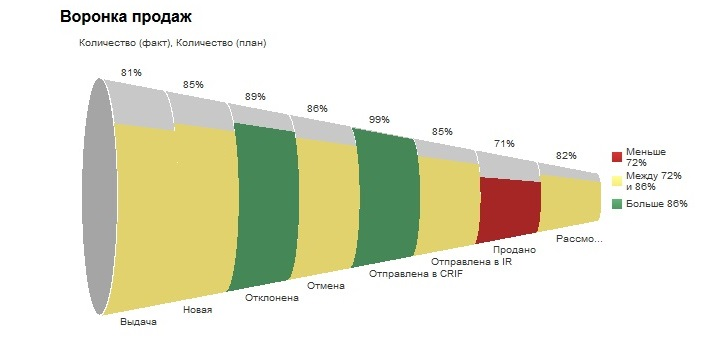
- Mosaic performance . This element is needed to display the most significant indicators on the information panel. Performance mosaic views contain one piece of data aggregate. The illustration below shows a dashboard with several performance mosaic elements.

- Tree cards . Organize data by grouping them into rectangles (known as tiles). Tree maps display tiles based on the size of one metric and the color of another metric.

What gives Visual Plugin Pack?
Visual Plugin Pack (VPP) extends the visual capabilities of OBIEE by adding 18 new views. The most interesting of them are below.
- Calendar - displays the calendar for the year in which the max \ min values are highlighted. For example: the number of sales every day for a year. Best / worst days.

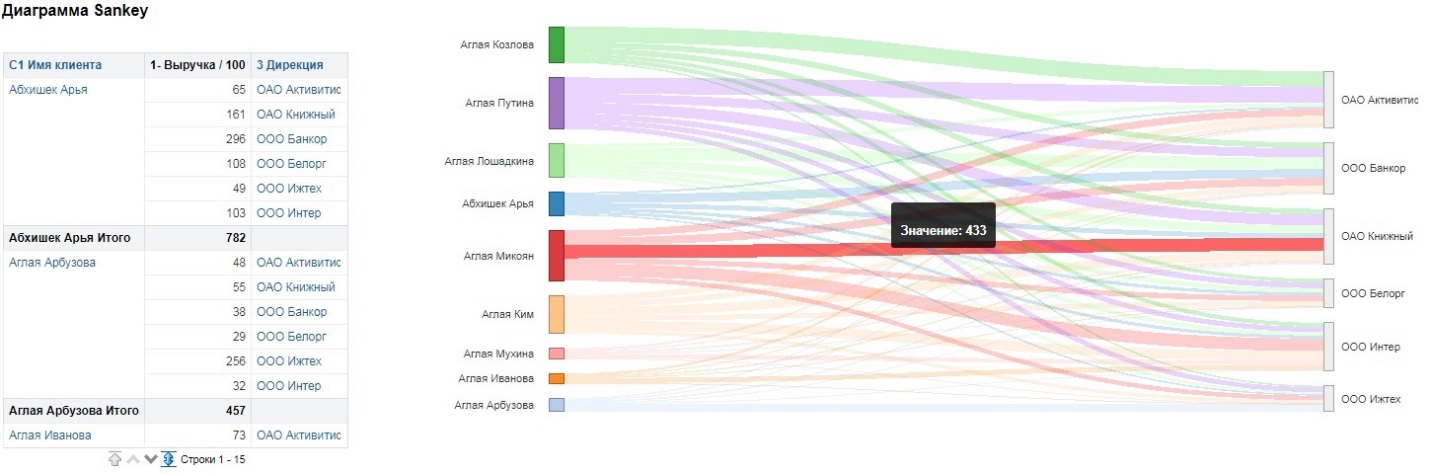
- Sankey diagram - view allows you to track various flows. For example, we have large legal entities who work with different managers. Managers, in turn, also work with different clients. You can see which sales (flow width) are most effective. A similar view exists in Visual Analyzer.
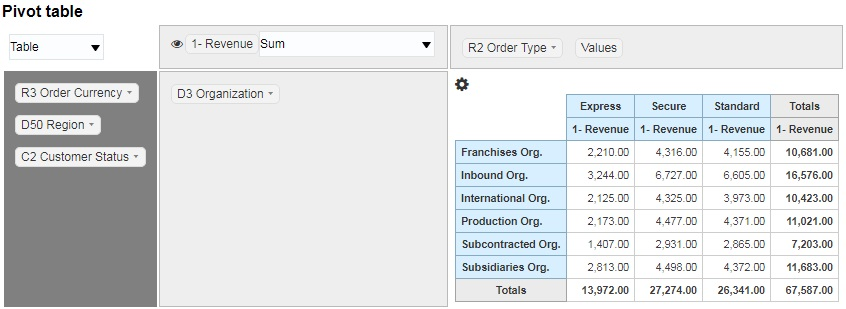
- Pivot table - Pivot table . There is a similar representation in OBIEE. The main difference is that the user has a new user-friendly interface for working with the slice table. You can exclude unnecessary columns, then return them back, change the methods of aggregating indicators, and change the presentation. And all this without using the reporting editor.
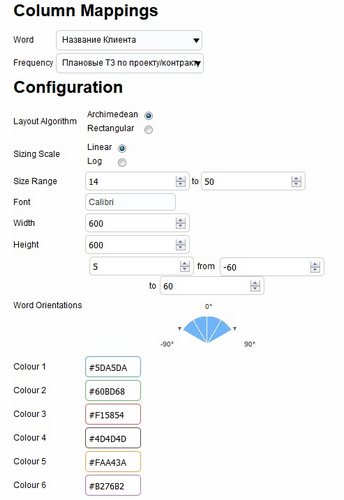
- Word Cloud . A word cloud is made up of the attributes most commonly used in analysis. Orientation levels, colors and dimensions of indicators are configured in the presentation options.

- Indicators . Indicators are great for demonstrating the excess of labor or other similar indicators.

VPP Installation
To install Visual Plugin Pack in OBIEE 12c, the following prerequisites must be met:
- download the RMVPP repository from the link ;
- Weblogic have access to the console, for example
http://localhost:9500/console; - have access to the folder with installed OBIEE (FMW_HOME);
- have access to the folder with unpacked RMVPP. It is advisable not to use the folder in OBIEE itself, but to create, for example, C: \ deployment \ rmvpp.
Next, proceed directly to the installation:
- we expand the directory RMVPP on Weblogic as an application;
- select the bi_cluster cluster (All servers in the cluster) ;
- select " I will make the deployment accessible from the following location " and specify the folder in which VPP was placed;
- go to the “Configuration” tab and set:
Servlet Reload Check (in seconds): 1Resource Reload Check (in seconds): 1JSP Page Check (in seconds): 1;
- We activate and start a new application.
It remains to edit 3 common.js files:
$FMW_HOME/user_projects/domains/bi/servers/bi_server1/tmp/_WL_user/analytics

/eiguw6/war/res/b_mozilla/common.js
$FMW_HOME/user_projects/domains/bi/servers/bi_server1/tmp/_WL_user/analytics
/za01ic/war/res/b_mozilla/common.js$FMW_HOME/user_projects/domains/bi/servers/obips1/tmp/earmanager/analytics
/yFQcjPLJ6hS6h3PCt4KoZA/res/b_mozilla/common.js
Some subdirectories following the Analytics folder may have randomly generated names, so files will have to be searched manually.
Insert the following line at the beginning of each file:
var src = document.createElement('script');src.setAttribute("type", "text/JavaScript");src.setAttribute("src", "/rmvpp/rmvpp.js");parent.document.getElementsByTagName("head")[0].appendChild(src);Save the changes and restart OBIEE. A Visual Plugin Pack button will appear in OBIEE.

Adding custom plugins
You can start small and try to supplement existing ideas with your own improvements. To do this, create a folder along the path $ VPP_HOME \ plugins, copy the view scripts into it, which we want to edit, and add information about the location of the new scripts to the rmvpp.js file.
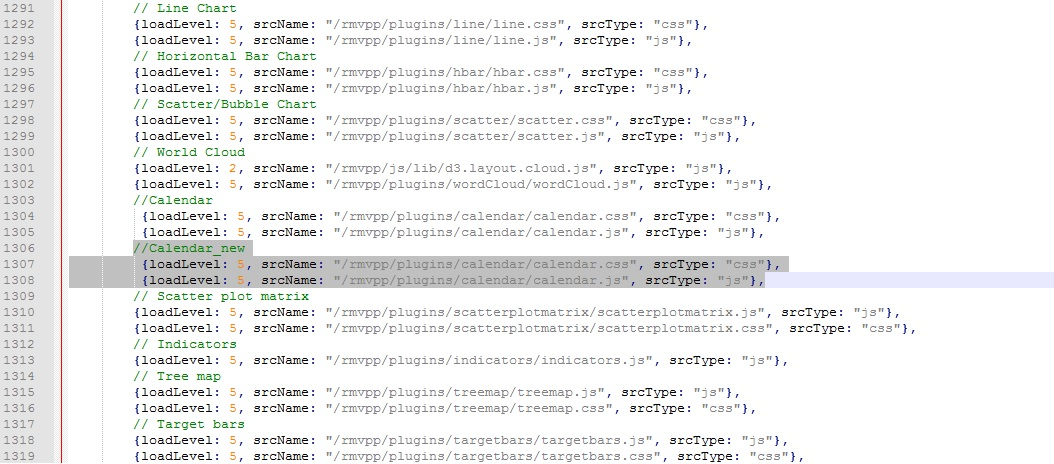
In general, the development of new plugins is a rather deep topic with its own nuances and pitfalls, deserving of a separate material. But, I think, it is not necessary, since the main points are well described in an article by VPP developer RittmanMead. And in addition - an installation guide .
Conclusion
The views above are a small part of the suite available for use in VPP. Other submissions are also interesting in their own way and may appeal to you or your customer, however, the main VPP feature is different.
Visual Plugin Pack is a whole structure that allows developers to create their own Javascript visualization plugins, which then report developers can use and configure using the OBIEE user interface.
So, for example, in the calendar presented above, we added the display of the days of the month, and adapted the beginning of the week to the Russian standard (Monday instead of Sunday). All these trivialities that were pleasant to the perception were “completed” by adding a couple of lines of code to the original presentation scripts.
In addition, you can add new column binding elements, as well as configuration components that will determine the scale / color / think_ yourself what your future view will be. The potential of the tool is huge and limited only by your imagination.
Oleg Zemnukhov, developer of the Jet Infosystems Business Systems Implementation Center