
 July 31, 2017 at 10:31
Docking a Highly Available Postgres Cluster
- Tutorial

A couple of months ago we moved from Amazon to our dedicated servers (Hetzner), one of the reasons for this was the high cost of RDS. There was a task to configure and start a master-slave cluster on dedicated servers. After googling and reading the official documentation, it was decided to build my own solution for the highly available Postgres asynchronous cluster.
Goals
- Use as few tools and dependencies as possible.
- Strives for transparency, no magic!
- Do not use all-included combines like pg-pool, stolon etc.
- Use docker and his buns.
So, let's begin. Actually, we need Postgres itself and such a wonderful tool as repmgr , which deals with replication management and cluster monitoring.
The project is called pg-dock, consists of 3 parts, each part lies on the github, you can take them and modify as you like.
- pg-dock-config is a ready - made set of configuration files, now 2 nodes are registered there, a master slave.
- pg-dock is involved in packing configs and delivering them to nodes, in the right form and in the right place.
- pg-dock-base is a basic docker image that will run on nodes.
Let's take a closer look at each part:
pg-dock-config
The cluster configuration has the following structure
 | Two nodes (n1, n2) are already registered in the repository, if you have more nodes, then just create another folder with the name of the new node. Each node has its own configuration files. It seems to me that everything is quite simple, for example, the env folder is the environment variables that will be picked up by docker-compose, the postgres folder, respectively, postgres configs, etc. For example, pg-dock-conf / n1 / env / main Tells us that during the initial initialization of postgres, the user postgres and the testdb database will be created. Also here are registered variables for the failover-ip script that changes ip to a new master node in case the old one becomes unavailable. pg-dock-conf / n1 / env / backup The environment variables for the interval backup of the base on s3 are picked up by docker-compose when the service starts. |
If we have common configuration files, in order not to duplicate them by nodes, we will put them in the shared folder.
Let's go through its structure:
- failover
In my case there is a script for Hetzner failover-ip, which changes ip to a new master. In your case, it could be a keepalived script or something like that. - initdb
All sql initializing requests must be put in this folder. - ssh
Here are the keys for connecting to another node, in our example, the keys on all the nodes are the same, so they are in the shared folder. ּּ Ssh needs repmgr to do manipulations such as switchover, etc. - sshd
The configuration file of the ssh server, ssh will work on port 2222 so that it does not overlap with the default port on the host (22)
pg-dock
Here the configuration is actually packaged for each node.
The bottom line is to pack the configuration of the node in the docker image, push it into the hub or your registry, and then make an update on the node.
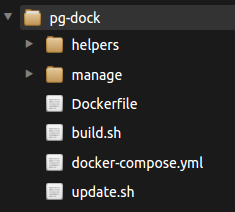 | There are basic operations for working, create a config build (build.sh), update the config on the node (update.sh) and start the cluster itself (docker-compose.yml)
|
At startup:
PG_DOCK_NODE=n1  PG_DOCK_CONF_IMAGE=n1v1 ./build.sh
docker images
REPOSITORY          TAG                 IMAGE ID            CREATED             SIZE
n1v1                latest              712e6b2ace1a        6 minutes ago       1.17MB
The configuration pg-dock-conf / n1 is copied to the folder pg-dock / pg-dock-conf-n1, then docker build starts with all the dependencies, the output is an image named n1v1 in which our configuration for node n1 is stored.
At startup:
PG_DOCK_CONF_IMAGE=n1v1 ./update.shThis starts a container that updates all the configuration files on the host. Thus, we can have several configuration images, rollback to different versions, etc.
pg-docker-base
The basic docker image in which all packages for the cluster are installed: repmgr, rsync, openssh-server, supervisor ( Dockerfile ). The image itself is based on the latest version of postgres 9.6.3, but you can use any other build. Components are launched by supervisor from under the postgres user. We will run this image on our servers (rsync, openssh-server are required for repmgr to work).
Let's start the cluster!
For convenience, in this article all manipulations will be done using docker-machine.
We clone the pg-dock and pg-dock-conf projects into the working folder (for example, lab)
mkdir ~/lab && cd ~/lab
git clone https://github.com/xcrezd/pg-dock
git clone https://github.com/xcrezd/pg-dock-conf
We create nodes, group and postgres user (uid, gid should be 5432 on the host and in the container)
docker-machine create n1
docker-machine ssh n1 sudo addgroup postgres --gid 5432
docker-machine ssh n1 sudo adduser -u 5432 -h /home/postgres --shell /bin/sh -D -G postgres postgres
#для debian/ubuntu
#sudo adduser --uid 5432 --home /home/postgres --shell /bin/bash --ingroup postgres --disabled-password postgres
docker-machine create n2
docker-machine ssh n2 sudo addgroup postgres -g 5432
docker-machine ssh n2 sudo adduser -u 5432 -h /home/postgres --shell /bin/sh -D -G postgres postgres
Add ip node to / etc / hosts
docker-machine ip n1
#192.168.99.100
docker-machine ip n2
#192.168.99.101
# в ноду n1
docker-machine ssh n1 "sudo sh -c 'echo 192.168.99.100 n1 >> /etc/hosts'"
docker-machine ssh n1 "sudo sh -c 'echo 192.168.99.101 n2 >> /etc/hosts'"
# в ноду n2
docker-machine ssh n2 "sudo sh -c 'echo 192.168.99.100 n1 >> /etc/hosts'"
docker-machine ssh n2 "sudo sh -c 'echo 192.168.99.101 n2 >> /etc/hosts'"
If the IP of your machines differs from the IP in the article, then you must add them to
- pg-dock-config / n1 / postgres / pg_hba.conf
- pg-dock-config / n2 / postgres / pg_hba.conf
We create configuration images and immediately update them on the nodes
cd pg-dock
docker-machine use n1
PG_DOCK_NODE=n1 PG_DOCK_CONF_IMAGE=n1v1 ./build.sh
PG_DOCK_CONF_IMAGE=n1v1 ./update.sh
docker-machine use n2
PG_DOCK_NODE=n2 PG_DOCK_CONF_IMAGE=n2v1 ./build.sh
PG_DOCK_CONF_IMAGE=n2v1 ./update.sh
Pay attention to the docker-machine use command ( how to do it ), each time we use it, we change the context of the docker client, that is, in the first case, all manipulations with the docker will be on node n1 and then on n2.
Launch containers
docker-machine use n1
PG_DOCK_NODE=n1 docker-compose up -d
docker-machine use n2
PG_DOCK_NODE=n2 docker-compose up -d
docker-compose will also launch the pg-dock-backup container, which will do periodic backup to s3.
Now let's see where the files we need are stored:
| Files | Host | Container |
| Db | / opt / pg-dock / data | / var / lib / postgresql / data |
| Logs | / opt / pg-dock / logs | / var / log / supervisor |
| Configuration and scripts | / opt / pg-dock / scripts | ** learn docker-compose.yml |
Go ahead, configure the cluster
docker-machine use n1
#Регестрируем как мастер ноду
docker exec -it -u postgres pg-dock repmgr master register
docker-machine use n2
#Клонируем данные из нода n1
docker exec -it -u postgres -e PG_DOCK_FROM=n1 pg-dock manage/repmgr_clone_standby.sh
#Регестрируем ноду как слейв
docker exec -it -u postgres pg-dock repmgr standby register
That's all, the cluster is ready
docker exec -it -u postgres pg-dock repmgr cluster show
Role      | Name | Upstream | Connection String
----------+------|----------|--------------------------------------------
* master  | n1   |          | host=n1 port=5432 user=repmgr dbname=repmgr
  standby | n2   | n1       | host=n2 port=5432 user=repmgr dbname=repmgr
Let's check his roboticness. In the pg-dock-config / shared / tests folder, we have such preparations for testing our cluster:
#Создает тестовую таблицу
cat tests/prepare.sh
CREATE TABLE IF NOT EXISTS testtable (id serial, data text);
GRANT ALL PRIVILEGES ON TABLE testtable TO postgres;
#Добавляет 100000 записей
cat tests/insert.sh
insert into testtable select nextval('testtable_id_seq'::regclass), md5(generate_series(1,1000000)::text);
#Считает сколько записей в таблице
cat tests/select.sh
select count(*) from testtable;
We create a test table, fill it with data and check if it is on the slave:
docker-machine use n1
#Создаем тестовую таблицу для проверки репликации
docker exec -it -u postgres pg-dock config/tests/prepare.sh
#Добавляем записи для проверки
docker exec -it -u postgres pg-dock config/tests/insert.sh
INSERT 0 1000000
docker-machine use n2
#Проверяем что записи находятся на n2 (репликация)
docker exec -it -u postgres pg-dock config/tests/select.sh
  count
---------
 1000000
(1 row)
Profit!
Now let's look at the wizard crash scenario:
#Останавливаем мастер ноду
docker-machine use n1
docker stop pg-dock
#Смотрим логи repmgr у слейва
docker-machine use n2
docker exec -it pg-dock tailf /var/log/supervisor/repmgr-stderr.log
#NOTICE: STANDBY PROMOTE successful
Full log
[2017-07-12 12:51:49] [ERROR] unable to connect to upstream node: could not connect to server: Connection refused
Is the server running on host “n1” (192.168.99.100) and accepting
TCP / IP connections on port 5432?
[2017-07-12 12:51:49] [ERROR] connection to database failed: could not connect to server: Connection refused
Is the server running on host “n1” (192.168.99.100) and accepting
TCP / IP connections on port 5432?
[2017-07-12 12:51:49] [WARNING] connection to master has lost, trying to recover ... 60 seconds before failover decision
[2017-07-12 12:51:59] [WARNING] connection to master has been lost, trying to recover ... 50 seconds before failover decision
[2017-07-12 12:52:09] [WARNING] connection to master has been lost, trying to recover ... 40 seconds before failover decision
[2017-07-12 12:52:19] [WARNING] connection to master has been lost, trying to recover ... 30 seconds before failover decision
[2017-07-12 12:52:29] [WARNING] connection to master has been lost, trying to recover ... 20 seconds before failover decision
[2017-07-12 12 : 52: 39] [WARNING] connection to master has been lost, trying to recover ... 10 seconds before failover decision
[2017-07-12 12:52:49] [ERROR] unable to reconnect to master (timeout 60 seconds) ...
[2017-07-12 12:52:54] [NOTICE] this node is the best candidate to be the new master, promoting ...
% Total% Received% Xferd Average Speed Time Time Time Time Current
Dload Upload Total Spent Left Speed
100 171 100 143 0 28 3 0 0:00:47 0:00:39 0:00:08 31
ERROR: connection to database failed: could not connect to server: Connection refused
Is the server running on host "n1" (192.168.99.100) and accepting
TCP / IP connections on port 5432?
NOTICE: promoting standby
NOTICE: promoting server using '/usr/lib/postgresql/9.6/bin/pg_ctl -D / var / lib / postgresql / data promote'
NOTICE: STANDBY PROMOTE successful
Is the server running on host “n1” (192.168.99.100) and accepting
TCP / IP connections on port 5432?
[2017-07-12 12:51:49] [ERROR] connection to database failed: could not connect to server: Connection refused
Is the server running on host “n1” (192.168.99.100) and accepting
TCP / IP connections on port 5432?
[2017-07-12 12:51:49] [WARNING] connection to master has lost, trying to recover ... 60 seconds before failover decision
[2017-07-12 12:51:59] [WARNING] connection to master has been lost, trying to recover ... 50 seconds before failover decision
[2017-07-12 12:52:09] [WARNING] connection to master has been lost, trying to recover ... 40 seconds before failover decision
[2017-07-12 12:52:19] [WARNING] connection to master has been lost, trying to recover ... 30 seconds before failover decision
[2017-07-12 12:52:29] [WARNING] connection to master has been lost, trying to recover ... 20 seconds before failover decision
[2017-07-12 12 : 52: 39] [WARNING] connection to master has been lost, trying to recover ... 10 seconds before failover decision
[2017-07-12 12:52:49] [ERROR] unable to reconnect to master (timeout 60 seconds) ...
[2017-07-12 12:52:54] [NOTICE] this node is the best candidate to be the new master, promoting ...
% Total% Received% Xferd Average Speed Time Time Time Time Current
Dload Upload Total Spent Left Speed
100 171 100 143 0 28 3 0 0:00:47 0:00:39 0:00:08 31
ERROR: connection to database failed: could not connect to server: Connection refused
Is the server running on host "n1" (192.168.99.100) and accepting
TCP / IP connections on port 5432?
NOTICE: promoting standby
NOTICE: promoting server using '/usr/lib/postgresql/9.6/bin/pg_ctl -D / var / lib / postgresql / data promote'
NOTICE: STANDBY PROMOTE successful
We look at the cluster status:
docker exec -it -u postgres pg-dock repmgr cluster show
Role     | Name | Upstream | Connection String
---------+------|----------|--------------------------------------------
  FAILED | n1   |          | host=n1 port=5432 user=repmgr dbname=repmgr
* master | n2   |          | host=n2 port=5432 user=repmgr dbname=repmgr
Now the new master is n2, failover ip also points to it.
Now let's return the old master as a new slave
docker-machine use n1
#Поднимаем контейнеры
PG_DOCK_NODE=n1 docker-compose up -d #как демон
#Клонируем данные из ноды n2
docker exec -it -u postgres -e PG_DOCK_FROM=n2 pg-dock manage/repmgr_clone_standby.sh
#Регестрируем ноду как слейв
docker exec -it -u postgres pg-dock repmgr standby register -F
We look at the cluster status:
docker exec -it -u postgres pg-dock repmgr cluster show
Role     | Name | Upstream  | Connection String
---------+------|-----------|--------------------------------------------
* master | n2   |           | host=n2 port=5432 user=repmgr dbname=repmgr
  standby| n1   | n2                  | host=n1 port=5432 user=repmgr dbname=repmgr
Done! And here is what we managed to do; We dropped the master, the automatic assignment of the slave by the new master worked, the failover IP changed. The system continues to function. Then we reanimated node n1, made it a new slave. Now for the sake of interest, we will do a swithover - that is, manually make n1 a master and n2 a slave, as it was before. That's just what repmgr is for and ssh is needed, the slave connects via ssh to the master and makes the necessary manipulations with scripts.
switchover:
docker-machine use n1
docker exec -it -u postgres pg-dock repmgr standby switchover
#NOTICE: switchover was successful
Full log
NOTICE: switching current node 1 to master server and demoting current master to standby ...
Warning: Permanently added '[n2]: 2222, [192.168.99.101]: 2222' (ECDSA) to the list of known hosts.
NOTICE: 1 files copied to / tmp / repmgr-n2-archive
NOTICE: current master has been stopped
ERROR: connection to database failed: could not connect to server: Connection refused
Is the server running on host "n2" (192.168.99.101) and accepting
TCP / IP connections on port 5432?
NOTICE: promoting standby
NOTICE: promoting server using '/usr/lib/postgresql/9.6/bin/pg_ctl -D / var / lib / postgresql / data promote'
server promoting
NOTICE: STANDBY PROMOTE successful
NOTICE: Executing pg_rewind on old master server
Warning: Permanently added '[n2]: 2222, [192.168.99.101]: 2222' (ECDSA) to the list of known hosts.
Warning: Permanently added '[n2]: 2222, [192.168.99.101]: 2222' (ECDSA) to the list of known hosts.
NOTICE: 1 files copied to / var / lib / postgresql / data
Warning: Permanently added '[n2]: 2222, [192.168.99.101]: 2222' (ECDSA) to the list of known hosts.
Warning: Permanently added '[n2]: 2222, [192.168.99.101]: 2222' (ECDSA) to the list of known hosts.
NOTICE: restarting server using '/usr/lib/postgresql/9.6/bin/pg_ctl -w -D / var / lib / postgresql / data -m fast restart'
pg_ctl: PID file "/ var / lib / postgresql / data / postmaster .pid "does not exist
Is server running?
starting server anyway
NOTICE:
NOTICE: switchover was successful
Warning: Permanently added '[n2]: 2222, [192.168.99.101]: 2222' (ECDSA) to the list of known hosts.
NOTICE: 1 files copied to / tmp / repmgr-n2-archive
NOTICE: current master has been stopped
ERROR: connection to database failed: could not connect to server: Connection refused
Is the server running on host "n2" (192.168.99.101) and accepting
TCP / IP connections on port 5432?
NOTICE: promoting standby
NOTICE: promoting server using '/usr/lib/postgresql/9.6/bin/pg_ctl -D / var / lib / postgresql / data promote'
server promoting
NOTICE: STANDBY PROMOTE successful
NOTICE: Executing pg_rewind on old master server
Warning: Permanently added '[n2]: 2222, [192.168.99.101]: 2222' (ECDSA) to the list of known hosts.
Warning: Permanently added '[n2]: 2222, [192.168.99.101]: 2222' (ECDSA) to the list of known hosts.
NOTICE: 1 files copied to / var / lib / postgresql / data
Warning: Permanently added '[n2]: 2222, [192.168.99.101]: 2222' (ECDSA) to the list of known hosts.
Warning: Permanently added '[n2]: 2222, [192.168.99.101]: 2222' (ECDSA) to the list of known hosts.
NOTICE: restarting server using '/usr/lib/postgresql/9.6/bin/pg_ctl -w -D / var / lib / postgresql / data -m fast restart'
pg_ctl: PID file "/ var / lib / postgresql / data / postmaster .pid "does not exist
Is server running?
starting server anyway
NOTICE:
NOTICE: switchover was successful
We look at the cluster status:
docker exec -it -u postgres pg-dock repmgr cluster show
Role      | Name | Upstream | Connection String
----------+------|----------|--------------------------------------------
  standby | n2   |          | host=n2 port=5432 user=repmgr dbname=repmgr
* master  | n1   |          | host=n1 port=5432 user=repmgr dbname=repmgr
That's all, the next time we need to update the configuration of the node, whether it's the postgres, repmgr, or supervisor config, we just pack it and update it:
PG_DOCK_NODE=n1 PG_DOCK_CONF_IMAGE=n1v1 ./build.sh
PG_DOCK_CONF_IMAGE=n1v1 ./update.sh
After updating the new configuration:
#Обновляем конфигурацию postgres
docker exec -it -u postgres pg-dock psql -c "SELECT pg_reload_conf();"
#Обновляем конфигурацию supervisor
docker exec -it -u postgres pg-dock supervisorctl reread
#перезапускаем отдельный процесс
docker exec -it -u postgres pg-dock supervisorctl restart foo:sshd
* A nice bonus, supervisor has a log rotation function, so we don’t have to worry about that either.
* Containers work directly through the host network, thereby avoiding network virtualization delays.
* I recommend adding existing production nodes to the docker-machine, this will greatly simplify your life.
Now let's touch on the topic of query balancing. I didn’t want to complicate (that is, use pg-pool, haproxy, stolon) so we will do the balancing on the application side, thereby relieving ourselves of the responsibility for organizing the high availability of the balancer himself. Our backends are written in rub, so the choice fell on gem makara. The gem can separate requests for selection and modification of data (insert / update / delete / alter), requests for selection can be balanced between several nodes (slaves). In case of failure of one of the nodes, the gem can temporarily exclude it from the pool.
Example database.yml configuration file:
production:
  adapter: 'postgresql_makara'
  makara:
    # the following are default values
    blacklist_duration: 5
    master_ttl: 5
    master_strategy: failover
    sticky: true
    connections:
      - role: master
        database: mydb
        host: 123.123.123.123
        port: 6543
        weight: 3
        username: <%= ENV['DATABASE_USERNAME'] %>
        password: <%= ENV['DATABASE_PASSWORD'] %>
      - role: slave
        database: mydb
        host: 123.123.123.124
        port: 6543
        weight: 7
        username: <%= ENV['DATABASE_USERNAME'] %>
        password: <%= ENV['DATABASE_PASSWORD'] %>
Libraries in other languages / frameworks:
→ laravel
→ Yii2
→ Node.js
Conclusion
So, what we got as a result:
- Self-contained master-standby cluster ready for battle.
- Transparency of all components, easy interchangeability.
- Automatic failover in case of master failure (repmgr)
- Load balancing on the client, thereby removing responsibility for the availability of the balancer
- The lack of a single point of failure, repmgr will run a script that will transfer the IP address to a new node, which was upgraded to the master in case of failure. There is a script for hetzner in the template, but nothing prevents to add keepalived, aws elasticIp, drdb, pacemaker, corosync.
- Version control, the ability to do rollback in case of problems / ab testing.
- The ability to customize the system for yourself, add nodes, repmgr witness, for example, the flexibility of the configuration and its changes.
- Periodic backup to S3
In the next article I will tell you how to place pg-dock and PgBouncer on the same node without losing high availability, thank you all for your attention!
Recommendations for familiarization: